

Avatar Forcing
AIOpen SourceFreeReal-time framework that generates interactive head avatars from audio and motion using diffusion forcing for low-latency, expressive reactions.
Avatar Forcing
Real-time framework that generates interactive head avatars from audio and motion using diffusion forcing for low-latency, expressive reactions.
About Avatar Forcing
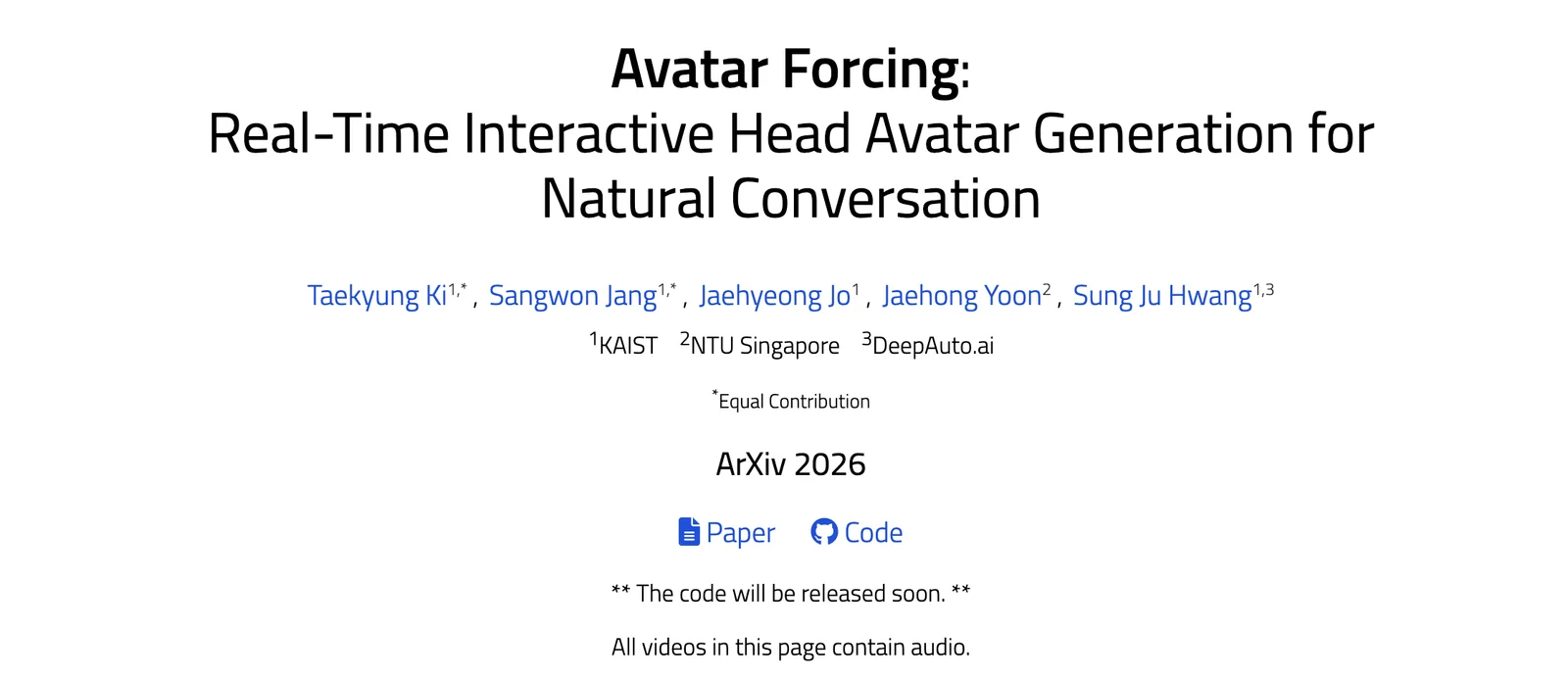
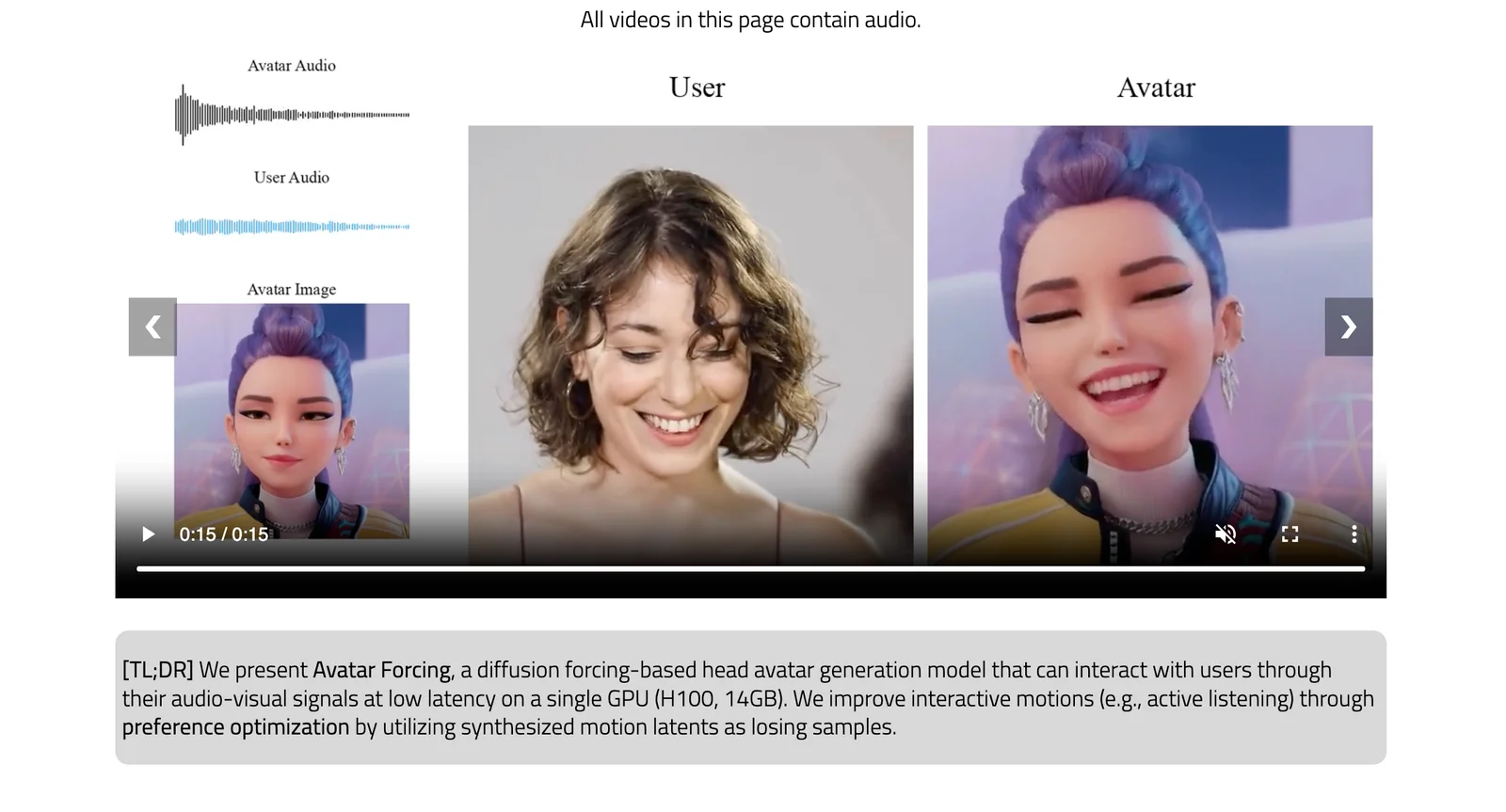
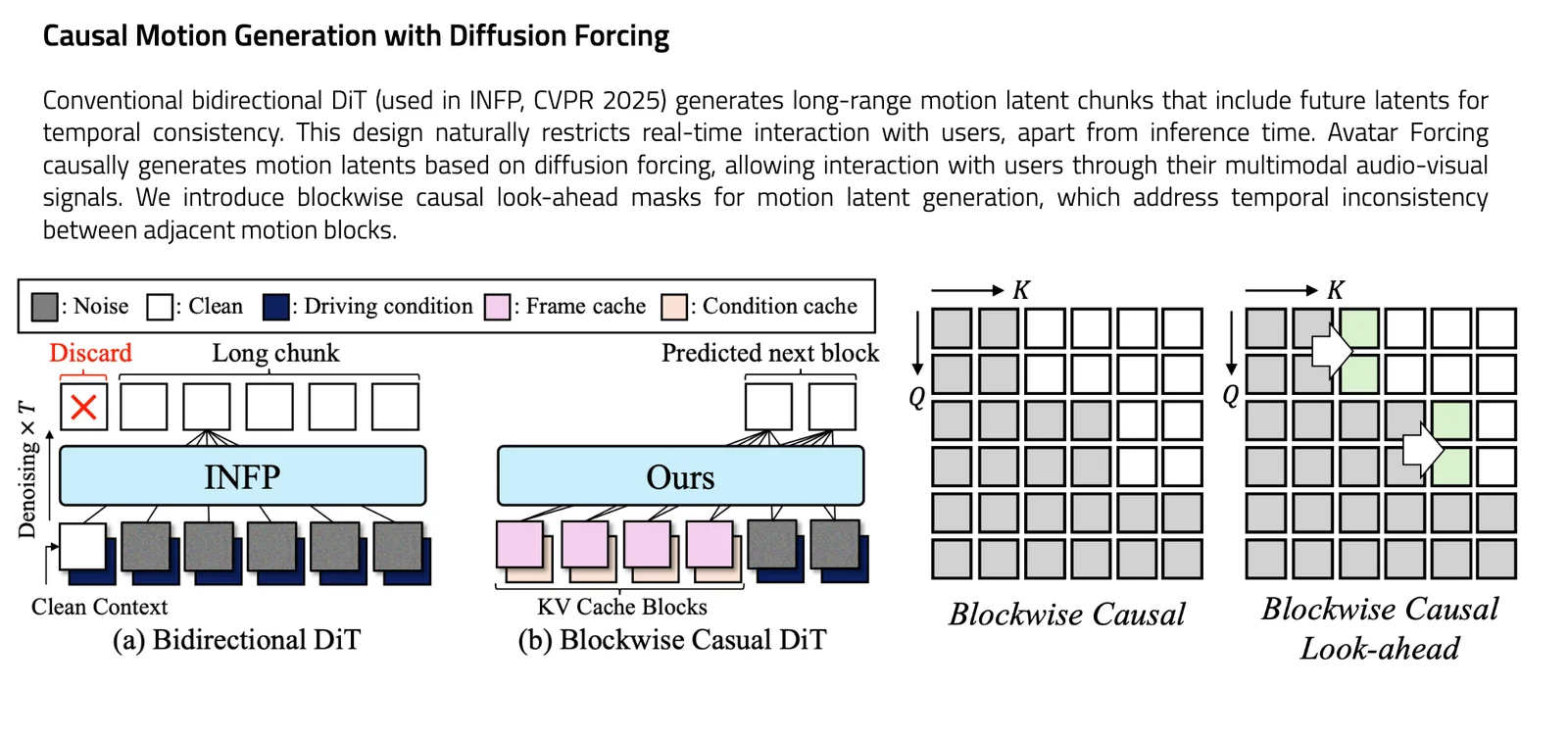
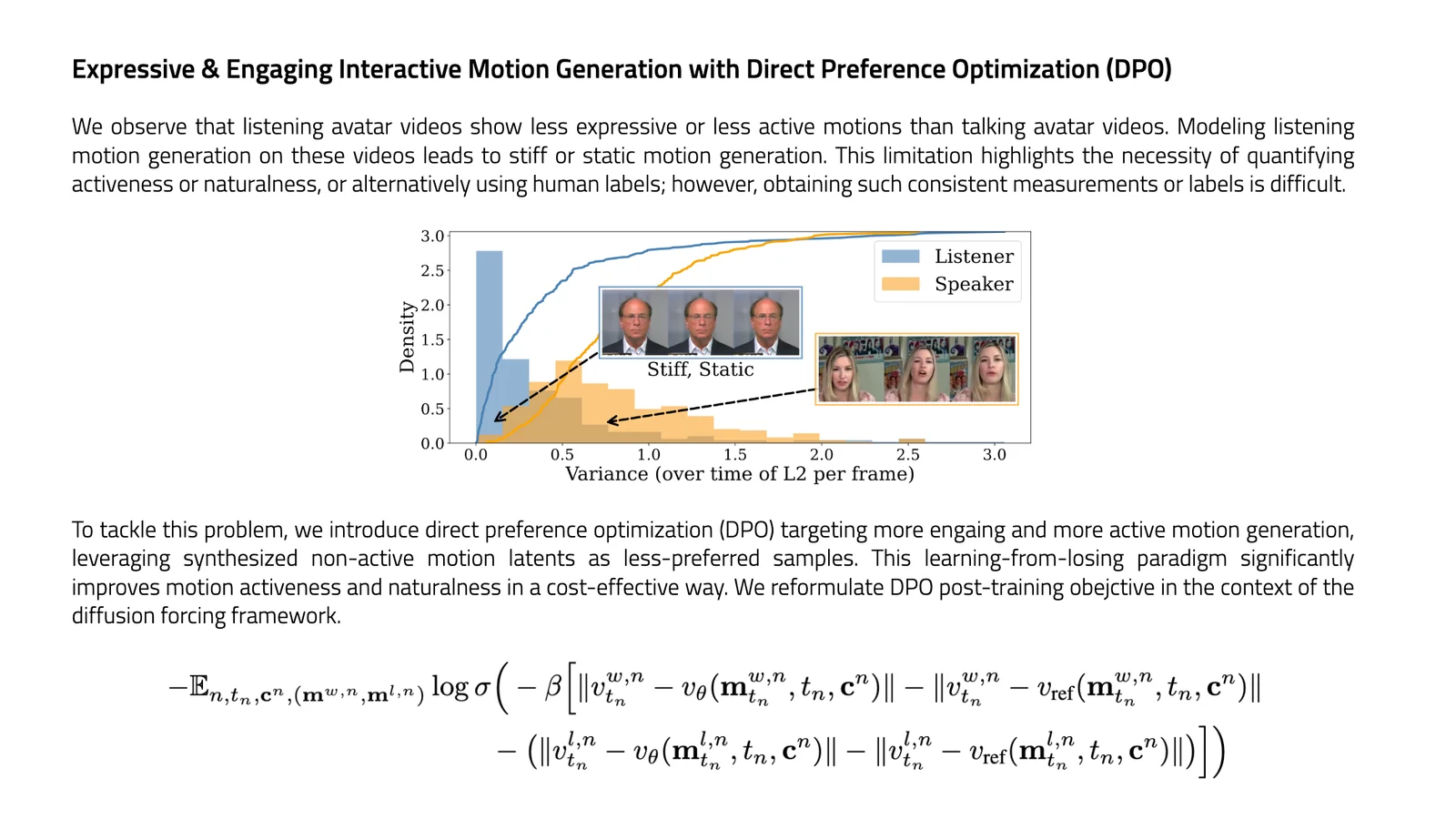
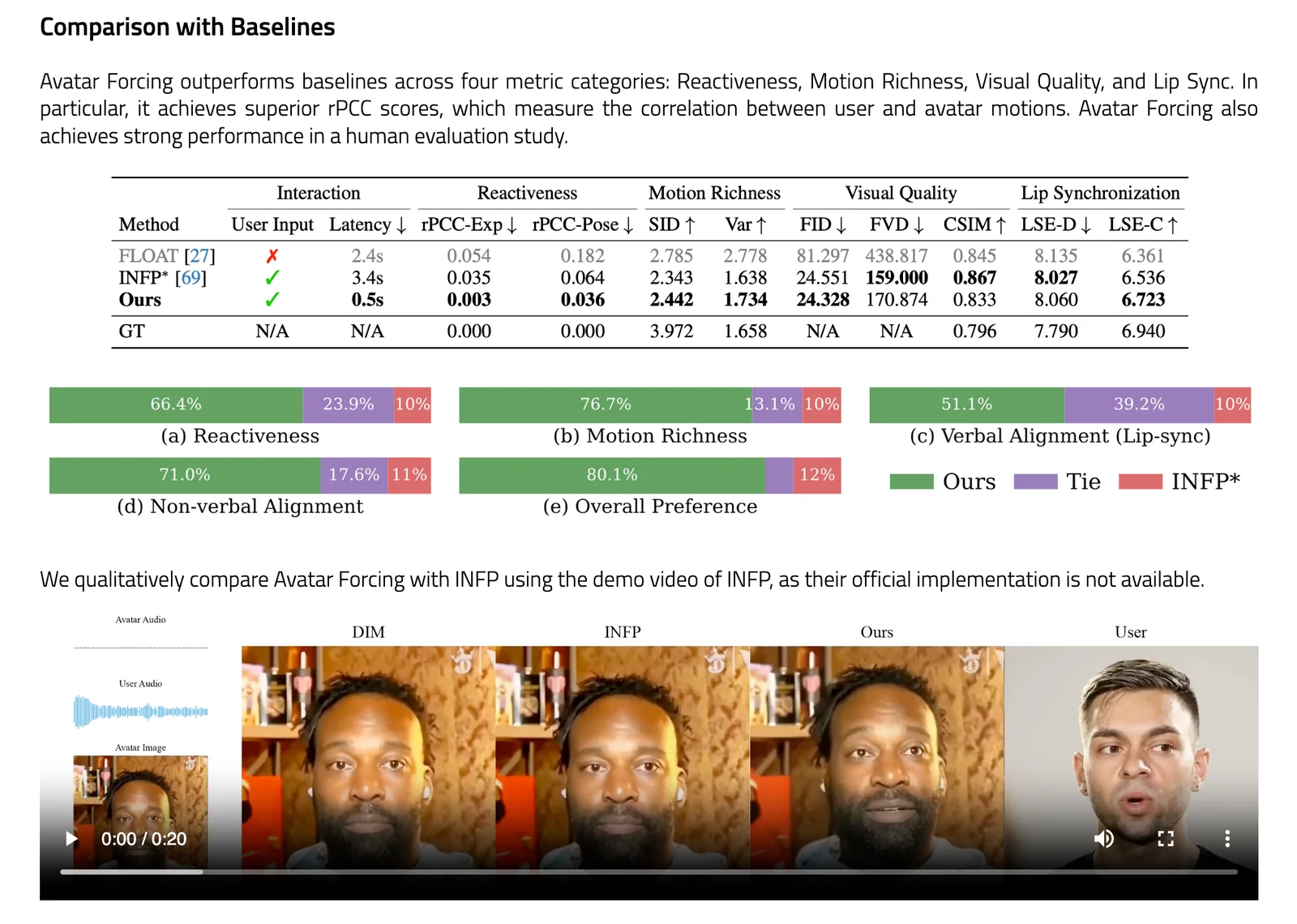
Avatar Forcing is a research framework for real-time, interactive head-avatar generation that conditions on multimodal user inputs (audio and motion) to produce expressive, reactive facial and head motion. It introduces Motion Latent Diffusion Forcing to enable causal, low-latency generation (reported ~500 ms) and a direct preference optimization method that uses synthetic "losing" samples (created by dropping user conditions) to learn expressive reactions without additional labeled data. The method is presented in an arXiv preprint and an official PyTorch implementation project page/repository; experiments report a 6.8x speedup over baselines and user preference rates over 80% versus baseline methods.
Screenshots
Key Features
Use Cases


Frequently asked questions about Avatar Forcing
What are the pricing options for Avatar Forcing?
Avatar Forcing provides a free open-source option, allowing users to access its project page and PyTorch implementation. For commercial applications, custom pricing and licensing agreements must be negotiated directly with the development team to fit specific business needs.
Key Points
- Free open-source option available
- Custom pricing for commercial use
- Direct negotiation with developers required
Detailed Explanation
Avatar Forcing is a cutting-edge AI tool designed for creating realistic avatars through advanced machine learning techniques. It offers a free open-source version, which allows developers and researchers to explore its capabilities using the PyTorch framework. This version is ideal for hobbyists, educators, or anyone interested in experimenting with avatar generation without any upfront costs.
For businesses looking to leverage Avatar Forcing in a commercial context, a custom pricing model is available. This typically involves a consultation with the developers to determine specific requirements and usage scenarios. Factors influencing pricing include the scale of deployment, the number of users, and any additional features or support needed. For instance, a startup might negotiate a different agreement than a large enterprise seeking extensive integration and support.
To initiate this process, interested parties should reach out via the official project page or GitHub repository, where they can find contact information for the development team. It’s advisable to have a clear understanding of your intended use case to facilitate a smoother negotiation.
Best Practices / Tips
- Explore the Open-Source Version: Before committing to a commercial license, try the open-source option to understand the tool's capabilities and limitations.
- Prepare for Negotiations: Clearly outline your intended use case, expected scale, and any specific features you might need when discussing pricing.
- Stay Updated: Follow the project’s updates on GitHub or related forums to keep abreast of new features or changes in pricing and licensing structures.
Additional Resources
- Avatar Forcing GitHub Repository - Access the open-source code and documentation.
- PyTorch Official Site - Learn more about the framework used for Avatar Forcing.
- AI Tools for Business - Explore other AI tools that may complement Avatar Forcing in commercial applications.
How does Avatar Forcing ensure low-latency avatar reactions?
Avatar Forcing ensures low-latency avatar reactions of approximately 500 milliseconds by employing a motion latent diffusion forcing mechanism. This advanced technology processes audio and motion inputs in real-time, allowing avatars to respond quickly and expressively to user interactions.
Key Points
- Real-time Processing: Utilizes advanced algorithms for immediate response.
- Motion Latent Diffusion: Integrates audio and motion data for seamless interaction.
- Low Latency: Achieves approximately 500ms inference time, enhancing user experience.
Detailed Explanation
Avatar Forcing leverages a sophisticated motion latent diffusion forcing mechanism that merges audio and motion data to facilitate near-instantaneous reactions from avatars. By focusing on real-time processing, this technology minimizes the delay between user input and avatar response, achieving a latency of around 500 milliseconds.
This low-latency performance is critical in applications such as virtual reality (VR), gaming, and live-streaming platforms, where user engagement relies heavily on timely and expressive avatar interactions. For example, in a VR gaming environment, if a player shouts a command, the avatar can promptly react, maintaining the immersive experience.
The system’s ability to process complex data streams simultaneously, without lag, is a game-changer for developers creating interactive experiences. It allows for more fluid communication and enhances emotional engagement, as avatars can express a wide range of emotions in sync with user inputs.
Best Practices / Tips
- Optimize Audio Input: Ensure clear and high-quality audio for the best response accuracy.
- Test Latency: Regularly monitor and test the system's latency to maintain performance.
- User Feedback: Implement user feedback loops to refine avatar responses and improve interaction quality.
- Keep Updates Regular: Stay updated with the latest advancements in AI and motion capture technologies to enhance avatar performance.
Additional Resources
How can I get started using Avatar Forcing?
To get started with Avatar Forcing, visit the official PyTorch implementation website. Follow the provided guidelines to set up the framework for your projects, ensuring you have the necessary software prerequisites and dependencies installed.
Key Points
- Understanding Avatar Forcing: A technique to enhance AI models.
- Installation Requirements: Necessary software and dependencies.
- Initial Setup: Steps to configure your environment for Avatar Forcing.
Detailed Explanation
Avatar Forcing is an innovative approach used in artificial intelligence to improve the performance and adaptability of models. To get started, first, ensure you have Python and PyTorch installed on your machine. Here’s a step-by-step guide:
- Install Python: Ensure you have Python version 3.6 or later. You can download it from the official Python website.
- Install PyTorch: Go to the PyTorch website and follow the instructions tailored to your operating system. You can choose between CPU or GPU versions based on your hardware.
- Clone the Repository: Use Git to clone the Avatar Forcing repository. Run the command:
git clone https://github.com/your-repo/avatar-forcing.git - Install Dependencies: Navigate to the cloned directory and install the required packages using:
pip install -r requirements.txt - Run Examples: Start with the provided example scripts to understand how Avatar Forcing works. Modify the parameters to see how they affect the output.
Best Practices / Tips
- Read Documentation: Before diving into the implementation, thoroughly read the documentation available on the GitHub page or the official PyTorch site.
- Start Small: Begin with simple datasets to familiarize yourself with the Avatar Forcing technique before applying it to more complex problems.
- Community Support: Engage with the community through forums or GitHub discussions to share insights and ask for help if needed.
Additional Resources
Is Avatar Forcing compatible with other AI tools and platforms?
Avatar Forcing is compatible with various AI tools and platforms, thanks to its foundation on PyTorch. Users should verify specific integration details based on their existing systems to ensure smooth functionality and optimal performance.
Key Points
- Built on PyTorch: Avatar Forcing leverages PyTorch libraries, enhancing compatibility.
- Integration Verification: Specific integrations may depend on your existing AI infrastructure.
- Cross-Platform Functionality: Works well across different machine learning environments.
Detailed Explanation
Avatar Forcing is a powerful AI tool that utilizes the PyTorch framework, which is widely adopted in the AI community. This compatibility allows developers to integrate Avatar Forcing with various AI platforms that support PyTorch libraries, such as TensorFlow, Keras, and others.
Use Cases
-
Enhanced Model Training: By integrating Avatar Forcing into your existing PyTorch setup, you can improve model training efficiency. For example, if you are using a convolutional neural network (CNN) for image classification, Avatar Forcing can optimize your training cycles.
-
Multi-Framework Support: If your team employs different AI tools, such as TensorFlow for certain projects and PyTorch for others, Avatar Forcing can act as a bridge, allowing seamless data flow and model compatibility.
-
Research and Development: In a research setting, Avatar Forcing can be integrated with other machine learning models to test new hypotheses and methodologies, making it a versatile addition to your AI toolkit.
Best Practices / Tips
-
Check Compatibility: Always confirm that your existing AI tools support PyTorch before integration. Look for version compatibility to avoid potential issues.
-
Use Documentation: Refer to the official PyTorch and Avatar Forcing documentation for detailed instructions on integration and best practices.
-
Test Integration: Before fully deploying Avatar Forcing, conduct thorough testing in a controlled environment to ensure that the integration works as expected.
-
Monitor Performance: After integration, keep track of system performance and model accuracy to identify any adjustments needed for optimal performance.
Additional Resources
What makes Avatar Forcing stand out from other avatar generation tools?
Avatar Forcing distinguishes itself from other avatar generation tools through its advanced real-time multimodal input processing and expressive motion modeling. This technology enables avatars to respond dynamically to both verbal and non-verbal cues, significantly enhancing user engagement and creating more immersive interactions.
Key Points
- Real-Time Multimodal Input Processing: Avatar Forcing analyzes various input types simultaneously.
- Expressive Motion Modeling: Avatars exhibit realistic movements and facial expressions.
- Enhanced User Engagement: The tool fosters deeper interactions through dynamic responses.
Detailed Explanation
Avatar Forcing leverages cutting-edge technology to redefine user interaction with avatars. Its real-time multimodal input processing means the tool can interpret and respond to different types of user inputs—such as voice tone, body language, and facial expressions—simultaneously. This capability allows for a more natural and fluid interaction, making conversations with avatars feel more human-like.
Example Use Cases:
- Virtual Customer Service: Businesses can utilize Avatar Forcing in customer support, where avatars can respond to customer queries while adapting their tone and demeanor based on the emotional context of the interaction.
- Gaming: In gaming environments, avatars can react to player commands and emotional cues, enhancing the gaming experience with realistic responses to players’ actions.
- Education: In online learning platforms, avatars can adapt their teaching styles based on student engagement levels, making learning more interactive and effective.
The expressive motion modeling feature of Avatar Forcing allows avatars to demonstrate a range of emotions through body language and facial expressions. This realism not only captures user attention but also helps build a connection, making users more likely to engage with the content presented by the avatars.
Best Practices / Tips
- Utilize Diverse Input Types: To maximize engagement, encourage users to interact using various inputs, such as voice, gestures, and facial expressions.
- Test Different Scenarios: Regularly test the avatar’s responses in diverse situations to ensure it reacts appropriately, maintaining a natural flow of conversation.
- Monitor User Feedback: Gather user feedback to continuously improve avatar interactions and adapt the tool to meet user expectations.
Additional Resources
Explore more AI Ai Models tools
Browse all Ai Models tools →Browse by use case: Voice & Audio
- Soup CLI
- VibeVoice
- Laguna by Poolside
- Arena AI: The Official AI Ranking & LLM Leaderboard
- PromptLayer
- PHBench
Compare Avatar Forcing: vs Soup CLI · vs VibeVoice · vs Laguna by Poolside · vs Arena AI: The Official AI Ranking & LLM Leaderboard