
Qwen3-Omni
AIOpen SourceFreeEnd-to-end omni-modal large language model that understands text, audio, images, and video and can generate real-time speech.
Qwen3-Omni
End-to-end omni-modal large language model that understands text, audio, images, and video and can generate real-time speech.
About Qwen3-Omni
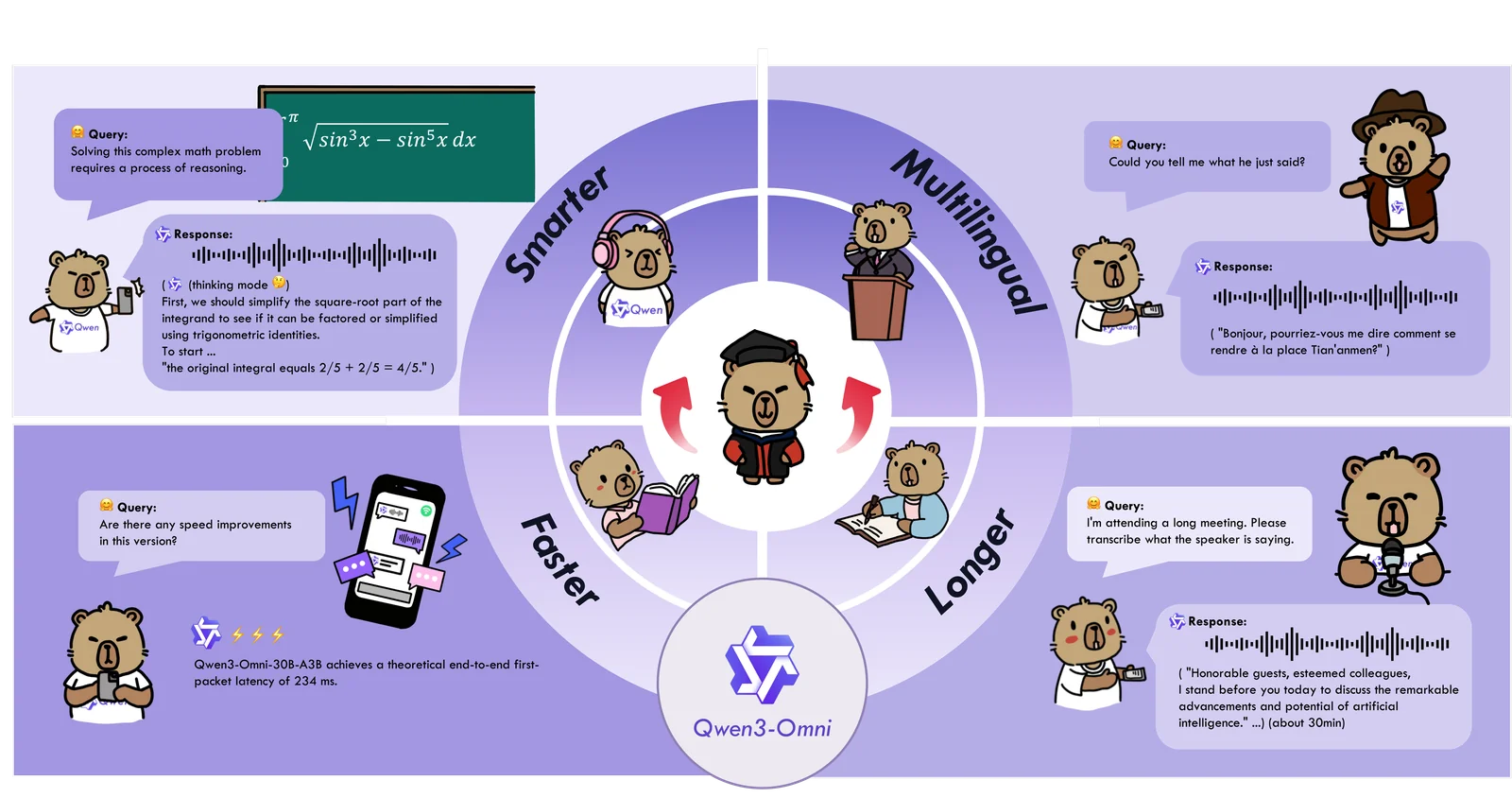
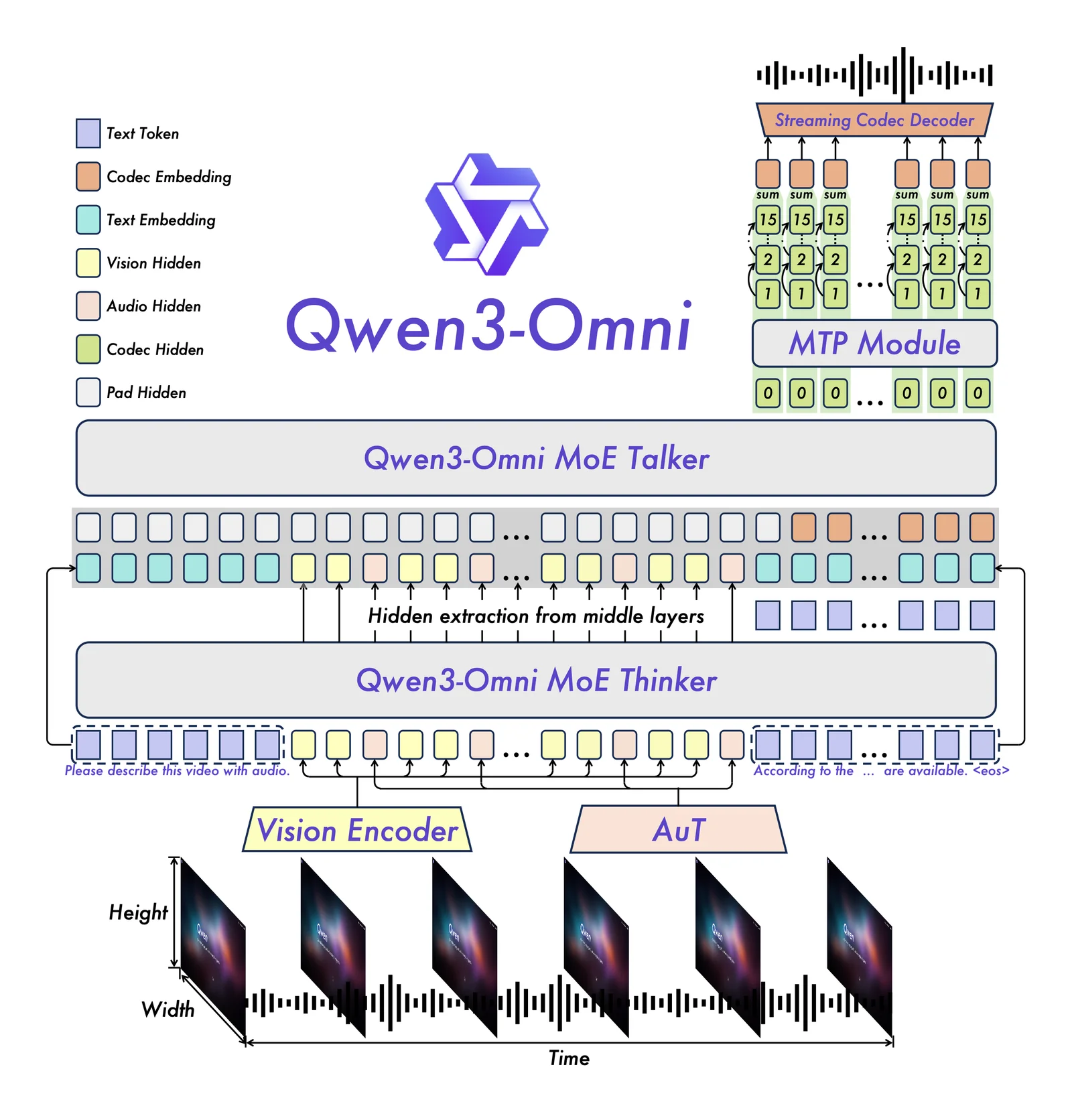
Qwen3-Omni is a natively end-to-end, omni-modal large language model developed by the Qwen team at Alibaba Cloud (QwenLM). It ingests and reasons over multiple input modalities — text, audio, images, and video — and can produce multimodal outputs including real-time speech. The project emphasizes low-latency, streaming interaction for audio/video conversations with natural turn-taking and immediate text or speech responses. Qwen3-Omni ships with specialized variants (e.g., Captioner, Instruct, Thinking) aimed at tasks such as detailed audio captioning and instruction following, and is published openly on GitHub to enable community use, inspection, and integration.
Screenshots
Key Features
Use Cases


Frequently asked questions about Qwen3-Omni
Is Qwen3-Omni free to use?
Yes, Qwen3-Omni is free to use as it is an open-source model available on GitHub. However, if you decide to deploy it on your own infrastructure, there may be associated costs for servers, storage, and maintenance.
Key Points
- Qwen3-Omni is an open-source model.
- It is freely accessible on GitHub.
- Potential costs arise from self-deployment infrastructure.
Detailed Explanation
Qwen3-Omni, a cutting-edge AI model, is accessible to anyone interested in leveraging its capabilities. Being open-source means that developers can view, modify, and use the code at no cost. You can download it from its official GitHub repository, where you’ll find comprehensive documentation and community support.
However, while the software itself is free, deploying Qwen3-Omni on your own servers may incur costs. These expenses typically include:
- Cloud Service Fees: If you choose to host the model on cloud platforms like AWS, Google Cloud, or Azure, you'll need to pay for computing resources, data storage, and bandwidth.
- Hardware Costs: If you opt for on-premises deployment, investing in suitable hardware, including GPUs for efficient processing, can be a significant expense.
- Maintenance and Management: Running an AI model requires ongoing maintenance, including updates, security patches, and performance monitoring, which may require hiring specialized IT personnel.
For instance, deploying Qwen3-Omni on AWS could cost anywhere from a few dollars per month for minimal usage to hundreds or thousands depending on the scale of your operations.
Best Practices / Tips
- Evaluate Your Needs: Before deploying Qwen3-Omni, assess whether the benefits outweigh the infrastructure costs. If you only need it for occasional use, consider using a managed service instead.
- Utilize Existing Cloud Solutions: Many cloud providers offer free tiers or credits for new users. Take advantage of these to minimize initial costs.
- Stay Informed: Regularly check the GitHub repository for updates, as community contributions can enhance the model's performance and reduce operational costs.
Additional Resources
- Qwen3-Omni GitHub Repository - Access the model and documentation.
- Understanding Open Source AI - Learn more about the advantages and challenges of open-source AI.
- Cloud Cost Management for AI Deployments - Strategies to manage your expenses effectively when deploying AI models.
What are the key features of Qwen3-Omni?
Qwen3-Omni features advanced omni-modal understanding, real-time speech generation, low-latency audio and video interaction, and a selection of specialized variants tailored for specific tasks. This combination enhances user experience in applications ranging from virtual assistants to interactive media.
Key Points
- Omni-modal Understanding: Integrates text, audio, and visual inputs.
- Real-time Speech Generation: Produces natural-sounding speech instantly.
- Low-latency Interaction: Ensures seamless audio and video communication.
Detailed Explanation
Qwen3-Omni is a state-of-the-art AI tool designed for enhanced interaction across various modalities. Its omni-modal understanding allows it to process and integrate multiple forms of data, including text, speech, and imagery, making it versatile for applications like customer service, education, and entertainment.
Omni-modal Understanding
This feature enables the system to interpret and respond to user inputs in diverse formats. For instance, in a virtual classroom, Qwen3-Omni can analyze a student’s text question, voice tone, and facial expressions, providing a more personalized response.
Real-time Speech Generation
With its real-time speech generation, Qwen3-Omni can convert text to speech instantly, making it ideal for applications such as virtual assistants and automated customer service. For example, businesses can deploy it to handle customer queries with human-like responses, significantly improving user engagement.
Low-latency Interaction
The low-latency audio and video interaction feature ensures that communication is smooth and uninterrupted. This is particularly beneficial in settings like video conferencing, where delays can hinder effective communication. Qwen3-Omni can deliver responses faster than traditional systems, enhancing overall user satisfaction.
In addition, Qwen3-Omni offers specialized variants optimized for different tasks, such as language translation, sentiment analysis, and content creation. These tailored solutions allow businesses to implement the tool in various sectors, maximizing productivity and efficiency.
Best Practices / Tips
- Integrate with Existing Systems: Ensure that Qwen3-Omni is compatible with your current technology stack for seamless implementation.
- Train for Specific Use Cases: Customize the tool by training it with data relevant to your industry to improve accuracy and performance.
- Monitor Performance: Regularly evaluate the effectiveness of Qwen3-Omni in your applications to identify areas for improvement.
Additional Resources
How do I get started with Qwen3-Omni?
To get started with Qwen3-Omni, visit its GitHub repository, download the model weights and code, and follow the provided example scripts for deployment and usage. This process is essential for leveraging the advanced capabilities of this AI tool effectively.
Key Points
- Access the GitHub Repository: Find all necessary resources.
- Download Model Weights: Obtain the essential files for functionality.
- Follow Example Scripts: Utilize provided scripts for easy deployment.
Detailed Explanation
To begin using Qwen3-Omni, your first step is to access the Qwen3-Omni GitHub repository. This repository contains the source code and model weights you need. Once on the page, download the latest version of the model weights, which are crucial for the AI's performance.
-
Download Model Weights and Code:
- Navigate to the "Releases" section of the GitHub repository.
- Click on the latest release to download the model weights (typically in a
.zipor.tar.gzformat). - Clone the repository using
git clone https://github.com/your-repo-link.gitif you prefer having the code locally.
-
Set Up Your Environment:
- Ensure you have Python installed (preferably version 3.6 or higher).
- Install required libraries using pip:
pip install -r requirements.txt
-
Follow Example Scripts:
- Inside the cloned repository, locate the
examplesfolder. - Open the example scripts (like
example.py) to understand how to implement the model. - Modify the scripts as necessary for your specific use case, such as adjusting parameters or input formats.
- Inside the cloned repository, locate the
Use Cases
Qwen3-Omni can be employed for various applications, including:
- Natural Language Processing (NLP): Enhance chatbots or virtual assistants.
- Data Analysis: Automate insights from large datasets.
- Content Generation: Generate articles or reports based on prompts.
Best Practices / Tips
- Check Compatibility: Ensure your hardware meets the requirements for running Qwen3-Omni effectively.
- Experiment with Parameters: Tweak the model parameters to optimize performance for your specific application.
- Engage with the Community: Join forums or discussion groups related to Qwen3-Omni for support and ideas.
Additional Resources
- Qwen3-Omni Documentation: For in-depth technical specifications.
- GitHub Issues Page: To report bugs or seek help.
- Tutorial Videos: Visual guides for deployment and usage.
Can I integrate Qwen3-Omni with my application?
Yes, you can integrate Qwen3-Omni with your application. It supports API integration and can be deployed using Docker containers, allowing you to customize the model to meet your specific application needs.
Key Points
- Qwen3-Omni offers robust API integration options.
- Deployment is flexible via Docker containers.
- The model can be customized for various application requirements.
Detailed Explanation
Integrating Qwen3-Omni with your application is straightforward due to its flexible architecture. The API allows developers to access the model's capabilities programmatically, making it easy to incorporate natural language processing, machine learning, or AI features into existing systems.
API Integration
To begin, you'll need access to the Qwen3-Omni API. This typically involves generating an API key through the Qwen3-Omni developer portal. Once you have your key, you can use HTTP requests to interact with the model, enabling functionalities like text generation, summarization, and more.
Docker Deployment
For those looking to deploy Qwen3-Omni locally or in a cloud environment, using Docker is an effective solution. By pulling the Qwen3-Omni Docker image, you can quickly set up your environment with all necessary dependencies. This method ensures consistency across different development and production setups.
Customization
Customization is key to maximizing the model's effectiveness. You can fine-tune Qwen3-Omni to align with your specific use case—be it chatbots, recommendation systems, or content creation. Familiarize yourself with the model's parameters and training options to adapt it effectively.
Best Practices / Tips
- Start Small: Begin with a basic integration to understand the API's capabilities before scaling up.
- Monitor Performance: Regularly evaluate the model's performance and make adjustments as needed to improve accuracy.
- Stay Updated: Keep an eye on updates from Qwen3-Omni for new features or improvements that can enhance your integration.
Additional Resources
How does Qwen3-Omni compare to other AI models?
Qwen3-Omni distinguishes itself from other AI models by offering omni-modal capabilities, allowing it to process and generate text, audio, images, and video all within a single framework. This versatility contrasts with many models that typically focus on one specific modality, making Qwen3-Omni a more comprehensive solution for diverse applications.
Key Points
- Omni-Modal Capabilities: Supports multiple data types including text, audio, images, and video.
- Versatility in Applications: Suitable for a variety of tasks, from content creation to interactive media.
- Performance and Efficiency: Streamlined architecture leads to quicker processing and integration.
Detailed Explanation
Qwen3-Omni is revolutionizing the AI landscape with its unique omni-modal capabilities. This means it can analyze and generate content across several formats—text, audio, images, and video—using a single model.
- Text Processing: It excels in natural language understanding and generation, making it ideal for chatbots, content creation, and sentiment analysis.
- Audio Features: With its audio processing capabilities, it can transcribe speech, generate voiceovers, and even create soundscapes, catering to industries like entertainment and education.
- Visual Content: Qwen3-Omni can analyze images and videos for object detection, scene understanding, and even generate artistic visuals, which can be beneficial in marketing and design.
For instance, a marketing team can utilize Qwen3-Omni to create promotional videos that include text overlays, background music, and engaging visuals—all generated from a single input prompt. This level of integration saves time and resources while enhancing creative output.
Best Practices / Tips
- Use Clear Prompts: When interacting with Qwen3-Omni, provide clear and detailed prompts to maximize the quality of generated content.
- Experiment with Modalities: Don’t hesitate to explore all available modalities. Combining text, audio, and visuals can lead to more engaging results.
- Monitor Performance: Regularly evaluate the outputs for quality and relevance, adjusting prompts as necessary to refine results.
Additional Resources
- Qwen3-Omni Official Documentation for technical specifications and implementation guidelines.
- AI Model Comparison to see how Qwen3-Omni stacks up against other AI models in various categories.
- Case Studies showcasing real-world applications and success stories using Qwen3-Omni.
Explore more AI Ai Models tools
Browse all Ai Models tools →Browse by use case: Image Generation · Video Generation · Code Generation · Voice & Audio
- Soup CLI
- VibeVoice
- Laguna by Poolside
- Arena AI: The Official AI Ranking & LLM Leaderboard
- PromptLayer
- PHBench
Compare Qwen3-Omni: vs Soup CLI · vs VibeVoice · vs Laguna by Poolside · vs Arena AI: The Official AI Ranking & LLM Leaderboard