
Qdrant
AIOpen SourceOfficial MCPOpen-source, high-performance Rust vector database and search engine for scalable vector similarity search with advanced filtering and APIs.
Qdrant
Open-source, high-performance Rust vector database and search engine for scalable vector similarity search with advanced filtering and APIs.
About Qdrant
Qdrant is an open-source vector database and similarity search engine implemented in Rust that provides a production-ready service to store, search, and manage high-dimensional vectors (points) with associated payload. It exposes convenient REST and gRPC APIs and client SDKs to integrate embeddings or neural-network encoders into applications. Qdrant emphasizes extended filtering and faceted search on payloads, enabling semantic matching combined with structured filters, and is available as both self-hosted software (Apache-2.0) and a managed cloud offering. The project includes official SDKs and components (for example, an MCP server implementation) to help build retrieval-augmented workflows and scalable AI-driven search and recommendation systems.
Screenshots
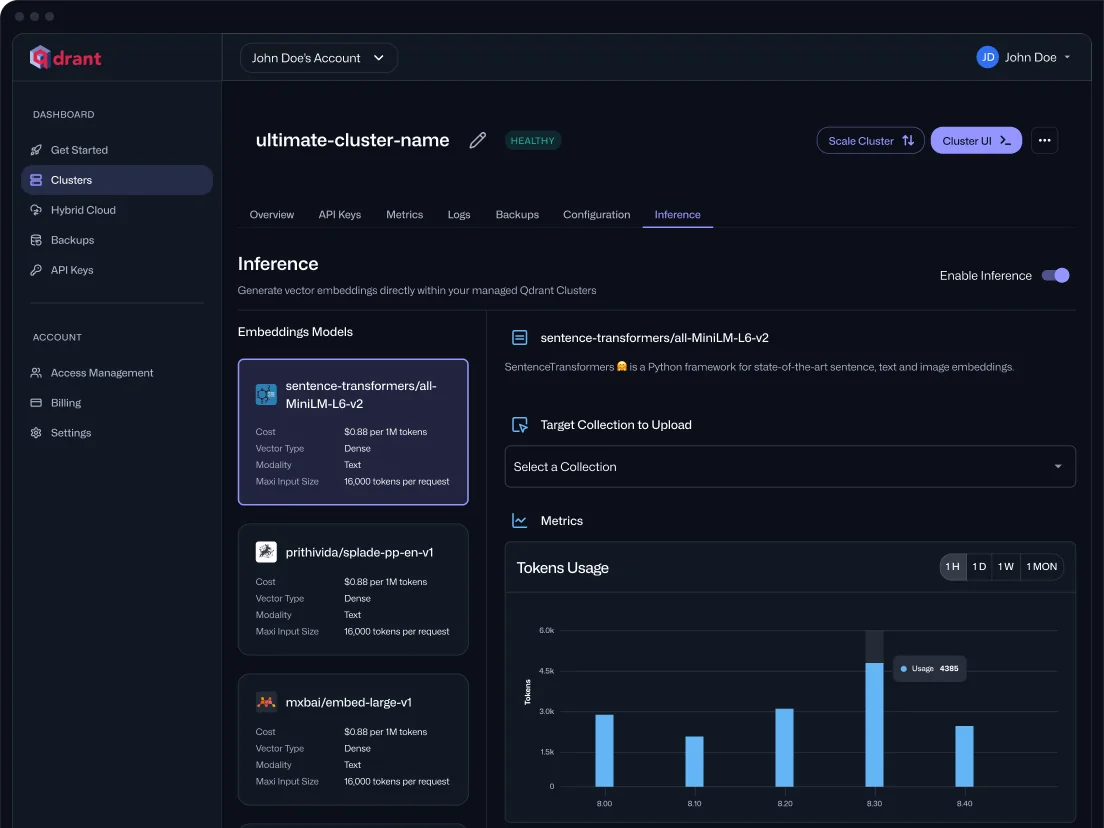
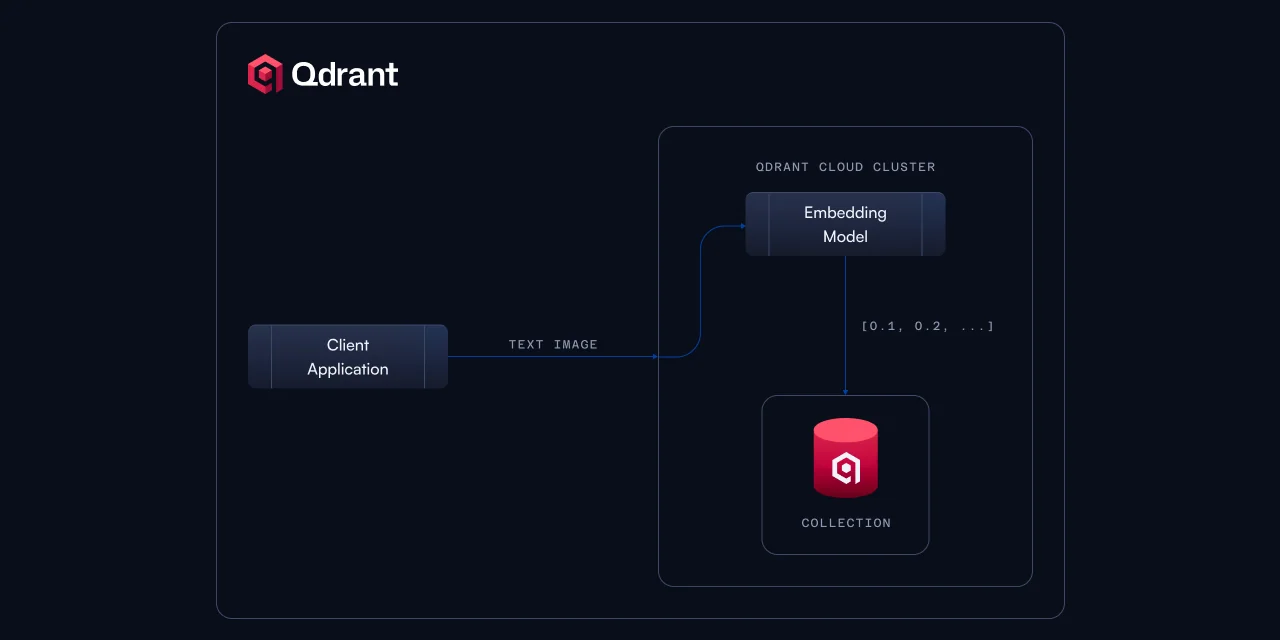
Key Features
Use Cases
MCP Server
https://qdrant.tech/blog/webinar-vibe-coding-rag/💡 MCP (Model Context Protocol) enables AI assistants to securely interact with local and remote resources.


Frequently asked questions about Qdrant
What are the pricing options for Qdrant?
Qdrant offers a flexible pricing structure that includes a free self-hosted version, a complimentary tier on Qdrant Cloud, and tailored managed cloud or enterprise plans designed to meet specific business needs. This makes it accessible for both individual developers and large organizations.
Key Points
- Freemium Model: Qdrant provides a free self-hosted version and a free tier on Qdrant Cloud.
- Custom Pricing: Managed cloud and enterprise plans are available based on specific requirements.
- Scalability: Options are designed to accommodate both small projects and large-scale deployments.
Detailed Explanation
Qdrant’s pricing options cater to a wide range of users, from individual developers experimenting with vector search technologies to enterprises needing robust and scalable solutions.
-
Free Self-Hosted Version: This option allows users to deploy Qdrant on their own servers at no cost. Ideal for developers or organizations wanting to test Qdrant's capabilities without financial commitment, it provides full access to the core features necessary for vector similarity search.
-
Free Tier on Qdrant Cloud: The cloud-based offering includes a free tier, enabling users to easily leverage Qdrant's capabilities without the hassle of server management. This tier is great for startups or small projects, providing an effortless way to get started with limited usage.
-
Managed Cloud and Enterprise Plans: For organizations with larger data needs or requiring dedicated support, Qdrant offers managed cloud services and custom enterprise plans. These options include enhanced security features, compliance support, and service-level agreements tailored to business requirements. Pricing for these plans is customized based on factors such as data volume, performance needs, and support levels.
Best Practices / Tips
- Evaluate Your Needs: Before choosing a pricing model, assess your data volume, expected growth, and specific feature needs.
- Start with Free Options: Use the free self-hosted version or the cloud tier to familiarize yourself with Qdrant's capabilities before committing to a paid plan.
- Consult Sales for Custom Plans: If you're considering a managed or enterprise plan, consult with Qdrant's sales team to discuss your unique requirements and get a tailored quote.
Additional Resources
- Qdrant Pricing Page - For up-to-date pricing details.
- Qdrant Documentation - Comprehensive guides on installation and usage.
- Qdrant Community - Join discussions and get support from other users.
How do I get started with Qdrant?
To get started with Qdrant, you can download the open-source version from the official website or sign up for the Qdrant Cloud free tier. Follow the comprehensive documentation available for installation and basic usage instructions to effectively utilize this vector search engine.
Key Points
- Download the open-source version from the official Qdrant website.
- Sign up for the Qdrant Cloud free tier for easy access.
- Consult the official documentation for installation and usage guidance.
Detailed Explanation
Qdrant is a powerful vector similarity search engine designed to handle large datasets. To begin using Qdrant, follow these steps:
-
Download Qdrant: Visit the official Qdrant website to download the latest version. You can choose between the self-hosted open-source version or the cloud option, which provides a free tier for new users.
-
Installation:
- If opting for the open-source version, follow the installation instructions in the documentation. This typically involves using Docker or compiling from the source.
- For Qdrant Cloud, simply sign up and log in to your account to access the dashboard.
-
Explore Documentation: The Qdrant documentation is a valuable resource. It covers setup, configuration, and basic usage, including how to create collections, insert data, and perform searches. Use this guide to familiarize yourself with key functionalities.
-
First Steps:
- Create your first collection by defining its schema.
- Insert sample vectors to test functionality.
- Use the API to perform queries and analyze results.
Use Cases
Qdrant is ideal for applications such as recommendation systems, image search, and natural language processing, where fast and accurate similarity search is crucial.
Best Practices / Tips
- Familiarize Yourself with Vector Representations: Understand how to convert your data into vector formats for effective indexing and searching.
- Optimize Queries: Use filters and metadata to refine your search results and improve performance.
- Monitor Resource Usage: If you're self-hosting, keep an eye on system resources to ensure optimal performance.
Additional Resources
- Qdrant Documentation
- Qdrant GitHub Repository
- Community Forum for support and discussions.
What are the key features of Qdrant?
Qdrant is a powerful open-source vector similarity search engine that excels in high-performance searches and advanced filtering. It features REST and gRPC APIs for flexible integration, and its customizable nature under the Apache-2.0 license allows for scalable deployment in various applications.
Key Points
- High-performance vector similarity search
- Advanced filtering capabilities
- REST and gRPC APIs for seamless integration
Detailed Explanation
Qdrant stands out in the realm of AI and machine learning applications due to its high-performance vector similarity search capabilities. This allows developers to quickly retrieve relevant data points from vast datasets, making it ideal for applications such as recommendation systems, image recognition, and natural language processing.
Performance
Qdrant is designed to efficiently handle millions of vectors, ensuring low-latency responses even under heavy loads. It uses optimized indexing techniques, such as HNSW (Hierarchical Navigable Small World) graphs, to facilitate rapid searches. For example, in an image search application, Qdrant can return similar images within milliseconds, significantly enhancing user experience.
Filtering
The advanced filtering capabilities allow users to refine their search results based on specific criteria, such as metadata attributes. This feature is particularly useful in e-commerce platforms, where users can filter products by categories, price ranges, or other attributes, thereby improving the relevance of search results.
API Integration
With both REST and gRPC APIs, Qdrant offers flexibility for developers. REST APIs are great for web applications, while gRPC is suited for high-performance environments, like microservices architecture. This versatility ensures that Qdrant can be easily integrated into various tech stacks, whether it's a startup project or an enterprise-level application.
Best Practices / Tips
- Optimize Vector Representation: Ensure that your vectors are accurately representing the underlying data. Use techniques like embeddings from deep learning models to improve search relevance.
- Leverage Filtering: Utilize Qdrant's filtering capabilities to narrow down results effectively, thus improving user satisfaction and engagement.
- Monitor Performance: Regularly analyze the performance metrics of your Qdrant instance to identify bottlenecks and optimize configurations for speed and efficiency.
Additional Resources
By utilizing these resources, developers can enhance their understanding of Qdrant's features and implement them effectively in their projects.
How does Qdrant compare to other vector databases?
Qdrant distinguishes itself from other vector databases through its open-source architecture, high-performance Rust implementation, and robust filtering capabilities. This combination enhances its effectiveness for applications in semantic search and personalized recommendations, making it a preferred choice for developers and data scientists alike.
Key Points
- Open-Source Model: Qdrant is fully open-source, promoting transparency and community-driven innovation.
- High-Performance Rust Implementation: Built using Rust, Qdrant ensures efficient data processing and speed.
- Advanced Filtering Capabilities: Offers sophisticated filtering options that enhance search accuracy and relevance.
Detailed Explanation
Qdrant is a vector database designed to manage, store, and search high-dimensional vectors efficiently. Here’s how it compares to other options:
-
Open-Source Model: Unlike several proprietary vector databases, Qdrant is open-source, allowing developers to customize and contribute to its features. This model encourages community involvement, leading to rapid improvements and adaptability to user needs.
-
High-Performance Rust Implementation: Qdrant's backend is developed in Rust, which is known for its memory safety and performance efficiency. This results in faster query processing times and lower resource consumption compared to alternatives built on less efficient languages.
-
Advanced Filtering Capabilities: Qdrant excels with its unique ability to filter results based on multiple criteria, such as metadata tags or specific features of the data. This is particularly useful in applications that require precise and personalized results, like recommendation systems or search engines.
Use Cases
- Semantic Search: Qdrant's filtering capabilities enable more relevant search results, making it ideal for applications like document search engines or product search on e-commerce platforms.
- Personalized Recommendations: By leveraging its high-performance capabilities, Qdrant can deliver tailored recommendations in real-time, improving user engagement and satisfaction.
Best Practices / Tips
- Leverage Open-Source Community: Engage with the Qdrant community for support, plugin development, and feature enhancements.
- Optimize Queries: Utilize Qdrant’s advanced filtering features to refine your search algorithms, ensuring users receive the most relevant results based on their query context.
- Monitor Performance: Regularly assess the performance metrics provided by Qdrant to ensure it meets your application's scalability and speed requirements.
Additional Resources
What APIs does Qdrant support for integration?
Qdrant supports integration through REST and gRPC APIs, alongside official SDKs for Python and TypeScript. These tools streamline the development process, allowing developers to efficiently connect Qdrant with various applications and services for enhanced functionality and performance.
Key Points
- REST API: A widely-used architectural style for building web services.
- gRPC API: A modern, high-performance framework for remote procedure calls.
- Official SDKs: Available for Python and TypeScript, simplifying integration.
Detailed Explanation
Qdrant provides two main types of APIs for integration: REST API and gRPC API.
-
REST API:
- The REST API follows standard HTTP methods, making it easy to use with any programming language that can send HTTP requests. It is ideal for web-based applications seeking to interact with Qdrant’s vector search capabilities.
- Example: A web application can use the REST API to send a POST request to index data, retrieve search results, or manage collections.
-
gRPC API:
- gRPC is built on top of HTTP/2 and is designed for high-performance communication. It supports bi-directional streaming, which is beneficial for real-time applications where low latency is crucial.
- Use Case: A mobile app can leverage gRPC for real-time updates from Qdrant, ensuring users receive immediate results when querying data.
-
Official SDKs:
- Qdrant offers official SDKs for Python and TypeScript, allowing developers to integrate Qdrant's features seamlessly into their applications with less boilerplate code.
- These SDKs come with pre-defined methods and classes that handle API requests, making it easier to implement complex functionalities without deep knowledge of the underlying API structure.
Best Practices / Tips
- Choose the Right API: Decide between REST and gRPC based on your application's needs. For simple CRUD operations, REST might suffice, while gRPC is better for performance-sensitive applications.
- Use SDKs: Whenever possible, utilize the official SDKs for faster development and fewer errors. They abstract many complexities involved in direct API calls.
- Monitor API Usage: Regularly check the performance of your API calls to identify bottlenecks or areas for optimization.
Additional Resources
Explore more AI Mcps tools
Browse all Mcps tools →Compare Qdrant: vs DocsAlot · vs Toolport · vs Kit for AI · vs In Parallel MCP