

Fudge MCP
AIMCP server that lets AI coding agents search real websites for fonts, color palettes, and UI patterns instead of inventing them.
Fudge MCP
MCP server that lets AI coding agents search real websites for fonts, color palettes, and UI patterns instead of inventing them.
About Fudge MCP
Fudge MCP is a Model Context Protocol server that gives AI design and coding agents access to a searchable library of nearly 10,000 real production websites. Rather than asking an LLM to invent another 'modern, premium' interface from scratch, agents can query Fudge by fonts, color palettes, components, layouts, page types, or visual similarity and get back real screenshots and measured design tokens. It combines evidence from live sites with a Chrome extension that lets designers capture new references, so agents remember and reuse the design language a team is already curating. Fudge runs locally through MCP and connects to any MCP-compatible client such as Claude Code, Cursor, and Windsurf.
Screenshots
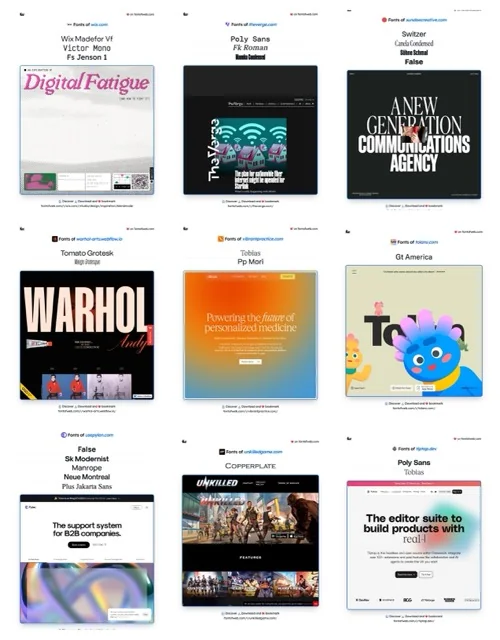
Key Features
Use Cases



Frequently asked questions about Fudge MCP
What is Fudge MCP?
Fudge MCP is a powerful server designed for AI coding agents, enabling them to search real websites for design elements like fonts, color palettes, and UI patterns. This functionality enhances the design process by utilizing existing resources instead of creating elements from scratch.
Key Points
- AI-Driven Design Search: Fudge MCP allows AI to access actual web elements.
- Resource Optimization: It saves time by using existing design resources.
- Enhanced Creativity: Encourages innovative design by providing real-world examples.
Detailed Explanation
Fudge MCP stands for "Fudge Multi-Component Platform." This server is particularly useful for developers and designers who wish to streamline their design process. By leveraging AI capabilities, Fudge MCP allows coding agents to scour the web for various design elements—such as typography, color schemes, and user interface layouts.
Use Cases
- Web Designers: Quickly find inspiration for website layouts and color combinations.
- App Developers: Identify UI patterns that enhance user experience by referencing successful applications.
- Marketing Teams: Gather visual elements that align with brand identity and current trends.
For instance, if a designer is working on a project that requires a modern, minimalistic style, Fudge MCP can pull examples from top-performing websites, showcasing the exact fonts and color schemes used. This not only boosts efficiency but also ensures that designs are relevant and contemporary.
Best Practices / Tips
- Start with Clear Objectives: Define what elements you’re looking for before using Fudge MCP, as this will streamline your search.
- Use Filters Wisely: Take advantage of filtering options to narrow down results based on specific styles or industries.
- Cross-Reference Sources: Always validate the components you find with design principles to ensure they fit your project context.
Common Pitfalls
- Over-Reliance on AI: While Fudge MCP is a powerful tool, it should complement, not replace, human creativity. Use it as a source of inspiration rather than a definitive guide.
- Ignoring Licensing Issues: Be mindful of copyright when using design elements found online.
Additional Resources
Using Fudge MCP effectively can significantly elevate your design projects by integrating real-world examples and resources, leading to innovative and functional designs.
How does Fudge MCP work?
Fudge MCP operates by integrating various design tools and resources, enabling users to access real-world design references, connect with compatible AI agents, and utilize design tokens for accurate styling. This empowers designers to enhance prototype aesthetics and streamline UI development with verified design elements.
Key Points
- Design Reference Search: Access nearly 10,000 real websites by various design criteria.
- MCP Server for Agents: Connects to clients like Claude Code and Cursor for on-the-fly design evidence retrieval.
- Real Design Tokens: Provides actual measured design values to eliminate guesswork.
Detailed Explanation
Fudge MCP utilizes a powerful combination of tools to redefine how designers approach UI development. Here's a deeper look at its components:
-
Design Reference Search: This feature allows users to query a vast database of nearly 10,000 real-world websites. Users can filter results based on font type, color palettes, layout components, and visual similarities. For example, if a designer is looking for a specific color scheme, they can quickly find sites that match their criteria, thus saving time in the design phase.
-
MCP Server for Agents: This server acts as a bridge between Fudge MCP and various compatible AI agents, such as Claude Code, Cursor, and Windsurf. These agents can pull relevant design evidence during the code generation process, ensuring that the visual elements align with real-world applications. This connection is crucial for maintaining design consistency and quality.
-
Real Design Tokens: Fudge MCP eliminates the common issue of "design hallucinations" by providing precise design tokens like font types, hex codes, and spacing metrics pulled from live websites. For instance, if a designer wants to implement a specific font style, they can directly access the accurate measurements, thereby enhancing the fidelity of their prototypes.
-
Chrome Extension Capture: Users can capture design references directly from any website they visit. This feature allows designers to save and pin new inspirations, which then become searchable by the agents they utilize. This functionality encourages a more organic approach to design gathering and inspiration.
-
Screenshot Evidence: Every design match is supported by real screenshots, allowing designers and agents to visually verify and authenticate the sources of inspiration. This reduces the risk of misinterpretation and enhances collaborative efforts between design teams.
Best Practices / Tips
- Utilize the Design Reference Search: Always start your design process by exploring existing sites for inspiration. This can help you identify trends and ensure your designs are contemporary.
- Leverage the Chrome Extension: Regularly capture design elements you encounter online. This habit will build a personal library of inspirations for future projects.
- Verify with Screenshot Evidence: Always cross-reference design elements with the provided screenshots to ensure accuracy before implementation.
Additional Resources
What are the main features of Fudge MCP?
Fudge MCP offers key features designed to enhance design and code generation efficiency. These include a vast Design Reference Search, a versatile MCP Server for Agents, Real Design Tokens for accurate data retrieval, a Chrome Extension for easy reference capturing, and Screenshot Evidence for visual verification of design inspiration.
Key Points
- Design Reference Search: Access to nearly 10,000 real websites.
- MCP Server for Agents: Connects with various MCP-compatible clients.
- Real Design Tokens: Provides accurate design values from live sites.
Detailed Explanation
Fudge MCP stands out in design and code generation through its innovative features:
-
Design Reference Search: This feature allows designers and developers to query an extensive library of nearly 10,000 real websites. Users can filter results based on specific criteria such as font type, color palette, layout, and visual similarity, enabling them to find design inspiration quickly and effectively.
-
MCP Server for Agents: The MCP Server facilitates seamless integration with multiple MCP-compatible clients like Claude Code, Cursor, and Windsurf. This connection empowers agents to retrieve design evidence while generating code, ensuring that the final output aligns closely with real-world examples.
-
Real Design Tokens: Fudge MCP eliminates the common issue of "hallucinating" design values by providing precise measurements of fonts, hex codes, and spacing directly sourced from live sites. This feature ensures that designers are working with accurate data, enhancing the quality and consistency of their designs.
-
Chrome Extension Capture: Users can easily save new design references from any website they visit using the Chrome Extension. Captured pins are stored and become searchable within the agents they use, streamlining the design process by keeping all relevant inspirations in one place.
-
Screenshot Evidence: Each design match is supported by real screenshots, allowing agents and designers to visually verify their inspirations. This feature enhances confidence in design decisions and helps maintain aesthetic integrity across projects.
Best Practices / Tips
- Utilize the Design Reference Search: Regularly explore the vast library of real websites to stay updated with current design trends.
- Integrate with Compatible Clients: Ensure you’re using MCP-compatible tools to maximize the utility of the MCP Server for Agents.
- Capture and Organize References: Use the Chrome Extension effectively to collect and categorize design inspirations, making them easily accessible for future projects.
- Verify with Screenshot Evidence: Always cross-check design matches against screenshot evidence to confirm visual alignments and improve design accuracy.
Additional Resources
Who is Fudge MCP for?
Fudge MCP is designed for designers, developers, and product managers who want to enhance Vibe-Coded App Styling, explore design systems, conduct font pairing research, source color palettes, and facilitate UI iterations with AI assistance. It’s ideal for creating visually appealing, professional-looking applications efficiently.
Key Points
- Vibe-Coded App Styling: Enhances prototypes with real production aesthetics.
- Design System Discovery: Investigates typography and color usage in similar products.
- Font Pairing Research: Identifies complementary fonts for targeted typefaces.
Detailed Explanation
Fudge MCP is a versatile tool that caters to various aspects of web and app design, making it invaluable for professionals seeking high-quality output without extensive manual effort.
Vibe-Coded App Styling
This feature allows users to give AI-built prototypes a polished look that resembles fully developed applications. Instead of relying on generic templates, designers can create unique styles that align with their brand identity. For instance, a startup can utilize Fudge MCP to generate a prototype that visually communicates its mission and values effectively.
Design System Discovery
By examining how established SaaS products manage typography and colors, Fudge MCP aids designers in developing cohesive design systems. This exploration helps finalize decisions on font choices and color schemes, ensuring consistency across all application interfaces. For example, analyzing a competitor's design choices can inspire a more effective layout or a fresh color palette.
Font Pairing Research
Fudge MCP simplifies the often cumbersome process of font pairing. Users can input a target typeface and discover real-world websites that successfully utilize it, along with secondary fonts that complement the primary choice. This functionality is particularly useful for designers seeking to elevate their typography without extensive trial and error.
Palette Sourcing
With palette sourcing, Fudge MCP enables users to search for existing production sites that utilize specific colors, providing the exact hex values required. This feature ensures that design choices remain harmonious and on-brand, which is critical for maintaining visual identity across digital platforms.
Agent-Assisted UI Iteration
By leveraging AI tools like Claude Code or Cursor, users can obtain three inspiration references before making changes to a UI component. This capability streamlines the design iteration process, allowing for faster decision-making and more informed design choices.
Best Practices / Tips
- Utilize AI Features: Make the most of Fudge MCP's AI capabilities to expedite design processes.
- Research Competitors: Regularly analyze competitors' design systems to stay current with industry trends.
- Maintain Brand Consistency: Always align color palettes and typography with your brand’s identity.
Additional Resources
How much does Fudge MCP cost?
Fudge MCP offers a free tier for users to explore its features, while paid plans start at approximately $29 per month for advanced functionalities. Pricing varies based on the level of service and the specific features you need, ensuring flexibility for different user requirements.
Key Points
- Fudge MCP has a free tier for basic use.
- Paid plans start at around $29 per month.
- Pricing varies based on features and user needs.
Detailed Explanation
Fudge MCP, a comprehensive tool for managing cloud resources, is accessible to all users through its free tier, which allows them to test fundamental functionalities without commitment. This tier is ideal for individuals or small teams who want to evaluate the tool's capabilities.
For users needing more advanced features, Fudge MCP offers several paid plans. The basic paid plan starts at approximately $29 per month and includes additional functionalities such as enhanced security, priority support, and access to exclusive integrations. Higher-tier plans are also available, catering to larger teams or enterprises that require extensive resource management features and custom solutions.
Example Use Cases:
- Small Teams: A startup can leverage the free plan to manage resources without initial investment.
- Medium Enterprises: Companies with growing needs might opt for the $29 plan to unlock team collaboration features.
- Large Organizations: Enterprises can choose premium plans for tailored solutions and dedicated support.
Best Practices / Tips
- Evaluate Your Needs: Before selecting a plan, assess which features are essential for your operations to avoid paying for unnecessary functionalities.
- Utilize the Free Tier: Take full advantage of the free tier to test the platform's capabilities and understand how it fits into your workflow.
- Consider Long-Term Commitments: If you anticipate long-term use, explore annual subscription options that may offer discounts over monthly billing.
Additional Resources
How do I get started with Fudge MCP?
To get started with Fudge MCP, visit this link to sign up for an account. Once registered, you can explore its features, tools, and integrations to enhance your design and collaboration workflow.
Key Points
- Easy sign-up process for Fudge MCP.
- Access to a variety of design tools and features.
- Integration capabilities with other platforms.
Detailed Explanation
Fudge MCP (Multi-Channel Publishing) is a versatile tool designed for designers, marketers, and content creators. To begin using Fudge MCP, follow these steps:
-
Sign Up: Click here to create your account. Fill in the required information, including your email and password.
-
Explore the Dashboard: Once logged in, familiarize yourself with the user-friendly dashboard. Here, you will find various tools designed for project management, design collaboration, and publishing.
-
Utilize the Features: Fudge MCP offers a range of features such as:
- Design Tools: Create and edit designs directly within the platform.
- Collaboration Options: Invite team members to collaborate in real-time.
- Publishing: Distribute your content across multiple channels seamlessly.
-
Integrate with Other Platforms: Fudge MCP supports integration with popular tools like Slack, Google Drive, and Adobe Creative Suite. This enhances your workflow and keeps all your design assets organized.
-
Start a Project: Choose a template or start from scratch. Use the intuitive interface to drag and drop elements, customize your design, and prepare for publication.
Best Practices / Tips
- Take Advantage of Tutorials: Fudge MCP offers numerous tutorials and guides. Utilize these resources to learn about advanced features and best practices.
- Regularly Save Your Work: Ensure you save your progress frequently to avoid losing any changes.
- Engage with the Community: Join forums or social media groups related to Fudge MCP. Networking can provide valuable tips and insights from other users.
Additional Resources
- Fudge Official Documentation for in-depth user guides.
- Fudge MCP Community Forum for user discussions and support.
- Fudge MCP Blog for updates on new features and best practices.
Explore more AI Mcps tools
Browse all Mcps tools →Compare Fudge MCP: vs ai-memory · vs CrawlForge MCP · vs Popcraft · vs Pomerado