

Github Spec Kit
AIOpen SourceFreeA CLI toolkit and template collection to get started with Spec-Driven Development, integrating Copilot, Claude, Gemini, and Cursor workflows.
Github Spec Kit
A CLI toolkit and template collection to get started with Spec-Driven Development, integrating Copilot, Claude, Gemini, and Cursor workflows.
About Github Spec Kit
GitHub Spec Kit is a public toolkit and template repository that helps teams adopt Spec-Driven Development (SDD). It provides a command-line interface (specify) and a set of versioned templates to scaffold specifications, plans, and task artifacts that tie into developer workflows and multiple assistant integrations (GitHub Copilot, Claude Code, Gemini CLI, Cursor). The project supplies commands to initialize projects from templates, validate the developer environment, and produce per-script variants (POSIX shell and PowerShell), enabling consistent, repeatable specification generation and handoff across tools and IDEs.
Screenshots

Key Features
Use Cases



Frequently asked questions about Github Spec Kit
Is GitHub Spec Kit free to use?
Yes, GitHub Spec Kit is completely free to use as it is published as an open-source repository. Users can access the repository, command-line interface (CLI), and templates at no cost, making it an excellent resource for developers and teams looking to streamline their project specifications.
Key Points
- GitHub Spec Kit is open-source and free to access.
- It includes a repository, CLI, and customizable templates.
- Ideal for developers seeking to enhance project documentation.
Detailed Explanation
GitHub Spec Kit is a powerful tool designed to help developers create and manage project specifications efficiently. Being an open-source repository, it allows anyone to use it without any financial barriers. The kit includes a comprehensive repository on GitHub, a command-line interface (CLI) for ease of use, and a range of customizable templates to suit various projects.
How to Access GitHub Spec Kit
- Visit the GitHub Repository: Go to the official GitHub page for Spec Kit.
- Clone or Download: You can clone the repository using Git commands or download it directly as a ZIP file.
- Install the CLI: Follow the installation instructions provided in the repository to set up the CLI.
- Use Templates: Explore the various templates available to guide your project documentation.
Use Cases
- Agile Development: Ideal for teams that follow Agile methodologies, as it can help maintain clarity in project requirements.
- Open Source Projects: Perfect for contributors to document their projects effectively, making it easier for others to understand and engage.
- Collaboration: Facilitates better communication among team members by providing a standardized format for specifications.
Best Practices / Tips
- Customize Templates: Tailor the provided templates to fit your specific project needs for maximum effectiveness.
- Stay Updated: Regularly check the repository for updates or new features that may enhance your experience.
- Engage with the Community: Participate in discussions and contribute to the repository to benefit from shared knowledge and improvements.
Additional Resources
What are the key features of GitHub Spec Kit?
GitHub Spec Kit is an essential tool for developers, featuring a command-line interface, versioned templates for spec-driven development, multi-assistant integrations, and environment validation checks. These features streamline project setup, enhance collaboration, and ensure consistency across development environments.
Key Points
- Command-Line Interface: Simplifies interaction with the kit.
- Versioned Templates: Facilitates spec-driven development.
- Multi-Assistant Integrations: Enhances collaboration across tools.
Detailed Explanation
GitHub Spec Kit is designed to improve the software development process by providing developers with a suite of features that promote efficiency and collaboration.
-
Command-Line Interface (CLI): The CLI allows developers to interact with the Spec Kit directly from their terminal, enabling quick access to commands and functionalities. This is particularly useful for automating workflows and integrating with continuous integration (CI) tools.
-
Versioned Templates: With the Spec Kit, developers can utilize versioned templates tailored for spec-driven development. This means that teams can maintain consistency in project specifications, making it easier to manage changes over time. For instance, if a team decides to alter a specification, they can revert to previous versions easily, ensuring that all team members are on the same page.
-
Multi-Assistant Integrations: GitHub Spec Kit supports integrations with various development assistants, such as GitHub Actions and CI/CD tools. This feature enables teams to automate workflows, trigger builds, and run tests seamlessly, thereby enhancing productivity and reducing manual errors.
-
Environment Validation Checks: This feature ensures that the project's environment is set up correctly before deployment. It checks for necessary dependencies and configurations, allowing teams to catch issues early in the development cycle. This proactive approach minimizes downtime and improves overall project reliability.
Best Practices / Tips
- Regularly Update Templates: Keep your versioned templates updated to incorporate best practices and new features. This ensures that your team is always using the most efficient tools available.
- Leverage CLI for Automation: Use the command-line interface to automate repetitive tasks, such as setting up new projects or running tests, which can save significant time.
- Integrate with Your Workflow: Make the most of the multi-assistant integrations by incorporating GitHub Spec Kit into your existing CI/CD pipelines. This will streamline your development process and enhance team collaboration.
- Conduct Environment Checks Frequently: Regularly validate your project environments during development to catch issues early, which can prevent costly fixes later in the project lifecycle.
Additional Resources
How do I get started with GitHub Spec Kit?
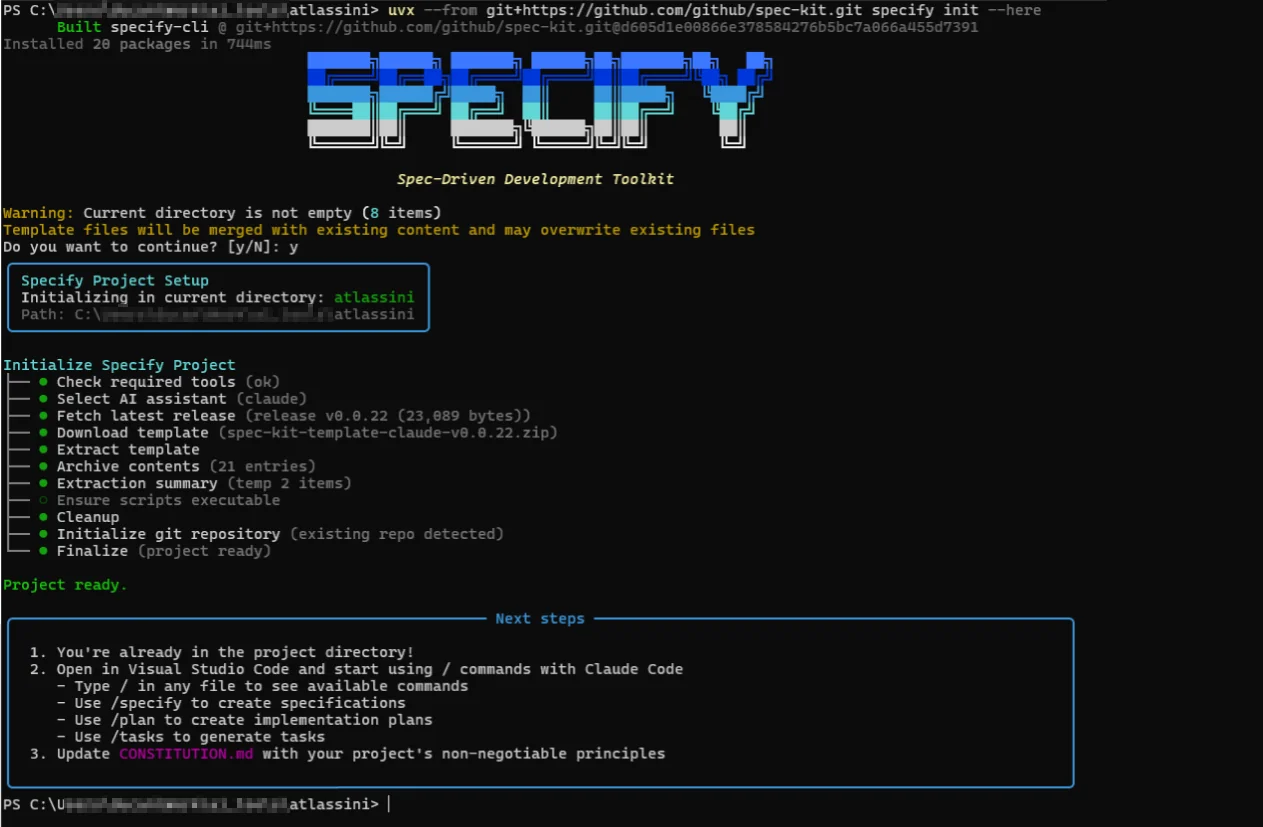
To get started with GitHub Spec Kit, first clone the repository from GitHub. Next, install the Specify CLI tool and run the specify init command to create a new project based on the latest templates. This process sets up your development environment efficiently.
Key Points
- Clone the GitHub repository to your local machine.
- Install the Specify CLI tool for project management.
- Use the
specify initcommand to scaffold your project.
Detailed Explanation
Step 1: Clone the Repository
To begin, you need to clone the GitHub Spec Kit repository. Open your terminal and run the following command:
git clone https://github.com/your-username/spec-kit.git
Replace your-username with the appropriate GitHub username if necessary. This command downloads the Spec Kit files to your local machine.
Step 2: Install the Specify CLI Tool
After cloning the repository, the next step is to install the Specify CLI tool. This can usually be done via npm. If you don't have Node.js and npm installed, download them from the Node.js website.
To install Specify globally, run:
npm install -g specify-cli
This command allows you to use Specify commands from anywhere in your terminal.
Step 3: Initialize Your Project
With the Specify CLI installed, navigate to your cloned repository folder:
cd spec-kit
Then, run the initialization command:
specify init
This command scaffolds a new project using the latest templates provided by Spec Kit. You can then customize the project according to your requirements.
Best Practices / Tips
- Check for Updates: Regularly check the Spec Kit repository for updates and new features.
- Explore Templates: Familiarize yourself with the available templates to choose the best fit for your project.
- Documentation: Always refer to the official documentation for troubleshooting and advanced features.
Additional Resources
What technical requirements does GitHub Spec Kit have?
GitHub Spec Kit requires essential developer tools, including Git, and specific assistant command-line interfaces (CLIs) like Claude, Gemini, and Cursor. Proper installation and configuration of these tools are critical for achieving optimal functionality and leveraging the full capabilities of the Spec Kit.
Key Points
- Essential tools: Git and assistant CLIs.
- Configuration is crucial for optimal use.
- Understanding each CLI's purpose enhances efficiency.
Detailed Explanation
To successfully utilize GitHub Spec Kit, you need to install essential developer tools:
-
Git: This version control system is fundamental for managing your code. Ensure you have the latest version installed. You can download Git from git-scm.com. After installation, verify it by running
git --versionin your terminal. -
Assistant CLIs: The Spec Kit specifically requires several command-line interfaces:
- Claude: This AI assistant can help automate tasks and streamline workflows. Installation instructions can typically be found in the tool's documentation.
- Gemini: This CLI aids in managing data and integration processes. Ensure you follow the setup guide provided on their official platform.
- Cursor: A CLI designed for simplifying interactions with your codebase. Proper configuration is essential to utilize its features effectively.
Once you have these tools installed, familiarize yourself with their commands and functionalities. This knowledge will significantly enhance your ability to use GitHub Spec Kit efficiently.
Best Practices / Tips
- Keep Tools Updated: Regularly check for updates to Git and your CLI tools to take advantage of new features and security enhancements.
- Read the Documentation: Each tool has its own set of features and commands. Thoroughly read the official documentation to understand how to configure them properly.
- Use Version Control Effectively: Make frequent commits and branches in Git to track changes and collaborate more efficiently with your team.
Additional Resources
- Git Official Documentation
- Claude CLI Documentation
- Gemini CLI Documentation
- Cursor CLI Documentation
By ensuring you meet these technical requirements and following best practices, you can maximize your productivity and effectiveness when using GitHub Spec Kit.
How does GitHub Spec Kit compare to other development tools?
GitHub Spec Kit is a leading development tool that excels with its open-source model, multi-assistant support, and emphasis on specification-driven development. These features make it a compelling alternative to paid tools, offering seamless integrations with various AI assistants while maintaining cost-effectiveness.
Key Points
- Open-Source Model: GitHub Spec Kit is free and community-driven.
- Multi-Assistant Support: Compatible with various AI assistants for enhanced functionality.
- Specification-Driven Development: Focuses on creating clear specifications, improving collaboration and accuracy.
Detailed Explanation
GitHub Spec Kit differentiates itself from other development tools primarily through its open-source model. This allows developers to access the tool without any financial investment, fostering a community that contributes to its continuous improvement. Unlike many paid tools, GitHub Spec Kit encourages collaboration, enabling users to modify and enhance the tool to suit their specific needs.
The multi-assistant support feature is another advantage. GitHub Spec Kit can integrate with popular AI assistants like ChatGPT, enabling teams to leverage AI capabilities for tasks such as code generation, debugging, and documentation. This integration simplifies workflows and enhances productivity, making it an attractive option for developers seeking to streamline their processes.
Furthermore, GitHub Spec Kit emphasizes specification-driven development. This approach helps teams create and manage project specifications effectively, ensuring that all stakeholders are aligned on project requirements. By focusing on clear specifications, teams can minimize misunderstandings and enhance the overall quality of their software projects.
For example, a development team working on a complex software application can use GitHub Spec Kit to define their project requirements thoroughly. The tool facilitates collaboration among developers, product managers, and stakeholders, ensuring that everyone has access to the same information and understands the project scope.
Best Practices / Tips
- Engage with the Community: Utilize GitHub’s community forums to seek advice and share insights with other users.
- Regular Updates: Keep your GitHub Spec Kit updated to benefit from the latest features and security patches.
- Leverage Integrations: Make the most of AI assistant integrations to automate repetitive tasks and improve efficiency.
Additional Resources
Explore more AI Ai Tools tools
Browse all Ai Tools tools →Browse by use case: Code Generation · Automation & Productivity
Compare Github Spec Kit: vs Mise · vs BiBimba · vs VoiceCap · vs NM Signals