
Ogment MCP-Builder
AINo-code MCP builder that converts APIs, data, and docs into production-ready Model Context Protocol integrations for chat experiences.
Ogment MCP-Builder
No-code MCP builder that converts APIs, data, and docs into production-ready Model Context Protocol integrations for chat experiences.
About Ogment MCP-Builder
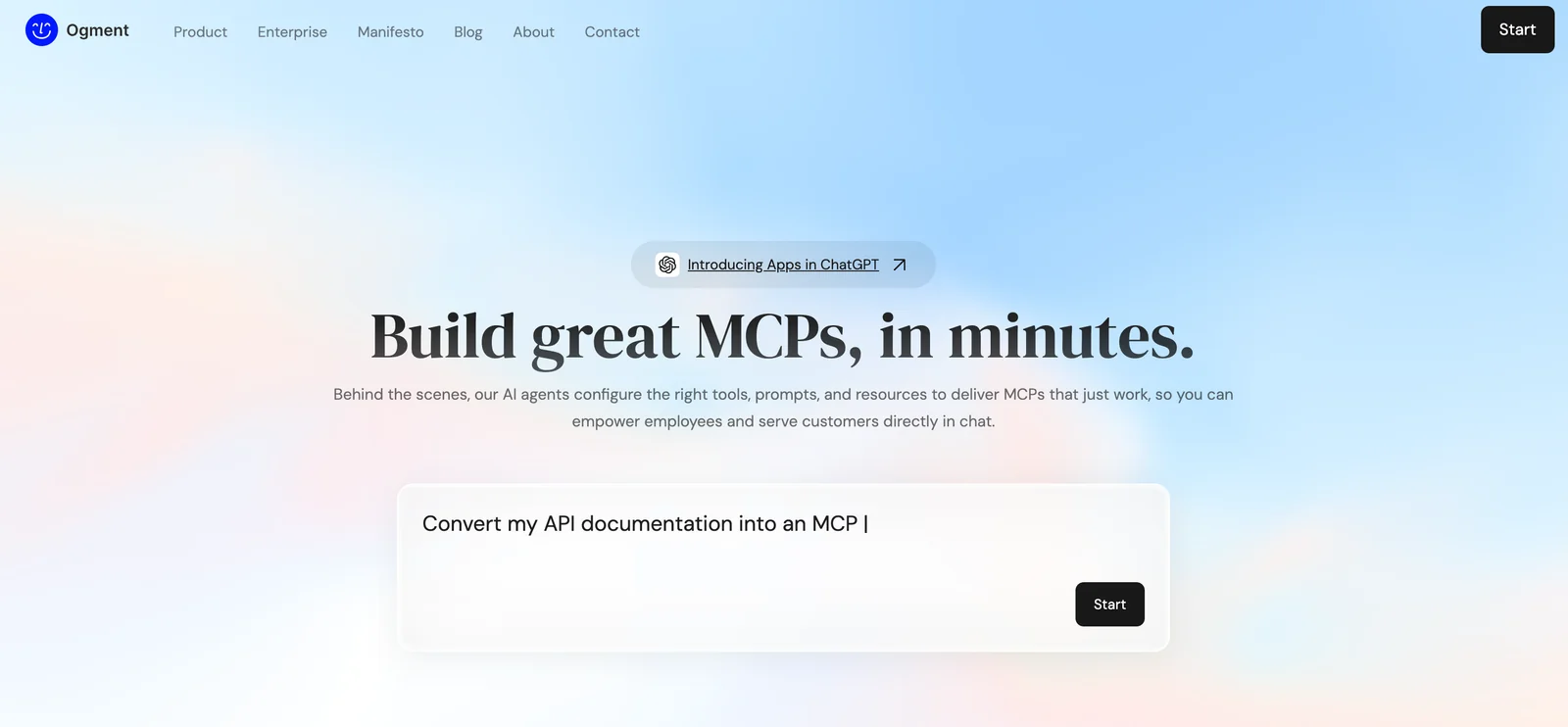
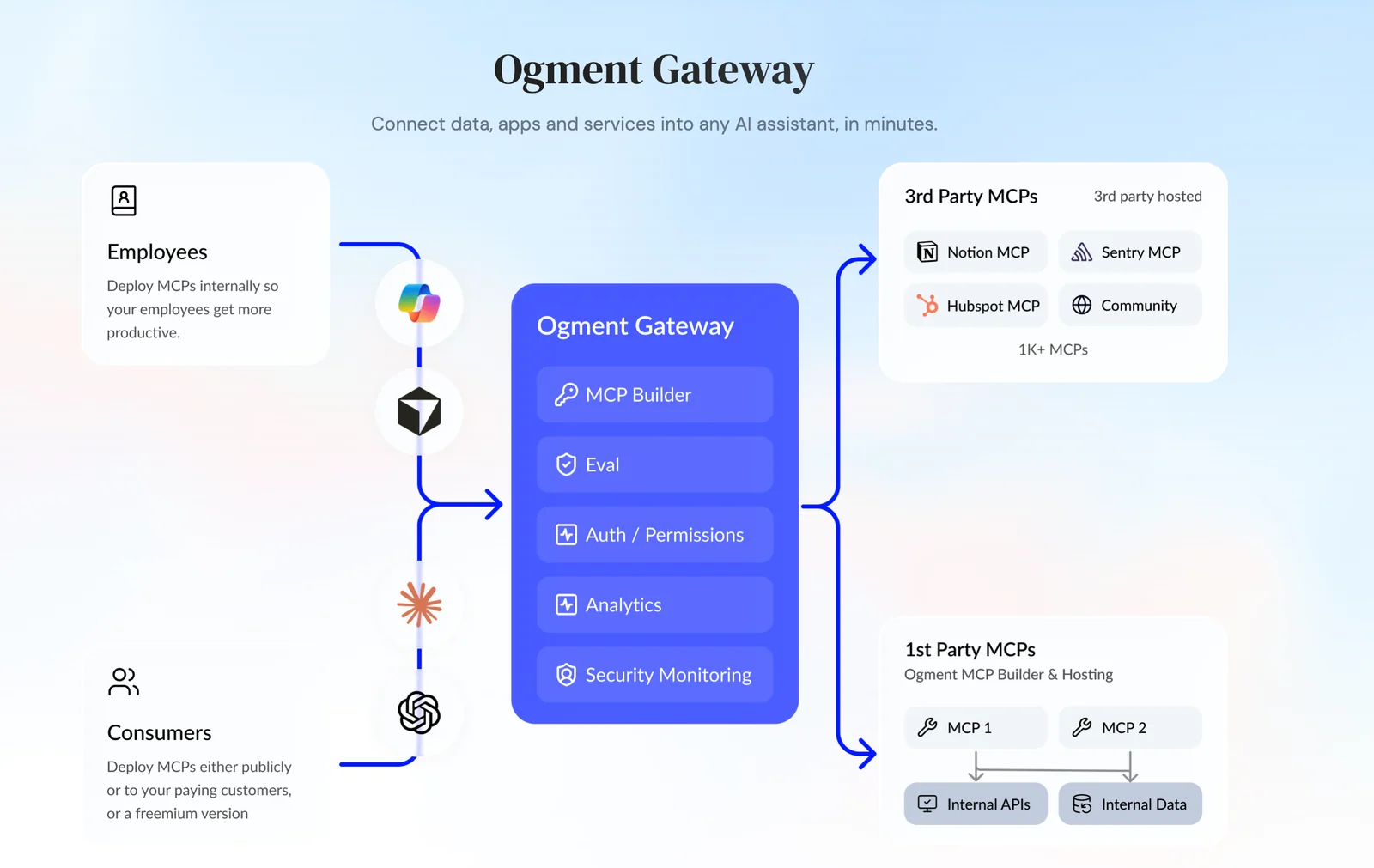
Ogment MCP-Builder is a no-code platform that turns product APIs, data, and documentation into production-ready Model Context Protocol (MCP) integrations. Using AI agents, the builder configures prompts, tools, connectors, endpoints, operations, and parameters to produce chat-native experiences that integrate with ChatGPT and other chat interfaces. The platform provides visual configuration, automated generation of connector metadata, and evaluation tooling so teams can quickly deploy reliable MCPs to empower employees or serve customers in chat workflows.
Screenshots
Key Features
Use Cases


Frequently asked questions about Ogment MCP-Builder
What are the pricing options for Ogment MCP-Builder?
Ogment MCP-Builder features a freemium pricing structure with four tiers: Starter (Free) with 10 credits, Dev at $10/month for 50 credits, Pro at $25/month offering more allowances, and Scale for $60/month providing the highest usage limits tailored for extensive needs.
Key Points
- Starter Tier: Free with 10 credits for basic usage.
- Dev Tier: Priced at $10/month, suitable for developers.
- Pro & Scale Tiers: For advanced and enterprise-level needs with higher credit limits.
Detailed Explanation
Ogment MCP-Builder's pricing model caters to a range of users, from beginners to advanced developers.
-
Starter Tier: This plan is ideal for new users wanting to explore the features of Ogment MCP-Builder. It provides 10 credits at no cost, allowing individuals to test the platform's capabilities without any financial commitment. Perfect for small-scale projects or initial experiments.
-
Dev Tier: At $10 per month, the Dev tier is designed for developers who require more resources. With 50 credits, this plan supports medium-sized projects and allows users to efficiently build and test their applications.
-
Pro Tier: For $25 per month, the Pro tier grants users higher allowances, making it suitable for businesses or teams that need to manage larger projects. This plan enhances productivity with additional features and credits, accommodating more extensive workflows.
-
Scale Tier: At $60 per month, the Scale tier is tailored for enterprises and large teams that demand the utmost flexibility and capacity. This plan offers the highest credit limits and is built for organizations with significant usage needs, ensuring that they can operate seamlessly even under high demand.
Best Practices / Tips
- Choose the Right Tier: Evaluate your project requirements before selecting a tier. If you're just starting, begin with the Starter tier and upgrade as needed.
- Monitor Credit Usage: Keep track of how many credits you use each month to avoid running out, especially if you are on a limited plan.
- Take Advantage of Free Trials: Utilize the free tier to familiarize yourself with Ogment MCP-Builder, helping ensure you make an informed choice when upgrading.
Additional Resources
How to use Ogment MCP-Builder for integrating APIs into chat?
To use Ogment MCP-Builder for integrating APIs into chat, first create an account and select a pricing plan. Then, utilize the no-code visual builder to seamlessly connect your APIs and configure Multi-Channel Platforms (MCPs) without needing to write code.
Key Points
- User-Friendly Interface: Ogment MCP-Builder offers a no-code environment.
- API Connectivity: Easily integrate multiple APIs into your chat systems.
- Flexible Pricing: Choose a plan that suits your business needs.
Detailed Explanation
Ogment MCP-Builder is a powerful tool designed to simplify API integration for chat applications. Here’s how to get started:
-
Create an Account: Visit the Ogment website and sign up. You will need to provide basic information and verify your email.
-
Choose a Pricing Plan: Ogment offers several pricing tiers based on features and usage. Review the plans carefully to select one that fits your budget and requirements.
-
Utilize the No-Code Visual Builder:
- Drag-and-Drop Functionality: Once logged in, access the visual builder, where you can drag and drop elements to create your chat interface.
- API Integration: Click on the API connector, select the APIs you want to integrate, and input necessary authentication details. The platform supports popular APIs like Twilio, Slack, and others.
- Testing and Configuration: After linking your APIs, configure your MCPs by adjusting settings for message handling, user interactions, and response triggers. Use the built-in testing tools to ensure everything works smoothly.
Example Use Case
For instance, if you want to integrate a customer support API, simply drag the API connector into your flow, input the API key, and set up the conversation pathways. This enables your chat to automatically respond to customer inquiries based on the API's data.
Best Practices / Tips
- Start Small: Begin with one or two APIs to familiarize yourself with the interface before scaling up.
- Utilize Documentation: Ogment provides comprehensive documentation and tutorials—make full use of these resources.
- Monitor Performance: Regularly review analytics within the MCP-Builder to optimize conversations and improve user engagement.
- Stay Updated: Keep an eye on new features and updates from Ogment that could enhance your integration capabilities.
Additional Resources
Following these steps will ensure that you can effectively use Ogment MCP-Builder to integrate APIs into your chat systems, enhancing user experience without the need for extensive coding knowledge.
What features does Ogment MCP-Builder provide for chat experiences?
Ogment MCP-Builder offers features that enhance chat experiences, including AI-assisted Multi-Channel Protocol (MCP) creation, a no-code visual builder for easy design, endpoint configuration for seamless integration, production-ready MCP generation, and built-in evaluation tools for testing and optimizing integrations.
Key Points
- AI-Assisted MCP Creation: Automates and simplifies the chat protocol building process.
- No-Code Visual Builder: Enables users to design chat interfaces without technical expertise.
- Built-in Evaluation Tools: Facilitates testing and ensures high-quality integrations.
Detailed Explanation
Ogment MCP-Builder is designed to streamline the development of chat experiences, making it ideal for businesses looking to enhance customer interactions.
-
AI-Assisted MCP Creation: This feature leverages artificial intelligence to help users create Multi-Channel Protocols efficiently. By analyzing user input and previous data, the AI suggests optimal configurations and responses, making the setup faster and more intuitive.
-
No-Code Visual Builder: Users can easily create chat interfaces using a drag-and-drop interface. This eliminates the need for programming knowledge, allowing marketers and product managers to focus on design and functionality rather than technical details. For example, a user can simply drag a chat widget onto a canvas and customize it in real-time.
-
Endpoint Configuration: Ogment MCP-Builder allows users to configure various endpoints for integration with existing systems, such as CRM software or customer databases. This ensures that chat interactions are personalized and relevant, improving user engagement and satisfaction.
-
Production-Ready MCP Generation: After designing the chat protocol, users can generate production-ready MCPs that are tested and optimized for deployment. This ensures that businesses can launch their chat experiences with confidence, knowing they are built to perform well under real-world conditions.
-
Built-in Evaluation Tools: These tools allow developers to test their integrations and collect data on performance. Users can track metrics such as response times, user satisfaction, and engagement rates, enabling continuous improvement of chat experiences.
Best Practices / Tips
- Utilize Templates: Start with pre-built templates in the no-code builder to speed up the design process.
- Test Frequently: Use the built-in evaluation tools to conduct regular tests during development, ensuring issues are identified early.
- Gather User Feedback: Actively seek feedback from users after deploying the chat experience to refine and enhance the functionality continuously.
- Optimize for Mobile: Ensure that chat interfaces are responsive and mobile-friendly, as a large portion of users engage via smartphones.
Additional Resources
- Ogment Official Documentation – Comprehensive guides and tutorials.
- Ogment Blog – Insights on chat experiences and industry trends.
- YouTube Channel – Video tutorials and webinars on using Ogment MCP-Builder effectively.
What are the technical requirements for using Ogment MCP-Builder?
Ogment MCP-Builder requires a stable internet connection and a modern web browser to function effectively. It supports integration with multiple APIs and data sources, enabling users to configure applications seamlessly without the need for backend coding or extensive programming knowledge.
Key Points
- Requires a stable internet connection.
- Compatible with modern web browsers (Chrome, Firefox, Edge, etc.).
- Supports integration with diverse APIs and data sources.
Detailed Explanation
Ogment MCP-Builder is designed to facilitate the creation and management of applications with minimal technical expertise. The primary technical requirements include:
-
Internet Connection: A reliable internet connection is essential for accessing the Ogment MCP-Builder platform. This ensures that users can utilize all features without interruption.
-
Web Browser Compatibility: Ogment MCP-Builder is optimized for several popular web browsers. Users should ensure they are using a recent version of browsers such as Google Chrome, Mozilla Firefox, or Microsoft Edge for the best experience. Using outdated browsers may lead to compatibility issues or reduced functionality.
-
API Integration: The platform allows seamless integration with various APIs. This means users can connect Ogment MCP-Builder to external data sources, enhancing its capabilities. For instance, businesses can integrate customer data from CRM systems or connect to third-party services for enhanced functionality.
-
No Backend Coding Required: One of the key features of Ogment MCP-Builder is its user-friendly interface that allows users to configure applications without backend coding. This opens up possibilities for non-developers to create and manage applications effectively.
Best Practices / Tips
-
Keep Your Browser Updated: Always use the latest version of your web browser to ensure compatibility with Ogment MCP-Builder. This can help avoid technical issues and enhance security.
-
Check Internet Speed: A reliable and fast internet connection will improve the overall performance of Ogment MCP-Builder, especially during data-intensive operations.
-
Utilize API Documentation: When integrating external APIs, refer to the documentation provided by those services. This will help you understand the requirements and limitations, facilitating smoother connections.
-
Explore Community Support: Engage with the Ogment community forums or support channels to get tips and solutions from experienced users.
Additional Resources
How does Ogment MCP-Builder compare to other no-code API integration tools?
Ogment MCP-Builder distinguishes itself from other no-code API integration tools through its AI-assisted features and its specialized focus on Model Context Protocols, enabling seamless chat integrations. Unlike generic platforms, it caters to developers and businesses seeking tailored solutions for complex conversational AI applications.
Key Points
- AI-Assisted Features: Leverages artificial intelligence for enhanced automation.
- Model Context Protocols: Specifically designed for effective chat and conversational AI integrations.
- User-Friendly Interface: Simplifies the integration process without sacrificing functionality.
Detailed Explanation
Ogment MCP-Builder has redefined the landscape of no-code API integration tools with its unique offerings:
-
AI-Assisted Features: The integration of AI not only streamlines the process but also enhances the adaptability of APIs. This means users can expect smarter integrations that learn and adapt to user interactions over time. For instance, if your application requires real-time data processing, Ogment can adjust its API calls based on user behavior, optimizing performance.
-
Model Context Protocols: This specialized focus sets Ogment apart from more generic platforms. Model Context Protocols allow developers to create APIs that understand the context of conversations, making it ideal for customer service bots or virtual assistants. For example, a retail chatbot can provide personalized recommendations based on previous user interactions, enhancing the user experience.
-
User-Friendly Interface: Ogment’s interface is designed for ease of use, making it accessible for non-technical users. The drag-and-drop functionality allows users to create complex integrations without writing any code. This feature is particularly beneficial for small businesses or startups that may not have extensive technical resources.
Best Practices / Tips
- Start with a Clear Use Case: Clearly define what you want to achieve with Ogment MCP-Builder. This ensures that you utilize its features to their fullest potential.
- Utilize AI Features Wisely: Explore how AI can optimize your specific integration needs. Tailor the AI settings to your target audience for better engagement.
- Regularly Update Protocols: Keep your Model Context Protocols updated based on user feedback and changing requirements to ensure your integrations remain effective.
Additional Resources
What is Ogment MCP-Builder?
Ogment MCP-Builder is a no-code tool that transforms APIs, data, and documents into production-ready Model Context Protocol (MCP) integrations, enhancing chat experiences. It allows users to create customized chat interfaces without needing extensive programming knowledge, making it accessible for businesses and developers alike.
Key Points
- No-Code Solution: Easily build integrations without coding skills.
- API Integration: Connect various APIs seamlessly to enhance chat functionality.
- Production-Ready: Quickly deploy integrations that are ready for real-world applications.
Detailed Explanation
Ogment MCP-Builder streamlines the process of creating sophisticated chat experiences by providing a no-code environment. Users can begin by inputting various data sources, including APIs and documents, which the tool then converts into MCP integrations. This means businesses can effectively utilize their existing data and services in real-time chat applications without needing to write code.
Use Cases
- Customer Support: Enhance customer service chatbots by integrating FAQs and support documents directly into the chat interface.
- Sales Automation: Link sales APIs to quickly pull product information and pricing, allowing for immediate responses to customer inquiries.
- Data Analytics: Utilize data from analytics APIs to tailor chat interactions based on user behavior and preferences.
Step-by-Step Example
- Choose Your Data Source: Select an API or document to integrate.
- Configure Settings: Use the intuitive interface to set parameters for how the data will be used in chat interactions.
- Test and Deploy: Run tests to ensure that the integration works as intended before deploying it in a live environment.
Best Practices / Tips
- Start Simple: Begin with one data source to familiarize yourself with the platform before expanding.
- Test Frequently: Regularly test your integrations to ensure they function correctly and provide a smooth user experience.
- Leverage Documentation: Utilize Ogment’s official documentation for guidance on best practices and troubleshooting common issues.
Additional Resources
How does Ogment MCP-Builder work?
Ogment MCP-Builder is an AI-driven tool designed to streamline daily workflows by integrating essential AI capabilities. It aids users in automating tasks, optimizing processes, and enhancing decision-making, making it an indispensable resource for professionals looking to leverage artificial intelligence effectively.
Key Points
- AI Integration: Seamlessly incorporates various AI technologies.
- Workflow Automation: Reduces manual tasks and speeds up processes.
- User-Friendly Interface: Designed for easy navigation and accessibility.
Detailed Explanation
Ogment MCP-Builder operates by harnessing a combination of machine learning algorithms, natural language processing, and automation features. This allows users to automate repetitive tasks, analyze data efficiently, and generate insights without extensive technical knowledge.
For example, a marketing team could use Ogment MCP-Builder to automate email campaigns by setting specific triggers and utilizing AI to personalize content based on user behavior. This ensures that the right message reaches the right audience at the optimal time, ultimately driving engagement and conversions.
Another use case is in project management. Users can integrate Ogment MCP-Builder to track progress, assign tasks, and receive automated reminders, thus increasing team productivity and ensuring deadlines are met. The tool's ability to analyze project data can also provide insights into potential bottlenecks, allowing for proactive adjustments.
Best Practices / Tips
- Define Clear Goals: Before using Ogment MCP-Builder, outline what you want to achieve—be it automating specific workflows, enhancing customer interactions, or improving data analysis.
- Explore Tutorials: Utilize available tutorials and documentation to fully understand the capabilities and features of Ogment MCP-Builder.
- Iterate and Optimize: Continuously monitor the effectiveness of automated processes and make adjustments as necessary to improve outcomes.
Additional Resources
What are the main features of Ogment MCP-Builder?
Ogment MCP-Builder features advanced AI capabilities, seamless integration options, customizable workflows, real-time analytics, and user-friendly interfaces. These tools empower users to streamline content creation, enhance productivity, and improve decision-making processes across various industries.
Key Points
- Advanced AI Capabilities: Leverage machine learning for content generation and analysis.
- Seamless Integration: Connect with existing tools and platforms effortlessly.
- Customizable Workflows: Tailor processes to fit specific business needs.
Detailed Explanation
Ogment MCP-Builder stands out for its advanced AI capabilities, allowing users to harness the power of machine learning algorithms for content generation and data analysis. This feature enables businesses to automate repetitive tasks, freeing up time for creative processes. For instance, users can generate high-quality marketing copy or analyze customer data trends quickly.
The platform’s seamless integration capabilities mean it can work harmoniously with existing software systems, such as CRM tools, content management systems, and social media platforms. This flexibility allows for a smoother transition and enhances overall productivity. For example, marketing teams can integrate Ogment with their CMS to streamline the process of publishing AI-generated content directly to their websites.
Another notable feature is the customizable workflows. Users can design specific workflows that align with their business objectives, ensuring that the tool meets their unique needs. This flexibility is particularly beneficial for teams working on diverse projects, as they can adapt the system according to different requirements, making it a versatile solution.
Real-time analytics provide insights into performance metrics, helping users make data-driven decisions. By tracking engagement and conversion rates, businesses can refine their strategies to achieve better results. The user-friendly interface ensures that team members, regardless of technical expertise, can navigate the platform effectively.
Best Practices / Tips
- Start Small: Implement Ogment MCP-Builder for a single project to understand its capabilities before scaling up.
- Training: Invest time in training your team to maximize the use of AI features and integration options.
- Monitor Performance: Regularly review the analytics provided to make informed adjustments to your content strategy.
- Feedback Loop: Encourage team members to provide feedback on workflow customizations to continually enhance efficiency.
Additional Resources
Who is Ogment MCP-Builder for?
Ogment MCP-Builder is designed for individuals and businesses that want to streamline their AI-driven workflows. It is particularly beneficial for data analysts, marketers, developers, and project managers seeking to integrate AI tools into their daily operations for enhanced efficiency and productivity.
Key Points
- Target Audience: Data analysts, marketers, developers, and project managers.
- Workflow Efficiency: Simplifies the integration of AI into daily tasks.
- Adaptability: Suitable for various industries and use cases.
Detailed Explanation
Ogment MCP-Builder is a versatile tool tailored for users across different sectors. Data analysts can utilize it to automate data processing, while marketers may leverage its capabilities to optimize campaigns through AI-driven insights. Developers benefit from its user-friendly interface, allowing them to build and customize AI applications with ease.
For instance, a marketing team can use Ogment MCP-Builder to analyze customer data, identify trends, and tailor content strategies, leading to improved engagement rates. Similarly, project managers can streamline task assignments and monitor progress through AI-generated reports, enhancing overall team productivity.
In practical terms, users can start by integrating Ogment MCP-Builder into their existing software systems. This involves:
- Setting Up the Tool: Create an account and access the dashboard.
- Choosing Templates: Select from pre-built AI workflow templates that cater to specific needs.
- Customizing Workflows: Modify templates according to team requirements, ensuring alignment with business objectives.
Best Practices / Tips
- Start Small: Begin with one or two workflows to familiarize your team with the tool's features.
- Regular Training: Invest in training sessions for team members to maximize the tool's potential.
- Monitor Performance: Use analytics features to assess the effectiveness of AI-driven workflows and make adjustments as necessary.
- Stay Updated: Keep abreast of new features and updates from Ogment to leverage improvements in AI capabilities.
Additional Resources
How much does Ogment MCP-Builder cost?
Ogment MCP-Builder offers a free tier, allowing users to access basic features without any cost. For advanced functionalities, Ogment provides various paid plans, typically starting at competitive pricing tailored to meet different user needs and project scales.
Key Points
- Ogment MCP-Builder has a free tier for basic access.
- Paid plans offer advanced features and capabilities.
- Pricing varies based on the selected plan and usage requirements.
Detailed Explanation
Ogment MCP-Builder is designed to cater to both individual users and teams seeking to build machine learning models efficiently. The free tier includes essential features such as model training and deployment tools. Users can experiment without financial commitment, making it ideal for beginners or small projects.
For those looking for more robust functionality, Ogment offers several paid plans. Prices typically start around $29 per month, depending on the plan chosen. The advanced plans provide features like enhanced data integration, priority support, and increased computational resources, which are particularly useful for larger teams or enterprises dealing with complex datasets.
Examples of Paid Plans:
- Basic Plan: Starting at $29/month, includes additional training hours and priority support.
- Pro Plan: Priced at $99/month, ideal for medium-sized businesses. Offers more advanced features like team collaboration tools and integrations with external data sources.
- Enterprise Plan: Customized pricing for large organizations needing comprehensive solutions and dedicated support.
Best Practices / Tips
- Evaluate Your Needs: Assess your project requirements and choose a plan that provides just enough features without overspending.
- Utilize the Free Tier: Experiment with the free version to understand its capabilities before committing to a paid plan.
- Stay Updated: Keep an eye on Ogment's announcements for potential discounts or new features that could enhance your current plan.
Additional Resources
By understanding the pricing structure and available features, users can make informed decisions that align with their project goals while maximizing the value from Ogment MCP-Builder.
How do I get started with Ogment MCP-Builder?
To get started with Ogment MCP-Builder, visit Ogment's official website to sign up for an account. After registration, explore the platform’s features and tutorials to maximize your experience with the tool.
Key Points
- Sign Up: Create an account on the Ogment website.
- Explore Features: Familiarize yourself with the platform's tools and functionalities.
- Utilize Tutorials: Access available resources for guidance.
Detailed Explanation
Starting with Ogment MCP-Builder involves a few straightforward steps. First, navigate to Ogment's official website and click on the "Sign Up" button. You’ll need to provide your email address, create a password, and verify your account. Once registered, you gain access to a user-friendly dashboard.
Next, take time to explore Ogment's features, such as AI-driven customization options and intuitive design tools. The platform allows users to create tailored content and applications efficiently. Utilize the tutorials and guided walkthroughs available on the website. These resources will help you understand how to leverage various tools like the API integration and data management features effectively.
As you become familiar with the platform, consider experimenting with sample projects to apply what you've learned. This hands-on approach can significantly enhance your understanding and capability within the MCP-Builder environment.
Best Practices / Tips
- Start Small: Begin with simple projects to build your confidence and understanding of the platform.
- Engage with Community: Join forums or social media groups related to Ogment MCP-Builder for tips, ideas, and troubleshooting.
- Regular Updates: Keep your skills fresh by regularly checking for updates and new features released by Ogment.
Additional Resources
- Ogment MCP-Builder Getting Started Guide
- Official Ogment Blog for Tips and Tricks
- Ogment Support Page for assistance with any technical issues.
Explore more AI Mcps tools
Browse all Mcps tools →Browse by use case: Automation & Productivity
Compare Ogment MCP-Builder: vs DocsAlot · vs Toolport · vs Kit for AI · vs In Parallel MCP