

Creatomate
AICloud API and editor for automated video and image generation using templates, JSON and developer integrations.
Creatomate
Cloud API and editor for automated video and image generation using templates, JSON and developer integrations.
About Creatomate
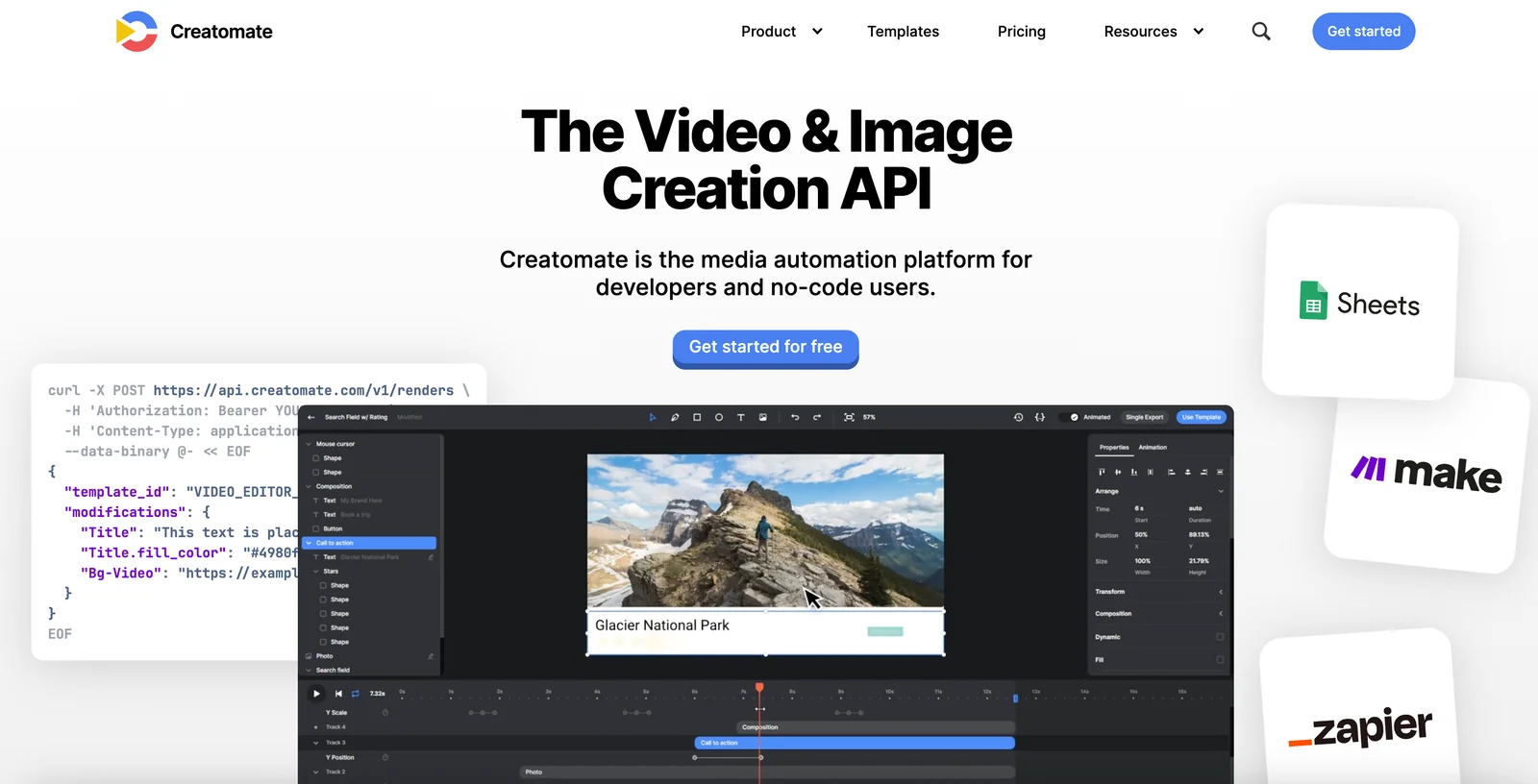
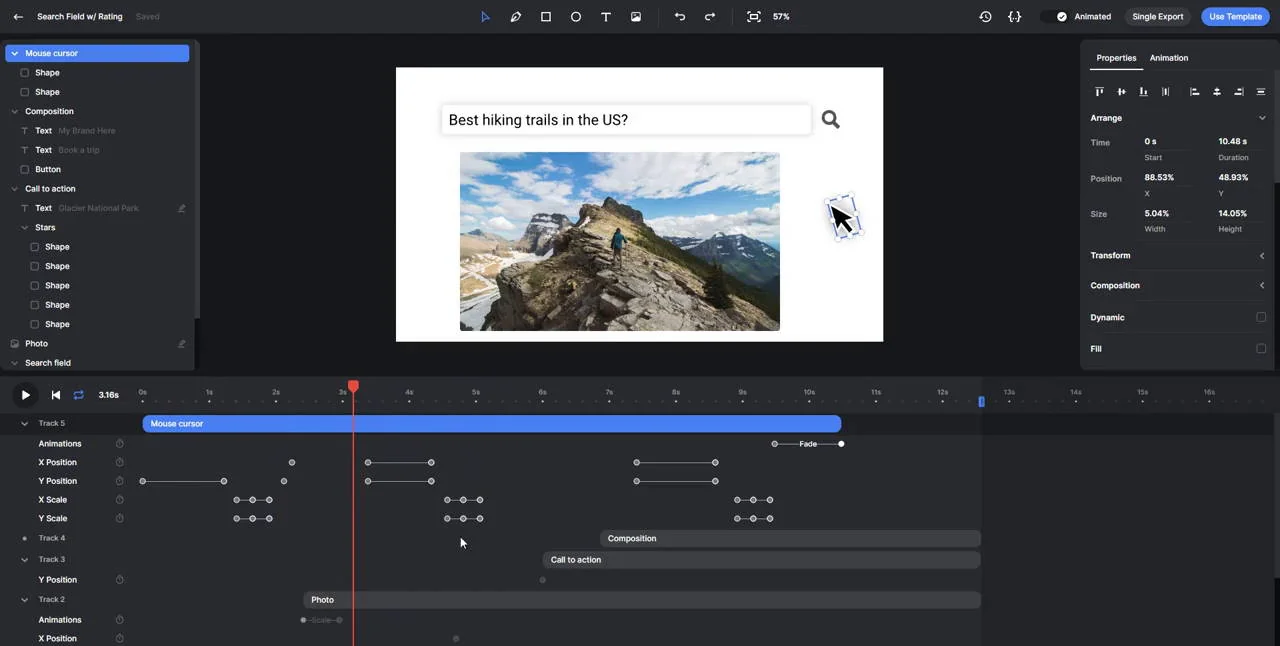
Creatomate is a cloud-based media generation API and online editor that automates creation and rendering of videos, GIFs and images from templates and JSON data. It processes all rendering on Creatomate's infrastructure and provides client libraries (Node.js, PHP, etc.), a Preview SDK for in-browser previews, and integrations with Zapier and Make to enable no-code and coded workflows. Users can build dynamic, personalized media by combining reusable templates, composable elements (videos, images, text, shapes), keyframes and animations, then render final MP4/GIF/JPEG/PNG outputs programmatically or from the web editor.
Screenshots
Key Features
Use Cases



Frequently asked questions about Creatomate
What is Creatomate's pricing structure and are there free options?
Creatomate features a freemium pricing structure, offering a free trial with 50 credits. Paid plans start at approximately $39/month for the Starter tier, increasing to $249/month for the Business tier based on usage, making it flexible for varying needs and budgets.
Key Points
- Freemium model with a free trial.
- Paid plans range from $39 to $249 per month.
- Pricing is based on usage and tier selection.
Detailed Explanation
Creatomate's pricing is designed to cater to a diverse audience, from individual users to large businesses. The free trial grants users access to 50 credits, allowing them to explore the platform's features without financial commitment. This introductory option is ideal for those who want to test the service and determine its suitability for their projects.
Paid Plans Overview:
-
Starter Tier ($39/month):
- Ideal for freelancers and small teams.
- Includes basic features and a limited number of credits.
- Suitable for users needing standard video creation tools.
-
Professional Tier ($99/month):
- Designed for growing businesses and marketers.
- Offers additional credits and enhanced features.
- Includes collaboration tools for team projects.
-
Business Tier ($249/month):
- Tailored for larger organizations with high volume needs.
- Provides maximum credits and premium features.
- Best for teams requiring extensive video production capabilities.
Creatomate’s tiered structure allows users to select a plan based on their specific requirements, ensuring they only pay for what they use.
Best Practices / Tips
- Utilize the Free Trial: Make the most of the 50 credits in the free trial to familiarize yourself with the platform and its capabilities.
- Choose the Right Plan: Assess your usage needs carefully before selecting a plan. If you find you rarely exceed the limits of the Starter tier, opt for that to save costs.
- Monitor Usage: Regularly check your credit usage to avoid unexpected charges and to effectively plan for your video production needs.
Additional Resources
How do I get started with Creatomate and use its features?
To get started with Creatomate, visit their website and sign up for a free trial. You can create custom templates using the intuitive online editor or integrate via API, allowing you to render videos or images efficiently based on dynamic JSON data.
Key Points
- Free Trial: Start with a free trial to explore features.
- Template Creation: Use the online editor or API to create templates.
- Dynamic Rendering: Render videos and images using JSON data.
Detailed Explanation
Creatomate is a powerful tool designed for video and image generation that allows you to automate content creation effortlessly. Here's how to get started:
-
Sign Up for a Free Trial: Head to the Creatomate website, where you can register for a free trial. This gives you access to all features for a limited time, allowing you to test the platform without any financial commitment.
-
Explore the Online Editor: Once signed up, familiarize yourself with the online editor. This user-friendly interface enables you to create customizable templates for videos and images. You can choose from various elements like text, images, and animations to enhance your designs.
-
Utilize the API: For developers, Creatomate offers a robust API. This allows for seamless integration into your existing applications or workflows. You can automate the creation of media assets directly from your software by sending dynamic JSON data to Creatomate.
-
Rendering Content: After setting up your templates, you can render videos or images based on your dynamic data. This feature is particularly useful for businesses needing personalized marketing materials at scale.
Best Practices / Tips
- Start Simple: When beginning, focus on creating simple templates. As you gain confidence, you can explore more complex designs and features.
- Leverage Documentation: Use the official Creatomate documentation for in-depth guidance on API integration and advanced template features.
- Test Different Formats: Experiment with various video and image formats to see what works best for your audience.
- Monitor Performance: Keep track of how your generated media performs, adjusting templates based on engagement metrics.
Additional Resources
By following these steps and tips, you can effectively utilize Creatomate to enhance your content creation process.
What are the key features of Creatomate?
Creatomate offers key features such as template-driven rendering, a robust cloud infrastructure for encoding, extensive animation support, no-code integrations with platforms like Zapier, and real-time previews via its Preview SDK, making it an ideal solution for creating dynamic content quickly and efficiently.
Key Points
- Template-Driven Rendering: Simplifies content creation.
- Cloud Infrastructure: Enhances performance and scalability.
- No-Code Integrations: Facilitates easy connectivity with other tools.
Detailed Explanation
Creatomate empowers users to create visually appealing content through its template-driven rendering feature. This allows users to select from a variety of pre-designed templates, streamlining the content creation process. For instance, a marketing team can quickly customize a video ad by simply filling in fields rather than starting from scratch.
The cloud infrastructure for encoding ensures that rendering is efficient and scalable. This means that regardless of how many projects are running concurrently, Creatomate can handle high workloads without lag, which is particularly beneficial for businesses with fluctuating demands. For example, during a product launch, multiple marketing campaigns can be executed simultaneously, supported by the robust cloud capabilities.
Creatomate also supports rich animation options, enabling users to add dynamic elements to their content. Users can enhance engagement through animated text, transitions, and graphics, which are essential for capturing audience attention in platforms like social media or digital advertising.
With no-code integrations, Creatomate connects seamlessly with tools like Zapier. This means that users can automate their workflows without needing to write any code. For example, a user can set up a Zap that automatically generates a new video from a template whenever a new product is added to their e-commerce site, saving time and reducing manual effort.
Lastly, the Preview SDK allows for real-time previews, enabling users to see changes instantly as they edit. This feature is invaluable for teams that require immediate feedback and quick iterations on their projects, such as video production teams or digital content creators.
Best Practices / Tips
- Utilize Templates: Start with templates to save time and ensure quality.
- Explore Animations: Experiment with different animation styles to find what resonates with your audience.
- Automate Workflows: Take advantage of no-code integrations to streamline repetitive tasks and improve efficiency.
- Regularly Preview Changes: Use the real-time preview feature frequently to catch errors early and ensure your content looks great.
Additional Resources
How does Creatomate's API work for integrations?
Creatomate's API enables developers to seamlessly integrate video and image creation, editing, and rendering into their applications using JSON templates. It supports various client libraries and is compatible with automation platforms like Zapier, enhancing workflow efficiency and customization.
Key Points
- Versatile API Functionality: Create, edit, and render multimedia.
- JSON Template Support: Simplifies integration with customizable templates.
- Automation Compatibility: Works with platforms like Zapier for enhanced workflow.
Detailed Explanation
Creatomate's API provides a robust platform for developers looking to automate video and image processing tasks. By utilizing JSON templates, developers can define the structure and content of their media files. This allows for dynamic content generation tailored to specific needs, such as marketing campaigns or personalized video messages.
Example Use Case
For instance, a marketing team can use Creatomate's API to automatically generate promotional videos based on user data. By feeding the API with JSON templates that include user names, product details, and branding elements, a personalized video can be rendered quickly. This process not only saves time but also provides a more engaging experience for potential customers.
Integration Steps
- Authenticate: Begin by obtaining an API key from Creatomate to authenticate your requests.
- Define Templates: Create JSON templates that outline the design and content of your media.
- Send Requests: Use HTTP requests to send data to the API, specifying the template and parameters required for rendering.
- Receive Output: Once processed, the API returns the rendered video or image URL, ready for deployment.
Best Practices / Tips
- Optimize JSON Templates: Keep templates simple and modular to enhance efficiency and reduce errors.
- Leverage Client Libraries: Use available SDKs in your preferred programming language to streamline API interactions.
- Monitor API Usage: Keep track of your API calls to avoid exceeding usage limits, especially during peak times.
- Test Thoroughly: Before deploying in production, ensure all templates are tested with various data inputs to prevent rendering issues.
Additional Resources
How does Creatomate compare to other video generation tools?
Creatomate is a leading video generation tool that distinguishes itself through its user-friendly template-driven approach and seamless no-code integrations. Unlike its competitors, Creatomate excels with cloud rendering capabilities and extensive options for template customization, making it ideal for marketers seeking automation and creativity.
Key Points
- Template-Driven Design: Simplifies video creation for all users.
- No-Code Integrations: Facilitates seamless use with existing marketing tools.
- Cloud Rendering: Enhances speed and efficiency in video generation.
Detailed Explanation
Creatomate is designed for marketers and content creators who require an efficient way to produce high-quality videos without extensive technical knowledge. Its template-driven design allows users to start from a library of professionally designed templates, which can be easily customized to match brand aesthetics.
One of the standout features of Creatomate is its no-code integrations, which enable users to connect with various marketing automation tools like Zapier, HubSpot, and Mailchimp. This means that videos can be generated automatically in response to specific triggers, streamlining workflow and saving time.
Cloud rendering is another critical advantage. Unlike traditional video editing tools that require powerful hardware, Creatomate processes video rendering in the cloud, allowing users to generate videos quickly from any device with internet access. This feature is particularly beneficial for teams working remotely or across different locations.
Additionally, Creatomate provides extensive options for template customization. Users can modify text, colors, images, and animations, ensuring that each video aligns perfectly with their brand's identity. This level of flexibility is not always available with other video generation tools, making Creatomate a preferred choice for many marketers.
Best Practices / Tips
- Utilize Templates: Start with a template that closely aligns with your video goals to save time and effort.
- Explore Integrations: Take advantage of no-code integrations to automate video creation processes linked to other marketing activities.
- Customize Thoughtfully: While customization is powerful, ensure that your changes maintain brand consistency to avoid diluting your message.
Additional Resources
By leveraging these features, Creatomate not only simplifies the video creation process but also enhances the overall effectiveness of marketing campaigns.
Explore more AI Ai Tools tools
Browse all Ai Tools tools →Browse by use case: Video Generation · Code Generation · Automation & Productivity
Compare Creatomate: vs nodeterm · vs A.I.G (AI Infra Guard) · vs Trama · vs Agents Never Sleep