

Alai 2.0
AIAI design partner that creates on-brand presentations, social posts, and infographics from a prompt, exportable to PDF and PPT.
Alai 2.0
AI design partner that creates on-brand presentations, social posts, and infographics from a prompt, exportable to PDF and PPT.
About Alai 2.0
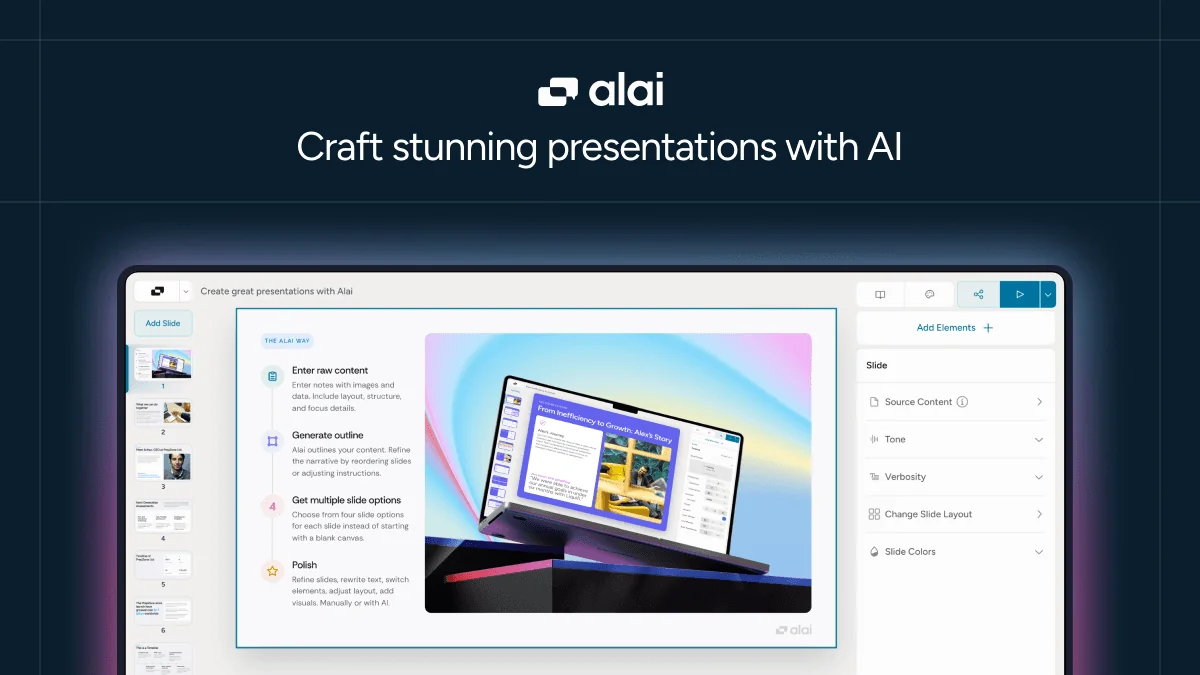
Alai is an AI presentation maker that produces on-brand design for presentations, social posts, infographics, and more. Users generate slides from a prompt, keep visual consistency across a deck without a designer on staff, and export results as PDF or PPT. Backed by Y Combinator and recognized as a Product Hunt #2 Product of the Day, Alai positions itself against tools like Gamma and Canva with design logic users describe as more reliable for producing polished, consistent slides. It offers a free forever plan plus paid plans with more AI credits and slides, and enterprise support for teams building decks at scale.
Screenshots
Key Features
Use Cases



Frequently asked questions about Alai 2.0
What is Alai 2.0?
Alai 2.0 is an AI-powered design tool that acts as a creative partner, generating on-brand presentations, social media posts, and infographics based on user prompts. It allows for seamless export to PDF and PPT formats, enhancing productivity for marketers, designers, and businesses.
Key Points
- AI-driven design capabilities: Generates visual content quickly.
- User-friendly interface: Accessible for both novices and professionals.
- Export options: Supports PDF and PPT formats for easy sharing.
Detailed Explanation
Alai 2.0 leverages advanced artificial intelligence to streamline the design process. Users simply input prompts describing their desired visual content, and the tool generates designs that align with branding guidelines. This functionality is particularly beneficial for marketers needing to create engaging presentations or social media content efficiently.
Examples of Use Cases
- Marketing Teams: Quickly create promotional materials such as infographics that highlight product features.
- Educators: Develop visually appealing presentations for lectures or workshops.
- Social Media Managers: Generate eye-catching posts that maintain brand consistency across platforms.
Alai 2.0's intuitive interface makes it easy for users of all skill levels to navigate the design process. With just a few clicks, users can customize elements, including colors, fonts, and layouts, ensuring that the final output is uniquely tailored to their specifications.
Best Practices / Tips
- Clear Prompts: Be specific in your prompts to receive the most relevant designs. For example, instead of saying "create a post," specify "design a summer sale social media post with tropical themes."
- Utilize Templates: Explore pre-existing templates to save time and maintain consistency across multiple projects.
- Review and Edit: Always review generated content for accuracy and make necessary adjustments to align with your brand voice.
Additional Resources
How does Alai 2.0 work?
Alai 2.0 operates by utilizing advanced artificial intelligence to generate presentation slides from a single text prompt. It ensures consistency in design across various formats, including presentations, social media posts, and infographics, while allowing users to export their work in PDF or PowerPoint formats.
Key Points
- AI Slide Generation: Instantly create presentation slides from prompts.
- On-Brand Design: Maintain visual consistency with customizable themes.
- Multi-Format Output: Produce various content types from one tool.
Detailed Explanation
Alai 2.0 leverages sophisticated AI algorithms to streamline the presentation creation process. Users can input a single text prompt, and the AI generates a fully designed slide deck, ensuring that all slides align with the specified branding guidelines. This feature is particularly beneficial for entrepreneurs and marketers who need to create professional content quickly.
Use Cases:
- Founders: A founder can generate a polished pitch deck to present to investors without needing to hire a professional designer.
- Marketers: A marketer can create on-brand social media posts and infographics that adhere to company styling, enhancing brand recognition.
- Consultants: A consultant might export AI-generated slides to PowerPoint for further editing, thus saving time during client projects.
- Enterprise Teams: Larger teams can produce numerous presentations at scale, utilizing dedicated support to streamline their efforts.
Alai 2.0 also features a comprehensive library of themes and visual elements, allowing users to customize their presentations effortlessly. The tool’s multi-format output capability means users can create diverse content, from infographics to social media graphics, all in one platform, enhancing workflow efficiency.
Best Practices / Tips
- Start with Clear Prompts: The quality of the generated slides is directly influenced by how specific and clear your prompts are. Aim for detailed input to get the best results.
- Utilize the Library: Explore the themes and elements library to enhance your presentations visually. Using consistent elements reinforces brand identity.
- Export Formats: Always export your final presentation in both PDF and PPT formats. This ensures you have a backup and can make further edits if necessary.
- Regular Updates: Stay updated with Alai 2.0's features and enhancements as the platform evolves, maximizing the benefits of any new tools introduced.
Additional Resources
What are the main features of Alai 2.0?
Alai 2.0 offers powerful features designed to streamline presentation creation. Key functionalities include AI Slide Generation from text prompts, consistent On-Brand Design, Multi-Format Output for various content types, easy Export to PDF and PPT, and an extensive Themes and Elements Library for enhanced visual appeal.
Key Points
- AI Slide Generation: Create slides based on a single text prompt.
- On-Brand Design: Maintain consistent colors, themes, and styles.
- Multi-Format Output: Generate presentations, social media posts, and infographics.
Detailed Explanation
Alai 2.0 revolutionizes how users create presentations with its innovative AI Slide Generation feature. By simply entering a text prompt, users can generate a complete presentation deck. This is particularly beneficial for busy professionals and educators who need to save time while ensuring impactful presentations.
The On-Brand Design feature ensures that every slide maintains a cohesive look. Users can customize their presentations by selecting specific colors, fonts, and themes that align with their brand identity. This consistency not only enhances professionalism but also strengthens brand recognition.
Another standout feature is Multi-Format Output. Alai 2.0 allows users to create not just presentations but also social media posts and infographics, all within the same platform. This versatility streamlines the content creation process, making it ideal for marketers and content creators who need to produce various formats quickly.
With the Export to PDF and PPT functionality, users can easily download their finished presentations in widely used formats, ensuring compatibility and ease of sharing. This feature is essential for businesses that need to present their work in meetings or share it with clients.
The Themes and Elements Library provides access to a range of design themes and visual elements, allowing users to enhance their slides with professional graphics and layouts. This extensive library means users can find the perfect elements to complement their content, saving time on design.
Best Practices / Tips
- Utilize AI Suggestions: Always take advantage of the AI-generated suggestions to enhance your presentations. This can lead to more engaging and creative outputs.
- Consistency is Key: Make sure to define your brand colors and themes before starting to maintain consistency throughout your slides.
- Explore the Library: Spend time exploring the Themes and Elements Library to find unique visuals that will make your presentation stand out.
- Test Export Formats: Before finalizing your presentation, test both PDF and PowerPoint exports to ensure all elements appear correctly.
Additional Resources
Who is Alai 2.0 for?
Alai 2.0 is designed for a diverse audience, including founders creating polished pitch decks, marketers crafting on-brand social media content, early-stage teams maintaining visual consistency, consultants exporting AI-generated slides to PowerPoint, and enterprise teams producing presentations at scale with tailored support.
Key Points
- Founders can create professional pitch decks without hiring a designer.
- Marketers can generate consistent, branded social media posts and infographics.
- Consultants and enterprise teams can leverage AI for scalable presentation creation.
Detailed Explanation
Alai 2.0 caters to a wide range of users looking to enhance their presentation skills and visual content.
-
Founders: Entrepreneurs can input prompts to generate visually appealing pitch decks that effectively communicate their business ideas. This eliminates the need for expensive design services, allowing startups to present professionally at minimal cost.
-
Marketers: With Alai 2.0, marketers can quickly create social media posts and infographics that align with their company's branding. This tool ensures that every piece of content maintains a cohesive style, which is essential for brand recognition and engagement.
-
Early-Stage Teams: Teams working on projects can utilize Alai 2.0 to ensure visual consistency across all decks during the brainstorming phase. This is crucial for maintaining a unified look and feel in presentations, which helps in clearly conveying ideas.
-
Consultants: Alai 2.0 allows consultants to export AI-generated slides directly to PowerPoint. This feature streamlines the editing process, enabling consultants to focus on refining content rather than starting from scratch.
-
Enterprise Teams: Large organizations can benefit from Alai 2.0's capability to produce presentations at scale. The tool offers dedicated support, ensuring that even large teams can work efficiently without sacrificing quality.
Best Practices / Tips
- Utilize Templates: Leverage the pre-designed templates available in Alai 2.0 to save time and maintain quality.
- Iterate on Feedback: Gather input from team members and use Alai 2.0 to refine your presentations based on their suggestions.
- Maintain Branding: Always input your brand guidelines into Alai 2.0 to ensure that all generated content aligns with your corporate identity.
Additional Resources
How much does Alai 2.0 cost?
Alai 2.0 offers a free tier with limited features, while its paid plans start at $15 per month, providing access to advanced functionalities and enhanced support. Users can choose from multiple pricing options based on their needs and usage levels.
Key Points
- Alai 2.0 has a free tier for basic users.
- Paid plans begin at $15 per month.
- Advanced features and support are available in the paid plans.
Detailed Explanation
Alai 2.0 is designed to cater to both casual users and professionals looking for enhanced AI capabilities. The free tier allows individuals to explore the tool's basic functionalities without any financial commitment. This is ideal for users who want to test the platform before investing.
For those who require more robust features, Alai 2.0 offers paid plans starting at $15 per month. These plans unlock advanced tools such as improved AI algorithms for content generation, customization options, and priority customer support. As users' needs grow, additional pricing tiers may be available, allowing for flexibility.
Pricing Breakdown:
- Free Tier: Access to basic features, ideal for casual users.
- Starter Plan: $15/month - includes basic advanced features.
- Pro Plan: $30/month - offers full access to all tools and enhanced support.
It is crucial to evaluate your specific needs before selecting a plan to ensure you get the best value for your investment.
Best Practices / Tips
- Evaluate Needs: Start with the free tier to assess whether the platform meets your requirements before committing to a paid plan.
- Compare Plans: Look at the features included in each paid tier to find the best fit for your needs.
- Utilize Trials: If available, take advantage of any trial periods for paid plans to explore the full range of features.
Additional Resources
How do I get started with Alai 2.0?
To get started with Alai 2.0, visit getalai.com to sign up for an account. After registration, you can explore the platform's features, including its AI-driven tools for content creation and automation, to enhance your productivity and creativity.
Key Points
- Easy sign-up process on the official website
- Access to AI tools for content and automation
- User-friendly interface for seamless navigation
Detailed Explanation
To begin using Alai 2.0, follow these steps:
-
Visit the Website: Navigate to getalai.com. Here, you'll find all the information about the platform, including its capabilities and benefits.
-
Create an Account: Click on the “Sign Up” button. You’ll need to provide your email address and create a password. Some features may require verification through your email.
-
Explore Features: Once logged in, take a guided tour of Alai 2.0. Familiarize yourself with its main functions, such as content generation, editing, and automation tools. This helps you understand how to maximize the platform's potential for your projects.
-
Utilize Resources: Check out the tutorials and documentation provided on the site. These resources can help you learn best practices for using Alai 2.0 effectively.
-
Join the Community: Engage with other users through forums or social media groups. Sharing experiences and tips can enhance your understanding and usage of the platform.
Best Practices / Tips
- Start Small: When you first begin with Alai 2.0, focus on one feature, such as content creation, to avoid feeling overwhelmed.
- Leverage Templates: Use pre-built templates to save time on standard tasks. This allows you to produce high-quality content quickly.
- Regular Updates: Keep an eye on updates from Alai 2.0. New features and enhancements can significantly improve your workflow.
- Feedback Loop: Utilize the feedback options within the platform to report bugs or suggest improvements, helping you and future users.
Additional Resources
By following these steps and tips, you can effectively harness the power of Alai 2.0 to enhance your content creation and productivity.
Explore more AI Ai Tools tools
Browse all Ai Tools tools →Compare Alai 2.0: vs Speech To Markdown · vs FluentDB · vs ReExplain · vs YC Has It