

AI Powered Inbox Zero for Gmail, Outlook & Zoho Mail | Replyless
AIAn AI email assistant that prioritizes messages, drafts replies, and removes noise to help users reach inbox zero across Gmail, Outlook, and Zoho Mail.
AI Powered Inbox Zero for Gmail, Outlook & Zoho Mail | Replyless
An AI email assistant that prioritizes messages, drafts replies, and removes noise to help users reach inbox zero across Gmail, Outlook, and Zoho Mail.
About AI Powered Inbox Zero for Gmail, Outlook & Zoho Mail | Replyless
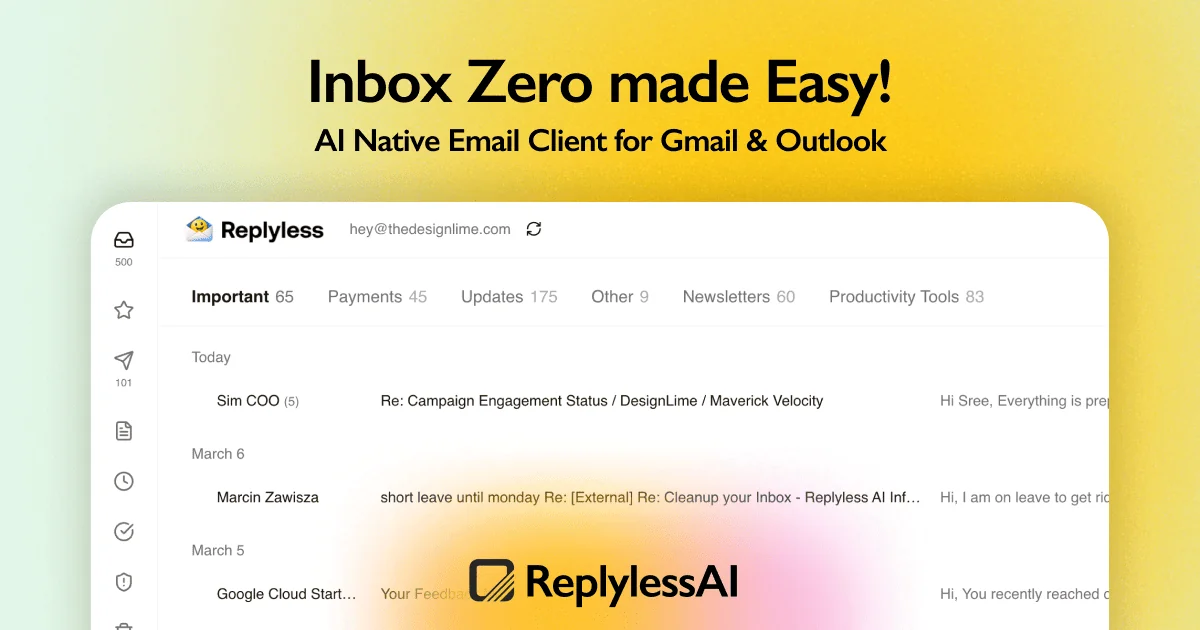
Replyless is an AI-powered email assistant that analyzes your inbox to surface priorities, automatically draft replies, and clean out noisy or unwanted messages to help you reach inbox zero. It connects with major mail providers (Gmail, Outlook, Zoho Mail) and applies natural-language understanding to categorize, summarize, and act on emails so users can focus on the highest-value messages. Replyless speeds routine workflows by generating context-aware reply drafts, suggesting actions (archive, snooze, unsubscribe), and grouping low-value threads to reduce inbox clutter.
Screenshots
Key Features
Use Cases



Frequently asked questions about AI Powered Inbox Zero for Gmail, Outlook & Zoho Mail | Replyless
What is AI Powered Inbox Zero for Gmail, Outlook & Zoho Mail | Replyless?
AI Powered Inbox Zero for Gmail, Outlook, and Zoho Mail by Replyless transforms your email experience. It utilizes artificial intelligence to create smart inboxes, automate replies, generate drafts, manage reusable snippets, and clean up your inbox, allowing you to achieve inbox zero efficiently without high costs.
Key Points
- Smart Inbox Management: AI-driven inbox organization.
- Automation Features: Auto replies and AI-generated drafts.
- Custom Snippets: Reusable snippets for quick responses.
Detailed Explanation
AI Powered Inbox Zero for Gmail, Outlook, and Zoho Mail leverages advanced artificial intelligence to streamline email management. This tool sorts your emails into smart inboxes, allowing you to focus on important messages while filtering out noise.
Smart Inbox Management
With AI, your inbox is intelligently categorized, helping you prioritize urgent emails. For example, work-related messages can be separated from newsletters and promotions, reducing clutter and enhancing productivity.
Automation Features
The automation capabilities include auto replies and AI-generated drafts. Imagine receiving an email while you're busy; Replyless can automatically send a polite response based on predefined templates or generate a draft for you to review later.
Custom Snippets
Reusable snippets allow you to save common responses. This is particularly useful for customer service representatives or professionals who frequently reply to similar inquiries. By inserting these snippets, you save time and ensure consistency in your communication.
Best Practices / Tips
- Set Clear Categories: Define categories for your smart inbox to maximize efficiency.
- Utilize Auto Replies: When away from your desk, use auto replies to maintain engagement without sacrificing responsiveness.
- Regularly Update Snippets: Keep your reusable snippets updated to reflect current information or changes in your responses.
Additional Resources
How does AI Powered Inbox Zero for Gmail, Outlook & Zoho Mail | Replyless work?
AI Powered Inbox Zero for Gmail, Outlook, and Zoho Mail | Replyless utilizes advanced artificial intelligence to streamline email management. It automates routine tasks, categorizes emails, and generates smart replies, enabling users to achieve an organized inbox efficiently and focus on high-priority communications.
Key Points
- Automation of Routine Tasks: AI handles repetitive actions.
- Smart Categorization: Emails are sorted intelligently.
- AI-Driven Replies: Instant responses enhance productivity.
Detailed Explanation
AI Powered Inbox Zero integrates seamlessly with Gmail, Outlook, and Zoho Mail, leveraging machine learning algorithms to enhance email productivity. The system analyzes incoming messages, identifies key information, and categorizes emails based on importance and urgency. For instance, it can prioritize emails from your boss or clients while filtering out newsletters and promotions.
How It Works:
- Email Analysis: The AI assesses the content and context of each email.
- Categorization: It automatically sorts emails into folders such as "Important," "Promotions," and "Social," allowing users to focus on critical communications first.
- Smart Responses: Based on previous interactions and the email's content, Replyless suggests quick replies, which users can customize or send directly, saving significant time.
This innovative tool is especially useful for busy professionals who receive a high volume of emails daily, as it allows them to maintain an organized inbox and respond promptly without feeling overwhelmed.
Best Practices / Tips
- Regularly Train the AI: Engage with the suggested replies to help the AI learn your preferences.
- Customize Categories: Adjust the automated sorting settings to align with your workflow.
- Review Spam Filters: Ensure that important emails are not miscategorized as spam.
Additional Resources
What are the main features of AI Powered Inbox Zero for Gmail, Outlook & Zoho Mail | Replyless?
AI Powered Inbox Zero for Gmail, Outlook, and Zoho Mail by Replyless offers advanced features such as intelligent email sorting, automated responses, and customizable workflows. These capabilities enhance productivity by ensuring that users focus on important messages while efficiently managing their inboxes.
Key Points
- Intelligent Email Sorting: Automatically categorizes and prioritizes emails.
- Automated Responses: Generates quick replies based on context.
- Customizable Workflows: Allows users to tailor email management processes.
Detailed Explanation
AI Powered Inbox Zero utilizes sophisticated algorithms to streamline email management across popular platforms like Gmail, Outlook, and Zoho Mail.
-
Intelligent Email Sorting: The AI analyzes incoming emails and sorts them into categories such as "Important," "Promotions," and "Social." This ensures that urgent messages are prioritized, reducing the time spent sifting through irrelevant emails. For example, a busy professional can immediately focus on client communications without distractions.
-
Automated Responses: This feature leverages machine learning to draft replies based on the content of the emails received. It can suggest responses like “Thanks for your email, I’ll get back to you shortly,” which saves time, especially for repetitive inquiries. Users can further customize these templates to align with their tone and style.
-
Customizable Workflows: Users can create workflows that automate routine tasks, such as tagging emails, moving them to specific folders, or even scheduling follow-ups. For instance, if you regularly receive project updates, you can set a workflow that automatically organizes these emails into a dedicated folder, making it easier to track progress.
Best Practices / Tips
- Leverage AI Suggestions: Always review AI-generated responses to ensure they match your voice and intent.
- Regularly Update Custom Workflows: As your needs change, revisit and adjust your workflows to maintain efficiency.
- Utilize Reporting Features: Monitor email patterns and response rates to identify areas for improvement in your email management strategy.
Additional Resources
Who is AI Powered Inbox Zero for Gmail, Outlook & Zoho Mail | Replyless for?
AI Powered Inbox Zero for Gmail, Outlook, and Zoho Mail | Replyless is designed for busy professionals, teams, and anyone seeking to enhance their email productivity through efficient AI workflows. It streamlines inbox management, reduces email overload, and automates repetitive tasks, making it ideal for users who prioritize organization and time management.
Key Points
- Target Audience: Professionals, teams, and organizations.
- Email Management: Reduces clutter and boosts productivity.
- Automation Features: AI-driven responses and task management.
Detailed Explanation
AI Powered Inbox Zero for Gmail, Outlook, and Zoho Mail | Replyless is a cutting-edge tool focused on optimizing email workflows. It's particularly beneficial for:
-
Busy Professionals: Individuals who receive a high volume of emails daily can leverage Replyless to automatically categorize and prioritize their emails, ensuring they focus on critical messages first.
-
Teams and Organizations: Teams can enhance collaborative efforts by using Replyless to manage shared inboxes effectively. This allows team members to track responses and delegate tasks without losing information in the clutter of a busy inbox.
-
Remote Workers: As remote work becomes more commonplace, tools like Replyless help users stay organized. It automates replies and schedules emails, allowing professionals to maintain productivity from anywhere.
Use Cases
For example, a marketing team can utilize Replyless to filter promotional emails and prioritize client communications, while a project manager can automate updates and reminders to team members, ensuring deadlines are met without constant manual follow-up.
Best Practices / Tips
- Set Clear Goals: Define what you want to achieve with Replyless, such as reducing response time or managing specific types of emails.
- Regularly Review Settings: Adjust the AI settings to suit your evolving workflow, ensuring it remains efficient and relevant.
- Integrate with Other Tools: Combine Replyless with project management tools like Trello or Asana for seamless task management.
Additional Resources
How much does AI Powered Inbox Zero for Gmail, Outlook & Zoho Mail | Replyless cost?
Pricing for the AI Powered Inbox Zero tool by Replyless for Gmail, Outlook, and Zoho Mail varies based on the subscription plan. For the most accurate and up-to-date pricing details, visit the Replyless official website directly.
Key Points
- Subscription Plans: Replyless offers multiple pricing tiers.
- Free Trial: A free trial may be available for new users.
- Enterprise Solutions: Custom pricing for larger organizations.
Detailed Explanation
Replyless provides AI-powered solutions to help users achieve Inbox Zero by automating email management in popular platforms like Gmail, Outlook, and Zoho Mail. The pricing structure typically includes several subscription plans catering to different user needs and organization sizes.
- Basic Plan: This often includes essential features suitable for individual users or small teams. Pricing can start as low as $10 per month.
- Pro Plan: Designed for medium-sized businesses, this plan may offer additional functionalities like advanced analytics and enhanced customer support, typically priced around $25 per month.
- Enterprise Plan: For large organizations, Replyless offers custom solutions. Pricing is usually negotiated based on specific requirements, including the number of users and additional features.
Many users can take advantage of a free trial, allowing you to explore the features before committing to a paid plan. This trial is an excellent way to evaluate the tool's effectiveness in managing your emails efficiently.
Best Practices / Tips
- Evaluate Your Needs: Before choosing a plan, consider how many users will benefit from the service and the specific features you require.
- Utilize the Free Trial: Make the most of the free trial to understand how well the tool integrates with your existing workflow.
- Stay Updated: Pricing and features can change, so regularly check the Replyless website for any updates or promotions.
Additional Resources
How do I get started with AI Powered Inbox Zero for Gmail, Outlook & Zoho Mail | Replyless?
To get started with AI Powered Inbox Zero for Gmail, Outlook, and Zoho Mail using Replyless, visit Replyless to sign up. Once registered, explore features that help automate email management and declutter your inbox efficiently.
Key Points
- Sign Up Easily: Create an account on Replyless to access AI features.
- Integration with Major Platforms: Works seamlessly with Gmail, Outlook, and Zoho Mail.
- Automated Email Management: AI helps prioritize emails and manage responses.
Detailed Explanation
Getting started with AI Powered Inbox Zero is straightforward and involves a few key steps:
- Visit the Website: Go to Replyless and click on the sign-up button.
- Create an Account: Fill in the required information, including your email address and password. You may also be asked to verify your email.
- Choose Your Email Provider: After signing up, select which email service you want to integrate—Gmail, Outlook, or Zoho Mail.
- Grant Permissions: Allow Replyless to access your email. This is essential for the AI to analyze your inbox for effective management.
- Explore Features: Once set up, you can start using features like automated responses, email categorization, and prioritization. The AI will learn your preferences over time to improve its suggestions.
For example, if you receive numerous promotional emails, Replyless can automatically filter these out, allowing you to focus on important communications.
Best Practices / Tips
- Regularly Review Settings: Periodically check your Replyless settings to ensure the AI is learning correctly and efficiently managing your inbox.
- Utilize Categorization Features: Make use of the categorization options to sort emails into folders such as "Urgent," "Follow Up," and "Promotions."
- Provide Feedback: Engage with the AI by providing feedback on its suggestions. This helps improve its accuracy in managing your emails.
- Avoid Overreliance: While AI can significantly enhance productivity, maintain a personal touch in crucial communications.
Additional Resources
- Replyless Official Documentation
- AI Email Management Tools Comparison
- Tips for Effective Email Management
By following these steps and utilizing best practices, you can efficiently manage your emails and achieve Inbox Zero with Replyless.
Explore more AI Ai Tools tools
Browse all Ai Tools tools →Browse by use case: Automation & Productivity
Compare AI Powered Inbox Zero for Gmail, Outlook & Zoho Mail | Replyless: vs Speech To Markdown · vs FluentDB · vs ReExplain · vs YC Has It