

Troopr AI Scrum Master
AISlack-native AI scrum master that drafts standups, retros and planning poker from real Jira, GitHub and Slack activity.
Troopr AI Scrum Master
Slack-native AI scrum master that drafts standups, retros and planning poker from real Jira, GitHub and Slack activity.
About Troopr AI Scrum Master
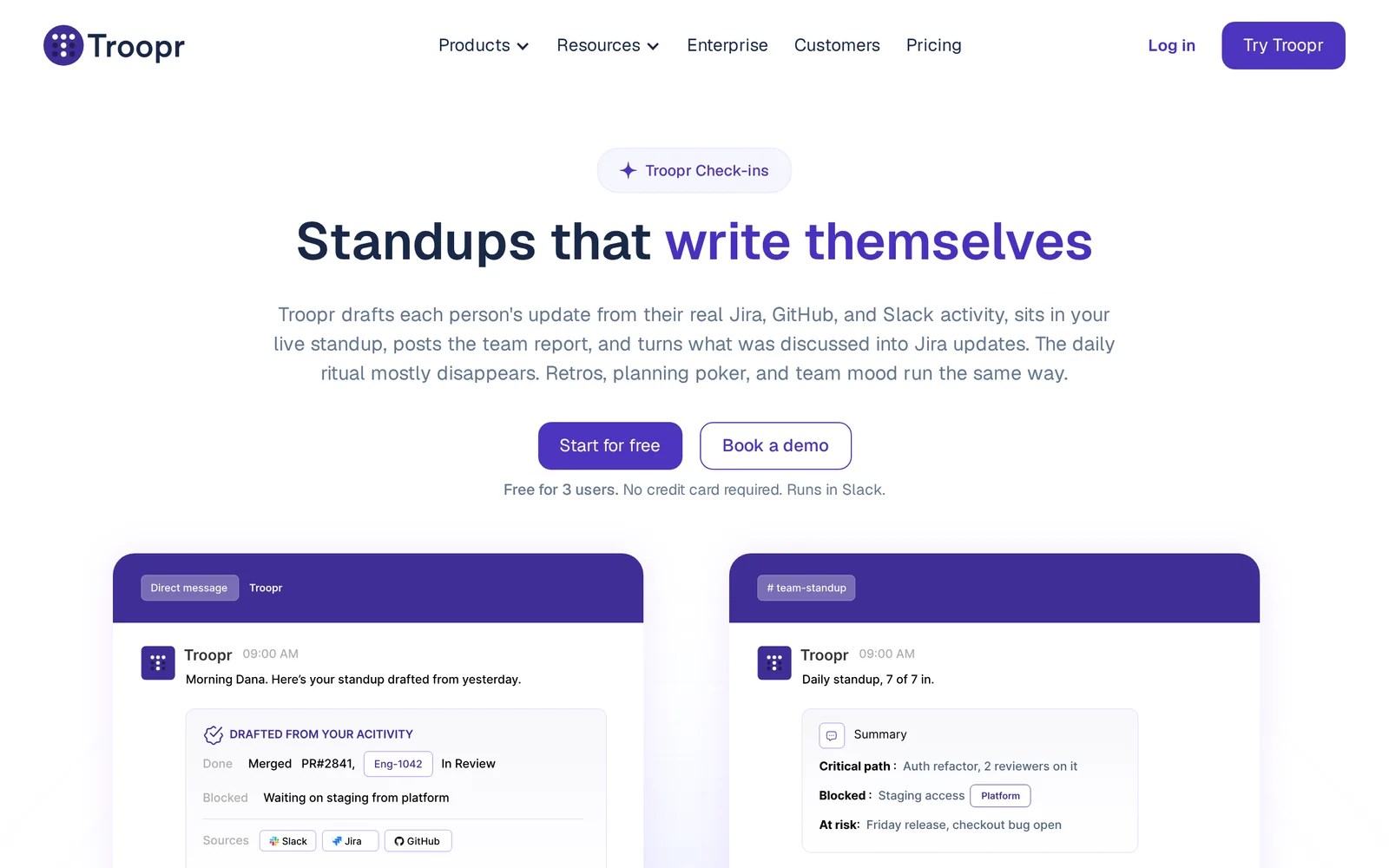
Troopr AI Scrum Master (Troopr Check-ins) is a Slack-native agent that runs standups, retros, planning poker and team mood check-ins for engineering teams. It drafts each person's update by reading their real Jira, GitHub and Slack activity and DMs it to them to confirm or edit; if they don't reply in the window, Troopr posts the auto-generated draft so the standup never stalls. When teams meet live, Troopr joins the call, takes notes, cross-references what's said against live Jira/GitHub, dedupes action items, and then compiles a team report with an AI-summarized top-line, per-person detail in the thread, blockers, and the critical path. Finally it proposes Jira updates grounded in activity, edits and meeting notes and waits for a DM confirmation. It ships with six agile templates, a full reports/insights dashboard, multi-timezone support, Slack Grid, Slack Connect and PDF export.
Screenshots
Key Features
Use Cases



Frequently asked questions about Troopr AI Scrum Master
What is Troopr AI Scrum Master?
Troopr AI Scrum Master is a Slack-native tool that automates essential Agile practices by drafting daily standups, retrospectives, and planning poker discussions based on real-time data from Jira, GitHub, and Slack activities. It streamlines team collaboration and enhances productivity in software development projects.
Key Points
- Integration with Popular Tools: Seamlessly connects with Jira, GitHub, and Slack.
- Automation of Scrum Practices: Drafts standups, retrospectives, and planning poker automatically.
- Enhanced Team Collaboration: Facilitates better communication and organization within Agile teams.
Detailed Explanation
Troopr AI Scrum Master leverages artificial intelligence to automate the repetitive aspects of Agile project management. By integrating with popular project management platforms like Jira and GitHub, it collects relevant activity data and summarizes it into concise reports.
Key Features:
-
Daily Standups: Troopr generates standup reports by analyzing team members' updates from Slack and project activities from Jira, allowing teams to focus on progress rather than reporting.
-
Retrospectives: After a sprint, Troopr compiles feedback and key performance metrics, making it easier for teams to reflect on what worked and what didn't, thereby enhancing future sprints.
-
Planning Poker: The tool simplifies estimation during sprint planning. It collects input from team members and helps in making informed decisions based on collective insights.
Use Cases:
- Remote Teams: For distributed teams, Troopr ensures that everyone is on the same page, regardless of location.
- Fast-Paced Environments: In environments where speed is crucial, automating routine tasks allows teams to focus on development and delivery.
Best Practices / Tips
- Customize Notifications: Tailor your notification settings in Slack to avoid information overload while still receiving critical updates from Troopr.
- Regularly Review Metrics: Use the insights from Troopr to guide discussions during retrospectives, focusing on data-driven decision-making.
- Encourage Team Participation: Promote a culture where all team members contribute to standups and retrospectives, enhancing the relevance of the AI-generated content.
Additional Resources
Utilizing Troopr AI Scrum Master can significantly enhance your Agile processes, making it a valuable tool for any software development team looking to improve collaboration and efficiency.
How does Troopr AI Scrum Master work?
Troopr AI Scrum Master streamlines agile workflows by automating standup meetings and reporting. It leverages real-time data from platforms like Jira, GitHub, and Slack to generate activity-grounded updates, ensuring that teams stay aligned without the need for constant live meetings.
Key Points
- Activity-Grounded Drafts: Updates are based on actual user activity.
- Auto Posting: Ensures that standups proceed smoothly, even if team members are unresponsive.
- Live Meeting Notes: Produces accurate reports during live standups.
Detailed Explanation
Troopr AI Scrum Master is designed to enhance the efficiency of agile teams by automating routine processes. Here’s how it works in detail:
-
Activity-Grounded Drafts: Troopr analyzes individual team members' activities from integrated tools like Jira, GitHub, and Slack. Each person's standup update is automatically drafted based on their recent work, allowing for a personalized and relevant report. This draft is then sent via direct message (DM) for confirmation, ensuring accuracy before sharing it with the team.
-
Auto Post on Behalf: If a team member does not respond within the designated time frame, Troopr automatically posts the drafted update, clearly marked as auto-generated. This feature guarantees that the standup process is not delayed, maintaining team momentum and communication.
-
Live Meeting Notes: During live standup meetings, Troopr listens in and creates real-time notes. These notes are cross-verified with data from Jira and GitHub, providing a comprehensive view of the current project status and facilitating informed decision-making.
-
Report Compilation: After the standup, Troopr compiles a summary report that includes details for each participant. It highlights blockers and critical tasks, ensuring everyone is aware of current challenges and priorities.
-
Jira Loop-Closing: Troopr proposes updates to Jira based on activity, edits, and meeting notes, waiting for user confirmation in DM before finalizing changes. This feature helps keep project management organized and up-to-date.
-
Async Engineering Standups: For teams working across different time zones, Troopr allows for asynchronous standups, enabling team members to contribute updates whenever it suits them, thus enhancing flexibility.
-
Distributed Team Alignment: Troopr can facilitate a shared standup across multiple teams, including external partners or contractors via Slack Connect, ensuring everyone is on the same page regardless of their location.
-
Sprint Retrospectives: Troopr simplifies the retrospective process by extracting actionable feedback from team members without the need for a dedicated facilitator.
-
Planning Poker Estimation: Team members can estimate stories using Troopr, which then aggregates the votes and presents them in the Slack channel, streamlining the estimation process.
-
Live Meeting Reporting: Troopr acts like a project manager during live standups, producing notes and Jira updates that reflect the real-time discussions, allowing for immediate action on decisions made.
Best Practices / Tips
- Maximize Tool Integration: Ensure Troopr is fully integrated with your existing tools like Jira, GitHub, and Slack for optimal functionality.
- Set Clear Response Timeframes: Specify response windows for team members to enhance participation and minimize auto-posting instances.
- Utilize Retrospectives: Regularly conduct sprint retrospectives using Troopr to continuously improve team processes and address any ongoing issues.
- Encourage Team Feedback: Foster a culture where team members provide regular feedback on Troopr's updates to refine the drafting process.
Additional Resources
What are the main features of Troopr AI Scrum Master?
Troopr AI Scrum Master offers key features like Activity-Grounded Drafts, Auto Post on Behalf, Live Meeting Notes, Report Compilation, and Jira Loop-Closing. These functionalities streamline the scrum process, enhancing team communication and ensuring that no updates are missed during standups.
Key Points
- Activity-Grounded Drafts: Generates updates based on real-time activity.
- Auto Post on Behalf: Ensures standups proceed smoothly, even if team members are unresponsive.
- Live Meeting Notes: Provides accurate reports during live standups.
Detailed Explanation
Troopr AI Scrum Master is designed to optimize the scrum process through several innovative features:
-
Activity-Grounded Drafts: This feature pulls data from various project management tools like Jira, GitHub, and Slack to create personalized standup updates. Each team member receives a draft message based on their recent activities, which they can confirm via direct message (DM). This ensures that updates are relevant and grounded in actual work done.
-
Auto Post on Behalf: If a team member doesn’t respond within a specified time frame, Troopr automatically posts the drafted update, marked as auto-generated. This eliminates delays in standup meetings, keeping the team informed and on track.
-
Live Meeting Notes: Troopr actively participates in live standups by listening to discussions and generating real-time reports. These reports are cross-checked against activity logs in Jira and GitHub, ensuring accuracy and relevance. This feature helps the team focus on discussions without worrying about note-taking.
-
Report Compilation: After the standup, Troopr compiles a comprehensive summary of the meeting. This includes individual updates, blockers, and critical paths, which are shared in the designated channel. The detailed report helps teams quickly identify issues and follow up on action items.
-
Jira Loop-Closing: Troopr facilitates updating Jira by proposing changes based on activity logs, edits made during the standup, and meeting notes. Users receive a DM to approve these updates, streamlining the process of maintaining project management tools.
Best Practices / Tips
- Encourage Team Engagement: Remind team members to review their updates promptly to foster accountability.
- Utilize Notifications: Set up notifications for when Troopr posts updates to keep everyone informed in real-time.
- Customize Settings: Take advantage of Troopr's customization options to tailor reminders and post formats to your team's workflow.
Additional Resources
Who is Troopr AI Scrum Master for?
Troopr AI Scrum Master is designed for teams looking to optimize their workflow through asynchronous standups, distributed team alignment, and sprint retrospectives. It benefits software development teams, remote workers, and organizations needing efficient communication and project tracking across time zones and platforms like Slack.
Key Points
- Async Engineering Standups: Replace live standups with AI-generated reports.
- Distributed Team Alignment: Facilitate collaboration across different time zones.
- Sprint Retrospectives: Collect feedback and track actionable items without a facilitator.
Detailed Explanation
Troopr AI Scrum Master enhances team collaboration through several key features:
-
Async Engineering Standups: This feature allows teams to move away from traditional live standups. Troopr generates AI-drafted reports based on team members' activities, which are then posted directly in Slack. This enables team members to catch up on progress without the need for synchronous meetings.
-
Distributed Team Alignment: For teams operating across various time zones, Troopr provides a unified platform for standups. This means that regardless of geographical location, all team members, including partners and contractors using Slack Connect, can stay aligned on project goals and updates.
-
Sprint Retrospectives: Troopr simplifies the retrospective process by extracting actionable items from individual feedback. This eliminates the need for a dedicated facilitator and allows teams to focus on improvement areas based on collective input.
-
Planning Poker Estimation: Teams can use Troopr for estimating user stories during planning sessions. Members can vote directly in Slack, and Troopr aggregates these votes into a concise report, making it easier to assess team consensus.
-
Live Meeting Reporting: During live standups, Troopr can function like a project manager. It records real-time notes and updates project management tools like Jira, ensuring that all discussions are accurately captured and tracked.
Best Practices / Tips
- Integrate with Existing Tools: Ensure Troopr is integrated with your existing project management tools for seamless updates and tracking.
- Encourage Team Participation: Foster a culture where team members regularly provide updates in Slack to maximize Troopr’s effectiveness.
- Review Reports Regularly: Make it a habit to review the AI-generated reports to identify trends and areas for improvement.
Additional Resources
How much does Troopr AI Scrum Master cost?
Troopr AI Scrum Master offers a free tier with essential features, while paid plans start at approximately $10 per user per month for advanced functionalities. Pricing may vary based on the number of users and specific features selected, providing flexibility for teams of different sizes.
Key Points
- Free Tier Availability: Troopr AI Scrum Master provides a no-cost option with basic features.
- Paid Plans: Pricing for advanced features begins around $10 per user per month.
- Scalability: Plans can be tailored based on team size and requirements.
Detailed Explanation
Troopr AI Scrum Master caters to both startups and established teams by offering a free tier, which is ideal for small teams or those wanting to test the software. This tier includes basic project management tools, integration with popular platforms like Slack, and essential Scrum functionalities.
For teams needing more advanced features, Troopr offers several paid plans. The starting price is approximately $10 per user per month, which includes features such as enhanced reporting, multi-project management, and priority support. Larger teams or enterprises may benefit from customized pricing arrangements, allowing for better scalability.
The pricing structure is designed to be flexible. For example, if a team of 10 users subscribes to the paid plan, the total monthly cost would be around $100. This makes it a budget-friendly option compared to other Scrum management tools in the market.
Use Cases
- Startups: A small tech startup can utilize the free tier to manage its agile processes without initial costs.
- Growing Teams: As the team scales, they can seamlessly transition to a paid plan for more robust tools.
- Remote Teams: With remote work gaining popularity, Troopr’s integration capabilities enhance collaboration across different locations.
Best Practices / Tips
- Evaluate Your Needs: Before choosing a plan, assess your team’s specific requirements to ensure you select the most cost-effective option.
- Utilize Free Features: Start with the free tier to familiarize yourself with the platform and its functionalities.
- Monitor User Feedback: Regularly collect feedback from your team to determine if you need to upgrade your plan or adjust features.
Additional Resources
By keeping these details in mind, you can make an informed decision about whether to choose the free tier or invest in a paid plan that suits your team’s growth and project management needs.
How do I get started with Troopr AI Scrum Master?
To get started with Troopr AI Scrum Master, visit Troopr's official website to sign up. After creating an account, you can explore its features tailored for Agile teams, including automated check-ins and reporting tools.
Key Points
- Easy Sign-Up: Quick registration process.
- User-Friendly Interface: Navigate seamlessly through features.
- Tailored for Agile Teams: Designed specifically for Scrum practices.
Detailed Explanation
Troopr AI Scrum Master is an innovative tool designed to enhance the Agile workflow by automating routine tasks. To begin, simply go to Troopr's sign-up page. The sign-up process is straightforward: provide your email, create a password, and verify your account.
Once registered, you can access various features that help streamline your Scrum processes:
- Automated Check-Ins: Troopr automates daily stand-ups, collecting updates from team members without the need for meetings.
- Real-Time Reporting: Generate real-time reports on team progress, burndown charts, and sprint performance to make informed decisions.
- Integrations: Troopr integrates seamlessly with popular project management tools like Jira and Trello, enhancing your existing workflows.
For example, if your team is using Jira, Troopr can pull data directly from your Jira boards to provide insights without manual input.
Best Practices / Tips
- Familiarize Yourself with Features: Spend time exploring the dashboard and available tools to maximize the benefits of Troopr AI.
- Customize Notifications: Set up tailored notifications to keep team members informed without overwhelming them with information.
- Regular Check-Ins: Encourage your team to regularly provide updates through Troopr to maintain alignment and transparency.
Avoid common pitfalls such as neglecting to use the reporting features, which can provide valuable insights into team performance and areas of improvement.
Additional Resources
- Troopr AI Documentation for in-depth guides.
- Agile Methodology Basics to understand Scrum principles better.
- Community Forums for user experiences and tips.
Explore more AI Ai Agents tools
Browse all Ai Agents tools →Compare Troopr AI Scrum Master: vs Playad · vs Concierge by Juniors AI · vs Scout by Fini · vs Ruflo