
Termexo
AIA local Windows workbench that runs Claude Code, Codex CLI, and other coding agents side by side in one grid.
Termexo
A local Windows workbench that runs Claude Code, Codex CLI, and other coding agents side by side in one grid.
About Termexo
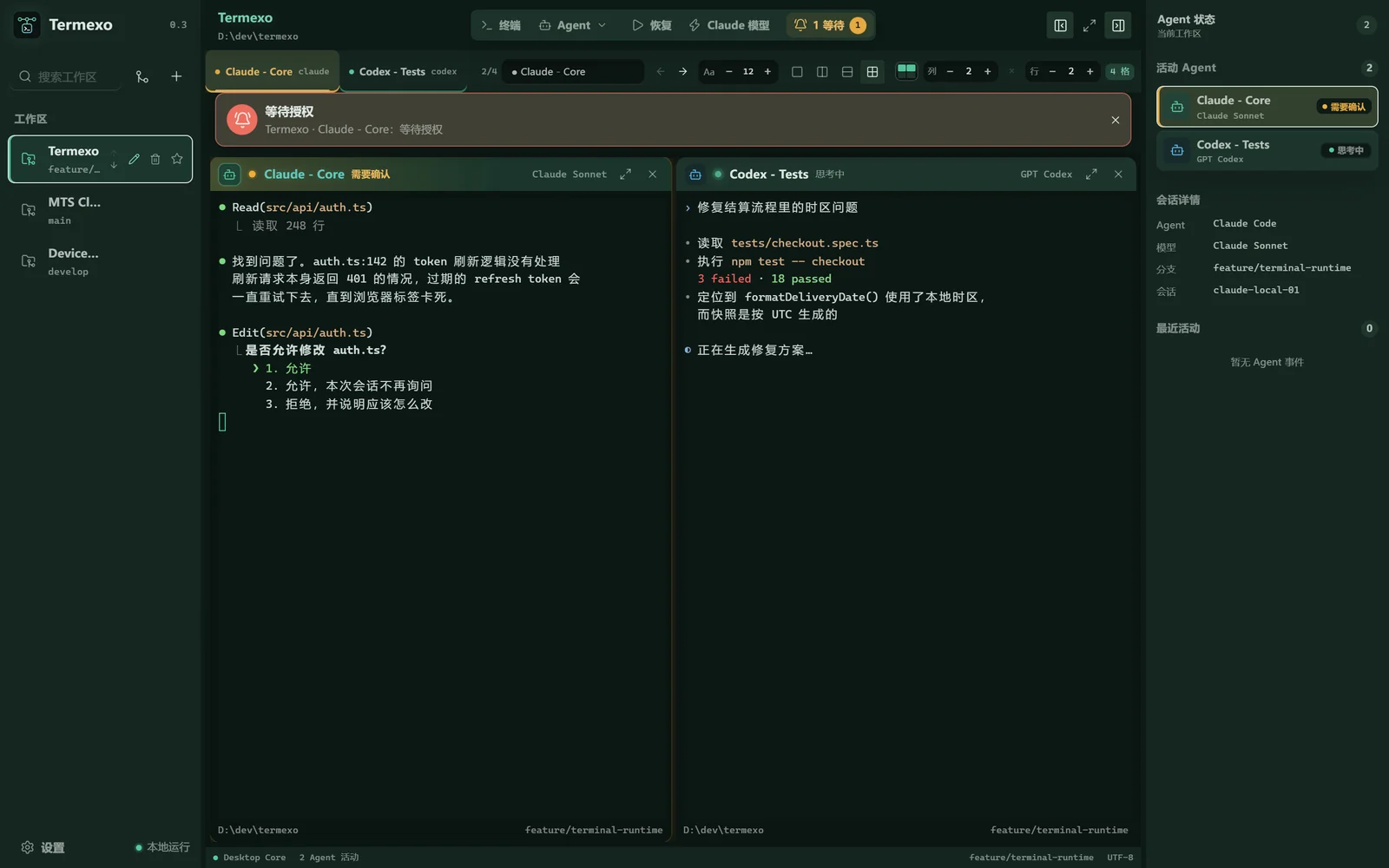
Termexo is a Windows desktop workbench that lets developers open multiple coding CLI agents — Claude Code, Codex CLI, DeepSeek, MiniMax, GLM and other compatible endpoints — inside a single tabbed window with a configurable grid layout. Each terminal keeps its own session alive, and Termexo surfaces which agent is waiting on an approval or input via taskbar flashes, system notifications, and persistent banners so nothing stalls unnoticed. Because the CLIs already store transcripts on disk, Termexo lists them so you can search across projects and resume through the tool's own `claude --resume` or `codex resume`. Everything runs locally: API keys are held in Windows Credential Manager, there is no account or cloud service, and session files are treated read-only. Model routing lets you keep the Claude Code CLI but point it at DeepSeek or another OpenAI-compatible provider, saved as switchable profiles.
Screenshots
Key Features
Use Cases



Frequently asked questions about Termexo
What is Termexo?
Termexo is a versatile local Windows workbench that enables users to run multiple coding agents, including Claude Code and Codex CLI, simultaneously in a unified grid layout. This platform enhances productivity for developers by providing an integrated environment for coding and testing.
Key Points
- Multi-Agent Support: Termexo allows the use of various coding agents side by side.
- User-Friendly Interface: The grid layout simplifies navigation and management of coding tasks.
- Local Environment: Works directly on Windows, ensuring fast performance without the need for cloud services.
Detailed Explanation
Termexo stands out as a powerful tool for software developers and data scientists. By allowing users to operate coding agents like Claude Code and Codex CLI simultaneously, it streamlines workflows and maximizes efficiency.
Features of Termexo:
- Grid Layout: The unique grid interface enables developers to visualize and manage multiple coding tasks easily. Each coding agent can be resized and organized according to user preference, enhancing workspace customization.
- Cross-Platform Integration: Although designed for Windows, Termexo can interface with various programming languages and tools, making it versatile for various development environments.
- Performance Optimization: Running locally on Windows reduces latency compared to cloud-based solutions, allowing for quicker testing and debugging.
Use Cases:
- Software Development: Developers can code in one agent while testing in another, significantly speeding up the development cycle.
- Data Analysis: Data scientists can use tools like Claude Code for analysis while simultaneously working with Codex CLI for data manipulation tasks.
- Learning Environment: Ideal for students and professionals learning programming, as it provides a hands-on approach to coding within a single platform.
Best Practices / Tips
- Customize Your Workspace: Utilize the grid layout to organize your coding environment in a way that works best for your workflow.
- Keep Software Updated: Regularly check for updates to Termexo and the coding agents to ensure optimal performance and access to the latest features.
- Utilize Documentation: Familiarize yourself with the official documentation to fully leverage all functionalities and avoid common pitfalls.
Additional Resources
How does Termexo work?
Termexo operates by integrating various AI tools within a customizable grid, allowing users to manage multiple projects efficiently. It features real-time notifications, session resumption capabilities, model routing profiles, and local-only credential storage to enhance productivity and security for developers using AI models like Claude Code and Codex.
Key Points
- Customizable Multi-Agent Grid: Combine various AI tools in a single interface.
- Real-Time Alerts: Receive notifications for blocked tasks and approvals.
- Local Credential Storage: Securely manage API keys without cloud exposure.
Detailed Explanation
Termexo offers a powerful platform for developers to streamline their AI workflows by merging multiple tools into a flexible grid system. This grid can be customized from 1x1 to 6x6 layouts, allowing developers to arrange their workspace according to their preferences. Here’s how each feature enhances productivity:
-
Multi-Agent Grid: Users can integrate Claude Code, Codex CLI, and shell terminals within the same grid. This ensures that no agent is left idle, maximizing efficiency. For example, a developer can run Claude Code on the backend while simultaneously interacting with Codex CLI and a shell terminal for infrastructure tasks.
-
Waiting-For-You Alerts: Termexo enhances user awareness by flashing the taskbar and sending system notifications whenever an agent requires input or approval. This feature is crucial for long-running processes, ensuring that tasks do not stall unattended, which is especially useful during overnight or batch jobs.
-
Session Resume Across Projects: The platform indexes all transcripts saved on disk, enabling users to search and resume sessions quickly. For instance, if a developer needs to switch projects, they can effortlessly resume their session without losing progress, thanks to the CLI's real resume command.
-
Model Routing Profiles: Users can maintain the Claude Code CLI while directing it at various AI endpoints such as Anthropic or OpenAI-compatible services. These profiles can be saved and accessed with a single click, allowing for quick comparison of different models on specific tasks.
-
Local-Only Credentials: For security, API keys are stored in the Windows Credential Manager, ensuring that sensitive information does not appear in plain text. This local-only setup is ideal for teams needing to keep their API keys secure without using cloud services.
Best Practices / Tips
- Utilize the Grid Effectively: Customize your grid layout based on your workflow for maximum efficiency. Experiment with different configurations to find what works best for you.
- Set Up Alerts Wisely: Tailor the notification settings to ensure you are alerted only for critical tasks, reducing distractions during deep work sessions.
- Keep Credentials Secure: Regularly review and manage your API keys within the Windows Credential Manager to maintain security and prevent unauthorized access.
Additional Resources
By leveraging Termexo's features, developers can significantly enhance their productivity and streamline their AI project management processes.
What are the main features of Termexo?
Termexo offers several key features, including a customizable Multi-Agent Grid, Waiting-For-You Alerts for task notifications, and Session Resume Across Projects for easy access to previous work. Users can also utilize Model Routing Profiles for different AI endpoints and maintain Local-Only Credentials for enhanced security.
Key Points
- Multi-Agent Grid: Customizable layout for managing multiple AI interfaces.
- Waiting-For-You Alerts: Notifications for blocked workflows.
- Session Resume Across Projects: Easy access to previous sessions and transcripts.
Detailed Explanation
Termexo is designed to enhance productivity and streamline workflows for users engaging with multiple AI models. Here’s a closer look at its main features:
Multi-Agent Grid
This feature allows users to open unlimited instances of Claude Code, Codex CLI, and shell terminals in a grid layout. The customizable grid can range from 1x1 to 6x6, remembering the layout for each project, which helps users organize their workspace efficiently. For example, a user can create a dedicated space for each AI model they’re working with, easily switching between them without losing context.
Waiting-For-You Alerts
Termexo enhances user experience by providing Waiting-For-You Alerts. When an agent is blocked waiting for approval or input, it triggers a taskbar flash, system notifications, and an on-screen banner. This ensures that users are immediately aware of any actions needed to proceed, minimizing downtime and boosting productivity.
Session Resume Across Projects
This feature indexes transcripts saved on disk, allowing users to search by name, path, branch, or model. With the CLI's "real resume" command, users can effortlessly reopen previous sessions. This is particularly beneficial for ongoing projects where continuity is vital, as it saves time spent searching for past work.
Model Routing Profiles
Termexo supports various AI models, allowing users to create Model Routing Profiles. This keeps the Claude Code CLI active while pointing it towards different endpoints like Anthropic, DeepSeek, MiniMax, GLM, or any OpenAI-compatible service. Profiles are saved for quick access, which is ideal for teams working with multiple AI technologies.
Local-Only Credentials
For security, Termexo writes API keys to Windows Credential Manager instead of plain-text configuration files. This ensures that sensitive information remains secure and does not leave the machine, which is crucial for projects dealing with proprietary or confidential data.
Best Practices / Tips
- Optimize Your Grid Layout: Customize your Multi-Agent Grid for specific projects to maximize efficiency.
- Stay Updated with Alerts: Make sure to configure notifications to avoid missing critical approvals.
- Leverage Session Resumes: Regularly save your work and utilize the resume feature to maintain continuity in projects.
- Secure Your Credentials: Always use Local-Only Credentials to protect sensitive API keys from unauthorized access.
Additional Resources
- Termexo Official Documentation for detailed guides and updates.
- Best Practices for AI Workflow Management for tips on optimizing productivity with AI tools.
Who is Termexo for?
Termexo is designed for developers and teams engaged in Parallel Agent Development, model comparison, and multi-project workflows. It benefits solo developers, collaborative teams, and anyone needing a local, no-cloud setup for efficient project management and uninterrupted workflow without relying on external APIs.
Key Points
- Parallel Agent Development: Optimize resource utilization with simultaneous operations.
- Model Comparison: Easily compare multiple AI models without reinstallation.
- Multi-Project Workflow: Manage multiple repositories seamlessly.
Detailed Explanation
Termexo caters to a wide range of users, primarily focusing on developers and teams engaged in AI and machine learning projects.
-
Parallel Agent Development: By enabling a solo developer to run Claude Code on the backend alongside Codex CLI and a shell in a unified grid, Termexo ensures that no agent remains idle. This setup maximizes productivity, allowing for the efficient use of resources and quick testing of different coding paradigms.
-
Model Comparison: Termexo facilitates a straightforward model comparison process. Developers can direct the same Claude Code CLI instance to interact with various models such as Sonnet, DeepSeek, and MiniMax across three tabs. This feature allows for a direct cost and quality comparison on identical tasks without the hassle of reinstalling software, thus streamlining the evaluation process.
-
Multi-Project Workflow: Developers often juggle multiple projects. Termexo allows for the simultaneous management of various repositories, each with its unique grid layout. Users can switch between projects without losing the terminal state, making it ideal for those who need to revisit previous work or collaborate on different tasks efficiently.
-
Never-Miss Approval Loops: With Termexo’s notification system, long-running processes that require user input (like
y/Nprompts) are highlighted through taskbar flashes. This ensures that overnight or batch jobs do not stall, providing an uninterrupted workflow. -
Local, No-Cloud Setup: For teams needing to keep sensitive information secure, Termexo operates entirely locally. This means no external service sign-ins, and credentials are stored safely in the OS keystore, ensuring data security and compliance with privacy regulations.
Best Practices / Tips
- Optimize your grid layout: Customize your workspace according to your project requirements for better visibility and efficiency.
- Use keyboard shortcuts: Familiarize yourself with keyboard shortcuts in Termexo to navigate quickly between projects and tabs.
- Regularly back up your sessions: Ensure you save your terminal state frequently, especially when working on critical projects, to prevent data loss.
Additional Resources
How much does Termexo cost?
Termexo is completely free to use, offering users a range of features without any subscription fees or hidden costs. This makes it an accessible tool for individuals and businesses looking to leverage its capabilities without financial barriers.
Key Points
- Termexo is a no-cost platform.
- Offers various features for free.
- No hidden fees or subscriptions.
Detailed Explanation
Termexo stands out in the market as a free-to-use tool that provides users with a wide array of functionalities designed to enhance productivity and streamline tasks. Since its launch, Termexo has gained popularity among freelancers, small business owners, and teams who appreciate its user-friendly interface and robust capabilities.
Some of the key features available in Termexo include:
- Task Management: Organize and prioritize tasks efficiently without any cost.
- Collaboration Tools: Work seamlessly with team members, sharing updates and files in real-time.
- Integration with Other Tools: Connect Termexo with other applications you use daily, enhancing its utility.
For example, a marketing team can utilize Termexo to manage campaigns, assign tasks, and track progress—all without incurring any costs. This makes it ideal for startups and entrepreneurs who may have limited budgets.
Best Practices / Tips
To maximize your experience with Termexo, consider the following tips:
- Explore All Features: Familiarize yourself with the range of tools available. Some features, like integrations, can significantly enhance your workflow.
- Stay Updated: Follow Termexo’s updates and announcements. Occasionally, they might introduce new features or enhancements that can benefit you.
- Utilize Customer Support: If you encounter any challenges or have questions, don’t hesitate to reach out to their customer support for assistance.
Common pitfalls to avoid include overlooking the importance of task organization and failing to utilize collaborative features, which can lead to inefficiencies.
Additional Resources
- Termexo Official Website
- Termexo User Guide
- Community Forum for tips and shared experiences from other users.
How do I get started with Termexo?
To get started with Termexo, visit www.termexo.com to sign up for an account. After creating your account, explore the platform's features, resources, and tools designed to enhance your experience and streamline your workflows.
Key Points
- Sign up easily through the Termexo website.
- Explore diverse features tailored for various needs.
- Access support and resources to maximize your usage.
Detailed Explanation
Starting with Termexo is straightforward. First, navigate to Termexo's official website. Click on the "Sign Up" button, and fill in the required details, such as your email address and password. After confirming your email, you can log in to your new account.
Exploring Features
Once logged in, take some time to familiarize yourself with the dashboard. Termexo offers various features, including project management tools, collaboration options, and analytics. Each feature is designed to simplify tasks and improve productivity.
For instance, if you’re managing a project, use the task management tool to assign tasks to team members and track progress. Additionally, the reporting feature allows you to visualize data trends and make informed decisions.
Learning Resources
Termexo provides valuable resources, including tutorials, FAQs, and community forums. These resources can help you understand how to leverage the platform effectively. Look for webinars or training sessions that cover advanced features.
Best Practices / Tips
- Set Up Notifications: Customize your notification settings to stay updated on project changes or task deadlines.
- Integrate Tools: Connect Termexo with other tools you use, such as calendars or communication apps, for a seamless workflow.
- Regularly Review Projects: Schedule time to review project progress and adjust plans as necessary. This habit ensures that you stay on track and meet deadlines.
- Engage with the Community: Join Termexo’s user forums or social media groups to share tips and learn from other users.
Additional Resources
- Termexo User Guide - Comprehensive documentation for all features.
- Termexo Community Forum - A platform for users to ask questions and share experiences.
- Webinars and Tutorials - Live sessions covering various aspects of Termexo usage.
By following these steps and utilizing available resources, you can effectively get started with Termexo and maximize its potential for your needs.
Explore more AI Ai Tools tools
Browse all Ai Tools tools →Compare Termexo: vs Humanizer · vs Worktrunk · vs Mise · vs BiBimba