

SapienX
AIAgentOS: a human operating layer for OpenClaw to create, manage, observe, and run local-first AI agents with context, policies, and approvals.
SapienX
AgentOS: a human operating layer for OpenClaw to create, manage, observe, and run local-first AI agents with context, policies, and approvals.
About SapienX
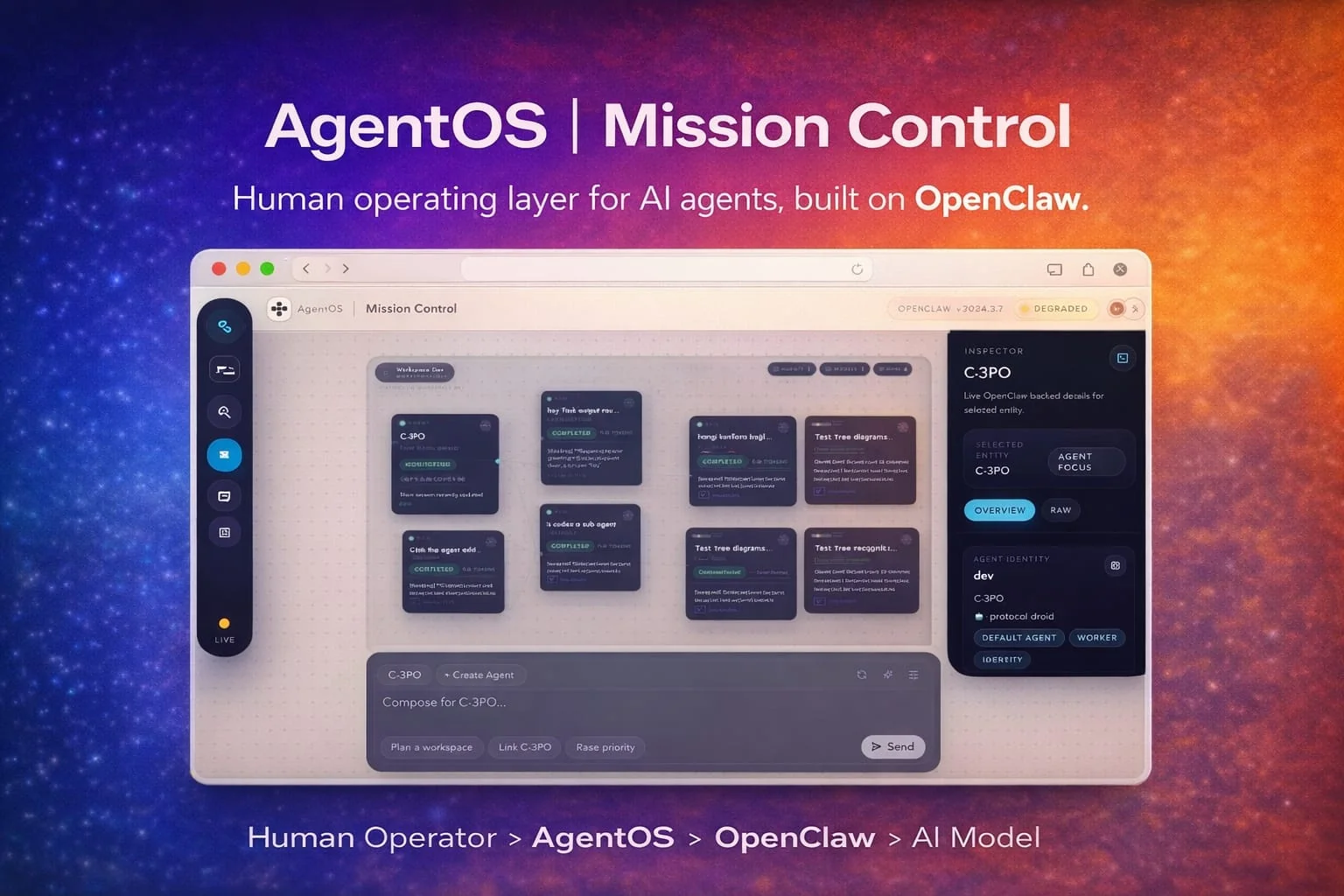
AgentOS is a human-focused control plane built on OpenClaw that enables creation, orchestration, observation, and management of AI agents from a single workspace. It maps missions to persistent project folders, not ephemeral chat threads, and preserves runtime output (files, transcripts, artifacts) for later inspection and auditing. AgentOS provides structured agent teams with presets, policies, memory, workspace scaffolds, and repeatable operating conventions, plus health and runtime observability to let a human operator manage models, runtimes, and costs. It ships as a local-first application with a CLI and packaged launcher for running the control surface locally and integrates with the OpenClaw orchestration kernel to run and coordinate agents securely and reproducibly.
Screenshots
Key Features
Use Cases



Frequently asked questions about SapienX
What is SapienX?
SapienX is a cutting-edge platform featuring AgentOS, a human operating layer designed on OpenClaw. It enables users to manage workspaces, agents, tasks, jobs, approvals, and runtime visibility seamlessly from a single, local-first control surface, enhancing productivity and coordination across diverse workflows.
Key Points
- Innovative Technology: Built on OpenClaw, enhancing operational efficiency.
- Centralized Management: Streamlines coordination of tasks and approvals.
- Local-First Control: Ensures data management is efficient and secure.
Detailed Explanation
SapienX stands out in the realm of productivity tools by integrating advanced technology with user-friendly interfaces. The core component, AgentOS, transforms how teams interact with their projects. Here’s a closer look at its features:
- Workspaces: Create customized environments tailored to specific projects or teams, allowing for focused collaboration.
- Agents: Automate repetitive tasks through intelligent agents that can learn from user behavior, optimizing workflows and reducing manual effort.
- Tasks and Jobs Management: Easily assign and track tasks, ensuring accountability and transparency within teams. This includes real-time updates and notifications for pending approvals or completions.
- Approvals Workflow: An integrated approvals system simplifies the decision-making process, allowing users to manage and track approvals without switching platforms.
- Runtime Visibility: Gain insights into operations with a user-friendly interface that provides real-time data visualizations and analytics.
For example, a marketing team using SapienX can manage a campaign from ideation to execution, tracking every task and approval directly within the platform, leading to improved project outcomes.
Best Practices / Tips
- Utilize Custom Workspaces: Tailor your workspaces to fit the specific needs of your projects for maximum efficiency.
- Leverage Agent Automation: Use agents for routine tasks to free up team members for strategic activities.
- Regularly Review Approvals: Implement a schedule for reviewing pending approvals to avoid bottlenecks in workflows.
- Training and Onboarding: Ensure that all team members are adequately trained on using SapienX to maximize its potential.
Additional Resources
How does SapienX work?
SapienX works by integrating advanced artificial intelligence capabilities to streamline daily workflows for users. By utilizing machine learning, natural language processing, and automation, it enhances productivity and simplifies complex tasks, making it easier for users to leverage AI in their everyday activities.
Key Points
- AI Integration: Combines various AI technologies for seamless user experience.
- Workflow Automation: Streamlines repetitive tasks to save time and effort.
- User-Friendly Interface: Designed for accessibility and ease of use, regardless of technical skill.
Detailed Explanation
SapienX harnesses the power of several core AI technologies to assist users in optimizing their daily tasks. Here’s a breakdown of its functionalities:
-
Artificial Intelligence: SapienX employs machine learning algorithms that learn from user behavior, adapting to individual needs. This means the more you use it, the better it becomes at predicting your preferences and automating tasks.
-
Natural Language Processing (NLP): Users interact with SapienX through natural language queries. For example, you can ask it to summarize documents, generate reports, or even create content based on prompts. This feature enables non-technical users to engage with AI without needing to learn programming languages.
-
Automation: SapienX automates routine tasks, such as scheduling meetings or sending reminders. By reducing the time spent on repetitive activities, users can focus on more strategic work. For instance, a marketing professional can set up automated email campaigns with just a few clicks.
-
Integration with Other Tools: SapienX can connect with various applications like Google Workspace, Slack, and CRM systems, allowing for a more cohesive workflow. This integration eliminates the need to switch between different platforms, enhancing productivity.
-
Real-Time Analytics: Users can access real-time data insights to make informed decisions quickly. For example, sales teams can analyze customer interactions to adjust strategies dynamically.
Best Practices / Tips
- Start Small: Begin by automating one or two tasks before fully integrating SapienX into your workflow.
- Utilize Tutorials: Make use of available training materials and tutorials to fully understand the software's capabilities.
- Gather Feedback: Regularly assess how SapienX is impacting your productivity and adjust your usage accordingly.
- Stay Updated: Keep an eye out for updates and new features to maximize the benefits of the platform.
Additional Resources
What are the main features of SapienX?
SapienX boasts several key features, including advanced AI capabilities for natural language processing, customizable workflows, and robust data analytics. These features enable users to streamline operations, enhance decision-making, and drive innovation across various industries.
Key Points
- Advanced AI Capabilities: Leveraging natural language processing and machine learning.
- Customizable Workflows: Tailored solutions for specific business needs.
- Robust Data Analytics: In-depth insights to inform strategic decisions.
Detailed Explanation
SapienX is designed to empower businesses with cutting-edge technology that enhances productivity and decision-making.
1. Advanced AI Capabilities
SapienX utilizes sophisticated natural language processing (NLP) and machine learning algorithms. This allows it to understand, interpret, and generate human language effectively. For instance, businesses can automate customer support systems, enabling 24/7 assistance and reducing response times.
2. Customizable Workflows
One of the standout features of SapienX is its ability to create tailored workflows. Users can design processes that align with their specific operational needs, ensuring that the software fits seamlessly into existing systems. For example, a marketing team can automate campaign management by integrating SapienX with their CRM tools, streamlining lead nurturing and follow-ups.
3. Robust Data Analytics
SapienX offers powerful data analytics tools that provide actionable insights. By analyzing user interactions and operational data, businesses can identify trends, forecast demand, and make informed decisions. An example is utilizing predictive analytics to optimize inventory levels based on historical sales data, reducing excess stock and improving cash flow.
Best Practices / Tips
- Start Small: Begin with a pilot project to identify how SapienX can best serve your business needs before scaling up.
- Leverage Customization: Take advantage of customizable workflows to ensure that the tool aligns with your existing processes.
- Regularly Review Analytics: Set up a routine for analyzing the data insights provided by SapienX to continuously improve processes and strategies.
Additional Resources
Who is SapienX for?
SapienX is designed for a wide range of users, including professionals, students, and hobbyists who want to streamline their daily tasks with AI workflows. It caters to anyone interested in enhancing productivity, automating repetitive tasks, or making data-driven decisions with the help of artificial intelligence.
Key Points
- Target Audience: Professionals, students, and tech enthusiasts.
- Use Cases: Automating tasks, improving productivity, and enhancing decision-making.
- Accessibility: User-friendly interface suitable for all skill levels.
Detailed Explanation
SapienX serves diverse user demographics, making it a versatile tool in the AI landscape.
-
Professionals: Individuals in various industries can leverage SapienX for automating routine tasks, such as data entry, scheduling, and report generation. For instance, a marketing manager might use SapienX to analyze customer data and generate insights, allowing them to focus on strategy rather than administrative duties.
-
Students: In academic settings, students can utilize SapienX to streamline research, manage projects, and collaborate with peers. For example, a student working on a group project can use the AI tool to gather relevant information and organize it efficiently, leading to improved outcomes and better time management.
-
Tech Enthusiasts: Hobbyists and tech-savvy individuals can explore the capabilities of SapienX to develop custom AI solutions. They can experiment with various workflows, integrating the tool with other applications to create a personalized productivity suite tailored to their specific needs.
Best Practices / Tips
- Start Simple: If you’re new to AI, begin with basic workflows and gradually explore advanced features.
- Utilize Templates: Take advantage of pre-built templates available in SapienX to save time and enhance efficiency.
- Regular Updates: Keep the software updated to access the latest features and security enhancements.
- Community Engagement: Join forums or user groups to share experiences and learn best practices from other users.
Additional Resources
How much does SapienX cost?
SapienX offers various pricing plans that cater to different needs and budgets. For the most accurate and up-to-date information on the costs of SapienX services, it's best to visit their official website, where detailed pricing tiers and options are clearly outlined.
Key Points
- Pricing varies based on features and subscription plans.
- Discounts may be available for annual subscriptions.
- Free trials or demos can help assess the tool's value.
Detailed Explanation
SapienX provides a range of pricing options designed to accommodate both individual users and businesses. Typically, the pricing structure includes:
-
Basic Plan: Often suited for personal use or small teams, this plan may start at approximately $19 per month. It usually includes essential features but may limit advanced functionalities.
-
Pro Plan: For more extensive capabilities, the Pro Plan might be priced around $49 per month. This plan generally offers additional features, integrations, and enhanced customer support.
-
Enterprise Solutions: Larger organizations may require custom solutions, which can be tailored to specific business needs. Pricing for these solutions is usually available upon request and often includes personalized support options.
In addition to these plans, SapienX may offer a free trial period, allowing users to explore the software before committing financially. This trial can be beneficial in determining how well the platform meets your needs.
Best Practices / Tips
-
Evaluate Your Needs: Before selecting a plan, consider your specific requirements. Determine which features are essential for your use case to avoid overpaying for unnecessary functionalities.
-
Take Advantage of Free Trials: Utilize any available free trials to fully explore the platform and assess its suitability for your needs without financial commitment.
-
Look for Discount Opportunities: Keep an eye out for seasonal promotions or discounts, especially for annual subscriptions, which can provide significant savings.
Additional Resources
How do I get started with SapienX?
To get started with SapienX, simply visit SapienX to sign up for an account. Once registered, you can explore its features, tools, and resources to utilize the platform effectively in your projects.
Key Points
- Easy online registration process.
- User-friendly interface for beginners.
- Access to a variety of AI tools and resources.
Detailed Explanation
To begin your journey with SapienX, follow these steps:
-
Visit the Website: Open your web browser and go to SapienX.
-
Create an Account: Click on the "Sign Up" button. You will be prompted to enter your email address and create a secure password. Ensure you use a strong password to safeguard your account.
-
Explore the Dashboard: After registration, log in to your account. Familiarize yourself with the user-friendly dashboard, which gives you access to various AI tools, analytics, and resources.
-
Access Tutorials and Resources: SapienX offers tutorials and documentation to help you understand how to leverage its features effectively. Explore these resources for guidance on using specific tools.
-
Start Creating: Once you're comfortable with the platform, start exploring its capabilities. You can create AI models, analyze data, and even integrate with other applications.
For example, if you’re looking to streamline customer service, you can use SapienX's chatbot features to enhance user interaction on your website.
Best Practices / Tips
- Use Strong Credentials: Always use a complex password and consider enabling two-factor authentication for added security.
- Engage with Community: Join forums or social media groups focused on SapienX to share experiences and learn from others.
- Regularly Update Your Knowledge: Stay updated with new features and tools released by SapienX, as they frequently introduce enhancements.
Additional Resources
By following these steps and tips, you can effectively start leveraging SapienX to enhance your projects and optimize your workflows.
Explore more AI Ai Agents tools
Browse all Ai Agents tools →Browse by use case: Code Generation · Automation & Productivity
Compare SapienX: vs Playad · vs Concierge by Juniors AI · vs Scout by Fini · vs Ruflo