

Runway
AIA cloud platform for generating and editing images and video with text, image, and video-based generative tools.
Runway
A cloud platform for generating and editing images and video with text, image, and video-based generative tools.
About Runway
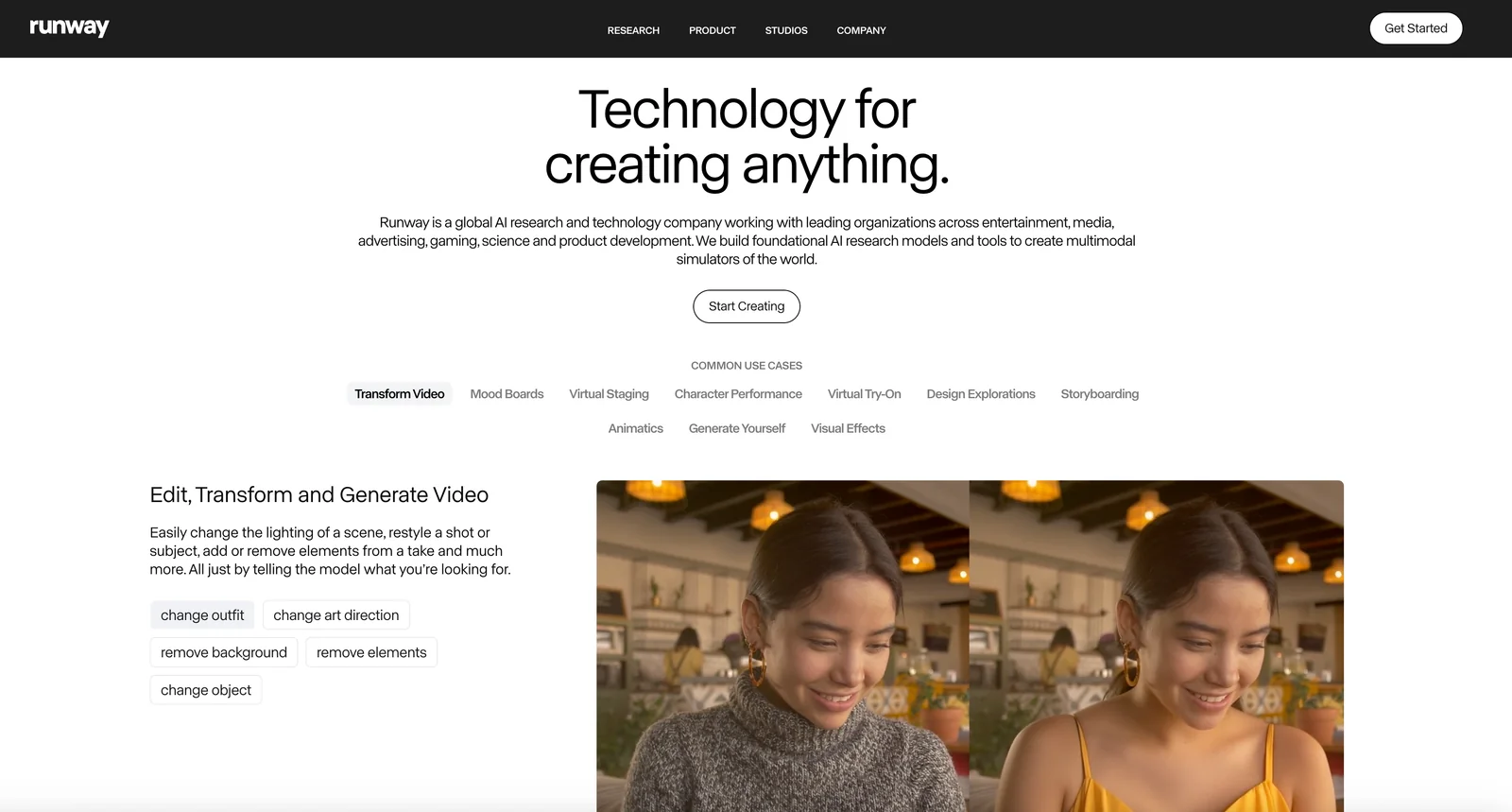
Runway is a cloud-based platform for generative image and video creation and editing. It provides text-to-video, image-to-video, and image generation pipelines along with editing tools to modify, inpaint, and composite media. Runway combines pretrained generative models, an intuitive timeline/editor interface, and cloud rendering to let creators produce and iterate on visual content quickly. The platform emphasizes accessibility for creators and teams by offering model libraries, export options, and collaborative workflows.
Screenshots
Key Features
Use Cases



Frequently asked questions about Runway
What are the pricing options for Runway?
Runway offers a freemium pricing model with four tiers: Free at $0, Standard at $12/month, Pro at $28/month, and Unlimited at $76/month. Additionally, custom Enterprise plans are available. Each tier provides varying credits and features tailored for different user needs.
Key Points
- Freemium Model: Runway's pricing structure allows users to start for free.
- Tiered Pricing: Different tiers cater to varying levels of usage and features.
- Enterprise Options: Custom plans are available for larger organizations.
Detailed Explanation
Runway's pricing is designed to accommodate a wide range of users, from beginners to professionals.
-
Free Tier ($0): Ideal for casual users or those just starting out. This tier offers basic features to explore the platform without any financial commitment.
-
Standard Tier ($12/month): This plan is suitable for individual creators and small teams, providing additional credits and features that enhance productivity. Users can access tools that include basic AI functionalities and collaboration features.
-
Pro Tier ($28/month): Geared towards advanced users, this plan offers enhanced capabilities, including higher credit allowances and more advanced features for complex projects.
-
Unlimited Tier ($76/month): Best for heavy users or larger teams, this plan provides unlimited credits and access to premium features, ensuring maximum flexibility and productivity.
-
Custom Enterprise Plans: For organizations needing tailored solutions, Runway provides custom enterprise plans that can include dedicated support, additional features, and pricing that reflects the scale of usage.
Best Practices / Tips
- Evaluate Your Needs: Before choosing a plan, assess your usage and feature requirements. Starting with the Free tier can help gauge the platform's suitability.
- Take Advantage of Trials: If available, utilize free trials on higher tiers to understand their value before committing financially.
- Stay Informed on Updates: Pricing and features can evolve, so regularly check Runway’s official website for the latest offerings and potential discounts.
Additional Resources
How do I get started with Runway for image and video generation?
To get started with Runway for image and video generation, sign up for a free account on their website. Utilize your free credits to explore basic tools, and access tutorials to enhance your skills in creating and editing visual content effectively.
Key Points
- Create a Free Account: Sign up on the Runway website.
- Explore Tools: Use free credits to try out image and video generation features.
- Learn with Tutorials: Access tutorials to improve your content creation skills.
Detailed Explanation
Runway offers a user-friendly platform for image and video generation powered by AI. To begin, visit Runway's official website and create a free account. During registration, you may need to provide an email address and create a password. Once your account is set up, you will receive free credits, which you can use to explore various creative tools.
Getting Started:
- Sign Up: Visit the Runway website and click on the "Get Started" button. Fill in the required details to create your account.
- Dashboard Navigation: After logging in, familiarize yourself with the dashboard, which displays available tools such as the image generator, video editor, and more.
- Selecting Tools: Choose the specific tool you wish to try. For instance, select "Image Generation" to create images based on text prompts or "Video Editing" for editing existing clips.
- Utilizing Credits: Your free credits allow you to test the features without any upfront costs. Keep track of your usage to maximize your experience.
Runway also provides a variety of tutorials designed to help users navigate the platform and utilize its features effectively. These resources cover different aspects, from basic operations to advanced techniques, ensuring that both beginners and experienced users can enhance their creative projects.
Best Practices / Tips
- Utilize Tutorials: Take advantage of available tutorials to quickly learn new features and improve your skills.
- Experiment Freely: Use your free credits to experiment with different tools without the pressure of costs.
- Stay Updated: Follow Runway’s updates and community forums to learn about new features and best practices.
Additional Resources
- Runway Documentation - Official documentation for in-depth guidance.
- Runway YouTube Channel - Video tutorials and walkthroughs.
- Runway Community Forum - Connect with other users for tips and support.
What features does Runway offer for video editing?
Runway offers a suite of advanced video editing features, including inpainting, background removal, and text-to-video generation. Enhanced collaboration tools enable seamless project sharing, making it a robust choice for both individual creators and teams working on video content.
Key Points
- Inpainting: Fill in missing parts of a video or image.
- Background Removal: Easily isolate subjects from their backgrounds.
- Text-to-Video Generation: Create videos by simply inputting text prompts.
Detailed Explanation
Runway's advanced inpainting feature allows users to edit videos by filling in or altering specific areas, making it ideal for correcting mistakes or enhancing visuals. For instance, if a scene has unwanted objects, inpainting lets you seamlessly remove them and replace the area with suitable content.
The background removal tool is particularly valuable for content creators looking to isolate subjects for overlays or dynamic backgrounds. This feature can be used in promotional videos, social media content, or even in film production where green screens are not available.
One of Runway's standout features is its text-to-video generation capability. Users can craft videos by simply typing in prompts, leveraging AI to interpret the text and produce corresponding visuals. This feature is perfect for marketers or educators who need quick video content without extensive editing experience.
Additionally, Runway includes collaboration tools that allow multiple users to work on projects simultaneously. This feature is essential for teams, enabling real-time feedback and edits, enhancing productivity and creativity.
Best Practices / Tips
- Experiment with Inpainting: Use inpainting to refine your video edits subtly. Start with small adjustments before making larger changes.
- Utilize Background Removal Effectively: Experiment with various backgrounds to see which complements your subject best. This can enhance the overall aesthetic of your video.
- Leverage Text-to-Video for Quick Content: Use text-to-video generation for brainstorming sessions or to quickly create content to meet tight deadlines.
Additional Resources
How does Runway compare to other AI image and video tools?
Runway distinguishes itself from other AI image and video tools through its innovative cloud-based generative models, advanced collaboration features, and intuitive interface. It uniquely offers text-to-video capabilities and a flexible freemium pricing model, making it accessible for both casual users and professionals.
Key Points
- Cloud-Based Generative Models: Runway's technology leverages powerful cloud infrastructure.
- Collaboration Features: Enhanced tools for team projects and real-time editing.
- Freemium Pricing Structure: Flexible options catering to various user needs.
Detailed Explanation
Runway is an AI-driven creative suite that excels in generating high-quality images and videos. Its cloud-based generative models allow users to create content without the need for powerful local hardware, making it ideal for creators who do not have access to expensive equipment. For example, Runway's AI can generate realistic visuals based on textual prompts, enabling users to quickly produce unique content.
The collaboration features are particularly noteworthy. Runway allows multiple users to work on the same project simultaneously, which is essential for teams in creative industries. This functionality is comparable to platforms like Google Docs but tailored for visual content creation. Users can leave comments, make edits, and see changes in real time, streamlining the creative process.
Runway's freemium pricing model sets it apart from competitors. Users can access basic features for free, which is appealing for beginners. Paid plans start at $12 per month, offering advanced features like higher resolution outputs and more extensive collaboration tools. This flexibility allows both hobbyists and professionals to choose a plan that fits their budget and needs.
Best Practices / Tips
- Experiment with Text-to-Video: Take advantage of Runway's unique text-to-video feature to create compelling narratives quickly.
- Utilize Collaboration Tools: For teams, leverage the collaboration features to enhance productivity and creativity.
- Stay Updated: Regularly check for updates and new features, as Runway frequently enhances its tools based on user feedback.
Additional Resources
Does Runway offer an API for integrations?
Yes, Runway provides an API that enables developers to integrate its powerful generative tools into various applications. This integration allows users to automate workflows, enhance their projects, and leverage Runway's capabilities for creative content creation seamlessly.
Key Points
- API Availability: Runway offers a robust API for integration.
- Automation: Users can automate workflows using Runway's tools.
- Enhanced Creativity: The API supports various creative projects and applications.
Detailed Explanation
Runway's API is designed for developers looking to incorporate advanced AI features into their applications. With this API, users can access Runway's generative tools, such as image synthesis, video editing, and content generation, directly from their platforms.
For instance, a video production team could use the API to automate the process of generating video content based on specific parameters, significantly reducing manual editing time. Developers can send requests to the API, receive outputs in real-time, and integrate these outputs into their applications, making it a powerful tool for enhancing creative workflows.
Example Use Cases:
- Content Creation: Bloggers and marketers can create unique images or videos for their articles by integrating Runway’s generative tools.
- Social Media Automation: Businesses can automate the posting of visually appealing graphics tailored to their brand.
- Game Development: Developers can use the API to generate textures or backgrounds dynamically, enhancing the gaming experience.
Best Practices / Tips
- Understand API Documentation: Familiarize yourself with Runway's API documentation to fully leverage its capabilities.
- Test Integrations: Before rolling out the API integration, conduct thorough testing to ensure functionality and performance.
- Monitor Usage: Regularly check API usage to avoid hitting rate limits and maintain optimal application performance.
Additional Resources
Explore more AI Ai Models tools
Browse all Ai Models tools →Browse by use case: Image Generation · Video Generation
Compare Runway: vs Mouse-1 · vs Milliseconds.ai · vs SWE-2 · vs Desert Ant Labs