
Replit Agent 3
AIAutonomous coding agent that builds, tests, and fixes apps automatically with long runtimes and workspace integrations.
Replit Agent 3
Autonomous coding agent that builds, tests, and fixes apps automatically with long runtimes and workspace integrations.
About Replit Agent 3
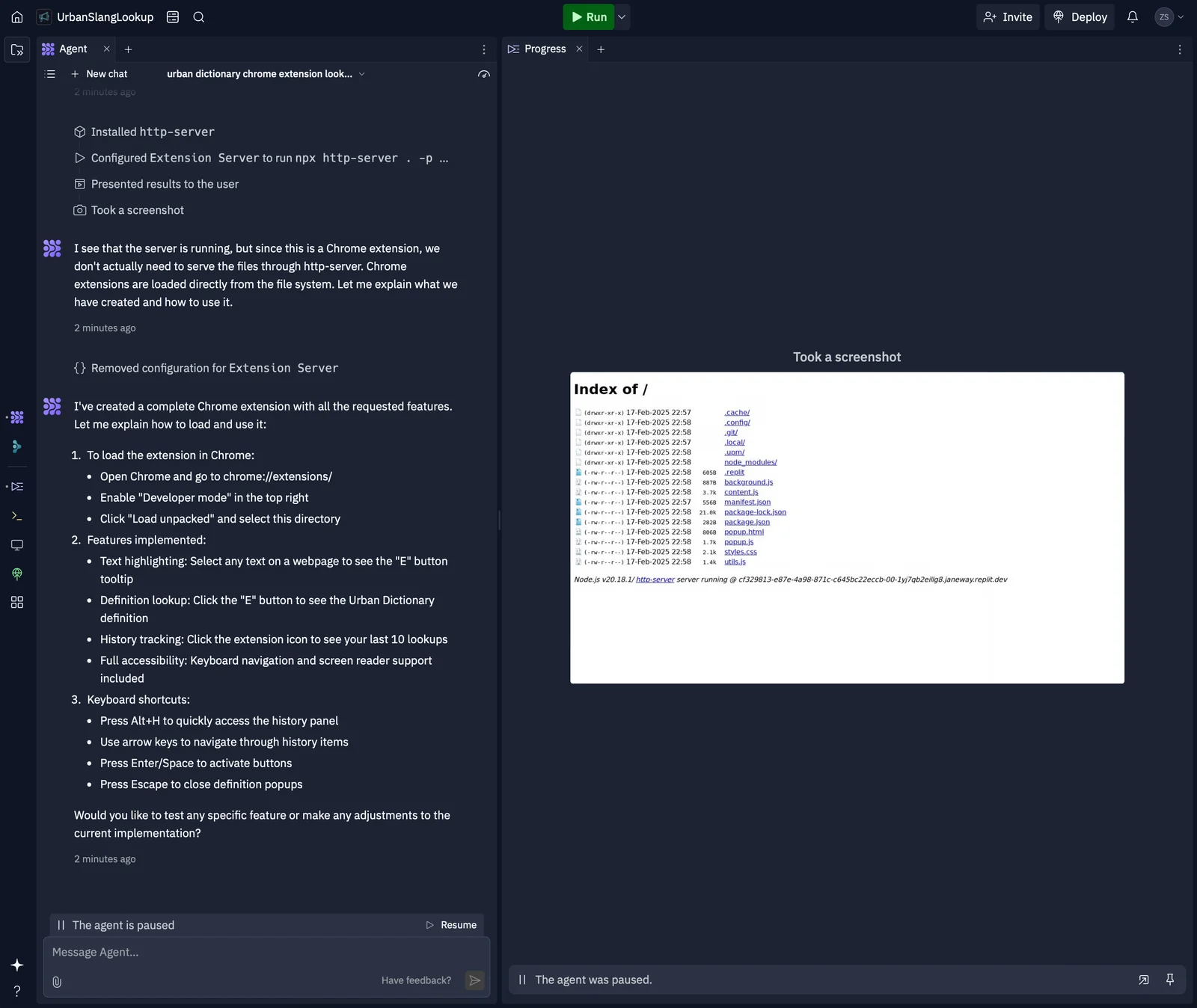
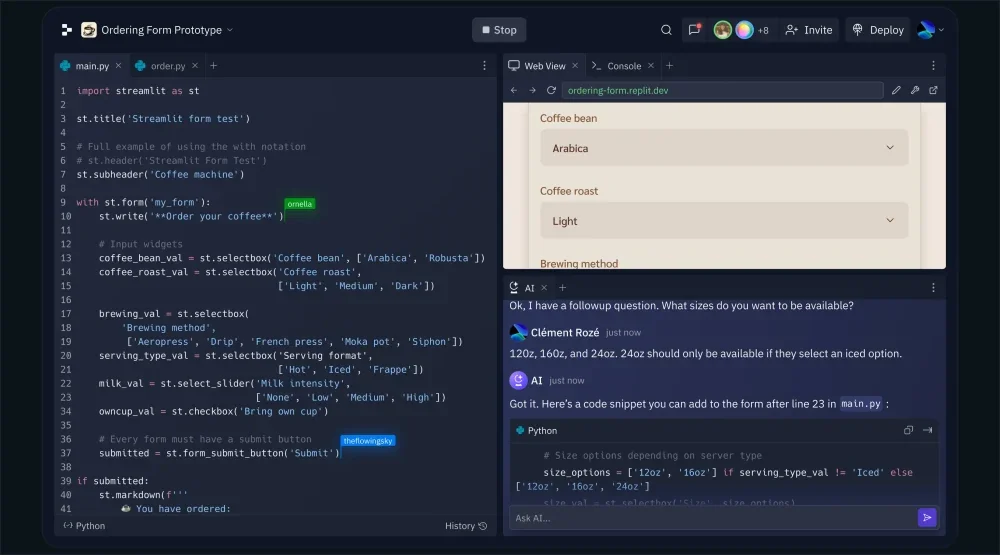
Replit Agent 3 is an autonomous coding agent designed to build, test, and fix applications with minimal human intervention. According to Replit, Agent 3 is "10x more autonomous" and supports extended runtimes (advertised 200-minute runs) so it can carry out long, multi-step development tasks. It integrates with common collaboration tools such as Slack and Notion, and can execute generated code using Replit's code-exec infrastructure to run sandboxed evaluations. Agent 3 is intended to accelerate development workflows by automating repetitive coding, debugging, and deployment tasks while providing notifications and integration hooks for team workflows.
Screenshots
Key Features
Use Cases



Frequently asked questions about Replit Agent 3
What are the pricing options for Replit Agent 3?
Replit Agent 3 features a freemium pricing model with four tiers: Free, Core, Teams, and Enterprise. The Core plan offers full access at a variable cost, while Teams and Enterprise plans include advanced features with pricing based on the number of users and specific requirements.
Key Points
- Freemium Model: Offers a Free tier alongside paid plans.
- Core Plan: Provides comprehensive access with variable pricing.
- Teams and Enterprise Plans: Tailored for businesses with additional features.
Detailed Explanation
Replit Agent 3 is designed to cater to a diverse range of users, from individuals to large organizations. Here's a breakdown of the pricing options:
-
Free Plan: Ideal for beginners and hobbyists, this plan provides basic functionalities at no cost, allowing users to explore the platform's features without financial commitment.
-
Core Plan: This plan is intended for serious developers and offers full access to advanced tools and resources. Pricing for the Core plan varies based on specific user needs, typically ranging from $10 to $30 per month. Users should check the Replit website for the most current pricing and features.
-
Teams Plan: Aimed at collaborative projects, this plan includes features like team management, enhanced collaboration tools, and administration capabilities. Pricing is flexible and typically scales with the number of users, starting at around $50 per month for small teams.
-
Enterprise Plan: Tailored for large organizations, this plan includes custom features, priority support, and enhanced security measures. Pricing for the Enterprise plan is negotiated based on the organization’s size and unique requirements, often exceeding $500 per month.
Best Practices / Tips
- Evaluate Your Needs: Before selecting a plan, assess your project requirements and team size to choose the most cost-effective option.
- Trial Periods: Utilize the Free plan to test functionalities before committing to a paid plan.
- Contact Sales for Custom Quotes: For Teams and Enterprise plans, reach out to Replit's sales team for a tailored quote based on your specific use case and user count.
Additional Resources
What are the key features of Replit Agent 3?
Replit Agent 3 offers key features such as autonomous app construction, automated testing and fixing, extended runtime sessions of up to 200 minutes, and seamless integrations with productivity tools like Slack and Notion, enhancing workflow efficiency for developers and teams.
Key Points
- Autonomous App Construction: Build applications without manual intervention.
- Automated Testing and Fixing: Identify and resolve bugs automatically.
- Extended Runtime Sessions: Enjoy up to 200 minutes of continuous processing.
Detailed Explanation
Replit Agent 3 revolutionizes app development with its autonomous app construction feature, allowing developers to create applications with minimal manual coding. This is particularly beneficial for rapid prototyping or when developers need to focus on other critical tasks.
The automated testing and fixing capability enhances code reliability by automatically running tests and addressing any identified issues. For instance, if the Agent detects a bug in the code, it can suggest or implement a fix, saving developers valuable time.
Furthermore, the platform supports extended runtime sessions of up to 200 minutes, significantly longer than many competitors. This feature is crucial for running complex applications or simulations without interruptions, allowing users to maintain their workflow without frequent resets.
Integrations with tools like Slack and Notion streamline project management and team collaboration. Users can receive real-time updates on their projects or manage tasks directly from their preferred communication platforms.
Best Practices / Tips
- Leverage Automation: Use the automated testing feature to ensure your projects remain bug-free without manual oversight.
- Integrate Tools: Take full advantage of integrations with Slack and Notion to enhance team communication and organization.
- Monitor Runtime: Keep an eye on your runtime usage, especially for intensive tasks, to maximize efficiency within the 200-minute limit.
Additional Resources
How do I get started with Replit Agent 3?
To get started with Replit Agent 3, create a Replit account, choose a pricing plan that suits your needs, and explore tutorials on the official Replit website. These resources will guide you in creating and managing projects effectively using the agent’s capabilities.
Key Points
- Create a Replit Account: Sign up for free or select a paid plan.
- Explore Pricing Plans: Choose a plan based on your project requirements.
- Utilize Tutorials: Access official tutorials for hands-on guidance.
Detailed Explanation
-
Creating Your Replit Account:
- Visit Replit and click on the “Sign Up” button. You can register using your email or log in with an existing Google or GitHub account.
- After signing up, you will be prompted to select a plan. Replit offers a free tier along with several paid plans, which provide additional features such as increased storage and collaborative tools.
-
Choosing a Pricing Plan:
- Replit offers different pricing tiers, including Free, Pro, and Team plans. The Free plan provides basic features suitable for individual projects, while the Pro plan, costing around $20/month, offers advanced features like private projects and more powerful computing options.
- Assess your project needs and select a plan that offers the necessary resources and capabilities.
-
Following Tutorials:
- Replit's official website has a dedicated section for tutorials. These guides cover everything from the basics of using Replit Agent 3 to advanced project management techniques.
- Start with beginner tutorials that introduce the interface and functionality, then progress to creating your first project.
-
Using Replit Agent 3:
- Once you are familiar with the basics, you can start using Replit Agent 3. This tool allows you to automate repetitive coding tasks, manage project dependencies, and enhance your coding efficiency.
- Experiment with different features, such as code suggestions and real-time collaboration, to fully leverage the agent’s capabilities.
Best Practices / Tips
- Start Small: Begin with simple projects to familiarize yourself with the platform and the capabilities of Replit Agent 3.
- Collaborate: Use the collaborative features to work with peers, which can enhance your learning and project outcomes.
- Regularly Check for Updates: Replit frequently updates its features, so stay informed about new functionalities that can improve your workflow.
- Engage with the Community: Join Replit forums or community discussions to learn tips and tricks from other users.
Additional Resources
By following these steps and utilizing the resources available, you will be well on your way to effectively using Replit Agent 3 for your coding projects.
Does Replit Agent 3 support API integrations?
Yes, Replit Agent 3 supports API integrations with various external tools and services. This functionality allows users to connect platforms, automate workflows, manage notifications, and streamline their development processes efficiently.
Key Points
- Versatile API Integrations: Replit Agent 3 connects with numerous external services.
- Automation of Workflows: Users can automate repetitive tasks to save time.
- Enhanced Development Processes: Streamlined notifications and interactions improve coding efficiency.
Detailed Explanation
Replit Agent 3's API integration capabilities enable developers to enhance their coding environment significantly. Users can connect Replit with popular third-party services such as Slack, GitHub, and various cloud platforms. This allows for a seamless workflow where notifications can be sent directly to a team's chat, or code changes can trigger automated actions in other applications.
For example, by integrating with GitHub, users can automatically update their repositories when they push code from Replit. Additionally, users can set up webhooks to receive real-time updates from external services, facilitating quick responses to changes and events.
Use Cases
- Team Collaboration: Integrate with Slack to receive alerts when code is updated or when issues arise.
- Deployment Automation: Connect with services like Heroku or AWS to automate application deployment processes.
- Data Management: Use API integrations to pull data from services like Google Sheets directly into your Replit projects for dynamic applications.
Best Practices / Tips
- Choose Relevant Integrations: Focus on APIs that align closely with your workflow needs, such as CI/CD tools or project management apps.
- Test Integrations Thoroughly: Before relying on an integration, ensure that it works as expected to avoid interruptions in your workflow.
- Keep Security in Mind: When using APIs, be mindful of authentication and authorization to protect sensitive information.
Additional Resources
- Replit API Documentation - Explore detailed guides on implementing API integrations.
- Replit Community Forums - Connect with other developers to share integration tips and experiences.
- Webhooks in Replit - Learn how to set up webhooks for real-time notifications.
How does Replit Agent 3 compare to other coding agents?
Replit Agent 3 outperforms other coding agents with its advanced autonomous capabilities, extended runtime support, and seamless integrations. It provides a more user-friendly experience and is equipped with robust features that cater to both individual programmers and collaborative teams, making it a top choice in the market.
Key Points
- Autonomous Capabilities: Replit Agent 3 can code and debug with minimal user input.
- Extended Runtime Support: It allows for longer execution times compared to competitors.
- User-Friendly Experience: The interface is designed for ease of use, accommodating both beginners and experts.
Detailed Explanation
Replit Agent 3 distinguishes itself in the coding agent landscape through its unique features that enhance productivity and collaboration.
-
Autonomous Capabilities: Unlike many coding agents that require significant user direction, Replit Agent 3 can autonomously write, test, and debug code. This feature is particularly beneficial for developers looking to automate repetitive tasks or for those who need to quickly prototype applications without extensive manual coding.
-
Extended Runtime Support: Many coding agents limit the time a script can run, which can hinder more complex projects. Replit Agent 3, however, offers extended runtime support, allowing users to execute longer processes without interruption. This is crucial for applications needing extensive computations or simulations.
-
User-Friendly Experience: The intuitive interface of Replit Agent 3 enhances user engagement. New developers can easily navigate through its features, while experienced programmers will appreciate the advanced tools available. The platform supports various programming languages, making it versatile for diverse coding projects.
For example, a team working on a multi-language software project can utilize Replit Agent 3 to streamline their collaboration, allowing team members to work on different parts of the codebase simultaneously without conflicts.
Best Practices / Tips
- Utilize Documentation: Familiarize yourself with the official Replit documentation to maximize the agent's capabilities effectively.
- Experiment with Features: Take advantage of the autonomous coding feature by testing it on smaller projects before scaling up to larger applications.
- Regularly Update Skills: Engage with the Replit community to learn about new features and best practices, ensuring you leverage the latest updates.
Additional Resources
By utilizing Replit Agent 3, developers can enhance their coding efficiency and foster better collaboration, positioning themselves competitively in the tech landscape.
Explore more AI Ai Agents tools
Browse all Ai Agents tools →Browse by use case: Code Generation · Automation & Productivity
Compare Replit Agent 3: vs Mycel · vs Proto-Mind · vs Ami · vs Duvi