

Recaply
AITransforms voice memos into structured, meeting-ready notes with AI transcription, summarization, and action-item extraction.
Recaply
Transforms voice memos into structured, meeting-ready notes with AI transcription, summarization, and action-item extraction.
About Recaply
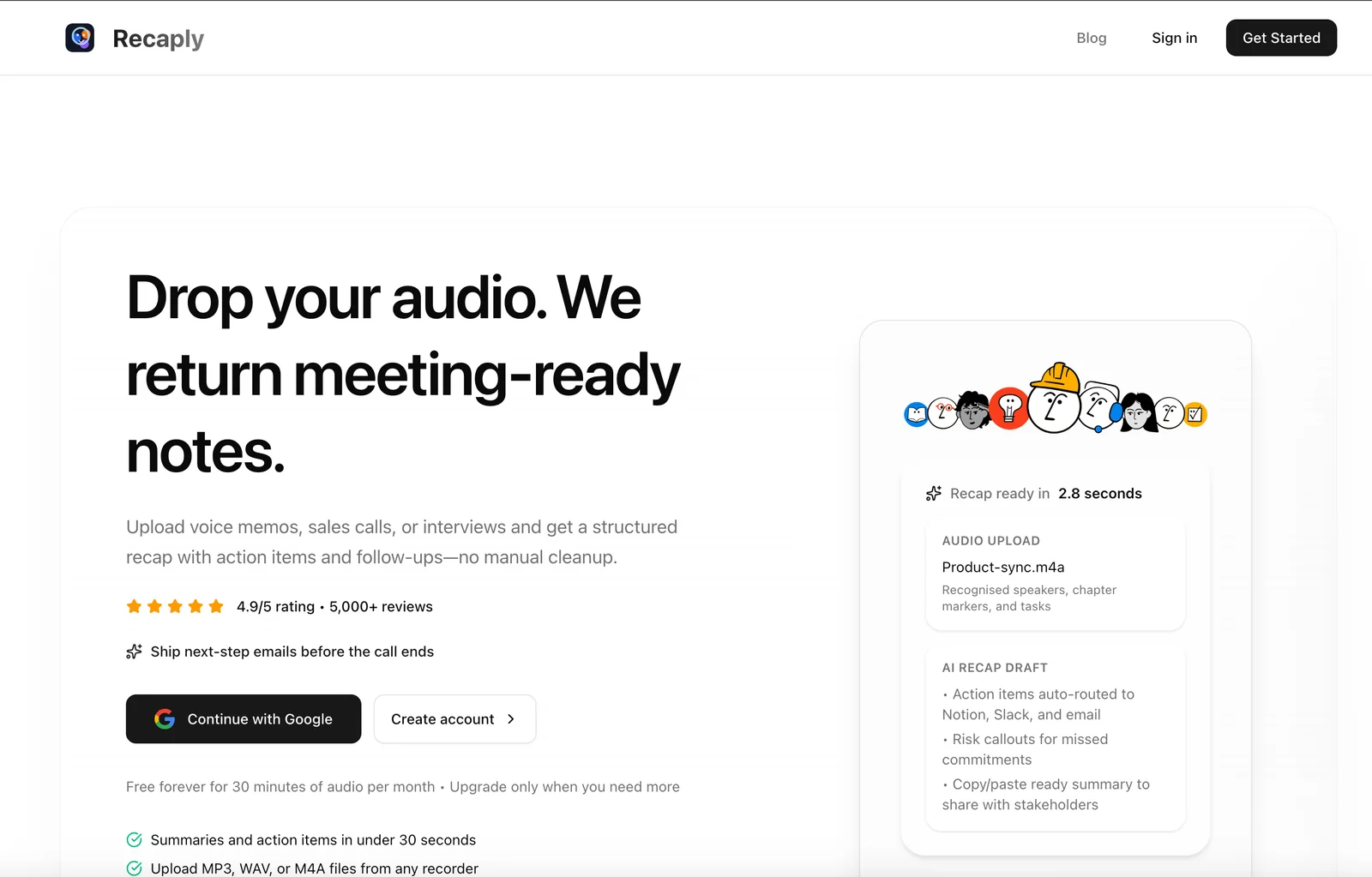
Recaply converts uploaded voice memos, sales calls, interviews and other audio into clean, structured notes by using AI-powered transcription and intelligent summarization. The service extracts key points, action items and follow-ups to produce meeting-ready recaps that require little or no manual cleanup. Aimed at professionals, students and content creators, Recaply speeds capture, synthesis, and sharing of audio-based information and can also produce concise audio recaps in podcast-style formats.
Screenshots
Key Features
Use Cases


Frequently asked questions about Recaply
What is the pricing structure for Recaply?
Recaply employs a freemium pricing model featuring a free tier for basic functionalities. For users requiring advanced features and extended recording capabilities, Recaply offers Pro/Team and Enterprise plans, with specific pricing details available upon direct inquiry with the company.
Key Points
- Freemium Model: Basic features available for free.
- Advanced Plans: Pro/Team and Enterprise options for enhanced functionalities.
- Contact for Pricing: Specific pricing details require direct communication with Recaply.
Detailed Explanation
Recaply’s pricing structure is designed to cater to a wide range of users, from casual individuals to large enterprises. The freemium model offers a free tier, which is ideal for users who need basic recording features without any financial commitment. This option allows users to explore Recaply's interface and understand its capabilities.
For those who need more robust features, Recaply provides Pro/Team and Enterprise plans. These plans unlock advanced functionalities such as longer recording durations, enhanced analytics, and team collaboration tools. While the free tier is useful for personal use or small projects, businesses may find the Pro/Team and Enterprise plans essential for their operational needs.
To obtain precise pricing details for these advanced plans, users must contact Recaply directly. This approach ensures that prospective customers receive tailored information based on their specific requirements, including the number of users and desired features.
Best Practices / Tips
- Evaluate Your Needs: Before choosing a plan, assess your recording needs and team size to ensure you select the most suitable option.
- Utilize the Free Tier: Take advantage of the free tier to become familiar with Recaply's functionalities before committing to a paid plan.
- Inquire for Discounts: When contacting Recaply for pricing, ask about potential discounts for annual subscriptions or bulk user licenses.
Additional Resources
- Recaply Pricing Page - Explore detailed pricing options and feature comparisons.
- Recaply Documentation - Access user guides and FAQs for a better understanding of features and functionalities.
How do I get started with using Recaply?
To get started with Recaply, visit the official website and sign up for an account. After signing in, upload your voice memos or recordings, and Recaply's AI will automatically convert them into structured notes and actionable items for you.
Key Points
- Easy sign-up process on the official Recaply website.
- Upload various audio formats for seamless processing.
- AI-driven technology for efficient note-taking and action item generation.
Detailed Explanation
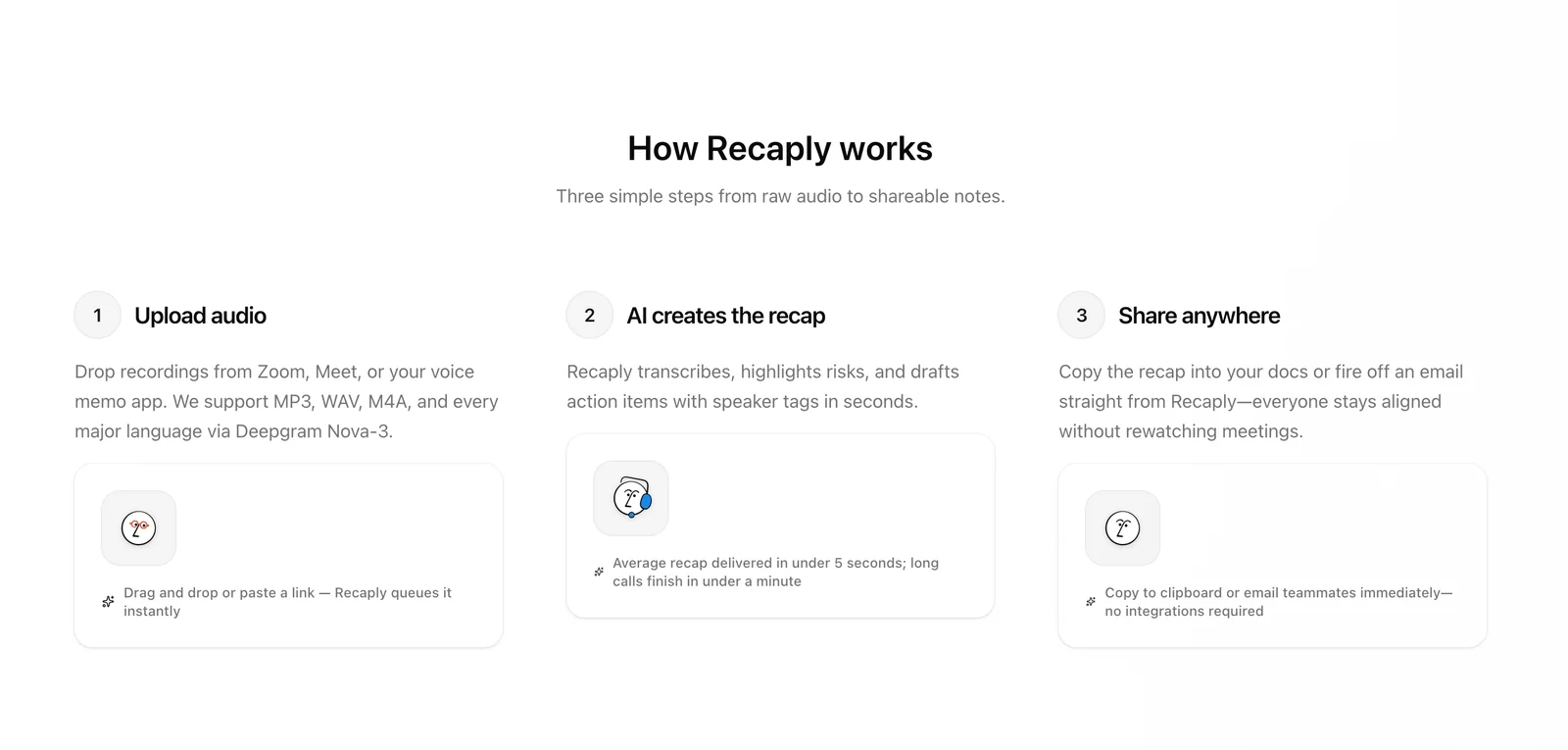
To begin your journey with Recaply, follow these simple steps:
-
Sign Up: Go to the Recaply website and create an account. You may need to provide an email address and create a password. Check your email for a confirmation link to activate your account.
-
Upload Your Audio: Once logged in, navigate to the upload section. Recaply supports various audio formats, including MP3, WAV, and M4A. You can upload voice memos from meetings, interviews, or personal notes.
-
AI Processing: After uploading, Recaply's AI will analyze your recordings. This technology identifies key points, topics, and action items, transforming your audio into structured notes. The process is quick, often taking just a few minutes, depending on the length of the audio.
-
Review and Edit: Once the processing is complete, review the generated notes. You can make edits, add comments, or organize your notes into categories for better clarity.
-
Export and Share: Finally, you can export your notes in various formats, such as PDF or Word, and share them with your team or save them for future reference.
Best Practices / Tips
- Use Clear Audio: For best results, ensure that your recordings are clear and free from background noise. This improves the AI's accuracy in note extraction.
- Organize Your Notes: After generating notes, categorize them by project or topic. This makes retrieval easier in the future.
- Regular Updates: Regularly check for updates on Recaply’s features. The platform is continually improving, and new functionalities may enhance your experience.
- Explore Integrations: If Recaply offers integrations with tools you already use (like Slack or Notion), take advantage of them to streamline your workflow.
Additional Resources
- Recaply Official Documentation
- Getting Started with Recaply - Video Tutorial
- Recaply Community Forum for user tips and support.
What are the key features of Recaply?
Recaply offers key features such as AI transcription of voice memos, intelligent summarization into meeting-ready notes, action item extraction, and support for various input formats. These capabilities streamline the note-taking process, making it easier to capture and organize information from different audio sources.
Key Points
- AI Transcription: Converts voice memos into text format.
- Intelligent Summarization: Produces concise notes suitable for meetings.
- Action Item Extraction: Identifies and highlights key tasks and decisions.
Detailed Explanation
Recaply is designed to enhance productivity by simplifying the transcription process. Here’s a closer look at its key features:
AI Transcription
Using advanced AI algorithms, Recaply transcribes audio files into accurate text. This functionality supports various audio formats, making it versatile for users who record meetings, lectures, or personal notes. For instance, if you have a voice memo from a brainstorming session, Recaply can quickly convert it into a text document.
Intelligent Summarization
Once the audio is transcribed, Recaply employs intelligent summarization technology to generate concise, meeting-ready notes. This feature ensures that users can easily skim through important information without sifting through lengthy transcripts. For example, after a team meeting, Recaply can summarize key points and decisions into a structured format, saving time and enhancing clarity.
Action Item Extraction
Recaply automatically identifies action items from the summarized notes, allowing users to focus on what needs to be done. This feature is particularly useful for project management, as it ensures that all tasks are clearly outlined and assigned. Users can benefit from this when distributing responsibilities after a planning meeting.
Best Practices / Tips
- Use Clear Audio: For optimal transcription accuracy, ensure that the audio quality is high and free from background noise.
- Review Summaries: Always review the intelligent summaries for accuracy and completeness before sharing them with your team.
- Organize Input Formats: Regularly categorize and label your audio files for easier retrieval and better organization within Recaply.
Additional Resources
Do I need technical skills to use Recaply effectively?
No, you do not need technical skills to use Recaply effectively. The platform is designed to be user-friendly, allowing anyone to upload audio files easily. Recaply's AI takes care of both transcription and summarization automatically, making it accessible for all users.
Key Points
- User-Friendly Interface: Recaply is designed for ease of use.
- Automated Processes: AI handles transcription and summarization.
- No Technical Knowledge Required: Suitable for everyone, regardless of skill level.
Detailed Explanation
Recaply provides a seamless experience for users looking to convert audio files into text and summaries. The process is straightforward: simply create an account, upload your audio files, and let Recaply's advanced AI technology do the rest.
-
Uploading Files: Users can drag and drop audio files in various formats (MP3, WAV, etc.) onto the platform. This intuitive interface minimizes the learning curve, making it suitable for educators, professionals, and students alike.
-
AI-Powered Transcription: Recaply utilizes state-of-the-art AI algorithms to transcribe the audio accurately. The system can process multiple speakers and differentiate between voices, enhancing the quality of the transcription.
-
Summarization Features: After transcription, Recaply automatically generates concise summaries, highlighting key points from the audio. This feature is particularly useful for students summarizing lectures or professionals reviewing meeting notes.
For example, a teacher can upload a lecture recording, and within minutes, receive both the full transcript and a brief summary, enabling efficient review and study.
Best Practices / Tips
- Clear Audio Quality: For the best results, ensure that the audio files are clear and have minimal background noise.
- Use Shorter Clips: If possible, break long recordings into shorter segments for more accurate transcription and summarization.
- Review Summaries: Always read through the AI-generated summaries to ensure they capture the essential points and adjust as necessary.
Common Pitfalls to Avoid
- Relying Solely on AI: While Recaply's AI is powerful, human review is essential for accuracy, especially in critical contexts.
- Uploading Poor Quality Files: Low-quality audio can lead to inaccurate transcriptions.
Additional Resources
By following these guidelines, anyone can leverage Recaply to enhance their productivity without needing technical expertise.
How does Recaply compare to other AI note-taking tools?
Recaply distinguishes itself from other AI note-taking tools by specializing in converting voice recordings into structured notes, featuring intelligent summarization and automatic action item extraction. This unique capability allows users to centralize diverse audio formats, enhancing productivity and organization unlike many other tools in the market.
Key Points
- Voice-to-Text Conversion: Recaply excels in turning voice recordings into written notes.
- Intelligent Summarization: The tool automatically summarizes content, saving time.
- Action Item Extraction: Users can easily identify and extract actionable tasks from recordings.
Detailed Explanation
Recaply’s innovative approach focuses on voice recordings, which sets it apart from traditional note-taking applications. Users can upload various audio formats, including meetings, lectures, and interviews, and Recaply will transcribe and format these recordings into coherent notes.
For instance, imagine you attend a lengthy meeting. Instead of manually jotting down notes, you record the session using Recaply. After the meeting, Recaply processes the audio, providing you with structured notes and highlighting key action items. This feature is particularly beneficial for professionals who need to manage multiple projects and tasks efficiently.
Example Use Cases:
- Business Meetings: Capture discussions and extract action items effortlessly.
- Lectures and Seminars: Students can record lectures and receive concise notes, enhancing study efficiency.
- Interviews: Journalists and researchers can transcribe interviews, simplifying the process of note-taking and information retrieval.
Best Practices / Tips
- Optimize Recording Quality: Ensure clear audio quality for better transcription accuracy. Use a good microphone if necessary.
- Review and Edit Notes: After processing, quickly review notes to add personal touches or clarify ambiguous sections.
- Utilize Tags and Categories: Organize notes by tagging or categorizing them for easier retrieval later.
Additional Resources
Explore more AI Ai Services tools
Browse all Ai Services tools →Browse by use case: Voice & Audio
Compare Recaply: vs BAND for Developers · vs NitroStack · vs GBrain · vs MentionBird