

Raccoon AI
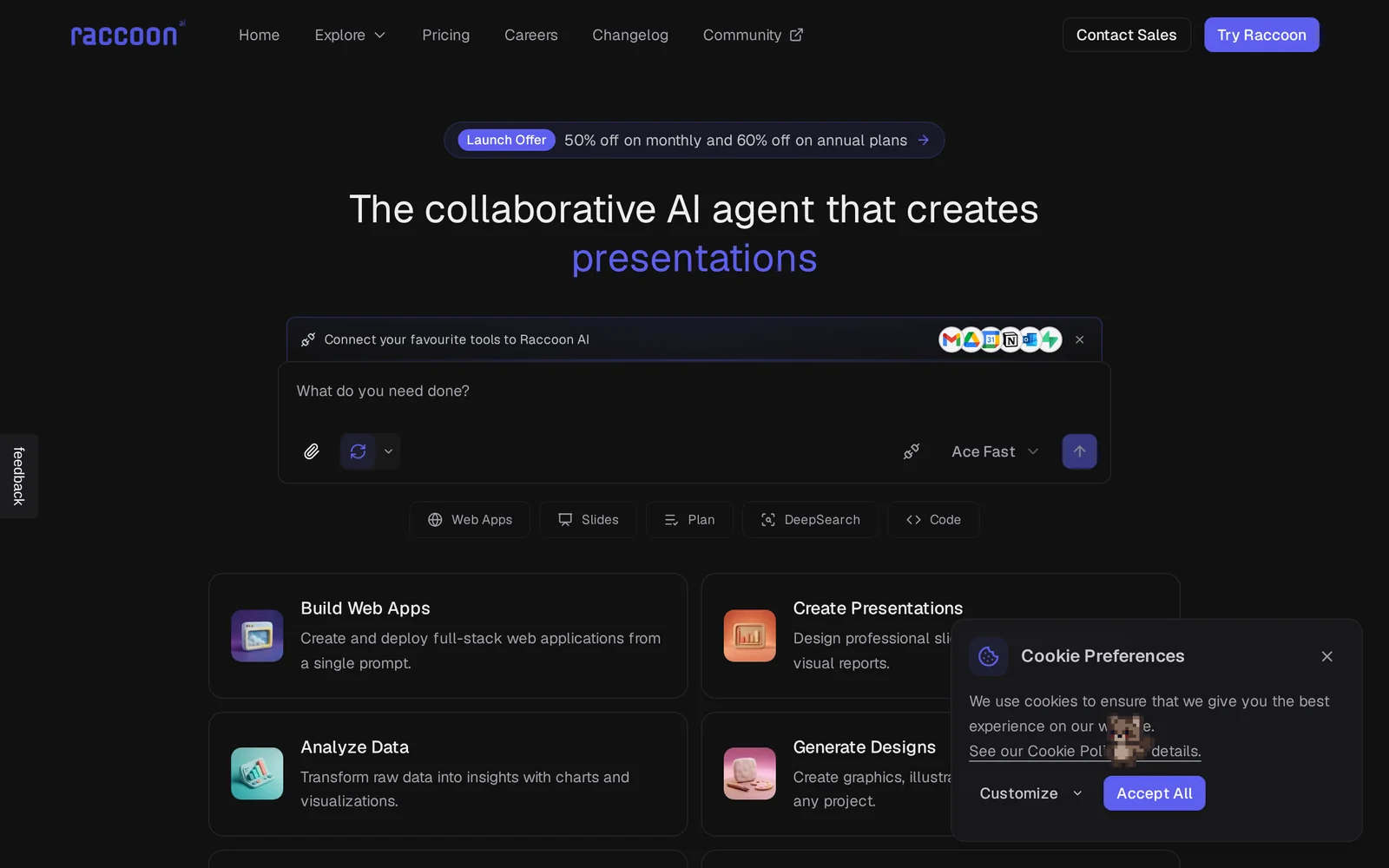
AIA collaborative AI agent that creates presentations, analyzes data, writes code, and automates end-to-end workflows.
Raccoon AI
A collaborative AI agent that creates presentations, analyzes data, writes code, and automates end-to-end workflows.
About Raccoon AI
Raccoon AI is a collaborative AI agent platform designed to automate complex, end-to-end workflows such as presentation generation, data analysis, code writing, and web automation. It exposes a REST API and official SDKs (including a Python client) to integrate programmatically, and provides a Model Context Protocol (MCP) server to enable web browsing, data extraction, and automated web tasks via a LAM API. The platform supports synchronous and asynchronous clients, configurable logging, raw response access, request retries and timeout handling, and can be integrated into desktop assistants or developer tooling to orchestrate multi-step tasks.
Screenshots
Key Features
Use Cases



Frequently asked questions about Raccoon AI
What is Raccoon AI?
Raccoon AI is a collaborative artificial intelligence platform designed to enhance productivity by creating presentations, analyzing data, writing code, and automating end-to-end workflows. It streamlines various tasks to improve efficiency and collaboration among teams.
Key Points
- Presentation Creation: Automates slide generation and design.
- Data Analysis: Provides insights through advanced analytics features.
- Workflow Automation: Integrates various tasks to enhance team productivity.
Detailed Explanation
Raccoon AI serves as a multifaceted tool that leverages artificial intelligence to simplify complex workflows.
Presentation Creation
With Raccoon AI, users can effortlessly generate professional presentations. For instance, the platform can analyze existing content and automatically create visually appealing slides, complete with relevant graphics and structured layouts. This feature is particularly beneficial for teams that need to prepare presentations quickly while maintaining high-quality standards.
Data Analysis
Raccoon AI also excels in data analysis. It can process large datasets to uncover trends and insights that may not be immediately apparent. Users can input raw data, and Raccoon AI will generate comprehensive reports, visualizations, and actionable recommendations. This capability is essential for data-driven decision-making in businesses.
Workflow Automation
The automation of end-to-end workflows is another standout feature. Raccoon AI can connect various applications and services, enabling seamless task management. For example, it can automate repetitive tasks such as data entry, report generation, and email notifications, allowing teams to focus on strategic activities rather than mundane chores.
Best Practices / Tips
- Integrate with Existing Tools: Raccoon AI works best when integrated with tools your team already uses, like Slack, Google Workspace, or project management software. This creates a cohesive workflow.
- Regularly Update Data: Ensure that the data you feed into Raccoon AI is current for optimal analysis results.
- Set Clear Objectives: Define what you want to achieve with Raccoon AI—whether it's faster presentations or deeper insights from data—to tailor its capabilities to your needs.
Additional Resources
- Raccoon AI Official Documentation
- How to Use Raccoon AI for Workflow Automation
- Case Studies on Raccoon AI Implementations
By leveraging Raccoon AI, teams can significantly enhance their productivity and streamline their tasks, making it an invaluable tool in the modern workplace.
How does Raccoon AI work?
Raccoon AI operates by integrating various artificial intelligence capabilities to streamline and enhance everyday workflows for users. By utilizing advanced algorithms, it automates tasks, improves decision-making processes, and increases productivity across multiple applications, making it an essential tool for businesses and individuals alike.
Key Points
- Integration of AI Technologies: Combines machine learning, natural language processing, and data analytics.
- Workflow Automation: Simplifies repetitive tasks, allowing users to focus on more strategic activities.
- User-Friendly Interface: Designed for ease of use, catering to both tech-savvy users and beginners.
Detailed Explanation
Raccoon AI harnesses the power of multiple AI technologies to assist users in their daily tasks. Key features include:
-
Machine Learning: This allows Raccoon AI to learn from user interactions, improving its responses and offering personalized recommendations over time. For instance, if a user frequently schedules meetings, the AI can suggest optimal times based on past behavior.
-
Natural Language Processing (NLP): Raccoon AI understands and processes human language, enabling it to interact seamlessly with users through chatbots or voice commands. This feature is particularly useful for customer service applications, where quick and accurate responses are crucial.
-
Data Analytics: By analyzing large datasets, Raccoon AI can provide insights that help users make informed decisions. For example, a marketing team could use Raccoon AI to analyze customer data and predict future buying trends, improving campaign effectiveness.
-
Integration Capabilities: Raccoon AI can easily integrate with existing software and tools, such as CRMs or project management platforms, creating a cohesive workflow that enhances productivity.
Best Practices / Tips
- Start Small: When implementing Raccoon AI, begin with a specific task to automate. This focused approach allows you to measure effectiveness before scaling.
- Regular Updates: Keep the AI updated with the latest features and improvements to maximize its capabilities.
- User Training: Provide training sessions for team members to ensure everyone understands how to leverage Raccoon AI effectively.
- Monitor Performance: Regularly review the AI's performance metrics to identify areas for improvement and ensure optimal operation.
Additional Resources
What are the main features of Raccoon AI?
Raccoon AI offers a range of powerful features, including advanced machine learning capabilities, natural language processing (NLP), and automated data analysis. These tools enable users to streamline workflows, enhance decision-making, and gain insights from large datasets efficiently.
Key Points
- Machine Learning Capabilities: Raccoon AI utilizes advanced algorithms for predictive analytics.
- Natural Language Processing: The platform excels in understanding and processing human language.
- Automated Data Analysis: Users can automate data-driven tasks, saving time and resources.
Detailed Explanation
Raccoon AI stands out with its machine learning capabilities that allow businesses to make data-driven decisions. The platform supports various algorithms, including supervised and unsupervised learning, which can be applied in sectors like finance for risk assessment or in marketing for customer segmentation.
The natural language processing (NLP) feature enables the AI to comprehend and generate human-like text, making it ideal for chatbots, sentiment analysis, and content generation. For example, businesses can use Raccoon AI to analyze customer feedback, extracting insights that can drive product improvements.
Moreover, Raccoon AI's automated data analysis capabilities streamline repetitive tasks. Users can set up workflows that automatically analyze large datasets and generate reports, which is particularly useful for businesses looking to enhance productivity. For instance, a retail company can automate inventory management analysis, leading to optimized stock levels and reduced costs.
Best Practices / Tips
- Leverage NLP for Customer Insights: Use Raccoon AI's NLP to gather and analyze customer sentiment from social media and reviews to enhance your product offerings.
- Implement Predictive Analytics: Use machine learning models to forecast sales trends, which can help in strategic planning and inventory management.
- Regularly Update Data Sources: Ensure that the datasets you use in Raccoon AI are current and relevant to maintain the accuracy of insights.
Additional Resources
Who is Raccoon AI for?
Raccoon AI is designed for a diverse audience, including businesses, freelancers, marketers, and tech enthusiasts looking to streamline their daily AI workflows. It caters to anyone needing efficient solutions for tasks like content creation, data analysis, and automation, making AI accessible for various industries.
Key Points
- Business Professionals: Enhance productivity with automated workflows.
- Freelancers: Improve project delivery and client communications.
- Marketers: Optimize campaigns and analyze customer data efficiently.
Detailed Explanation
Raccoon AI is a versatile tool that serves multiple user groups.
Business Professionals
For businesses, Raccoon AI automates repetitive tasks, such as scheduling meetings and generating reports. This efficiency allows teams to focus on strategic initiatives rather than administrative burdens. For instance, Raccoon AI can analyze large datasets to provide actionable insights, enhancing decision-making.
Freelancers
Freelancers can leverage Raccoon AI to streamline project management. By automating client communications and project updates, they can deliver work more efficiently. For example, using AI-generated content ideas can help freelancers produce high-quality work faster, leading to increased client satisfaction and referrals.
Marketers
Marketers find Raccoon AI particularly beneficial for campaign optimization. The tool can analyze customer data to identify trends and preferences, enabling marketers to tailor their strategies effectively. Additionally, Raccoon AI can assist in generating engaging social media posts and email marketing content, improving outreach efforts.
Best Practices / Tips
- Define Your Goals: Before using Raccoon AI, clearly outline what you want to achieve. This focus will help you utilize the tool effectively.
- Start Small: Begin with a single workflow to understand the tool’s capabilities before scaling to more complex tasks.
- Monitor Performance: Regularly review the results of AI-generated content or automated processes to ensure they meet your quality standards.
Additional Resources
How much does Raccoon AI cost?
Raccoon AI offers a free tier for users, allowing access to basic features at no cost. For advanced functionalities, it provides paid plans starting at competitive prices. Specific pricing varies based on the features selected, with monthly and annual subscription options available.
Key Points
- Raccoon AI provides a free tier for basic use.
- Paid plans offer advanced features and functionalities.
- Pricing varies based on subscription type and features selected.
Detailed Explanation
Raccoon AI caters to a wide range of users, from individuals to businesses, by offering a free tier that allows users to explore its capabilities without any financial commitment. This introductory option is perfect for those new to AI tools, enabling them to understand the platform's functionalities.
For users seeking more advanced features, Raccoon AI offers several paid plans. Pricing typically starts at around $10 per month for individual users, which can provide access to additional tools and enhanced support. Business plans may range from $50 to $200 per month, depending on the number of users and specific feature sets required.
Plan Breakdown:
- Free Tier: Basic features, suitable for casual users.
- Individual Plan: Starting at $10/month, includes advanced tools like analytics and reporting.
- Business Plan: Ranges from $50 to $200/month, offering team collaboration and customized solutions.
These plans often come with a free trial period, allowing users to test the advanced features before committing to a subscription.
Best Practices / Tips
- Evaluate Your Needs: Before selecting a plan, identify which features are essential for your tasks. This can help you choose the most cost-effective option.
- Take Advantage of the Free Tier: Utilize the free tier to familiarize yourself with the platform's interface and capabilities.
- Check for Promotions: Occasionally, Raccoon AI may offer discounts or promotional rates for new users. Stay updated by subscribing to their newsletter.
Additional Resources
By exploring the options and utilizing the resources provided, users can effectively choose the right plan that meets their needs while maximizing the value of Raccoon AI.
How do I get started with Raccoon AI?
To get started with Raccoon AI, visit raccoonai.tech to sign up for an account. Once registered, you can explore its features, including AI-powered automation tools and data analytics that enhance productivity and decision-making within your organization.
Key Points
- Easy Sign-Up: Register quickly on the official website.
- Feature Exploration: Discover various AI tools available.
- User Support: Access resources and support for setup.
Detailed Explanation
Raccoon AI offers a seamless onboarding experience. Here’s how you can get started:
- Visit the Website: Navigate to raccoonai.tech.
- Create an Account: Click on the sign-up button and fill out the required fields, including your email and password.
- Verify Your Email: Check your inbox for a verification email and follow the link to activate your account.
- Explore Features: Once logged in, you can explore various tools, such as:
- Automation Tools: Streamline repetitive tasks to save time.
- Data Analytics: Analyze your data for better insights and decision-making.
- Set Up Your Preferences: Customize your dashboard to focus on the tools you plan to use most.
Raccoon AI is designed for businesses of all sizes, from startups to large enterprises, allowing users to leverage AI technology for enhanced operational efficiency.
Best Practices / Tips
- Start with Tutorials: Utilize the beginner tutorials available on the platform to familiarize yourself with the interface.
- Regular Updates: Keep an eye on updates and new features from Raccoon AI to maximize your usage.
- Integrate with Existing Tools: Connect Raccoon AI with your current software to streamline workflows effectively.
- Engage with Support: If you encounter issues, reach out to customer support for prompt assistance.
Additional Resources
- Raccoon AI Documentation
- Raccoon AI Blog for tips and case studies.
- Raccoon AI Community Forum to connect with other users and share insights.
By following these steps and tips, you’ll be well on your way to leveraging Raccoon AI to enhance your business processes.
Explore more AI Ai Agents tools
Browse all Ai Agents tools →Browse by use case: Code Generation · Automation & Productivity
Compare Raccoon AI: vs Playad · vs Concierge by Juniors AI · vs Scout by Fini · vs Ruflo