

Qwen Image MultipleAngles
AIFreeUpload an image and apply camera effects (rotation, zoom, angles) using presets or custom prompts to generate multiple views.
Qwen Image MultipleAngles
Upload an image and apply camera effects (rotation, zoom, angles) using presets or custom prompts to generate multiple views.
About Qwen Image MultipleAngles
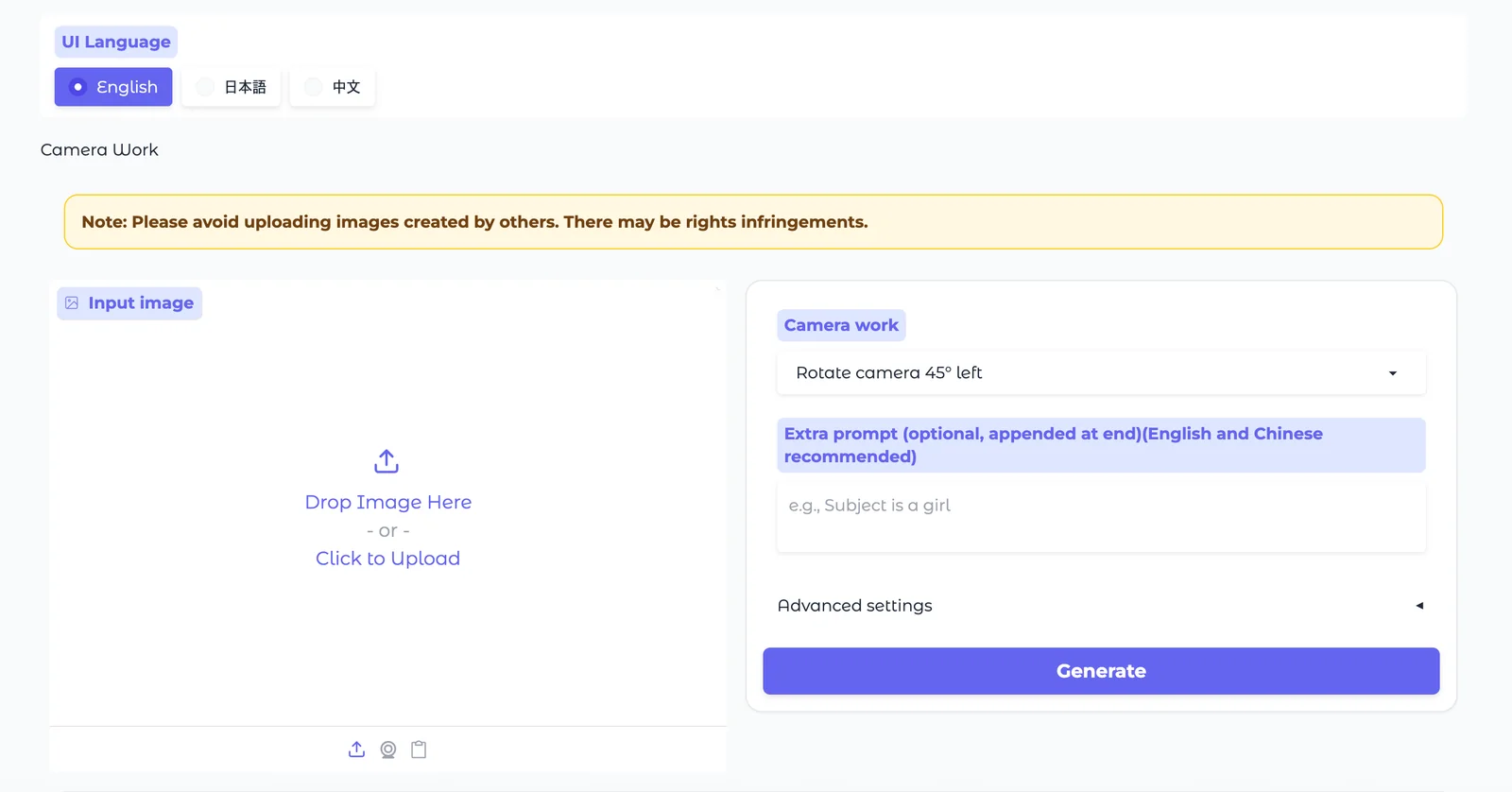
Qwen Image MultipleAngles is a Hugging Face Space that lets users upload one or more photos and generate alternate camera views by adjusting angle, height, distance, rotation and zoom. The tool accepts predefined transformation options or free-form text prompts and can use LoRA adapters to apply specialized camera control, style, or relighting transformations. It integrates with the Qwen Image Edit family (2509/2511 variants) and related workflows, preserving original pose and composition where requested and enabling multi-image composition or replacement. The Space is designed for interactive experimentation, rapid iteration, and can be run locally or on Hugging Face Spaces with GPU-backed inference.
Screenshots
Key Features
Use Cases



Frequently asked questions about Qwen Image MultipleAngles
What is the pricing structure for Qwen Image MultipleAngles?
Qwen Image MultipleAngles offers a flexible pricing structure, starting with a free tier that provides access to the Hugging Face Space and downloadable model files. Paid options are based on usage at $0.023 per image, with additional fees for advanced features such as fine-tuning and super-resolution.
Key Points
- Free Tier: Open access to basic features.
- Usage-Based Pricing: $0.023 per image.
- Advanced Features: Additional costs for fine-tuning and super-resolution.
Detailed Explanation
Qwen Image MultipleAngles presents a tiered pricing model designed to accommodate both casual users and professional developers.
-
Free Tier: Users can access the Hugging Face Space for free, which allows exploration of basic functionalities. Downloadable model files are also available, enabling users to experiment without any initial investment.
-
Paid Usage: The core paid option is usage-based pricing at $0.023 per image. This model is ideal for users who require scalability, as it allows them to pay only for what they use, making it cost-effective for varying project sizes.
-
Advanced Features: For users needing more sophisticated capabilities, Qwen offers additional features:
- Fine-Tuning: Customize the model to better suit specific needs, which incurs extra costs.
- Super-Resolution: Enhance image quality post-processing, also available for an additional fee.
Use Cases
- For Hobbyists: The free tier is perfect for those experimenting with AI and image manipulation.
- For Businesses: Companies can leverage the paid model for bulk image processing at a predictable cost.
- For Developers: Advanced features allow for tailored solutions in product design or media creation.
Best Practices / Tips
- Start with the Free Tier: Experiment with the platform to understand its capabilities before committing financially.
- Monitor Usage: Keep track of how many images you process to manage costs effectively.
- Evaluate Needs: Assess whether you require advanced features like fine-tuning or super-resolution to avoid unnecessary expenses.
Additional Resources
What are the key features of Qwen Image MultipleAngles?
Qwen Image MultipleAngles offers advanced features like camera effects controls for rotation and zoom, prompt-driven transformations for versatile edits, LoRA adapter support for tailored adjustments, and multi-image composition capabilities for intricate editing tasks, making it an essential tool for creative professionals.
Key Points
- Camera Effects Controls: Fine-tune rotation and zoom for precise image manipulation.
- Prompt-Driven Transformations: Easily apply diverse edits through intuitive prompts.
- LoRA Adapter Support: Integrate specialized models for enhanced adjustments.
- Multi-Image Composition: Combine multiple images for complex editing projects.
Detailed Explanation
Qwen Image MultipleAngles stands out with its sophisticated camera effects controls, allowing users to manipulate images dynamically. Users can adjust rotation angles and zoom levels, enabling precise edits that enhance visual storytelling. For instance, a photographer can rotate a product image to showcase it from multiple angles, improving customer engagement.
The prompt-driven transformation feature empowers users to apply a variety of edits seamlessly. By simply entering commands, users can achieve effects like color correction, background changes, or style transfers. This functionality is particularly useful for content creators looking to produce eye-catching visuals quickly.
Support for LoRA (Low-Rank Adaptation) adapters allows for specialized adjustments tailored to specific needs. This feature is especially beneficial for users who require unique transformations or effects that go beyond standard editing tools. For example, an artist could use a specific LoRA model to apply a distinct artistic style to their images.
Furthermore, the multi-image composition capabilities enable users to create intricate collages or composite images. This is ideal for graphic designers who need to combine several images into one cohesive piece, such as promotional materials or social media graphics.
Best Practices / Tips
- Experiment with Settings: Take time to explore different rotation and zoom settings to see how they impact your image.
- Utilize Prompts Effectively: Familiarize yourself with available prompts to maximize the tool’s editing capabilities.
- Leverage LoRA Models: Research and choose LoRA models that align with your specific editing goals for optimal results.
- Practice Composite Techniques: Experiment with layering images in the composition feature to enhance creativity.
Additional Resources
How do I use Qwen Image MultipleAngles to generate multiple views from an image?
To use Qwen Image MultipleAngles, upload an image on the Hugging Face Space interface. Then, select your desired camera effects or enter custom prompts. The tool will generate multiple views based on these settings, allowing for versatile visual outputs tailored to your specifications.
Key Points
- User-Friendly Interface: Qwen Image MultipleAngles is accessible through Hugging Face Space, making it easy to navigate.
- Customizable Settings: Users can choose various camera effects or input specific prompts to influence the generated images.
- Versatile Outputs: The tool creates multiple angles of the uploaded image, enhancing creativity and presentation options.
Detailed Explanation
Qwen Image MultipleAngles is a powerful AI tool designed to generate multiple perspectives from a single image. Here’s how to effectively use it:
-
Upload an Image: Visit the Hugging Face Space for Qwen Image MultipleAngles. Click on the upload button to select the image you want to transform. Supported formats typically include JPEG and PNG.
-
Select Camera Effects: Once your image is uploaded, you will see a panel offering various camera effects. These might include options for tilt, rotation, and perspective adjustments. Choose the ones that best suit your project.
-
Enter Custom Prompts: If you want specific outputs, you can input custom prompts. For example, you could request a “top-down view” or “45-degree angle” to guide the AI in generating the desired perspectives.
-
Generate Views: After setting your preferences, click on the “Generate” button. The tool will process your request and produce multiple views of your image, which you can then download or further modify as needed.
-
Review and Download: Check the generated images to ensure they meet your expectations. You can download the views directly to your device for use in presentations, marketing materials, or personal projects.
Best Practices / Tips
- Use High-Quality Images: Start with high-resolution images for better results. Low-quality images may lead to unsatisfactory outputs.
- Experiment with Prompts: Don’t hesitate to try different prompts to see how they affect the generated angles. This exploration can yield surprising and creative results.
- Check Compatibility: Ensure your browser is compatible with Hugging Face Space to prevent technical issues while using Qwen Image MultipleAngles.
- Utilize Preview Features: If available, use any preview features before finalizing your selections to save time and enhance your project.
Additional Resources
- Qwen Image MultipleAngles on Hugging Face
- User Guide for Hugging Face Tools
- Tips for Image Optimization
By following these guidelines, you can leverage Qwen Image MultipleAngles effectively, gaining the ability to create dynamic and engaging visual presentations.
Can Qwen Image MultipleAngles integrate with existing workflows or APIs?
Yes, Qwen Image MultipleAngles can seamlessly integrate with existing workflows via APIs and supports local deployment through platforms like Gradio and ComfyUI. This flexibility enables it to be incorporated into various applications, enhancing productivity and streamlining processes.
Key Points
- API Integration: Easily connect with other applications.
- Local Deployment Options: Use Gradio or ComfyUI for customization.
- Versatile Applications: Suitable for diverse industries and use cases.
Detailed Explanation
Qwen Image MultipleAngles offers robust integration capabilities, making it a versatile tool for developers and organizations. By utilizing APIs, users can connect Qwen with existing software systems, enhancing functionality and data flow. For example, a retail company can integrate Qwen to generate multiple angles of product images, automatically updating their e-commerce platform with fresh visuals.
Local Deployment
Local deployment options such as Gradio and ComfyUI allow users to run Qwen Image MultipleAngles on their own servers. This setup is beneficial for businesses that prioritize data security or require customized interfaces.
-
Gradio: This framework simplifies deploying machine learning models with a user-friendly interface. You can create a demo for Qwen Image MultipleAngles in just a few lines of code.
-
ComfyUI: Ideal for users looking for a more customizable workflow, ComfyUI provides advanced options for building tailored user interfaces that suit specific project needs.
Use Cases
- E-commerce: Generate product images from various angles for online listings.
- Real Estate: Create virtual tours by displaying properties from different perspectives.
- Marketing: Enhance promotional materials with diverse visual content.
Best Practices / Tips
- Test API Connections: Ensure that the integration with other software is smooth by running tests before full deployment.
- Optimize Image Quality: Adjust settings to balance between image quality and processing speed.
- Regular Updates: Keep Qwen Image MultipleAngles updated to leverage new features and security improvements.
Additional Resources
By following these guidelines, you can effectively integrate Qwen Image MultipleAngles into your existing workflows, maximizing its potential and enhancing your operational efficiency.
How does Qwen Image MultipleAngles compare to other image transformation tools?
Qwen Image MultipleAngles excels in image transformation by offering prompt-driven transformations, advanced camera effects, and compatibility with LoRA adapters. These features provide greater flexibility and creative options compared to other image transformation tools, which often lack such comprehensive capabilities.
Key Points
- Prompt-Driven Transformations: Easily customize outputs based on user-defined prompts.
- Comprehensive Camera Effects: Offers a variety of camera effects that enhance image quality.
- LoRA Adapter Support: Enables seamless integration of additional models for expanded functionality.
Detailed Explanation
Qwen Image MultipleAngles distinguishes itself in the competitive field of image transformation tools through its innovative features.
-
Prompt-Driven Transformations: Users can generate images based on specific textual prompts. This capability allows for a high level of customization, where the user can dictate aspects like style, perspective, and more. For instance, a user can input "a futuristic cityscape at sunset" and receive a tailored image that fits this description.
-
Comprehensive Camera Effects: The tool includes features that replicate various camera techniques, such as depth of field, exposure adjustments, and focus effects. These enhancements allow users to create professional-grade images without needing extensive photography skills. For example, users can simulate a DSLR camera's bokeh effect, adding artistic flair to their images.
-
LoRA Adapter Support: Qwen Image MultipleAngles is compatible with Low-Rank Adaptation (LoRA) models, allowing users to extend the tool's capabilities further. This means users can incorporate additional styles or transformations without compromising performance. For example, a photographer might use a LoRA adapter to apply a specific artistic style to their images, broadening their creative options.
Overall, these features position Qwen Image MultipleAngles as a versatile tool ideal for both professionals and hobbyists looking to elevate their image transformation process.
Best Practices / Tips
- Experiment with Prompts: Try various phrasing and details in your prompts to see how the output changes.
- Utilize Camera Effects: Take full advantage of the tool’s camera effects to enhance your images. Experiment with different settings to discover unique looks.
- Integrate LoRA Adapters: Explore available LoRA models that can add new dimensions to your work. Research community-shared models for inspiration and unique styles.
Additional Resources
Explore more AI Ai Models tools
Browse all Ai Models tools →Browse by use case: Image Generation
Compare Qwen Image MultipleAngles: vs Mouse-1 · vs Milliseconds.ai · vs SWE-2 · vs Desert Ant Labs