
OpenRouter Model Fusion
AIRun multiple models side-by-side, analyze their strengths, and fuse the best answer.
OpenRouter Model Fusion
Run multiple models side-by-side, analyze their strengths, and fuse the best answer.
About OpenRouter Model Fusion
OpenRouter Model Fusion lets users execute multiple language models in parallel, compare their outputs, and combine (fuse) the best parts into a single, higher-quality response. It analyzes model strengths and weaknesses, supports configurable fusion strategies, and integrates with the OpenRouter API to leverage dozens to hundreds of models. The feature improves answer reliability, reduces hallucinations by cross-checking outputs, and streamlines model selection by surfacing comparative metrics like confidence, latency, and cost.
Screenshots
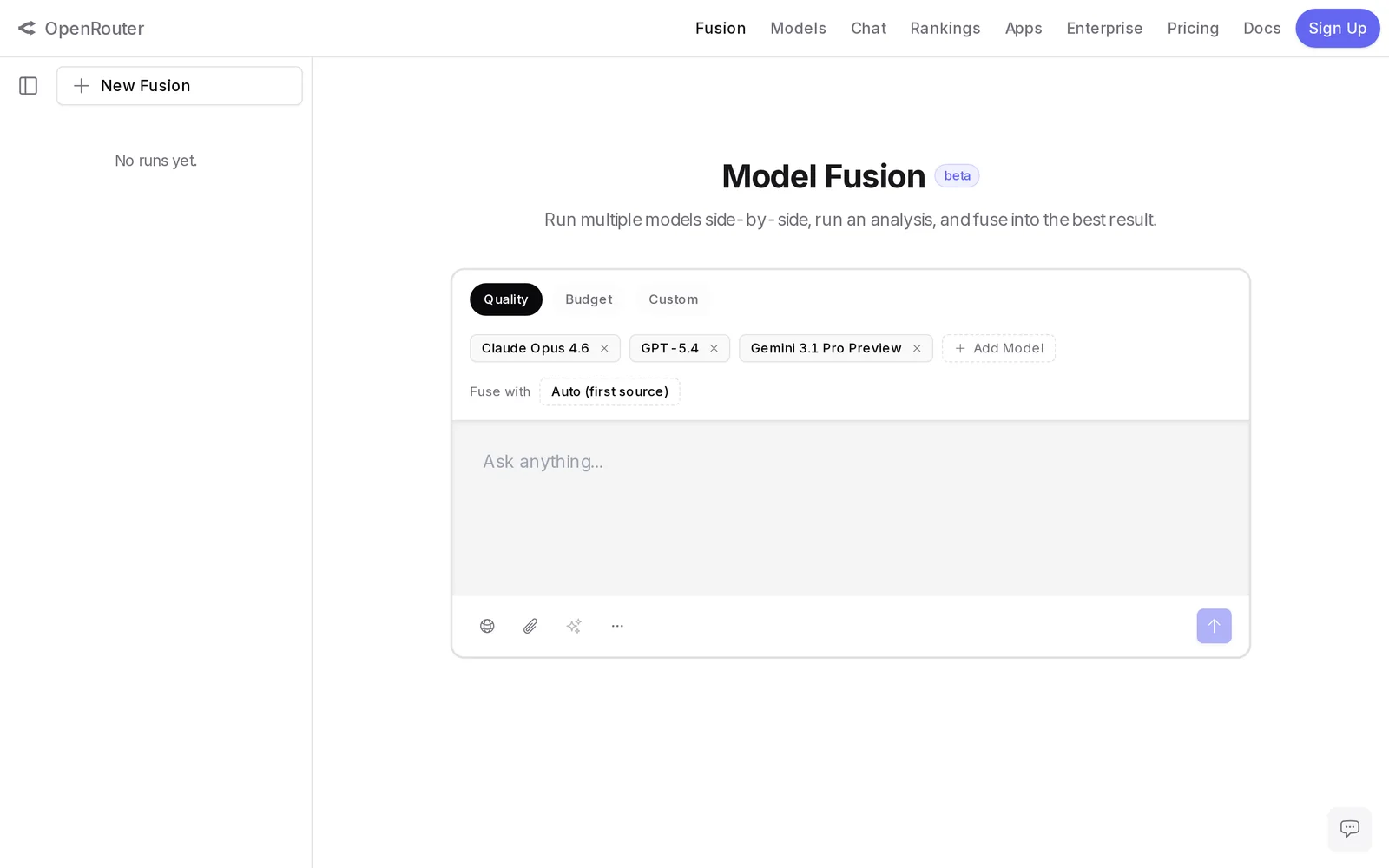
Key Features
Use Cases



Frequently asked questions about OpenRouter Model Fusion
What is OpenRouter Model Fusion?
OpenRouter Model Fusion is a powerful AI tool that allows users to run multiple models concurrently, evaluate their individual strengths, and combine their outputs to generate the most accurate and relevant answers. This innovative approach enhances decision-making and improves the quality of AI-generated content.
Key Points
- Concurrent Model Execution: Operate various AI models side-by-side for comprehensive analysis.
- Strength Evaluation: Assess the capabilities and performance of different models.
- Optimized Outputs: Fuse the best responses from each model for superior results.
Detailed Explanation
OpenRouter Model Fusion provides a unique capability for users looking to maximize the potential of artificial intelligence. By enabling the simultaneous execution of various AI models, users can leverage diverse algorithms tailored for specific tasks.
How It Works
- Model Selection: Users can choose from a range of pre-trained models suited for different domains, such as natural language processing, image recognition, or data analysis.
- Run Models Side-by-Side: Once selected, these models operate concurrently. For instance, a user can run a sentiment analysis model alongside a summarization model to gather a richer understanding of a text.
- Strength Analysis: After execution, the outputs from each model are analyzed. This step identifies which model performed best based on accuracy, relevance, and contextual understanding.
- Fusing Outputs: Finally, the best responses are combined to form a single, coherent answer. This fusion process can involve techniques like averaging scores, selecting the most confident predictions, or using ensemble methods.
Use Cases
- Content Creation: Writers can utilize Model Fusion to create engaging articles that incorporate various perspectives.
- Data Analysis: Businesses can analyze customer feedback using multiple models to derive actionable insights.
- Research Applications: Scholars can synthesize findings from different research models to strengthen their conclusions.
Best Practices / Tips
- Choose Complementary Models: When selecting models, ensure they have different strengths to maximize the benefits of fusion.
- Regularly Update Models: Keep your models updated to utilize the latest advancements in AI technology for better performance.
- Monitor Performance: Regularly assess the effectiveness of fused outputs to refine model selection and fusion strategies.
Additional Resources
How does OpenRouter Model Fusion work?
OpenRouter Model Fusion operates by integrating various AI models and core capabilities, enabling users to streamline their daily AI workflows. This process enhances efficiency and productivity by allowing seamless interaction between different AI tools, making it easier to tackle complex tasks and projects.
Key Points
- Integration of Multiple Models: Combines various AI models for enhanced capabilities.
- Workflow Optimization: Streamlines daily tasks, improving user productivity.
- User-Friendly Interface: Designed to be intuitive, facilitating ease of use.
Detailed Explanation
OpenRouter Model Fusion leverages the power of multiple AI models to provide a unified solution for users. By integrating diverse AI capabilities, it allows for improved performance in various applications, such as natural language processing, image recognition, and data analysis.
For example, a marketing team can use OpenRouter to combine a language model for content generation with an analytics model for performance tracking. This synergy enables them to create engaging content while simultaneously evaluating its impact, thereby optimizing their marketing strategies in real-time.
The process of Model Fusion involves several steps:
- Model Selection: Users can choose from a library of pre-trained models suitable for their specific tasks.
- Configuration: Users can customize the models according to their needs, adjusting parameters for optimal performance.
- Execution: Once configured, the models work together, sharing insights and data to produce superior results.
Best Practices / Tips
- Start Simple: Begin with a single use case to understand the integration process before scaling.
- Monitor Performance: Regularly assess how well the fused models perform against your objectives, making adjustments as necessary.
- Leverage Community Resources: Engage with user forums and documentation to learn best practices and troubleshoot common issues.
- Stay Updated: Keep an eye on updates and new model releases to enhance capabilities and maintain competitive advantage.
Additional Resources
- OpenRouter Official Documentation
- Getting Started with OpenRouter Model Fusion
- Community Forum for OpenRouter Users
By utilizing OpenRouter Model Fusion, users can significantly enhance their AI workflows, ensuring they remain at the forefront of innovation and efficiency.
What are the main features of OpenRouter Model Fusion?
OpenRouter Model Fusion offers advanced AI capabilities, including model interoperability, enhanced performance optimization, and user-friendly integration. These features enable seamless collaboration between different AI models, driving efficiency and innovation in AI-driven applications.
Key Points
- Model Interoperability: Supports multiple AI frameworks.
- Performance Optimization: Enhances processing speed and accuracy.
- User-Friendly Integration: Simplifies deployment and management.
Detailed Explanation
OpenRouter Model Fusion is designed to provide a seamless experience for developers and businesses looking to leverage AI technology.
-
Model Interoperability: This feature allows various AI models to work together, regardless of the platform they were built on. For instance, a developer can integrate a model trained on TensorFlow with another built using PyTorch, enabling richer data processing and more robust outcomes.
-
Performance Optimization: With built-in performance enhancements, OpenRouter Model Fusion significantly reduces response times and improves accuracy. This feature is particularly useful in real-time applications, such as chatbots and recommendation systems, where speed and precision are critical.
-
User-Friendly Integration: OpenRouter Model Fusion simplifies the deployment of AI models through easy-to-use APIs and a comprehensive dashboard. This means that even those with limited technical expertise can effectively manage and deploy their AI models, fostering innovation without the steep learning curve typically associated with AI technologies.
Best Practices / Tips
- Experiment with Different Models: Utilize the interoperability feature to combine the strengths of various models, enhancing the overall performance of your applications.
- Monitor Performance: Regularly assess the performance metrics provided by OpenRouter to identify areas for optimization.
- Utilize Documentation: Take advantage of OpenRouter’s extensive documentation to familiarize yourself with best practices and advanced features, ensuring you maximize the platform's capabilities.
Additional Resources
Who is OpenRouter Model Fusion for?
OpenRouter Model Fusion is designed for developers, data scientists, and businesses looking to enhance their AI workflows. It streamlines the integration and utilization of multiple AI models, making it suitable for anyone aiming to improve efficiency and effectiveness in AI-driven projects.
Key Points
- Target Audience: Developers, data scientists, and businesses.
- Enhances AI Workflows: Streamlines model integration and usage.
- Versatile Applications: Suitable for various industries and applications.
Detailed Explanation
OpenRouter Model Fusion is beneficial for a diverse range of users who are engaged in building or implementing AI solutions.
-
Developers: Software developers can leverage Model Fusion to integrate various AI models into applications seamlessly. This enables them to create more sophisticated and responsive applications without the need for extensive coding. For instance, a developer working on a chatbot can combine language models for better understanding and response accuracy.
-
Data Scientists: Data scientists can utilize Model Fusion to experiment with multiple models and select the best-performing ones. By using this tool, they can easily switch between models for comparative analysis, enhancing their ability to derive insights from data. For example, a data scientist can combine predictive models to optimize forecasting accuracy in financial data.
-
Businesses: Organizations across various sectors can implement OpenRouter Model Fusion to enhance their operational efficiency. Businesses can manage multiple AI applications, such as customer service automation and data analysis tools, all in one platform. This is particularly useful for companies looking to scale their AI initiatives without overwhelming their technical resources.
Best Practices / Tips
- Evaluate Model Performance: Regularly assess the performance of integrated models to ensure optimal results. Use metrics like accuracy, precision, and recall to gauge effectiveness.
- Start Small: Begin with a few models before expanding to more complex integrations. This allows for better troubleshooting and understanding of the workflow.
- Documentation: Keep thorough documentation of your integrations and processes to streamline troubleshooting and future updates.
- Stay Updated: Follow the latest advancements in AI models and tools to ensure you are using the most effective technologies available.
Additional Resources
How much does OpenRouter Model Fusion cost?
OpenRouter Model Fusion provides a free tier that allows users to access basic features. For advanced functionalities, it offers various paid plans, which typically range in price based on the level of service and features required, ensuring flexibility for different user needs.
Key Points
- OpenRouter Model Fusion has a free tier available.
- Paid plans offer advanced features for professional use.
- Pricing varies depending on the selected plan and features.
Detailed Explanation
OpenRouter Model Fusion’s pricing structure is designed to accommodate both casual users and professionals. The free tier provides essential features, making it an excellent choice for individuals or small teams looking to explore the platform without financial commitment.
For users needing more advanced capabilities, OpenRouter offers several paid plans. These plans typically offer enhanced features such as:
- Increased API access
- Enhanced performance metrics
- Priority customer support
The pricing for these plans can vary significantly. For instance, a basic paid plan may start at around $10 per month, while enterprise-level solutions could cost $100 or more, depending on the scale and specific needs of the organization.
Use Cases
- Small Startups: Utilize the free tier to prototype models before upgrading.
- Freelancers and Consultants: Access paid plans to leverage advanced features for client projects.
- Large Enterprises: Implement enterprise solutions to manage multiple models with enhanced support.
Best Practices / Tips
- Evaluate your needs: Start with the free tier to assess which features you truly require before committing to a paid plan.
- Monitor usage: Keep track of your usage to determine if a paid plan is necessary as your needs grow.
- Explore discounts: Look for promotional offers or annual payment discounts that can reduce costs.
Additional Resources
These resources provide in-depth information on features, pricing, and community support, helping users make informed decisions about their OpenRouter Model Fusion experience.
How do I get started with OpenRouter Model Fusion?
To get started with OpenRouter Model Fusion, visit OpenRouter.ai/labs/fusion to sign up for an account. You can explore the platform's features and capabilities, enabling you to leverage advanced AI model fusion for your projects.
Key Points
- Easy Sign-Up Process: Quick registration to access tools.
- Explore Features: Hands-on experience with AI model fusion.
- User-Friendly Interface: Intuitive design for seamless navigation.
Detailed Explanation
OpenRouter Model Fusion enables users to combine multiple AI models to enhance performance and achieve specific goals. To begin, follow these steps:
-
Sign Up: Navigate to OpenRouter.ai/labs/fusion and create an account. The process is straightforward and requires basic information.
-
Explore the Dashboard: Once logged in, you'll encounter a user-friendly dashboard. Familiarize yourself with available tools and options to understand how they can serve your needs.
-
Select Models: OpenRouter offers a variety of AI models. Choose the ones that align with your project objectives. Consider the model types, such as natural language processing, computer vision, or reinforcement learning.
-
Fusion Process: Utilize the Model Fusion feature to integrate selected models. This allows for enhanced capabilities, enabling tasks such as multi-modal learning or improved accuracy in predictions.
-
Testing and Iterating: After fusing models, test their performance using sample data. Monitor results and iterate by adjusting parameters or selecting different models to optimize outcomes.
Best Practices / Tips
- Define Clear Goals: Before starting, outline what you want to achieve with Model Fusion. This will guide your model selection.
- Experiment with Combinations: Don’t hesitate to try various combinations of models. The fusion process can yield unique results that may surprise you.
- Leverage Documentation: Utilize OpenRouter’s documentation and community forums for troubleshooting and best practices.
- Monitor Performance: Regularly analyze the performance of your fused models to identify areas for improvement.
Additional Resources
By following these steps and utilizing resources effectively, you can successfully integrate OpenRouter Model Fusion into your AI projects.
Explore more AI Ai Models tools
Browse all Ai Models tools →Compare OpenRouter Model Fusion: vs Mouse-1 · vs Milliseconds.ai · vs SWE-2 · vs Desert Ant Labs