

Offsite
AIBuild and orchestrate multi-agent systems that coordinate and work together seamlessly.
Offsite
Build and orchestrate multi-agent systems that coordinate and work together seamlessly.
About Offsite
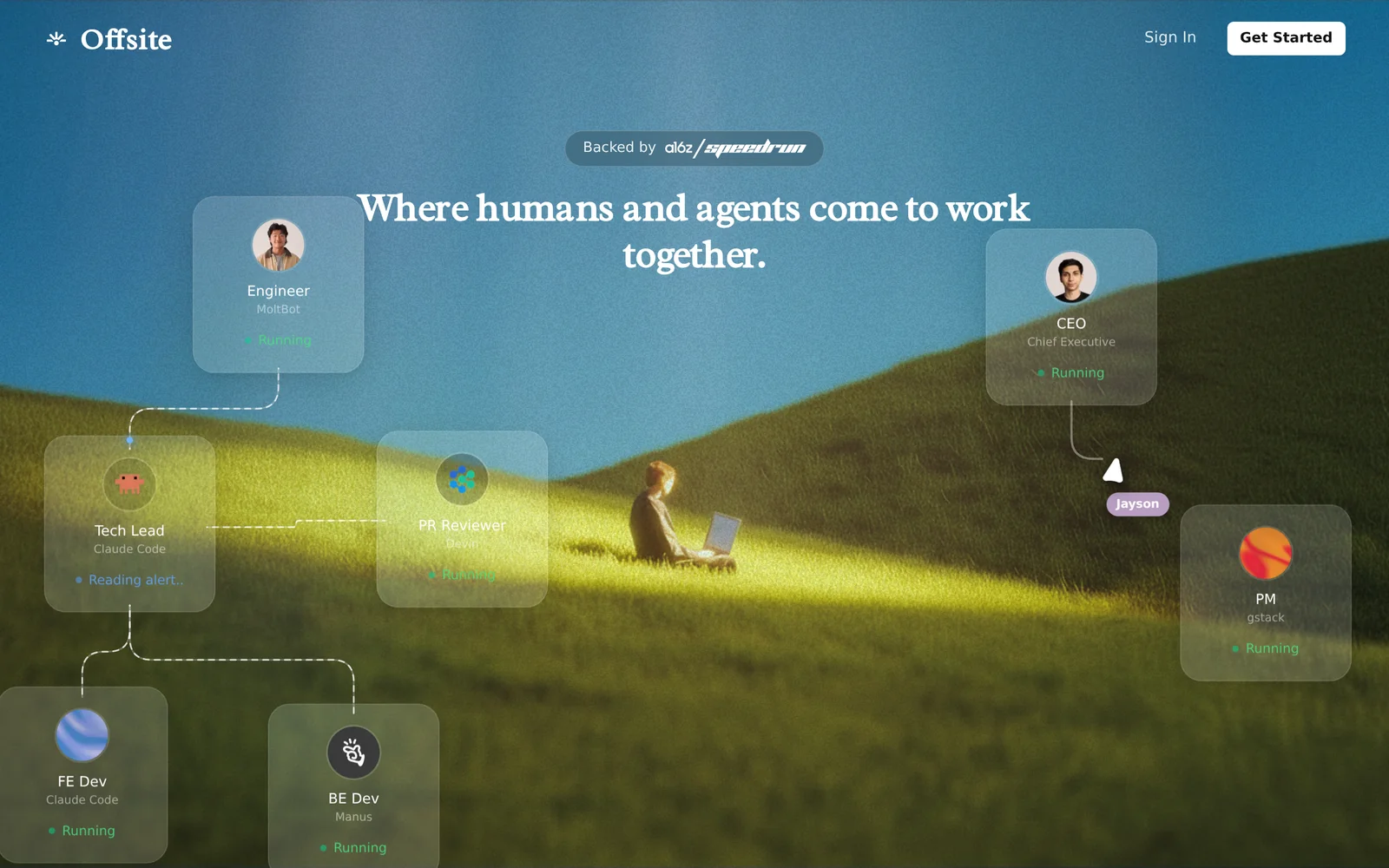
Offsite is a platform for building powerful multi-agent systems that coordinate to solve tasks. According to the official site, it focuses on enabling multiple agents to work together seamlessly; typical platform capabilities include defining agent roles, orchestrating inter-agent communication, and managing task workflows. Offsite's value is in simplifying the design, execution, and monitoring of collaborative agent-based applications so teams can compose complex behaviors from specialized agents rather than a single monolithic model.
Screenshots
Key Features
Use Cases



Frequently asked questions about Offsite
What is Offsite?
Offsite refers to the process of building and managing multi-agent systems that operate independently yet coordinate effectively. This approach enhances system performance by enabling agents to collaborate on tasks, share information, and execute complex operations seamlessly across different platforms or environments.
Key Points
- Definition of Offsite: Offsite systems involve multiple agents that work together.
- Collaboration: Agents communicate and share tasks to optimize performance.
- Applications: Used in various fields including AI, robotics, and cloud computing.
Detailed Explanation
Offsite systems leverage multi-agent frameworks where individual agents possess specific roles and capabilities. For instance, in an e-commerce platform, one agent might handle inventory management, while another processes customer queries. This division of labor allows for more efficient operations, as tasks can be completed simultaneously, reducing overall processing time.
Use Cases
- Robotics: In manufacturing, robots can work offsite to assemble products. Each robot can specialize in a specific task such as welding or painting, enhancing productivity.
- Cloud Computing: Cloud-based multi-agent systems can distribute workloads across various servers, ensuring that resources are utilized efficiently and without bottlenecks.
- Smart Cities: Offsite agents can manage traffic lights, waste collection, and energy distribution, optimizing urban infrastructure for better living conditions.
Best Practices / Tips
- Define Agent Roles Clearly: Each agent should have a distinct responsibility to prevent overlap and confusion.
- Implement Robust Communication Protocols: Ensure agents can exchange information quickly and reliably to enhance coordination.
- Monitor Performance Regularly: Use analytics to assess the efficiency of the multi-agent system and make adjustments as necessary.
Additional Resources
How does Offsite work?
Offsite operates by integrating advanced AI capabilities to streamline everyday workflows for users. This tool enhances productivity by automating tasks, improving collaboration, and providing intelligent insights, making it easier for teams to manage their projects and achieve their goals efficiently.
Key Points
- Automation of Routine Tasks: Offsite simplifies repetitive tasks.
- Enhanced Collaboration: Facilitates teamwork and communication.
- Intelligent Insights: Offers data-driven recommendations and analytics.
Detailed Explanation
Offsite leverages artificial intelligence to optimize various workflows, significantly benefiting users in project management, content creation, and data analysis. For instance, in project management, Offsite can automate task assignments based on team members' workloads and deadlines. This ensures that no task is overlooked and that resources are allocated efficiently.
In terms of collaboration, Offsite provides tools that allow teams to share updates, documents, and feedback in real-time. This feature minimizes communication gaps that often lead to project delays. Additionally, the intelligent insights feature analyzes past project data, helping users make informed decisions and improve future workflows.
For example, if a content marketing team uses Offsite, they can automate content scheduling while receiving suggestions on optimizing engagement based on analytics. This not only saves time but also increases the potential for content success.
Best Practices / Tips
- Leverage Automation: Identify repetitive tasks in your workflow and set up automations to save time and reduce errors.
- Utilize Collaborative Features: Encourage your team to use Offsite’s collaboration tools for real-time communication to enhance project visibility.
- Review Insights Regularly: Regularly check the insights provided by Offsite to adapt and optimize your strategies based on data trends.
Additional Resources
What are the main features of Offsite?
Offsite offers a range of advanced features including robust AI capabilities, seamless integrations, and powerful data analytics tools. These functionalities help businesses optimize their workflows, enhance customer engagement, and drive data-driven decision-making.
Key Points
- AI Capabilities: Advanced machine learning models.
- Integrations: Connect with various third-party applications.
- Analytics Tools: In-depth insights and reporting features.
Detailed Explanation
Offsite's key features revolve around its core AI capabilities. The platform leverages machine learning algorithms to automate tasks, analyze data, and generate insights that empower businesses to make informed decisions. For instance, Offsite's predictive analytics can forecast trends based on historical data, allowing companies to strategize effectively.
Seamless integrations are another vital aspect of Offsite. The platform can connect with popular third-party tools like Salesforce, HubSpot, and Google Analytics, enabling users to unify their data and streamline operations. This integration capability ensures that businesses can maintain a cohesive digital ecosystem, enhancing productivity and collaboration.
Additionally, Offsite provides powerful analytics tools that offer comprehensive reporting features. Users can track key performance indicators (KPIs) and visualize data through customizable dashboards. This allows businesses to identify areas for improvement and make data-driven adjustments to their strategies.
Best Practices / Tips
- Utilize AI Features: Take advantage of Offsite's AI capabilities by automating repetitive tasks to save time and reduce errors.
- Regularly Review Analytics: Consistently analyze your data reports to identify trends and adjust your strategies accordingly.
- Explore Integrations: Maximize productivity by integrating Offsite with other tools you use for a more streamlined workflow.
Additional Resources
Who is Offsite for?
Offsite is ideal for professionals and businesses seeking to enhance their daily AI workflows, including marketers, content creators, and data analysts. It streamlines tasks, boosts productivity, and integrates seamlessly with various AI tools, making it an essential resource for anyone looking to optimize their operations using artificial intelligence.
Key Points
- Target Audience: Professionals in diverse fields such as marketing, content creation, and data analysis.
- Functionality: Designed to simplify and automate daily AI tasks.
- Integration: Works well with various AI tools and platforms.
Detailed Explanation
Offsite caters to a wide range of users who want to leverage AI in their daily operations. Here are some specific groups that benefit from Offsite:
-
Marketers: Offsite helps marketers automate social media posts, analyze data trends, and personalize campaigns. For instance, a digital marketing team can use Offsite to generate content ideas based on trending topics, saving time and improving engagement.
-
Content Creators: Writers and content strategists can utilize Offsite to streamline research, optimize SEO, and manage content calendars. By integrating AI-driven tools, they can enhance their writing process and ensure that content is both relevant and high-quality.
-
Data Analysts: Offsite enables data analysts to automate data collection and visualization tasks. For example, analysts can set up workflows that automatically pull data from various sources, allowing for quicker insights and decision-making.
Best Practices / Tips
- Identify Workflow Needs: Before integrating Offsite, clearly define which daily tasks you want to automate. This will help you maximize the benefit.
- Leverage Integration: Take advantage of Offsite’s compatibility with other AI tools to create a more cohesive workflow.
- Stay Updated: Regularly check for updates and new features to ensure you’re utilizing Offsite to its fullest potential.
Additional Resources
How much does Offsite cost?
Offsite offers a free tier that allows users to access basic features at no cost. For advanced functionalities, the platform provides various paid plans, starting at competitive prices to suit different needs and budgets, ensuring flexibility for both individuals and businesses.
Key Points
- Free Tier: Basic features available without cost.
- Paid Plans: Options for advanced functionalities at varying prices.
- Flexible Pricing: Plans cater to different user needs and budgets.
Detailed Explanation
Offsite's pricing structure is designed to accommodate a wide range of users, from individuals to large enterprises. The free tier allows users to explore fundamental features such as basic analytics and content management tools, making it an excellent choice for beginners or those on a tight budget.
When users find value in the free offerings, they can opt for paid plans that unlock advanced features, such as enhanced analytics, priority support, and custom integrations. For example, Offsite's paid plans typically start around $10 to $50 per month, depending on the specific features selected and the scale of usage.
Here’s a breakdown of what you might expect:
- Basic Plan: Approx. $10/month with essential tools.
- Pro Plan: Around $25/month, including advanced reporting and integrations.
- Enterprise Plan: Custom pricing for larger organizations requiring tailored solutions and dedicated support.
This tiered approach not only provides users with the flexibility to choose based on their needs but also allows for scalability as users grow or their requirements change.
Best Practices / Tips
- Evaluate Your Needs: Before committing to a paid plan, assess which features will benefit you the most.
- Utilize the Free Tier: Use the free version to familiarize yourself with the interface and capabilities before upgrading.
- Consider Long-term Costs: If you're planning to use Offsite for an extended period, factor in whether the advanced features justify the monthly fees.
Additional Resources
How do I get started with Offsite?
To get started with Offsite, visit teamoffsite.ai to sign up for an account. After signing up, explore the platform's features, tools, and resources to enhance your experience and optimize your workflows effectively.
Key Points
- Easy sign-up process at teamoffsite.ai
- Explore features tailored for your needs
- Access resources for effective collaboration
Detailed Explanation
Getting started with Offsite is straightforward. First, navigate to teamoffsite.ai and click the "Sign Up" button. You’ll need to provide your email address and create a password. After confirming your email, you can log in to your new account.
Once logged in, take a moment to explore the dashboard. Offsite offers various tools designed to improve remote collaboration, including project management features, file sharing capabilities, and real-time communication tools. For example, you can create teams, assign tasks, and set deadlines, making it easier to manage projects from anywhere.
Additionally, Offsite provides a rich library of resources, including tutorials and FAQs, which can help you understand how to utilize the platform effectively. Familiarize yourself with these resources to maximize your usage of Offsite's features.
Best Practices / Tips
- Complete Your Profile: Fill out your profile with relevant information to help team members recognize you and understand your role.
- Utilize Templates: Offsite often provides templates for common tasks. Use these to save time and maintain consistency across projects.
- Regular Updates: Make it a habit to regularly check for updates or new features that Offsite might roll out, as staying informed can enhance your productivity.
Common Pitfalls to Avoid
- Neglecting Communication: Ensure that you are actively communicating with your team. Offsite’s tools are designed to facilitate this, so take advantage of them.
- Skipping Tutorials: Don’t skip the introductory tutorials, as they can provide valuable insights into effectively using the platform.
Additional Resources
- Official Offsite Documentation
- Getting Started with Offsite Guide
- Offsite Community Forum for tips and user experiences.
Explore more AI Ai Agents tools
Browse all Ai Agents tools →Browse by use case: Automation & Productivity
Compare Offsite: vs Apache Maka · vs Construct Computer · vs ShogunAI · vs fx