
OCR Arena
AIA free playground to test, compare, and rank foundation VLMs and open-source OCR models on uploaded documents.
OCR Arena
A free playground to test, compare, and rank foundation VLMs and open-source OCR models on uploaded documents.
About OCR Arena
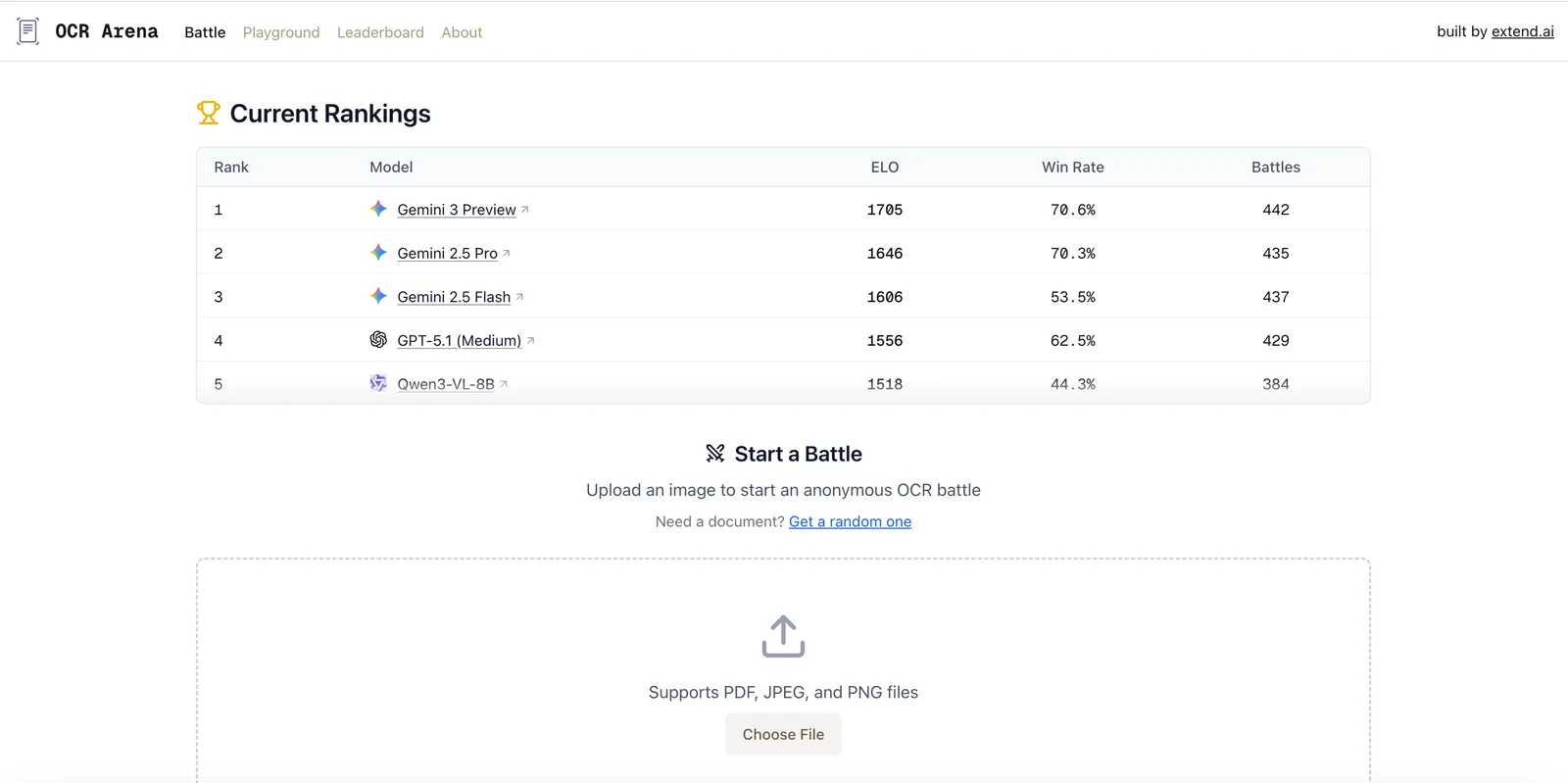
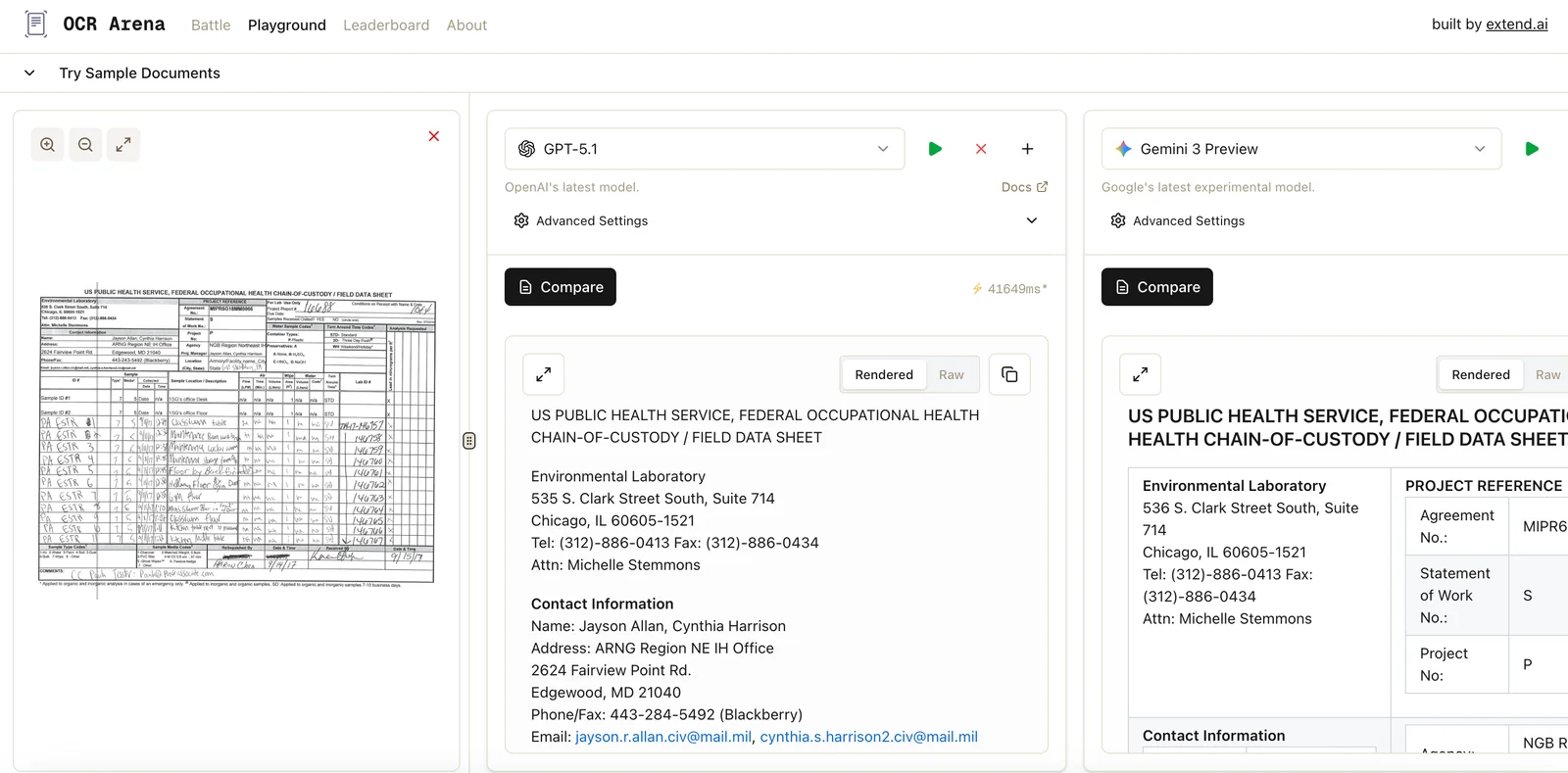
OCR Arena is a web-based playground for evaluating and benchmarking foundation vision–language models (VLMs) and open-source OCR models side-by-side. Users upload documents, run multiple OCR/VLM models on the same inputs, measure accuracy with built-in metrics, and participate in a public leaderboard and community voting to surface top-performing models. The platform enables transparent, repeatable comparisons across models and fosters community-driven evaluation and model selection.
Screenshots

Key Features
Use Cases



Frequently asked questions about OCR Arena
How do I get started with OCR Arena?
To get started with OCR Arena, simply visit the official website at ocrarena.ai, create a free account, and upload your documents for testing and comparison. This platform allows users to leverage advanced OCR capabilities for efficient data extraction.
Key Points
- User-Friendly Interface: OCR Arena offers an intuitive design for easy navigation.
- Document Upload: Supports various file formats for seamless processing.
- Testing and Comparison: Allows users to evaluate OCR accuracy on different documents.
Detailed Explanation
OCR Arena is a powerful Optical Character Recognition (OCR) tool designed for both individuals and businesses. To begin using it, follow these steps:
- Visit the Website: Open your web browser and go to ocrarena.ai.
- Create an Account: Click on the "Sign Up" button. Fill in the required information, such as your name, email, and password. Verify your email address to activate your account.
- Upload Your Documents: Once logged in, navigate to the document upload section. You can upload various file formats, including PDFs, images (JPEG, PNG), and more. The platform supports batch uploads, making it easy to handle multiple files at once.
- Select OCR Options: Choose the OCR settings based on your needs. You can specify the language, output format, and any additional processing features offered by OCR Arena.
- Start Testing: Initiate the OCR process. The tool will analyze your documents and extract text, enabling you to compare results and assess accuracy.
OCR Arena's advanced algorithms ensure high-quality text extraction while maintaining the layout of the original document.
Best Practices / Tips
- Verify File Format: Ensure your documents are in supported formats (PDF, JPEG, PNG) for optimal processing.
- Use Clear Scans: For best results, upload high-resolution images or PDFs. Poor quality scans may yield inaccurate text extraction.
- Explore Features: Take advantage of the platform’s features like language selection and formatting options to enhance your results.
- Regular Checks: Frequently test different document types to familiarize yourself with OCR capabilities and limitations.
Additional Resources
By following these steps and tips, you can maximize your experience with OCR Arena and efficiently convert your documents into editable text.
What features does OCR Arena offer for document processing?
OCR Arena provides powerful features for document processing, including the ability to upload documents for testing, a side-by-side comparison of different OCR models, detailed accuracy metrics, and a public leaderboard that promotes community evaluations and fosters competition.
Key Points
- Document Uploads: Easily test various documents for OCR performance.
- Model Comparison: Compare different OCR models side-by-side for optimal selection.
- Accuracy Metrics: Access detailed metrics to evaluate performance.
- Public Leaderboard: Engage with the community through evaluations and rankings.
Detailed Explanation
OCR Arena is designed for developers and researchers working with Optical Character Recognition (OCR) technologies. Here are the main features in detail:
Document Uploads
Users can upload a variety of document types, such as PDFs, images, and scanned files, for testing. This feature allows users to evaluate how well different OCR models handle their specific documents, improving the overall selection process.
Model Comparison
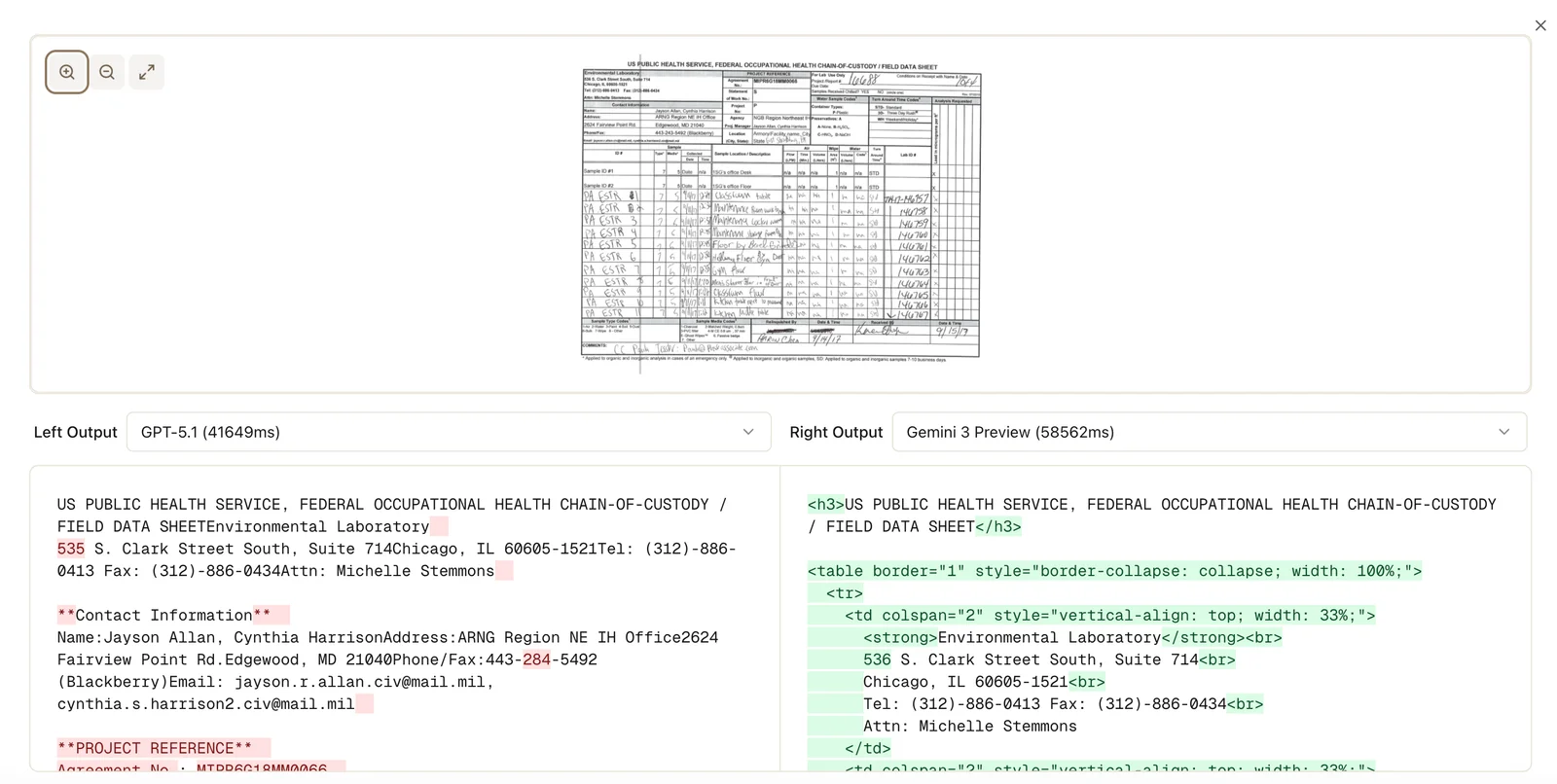
The side-by-side comparison tool enables users to analyze the output from multiple OCR models simultaneously. This feature is particularly useful for determining which model has the highest accuracy or best handles particular document formats. For example, users can compare results from Tesseract and Google Vision API to see which performs better on their data set.
Accuracy Metrics
OCR Arena provides comprehensive accuracy metrics, including precision, recall, and F1 scores, to help users evaluate how well each model performs. These metrics are crucial for understanding the strengths and weaknesses of different OCR solutions and making informed decisions based on data-driven insights.
Public Leaderboard
The platform's public leaderboard fosters a competitive spirit among users. It ranks OCR models based on community evaluations, providing users with an overview of the top-performing solutions. This feature encourages users to share their findings and contribute to ongoing improvements in OCR technology.
Best Practices / Tips
- Experiment with Multiple Formats: Upload various document types to see how models perform across different formats.
- Regularly Check the Leaderboard: Stay updated on the latest top-performing OCR models to make informed decisions.
- Use Accuracy Metrics Wisely: Focus on metrics that align with your specific use case, whether that’s precision for data extraction or recall for broad text recognition.
Additional Resources
Do I need any technical skills to use OCR Arena effectively?
No technical skills are required to use OCR Arena effectively. Its intuitive, user-friendly interface enables anyone to easily upload documents and compare various OCR models, making it accessible for users of all levels, from beginners to advanced professionals.
Key Points
- User-Friendly Interface: Designed for non-technical users.
- Easy Document Upload: Streamlined process for all types of documents.
- Model Comparison: Simple tools to assess different OCR solutions.
Detailed Explanation
OCR Arena is specifically designed to cater to users without any technical background. The platform allows users to upload a variety of document formats, including PDFs, images, and scanned files, with just a few clicks.
-
Uploading Documents: Users can drag and drop files directly into the interface or use the upload button to select documents from their devices. Supported formats include JPEG, PNG, TIFF, and PDF.
-
Comparing OCR Models: Once documents are uploaded, users can choose from a selection of OCR models to test. This functionality is crucial for businesses looking to evaluate the effectiveness of different OCR technologies. The platform provides clear metrics and comparisons, allowing users to make informed decisions.
-
User Support: For those who might have questions, OCR Arena offers comprehensive support documentation and tutorials. These resources guide users through the uploading and comparison processes, ensuring a smooth experience.
Best Practices / Tips
- Choose the Right Format: Ensure that your documents are in a supported format for optimal results.
- Test Multiple Models: Take advantage of the comparison features by testing several OCR models to find the best fit for your needs.
- Stay Updated: Regularly check for updates or new features in OCR Arena to maximize your usage of the platform.
Additional Resources
How does OCR Arena compare to other OCR tools in the market?
OCR Arena differentiates itself from other OCR tools by providing a free platform for side-by-side comparisons of numerous OCR models and Vision Language Models (VLMs), enhanced by community-driven benchmarking and voting features. This collaborative environment fosters informed decisions for users seeking the best OCR solutions.
Key Points
- Free Comparison Platform: Users can evaluate various OCR models without any cost.
- Community-Driven Insights: Real-time feedback and benchmarking from users improve transparency.
- Focus on VLMs: Includes advanced Vision Language Models for enhanced functionality.
Detailed Explanation
OCR Arena’s unique features make it a compelling choice in the crowded OCR market. By allowing users to compare different OCR models side by side, it simplifies the process of selecting the right tool for specific needs. Here are some key aspects that set OCR Arena apart:
-
User-Friendly Interface: The platform is designed for ease of use, enabling users to navigate through multiple models seamlessly. This is particularly beneficial for businesses and individuals who may not have extensive technical expertise.
-
Community-Driven Benchmarking: Users can contribute to the benchmarking process by sharing their experiences and results, leading to a more robust understanding of each tool’s performance. This aspect encourages a collaborative atmosphere where users help each other make informed choices.
-
Voting Features: The ability to vote on the effectiveness of different models adds an element of gamification, encouraging more users to participate and share their insights. This feedback loop can lead to continuous improvement in the tools being evaluated.
-
Inclusion of VLMs: Unlike many traditional OCR tools that focus solely on text extraction, OCR Arena’s inclusion of Vision Language Models allows for more complex tasks, such as understanding visual context in addition to text.
For example, a user needing to digitize a large volume of documents can leverage OCR Arena to compare various OCR solutions based on speed, accuracy, and additional features like multilingual support.
Best Practices / Tips
- Evaluate Needs First: Before using OCR Arena, clearly define your requirements (e.g., language support, accuracy, processing speed).
- Engage with the Community: Take advantage of user feedback and community insights for the best results.
- Regularly Check for Updates: The OCR landscape is constantly evolving, so keep an eye on new model comparisons and community votes.
Additional Resources
Explore more AI Ai Models tools
Browse all Ai Models tools →Compare OCR Arena: vs Mouse-1 · vs Milliseconds.ai · vs SWE-2 · vs Desert Ant Labs