

Mistral OCR 3
AIHigh-accuracy, efficient OCR designed to improve document processing accuracy and speed.
Mistral OCR 3
High-accuracy, efficient OCR designed to improve document processing accuracy and speed.
About Mistral OCR 3
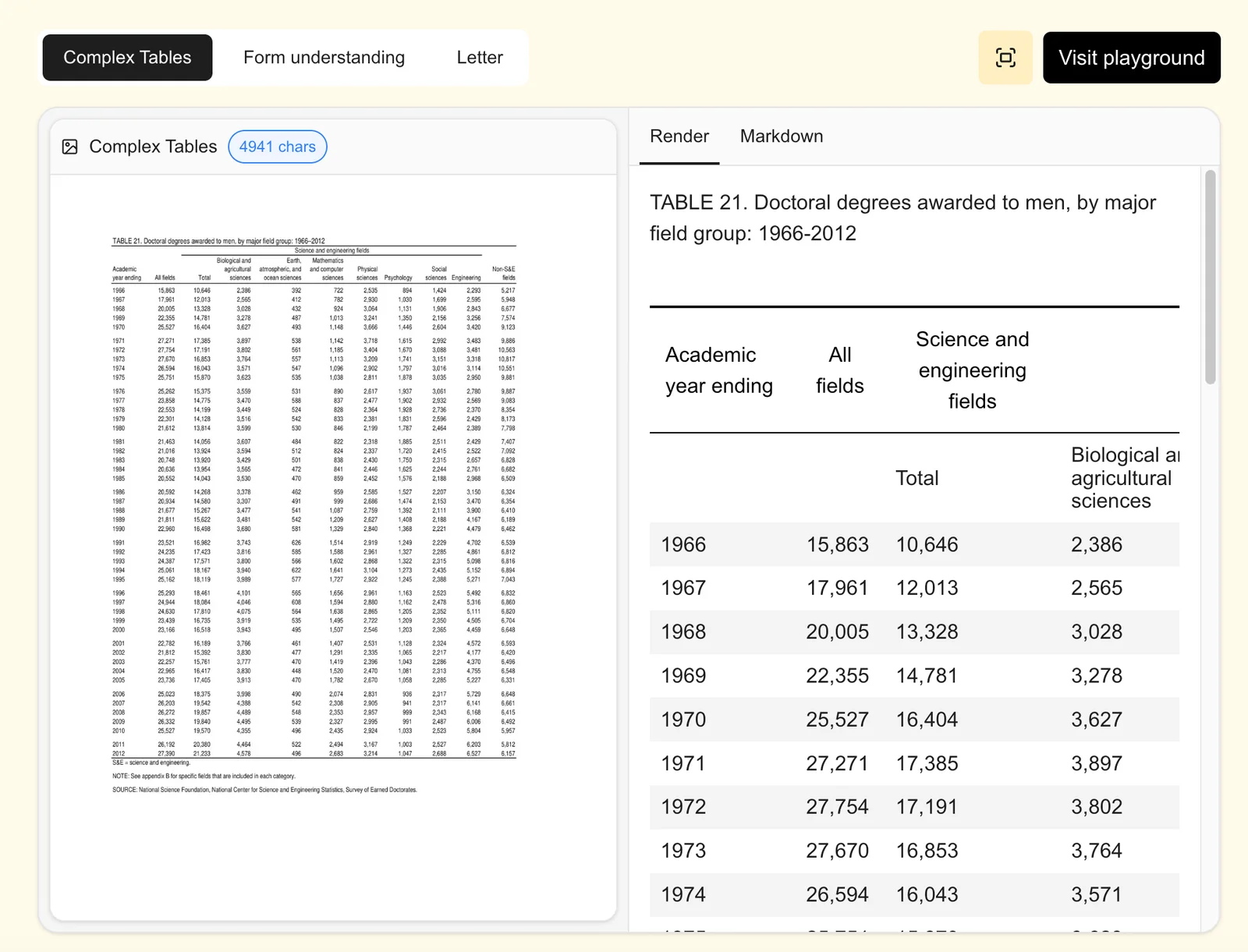
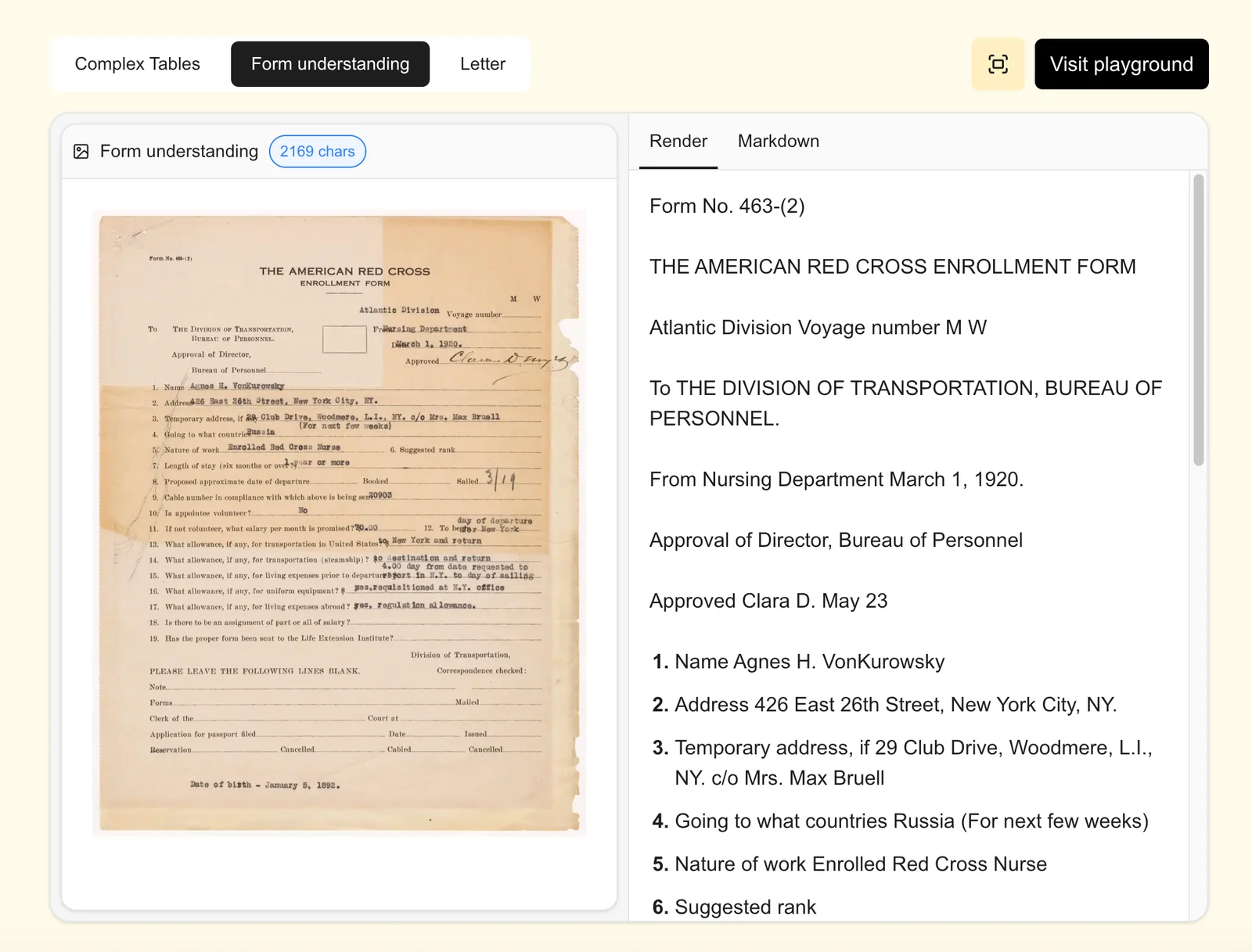
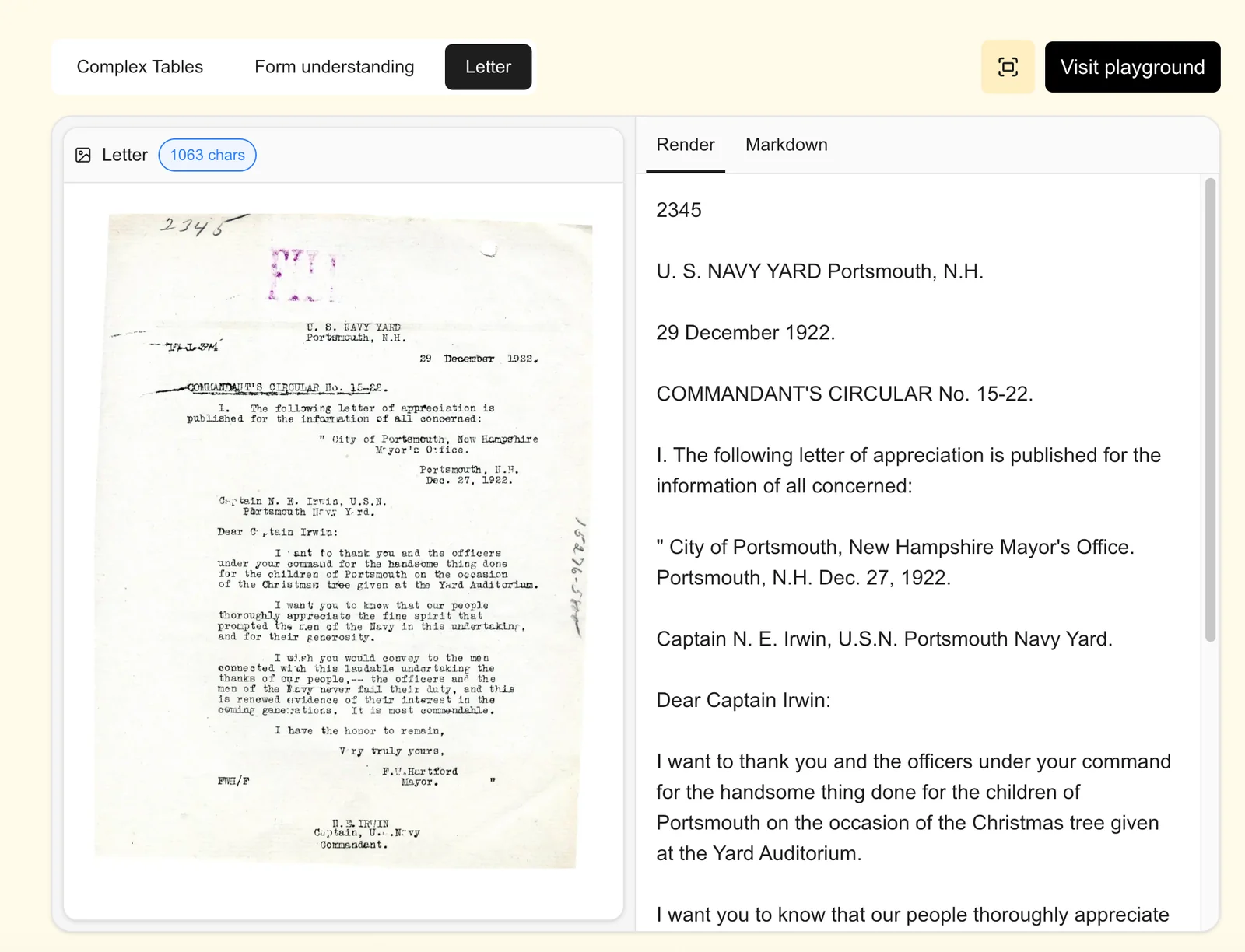
Mistral OCR 3 is a next-generation optical character recognition model focused on advancing both recognition accuracy and processing efficiency for document workloads. It targets robust extraction of text and document structure from diverse inputs (scans, photos, multi-page documents) while optimizing inference cost and latency. The model is intended to be integrated into document automation pipelines to reduce manual data-entry, improve downstream NLP reliability, and accelerate large-scale digitization efforts.
Screenshots

Key Features
Use Cases



Frequently asked questions about Mistral OCR 3
What are the pricing options for Mistral OCR 3?
Mistral OCR 3 does not publicly disclose specific pricing tiers. For accurate details on pricing options, including potential free trials or enterprise solutions, contacting Mistral AI's sales team directly is recommended to get tailored information based on your needs.
Key Points
- Mistral OCR 3 pricing is not listed publicly.
- Custom quotes are available based on usage and requirements.
- Contacting the sales team is essential for accurate information.
Detailed Explanation
Mistral OCR 3 is an advanced optical character recognition tool designed for various applications, including document digitization and data extraction. While the exact pricing structure remains undisclosed on the Mistral AI website, potential customers are encouraged to reach out directly to the sales team.
This approach allows you to receive personalized quotes based on your specific needs, usage volume, and any required features. For instance, organizations may benefit from tailored packages that address both small-scale and enterprise-level demands.
If you are considering Mistral OCR 3 for your business, it’s beneficial to prepare a list of questions related to your expected usage, such as:
- Expected volume of documents processed monthly
- Required integration with existing systems
- Additional features needed, such as multi-language support or advanced analytics
By providing this information, the sales team can offer a more precise pricing model, including any available free trials that allow you to test the software before committing.
Best Practices / Tips
- Prepare Your Questions: Before contacting sales, outline your specific needs and scenarios to facilitate a productive conversation.
- Inquire About Trials: Ask if there are any free trials or limited-time offers to test the capabilities of Mistral OCR 3.
- Consider Long-Term Needs: Think about future scalability. Will the pricing model fit your growth plans?
Additional Resources
How does Mistral OCR 3 improve document processing efficiency?
Mistral OCR 3 significantly enhances document processing efficiency through its optimized model architecture, which reduces both latency and compute costs. This makes it particularly effective for handling large-scale workloads, enabling quicker, more cost-effective document analysis and extraction.
Key Points
- Optimized Model Architecture: Reduces processing time and resource consumption.
- Scalability: Suitable for large-scale workloads and high-volume document processing.
- Cost Efficiency: Lowers operational costs associated with OCR tasks.
Detailed Explanation
Mistral OCR 3 leverages advanced machine learning techniques to streamline the document processing workflow. By employing an optimized model architecture, it minimizes latency—the time taken to process each document—which is crucial for operations that require real-time processing. For instance, businesses that handle thousands of invoices daily can benefit from faster data extraction, reducing the time spent on manual entry and verification.
Moreover, Mistral OCR 3 is designed for scalability. Its architecture allows it to efficiently manage increased workloads without a corresponding increase in resource usage. This means that organizations can expand their processing capabilities as their document volume grows, all while maintaining optimal performance levels.
In terms of cost efficiency, Mistral OCR 3 significantly lowers compute costs associated with traditional OCR systems. By reducing the computational power needed for processing tasks, businesses can save on cloud service fees or hardware investments, enhancing their overall return on investment (ROI).
Use Cases
- Invoice Processing: Automate the extraction of key data from invoices to speed up accounts payable.
- Legal Document Analysis: Quickly analyze and categorize large volumes of legal documents, saving time for legal professionals.
- Healthcare Records Management: Streamline the digitization of patient records, facilitating faster access to important medical information.
Best Practices / Tips
- Monitor Performance: Regularly assess the performance of Mistral OCR 3 to identify any bottlenecks or areas for improvement.
- Train the Model: Customize the OCR model with specific fonts and layouts relevant to your documents for improved accuracy.
- Integrate with Workflow: Seamlessly integrate Mistral OCR 3 into existing document management systems to enhance efficiency.
Additional Resources
What are the best use cases for Mistral OCR 3?
Mistral OCR 3 is highly effective for automated invoice processing, form digitization, and archival document conversion. This advanced optical character recognition tool excels in extracting structured data, making it suitable for various business applications, thereby enhancing productivity and accuracy in document management.
Key Points
- Automated Invoice Processing: Streamlines financial workflows.
- Form Digitization: Converts paper forms into digital formats.
- Archival Document Conversion: Facilitates easy access to historical records.
Detailed Explanation
Mistral OCR 3 leverages state-of-the-art optical character recognition technology to transform printed text into digital data efficiently. Here are some specific use cases:
-
Automated Invoice Processing: Mistral OCR 3 can scan and extract data from invoices, such as vendor names, amounts, and dates, significantly reducing manual entry errors and processing time. For businesses handling hundreds of invoices daily, this automation can save hours of labor.
-
Form Digitization: Companies often rely on paper forms for customer feedback, registrations, or surveys. Mistral OCR 3 can digitize these forms, converting handwritten and printed responses into structured data for easy analysis. This use case is particularly beneficial for organizations aiming to transition to a paperless environment.
-
Archival Document Conversion: Many businesses maintain extensive archives of documents that are not easily accessible. Mistral OCR 3 enables the conversion of these documents into searchable PDFs or other digital formats, ensuring that valuable information is preserved and readily available for reference.
Best Practices / Tips
- Regular Updates: Ensure the software is up-to-date to benefit from the latest features and improvements.
- Quality Scanning: Use high-resolution scans to enhance OCR accuracy, particularly with mixed fonts or low-quality documents.
- Batch Processing: For efficiency, utilize batch processing capabilities to handle multiple documents simultaneously.
Additional Resources
- Mistral OCR 3 Official Documentation
- Understanding Optical Character Recognition
- Comparing OCR Tools
By implementing Mistral OCR 3 effectively, businesses can streamline operations, reduce costs, and improve data accuracy across various processes.
What technical requirements are needed to integrate Mistral OCR 3?
Mistral OCR 3 requires a compatible operating system, sufficient RAM (minimum 8 GB), processing power (dual-core CPU or better), and specific software libraries like TensorFlow or PyTorch for optimal performance. Integration typically supports RESTful APIs, making it adaptable for RPA and NLP workflows.
Key Points
- Compatible operating systems include Windows, macOS, and Linux.
- Minimum hardware requirements are 8 GB RAM and a dual-core CPU.
- Integration via RESTful APIs enhances compatibility with various systems.
Detailed Explanation
Mistral OCR 3 is designed to seamlessly integrate into existing infrastructure, providing machine-readable outputs that enhance RPA (Robotic Process Automation) and NLP (Natural Language Processing) workflows. The integration process begins with ensuring that your system meets the following technical requirements:
-
Operating System Compatibility: Mistral OCR 3 supports multiple operating systems, including:
- Windows 10 or later
- macOS 10.14 or later
- Linux distributions such as Ubuntu 20.04 or CentOS 8.
-
Hardware Specifications: To achieve optimal performance, you need:
- RAM: A minimum of 8 GB is recommended to handle larger datasets efficiently.
- Processor: A dual-core CPU or better ensures smooth operation and faster processing times.
- Storage: Adequate SSD storage (at least 20 GB free) is needed for software installation and data handling.
-
Software Dependencies: Mistral OCR 3 relies on specific libraries for functioning:
- TensorFlow or PyTorch: These frameworks are essential for running machine learning models, so ensure they are installed and configured correctly.
- Python 3.6 or later: The OCR tool is built primarily in Python, requiring the latest version for compatibility with various libraries.
-
Integration Methods: Mistral OCR 3 offers RESTful APIs to facilitate easy integration with other systems. This allows for:
- Access to OCR capabilities from various applications.
- Direct data input/output with RPA tools like UiPath or Automation Anywhere.
Best Practices / Tips
- System Testing: Before full deployment, test Mistral OCR 3 on a staging environment to ensure all components work seamlessly together.
- Library Updates: Regularly update TensorFlow or PyTorch to the latest versions to benefit from performance improvements and security patches.
- Monitor Performance: Keep an eye on system performance metrics following integration, adjusting resources as needed to maintain efficiency.
Additional Resources
How does Mistral OCR 3 compare to other OCR tools?
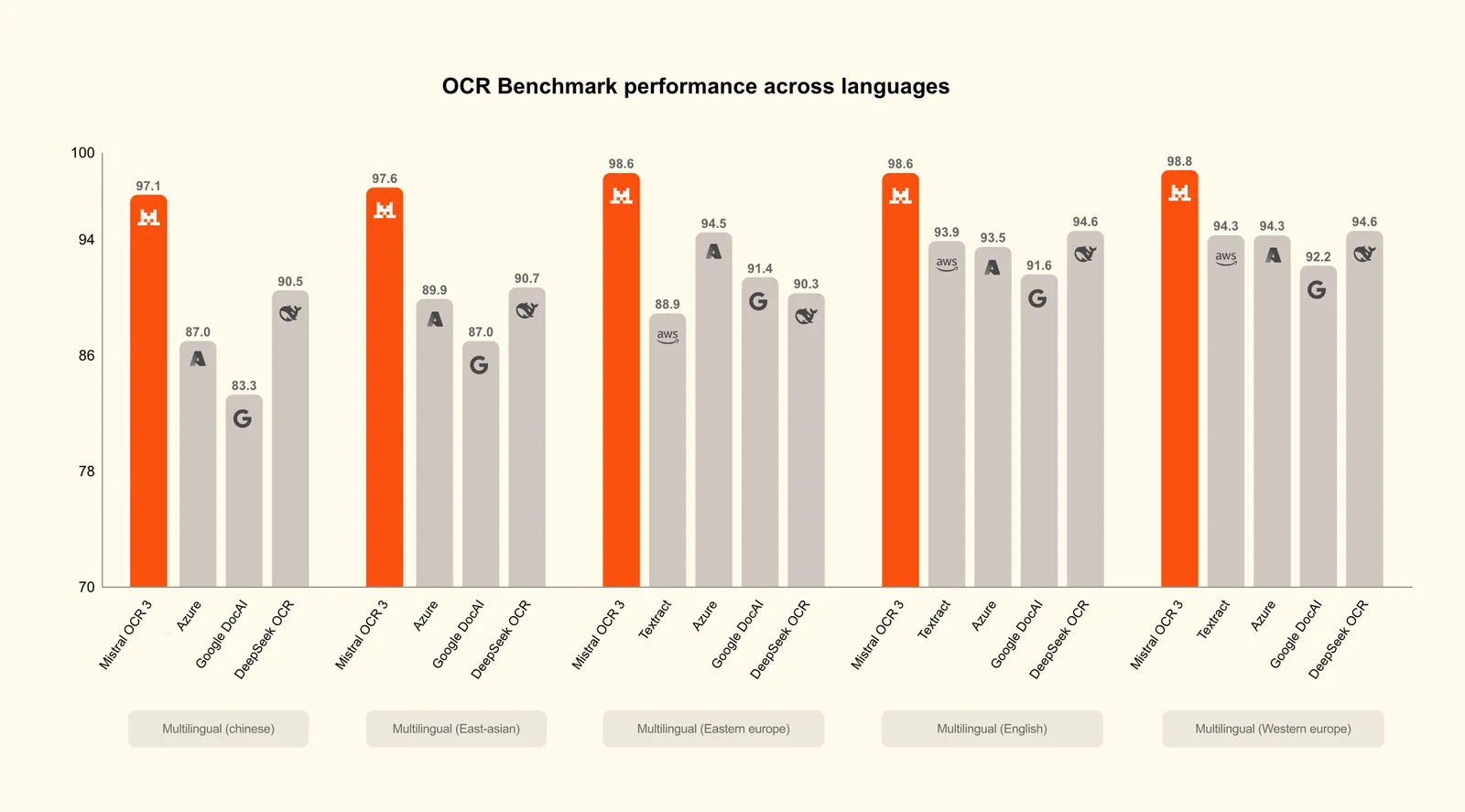
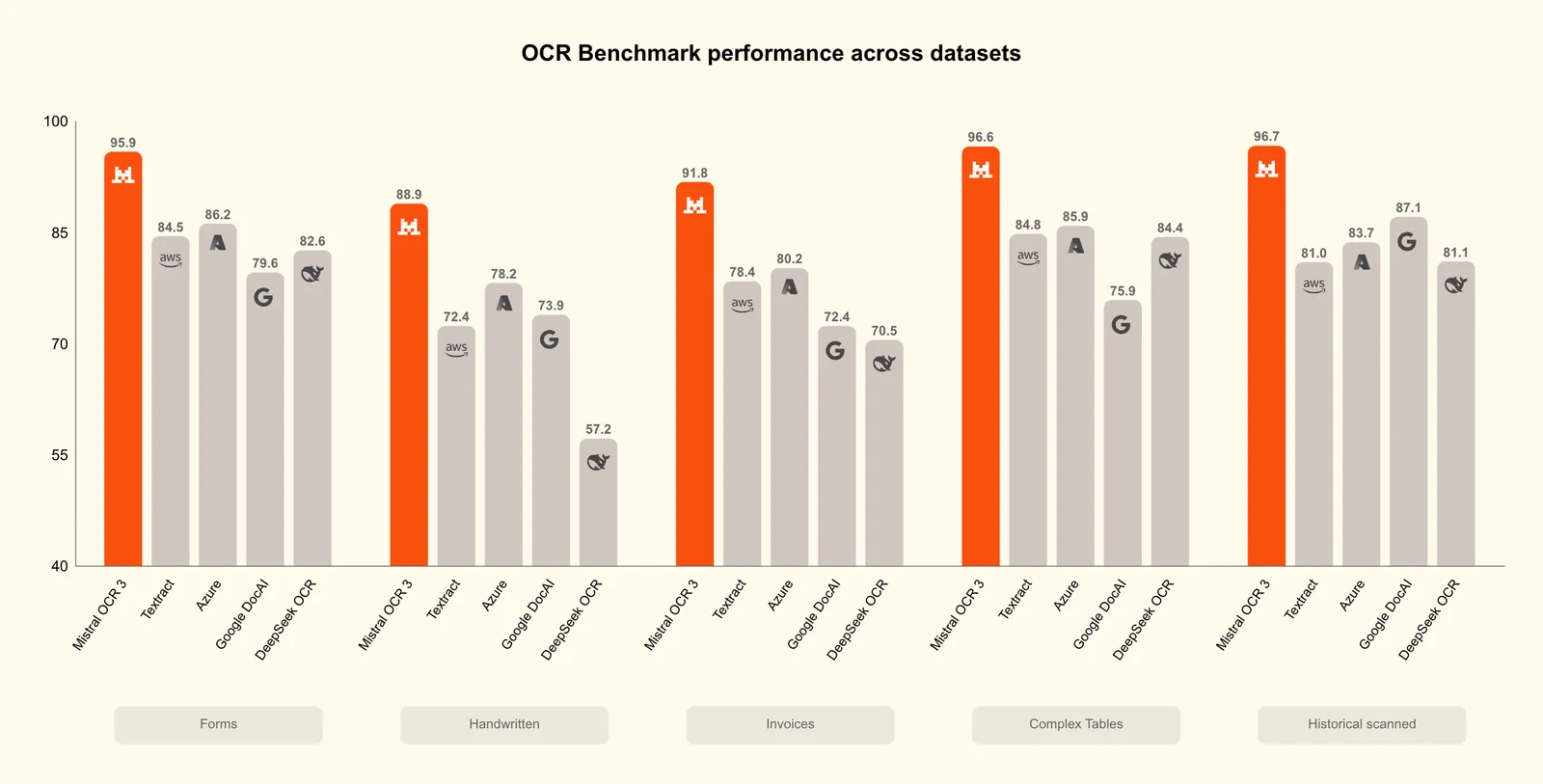
Mistral OCR 3 is distinguished by its superior accuracy and exceptional multi-page processing capabilities, making it a top choice for businesses seeking efficient document automation. Compared to other OCR tools, it excels in handling varied document formats and offers robust integration options.
Key Points
- High Accuracy: Mistral OCR 3 boasts an impressive recognition rate, reducing errors in text extraction.
- Multi-Page Processing: Efficiently handles large documents, saving time during data entry.
- Integration Capabilities: Seamlessly integrates with various business applications for streamlined workflows.
Detailed Explanation
Mistral OCR 3 utilizes advanced machine learning algorithms to achieve high accuracy levels, often exceeding 98% in text recognition. This is particularly beneficial for industries like legal and healthcare, where precision is critical. The multi-page processing feature allows users to scan and digitize entire documents in one go, significantly improving productivity.
For example, a law firm handling thousands of pages of case files can quickly convert them into searchable digital formats, enabling easier access and retrieval. Additionally, Mistral OCR 3 supports various file formats, including PDFs, images, and office documents, making it versatile for different business needs.
In contrast, many other OCR tools struggle with accuracy, especially with complex layouts or handwritten text. Some may also have limitations in processing multiple pages simultaneously, leading to longer turnaround times and increased operational costs.
Best Practices / Tips
- Evaluate Your Needs: Consider the types of documents you handle most frequently. Mistral OCR 3 is particularly effective for mixed-format documents.
- Test with Different Layouts: Run trials with documents that have varied layouts to gauge accuracy and processing speed.
- Integrate with Existing Systems: Take advantage of Mistral OCR 3’s integration capabilities to connect with your existing CRM or document management systems for optimized workflows.
Additional Resources
- Mistral OCR 3 Official Documentation
- Comparison of Top OCR Tools
- Best Practices for Document Automation
By utilizing Mistral OCR 3, businesses can enhance their document management processes, improve efficiency, and reduce errors, setting themselves apart in today’s data-driven environment.
Explore more AI Ai Models tools
Browse all Ai Models tools →Compare Mistral OCR 3: vs Mouse-1 · vs Milliseconds.ai · vs SWE-2 · vs Desert Ant Labs