

MindPal
AINo-code platform to build AI agents and multi-agent workflows that automate marketing, sales, and client delivery.
MindPal
No-code platform to build AI agents and multi-agent workflows that automate marketing, sales, and client delivery.
About MindPal
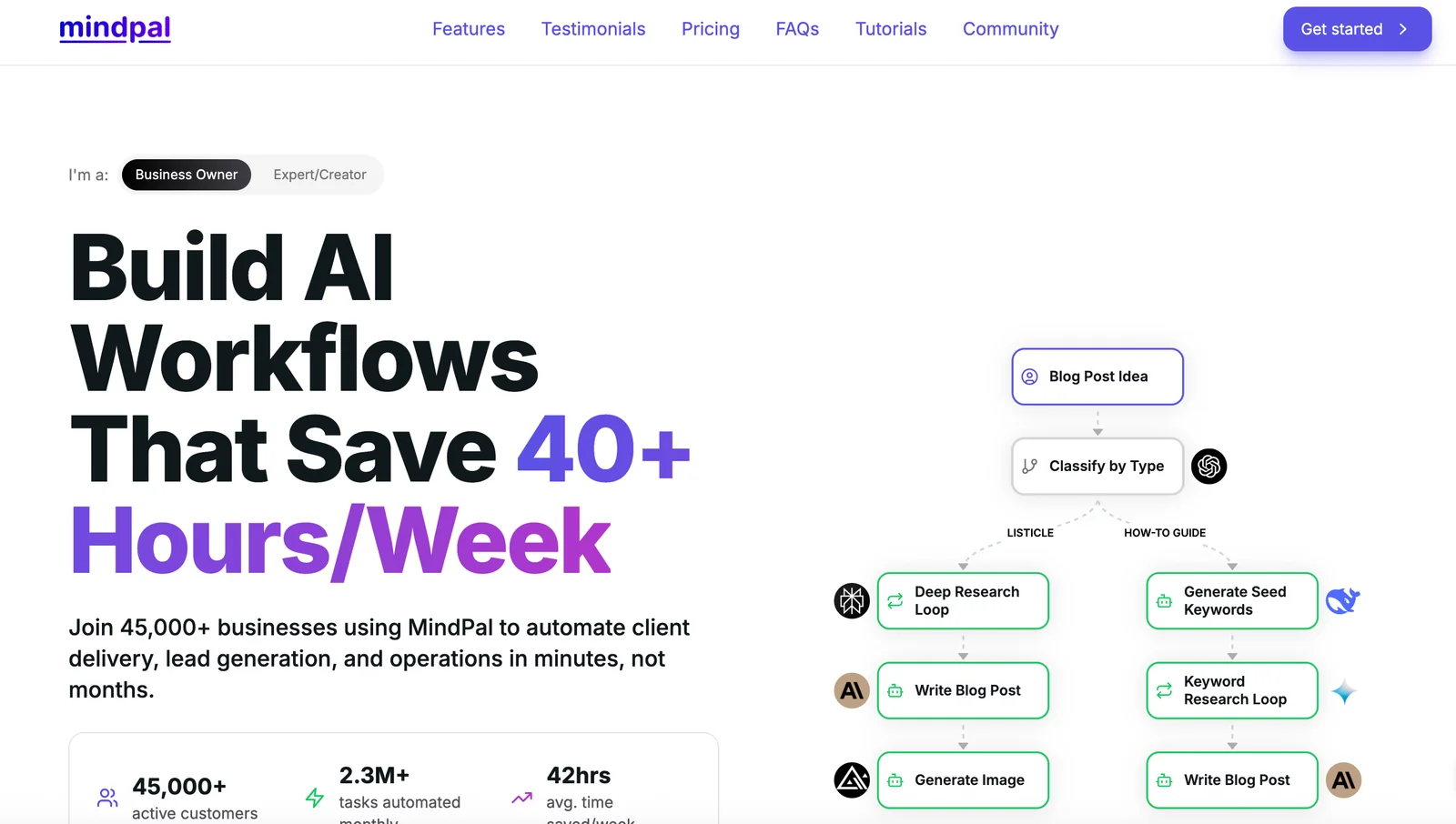
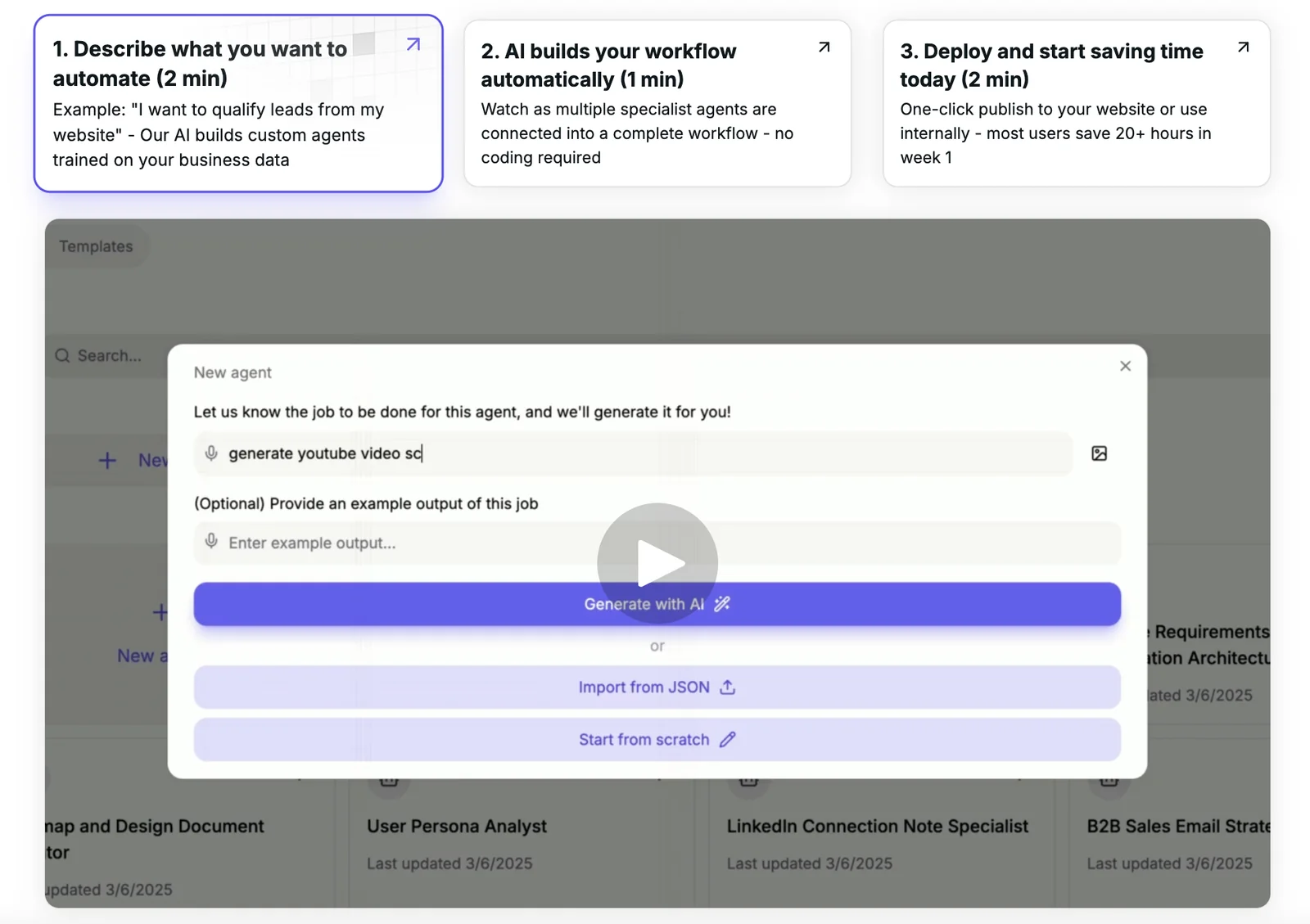
MindPal is a no-code platform that enables teams to design, train, and deploy AI agents and multi-agent workflows to automate business processes such as marketing, sales, and client delivery. Users can connect knowledge sources, orchestrate sub-agents, run browser automations and external tools via hosted MCP servers, and publish workflows as reusable forms or directory entries. The platform emphasizes rapid assembly of multi-agent systems, integrations with external automation tools, and measurable time-savings for teams.
Screenshots
Key Features
Use Cases


Frequently asked questions about MindPal
What are the pricing options for MindPal and what features do they include?
MindPal offers a FREEMIUM model alongside several paid plans: Pro at $29/month, Team at $99/month, Business at $249/month, and custom pricing for Enterprise. Each plan includes varying amounts of AI credits, storage, and features such as advanced models and collaboration tools tailored for different user needs.
Key Points
- FREEMIUM Model: Basic features available for free.
- Pricing Tiers: Pro ($29/mo), Team ($99/mo), Business ($249/mo), Enterprise (custom pricing).
- Feature Variability: Each plan offers different levels of AI credits, storage, and collaborative features.
Detailed Explanation
MindPal's pricing structure is designed to accommodate a wide range of users, from individuals to large organizations.
-
FREEMIUM Model: The free version provides users with basic access to MindPal's features, allowing them to explore the platform without any financial commitment. This is ideal for individuals wanting to test the waters before upgrading.
-
Pro Plan ($29/month): Best suited for solo users or freelancers, this plan includes enhanced AI capabilities, offering a set number of AI credits and sufficient storage for personal projects. Users can leverage advanced models for personalized insights.
-
Team Plan ($99/month): This plan caters to small teams or collaborative groups, providing more AI credits and storage. It includes collaboration tools to facilitate teamwork, sharing projects, and insights seamlessly.
-
Business Plan ($249/month): Targeted at larger organizations, this plan offers extensive features tailored for business needs, including higher limits on AI credits and storage, plus advanced analytics tools to track performance and productivity.
-
Enterprise Solutions: Custom pricing is available for enterprises requiring tailored solutions. This option can include dedicated support, enhanced security features, and bespoke integrations to fit specific business workflows.
Best Practices / Tips
- Assess Your Needs: Identify your specific requirements—whether personal or professional—before choosing a plan.
- Explore the FREEMIUM Option: Take advantage of the free version to assess MindPal’s capabilities before committing to a paid plan.
- Prioritize Collaboration: If working in a team, opt for the Team or Business plans to maximize collaborative features and efficiency.
- Monitor Usage: Keep track of your AI credit usage to choose the most cost-effective plan that aligns with your needs.
Additional Resources
How does MindPal's no-code workflow builder work?
MindPal's no-code workflow builder enables users to create and automate both single-agent and multi-agent workflows visually, without any coding knowledge. This intuitive platform streamlines automation, enhancing productivity for marketers and sales teams looking to optimize their processes efficiently.
Key Points
- User-Friendly Interface: Designed for non-technical users.
- Visual Workflow Design: Drag-and-drop functionality.
- Multi-Agent Capability: Supports complex automation needs.
Detailed Explanation
MindPal's no-code workflow builder stands out due to its user-friendly interface, which allows individuals without programming expertise to design sophisticated workflows. Users can drag and drop various elements to create workflows, making it accessible for marketers and sales teams.
How It Works
- Start with a Template: Users can select from pre-designed templates tailored for specific tasks, such as lead generation or customer follow-ups.
- Visual Design: The drag-and-drop interface lets users connect different agents and tasks visually, streamlining the process of creating workflows.
- Automation Triggers: Users can set triggers based on actions or events, such as user sign-ups or purchase completions, to automate responses or subsequent tasks.
Use Cases
- Marketing Campaigns: Automate email sending based on user behavior.
- Sales Follow-Ups: Create workflows that automatically follow up on leads.
- Customer Support: Build workflows that route inquiries to appropriate agents or resources.
Best Practices / Tips
- Start Simple: Begin with basic workflows to understand how the platform works before advancing to complex automations.
- Test Regularly: Always test workflows to ensure they perform as expected. Regular testing can help identify any bottlenecks.
- Utilize Analytics: Monitor workflow performance metrics to optimize and refine automations for better results.
Additional Resources
What are the key use cases for MindPal in business automation?
MindPal is a versatile AI tool that automates key business processes such as client delivery, lead generation, marketing content creation, and internal operations. By orchestrating tasks among various agents, it enhances efficiency, reduces manual workload, and streamlines operations across multiple business functions.
Key Points
- Client Delivery Automation: Streamlines service fulfillment.
- Lead Generation: Enhances prospect engagement and conversion.
- Content Creation: Generates marketing materials efficiently.
Detailed Explanation
MindPal excels in automating several critical aspects of business operations:
-
Client Delivery Automation: MindPal can manage client onboarding and service delivery processes, ensuring that customers receive timely and accurate information. For example, using AI-driven chatbots, businesses can answer client queries instantly, reducing the time spent on repetitive tasks.
-
Lead Generation: By utilizing machine learning algorithms, MindPal identifies potential leads based on user behavior and demographics. This targeted approach increases conversion rates. For instance, it can automate outreach campaigns that nurture leads through personalized email sequences, significantly boosting engagement.
-
Marketing Content Creation: MindPal can generate high-quality marketing content such as blog posts, social media updates, and newsletters. This not only saves time but also ensures consistency in brand messaging. For example, a business can use MindPal to create a month’s worth of social media content in just a few hours.
-
Internal Operations: MindPal assists in optimizing internal workflows by automating routine tasks like scheduling meetings, tracking project progress, and managing team assignments. This allows employees to focus on more strategic initiatives rather than administrative duties.
Best Practices / Tips
- Define Clear Goals: Before implementing MindPal, outline specific objectives you want to achieve with automation, such as reducing client response times or increasing lead acquisition.
- Integrate with Existing Tools: Ensure that MindPal integrates seamlessly with your current CRM, project management, and marketing tools to maximize efficiency.
- Regularly Review Performance: Use analytics provided by MindPal to assess the effectiveness of automated processes and make adjustments as necessary.
- Train Your Team: Provide adequate training for your staff to effectively utilize MindPal's features for maximum benefit.
Additional Resources
What integration options does MindPal provide for existing tools?
MindPal offers integration with popular automation platforms like Zapier and Make, enabling users to seamlessly connect existing tools and automate workflows. This functionality enhances productivity across various business environments and supports a wide range of applications, making MindPal a versatile solution for users seeking efficiency.
Key Points
- Automation Platforms: Integrates with Zapier and Make.
- Workflow Optimization: Streamlines processes by connecting multiple tools.
- Versatile Applications: Supports diverse business needs and functions.
Detailed Explanation
MindPal's integration options primarily involve two major automation platforms: Zapier and Make. These integrations allow users to automate repetitive tasks by creating workflows that connect MindPal with other applications such as Google Sheets, Slack, and Trello.
Example Use Cases:
- Task Management: Automatically create tasks in Trello when a new MindPal project is initiated. This keeps team members updated without manual input.
- Data Synchronization: Use Zapier to sync MindPal data with Google Sheets, ensuring that all information is up-to-date and accessible in real-time for reporting purposes.
Step-by-Step Guidance:
- Connect to Zapier or Make: Begin by linking your MindPal account to your chosen automation platform.
- Choose Triggers: Select a trigger in MindPal (e.g., a new project) that will initiate the workflow.
- Set Actions: Define what actions should occur in connected apps (e.g., creating a calendar event).
- Test the Workflow: Ensure your integration works correctly by running a test.
Best Practices / Tips
- Start Simple: Begin with basic automations to familiarize yourself with the integration process before moving on to more complex workflows.
- Monitor Performance: Regularly check the performance of automated workflows to identify any issues or areas for improvement.
- Document Workflows: Keep a record of created workflows for easier management and troubleshooting.
Additional Resources
How does MindPal compare to other AI workflow tools in the market?
MindPal differentiates itself from other AI workflow tools through its no-code approach, advanced AI models, and robust multi-agent orchestration. It offers a user-friendly interface and extensive integrations, making it particularly accessible for non-technical users, which enhances productivity and collaboration across teams.
Key Points
- No-Code Approach: Enables users to build workflows without programming knowledge.
- Advanced AI Models: Leverages state-of-the-art AI for enhanced automation and decision-making.
- Robust Integrations: Works seamlessly with popular tools like Slack, Trello, and Google Workspace.
Detailed Explanation
MindPal’s no-code platform allows users to create and automate workflows effortlessly. This is particularly beneficial for businesses without dedicated IT teams, as it reduces the learning curve associated with traditional coding-based tools. For example, a marketing team can quickly set up automated email campaigns and track responses without needing a developer.
The advanced AI models employed by MindPal enhance its capability to analyze data and provide insights. For instance, businesses can automate data entry, retrieve information, and even predict project outcomes based on historical data, which streamlines decision-making processes.
Additionally, MindPal's robust multi-agent orchestration allows different AI agents to work collaboratively on tasks. This is particularly useful in complex projects where various aspects need to be managed simultaneously, enabling teams to achieve more efficient workflows.
Best Practices / Tips
- Explore Integrations: Take full advantage of MindPal’s integrations to connect your existing tools and maximize productivity.
- Start Small: Begin with simple workflows to familiarize yourself with the platform before scaling up to more complex automations.
- Regularly Update Workflows: As your business needs change, revisit and refine your workflows to ensure they remain effective.
Additional Resources
Explore more AI Ai Agents tools
Browse all Ai Agents tools →Browse by use case: Automation & Productivity
Compare MindPal: vs Scout by Fini · vs Ruflo · vs Harness² · vs The New Beings