

MiMo-V2-Flash
AIOpen SourceFreeMiMo-V2-Flash is a MiMo family language-model variant focused on improving reasoning capabilities through pretraining-to-posttraining methods.
MiMo-V2-Flash
MiMo-V2-Flash is a MiMo family language-model variant focused on improving reasoning capabilities through pretraining-to-posttraining methods.
About MiMo-V2-Flash
MiMo-V2-Flash is a model variant from the MiMo project, which aims to unlock and enhance the reasoning potential of large language models across the full lifecycle from pretraining to posttraining. The MiMo repository provides the research codebase, training recipes, and evaluation tooling that support development, fine-tuning, and assessment of models such as MiMo-V2-Flash. Its value lies in combining model architectures, training strategies, and posttraining techniques to improve reasoning, inference performance, and reproducibility for researchers and practitioners.
Screenshots
Key Features
Use Cases



Frequently asked questions about MiMo-V2-Flash
Is MiMo-V2-Flash really free to use?
Yes, MiMo-V2-Flash is completely free to use as it is an open-source project. Users can access the source code, training scripts, and model configurations at no cost on GitHub, making it an excellent tool for developers and researchers interested in machine learning.
Key Points
- Open-source Accessibility: MiMo-V2-Flash is freely available on GitHub.
- Community-driven: Contributions from users enhance its functionality and features.
- No Hidden Costs: Users can utilize all aspects of the tool without any fees.
Detailed Explanation
MiMo-V2-Flash is an open-source machine learning framework designed for speed and efficiency. As a free tool, it allows developers to experiment with cutting-edge technologies without incurring expenses. The project is hosted on GitHub, where anyone can access the complete source code, training scripts, and model configurations.
How to Access MiMo-V2-Flash
- Visit GitHub: Go to the MiMo-V2-Flash repository.
- Clone the Repository: Use Git to clone the repository to your local machine with the command:
git clone https://github.com/username/mimo-v2-flash.git - Explore the Code: Review the README file for setup instructions and documentation.
Use Cases
- Research: Academics can use MiMo-V2-Flash for experiments and prototyping.
- Development: Developers can integrate the framework into applications needing high-performance machine learning solutions.
- Learning: Students and hobbyists can learn about machine learning with a practical, hands-on approach.
Best Practices / Tips
- Stay Updated: Regularly check for updates on GitHub to take advantage of new features and bug fixes.
- Engage with the Community: Participate in discussions and forums to gain insights and share experiences with other users.
- Document Your Work: Keep notes on modifications or experiments to track your progress and optimize your usage of the tool.
Additional Resources
What unique features does MiMo-V2-Flash offer compared to other AI models?
MiMo-V2-Flash distinguishes itself from other AI models by enhancing reasoning capabilities through sophisticated pretraining-to-posttraining methods. It offers documented workflows for reproducibility and tailored fine-tuning guidance, making it an ideal choice for specific task optimization in various applications.
Key Points
- Enhanced Reasoning Capabilities: Utilizes advanced pretraining-to-posttraining techniques.
- Documented Workflows: Ensures reproducibility in AI model training.
- Tailored Fine-Tuning Guidance: Provides specific instructions for optimizing performance on particular tasks.
Detailed Explanation
MiMo-V2-Flash is engineered to tackle complex reasoning tasks that many traditional AI models struggle with. The advanced pretraining-to-posttraining methods allow the model to adapt better to new information and contexts, improving its overall reasoning abilities.
Pretraining-to-Posttraining Methods
These methods involve a two-phase approach:
- Pretraining: The model learns from a vast dataset, absorbing general knowledge and patterns.
- Posttraining: It further refines its skills on a more focused dataset, enhancing its capability to address specific tasks effectively.
This dual-phase training is crucial for applications in domains such as natural language understanding, data analysis, and decision-making processes, where reasoning is paramount.
Documented Workflows
MiMo-V2-Flash provides comprehensive workflows that outline each step of the training process. This transparency fosters reproducibility, which is vital for researchers and developers who need to validate their models or adapt them for new tasks.
Tailored Fine-Tuning Guidance
The model includes specific guidance for fine-tuning, enabling users to customize the AI's capabilities according to their unique requirements. This feature is particularly beneficial for industries like healthcare, finance, and customer service, where precision and task relevance are essential.
Best Practices / Tips
- Utilize the Provided Workflows: Follow the documented workflows closely to ensure consistency and reliability in training outcomes.
- Focus on Fine-Tuning: Invest time in the fine-tuning phase based on the specific needs of your application to achieve optimal performance.
- Regularly Update Training Data: Keep the dataset fresh and relevant to maintain the model’s reasoning capabilities over time.
Additional Resources
How do I get started with MiMo-V2-Flash for my research?
To get started with MiMo-V2-Flash for your research, visit the official GitHub repository to download the source code. Follow the comprehensive documentation that includes pretraining and posttraining recipes to tailor the model effectively to your specific research needs.
Key Points
- Access the MiMo-V2-Flash GitHub repository.
- Download the source code and necessary dependencies.
- Follow the detailed documentation for pretraining and posttraining.
Detailed Explanation
MiMo-V2-Flash is an advanced model designed for research in machine learning and artificial intelligence. To begin your research effectively, you should:
-
Visit the GitHub Repository: Navigate to the MiMo-V2-Flash GitHub page. This is where you can access the source code, example datasets, and community contributions.
-
Clone or Download the Repository: Use Git to clone the repository or download it as a ZIP file. Ensure you have Git installed on your machine. Run the following command in your terminal:
git clone https://github.com/your-repo-link.git -
Set Up Your Environment: Follow the environment setup instructions in the documentation. This usually includes installing Python, necessary libraries, and dependencies, which can typically be done via:
pip install -r requirements.txt -
Pretraining and Posttraining Recipes: The documentation provides specific recipes for both pretraining and posttraining phases. These recipes guide you through configuring hyperparameters, choosing datasets, and understanding evaluation metrics. For example, if you're focusing on image classification, the documentation will suggest optimal settings for your training process.
-
Examples and Use Cases: Explore the example scripts included in the repository. These scripts demonstrate how to implement the model on various datasets, helping you understand its functionality better.
Best Practices / Tips
- Follow Documentation Closely: Make sure to adhere to the guidelines laid out in the documentation to avoid common pitfalls related to configuration errors or dependency issues.
- Experiment with Hyperparameters: Adjust hyperparameters like learning rate and batch size based on your dataset for optimal performance. Start with suggested default values and tweak them based on results.
- Utilize Community Support: Engage with the community through GitHub issues or forums. Asking questions and sharing experiences can provide valuable insights and solutions.
Additional Resources
What are the technical requirements to run MiMo-V2-Flash?
MiMo-V2-Flash requires a compatible self-hosted environment with adequate computational resources, particularly Graphics Processing Units (GPUs). Users should ensure they have a minimum of 8GB VRAM and a robust CPU to efficiently run the model and execute training scripts effectively.
Key Points
- Computational Resources: Minimum GPU requirements of 8GB VRAM.
- Environment Setup: A compatible self-hosted setup is essential.
- Software Dependencies: Installation of specific libraries and frameworks is necessary.
Detailed Explanation
To successfully run MiMo-V2-Flash, you need to set up a self-hosted environment that meets the following technical requirements:
-
Hardware Requirements:
- GPU: At least one NVIDIA GPU with a minimum of 8GB VRAM is recommended. This ensures efficient processing of the model's computations.
- CPU: A multi-core processor (e.g., Intel i5 or AMD Ryzen 5) is essential for handling parallel tasks.
- RAM: A minimum of 16GB RAM is advisable to facilitate smooth operation, especially during data processing.
-
Software Requirements:
- Operating System: Linux (Ubuntu is preferred) or Windows 10.
- Python Version: Python 3.7 or later is necessary to run the model.
- Libraries: Ensure you have TensorFlow, PyTorch, and other dependencies installed. Use a package manager like pip to simplify installation.
-
Networking: A stable internet connection is recommended for downloading model weights and datasets.
Example Use Case
For instance, if you are looking to fine-tune MiMo-V2-Flash on a specific dataset, ensure your hardware meets or exceeds these requirements. This will help avoid crashes and improve training times.
Best Practices / Tips
- Upgrade Your Hardware: If you plan to work extensively with AI models, consider investing in a more powerful GPU or additional RAM to future-proof your setup.
- Virtual Environment: Use virtual environments (like conda or venv) to manage dependencies and avoid conflicts between libraries.
- Backup Your Work: Regularly back up your training data and model checkpoints to prevent data loss.
Additional Resources
How does MiMo-V2-Flash compare to other language models like GPT-3?
MiMo-V2-Flash differentiates itself from models like GPT-3 by focusing on enhanced reasoning capabilities and reproducibility through its open-source framework. This makes MiMo-V2-Flash particularly suitable for research applications that require transparency and adaptability in language tasks.
Key Points
- Reasoning Capabilities: MiMo-V2-Flash prioritizes advanced logical reasoning.
- Open-Source Framework: It offers an open-source structure, promoting transparency.
- Research Applications: Tailored for academic and experimental purposes.
Detailed Explanation
MiMo-V2-Flash is developed to address specific needs in language processing tasks, particularly in academic and research settings. Unlike GPT-3, which excels in generating human-like text and has a broad application range, MiMo-V2-Flash is engineered to enhance reasoning and comprehension.
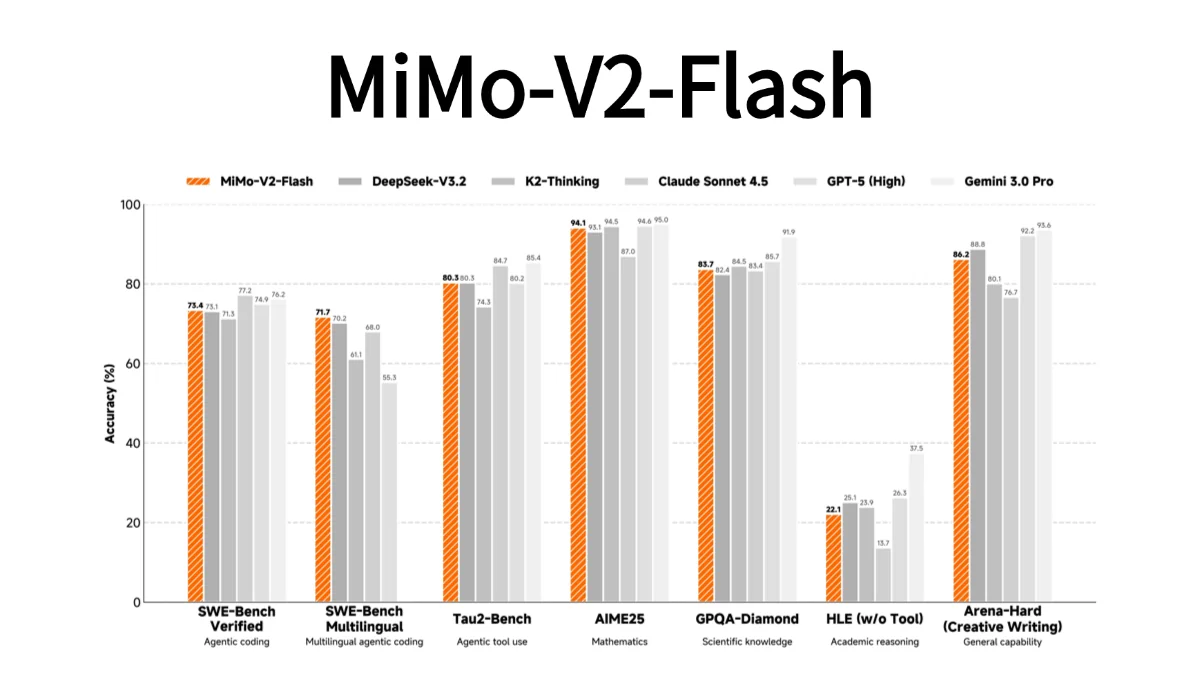
For example, in tasks requiring complex problem-solving or logical deduction, MiMo-V2-Flash can outperform GPT-3 by providing more accurate and relevant responses. Its open-source nature allows researchers to modify and adapt the model for particular use cases, fostering innovation and collaboration.
In contrast, GPT-3 operates primarily as a closed-source model, which can limit customization and transparency. This difference is crucial for researchers who need to understand the underlying mechanisms of the model they are working with or who wish to replicate results in their studies.
Best Practices / Tips
- Select the Right Tool: Choose MiMo-V2-Flash for tasks involving critical reasoning or research, whereas GPT-3 may be better for general content generation.
- Utilize Open-Source Flexibility: Take advantage of the open-source framework of MiMo-V2-Flash to tailor the model to your specific research needs.
- Test and Evaluate: Regularly benchmark both models against your specific use cases to determine which performs better in your context.
Additional Resources
Explore more AI Ai Models tools
Browse all Ai Models tools →Compare MiMo-V2-Flash: vs Mouse-1 · vs Milliseconds.ai · vs SWE-2 · vs Desert Ant Labs