

Merry Christmas ai video generator
AICreate personalized Christmas video greetings in minutes using template-based generation with scenes, voiceovers, music, and effects.
Merry Christmas ai video generator
Create personalized Christmas video greetings in minutes using template-based generation with scenes, voiceovers, music, and effects.
About Merry Christmas ai video generator
AI Christmas Video Generator (Merry Christmas AI video generator) enables users to produce personalized Christmas video greetings quickly by selecting a template and clicking generate. The tool automates scene assembly, media selection, voiceover generation, sound effects, and music to deliver finished holiday clips instantly. Its value lies in end-to-end automation for festive multimedia content, letting individuals and businesses create polished, shareable Christmas videos without video-editing expertise.
Screenshots
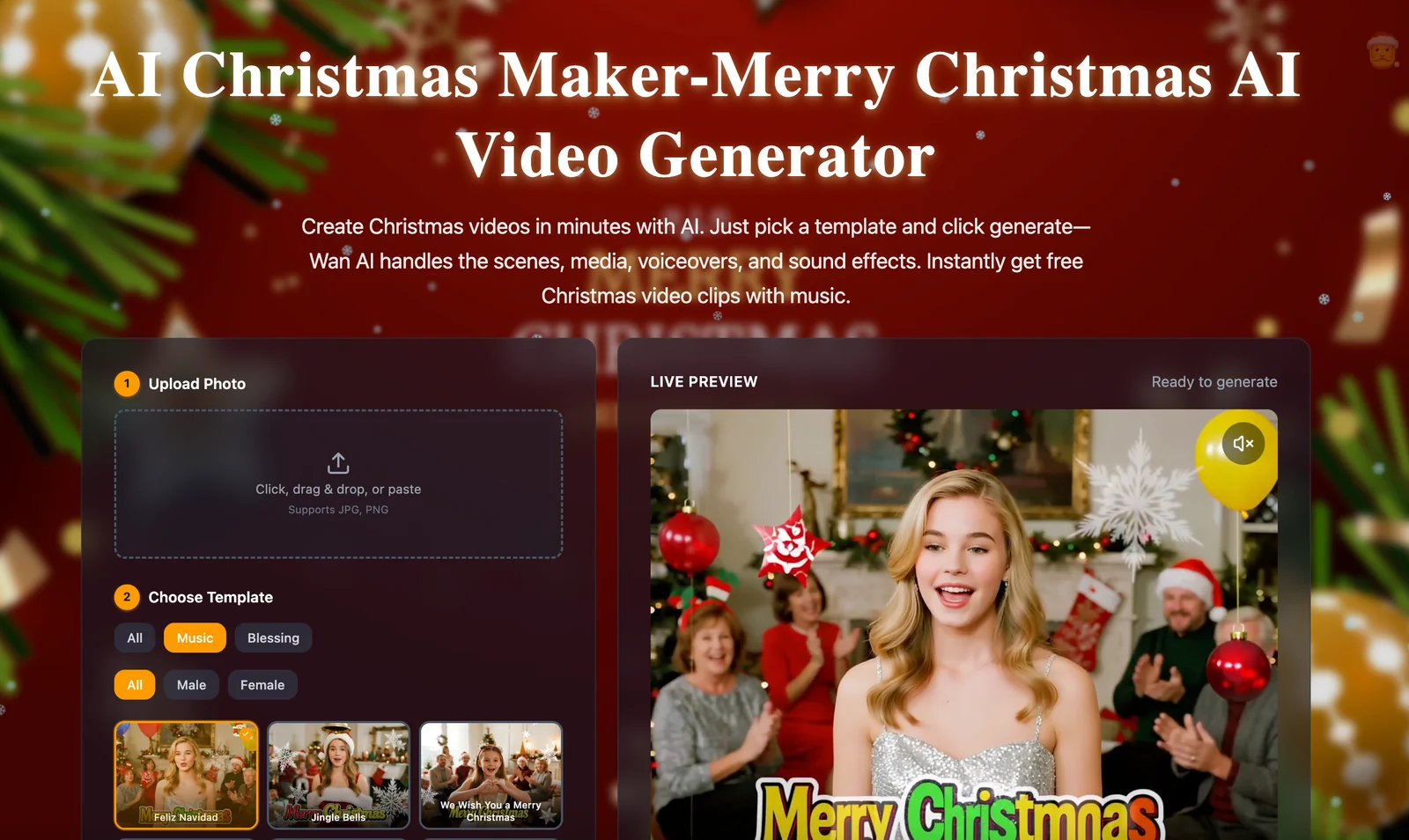
Key Features
Use Cases


Frequently asked questions about Merry Christmas ai video generator
What are the pricing options for Merry Christmas ai video generator?
Merry Christmas AI video generator offers a free option for creating and downloading Christmas video clips. For users seeking advanced features, custom paid plans are available. To explore the specific pricing options, you can contact Wan AI directly for detailed information.
Key Points
- Free Option: Create and download basic Christmas video clips.
- Paid Plans: Access advanced features through custom pricing.
- Contact Information: Reach out to Wan AI for personalized pricing details.
Detailed Explanation
The Merry Christmas AI video generator allows users to create festive video clips effortlessly. The free version is perfect for individuals or small projects, enabling users to generate basic Christmas-themed videos without any costs. This option includes essential features suitable for casual use, making it accessible to everyone.
For those looking for advanced features, including higher resolution outputs, additional templates, and enhanced customization options, the generator offers custom paid plans. These plans are tailored to meet specific needs, such as businesses looking to create promotional videos or individuals wanting to produce high-quality Christmas cards. Pricing can vary based on the features selected, so it’s best to contact Wan AI for a detailed quote.
Use Cases:
- Personal Projects: Create memorable holiday videos for family and friends with the free option.
- Business Marketing: Use the paid plans for producing marketing videos, holiday greetings, or social media content to engage customers during the festive season.
Best Practices / Tips
- Start with Free: If you’re new to video creation, begin with the free version to understand the tool's capabilities before committing to a paid plan.
- Explore Features: Take advantage of all available features, including text overlays and music options, to enhance your videos.
- Contact for Clarity: Don’t hesitate to reach out to Wan AI for clarification on pricing and features to ensure you choose the right plan for your needs.
Additional Resources
How do I create a personalized Christmas video greeting using this tool?
To create a personalized Christmas video greeting, select a template from the Merry Christmas AI video generator, customize it by entering your unique text or images, and then click the one-click produce button to instantly generate your festive video.
Key Points
- Choose from a variety of festive templates.
- Customize your video with personalized text and images.
- Use the one-click produce feature for instant results.
Detailed Explanation
Creating a personalized Christmas video greeting with the Merry Christmas AI video generator is a straightforward process. Here’s how to do it:
-
Select a Template: Start by visiting the Merry Christmas AI video generator platform. Browse through the available templates designed specifically for Christmas greetings. These templates come with festive designs and animations that capture the holiday spirit.
-
Customize Your Video: After selecting a template, you will be prompted to enter your personalized text. This could be a heartfelt message, a holiday wish, or even a funny quote. You can also upload images or video clips that you want to include, such as family photos or memorable moments from past Christmas celebrations.
-
Produce Your Video: Once you’ve completed your customization, simply click the one-click produce button. This feature streamlines the video creation process, allowing you to generate your video in seconds. The AI will render your project, ensuring high-quality output suitable for sharing with friends and family.
-
Download and Share: After generation, you can preview your video. If satisfied, download it to your device or share it directly on social media platforms to spread holiday cheer.
Best Practices / Tips
- Keep It Short and Sweet: Aim for a concise message that conveys your sentiments effectively. A shorter video is more likely to be shared and appreciated.
- Use High-Quality Images: If you include images, ensure they are high resolution to maintain video quality.
- Add Background Music: Consider adding a festive background track to enhance the viewing experience. Most templates come with music options, or you can upload your own.
- Test Different Templates: Explore various templates to find the one that best fits your style and message. Don’t hesitate to experiment with different designs for unique results.
- Check Compatibility: Ensure your video format is compatible with the platforms you intend to use for sharing.
Additional Resources
- Merry Christmas AI Video Generator Documentation - Learn more about features and functionalities.
- Video Creation Tips - Explore best practices for creating engaging videos.
- Holiday Greeting Ideas - Get inspired with creative message ideas for your Christmas video.
Is Merry Christmas ai video generator suitable for beginners?
Yes, the Merry Christmas AI video generator is highly suitable for beginners. Its intuitive interface enables users with no prior video editing experience to effortlessly create festive video greetings in just a few simple steps, making it accessible for anyone looking to spread holiday cheer.
Key Points
- User-Friendly Interface: Designed for ease of use, ideal for novices.
- Quick Video Creation: Allows users to generate videos in minutes.
- Customizable Templates: Offers festive themes that can be tailored.
Detailed Explanation
The Merry Christmas AI video generator is crafted specifically with beginners in mind. With its user-friendly dashboard, even those with no background in video editing can navigate the platform effortlessly.
Step-by-Step Guide:
- Sign Up: Create an account on the Merry Christmas platform.
- Choose a Template: Browse through various festive templates tailored for Christmas greetings.
- Personalize Content: Insert your text, images, or even videos to customize your greeting.
- Add Audio: Select from an array of holiday-themed background music or upload your own.
- Preview and Edit: Review your video and make any necessary adjustments.
- Export and Share: Once satisfied, export your video in your desired format and share it via social media, email, or other platforms.
This straightforward process allows users to create personalized videos that capture the spirit of the holidays, making it a fun and engaging way to connect with friends and family.
Best Practices / Tips
- Explore Templates: Take advantage of the diverse range of templates available to find one that resonates with your style.
- Keep It Short and Sweet: Aim for videos that are 30-60 seconds long to maintain viewer engagement.
- Optimize for Sharing: Consider the platform where you’ll share the video and tailor the aspect ratio accordingly (e.g., square for Instagram, landscape for YouTube).
- Use High-Quality Images: Ensure that any images or videos you upload are high resolution to enhance the final product.
Additional Resources
Are there any technical requirements to use Merry Christmas ai video generator?
The Merry Christmas AI video generator is entirely web-based, requiring only a modern web browser and a stable internet connection. There's no need for installation or advanced technical skills, making it accessible for everyone looking to create festive videos easily.
Key Points
- Web-Based Access: No downloads required.
- Compatible Browsers: Works with all modern browsers.
- User-Friendly: Designed for users of all skill levels.
Detailed Explanation
The Merry Christmas AI video generator is designed to be user-friendly and accessible. To use it, simply navigate to the website using a modern web browser such as Google Chrome, Mozilla Firefox, Safari, or Microsoft Edge. This tool does not require any software downloads or installations, which makes it convenient for quick access.
System Requirements
- Modern Web Browser: Ensure you are using an updated version of popular browsers like Chrome, Firefox, or Safari.
- Stable Internet Connection: A reliable internet connection is essential for seamless video generation and to avoid interruptions.
- Device Compatibility: The generator works on desktops, laptops, tablets, and even smartphones, allowing flexibility in usage.
Use Cases
- Personalized Holiday Greetings: Users can create custom video messages to send to family and friends.
- Business Promotions: Companies can generate festive promotional videos to engage their customers during the holiday season.
- Social Media Content: Create eye-catching videos to share on platforms like Instagram, Facebook, and TikTok.
Best Practices / Tips
- Use Updated Browsers: Always keep your browser updated to ensure compatibility and security.
- Check Internet Speed: A faster connection can improve your experience and reduce rendering time for videos.
- Explore Features: Take time to familiarize yourself with all the features offered by the generator, such as templates and customization options, to make the most of the tool.
Additional Resources
By adhering to these guidelines, you can effectively utilize the Merry Christmas AI video generator to create festive and engaging video content with ease.
How does Merry Christmas ai video generator compare to other video greeting tools?
Merry Christmas AI video generator excels over other video greeting tools due to its user-friendly template-based design, automated voiceover capabilities, and the provision of instant free holiday clips. This makes it an ideal choice for personalized, quick holiday greetings that stand out from the competition.
Key Points
- Template-Based Generation: Offers a variety of customizable templates.
- Automated Voiceovers: Provides realistic voice options for a personal touch.
- Instant Free Clips: Allows users to create and download clips effortlessly.
Detailed Explanation
Merry Christmas AI video generator simplifies the creation of festive video greetings with its intuitive interface. Users can select from a range of professionally designed templates that cater to different holiday themes and moods.
For instance, if you choose a cheerful template, you can easily customize text, colors, and images to match your personal style. The automated voiceover feature is a standout, allowing you to select from multiple voice options to narrate your greeting, making it sound warm and inviting.
Moreover, the generator provides instant free clips, meaning you can create and receive your video within minutes. This is particularly beneficial for last-minute holiday greetings or for those who want to quickly share festive cheer with friends and family.
Best Practices / Tips
- Explore Various Templates: Take time to explore different templates to find the one that best fits your message.
- Optimize Audio Settings: Experiment with different voiceover options to match the tone of your greeting.
- Share Widely: Once your video is ready, utilize social media platforms for sharing to maximize reach and engagement.
Additional Resources
Explore more AI Ai Services tools
Browse all Ai Services tools →Browse by use case: Video Generation · Voice & Audio · Automation & Productivity
Compare Merry Christmas ai video generator: vs BAND for Developers · vs NitroStack · vs GBrain · vs MentionBird