

Medley
AIClaude Code plugin that decomposes prompts into coordinated multi-agent plans and visualizes the plan at a shareable URL.
Medley
Claude Code plugin that decomposes prompts into coordinated multi-agent plans and visualizes the plan at a shareable URL.
About Medley
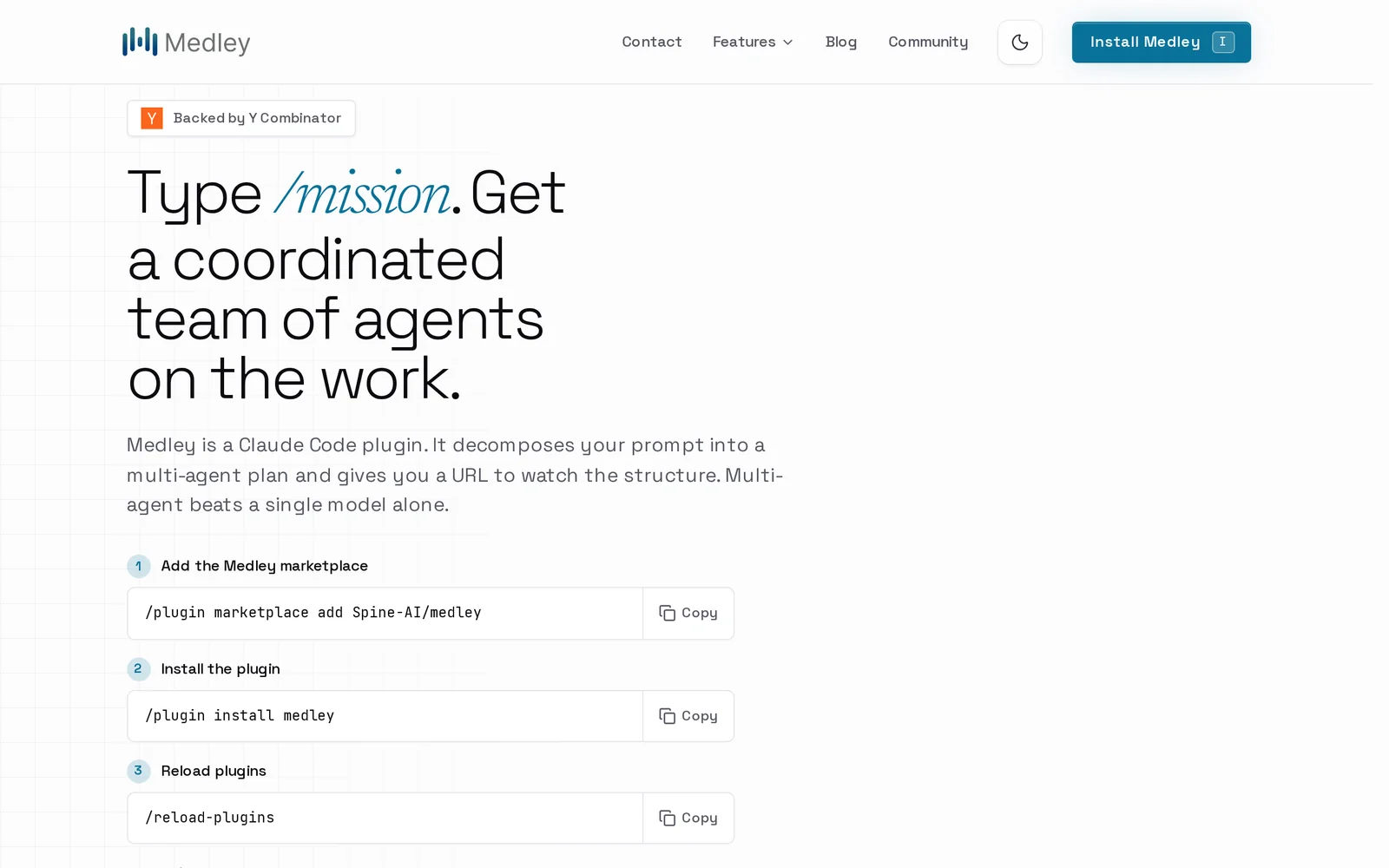
Medley is a plugin for Claude Code that transforms a single user prompt into a structured, coordinated multi-agent plan. Users invoke it via the /mission command; Medley decomposes the prompt into tasks, assigns roles or agents, orders dependencies, and exposes the resulting plan structure at a URL for inspection and sharing. By orchestrating multiple specialized agents and making the plan explicit, Medley aims to solve more complex, multi-step problems more reliably than a single model running alone.
Screenshots
Key Features
Use Cases



Frequently asked questions about Medley
What is Medley?
Medley is a multi-agent orchestration layer designed for Claude Code, allowing users to type "/mission" and receive a coordinated agent plan across their applications. This tool streamlines collaboration between various AI agents, enhancing productivity and efficiency in task execution.
Key Points
- Multi-agent orchestration: Facilitates communication and task delegation among AI agents.
- User-friendly interface: Simple command input ("/mission") for quick access to coordinated plans.
- Enhanced productivity: Streamlines workflows by automating complex tasks across applications.
Detailed Explanation
Medley serves as an innovative orchestration layer that combines multiple AI agents to work cohesively within the Claude Code environment. When users input the command "/mission," Medley analyzes the request and generates a comprehensive agent plan, detailing how each AI will contribute to the task at hand.
Use Cases
- Project Management: In a project management scenario, users can assign tasks to various agents, such as scheduling meetings, tracking project progress, or sending reminders. Medley ensures all agents work together seamlessly, providing a unified output.
- Content Creation: For content creators, Medley can coordinate agents responsible for research, writing, and editing. By harnessing the power of multiple AI tools, users can enhance the quality and speed of their outputs.
- Customer Support: Businesses can use Medley to manage customer inquiries by deploying different agents for various query types, ensuring a quicker and more efficient response time.
Best Practices / Tips
- Be Specific: When using the "/mission" command, provide clear and detailed instructions to receive the most relevant agent plans.
- Regular Updates: Keep your agents updated to ensure they are equipped with the latest features and capabilities, maximizing their efficiency.
- Monitor Performance: Regularly review the outputs and performance of the orchestrated plans to identify areas for improvement.
Additional Resources
How does Medley work?
Medley simplifies project management and development by coordinating multiple AI agents to execute complex tasks. It utilizes a single command to create a visible mission plan, integrates with various tools, and automates cross-application workflows for long-running refactors, overnight research, and seamless updates across platforms.
Key Points
- Mission Command: Initiate complex tasks with a single slash command.
- Multi-Agent Coordination: Run agents in parallel or sequentially for efficiency.
- Broad Integration: Connects to popular tools like GitHub, Slack, and Google Drive.
Detailed Explanation
Medley operates through a unique command structure that allows users to decompose tasks into manageable missions. When you type /mission, Medley creates a comprehensive plan that outlines the steps and assigns them to various AI agents. This approach not only streamlines productivity but also enhances collaboration across multiple applications.
Examples of Use Cases:
-
Long-Running Refactors: Developers can initiate a multi-file refactor by simply typing
/mission. Medley will then coordinate agents to work on different files simultaneously, significantly reducing the time required for updates. -
Overnight Investigations: Teams can kick off a research mission at the end of the workday, allowing agents to gather data and compile a structured report that is ready for review by the morning.
-
Cross-Tool Delivery: A mission can seamlessly manage tasks like editing code in GitHub, updating project management tools like Linear, and sending summaries to Slack—all in one cohesive flow.
-
Documentation Sync: When code changes occur, Medley can automatically update the corresponding documentation in Notion or Confluence, ensuring that both code and documentation remain aligned.
-
Ops Automation: Users can create missions that interact with Gmail, Calendar, and Google Drive to prepare meeting materials without needing to switch between applications.
Best Practices / Tips
- Utilize Clear Commands: When using Medley, make sure your commands are clear and specific to ensure efficient task decomposition.
- Plan for Integration: Leverage Medley’s extensive integration capabilities by connecting the tools your team already uses to maximize efficiency.
- Monitor Progress: Use the Visible Plan URL to track the progress of your missions in real-time, ensuring transparency and accountability.
Additional Resources
What are the main features of Medley?
Medley’s main features include the Mission Command for orchestrating tasks, Multi-Agent Coordination for executing tasks efficiently, and a Visible Plan URL for tracking progress. It integrates seamlessly with various applications such as GitHub, Slack, and Google Drive, enhancing productivity across diverse workflows.
Key Points
- Mission Command: Orchestrates tasks with a single slash command.
- Multi-Agent Coordination: Executes tasks sequentially or in parallel for efficiency.
- Broad Integration Surface: Connects with numerous applications for enhanced productivity.
Detailed Explanation
Medley is designed to streamline complex workflows and enhance collaboration. Here’s a closer look at its key features:
Mission Command
The Mission Command feature uses a simple slash command in Claude Code to break down any prompt into a well-structured plan. This allows users to run tasks as missions, significantly reducing the complexity involved in project management. For instance, a user can input a command that generates a comprehensive to-do list for a software release, making it easier to track progress.
Multi-Agent Coordination
With Multi-Agent Coordination, Medley runs a series of agents either sequentially, in parallel, or overnight. This means that instead of chaining tasks to a single model, multiple agents can work simultaneously, optimizing time and resources. For example, while one agent compiles data, another can initiate communication with team members, thus enhancing productivity.
Visible Plan URL
Every mission in Medley is accompanied by a Visible Plan URL that provides a shareable link. This URL showcases the decomposed plan and live progress across agents, making it easy for teams to stay aligned. Stakeholders can view updates in real-time, fostering transparency and accountability.
Cross-App Missions
Medley supports Cross-App Missions, allowing users to extend tasks beyond mere coding. It can integrate research, outreach, documentation, calendars, and third-party workflows seamlessly. This flexibility is particularly beneficial for teams that juggle multiple platforms and tools.
Broad Integration Surface
Medley boasts a Broad Integration Surface, connecting with popular tools like GitHub, GitLab, Slack, Discord, Notion, Linear, Jira, Confluence, Figma, Gmail, Google Drive/Calendar, Zapier, AWS, Vercel, Supabase, Stripe, and many more. This extensive compatibility enables teams to work within their preferred environments while leveraging Medley’s capabilities.
Best Practices / Tips
- Utilize Mission Command: Leverage the slash command to streamline your task management process.
- Plan Parallel Tasks: Take advantage of Multi-Agent Coordination to execute tasks concurrently, saving time and improving efficiency.
- Share Visible Plan URLs: Regularly update and share the Visible Plan URLs with your team to keep everyone informed and engaged in the project’s progress.
Additional Resources
Who is Medley for?
Medley is designed for developers, teams, and operations personnel who need to streamline tasks such as multi-file refactoring, research missions, cross-tool delivery, documentation synchronization, and automating operational workflows. It enhances productivity and collaboration across various tools and processes in software development and project management.
Key Points
- Long-Running Refactors: Efficiently manage complex code changes.
- Overnight Investigations: Facilitate teamwork with structured reporting.
- Cross-Tool Delivery: Integrate multiple platforms for smoother workflows.
Detailed Explanation
Medley serves a diverse audience, primarily focusing on enhancing productivity in software development and project management. Here’s how different users can benefit from its features:
-
Long-Running Refactors: Developers can initiate multi-file refactoring by simply typing
/mission. Medley coordinates parallel agents across the codebase, allowing developers to implement extensive changes without manual oversight. This feature is especially valuable during major updates, ensuring consistency and reducing error rates. -
Overnight Investigations: Teams can utilize Medley for research missions that can be initiated at the end of the workday. After conducting research, the team can review a structured report the following morning. This feature promotes efficient use of time, allowing teams to start their day informed and prepared.
-
Cross-Tool Delivery: Medley supports seamless integration with tools like GitHub, Linear, and Slack. A user can execute a shipping mission that edits code in GitHub, updates the corresponding Linear ticket, and sends a summary to Slack—all in one workflow. This automation reduces the friction of switching between platforms, enhancing efficiency.
-
Docs + Code Sync: With a mission that updates both code and documentation in Notion or Confluence, Medley ensures that both aspects remain aligned. This is crucial for maintaining accurate documentation that reflects the current state of the codebase, thereby reducing confusion and improving team collaboration.
-
Ops Automation: Users can automate their operational tasks by running missions that interact with Gmail, Calendar, and Google Drive. For instance, preparing meeting materials can be automated, saving time and effort, and allowing users to focus on more critical tasks.
Best Practices / Tips
- Leverage Automation: Regularly use Medley’s automation features to save time on repetitive tasks.
- Maintain Documentation: Always ensure that documentation is updated in real-time to prevent discrepancies.
- Integrate Tools: Maximize your workflow efficiency by integrating as many tools as possible with Medley to streamline processes.
Additional Resources
How much does Medley cost?
Medley offers a free tier, allowing users to access basic features without charge. For those seeking advanced functionality, Medley provides paid plans that start at competitive rates, tailored to meet various usage needs and preferences.
Key Points
- Medley has a free tier for basic features.
- Paid plans are available for advanced functionalities.
- Pricing varies based on the selected plan.
Detailed Explanation
Medley is a versatile platform designed to enhance productivity and collaboration. The free tier includes essential features, making it ideal for individual users or small teams who require basic project management tools. As teams grow or require more sophisticated capabilities—like enhanced analytics, integrations, or priority support—paid plans become invaluable.
Free Tier Features
- Basic Collaboration Tools: Users can communicate and share files seamlessly.
- Project Tracking: Basic task management features are included to help keep projects organized.
Paid Plans
Medley’s paid plans typically start around $10 per user per month. These plans may include:
- Advanced Analytics: Access to in-depth performance metrics.
- Custom Integrations: Ability to connect with other software tools.
- Priority Support: Faster response times and dedicated customer service.
By offering a tiered pricing structure, Medley ensures that users can scale their usage according to their growing needs without overwhelming costs.
Best Practices / Tips
- Evaluate Your Needs: Before choosing a paid plan, assess the specific features your team requires to avoid unnecessary expenses.
- Utilize the Free Tier: Take advantage of the free tier to understand Medley’s capabilities and determine if it meets your needs.
- Monitor Usage: Regularly review your team’s usage patterns; this can help identify if a paid plan is beneficial or if the free tier suffices.
Additional Resources
These resources will provide more insights into Medley’s offerings and help you make an informed decision regarding your subscription.
How do I get started with Medley?
To get started with Medley, visit https://medley.sh/?utm_source=producthunt to sign up for an account. Once registered, you can explore Medley’s features, tools, and user-friendly interface designed to enhance your workflow and productivity.
Key Points
- Sign up for an account on the Medley website.
- Explore various features tailored for productivity.
- Utilize community resources and documentation for effective use.
Detailed Explanation
To begin using Medley, simply navigate to its official website. The signup process is straightforward: you’ll need to provide basic information such as your email address and create a password. Once registered, you can log in and explore the platform.
Medley offers a variety of features aimed at improving productivity, including:
- Project Management Tools: Organize tasks and collaborate on projects.
- Documentation Support: Access a rich library of resources to help you maximize your use of the platform.
- Integrations: Connect Medley with other tools you already use, enhancing your workflow.
After signing up, familiarize yourself with the dashboard. It’s designed to be intuitive, allowing you to quickly navigate through different sections, such as task views, project timelines, and collaboration features. Consider taking a tour of the platform or checking out tutorials available on the website.
Best Practices / Tips
- Explore Tutorials: Utilize the built-in tutorials and help guides to quickly understand all features.
- Join the Community: Engage with other users in forums or community spaces to share tips and strategies.
- Set Up Notifications: Customize your notification settings to stay updated on project changes and deadlines.
Common pitfalls include not fully utilizing the available features, so take the time to experiment with different tools within Medley. Regularly check for updates as Medley continues to add new functionalities that can further enhance your experience.
Additional Resources
- Medley Documentation for detailed guides and user manuals.
- Medley Community Forum for discussions and support from fellow users.
- YouTube Tutorials for visual learning and step-by-step guidance.
Explore more AI Ai Agents tools
Browse all Ai Agents tools →Browse by use case: Automation & Productivity
Compare Medley: vs TryCase · vs Aside · vs Wisry · vs Cline