

Kling Motion Control
AIPrecise AI-driven motion transfer for realistic character actions, expressions, and full-body performance with professional control.
Kling Motion Control
Precise AI-driven motion transfer for realistic character actions, expressions, and full-body performance with professional control.
About Kling Motion Control
Kling Motion Control delivers precise AI-driven motion transfer that maps source performances to digital characters, producing realistic actions, expressions, and full-body movement. The tool emphasizes professional control, enabling animators to refine and shape transferred motion for production-quality results. It is positioned for use in character animation workflows where accurate motion replication and expressive performance are required.
Screenshots

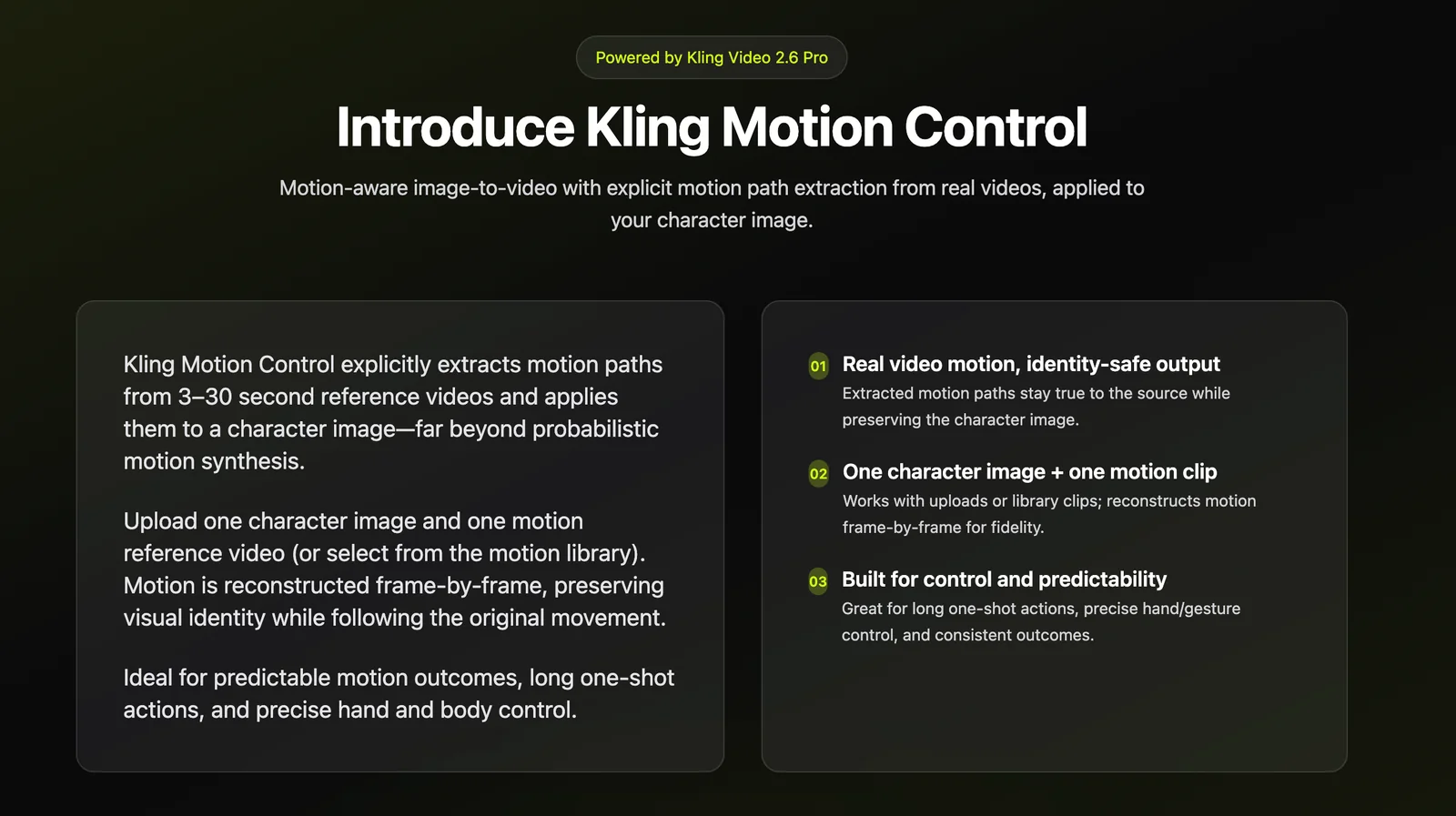
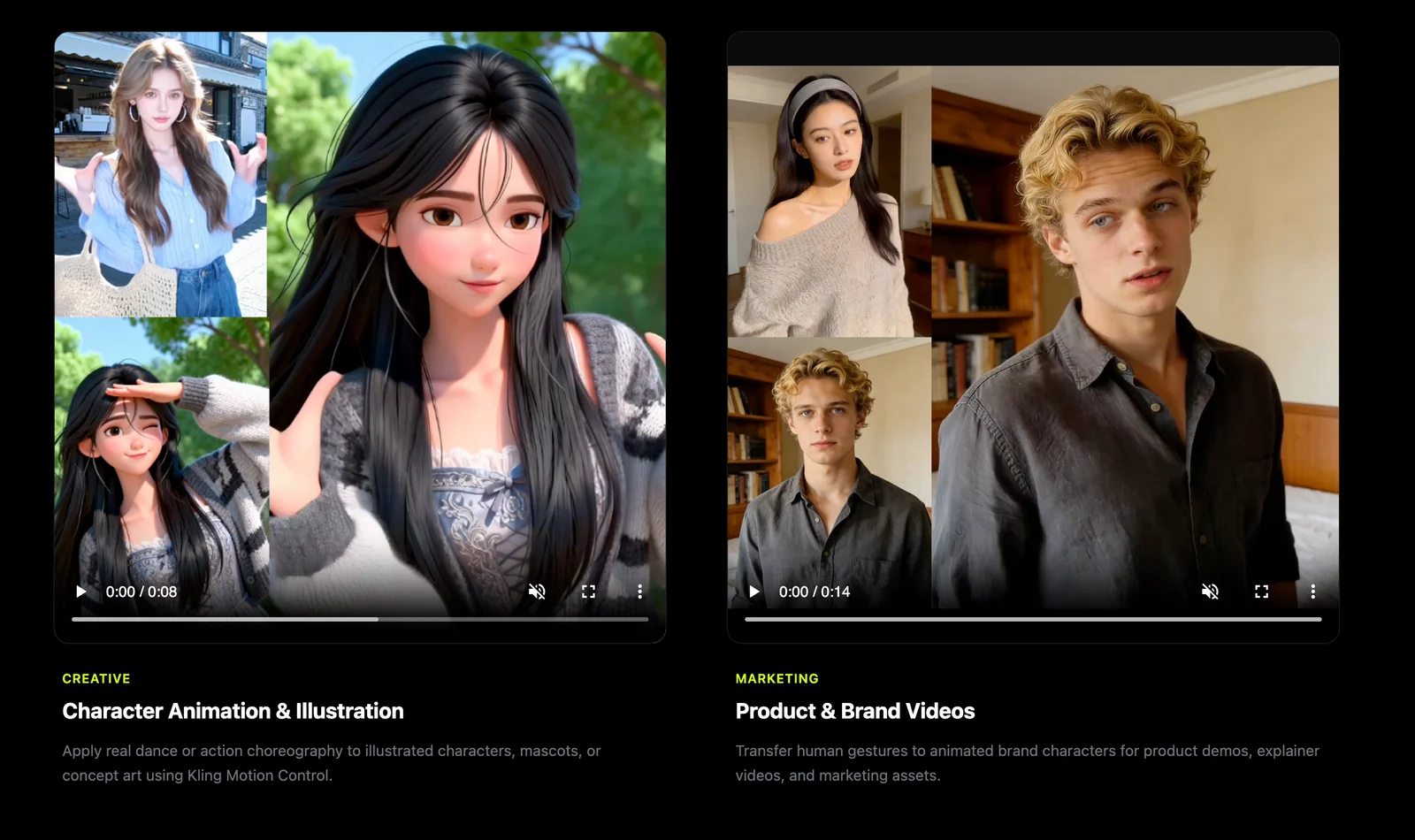
Key Features
Use Cases



Frequently asked questions about Kling Motion Control
What is the pricing model for Kling Motion Control?
Kling Motion Control utilizes a freemium pricing model, offering basic features for free while advanced functionalities may incur costs. Specific pricing details, including any available free tiers or trials, are not publicly listed. For the most accurate information, it’s best to contact Kling Motion directly.
Key Points
- Kling Motion Control offers a freemium pricing model.
- Detailed pricing information is not publicly available.
- Contacting Kling Motion is recommended for specific inquiries.
Detailed Explanation
Kling Motion Control's freemium model allows users to access essential features without any financial commitment. This approach is particularly appealing for individuals or small teams looking to experiment with motion control solutions before making a financial investment. However, advanced features that enhance functionality may require a subscription or one-time payment.
As pricing specifics are not openly disclosed on their website, potential customers are encouraged to reach out to Kling Motion directly. Doing so will provide insights into various pricing tiers, including any free trials or promotional offers that might be available. Additionally, inquiring about special packages for educational institutions or non-profits could yield cost-saving opportunities.
For example, if you're a developer or a business looking to integrate Kling Motion's technology into your projects, understanding the full range of offerings and corresponding costs is essential for budgeting and planning. The direct engagement will also allow you to clarify any questions regarding the differences in features between free and paid tiers.
Best Practices / Tips
- Contact Directly: Always reach out to Kling Motion for the most up-to-date pricing information or potential discounts.
- Evaluate Needs: Determine which features you truly need before considering a paid plan to avoid unnecessary costs.
- Explore Free Features: Take full advantage of the free tier to familiarize yourself with the platform and assess its suitability for your projects.
Additional Resources
What are the key features of Kling Motion Control?
Kling Motion Control provides advanced features including precise motion transfer, comprehensive full-body performance support, detailed expression mapping, and professional control mechanisms. These elements collectively enable realistic character animations and effective actor performance mapping, making it ideal for animation studios and game developers.
Key Points
- Precise Motion Transfer: Enables highly accurate movements that reflect real-life actions.
- Full-Body Performance Support: Captures and translates the entire body's motion for more dynamic animations.
- Expression Mapping: Allows for nuanced facial expressions and emotional conveyance in characters.
Detailed Explanation
Kling Motion Control excels in delivering intricate motion capture solutions that cater to various industries, including film, gaming, and virtual reality.
-
Precise Motion Transfer: This feature utilizes cutting-edge technology to ensure that every movement of the actor is translated into the digital character seamlessly. This precision is crucial for creating realistic animations that resonate with audiences. For instance, if an actor performs a subtle head nod or a complex dance move, Kling Motion Control captures these nuances without loss of detail.
-
Full-Body Performance Support: Unlike some motion capture systems that only focus on the upper body, Kling offers comprehensive tracking that includes the entire body. This capability allows animators to recreate complex actions, such as full-body combats or intricate choreographies, providing a more immersive experience in gaming and cinematic contexts.
-
Expression Mapping: This feature is vital for character development, enabling animators to map out detailed facial expressions and emotions. By capturing the subtle changes in an actor's face, Kling Motion Control enhances the storytelling by allowing characters to convey emotions more authentically. For example, a character can display joy, sadness, or anger, making the narrative more engaging.
Best Practices / Tips
- Select Appropriate Equipment: Ensure you use high-quality cameras and sensors for optimal motion capture. Poor equipment can lead to inaccurate data.
- Plan Your Shoot: Pre-visualize the scenes and movements you want to capture to maximize efficiency during the motion capture process.
- Regular Calibration: Frequently calibrate your system to maintain accuracy and reliability in motion data.
- Test Animations: Run tests with the captured data to identify any discrepancies and make necessary adjustments before finalizing your animations.
Additional Resources
How can I start using Kling Motion Control for my animation projects?
To start using Kling Motion Control for your animation projects, visit the official website to explore available options, including potential free trials, tutorials, and tailored solutions to fit your specific needs. Engage with their customer support for personalized guidance and to maximize your project’s success.
Key Points
- Explore the official Kling Motion Control website for resources.
- Check for free trials or demos that suit your animation needs.
- Contact customer support for custom solutions and personalized assistance.
Detailed Explanation
Kling Motion Control is a powerful tool designed for animators seeking to enhance their projects with advanced motion control technology. Here’s how to get started:
-
Visit the Official Website: Go to the Kling Motion Control website to familiarize yourself with the software’s features and capabilities. The site offers comprehensive information about different tools, setups, and integrations available.
-
Evaluate Free Trials: Look for any available free trials or demo versions. These trials allow you to test the software's functionalities before committing to a purchase. This is especially useful for determining if Kling Motion Control aligns with your project requirements.
-
Contact Customer Support: For specific inquiries or custom solutions, reach out to Kling's customer support. They can provide insights into how Kling Motion Control can be tailored for your unique animation projects. Discuss your needs and ask about professional services or training sessions.
-
Utilize Tutorials and Resources: Once you have access, take advantage of any tutorials or learning resources provided by Kling. Familiarize yourself with the software's interface and tools through step-by-step guides available on their website.
Best Practices / Tips
- Start Small: If you’re new to motion control, begin with smaller projects to build your confidence and understanding of the software.
- Join Online Communities: Engage with other users in forums or social media groups to share experiences and gain insights. This can provide valuable tips and tricks that enhance your workflow.
- Keep Software Updated: Regularly check for software updates to benefit from new features and improvements, ensuring your animation projects stay current with the latest technology.
Additional Resources
- Kling Motion Control Official Documentation
- User Forums and Community Support
- Video Tutorials on YouTube
By following these steps, you can effectively start using Kling Motion Control and elevate your animation projects to new heights.
What technical requirements are needed to integrate Kling Motion Control into my pipeline?
Kling Motion Control requires specific technical specifications for seamless integration into your animation pipeline. Key requirements usually include compatible software versions, hardware specifications, and system architecture. For detailed information, visit the official Kling website or contact their support team for personalized assistance.
Key Points
- Compatible Software: Ensure your animation software supports Kling Motion Control.
- Hardware Requirements: Identify the minimum system requirements for optimal performance.
- System Architecture: Understand whether you need a specific architecture for integration.
Detailed Explanation
Integrating Kling Motion Control into your animation pipeline involves several technical requirements that can impact performance and usability.
-
Compatible Software: Kling Motion Control is designed to work with popular animation software like Autodesk Maya, Blender, and Unity. Check the latest version compatibility on the Kling website to avoid integration issues.
-
Hardware Requirements: The performance of Kling Motion Control relies heavily on your system's hardware. A recommended setup includes:
- CPU: Multi-core processor (at least i5 or equivalent).
- RAM: Minimum of 16GB; 32GB or more is ideal for larger projects.
- Graphics Card: Dedicated GPU such as NVIDIA GeForce GTX 1060 or better.
- Storage: SSD for faster read/write speeds, particularly for large animation files.
-
System Architecture: Make sure your operating system aligns with the requirements. Most users find Windows 10 or later versions provide the best stability, while macOS must meet specific versions for compatibility.
Best Practices / Tips
- Regular Updates: Keep your software and hardware drivers updated to ensure compatibility with Kling Motion Control.
- Testing Environment: Set up a staging environment for testing the integration before deploying it in a live production setting.
- Documentation: Maintain thorough documentation of your setup process to troubleshoot any issues quickly in the future.
Additional Resources
How does Kling Motion Control compare to other motion capture tools?
Kling Motion Control distinguishes itself from other motion capture tools through its advanced AI-driven motion transfer technology and comprehensive full-body performance capabilities. This makes it a superior choice for animators seeking realistic and fluid character animations compared to traditional motion capture systems.
Key Points
- AI-Driven Motion Transfer: Leverages artificial intelligence for enhanced accuracy.
- Full-Body Performance Capture: Captures complex movements seamlessly.
- User-Friendly Interface: Designed for ease of use, enabling quick integration.
Detailed Explanation
Kling Motion Control utilizes cutting-edge AI technology to facilitate motion transfer, which allows for more lifelike animations. Unlike traditional motion capture tools that often require extensive setup and calibration, Kling's system streamlines the process, significantly reducing preparation time. This is particularly advantageous for animators who prioritize efficiency without sacrificing quality.
Comparison with Traditional Motion Capture
- Setup Time: Traditional motion capture systems can take hours to set up with multiple cameras and markers, while Kling Motion Control simplifies this process, allowing for quicker deployment.
- Realism: The AI algorithms in Kling Motion Control analyze motion data, ensuring that character movements appear natural and fluid, a common challenge in conventional motion capture methods.
- Cost-Effectiveness: Many traditional systems involve high costs for equipment and software. Kling Motion Control offers competitive pricing, making it accessible for independent animators and small studios.
Use Cases
- Gaming Industry: Developers can create immersive character animations without the need for extensive resources.
- Film Production: Directors can achieve realistic stunt sequences with minimal post-production adjustments.
- Virtual Reality: Enhanced user experiences through lifelike avatars and interactions.
Best Practices / Tips
- Experiment with Settings: Take advantage of Kling's adjustable parameters to customize motion capture for specific projects.
- Regular Updates: Keep your software updated to benefit from the latest AI advancements and features.
- Training Resources: Utilize available tutorials and workshops to maximize your understanding of the software's capabilities.
Additional Resources
Explore more AI Ai Models tools
Browse all Ai Models tools →Compare Kling Motion Control: vs Mouse-1 · vs Milliseconds.ai · vs SWE-2 · vs Desert Ant Labs