

Faiss
AIOpen SourceFreeA library for efficient similarity search and clustering of dense vectors.
Faiss
A library for efficient similarity search and clustering of dense vectors.
About Faiss
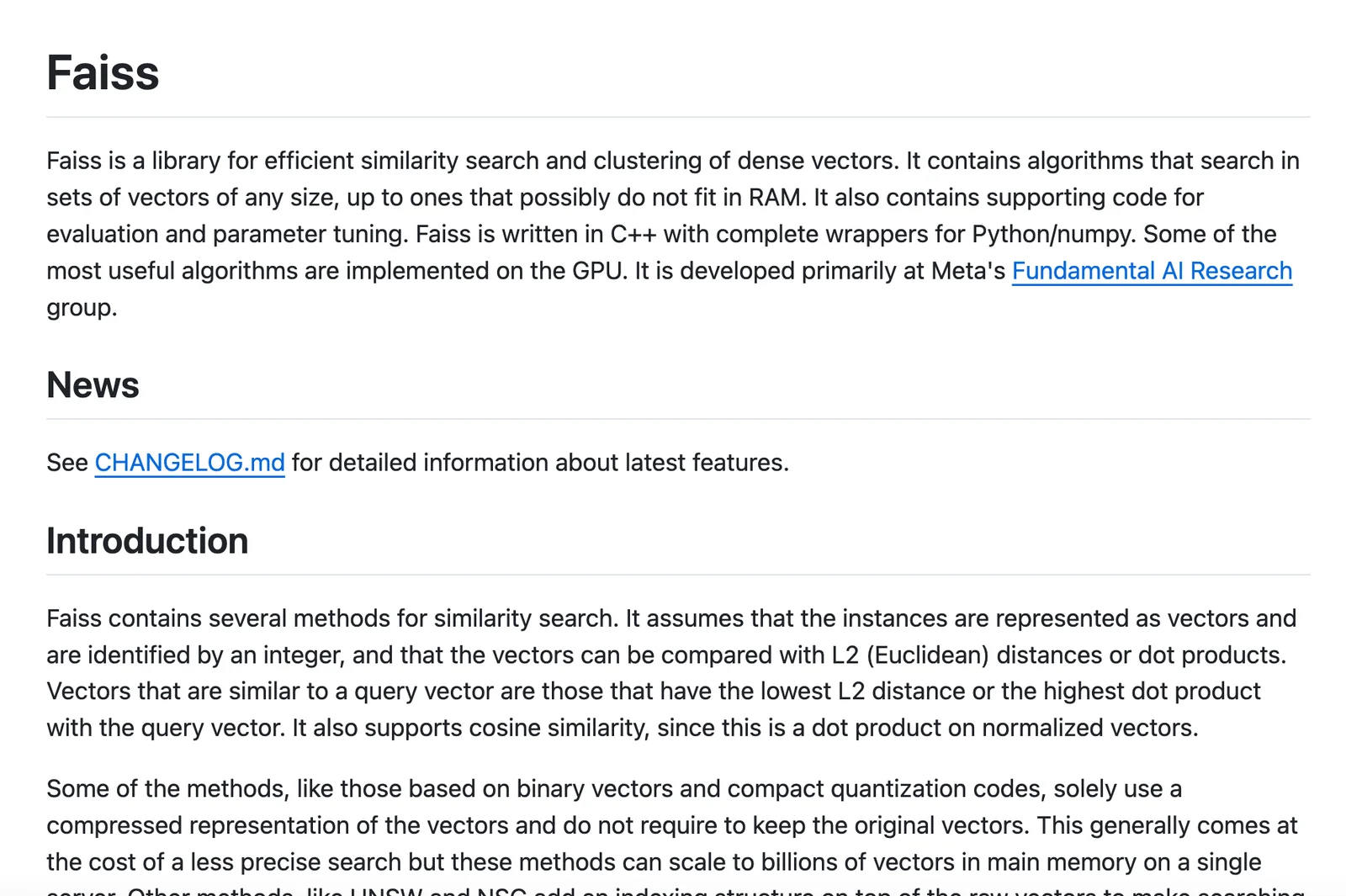
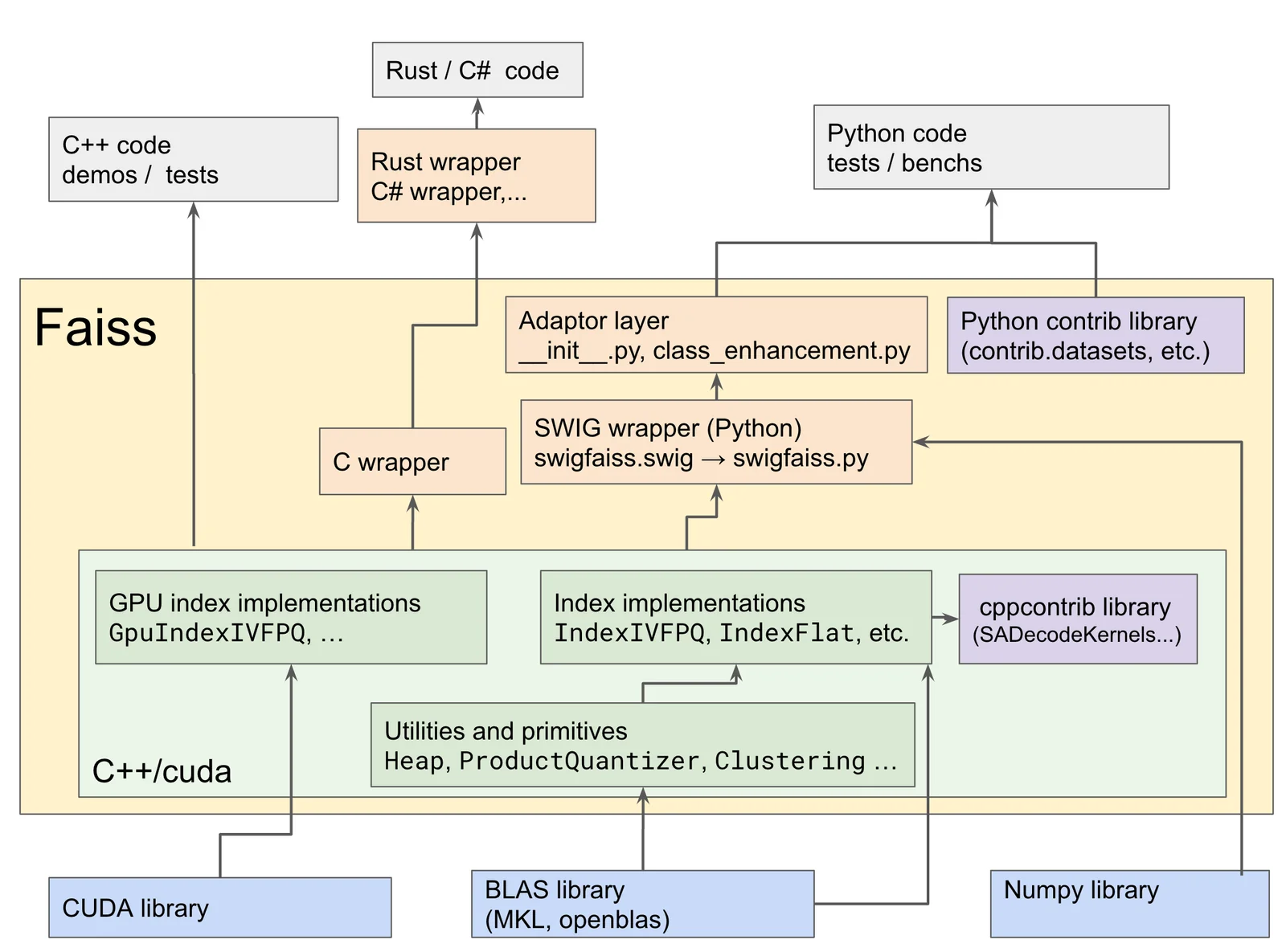
Faiss is an open-source library for efficient similarity search and clustering of dense vectors, developed by Meta AI Research (facebookresearch). It provides a wide range of index structures (flat, quantized, inverted-file, graph-based, and binary indexes), optimization techniques (product quantization, residual quantizers, PCA), and CPU/GPU implementations to enable fast nearest-neighbor and range searches at large scale. Faiss exposes C++ and Python bindings, supports GPU acceleration and multi-GPU workflows, and is designed for production usage and research benchmarking on millions to billions of vectors.
Screenshots
Key Features
Use Cases



Frequently asked questions about Faiss
Is Faiss free to use?
Yes, Faiss is a free, open-source library developed by Facebook AI Research, allowing users to utilize, modify, and distribute it under its permissive license. There are no hidden commercial fees associated with its use, making it accessible for both personal and commercial applications.
Key Points
- Open-source: Faiss is freely available for everyone.
- License: It operates under a permissive license, allowing modifications.
- No commercial fees: Users can implement it without any cost.
Detailed Explanation
Faiss, which stands for Facebook AI Similarity Search, is a library designed for efficient similarity search and clustering of dense vectors. It is particularly useful in applications involving machine learning, such as image and text retrieval, recommendation systems, and large-scale search engines.
Features:
- Highly Efficient: Faiss is optimized for both CPU and GPU, allowing for rapid processing of high-dimensional data.
- Versatile: It supports various indexing methods, including flat, inverted file, and HNSW (Hierarchical Navigable Small World) graphs, catering to different use cases and performance requirements.
- Scalability: Perfect for handling large datasets with millions of entries, making it ideal for big data applications.
For example, a company can use Faiss to build a recommendation system that suggests products based on user behavior by indexing user activity and finding similar patterns.
Best Practices / Tips
- Understand Your Data: Before implementing Faiss, ensure you understand the dimensionality and distribution of your data to choose the right indexing method.
- Experiment with Settings: Faiss offers various parameters for tuning performance. Experiment with these to find the best balance between speed and accuracy.
- Monitor Performance: Regularly evaluate the performance of your Faiss implementation. Profiling helps identify bottlenecks and optimize further.
Additional Resources
- Faiss GitHub Repository: Official documentation and source code.
- Faiss Documentation: Detailed technical documentation and usage examples.
- Getting Started with Faiss: A guide to help new users set up and start using Faiss effectively.
What are the key features of Faiss?
Faiss, developed by Facebook AI Research, features multiple index types, GPU acceleration for faster processing, product quantization for reduced memory usage, and high-performance search tuning. It provides seamless integration with both C++ and Python APIs, making it a versatile tool for efficient similarity search and clustering in large datasets.
Key Points
- Multiple Index Types: Faiss supports various indexing structures including flat, inverted file, and HNSW.
- GPU Acceleration: Utilizes graphical processing units to enhance performance in high-dimensional space searches.
- Product Quantization: Reduces memory footprint while maintaining accuracy, enabling efficient storage and retrieval.
Detailed Explanation
Faiss (Facebook AI Similarity Search) is a powerful library designed for efficient similarity search and clustering of dense vectors. Here’s a closer look at its key features:
-
Multiple Index Types: Faiss supports several indexing methods tailored for different use cases. For example, the Flat index provides exact nearest neighbor search, while the Inverted File index is ideal for large datasets, offering a balance between speed and accuracy. The HNSW (Hierarchical Navigable Small World) graph is another option for rapid approximate searches in high-dimensional spaces.
-
GPU Acceleration: Faiss is optimized for GPU processing, allowing for significant speed improvements, especially when handling large datasets. This feature is particularly beneficial for applications like image retrieval or natural language processing, where performance is critical.
-
Product Quantization: This advanced feature compresses vectors into lower-dimensional spaces without sacrificing accuracy. It drastically reduces the memory requirements for datasets, making it feasible to perform searches on devices with limited resources. For instance, product quantization can compress a dataset of 1 million vectors from 400 MB to just 100 MB.
-
High-Performance Search Tuning: Users can fine-tune the performance of their searches by adjusting parameters such as the number of probes in the search algorithm, ensuring faster results tailored to specific application needs.
-
API Support: Faiss provides straightforward APIs in both C++ and Python, making it accessible for developers across various platforms. This cross-language support streamlines the integration process into existing applications and workflows.
Best Practices / Tips
- Choose the Right Index: Assess your dataset size and search requirements to select the most appropriate index type for your needs.
- Utilize GPU Resources: If available, always leverage GPU acceleration to enhance performance, particularly for large-scale applications.
- Experiment with Quantization: Test different levels of product quantization to find the best trade-off between speed, accuracy, and memory usage.
- Monitor Performance: Regularly evaluate your search performance and adjust parameters to optimize speed and accuracy for your applications.
Additional Resources
By understanding these features and following best practices, users can maximize the benefits of Faiss in their similarity search projects.
How do I get started with Faiss?
To get started with Faiss, visit the official GitHub page at Faiss GitHub, where you'll find installation instructions, comprehensive documentation, and example codes to assist you in setting up this powerful library for efficient similarity search and clustering of dense vectors.
Key Points
- Installation: Follow the detailed installation guide available on GitHub.
- Documentation: Access the extensive documentation for understanding features and functionalities.
- Examples: Utilize example codes to quickly implement Faiss in your projects.
Detailed Explanation
Faiss (Facebook AI Similarity Search) is a library designed for efficient similarity search and clustering of high-dimensional vectors. To get started, begin by checking out the official GitHub page. Here’s a step-by-step guide to help you set up:
-
Installation:
- Faiss can be installed via pip or from source. For Python users, run:
or for GPU support:pip install faiss-cpupip install faiss-gpu - Ensure you have the appropriate version of Python (3.6 or later) and compatible packages (like NumPy).
- Faiss can be installed via pip or from source. For Python users, run:
-
Documentation:
- The documentation offers insights into various functions and classes available in Faiss. Key topics include indexing, searching, and clustering. Familiarize yourself with concepts such as
IndexFlatL2for basic L2 distance searches, andIndexIVFFlatfor more advanced indexing.
- The documentation offers insights into various functions and classes available in Faiss. Key topics include indexing, searching, and clustering. Familiarize yourself with concepts such as
-
Examples:
- The GitHub repository includes example scripts that demonstrate how to load data, create an index, and perform searches. For instance, you can start with:
import faiss
import numpy as np

# Create some sample data
data = np.random.rand(1000, 128).astype('float32')

# Create the index
index = faiss.IndexFlatL2(128)
index.add(data)

# Perform a search
D, I = index.search(data[:5], 5)  # Search for the 5 nearest neighbors
print(I)
- The GitHub repository includes example scripts that demonstrate how to load data, create an index, and perform searches. For instance, you can start with:
Best Practices / Tips
- Choose the Right Index: Depending on your dataset size and search speed requirements, choose an appropriate index type. For small datasets,
IndexFlatL2is sufficient, but larger datasets may benefit fromIndexIVFPQ. - Normalize Your Data: If using L2 distance, normalize your vectors to improve search accuracy.
- Experiment with Parameters: Faiss allows various parameters for tuning. Experiment with these to optimize performance for your specific application.
Additional Resources
- Faiss GitHub Repository: Access the official repository for downloads, updates, and community discussions.
- Faiss Documentation: Comprehensive guide on installation, usage, and advanced features.
- Faiss Tutorials: Check out the wiki for tutorials and use cases to enhance your understanding of Faiss capabilities.
How can I integrate Faiss with my application?
Faiss can be integrated into your application using its APIs available in both C++ and Python. This allows developers to efficiently build similarity search features for tasks such as image or text retrieval, making it a powerful tool for machine learning and data science applications.
Key Points
- API Availability: Faiss is accessible through C++ and Python APIs.
- Use Cases: Ideal for similarity search in large datasets.
- Performance: Optimized for high-dimensional vector data.
Detailed Explanation
Faiss, developed by Facebook AI Research, is a library designed for efficient similarity search and clustering of dense vectors. To integrate Faiss into your application, follow these steps for both C++ and Python:
-
Installation:
- For Python, install using pip:
or for GPU support:pip install faiss-cpupip install faiss-gpu - For C++, compile the library from source or install using package managers depending on your operating system.
- For Python, install using pip:
-
Building Indexes: Start by converting your data into vectors. Faiss supports various index types (e.g., Flat, IVFFlat, HNSW).
- Example in Python:
import faiss
import numpy as np

# Generate some random data
data = np.random.random((1000, 128)).astype('float32')
index = faiss.IndexFlatL2(128)  # Using L2 distance
index.add(data)  # Add vectors to the index
- Example in Python:
-
Querying: Once you have built your index, you can perform searches.
- Example:
query = np.random.random((5, 128)).astype('float32')
distances, indices = index.search(query, k=5)  # k = number of nearest neighbors
print(indices, distances)
- Example:
This simple workflow allows you to integrate powerful similarity search functionality into your applications seamlessly.
Best Practices / Tips
- Choose the Right Index: Depending on your dataset size and search speed requirements, select an appropriate index type to balance performance and accuracy.
- Optimize for GPU: If you're dealing with large datasets, consider using the GPU version of Faiss to significantly speed up computations.
- Experiment with Parameters: Tweak parameters such as the number of clusters in IVFFlat or the number of probes to optimize search accuracy and speed.
Additional Resources
By following these guidelines, you can effectively integrate Faiss into your application, enhancing your machine learning and data processing capabilities.
How does Faiss compare to other similarity search tools?
Faiss outperforms many similarity search tools due to its unmatched speed and efficiency, especially with large datasets. It provides extensive flexibility in indexing types and is optimized for both CPU and GPU environments, making it a preferred choice for machine learning and data science applications.
Key Points
- Speed and Efficiency: Faiss is exceptionally fast, particularly for large-scale data.
- Flexible Indexing: Offers various indexing methods tailored to different use cases.
- Hardware Optimization: Efficiently utilizes both CPU and GPU resources.
Detailed Explanation
Faiss (Facebook AI Similarity Search) is an open-source library developed by Facebook AI Research that specializes in similarity searches and clustering of high-dimensional vectors. Here’s how it compares to other similarity search tools:
-
Speed and Performance: Faiss is engineered for high-speed performance. It can handle billions of vectors efficiently, with benchmarks showing that it can perform searches in milliseconds. This makes it ideal for applications such as image and video retrieval, recommendation systems, and natural language processing.
-
Flexible Indexing Types: Faiss supports various indexing types, including flat (brute-force), inverted file (IVF), and product quantization (PQ). This flexibility allows users to choose the best index based on their specific dataset and search requirements. For instance, if you need high accuracy for a smaller dataset, a flat index may be suitable, whereas larger datasets benefit from IVF or PQ for faster searches.
-
Hardware Optimization: Unlike many other tools that are designed primarily for CPU usage, Faiss is optimized for both CPU and GPU. This dual optimization enables users to leverage powerful GPU resources, significantly speeding up both indexing and search processes. For example, using NVIDIA GPUs can dramatically reduce search times compared to CPU-only solutions.
Best Practices / Tips
- Select Appropriate Index Type: Choose the right indexing method based on your dataset size and query requirements. Experiment with different types to find the best performance balance.
- Optimize for Hardware: If possible, utilize GPU resources for large-scale applications to maximize speed.
- Benchmark Performance: Regularly benchmark Faiss against your specific datasets and use cases to ensure optimal performance and make necessary adjustments to indexing strategies.
Additional Resources
Explore more AI Ai Tools tools
Browse all Ai Tools tools →Compare Faiss: vs Humanizer · vs Worktrunk · vs Mise · vs BiBimba