

Estera
AIAn AI receptionist that answers phone calls and WhatsApp messages 24/7, qualifies leads, and books appointments in 50+ languages.
Estera
An AI receptionist that answers phone calls and WhatsApp messages 24/7, qualifies leads, and books appointments in 50+ languages.
About Estera
Estera is a multi-channel AI receptionist for small and mid-sized businesses that combines voice and messaging agents into one platform. Trained on a business's services, pricing, policies, and FAQs, Estera picks up calls and WhatsApp messages in under five seconds, qualifies leads, books appointments directly into the existing calendar/PMS/CRM, and follows up automatically. The system ships as three connected products — Concierge for inbound WhatsApp, Voice for inbound phone calls, and Messages for outbound WhatsApp campaigns — using the business's existing phone number and WhatsApp Business number so customers don't see a change. It speaks 50+ languages and is aimed at industries like real estate, hotels, restaurants, and dental clinics, with a setup that the team says takes under three minutes.
Screenshots
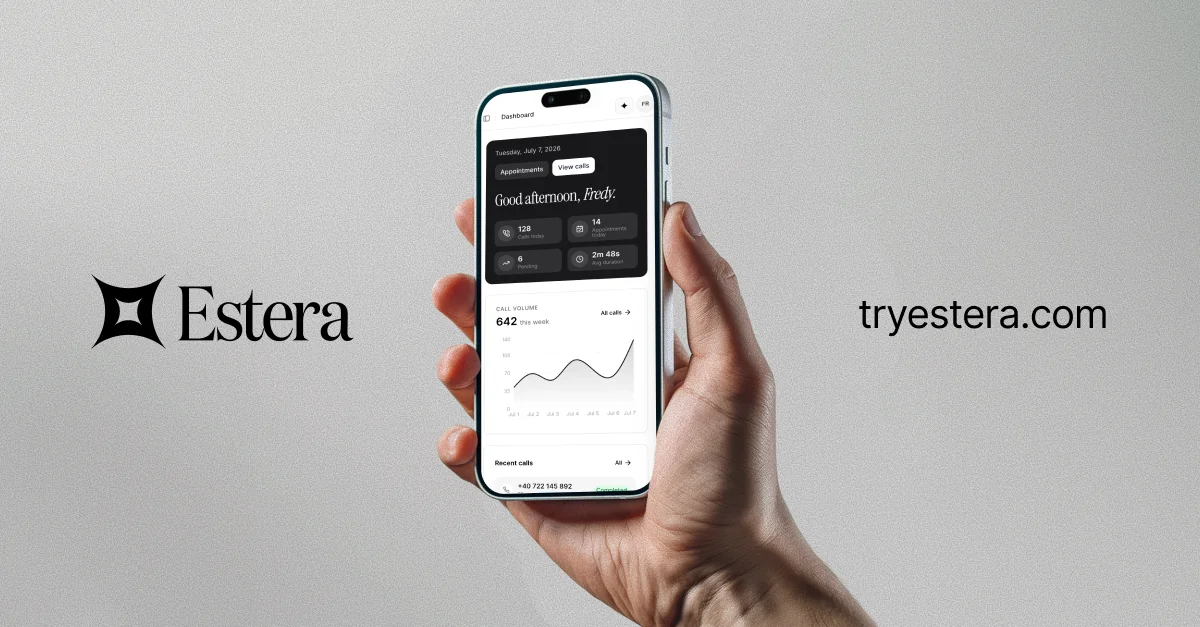
Key Features
Use Cases



Frequently asked questions about Estera
What is Estera?
Estera is an advanced AI receptionist designed to handle phone calls and WhatsApp messages 24/7. It qualifies leads and books appointments in over 50 languages, providing businesses with a seamless communication solution that enhances customer engagement and improves operational efficiency.
Key Points
- 24/7 Availability: Estera operates around the clock to ensure no customer inquiries are missed.
- Multi-Language Support: Communicates fluently in over 50 languages, catering to a global audience.
- Lead Qualification: Efficiently assesses potential leads to enhance sales processes.
Detailed Explanation
Estera revolutionizes customer interaction by serving as a virtual receptionist. Available 24/7, it ensures that businesses never miss a call or message, responding promptly to inquiries regardless of the time of day. By utilizing cutting-edge natural language processing (NLP) technology, Estera engages customers in real-time, providing them with the information they need.
Use Cases:
- Small Businesses: A local salon can use Estera to manage appointment bookings, answer customer queries about services, and handle last-minute cancellations.
- E-commerce: An online retail store benefits from Estera by receiving inquiries about product availability and order statuses, enhancing customer satisfaction.
- Healthcare Providers: Clinics can deploy Estera to schedule patient appointments and manage follow-up calls, streamlining their operations.
Estera's ability to qualify leads is a game-changer for sales teams. It collects essential information from potential clients and prioritizes follow-ups based on their readiness to purchase. This feature allows businesses to focus on high-value prospects, increasing conversion rates significantly.
Best Practices / Tips
- Integration: Ensure Estera is integrated with your CRM system to streamline lead management and appointment scheduling.
- Customization: Tailor Estera’s responses and workflows to reflect your brand's voice and meet your specific operational needs.
- Training: Regularly update Estera with new information about products or services to keep responses accurate and relevant.
Common Pitfalls:
- Neglecting Updates: Failing to update Estera’s knowledge base can lead to outdated information being provided to customers.
- Over-Reliance: While Estera handles many tasks, ensure there's a system in place for escalation to human agents for complex inquiries.
Additional Resources
How does Estera work?
Estera enhances business communication by integrating multiple AI-driven tools, including an Inbound Voice Agent for efficient call handling, a WhatsApp Concierge for 24/7 messaging support, and automated booking integration with existing systems. This ensures seamless customer interactions across various platforms, tailored specifically to each business’s needs.
Key Points
- Inbound Voice Agent: Answers calls swiftly and manages inquiries.
- WhatsApp Concierge: Provides round-the-clock messaging support.
- Automated Booking: Integrates with calendars and CRM systems for efficient appointment management.
Detailed Explanation
Estera functions through a suite of intelligent tools designed to streamline customer interactions.
-
Inbound Voice Agent: This feature guarantees that phone calls are answered in under five seconds. It efficiently handles reservations, responds to customer questions, and manages overflow during peak hours, ensuring no call goes unanswered.
-
WhatsApp Concierge: Operating 24/7, this tool replies to customer messages via WhatsApp, utilizing the business’s own WhatsApp Business number. Whether handling inquiries or providing information, it ensures instant communication at any hour, enhancing customer satisfaction.
-
Outbound Messaging: Estera allows businesses to run targeted WhatsApp campaigns for reminders, follow-ups, and re-engagement efforts. This proactive communication can significantly improve customer retention.
-
Calendar & CRM Integration: This functionality automates the booking process by writing appointments directly into existing calendars, Property Management Systems (PMS), or Customer Relationship Management (CRM) software. This reduces manual entry errors and saves time.
-
Business-Specific Training: Estera is trained specifically on the business’s services, pricing, policies, and frequently asked questions (FAQs). This ensures that responses remain on-brand and relevant, enhancing the overall customer experience.
Use Cases
- Restaurant Reservations: Estera efficiently manages bookings and special requests, allowing restaurants to handle busy-hour calls without staff being overwhelmed.
- Hotel Front Desk: Hotels benefit from answering availability and amenities inquiries in multiple languages, providing guests with a seamless experience.
- Dental & Medical Clinics: Clinics can book appointments and address intake questions via both WhatsApp and voice, streamlining patient engagement.
- Real Estate: Estera screens inbound inquiries about property listings, allowing agents to focus on qualified leads.
- SMB Overflow Coverage: Small to medium businesses can catch after-hours and busy-hour calls, preventing missed opportunities.
Best Practices / Tips
- Leverage AI Training: Regularly update the training data to reflect changes in services or pricing.
- Monitor Performance: Use analytics to track response times and customer satisfaction, adjusting strategies as needed.
- Integrate Seamlessly: Ensure that Estera’s tools are fully integrated with existing systems for maximum efficiency.
- Customize Responses: Tailor the FAQs and responses to match your brand voice, ensuring a consistent customer experience.
Additional Resources
What are the main features of Estera?
Estera offers essential features designed to enhance customer engagement and streamline business operations. Key functionalities include a rapid Inbound Voice Agent, a 24/7 WhatsApp Concierge, targeted Outbound Messaging, seamless Calendar & CRM Booking, and tailored Business-specific Training for personalized responses.
Key Points
- Inbound Voice Agent: Handles calls swiftly and efficiently.
- WhatsApp Concierge: Provides round-the-clock messaging support.
- Calendar & CRM Booking: Integrates with existing systems for hassle-free scheduling.
Detailed Explanation
Estera's Inbound Voice Agent is a powerful tool that answers phone calls in under five seconds, addressing customer inquiries, managing reservations, and handling busy-hour overflow smoothly. This feature not only improves customer satisfaction but also ensures that no call goes unanswered, making it essential for businesses with high call volumes.
The WhatsApp Concierge feature allows businesses to interact with customers via their official WhatsApp Business number, responding to inquiries and messages 24/7. This ensures that your customers receive timely support, regardless of the hour, boosting engagement and retention.
Estera also excels in outbound communication with targeted Outbound Messages. This feature enables businesses to run WhatsApp campaigns for crucial notifications such as appointment reminders, follow-ups, and customer re-engagement strategies. By automating these communications, businesses can enhance their outreach without additional workload.
The Calendar & CRM Booking integration is another standout feature. Estera seamlessly writes appointments directly into existing calendars, Property Management Systems (PMS), or Customer Relationship Management (CRM) software. This integration minimizes the risk of double-bookings and ensures that all scheduling is accurate and up-to-date.
Lastly, Estera's Business-specific Training ensures that the AI is well-versed in your unique services, pricing, policies, and frequently asked questions (FAQs). This customization allows for on-brand and informed responses, enhancing the customer experience and building trust.
Best Practices / Tips
- Optimize Your Training: Regularly update the training data for the AI to reflect changes in services or pricing.
- Monitor Performance: Use analytics to track the performance of the Inbound Voice Agent and WhatsApp Concierge for continuous improvement.
- Encourage Customer Interaction: Promote the WhatsApp Concierge in your marketing materials to increase user engagement.
Additional Resources
Who is Estera for?
Estera is designed for various industries, including restaurants, hotels, dental and medical clinics, real estate, and small to medium-sized businesses (SMBs). It streamlines bookings and inquiries, ensuring efficient communication and service without needing constant staff presence.
Key Points
- Restaurant Reservations: Efficiently manage bookings and special requests.
- Hotel Front Desk Support: Provide 24/7 answers to guests in multiple languages.
- Healthcare Appointment Management: Handle patient intake and appointment scheduling seamlessly.
Detailed Explanation
Estera is an AI-powered communication tool tailored for sectors requiring high-volume customer interactions.
Restaurant Reservations
Restaurants can utilize Estera to handle reservations, manage busy-hour calls, and accommodate special requests. This tool reduces the need for staff to be constantly on the phone, allowing them to focus on in-house operations. For example, Estera can automatically confirm reservations and send reminders to customers, increasing retention rates.
Hotel Front Desk Support
Hotels benefit from Estera's capability to answer frequent guest inquiries about room availability, amenities, and services 24/7. It can communicate in multiple languages, making it ideal for international guests. This feature enhances guest satisfaction and can improve online reviews, as inquiries are resolved promptly.
Dental & Medical Clinics
In healthcare settings, Estera can streamline appointment bookings and manage patient inquiries through platforms like WhatsApp and voice. Clinics can maintain patient engagement by automating appointment reminders and answering common intake questions, which helps reduce no-shows and improves the overall patient experience.
Real Estate Lead Qualification
Real estate agents can use Estera to qualify leads by screening inquiries about property listings. This automation ensures that only serious inquiries are routed to agents, optimizing their time and increasing conversion rates.
SMB Overflow Coverage
For small and medium-sized businesses, Estera provides essential overflow coverage during busy hours and after-hours, ensuring that potential customers' calls do not go unanswered. This capability is crucial for maintaining customer relationships and maximizing sales opportunities.
Best Practices / Tips
- Customize Responses: Tailor Estera’s automated messages to reflect your brand's voice and tone.
- Monitor Performance: Regularly analyze communication metrics to identify areas for improvement.
- Train Staff: Ensure staff is familiar with Estera’s functionalities to leverage its full potential.
Additional Resources
How much does Estera cost?
Estera is a paid product, and its pricing varies based on the features and subscription plans you choose. For the most accurate and up-to-date pricing, it's best to visit the official Estera website directly.
Key Points
- Estera offers multiple subscription plans.
- Pricing may depend on feature access and user count.
- Discounts may be available for annual subscriptions.
Detailed Explanation
Estera provides a range of subscription options tailored to different user needs, including individual plans for freelancers and comprehensive solutions for teams. The base pricing typically starts at around $15 per month for individual use, with higher-tier plans that can go up to $100 per month for businesses requiring advanced features, integrations, and greater user access.
For example, the Basic plan may include essential functionalities, while the Premium plan offers advanced analytics and priority customer support. Businesses often benefit from annual subscriptions, which can result in cost savings of up to 20% compared to monthly payments.
Additionally, Estera frequently runs promotions, so checking their official website for seasonal discounts or bundle offers can also yield savings.
Best Practices / Tips
- Assess Your Needs: Before choosing a plan, evaluate the features you require. Consider starting with a basic plan and upgrading later if needed.
- Take Advantage of Trials: Estera often provides free trial periods for new users. Utilize this to test the platform's suitability for your needs.
- Monitor Updates: Keep an eye on Estera’s website for new features and pricing changes; this can help you make the most cost-effective decision.
Additional Resources
How do I get started with Estera?
To get started with Estera, visit tryestera.com to sign up for an account. You can explore its features, choose a suitable plan, and access helpful resources that will guide you through the platform's functionalities.
Key Points
- Sign up easily at the official website.
- Choose from various subscription plans.
- Explore comprehensive support and resources.
Detailed Explanation
Estera is a versatile platform designed for various users, from individuals to businesses looking to optimize their workflows. To begin, follow these steps:
-
Visit the Website: Go to tryestera.com. The homepage offers an intuitive interface to navigate.
-
Sign Up: Click on the "Get Started" button to create your account. You will need to provide basic information such as your name, email, and password.
-
Choose a Plan: Once registered, you can select a subscription plan that fits your needs. Estera offers several options, including free trials and premium memberships. Evaluate features like storage limits, user access, and additional tools to determine the best fit.
-
Explore Features: After signing up, take time to explore the dashboard. Estera provides various tools for project management, collaboration, and data analytics. Utilize the tutorials and documentation available to familiarize yourself with the platform.
-
Engage with Support: If you have questions or need assistance, Estera offers customer support through live chat and email. Take advantage of these resources to enhance your experience.
Best Practices / Tips
-
Start with a Free Trial: If available, begin with a free trial to assess whether Estera meets your needs without upfront costs.
-
Utilize Tutorials: Make use of Estera's tutorial videos and guides to maximize the platform's features effectively.
-
Set Clear Goals: Define what you want to achieve with Estera. Whether it's improving team collaboration or project tracking, having clear objectives can help you utilize the platform efficiently.
-
Avoid Overlooking Features: Don’t ignore the advanced tools that Estera offers. Explore functionalities like automation and reporting, which can significantly enhance productivity.
Additional Resources
- Estera Official Documentation
- Estera Blog for tips and updates
- Estera Community Forum for user discussions and support
Explore more AI Ai Agents tools
Browse all Ai Agents tools →Browse by use case: Automation & Productivity
Compare Estera: vs TryCase · vs Aside · vs Wisry · vs Cline