
EpsteinGPT
AIA specialized research platform and custom GPT focused on providing uncensored access to Epstein-related files and research.
EpsteinGPT
A specialized research platform and custom GPT focused on providing uncensored access to Epstein-related files and research.
About EpsteinGPT
EpsteinGPT is presented as a specialized research tool and custom GPT aimed at providing uncensored, unbiased access to the Epstein files and related research. The project includes a web-based platform design and a custom GPT/prompt instance for conversational research and exploration of documents. The public project notes a Phase 2 plan to become a monetized, payment-gated research portal with tiered pricing and a modern UX, intended to centralize documents, enable searchable access, and provide tiered subscriber access to curated investigative material.
Screenshots
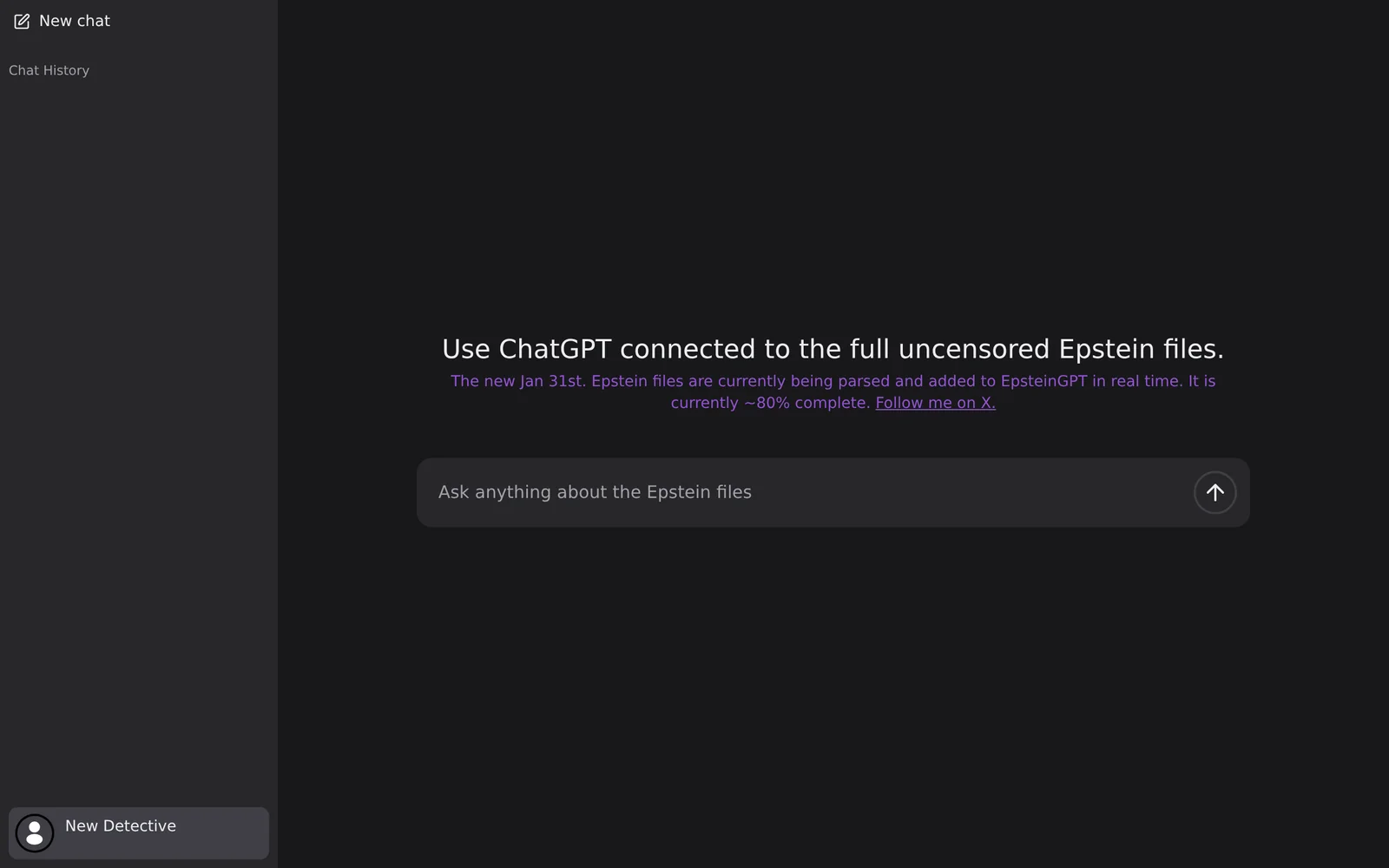
Key Features
Use Cases



Frequently asked questions about EpsteinGPT
What is EpsteinGPT?
EpsteinGPT is a specialized research platform and custom AI model designed to provide uncensored access to files and research related to Jeffrey Epstein. It facilitates in-depth exploration of sensitive topics, ensuring users can find a comprehensive range of information and insights about Epstein's connections and activities.
Key Points
- Uncensored Research: Access to a wide variety of Epstein-related documents.
- Custom AI Model: Tailored GPT model designed for in-depth analysis.
- User-Friendly Interface: Simplifies navigation through extensive data.
Detailed Explanation
EpsteinGPT utilizes advanced AI technology to offer users a platform dedicated to the exploration of Jeffrey Epstein's controversial life and connections. This tool compiles extensive databases of uncensored documents, including legal filings, testimonies, and media reports.
Features of EpsteinGPT:
- Comprehensive Document Access: Users can explore thousands of files and documents related to Epstein, ensuring a broad understanding of the subject matter. This includes court documents, news articles, and personal accounts.
- Custom AI Capabilities: The platform employs a specialized version of GPT, optimized for research purposes. It can summarize documents, generate reports, and answer specific queries, making it a valuable resource for researchers, journalists, and the general public.
- User-Centric Design: The interface is designed for ease of use, allowing users to quickly find relevant information. Features such as search filters and keyword suggestions enhance the research experience.
Best Practices / Tips
- Utilize Advanced Search Filters: Take advantage of the filtering options to narrow down your search by date, type of document, or specific keywords.
- Stay Updated: Regularly check for new documents and updates as the platform continually expands its database.
- Verify Information: Cross-reference findings with reliable sources to ensure accuracy and context.
Additional Resources
By leveraging EpsteinGPT, users gain critical insights into one of the most talked-about figures in contemporary history, empowering informed discussions and research on related topics.
How does EpsteinGPT work?
EpsteinGPT operates by integrating advanced AI capabilities such as natural language processing, machine learning, and data analytics to streamline daily workflows. It assists users in a variety of tasks, enhancing productivity and decision-making through intelligent automation and personalized responses.
Key Points
- Natural Language Processing: Understands and generates human-like text.
- Machine Learning: Continuously improves its performance based on user interactions.
- Data Analytics: Analyzes information to provide actionable insights.
Detailed Explanation
EpsteinGPT leverages cutting-edge AI technologies to address various user needs. Here's how it works:
-
Natural Language Processing (NLP): By utilizing NLP, EpsteinGPT can comprehend user queries and generate relevant responses. This allows for seamless interaction, similar to conversing with a human. For instance, if a user asks for a summary of a complex report, EpsteinGPT can distill the key points into concise information.
-
Machine Learning (ML): EpsteinGPT employs machine learning algorithms to learn from user behavior. Over time, it adapts to individual preferences and improves its responses. For example, if a user consistently asks about marketing strategies, EpsteinGPT will prioritize related content in future interactions.
-
Data Analytics: EpsteinGPT analyzes large datasets to extract meaningful insights. This feature is particularly useful for businesses that need to make data-driven decisions. For instance, it can identify trends in customer feedback and suggest improvements to products or services.
Overall, EpsteinGPT is designed to enhance user experience by providing quick, accurate, and contextually relevant responses, making it a valuable tool for both personal and professional use.
Best Practices / Tips
- Define Clear Objectives: Clearly specify what you want to achieve with EpsteinGPT to get the best results.
- Engage Regularly: Frequent interactions help the AI understand your needs better, leading to improved service over time.
- Provide Feedback: If responses are off-target, give constructive feedback. This helps fine-tune the AI's capabilities.
Additional Resources
What are the main features of EpsteinGPT?
EpsteinGPT offers advanced AI capabilities, including natural language processing, personalized content generation, and seamless integration with various platforms. These features empower users to enhance productivity, automate tasks, and create engaging content tailored to their audience's needs.
Key Points
- Natural Language Processing (NLP): Understands and generates human-like text.
- Content Personalization: Crafts unique content based on user preferences.
- Platform Integration: Connects with tools like Slack, Google Docs, and more.
Detailed Explanation
EpsteinGPT harnesses the power of Natural Language Processing (NLP) to interpret and generate text that closely resembles human communication. This allows for applications in chatbots, automated customer support, and dynamic content creation, making it an invaluable tool for businesses looking to improve user interaction.
Content Personalization
One of the standout features of EpsteinGPT is its ability to create personalized content. By analyzing user behavior and preferences, it can generate blog posts, marketing materials, and social media updates tailored to specific audiences. For instance, a marketing team can use EpsteinGPT to create emails that resonate with different segments of their customer base, enhancing engagement and conversion rates.
Platform Integration
EpsteinGPT offers seamless integration with popular productivity tools such as Slack, Google Docs, and Microsoft Teams. This feature streamlines workflows by allowing users to access AI capabilities directly within their existing platforms. For example, a project manager can draft meeting notes or reports in Google Docs while utilizing EpsteinGPT to generate content suggestions, making the process more efficient.
Best Practices / Tips
- Utilize NLP Features: Leverage NLP capabilities to automate responses in customer service. This can significantly reduce response times and improve customer satisfaction.
- Experiment with Personalization: Regularly analyze user feedback to refine the content generated by EpsteinGPT, ensuring it stays relevant and engaging.
- Maximize Integrations: Take advantage of the platform integrations to enhance team collaboration. Ensure all team members are trained on how to use EpsteinGPT effectively within their workflows.
Additional Resources
- Official EpsteinGPT Documentation
- Understanding Natural Language Processing
- Best Practices for AI Content Generation
By understanding and utilizing these features effectively, users can maximize the potential of EpsteinGPT, driving enhanced productivity and creativity in their projects.
Who is EpsteinGPT for?
EpsteinGPT is ideal for individuals and businesses looking to streamline their daily AI workflows. It caters to professionals in various fields, including marketing, education, and content creation, who want to enhance productivity and leverage AI for effective decision-making and task automation.
Key Points
- Target Audience: Professionals across multiple industries.
- Use Cases: Content creation, data analysis, and task automation.
- Benefits: Increased productivity and streamlined workflows.
Detailed Explanation
EpsteinGPT serves a diverse audience, including marketers, educators, and entrepreneurs. For instance, marketers can utilize EpsteinGPT to generate engaging content and analyze consumer behavior trends. Educators can create personalized lesson plans and automate administrative tasks. Entrepreneurs can leverage the tool for market research and efficient project management.
Use Cases:
- Content Creation: Generate blog posts, social media content, and email newsletters quickly and effectively.
- Data Analysis: Analyze large datasets to extract insights and inform business strategies.
- Task Automation: Automate repetitive tasks, freeing up time for more critical activities.
By integrating EpsteinGPT into daily operations, users can significantly enhance their productivity and make informed decisions based on real-time data.
Best Practices / Tips
- Define Your Goals: Clearly outline what you want to achieve with EpsteinGPT to maximize its potential.
- Stay Updated: Regularly check for updates and new features that can further enhance your workflows.
- Test and Iterate: Experiment with different prompts and tasks to discover the most effective uses for your specific needs.
Common Pitfalls to Avoid:
- Over-reliance on AI without human oversight can lead to errors.
- Failing to customize the tool for specific tasks may result in suboptimal outcomes.
Additional Resources
How much does EpsteinGPT cost?
EpsteinGPT is a premium AI product, and its pricing varies based on subscription tiers and features. For the most accurate and up-to-date pricing information, please visit the official EpsteinGPT website.
Key Points
- Pricing varies by subscription tier.
- Official website provides the latest updates.
- Free trials or demos may be available.
Detailed Explanation
EpsteinGPT offers several subscription tiers tailored to different user needs, such as individual users, small businesses, and enterprise solutions. Each tier comes with distinct features and benefits, including varying levels of access to advanced AI capabilities, support, and additional tools.
For example, the basic tier may include essential features suitable for individual users, whereas higher tiers could offer enhanced functionalities like priority support and customization options for businesses. Prices can change depending on promotions or new feature releases, so it’s crucial to check the official website regularly for the latest pricing updates.
Additionally, some users may benefit from free trials or demo versions that allow them to explore the product without upfront investment. This is particularly advantageous for businesses looking to assess the AI's capabilities before committing to a subscription.
Best Practices / Tips
- Compare Tiers: Before choosing a plan, analyze the features of each subscription tier to find one that best fits your needs.
- Check for Promotions: Look for seasonal discounts or promotions on the official site that may offer lower rates.
- Utilize Trials: Take advantage of free trials to evaluate the performance and usability of EpsteinGPT in real scenarios before making a financial commitment.
Additional Resources
- EpsteinGPT Official Website - For pricing, features, and updates.
- User Reviews and Testimonials - Insights from current users about their experiences with EpsteinGPT.
- FAQ Section - For common questions regarding features and pricing.
How do I get started with EpsteinGPT?
To get started with EpsteinGPT, visit epsteingpt.com to sign up for an account. Once registered, you can explore various features, access tutorials, and begin utilizing the AI tool for your specific needs, such as content generation or data analysis.
Key Points
- Create an Account: Sign up for free or choose a subscription plan.
- Explore Features: Familiarize yourself with the user interface and tools available.
- Utilize Resources: Access tutorials and community support for guidance.
Detailed Explanation
Getting started with EpsteinGPT involves a few simple steps:
-
Create an Account:
- Visit epsteingpt.com.
- Click on the “Sign Up” button.
- Fill in your details or use an existing social media account for fast registration.
-
Select a Plan:
- EpsteinGPT offers various subscription plans, including a free tier with limited features and premium plans with advanced capabilities. Review the pricing page to choose the plan that best fits your needs.
-
Explore Features:
- After signing up, navigate the dashboard to familiarize yourself with the features. EpsteinGPT provides tools for content generation, data analysis, and more. You can access templates for blog posts, marketing content, and even coding assistance.
-
Utilize Tutorials:
- EpsteinGPT provides comprehensive tutorials and documentation to help you maximize the tool’s potential. Check the “Resources” section for guides and video tutorials that explain different functionalities.
-
Engage with the Community:
- Join forums and community groups to share experiences and seek advice from other users. This can provide insights into best practices and innovative use cases.
Best Practices / Tips
- Start Small: Begin with simple tasks to understand the platform before tackling more complex projects.
- Experiment with Features: Utilize various tools within EpsteinGPT to discover what works best for your specific needs.
- Stay Updated: Regularly check for new features and updates to leverage the latest enhancements.
- Join the Community: Engage with other users to learn tips and tricks that can enhance your experience.
Additional Resources
Explore more AI Ai Services tools
Browse all Ai Services tools →Compare EpsteinGPT: vs Context.dev · vs ZeroClick · vs jurniti · vs Cadenya