

Dia Browser
AIA privacy-forward AI browser by The Browser Company that lets you chat with your open tabs and get contextual writing, research, and shopping help.
Dia Browser
A privacy-forward AI browser by The Browser Company that lets you chat with your open tabs and get contextual writing, research, and shopping help.
About Dia Browser
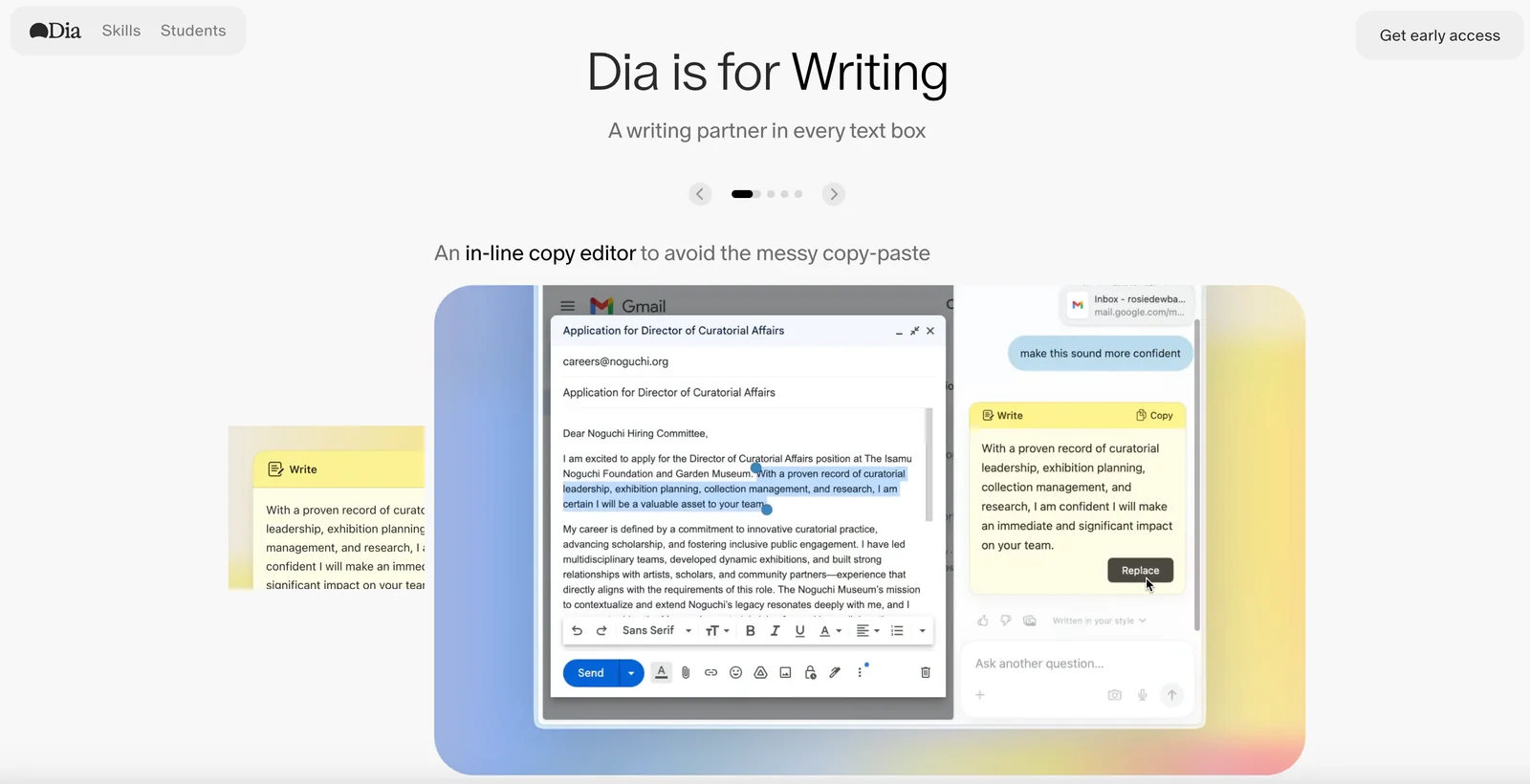
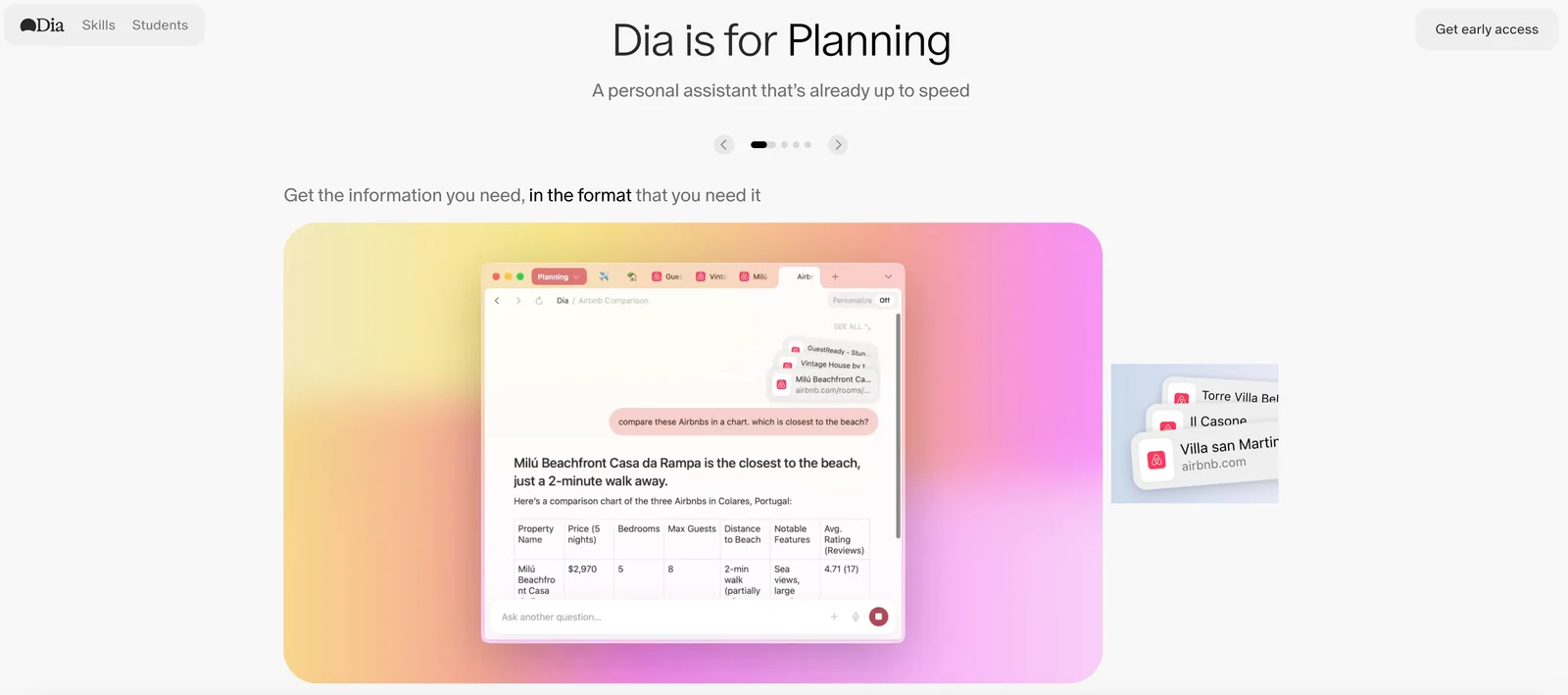
Dia is an AI-first web browser from The Browser Company that enables conversational interaction with the content of your open tabs. Users can ask questions, summarize pages, and perform multi-tab research by having the browser's assistant access and reason over the content currently loaded in tabs. It supports personalized writing (generate or rewrite text in your voice), task planning, shopping assistance, and fast learning workflows while emphasizing user-controlled privacy and data handling. Dia integrates browsing and conversational capabilities to reduce context switching and accelerate web-based tasks.
Screenshots


Key Features
Use Cases



Frequently asked questions about Dia Browser
What are the pricing options for Dia Browser?
Dia Browser offers a freemium pricing model, featuring a Free tier at $0/month with essential functionalities, and a Pro tier at $20/month that provides personalized memory, unlimited chat usage, and a 14-day free trial. This flexible pricing structure caters to various user needs and preferences.
Key Points
- Freemium Model: Access basic features for free.
- Pro Tier Benefits: Enhanced functionalities for $20/month.
- Trial Period: Experience Pro features risk-free for 14 days.
Detailed Explanation
Dia Browser's pricing options are designed to accommodate a wide range of users. The Free tier, available at $0/month, includes core functionalities like basic browsing, limited chat options, and essential memory capabilities. This tier is ideal for casual users who need basic browsing without any financial commitment.
On the other hand, the Pro tier, priced at $20/month, unlocks advanced features. Users enjoy personalized memory, which enhances the browsing experience by remembering user preferences and previous interactions. Additionally, the Pro tier offers unlimited chat usage, allowing for more extensive engagement with the browser's AI capabilities. The 14-day free trial allows potential subscribers to explore these premium features without any upfront cost, making it a risk-free opportunity to evaluate the value of the Pro tier.
Use Cases:
- Casual users can utilize the Free tier for everyday browsing.
- Power users or professionals may benefit from the Pro tier's extensive features for research or project management.
Best Practices / Tips
- Evaluate Your Needs: Assess whether the Free tier meets your requirements or if the Pro tier's advanced features justify the cost.
- Take Advantage of the Trial: Use the 14-day free trial to explore Pro tier features thoroughly before committing to a subscription.
- Stay Updated: Regularly check for any promotional offers or updates to the pricing model that might benefit you.
Additional Resources
How do I use the chat feature in Dia Browser?
To use the chat feature in Dia Browser, open the browser and click the chat icon. You can then ask questions about your current tabs, and the chat tool will deliver context-sensitive responses based on the content you are viewing, enhancing your browsing experience.
Key Points
- Access the chat feature easily via the chat icon.
- Engage with context-aware responses tailored to your open tabs.
- Enhance productivity by getting quick answers without leaving your current page.
Detailed Explanation
The chat feature in Dia Browser is designed to streamline your browsing experience. To get started, simply launch Dia Browser on your device. Look for the chat icon, usually located in the toolbar or sidebar, and click on it to open the chat interface.
Once the chat feature is active, you can type questions or prompts related to the content of your open tabs. For instance, if you are reading an article about climate change, you can ask, "What are the main causes of climate change?" The chat tool will analyze the text on your screen and provide a response that incorporates the relevant information, making it easier for you to find answers without navigating away from your current task.
This feature is particularly useful for researchers and students who need quick clarifications while studying or working on projects. By leveraging the chat's context-aware capabilities, you can enhance your learning and productivity significantly.
Best Practices / Tips
- Stay Specific: When asking questions, be as specific as possible to receive the most relevant answers. For example, instead of asking, "Tell me about technology," you might ask, "What are the latest trends in AI technology?"
- Use Natural Language: Frame your questions in a conversational tone, as this helps the chat feature understand your intent better.
- Explore Related Topics: If the chat provides a useful answer, consider asking follow-up questions to dive deeper into the subject matter.
Additional Resources
What are the key features of Dia Browser?
Dia Browser offers key features such as tab-aware chat for contextual interactions, personalized writing assistance, advanced research tools for summarizing content, shopping assistance, and strong privacy controls for effective data management. These tools enhance productivity and user experience while maintaining data security.
Key Points
- Tab-aware chat: Engages users with context-specific interactions.
- Personalized writing assistance: Tailors suggestions to enhance writing quality.
- Research tools: Summarizes large volumes of content efficiently.
Detailed Explanation
1. Tab-aware Chat
Dia Browser’s tab-aware chat feature allows users to engage in conversations that are contextually relevant to the active tab. This means that whether you are browsing articles, shopping, or conducting research, the chat assistant can provide relevant information seamlessly. For example, while reading a news article, you can ask questions about specific details, and the assistant will pull contextually relevant responses.
2. Personalized Writing Assistance
The personalized writing assistant in Dia Browser offers real-time suggestions and corrections tailored to your writing style. This feature is particularly beneficial for students, professionals, or content creators who want to enhance their writing. It can help users with grammar checks, style improvements, and even generating ideas based on the topic being discussed.
3. Advanced Research Tools
Dia Browser includes advanced research tools that help users summarize lengthy content quickly. This feature is perfect for academics or anyone needing to digest information efficiently. Users can input a URL or text, and the browser will generate concise summaries, highlighting key points and concepts, which saves time and enhances learning.
4. Shopping Assistance
The shopping assistance feature enables users to compare prices, find deals, and receive product recommendations based on their browsing habits. This integrated feature simplifies online shopping and helps users make informed purchasing decisions.
5. Robust Privacy Controls
Privacy is a significant concern for many internet users today. Dia Browser addresses this with robust privacy controls that allow users to manage their data effectively. Features include customizable tracking settings, incognito browsing modes, and options to delete browsing history easily.
Best Practices / Tips
- Utilize Tab-aware Chat: Engage with the chat feature actively to maximize contextual assistance.
- Leverage Writing Assistance: Always enable writing suggestions for improved quality in your documents.
- Explore Research Tools: Use summarization tools when dealing with large amounts of information to save time.
- Shop Smart: Take advantage of the shopping assistant to ensure you’re getting the best deals.
Additional Resources
By leveraging these features effectively, users can significantly enhance their browsing experience while maintaining strong control over their data privacy.
How does Dia Browser compare to other AI browsers?
Dia Browser excels compared to other AI browsers due to its innovative tab-aware chat feature, personalized writing tools, and robust privacy controls. These elements enhance user experience, making Dia Browser particularly suitable for research and communication, setting it apart from its competitors.
Key Points
- Tab-aware chat feature: Facilitates multitasking and improved research efficiency.
- Personalized writing tools: Tailors suggestions and corrections based on user behavior.
- Strong privacy controls: Prioritizes user data security and anonymity.
Detailed Explanation
Dia Browser integrates advanced AI capabilities that significantly improve user interaction. The tab-aware chat feature allows users to initiate conversations within each browser tab, creating a context-specific dialogue that enhances productivity. For example, while researching a topic, users can ask questions directly related to the content displayed in that specific tab, making the browsing experience more focused and efficient.
The personalized writing tools of Dia Browser utilize machine learning algorithms to understand user preferences over time. This leads to tailored suggestions for grammar, style, and content structure, enhancing the quality of written communication. For instance, a user drafting emails or reports will receive real-time feedback that aligns with their writing style, reducing the time spent on revisions.
Additionally, Dia Browser's strong privacy controls are a standout feature in today’s digital landscape. With end-to-end encryption and customizable privacy settings, users can browse the web without the fear of data tracking or unauthorized access. This is particularly beneficial for individuals concerned about their digital footprint, offering peace of mind while using AI tools.
Best Practices / Tips
- Utilize the tab-aware chat feature effectively by keeping related tasks within the same tab to maintain context.
- Explore personalized writing tools to streamline your writing process; regularly engage with the suggestions to adapt the tool to your style.
- Regularly review privacy settings to ensure optimal security measures are in place, especially when accessing sensitive information.
Additional Resources
Does Dia Browser have an API for integration?
Currently, Dia Browser does not provide an API for external integrations. It is designed to prioritize a seamless in-browser experience, focusing on AI-assisted tasks and research without the complexities of external connections.
Key Points
- No API available for Dia Browser.
- Emphasis on in-browser user experience.
- Designed for AI-assisted tasks and research.
Detailed Explanation
Dia Browser is a modern web browser tailored for users engaging in AI-assisted tasks and research. While many browsers offer APIs for developers to create extensions or integrate third-party applications, Dia Browser has opted for a streamlined approach, focusing solely on enhancing the user experience within its platform.
This decision allows Dia Browser to maintain a high level of performance and security, as APIs often introduce vulnerabilities and additional complexities. By eliminating the need for external integrations, Dia Browser can ensure that users have a consistent, efficient experience while conducting their research or utilizing AI tools directly within the browser.
For users seeking specific functionalities typically offered through APIs, Dia Browser provides robust built-in features that simplify tasks such as data analysis, content generation, and information retrieval. The browser's design philosophy emphasizes usability and efficiency, making it an ideal choice for individuals focused on maximizing their productivity without the distractions of external integrations.
Best Practices / Tips
- Maximize Built-in Features: Explore all the native functionalities of Dia Browser to enhance your research and AI tasks.
- Stay Updated: Regularly check for updates, as future versions may introduce new features or integrations.
- Engage with Community: Join forums or user groups to share tips and discover innovative ways to utilize Dia Browser.
Additional Resources
Explore more AI Ai Agents tools
Browse all Ai Agents tools →Browse by use case: Chatbots & Assistants · Automation & Productivity
Compare Dia Browser: vs Playad · vs Concierge by Juniors AI · vs Scout by Fini · vs Ruflo