

Cursor
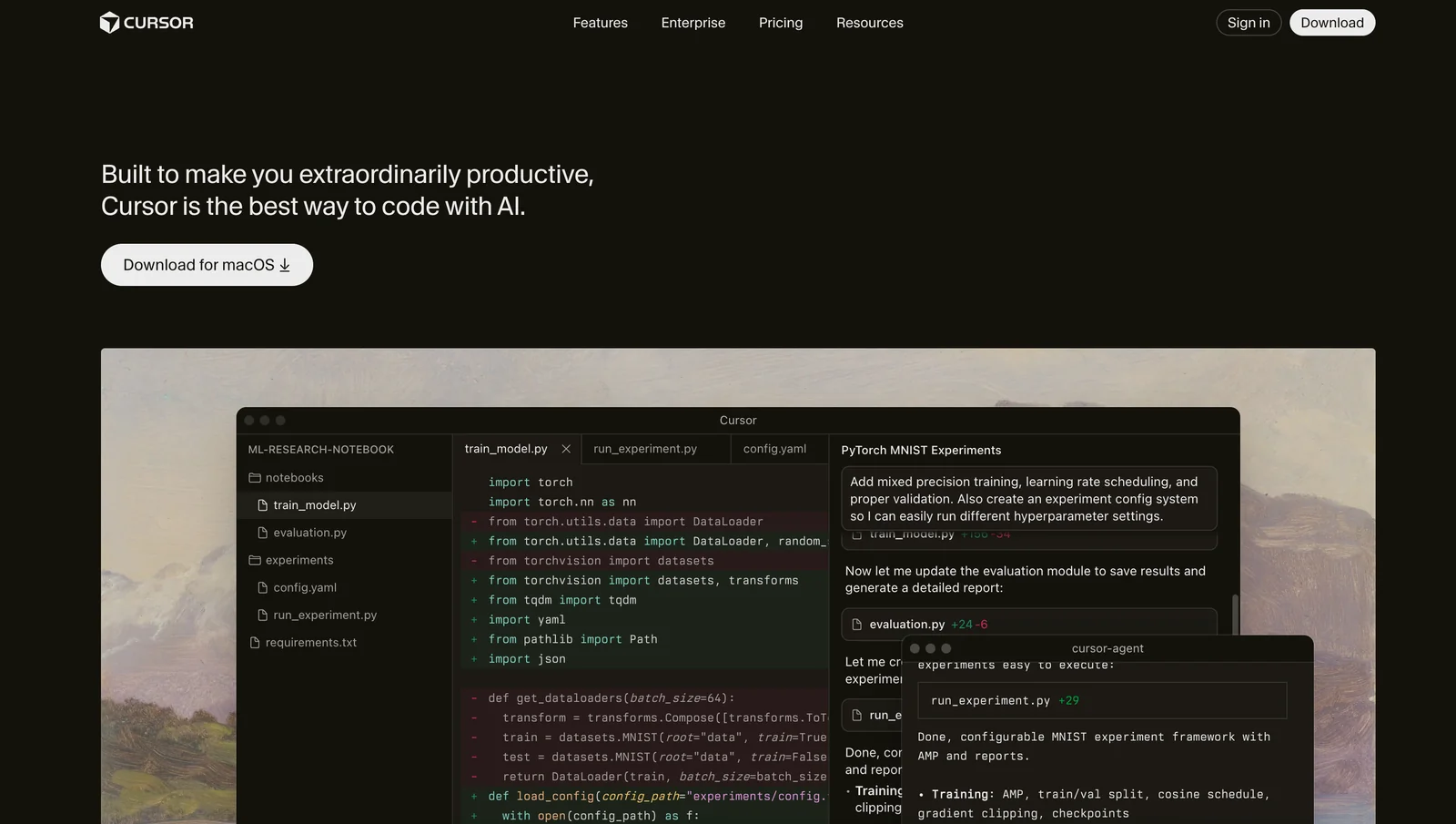
AIFeaturedPopularA code editor built to make programmers extraordinarily productive by integrating AI-powered coding assistance directly into the editor.
Cursor
A code editor built to make programmers extraordinarily productive by integrating AI-powered coding assistance directly into the editor.
About Cursor
Cursor is a code editor designed for programming with AI, positioning itself as a productivity-first environment that tightly integrates AI assistance into the coding workflow. It embeds context-aware generation and completion capabilities directly into the editor so developers can write, refactor, and explore code faster. Cursor focuses on making AI-driven coding features feel native to the development experience, improving iteration speed and reducing context switching between tools.
Screenshots

Key Features
Use Cases



Frequently asked questions about Cursor
What are the pricing options for Cursor?
Cursor offers a freemium pricing model with three tiers: Free ($0), Pro ($40/user/month), and Teams ($40/user/month). The Free plan includes limited code reviews, while the Pro and Teams plans provide enhanced features, collaboration tools, and priority support, making them ideal for individual developers and teams alike.
Key Points
- Free Plan: Basic features, limited code reviews.
- Pro Plan: Advanced features for individual developers.
- Teams Plan: Collaborative tools designed for organizations.
Detailed Explanation
Cursor provides three distinct pricing tiers to accommodate various user needs:
-
Free Plan: This plan is designed for individual users or beginners. It offers essential features and allows users to perform a limited number of code reviews. This is a great way for new users to explore the platform without any financial commitment.
-
Pro Plan: At $40 per user per month, the Pro plan is tailored for professional developers who require more robust features. Users can access unlimited code reviews, advanced analytics, and integrations with popular development tools. This plan is ideal for freelancers or solo developers looking to enhance their productivity.
-
Teams Plan: Also priced at $40 per user per month, the Teams plan expands on the Pro plan's features, adding collaboration tools that enable multiple users to work together seamlessly. This includes shared code reviews, team dashboards, and priority customer support. This plan is particularly beneficial for development teams aiming for efficient collaboration.
Best Practices / Tips
- Evaluate Your Needs: Before committing to a paid plan, assess your specific requirements. If you’re an individual developer, the Pro plan may suffice, but teams should consider the Teams plan for collaborative features.
- Utilize the Free Plan: Take advantage of the Free plan to test Cursor’s functionalities before upgrading. This can help you understand which features are most beneficial for your workflow.
- Monitor Usage: Keep an eye on how many code reviews you perform. If you find yourself often hitting the limits of the Free plan, upgrading to Pro or Teams may be worth the investment.
Additional Resources
What features does Cursor offer for coding assistance?
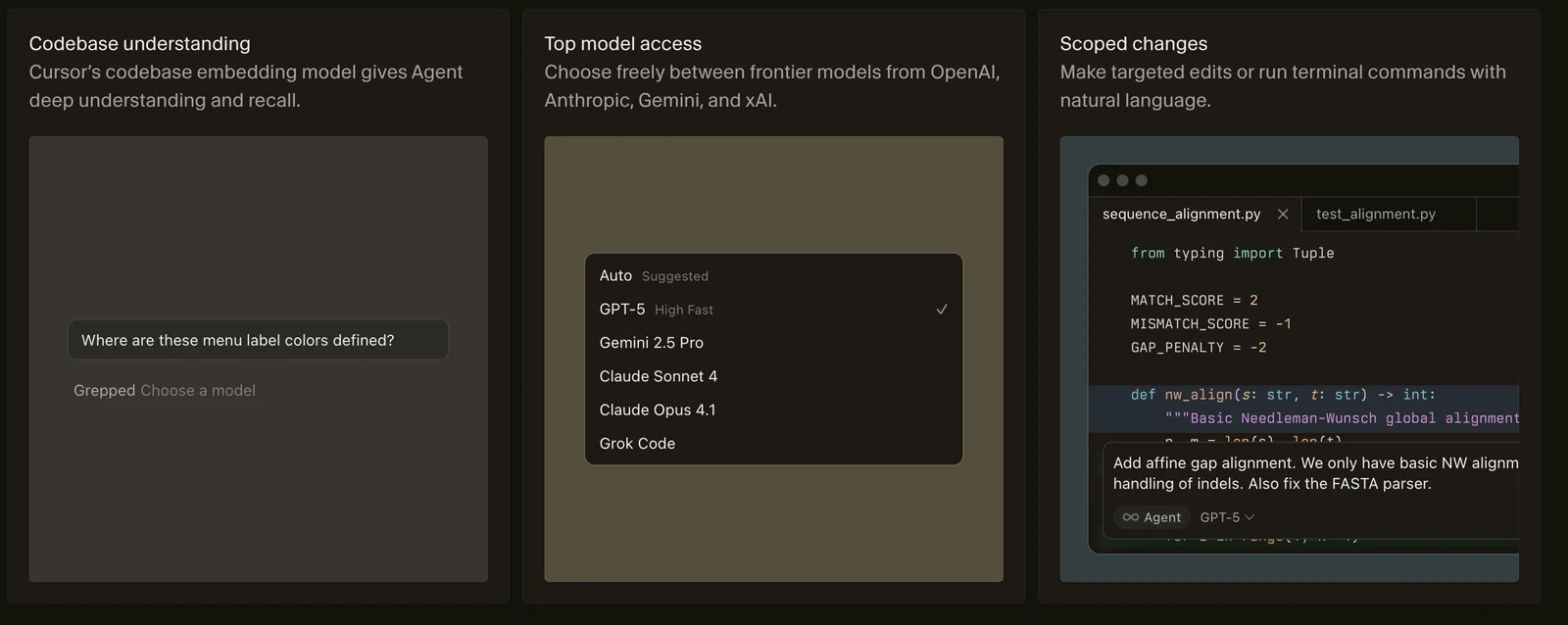
Cursor offers a range of powerful features for coding assistance, including AI-assisted coding, multi-file awareness, automated code reviews, bug fixes, and seamless GitHub integration. These capabilities significantly enhance productivity and streamline development workflows for programmers, making coding more efficient and accurate.
Key Points
- AI-Assisted Coding: Provides real-time suggestions and code completions.
- Multi-File Awareness: Understands project structure across multiple files.
- Automated Code Reviews: Highlights potential issues and offers fixes.
Detailed Explanation
Cursor's AI-assisted coding feature uses advanced algorithms to analyze your coding style and suggest contextually relevant code completions. For instance, while writing a function, Cursor can recommend the best syntax and even complete entire lines based on the code already written. This not only saves time but also reduces syntax errors.
The multi-file awareness functionality allows Cursor to maintain context across different files in a project. For example, if you are working on a web application with HTML, CSS, and JavaScript files, Cursor tracks changes and relationships between these files, ensuring that suggestions remain relevant and accurate.
Automated code reviews are another standout feature of Cursor. By analyzing your codebase, it identifies potential bugs and security vulnerabilities. This feature not only speeds up the review process but also helps maintain high code quality by offering actionable suggestions for improvements.
Moreover, Cursor's GitHub integration ensures seamless collaboration. You can easily push changes and pull requests directly from the Cursor interface, helping teams keep their code organized and up to date.
Best Practices / Tips
- Leverage AI Suggestions: Always consider Cursor's AI suggestions but review them critically to ensure they align with your project's best practices.
- Regular Code Reviews: Enable automated code reviews regularly to catch issues early in the development cycle.
- Utilize Multi-File Awareness: Use multi-file awareness to ensure your codebase remains cohesive, especially in larger projects where context can easily be lost.
Additional Resources
How do I get started with Cursor?
To get started with Cursor, visit the official website, sign up for a free account, and download the code editor. Once installed, you can begin coding right away, benefiting from integrated AI assistance that enhances your programming experience and boosts productivity.
Key Points
- Official Website: Access the Cursor platform easily.
- Free Account: Sign up without any initial costs.
- Integrated AI Assistance: Enhance your coding with AI features.
Detailed Explanation
To kick off your journey with Cursor, follow these steps:
-
Visit the Official Website: Go to Cursor's official website to access all available features and resources.
-
Sign Up for a Free Account: Click on the "Sign Up" button. You will need to provide basic information such as your email address and create a password. This free account grants you full access to the code editor and its features.
-
Download and Install the Code Editor: After signing up, download the Cursor code editor application. It's compatible with multiple operating systems, including Windows, macOS, and Linux. Follow the installation instructions specific to your OS to set it up on your machine.
-
Start Coding with AI Assistance: Once installed, open the editor. You'll find an intuitive interface designed for various programming languages. The integrated AI assistance offers real-time suggestions, code completions, and debugging tips, streamlining your coding process.
Example Use Cases
- Beginner Coders: If you're new to programming, Cursor's AI can guide you through learning syntax and best practices in your chosen language.
- Experienced Developers: Leverage AI to optimize your code, troubleshoot errors, and explore new coding techniques efficiently.
Best Practices / Tips
- Explore Tutorials: Utilize Cursor's in-app tutorials to familiarize yourself with key features and functionalities.
- Customize Your Environment: Tailor the code editor's settings to your preferences for enhanced productivity.
- Stay Updated: Regularly check for updates to ensure you are using the latest features and improvements.
By following these steps and tips, you can maximize your experience with Cursor and take full advantage of its AI-powered coding capabilities.
Additional Resources
- Cursor Documentation - For in-depth guidance and troubleshooting.
- Community Forum - Engage with other users for tips and support.
Does Cursor support API integrations?
Yes, Cursor supports various API integrations, including GitHub, which enables automated pull request reviews and efficient workflows. This functionality allows developers to seamlessly incorporate AI capabilities into their existing tools, enhancing productivity and collaboration within software development projects.
Key Points
- Wide Range of Integrations: Cursor supports numerous APIs, enhancing versatility.
- GitHub Integration: Automates pull request reviews and improves workflow efficiency.
- Enhanced Developer Experience: AI capabilities streamline processes and boost productivity.
Detailed Explanation
Cursor's API integrations are designed to enhance the development workflow by allowing seamless connectivity with popular tools. For instance, the integration with GitHub automates pull request reviews, enabling developers to focus more on coding rather than manual reviews. This integration not only speeds up the review process but also enhances code quality by leveraging AI capabilities to identify potential issues before merging code.
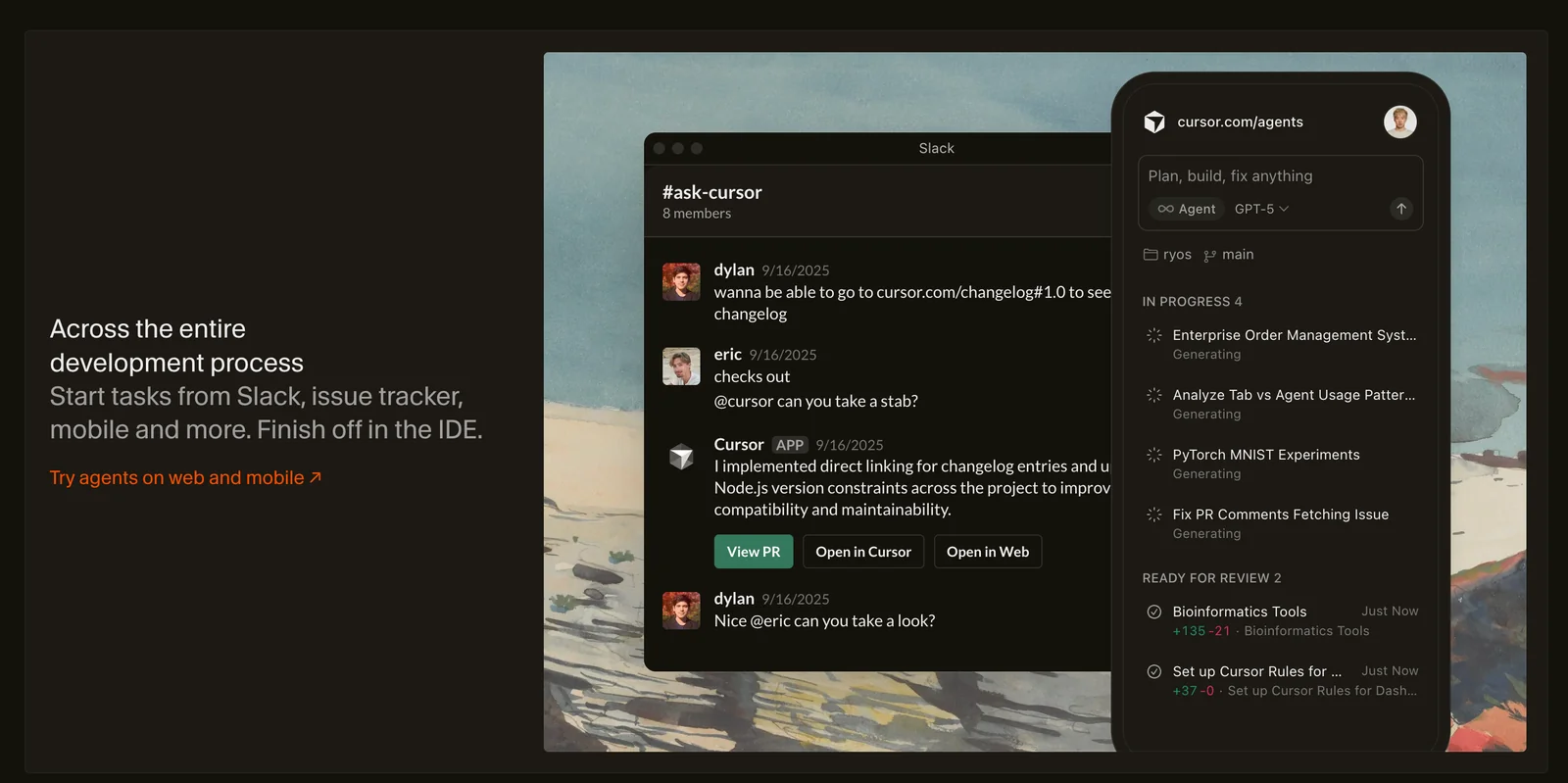
Moreover, Cursor supports other integrations such as Slack, Jira, and Trello, which help in managing projects and communication effectively. By connecting these tools, teams can receive real-time updates, streamline task assignments, and monitor project progress, all while utilizing AI to optimize workflows.
Use Cases
- Automated Code Reviews: Developers can set up automated reviews on GitHub to ensure code quality and adherence to standards.
- Project Management: Integrating with Jira allows teams to manage tasks efficiently, providing updates directly within their development environment.
- Real-time Collaboration: With Slack integration, team members can receive notifications about code changes, comments, and project status updates instantly.
Best Practices / Tips
- Explore All Integrations: Take advantage of Cursor's full suite of integrations to maximize productivity.
- Customize Workflows: Tailor the integration settings within GitHub to match your team's specific workflow needs.
- Monitor Performance: Regularly review the effectiveness of integrations to ensure they are providing the intended benefits and adjust settings as necessary.
Additional Resources
How does Cursor compare to other coding tools?
Cursor distinguishes itself from other coding tools by combining advanced AI features with a user-friendly code editor designed to reduce context switching. Its unique integration of AI assistance and team collaboration tools enhances productivity and streamlines the coding process, making it a preferred choice for developers.
Key Points
- Integrated AI Features: Cursor offers real-time code suggestions and debugging assistance.
- Dedicated Code Editor: Streamlined interface minimizes distractions and improves focus.
- Team Collaboration Tools: Enables seamless sharing and collaboration among team members.
Detailed Explanation
Cursor provides a powerful coding environment that integrates artificial intelligence directly into the coding process. Unlike traditional coding tools that may require switching between different applications for AI assistance, Cursor's AI capabilities are embedded within the editor. This includes features like:
- Code Autocompletion: Cursor predicts and suggests code snippets as you type, significantly speeding up the coding process.
- Error Detection and Debugging: The AI identifies potential bugs and offers solutions in real time, reducing debugging time.
- Contextual Learning: Cursor learns from your coding style and preferences, making suggestions more relevant and personalized over time.
In comparison to competitors such as Visual Studio Code or GitHub Copilot, Cursor's focus on minimizing context switching sets it apart. While tools like GitHub Copilot require users to leave their primary coding environment, Cursor keeps everything in one place, enhancing workflow efficiency.
Furthermore, the collaboration features allow multiple developers to work on the same project simultaneously. This includes live sharing of code and instant feedback, which is particularly valuable in team settings or for remote work scenarios.
Best Practices / Tips
- Explore AI Features: Familiarize yourself with Cursor's AI capabilities to maximize productivity. Utilize features like code snippets and error detection to streamline your coding process.
- Utilize Collaboration Tools: Take advantage of the built-in collaboration features for better teamwork and project management. Regularly communicate with team members within the platform to maintain clarity and efficiency.
- Customize Your Workspace: Tailor the editor's layout and settings to fit your workflow preferences, which can help minimize distraction and enhance focus.
Additional Resources
Explore more AI Ai Agents tools
Browse all Ai Agents tools →Browse by use case: Code Generation · Automation & Productivity
Compare Cursor: vs Playad · vs Concierge by Juniors AI · vs Scout by Fini · vs Ruflo