

Cursor 2.0
AIPopularAn AI-first code editor with an agent-focused interface and Composer coding model for fast, multi-agent programming workflows.
Cursor 2.0
An AI-first code editor with an agent-focused interface and Composer coding model for fast, multi-agent programming workflows.
About Cursor 2.0
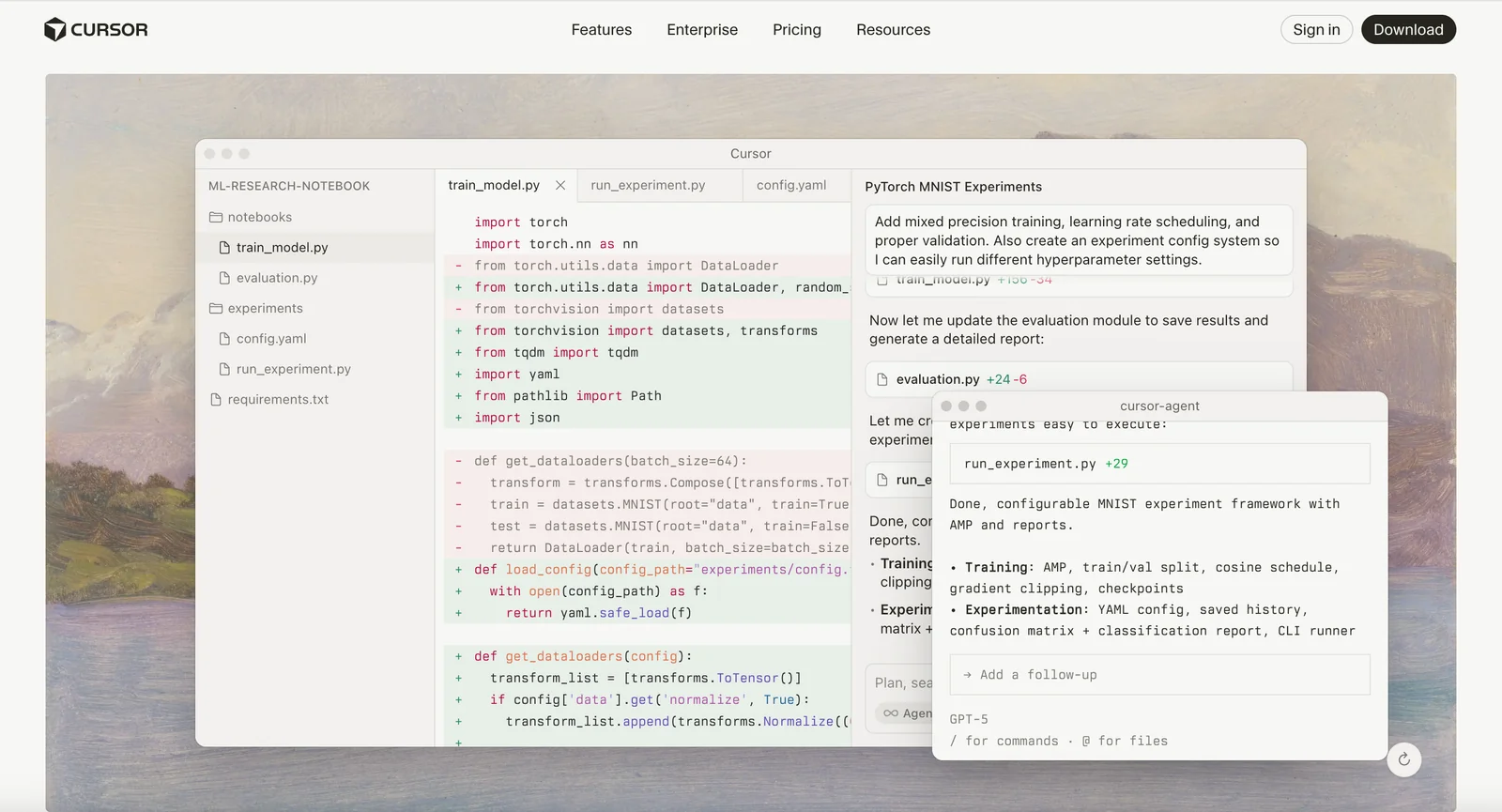
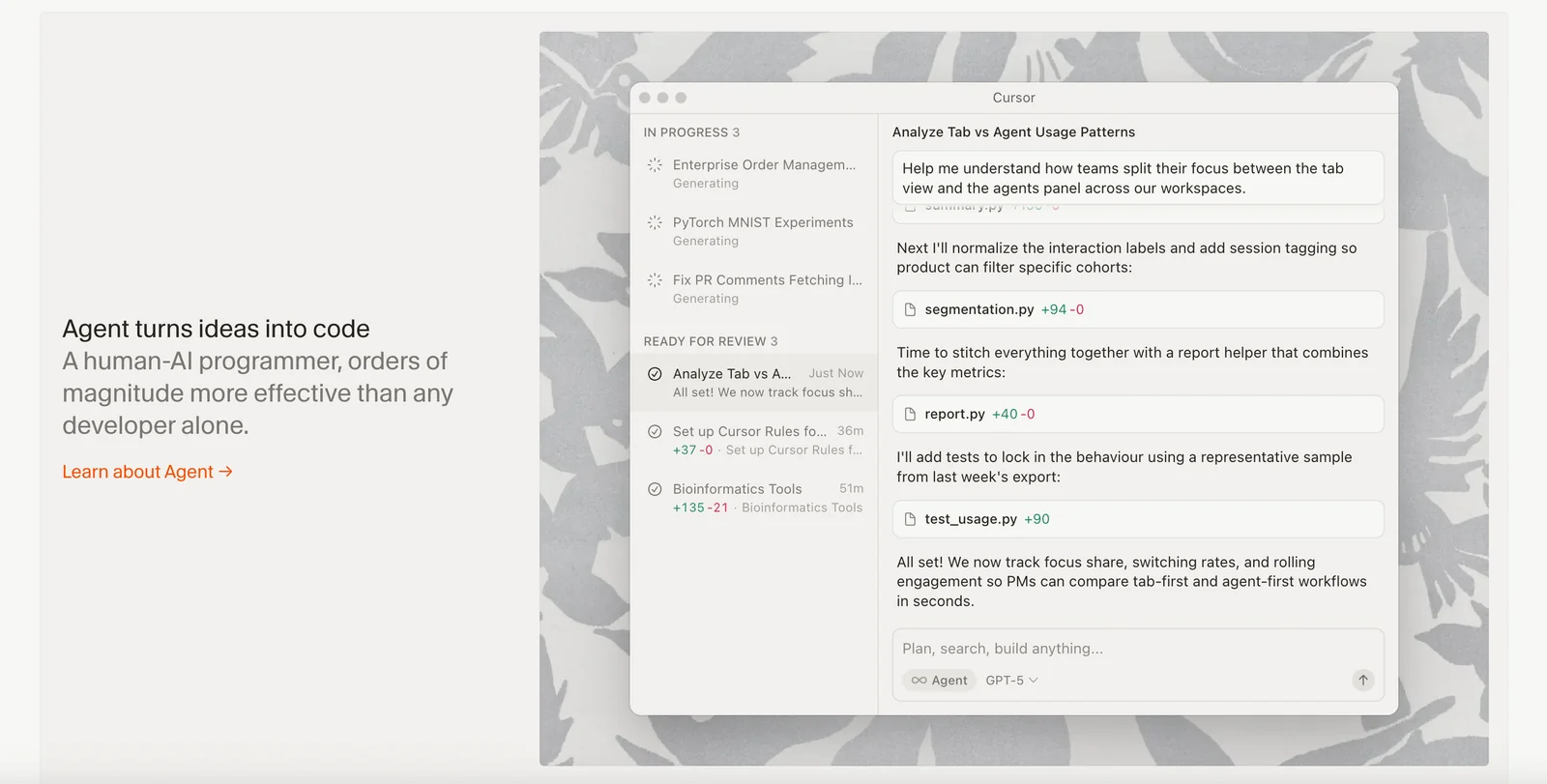
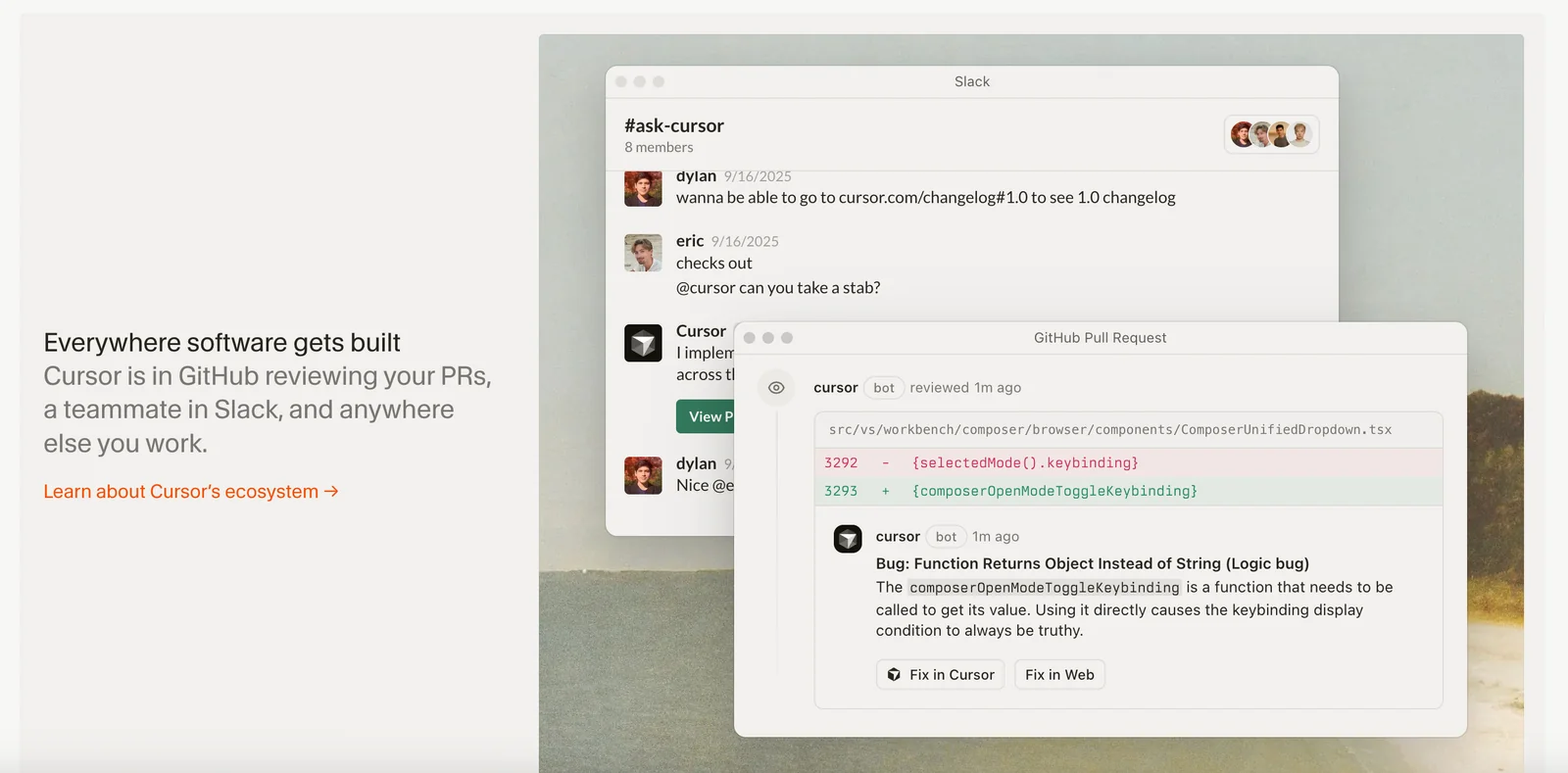
Cursor 2.0 is a major update to the Cursor AI code editor that introduces a redesigned interface and Composer, the product's first coding model purpose-built to work with agents. The platform tightly integrates multi-agent workflows, background agents, and workspace indexing directly into the editor so developers can generate, refactor, search, and review code with autonomous helpers. Cursor emphasizes productivity through embedded tools (like an internal browser), deeplinks, a marketplace/extension ecosystem, and customizable generation rules to tailor agent behavior to team standards and codebases.
Screenshots
Key Features
Use Cases



Frequently asked questions about Cursor 2.0
What are the pricing options for Cursor 2.0?
Cursor 2.0 offers various pricing options: Hobby (Free), Pro ($20/month), Pro+ ($60/month), Ultra ($200/month), Team ($40/user/month), and Enterprise (Custom pricing). Each tier unlocks distinct features and usage limits tailored to different user needs, from individual hobbyists to large organizations.
Key Points
- Hobby Tier: Completely free with limited features.
- Pro Tier: Affordable monthly subscription for advanced users.
- Enterprise Tier: Custom pricing for large organizations with specific needs.
Detailed Explanation
Cursor 2.0 is designed to cater to a wide range of users with its flexible pricing structure.
-
Hobby Tier (Free): This option is ideal for newcomers or casual users who want to explore the basic functionalities of Cursor without any financial commitment. It includes essential features but has restrictions on usage limits, making it suitable for light tasks or personal projects.
-
Pro Tier ($20/month): This subscription is perfect for freelancers or small businesses requiring more advanced features. It unlocks additional capabilities, including enhanced collaboration tools, priority support, and higher usage limits. Users can benefit from tools that streamline their workflow, making this tier a cost-effective choice.
-
Pro+ Tier ($60/month): Aimed at power users, this tier offers everything in the Pro plan but with even more robust features. Users can expect additional integrations, analytics tools, and a larger capacity for projects, making it ideal for developers or teams working on multiple complex tasks.
-
Ultra Tier ($200/month): This is tailored for businesses needing comprehensive features and high usage limits. It includes all the essential tools for large-scale projects, including advanced reporting and priority customer support, ensuring that teams can operate efficiently without interruptions.
-
Team Tier ($40/user/month): This option is designed for collaborative environments, allowing multiple users to access shared features at a reduced rate per user. It's beneficial for small to medium-sized teams looking to enhance productivity through shared resources.
-
Enterprise Tier (Custom pricing): Large organizations can benefit from customized pricing that aligns with their specific needs. This tier allows for tailored features, dedicated account management, and extensive support to ensure all organizational requirements are met.
Best Practices / Tips
- Evaluate Your Needs: Before selecting a plan, assess your actual usage and feature requirements. Start with the Hobby plan if you're unsure.
- Take Advantage of Trials: If available, utilize free trials to explore higher tiers before committing.
- Budget Considerations: Always keep in mind your budget constraints and the potential return on investment based on the features offered in each tier.
Additional Resources
How does Cursor 2.0's agent-focused interface improve coding efficiency?
The agent-focused interface in Cursor 2.0 enhances coding efficiency by allowing multiple autonomous agents to operate concurrently on different coding tasks. This functionality simplifies the generation of complex functions and automates refactoring, leading to a significant boost in productivity and streamlined workflows for developers.
Key Points
- Concurrent Task Management: Multiple agents handle various coding tasks simultaneously.
- Automation of Complex Functions: Simplifies the creation of intricate code structures.
- Enhanced Refactoring Processes: Automates code adjustments, reducing manual effort.
Detailed Explanation
Cursor 2.0’s agent-focused interface revolutionizes coding by leveraging the concept of autonomous agents. Each agent is designed to focus on specific tasks, such as:
-
Code Generation: Agents can collaborate to generate complex functions. For example, one agent might handle API integration while another focuses on UI components, allowing for more efficient project completion.
-
Refactoring Automation: The interface automates refactoring, which is the process of restructuring existing computer code without changing its external behavior. This not only speeds up the coding process but also helps maintain a clean codebase, reducing technical debt.
-
Real-time Collaboration: Developers can work alongside these agents, receiving suggestions and real-time updates, which enhances teamwork and project management. This is particularly useful in agile development environments where rapid iterations are crucial.
-
Error Detection and Correction: The agents can also detect potential coding errors and suggest corrections, which minimizes debugging time and enhances code quality.
For instance, if a developer is working on a web application, one agent might focus on backend logic while another addresses frontend design. This division of labor leads to faster iteration cycles and a more efficient development process.
Best Practices / Tips
- Leverage Agent Specialization: Assign specific tasks to agents based on their strengths to maximize efficiency.
- Monitor Agent Performance: Regularly assess how well agents are performing their designated tasks and adjust as needed to optimize workflows.
- Integrate with Existing Tools: Ensure that Cursor 2.0 can seamlessly integrate with your current development tools to avoid disruptions.
- Train Your Team: Provide training for your team on how to effectively use the agent-focused interface to realize its full potential.
Additional Resources
What unique features does Cursor 2.0 provide for developers?
Cursor 2.0 offers developers an agent-focused interface, a Composer coding model for context-aware completions, persistent background agents for ongoing tasks, and an internal browser for testing outputs. These features collectively streamline programming workflows, enhancing productivity and collaboration within development environments.
Key Points
- Agent-Focused Interface: Tailored for enhanced interaction.
- Composer Coding Model: Provides context-aware code suggestions.
- Persistent Background Agents: Enable ongoing task management.
Detailed Explanation
Cursor 2.0 is designed with a unique agent-focused interface that prioritizes usability and efficiency. This interface allows developers to interact seamlessly with various programming agents, focusing on enhancing their productivity. By using a more intuitive layout, developers can easily navigate through their tools without interruption.
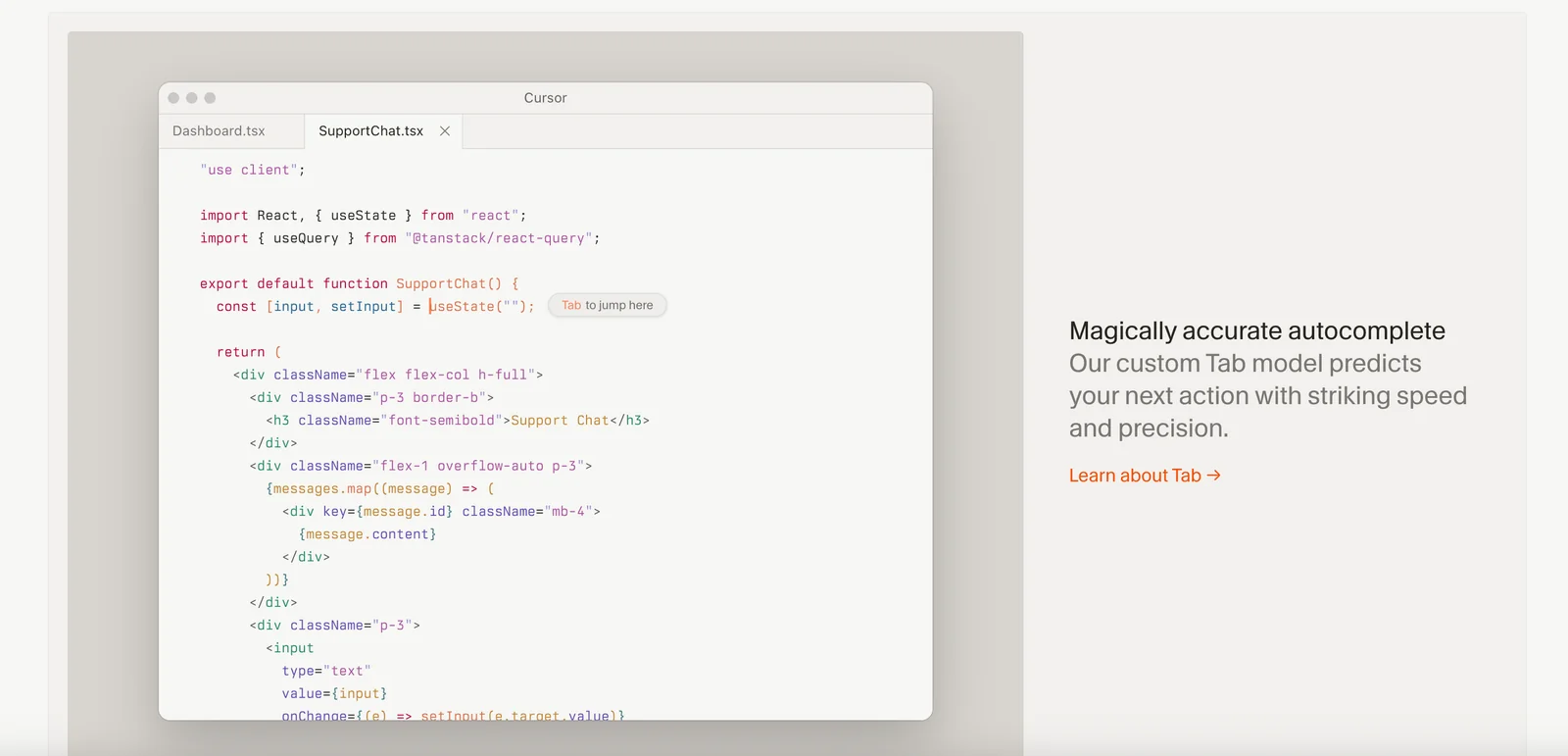
The Composer coding model is another standout feature, which offers context-aware code completions. This means that as developers type, Cursor 2.0 intelligently suggests code snippets based on the current context of the project. For example, if a developer is working within a specific function, the suggestions will be relevant to that function's logic and syntax, significantly reducing coding time and errors.
Persistent background agents are particularly useful for managing long-running tasks—like testing or deployment—without disrupting the main workflow. These agents can run in the background, allowing developers to focus on coding while the tool handles tasks such as compiling or running tests.
Moreover, the internal browser provides a robust environment for testing outputs directly within the development platform. This feature eliminates the need to switch between tools, fostering a more efficient workflow. Developers can instantly check how their code performs in different environments or scenarios.
Best Practices / Tips
- Utilize the Agent-Focused Interface: Familiarize yourself with the layout and shortcuts to maximize your workflow efficiency.
- Leverage Context-Aware Completions: Take advantage of the Composer coding model to reduce coding errors and improve speed.
- Monitor Background Agents: Regularly check on persistent tasks to ensure they are running smoothly without any failures.
Additional Resources
How do I use Cursor 2.0 for AI pair programming?
To use Cursor 2.0 for AI pair programming, first set up your coding environment and leverage the Composer coding model. This enables you to collaboratively generate complex functions and write unit tests alongside AI agents, enhancing productivity and code quality.
Key Points
- Workspace Setup: Ensure your coding environment is ready for integration.
- Composer Coding Model: Utilize this feature for generating code and tests.
- Collaborative Development: Work seamlessly with AI agents for enhanced programming.
Detailed Explanation
Using Cursor 2.0 for AI pair programming involves several steps:
-
Workspace Setup: Begin by configuring your IDE or code editor to work with Cursor 2.0. Install any necessary plugins and ensure that your programming language is supported. The setup process is crucial for smooth operation and integration with AI tools.
-
Utilizing the Composer Coding Model: The Composer model is designed to assist in generating complex functions based on your input. For example, if you need a function to sort an array, simply describe the functionality in natural language. Cursor 2.0 will provide code snippets that can be directly integrated into your project.
-
Collaborative Development: Engage with AI agents as virtual pair programmers. As you write code, the AI can suggest optimizations, catch potential errors, and even help write unit tests. This collaborative approach not only speeds up the development process but also improves the quality of the codebase.
Example Use Case
Suppose you are developing a web application and need to create a user authentication module. By describing your requirements to Cursor 2.0, you can receive a tailored code snippet that handles user login, registration, and validation. The AI can also assist in generating corresponding unit tests to ensure reliability.
Best Practices / Tips
- Be Clear and Specific: When describing what you need from the AI, use clear and concise language to get the best results.
- Iterate Quickly: Don’t hesitate to refine your questions or requests based on the responses you receive. AI tools improve with context.
- Test Thoroughly: Always review and test the generated code snippets to confirm they meet your expectations and security standards.
Additional Resources
How do I get started with Cursor 2.0?
To get started with Cursor 2.0, download the version compatible with your operating system—Windows, macOS, or Linux—from the official site. Next, create an account and select a pricing tier that fits your needs. For detailed setup instructions, consult the provided documentation.
Key Points
- Download the correct version for your OS.
- Create an account to access features.
- Choose a suitable pricing plan based on your use case.
Detailed Explanation
Cursor 2.0 is designed to enhance your productivity with a user-friendly interface and powerful features. To begin:
-
Download the Software: Go to the Cursor official site and select the version appropriate for your operating system. Ensure your system meets the minimum requirements for optimal performance.
-
Create an Account: After downloading, launch the application. You will need to register for an account. This process typically requires an email address and password, and you may need to verify your email.
-
Select a Pricing Tier: Cursor 2.0 offers various subscription plans, including free and premium options. The free version may have limited features, while the premium tier unlocks advanced functionalities like team collaboration and priority support. Review the pricing page for detailed information.
-
Setup Guidance: Once your account is created, you can begin exploring Cursor 2.0. The documentation available on the site includes step-by-step setup guidance and tutorials to help you familiarize yourself with the tool.
Best Practices / Tips
- Check System Requirements: Before downloading, ensure your device meets all necessary technical specifications.
- Explore Tutorials: Take advantage of the tutorials and guides available in the documentation to maximize your use of Cursor 2.0.
- Utilize Free Trials: If unsure about which pricing tier to choose, consider starting with a free trial of the premium features to assess their value for your needs.
- Stay Updated: Regularly check for software updates to benefit from new features and security improvements.
Additional Resources
- Cursor Documentation
- Cursor Pricing Plans
- Community Forums for user discussions and tips.
What features make Cursor 2.0 stand out from other code editors?
Cursor 2.0 distinguishes itself from other code editors with its agent-focused interface, a unique Composer coding model, background agents for managing long-running tasks, and built-in browser capabilities. These features enhance productivity and streamline coding workflows, making it a powerful tool for developers.
Key Points
- Agent-Focused Interface: Simplifies user experience.
- Purpose-Built Composer Model: Optimizes coding efficiency.
- Background Agents: Manage complex tasks seamlessly.
Detailed Explanation
Cursor 2.0 is designed with a user-centric approach, focusing on an agent-based interface that allows developers to interact with the editor in a more intuitive way. This interface reduces cognitive load by providing context-sensitive assistance and suggestions, making coding faster and less error-prone.
The Composer coding model is purpose-built for enhancing coding efficiency. It allows developers to compose code segments easily, supporting rapid prototyping and reducing the time spent on repetitive tasks. For instance, if a developer is writing a function that fetches data from an API, the Composer can suggest code snippets based on previous usage, significantly speeding up the process.
One of the standout features of Cursor 2.0 is its background agents, which handle long-running tasks without interrupting the coding flow. This means that while the developer is working on one part of the code, the background agents can compile, run tests, or perform other intensive operations in parallel. This multitasking capability is particularly beneficial for larger projects where efficiency is crucial.
Additionally, Cursor 2.0 includes internal browser capabilities, allowing developers to explore documentation or reference materials without leaving the coding environment. This feature helps maintain focus and minimizes distractions, which is vital for productivity.
Best Practices / Tips
- Utilize the Agent-Focused Interface: Familiarize yourself with the interface to maximize productivity.
- Leverage Composer Suggestions: Take advantage of the coding suggestions to streamline your workflow.
- Monitor Background Tasks: Keep an eye on background agents to ensure they are functioning as expected without overwhelming system resources.
Additional Resources
By leveraging these features, developers can significantly enhance their coding experience, making Cursor 2.0 a compelling choice among code editors.
What are the system requirements for running Cursor 2.0?
Cursor 2.0 is compatible with Windows, macOS, and Linux. To ensure optimal performance, your system should have at least 8 GB of RAM and a multi-core processor. Additionally, a stable internet connection is recommended for seamless multi-agent workflows and real-time collaboration features.
Key Points
- Supported Operating Systems: Windows, macOS, Linux
- Minimum System Requirements: 8 GB RAM, multi-core processor
- Internet Connectivity: Stable connection for optimal performance
Detailed Explanation
Cursor 2.0 aims to provide an efficient environment for collaborative workflows, particularly when utilizing its advanced multi-agent capabilities. Here are the detailed system requirements to ensure you can fully leverage its features:
-
Operating Systems: Cursor 2.0 supports modern versions of Windows (10 or later), macOS (Catalina or later), and major distributions of Linux (like Ubuntu 20.04 and Fedora 34). Check your OS version to ensure compatibility.
-
Hardware Specifications:
- RAM: A minimum of 8 GB is essential, but 16 GB or more is recommended for handling larger projects with multiple agents simultaneously.
- Processor: A multi-core processor (Quad-core or higher) will enhance performance, especially during resource-intensive tasks such as rendering or running simulations.
-
Internet Connection: A reliable internet connection (minimum of 10 Mbps recommended) is crucial for real-time collaboration features, ensuring that all agents can communicate effectively without lag.
Best Practices / Tips
- Upgrade Your Hardware: If you notice slow performance, consider upgrading your RAM or processor. This can significantly improve your experience.
- Maintain Software Updates: Regularly update your operating system and Cursor 2.0 to access the latest features and security patches.
- Check Network Speed: Use a speed test to verify your internet connection is stable and fast enough for collaborative tasks.
Additional Resources
Does Cursor 2.0 support integration with other tools?
Yes, Cursor 2.0 supports integration with various tools, including Remote SSH for remote development. It also allows users to install extensions from the marketplace, enabling customization of agent behaviors and workflows to enhance productivity and streamline processes.
Key Points
- Integration with Remote SSH: Enables seamless remote development.
- Marketplace Extensions: Customize functionalities to meet specific needs.
- Enhanced Workflows: Tailor agent behaviors to improve efficiency.
Detailed Explanation
Cursor 2.0 is designed to enhance development workflows by integrating with essential tools and services. One of its standout features is the integration with Remote SSH, which allows developers to work on remote servers as if they were working locally. This is particularly useful for teams that operate in cloud environments or need to access remote databases and applications.
In addition to Remote SSH, Cursor 2.0 supports a variety of extensions available in its marketplace. These extensions can be installed easily and allow users to customize agent behaviors according to their specific workflows. For instance, if you're working on a project that requires specific code formatting or linting, you can install an extension that automates these tasks, saving you time and reducing errors.
Example Use Cases
- Remote Development: A developer can connect to a virtual server using Remote SSH and edit files directly from their local machine, facilitating seamless collaboration.
- Custom Workflows: An organization can tailor Cursor 2.0 to include specific tools like GitHub integration for better version control, making project management more efficient.
Best Practices / Tips
- Explore the Marketplace: Regularly check for new extensions that can enhance your workflow.
- Utilize Remote SSH: Set up your Remote SSH connections to ensure a smooth transition between local and remote environments.
- Read Extension Reviews: Before installing, look at user feedback to ensure that the extensions meet your needs and are reliable.
Additional Resources
Does Cursor 2.0 support API integrations?
Yes, Cursor 2.0 supports a variety of API integrations, including Remote SSH and customizable rules via its marketplace. This functionality allows users to enhance their workflows and seamlessly integrate with other tools, contributing to increased productivity and flexibility in software development and automation tasks.
Key Points
- Diverse API Integrations: Cursor 2.0 offers multiple integration options, enhancing its usability.
- Remote SSH Capabilities: Users can access and manage remote servers efficiently.
- Customizable Rules Marketplace: Tailor the tool to meet specific project needs through various customizable features.
Detailed Explanation
Cursor 2.0 is designed with flexibility in mind, supporting various API integrations that cater to different user needs. Among these integrations, Remote SSH allows developers to connect to remote servers directly from the interface, making it easier to edit and manage code hosted on external platforms. This is particularly beneficial for teams that operate in cloud environments or require constant access to remote resources.
The marketplace feature provides a selection of customizable rules that users can implement, allowing for enhanced functionality tailored to specific workflows. For instance, a software development team could create rules that automatically trigger deployment processes or integrate with project management tools like Jira or Trello, streamlining their development cycle.
Example Use Cases
- Remote Development: Use Remote SSH to edit files on a server without needing to switch between different applications.
- Automated Workflows: Set up rules in the marketplace to automate repetitive tasks, such as code linting or deployment notifications.
- Enhanced Collaboration: Integrate with team communication tools like Slack to receive updates directly within your chat channels.
Best Practices / Tips
- Explore the Marketplace: Regularly check for new integrations and rules that could improve your workflow.
- Utilize Documentation: Familiarize yourself with the API documentation provided by Cursor 2.0 to maximize the benefits of available integrations.
- Test Integrations: Before fully implementing a new API integration, run tests to ensure compatibility with your existing systems and workflows.
Additional Resources
Why should I choose Cursor 2.0 over other code editors?
Cursor 2.0 is the ideal choice over other code editors due to its unique agent-focused interface and Composer coding model, which streamline multi-agent programming workflows. It automates complex tasks, significantly enhancing developer productivity and collaboration compared to traditional code editors.
Key Points
- Agent-Focused Interface: Tailored for collaborative programming.
- Automated Task Management: Reduces manual coding efforts.
- Enhanced Multi-Agent Workflows: Simplifies team collaborations.
Detailed Explanation
Cursor 2.0 revolutionizes coding by introducing an agent-focused interface that allows multiple agents to collaborate on projects seamlessly. This is particularly beneficial for teams working on large-scale applications. Unlike traditional code editors, which often require manual intervention for repetitive tasks, Cursor 2.0 automates these processes. For instance, developers can set up agents to handle debugging or code reviews, freeing them to focus on more critical aspects of development.
The Composer coding model further enhances usability by allowing developers to create modular code components. This feature encourages reusability and better organization of codebases. For example, if a developer is working on a web application, they can use Composer to break down the application into smaller, manageable parts, making it easier to debug and update.
Additionally, Cursor 2.0 supports real-time collaboration, enabling multiple developers to work on the same codebase simultaneously. This is particularly useful for remote teams, as it eliminates the delays associated with traditional version control systems. With built-in chat and commenting functionalities, team members can discuss changes and troubleshoot issues in real-time, significantly speeding up the development process.
Best Practices / Tips
- Leverage Automation: Utilize Cursor's automation features for repetitive tasks to save time.
- Use Composer Effectively: Break your projects into smaller modules; it enhances clarity and reduces bugs.
- Engage in Real-Time Collaboration: Make the most of the live collaboration features to improve team communication and project flow.
Additional Resources
How does Cursor 2.0 compare to other AI code editors?
Cursor 2.0 distinguishes itself from other AI code editors through its innovative agent-focused interface and Composer coding model. Key features like persistent background agents and semantic pull request search enhance coding efficiency, making it a powerful tool for developers compared to traditional code editors.
Key Points
- Agent-Focused Interface: Offers a unique way to interact with coding tasks.
- Composer Coding Model: Facilitates better code generation and organization.
- Advanced Features: Includes persistent background agents and semantic PR search.
Detailed Explanation
Cursor 2.0 is designed with a focus on enhancing the coding experience through its distinct agent-focused interface. This approach allows developers to manage multiple tasks seamlessly, assigning specific agents to handle various coding functions. For instance, while one agent handles debugging, another can work on code optimization, thus streamlining the development process.
Composer Coding Model
The Composer coding model in Cursor 2.0 promotes an organized method of writing code. This model enables developers to break down complex coding tasks into smaller, manageable pieces. For example, a developer can create a module with specific functionalities and let the AI suggest improvements or alternative methods of implementation.
Persistent Background Agents
One of the standout features is the use of persistent background agents. These agents continue to learn and adapt while coding progresses. If a developer is working on a large project, these agents can provide real-time suggestions based on the project's context. This feature is especially beneficial in collaborative environments, where code quality and consistency are crucial.
Semantic Pull Request Search
Another significant advantage is the semantic pull request (PR) search. Unlike traditional code editors that rely on keyword searches, Cursor 2.0’s semantic search understands context and relationships within the code. This capability allows developers to quickly find relevant PRs, reducing the time spent on code reviews and improving overall workflow.
Best Practices / Tips
- Utilize Background Agents: Assign specific tasks to agents to optimize workflow.
- Leverage Semantic Search: Take advantage of the semantic PR search to enhance code review efficiency.
- Experiment with Composer: Regularly use the Composer coding model to improve code structure and maintenance.
Additional Resources
Explore more AI Ai Agents tools
Browse all Ai Agents tools →Browse by use case: Code Generation · Automation & Productivity
Compare Cursor 2.0: vs Mycel · vs Proto-Mind · vs Ami · vs Duvi