

Comet Browser
AIPopularAn AI-powered, Chromium-compatible web browser from Perplexity focused on agentic search, privacy controls, and a Windows-11-oriented UI.
Comet Browser
An AI-powered, Chromium-compatible web browser from Perplexity focused on agentic search, privacy controls, and a Windows-11-oriented UI.
About Comet Browser
Comet Browser is an AI-powered web browser associated with Perplexity that emphasizes agentic search and privacy-oriented browsing. It targets a modern Windows 11 look-and-feel and aims to integrate advanced search capabilities directly into the browsing experience while remaining Chromium-compatible. Community and experimental implementations (including Electron-based projects) exist, and extensions/compatibility (e.g., AdGuard) have been discussed publicly as the product evolves.
Screenshots
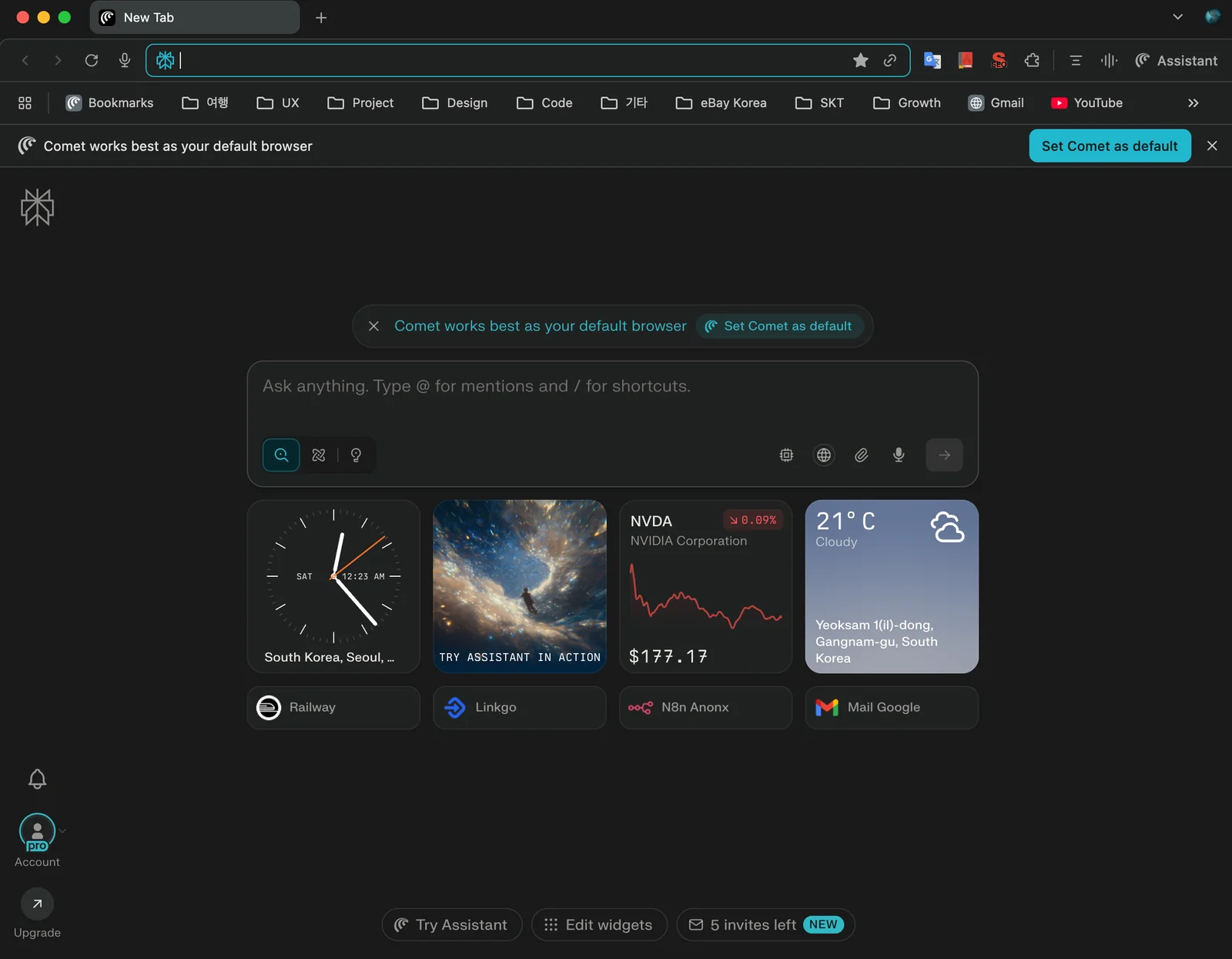
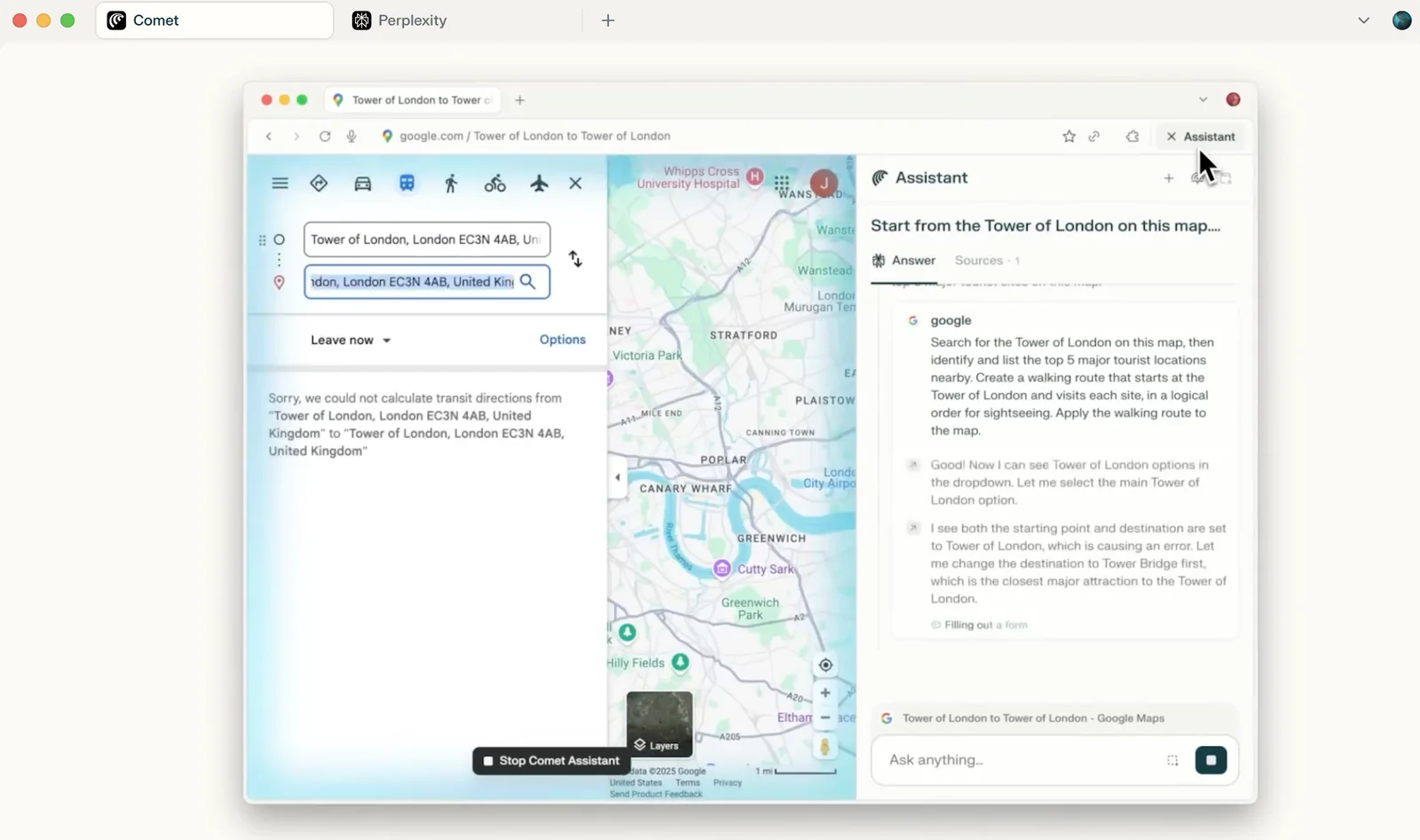

Key Features
Use Cases



Frequently asked questions about Comet Browser
What is the pricing structure for Comet Browser?
Comet Browser operates on a freemium pricing model that includes a Free tier (waitlist access), Comet Plus for $5 per month, and Perplexity Max at $200 per month for full functionality. This structure allows users to choose a plan that best fits their needs and usage.
Key Points
- Freemium Model: Free access with waitlist.
- Comet Plus: Enhanced features for $5/month.
- Perplexity Max: Comprehensive functionality at $200/month.
Detailed Explanation
Comet Browser's pricing structure is designed to cater to a wide range of users, from casual browsers to advanced users requiring comprehensive features.
-
Free Tier: Users can sign up for the free version, which requires joining a waitlist. This tier provides basic access to the browser's features but may have limitations on functionality.
-
Comet Plus: At $5 per month, this plan unlocks additional features such as ad blocking, enhanced privacy settings, and custom browsing experiences. This option is ideal for users who want a more robust browsing experience without committing to a higher price.
-
Perplexity Max: The premium offering at $200 per month is aimed at power users and organizations. It includes full access to all features, priority customer support, and advanced tools that enhance productivity and web interaction. This plan is suitable for businesses or developers needing extensive functionalities.
Best Practices / Tips
- Evaluate Your Needs: Before selecting a plan, consider your browsing habits and specific needs. If you only need basic features, the free version may suffice.
- Trial Periods: Check if Comet Browser offers any free trial for Comet Plus or Perplexity Max, allowing you to test features before committing financially.
- Stay Updated: Regularly visit the Comet Browser website or subscribe to their newsletter to keep informed about any changes in pricing or new features.
Additional Resources
This comprehensive understanding of Comet Browser's pricing structure will help you make an informed decision based on your browsing needs and budget.
How do I get started with Comet Browser?
To get started with Comet Browser, you can either join the free waitlist for access or opt for immediate entry by subscribing to Comet Plus or Perplexity Max. Visit the official Comet Browser website for further information on available plans and features.
Key Points
- Join the waitlist for free access.
- Subscribe to Comet Plus or Perplexity Max for immediate access.
- Explore the official website for detailed information.
Detailed Explanation
Comet Browser is quickly becoming popular due to its unique features and user-friendly interface. If you're eager to explore this innovative browser, you have two main options for getting started:
-
Join the Waitlist: This is a free option allowing users to gain access once slots are available. Simply visit the Comet Browser website, fill out your information, and you'll be notified when access is granted.
-
Subscribe to Comet Plus or Perplexity Max: For those who want to dive in immediately, these subscription plans provide instant access.
- Comet Plus: This plan typically offers additional features such as enhanced privacy settings and advanced browsing tools. Pricing may vary, so it's best to check the site for the latest rates.
- Perplexity Max: This premium option often includes all features of Comet Plus along with exclusive tools, personalized recommendations, and priority customer support.
By subscribing, you'll enjoy a seamless browsing experience with all the latest updates and features.
Best Practices / Tips
- Stay Informed: Keep an eye on the official Comet Browser website for updates on new features and enhancements.
- Utilize Free Trials: If available, take advantage of any free trials to explore premium features before committing.
- Engage with the Community: Join forums or social media groups related to Comet Browser to share experiences and gain tips from other users.
- Check Compatibility: Ensure that your device is compatible with the latest version of Comet Browser for optimal performance.
Additional Resources
What are the key features of Comet Browser?
Comet Browser features agentic search, robust privacy controls, and a modern user interface tailored for Windows 11. It also supports Chromium extensions, allowing users to enhance functionality, improve productivity, and customize their browsing experience.
Key Points
- Agentic Search: Personalized and intuitive search tool.
- Privacy Controls: Comprehensive settings for user data protection.
- Modern UI for Windows 11: Sleek design optimized for performance.
Detailed Explanation
Comet Browser stands out with its agentic search capability, which tailors results based on user preferences and behavior, enhancing the overall efficiency of information retrieval. This feature learns from your search habits and provides more relevant suggestions, making it easier to find what you need quickly.
The browser prioritizes user privacy, offering extensive privacy controls. Users can easily manage tracking settings, block third-party cookies, and utilize a built-in VPN for secure browsing. This focus on privacy ensures that your online activities remain confidential, aligning with growing concerns about data security.
Designed specifically for Windows 11, Comet Browser boasts a modern user interface that is visually appealing and functional. The layout is intuitive, with easy navigation and customizable options that cater to both novice and experienced users. Additionally, it supports Chromium extensions, allowing users to install various add-ons that can enhance productivity—ranging from ad blockers to productivity tools like Notion and Todoist.
Best Practices / Tips
- Explore Extensions: Leverage the power of Chromium extensions to customize your Comet Browser experience. Popular options include Grammarly for writing assistance and LastPass for password management.
- Adjust Privacy Settings: Regularly review and update your privacy settings to ensure maximum protection. Utilize features like tracking prevention and private browsing modes when necessary.
- Keep the Browser Updated: Regularly check for updates to ensure you have the latest features and security enhancements. This keeps your browsing experience smooth and secure.
Additional Resources
How does Comet Browser compare to other web browsers?
Comet Browser stands out from other web browsers like Chrome and Firefox due to its AI-driven search capabilities and robust privacy controls. It offers unique agentic browsing features that enhance user experience by prioritizing personalized results and protecting user data more effectively than traditional browsers.
Key Points
- AI-Driven Search: Comet Browser utilizes advanced AI algorithms for optimized search results.
- Enhanced Privacy Controls: Offers superior privacy features, keeping user data secure.
- Agentic Browsing Features: Provides tools that empower users to customize their browsing experience.
Detailed Explanation
Comet Browser leverages artificial intelligence to improve the search experience significantly. By analyzing user behavior and preferences, it delivers personalized content, which sets it apart from mainstream browsers like Chrome and Firefox that often rely on basic search algorithms. For instance, if you frequently search for travel-related information, Comet will prioritize relevant travel deals, articles, and tips in your search results.
In terms of privacy, Comet Browser incorporates robust controls that allow users to manage their data efficiently. Unlike Chrome, which has faced scrutiny for data collection practices, Comet emphasizes user privacy, offering features such as automatic ad-blocking and a built-in VPN. This means users can browse without worrying about their data being sold or misused.
Agentic browsing features are another highlight. Comet allows users to create custom search agents that can automatically filter and display content based on specified criteria. This level of customization is not available in Chrome or Firefox, making Comet Browser particularly appealing for users who enjoy a tailored browsing experience.
Best Practices / Tips
- Maximize AI Features: Take advantage of Comet's AI-driven search by allowing it to learn your preferences over time.
- Utilize Privacy Settings: Regularly check and adjust your privacy settings to ensure maximum data protection.
- Explore Custom Agents: Experiment with creating personalized search agents to enhance your browsing efficiency.
Additional Resources
Does Comet Browser support API integrations?
Yes, Comet Browser supports API integrations due to its Chromium-compatible core. This allows users to integrate various extensions and APIs, although the level of support may vary depending on the specific extension or API being used.
Key Points
- Chromium-Compatible Core: Comet Browser is built on a robust foundation that supports many APIs.
- Extension Compatibility: Users can install a wide range of extensions that may utilize APIs.
- Varied Support: Not all extensions will have the same level of API support.
Detailed Explanation
Comet Browser's architecture is based on Chromium, which is a popular open-source web browser project. This framework inherently supports a variety of extensions and APIs, making it a flexible choice for users seeking to enhance their browsing experience.
API Integrations
API integrations allow developers to create extensions that can interact with web pages or enhance the browser's functionality. For example, developers can use JavaScript APIs to create extensions for ad-blocking, password management, or productivity tools. The availability of these APIs means that users can customize their Comet Browser experience significantly.
Extension Compatibility
Comet Browser is compatible with a wide range of Chrome extensions available in the Chrome Web Store. This means users can integrate popular tools like Grammarly for grammar checking, LastPass for password management, and many more. Integration typically involves straightforward installation from the store, allowing users to access these functionalities with minimal effort.
Variability in Support
While most Chrome extensions should work seamlessly, it's important to note that not all extensions may function perfectly. Some might require specific permissions or may not be fully optimized for Comet Browser. Users are encouraged to check reviews and compatibility notes before installing extensions.
Best Practices / Tips
- Check Compatibility: Before installing an extension, verify its compatibility and reviews to ensure it works well with Comet Browser.
- Regular Updates: Keep both the browser and installed extensions updated to benefit from the latest features and security enhancements.
- Limit Extensions: Avoid installing too many extensions, as this may slow down browser performance. Focus on the most useful tools for your needs.
Additional Resources
Explore more AI Ai Agents tools
Browse all Ai Agents tools →Browse by use case: Automation & Productivity
Compare Comet Browser: vs Mycel · vs Proto-Mind · vs Ami · vs Duvi