

Cohere Command R+
AI104B-parameter LLM optimized for long-context conversational tasks, RAG, grounded generation, and multi-step tool use (open research release).
Cohere Command R+
104B-parameter LLM optimized for long-context conversational tasks, RAG, grounded generation, and multi-step tool use (open research release).
About Cohere Command R+
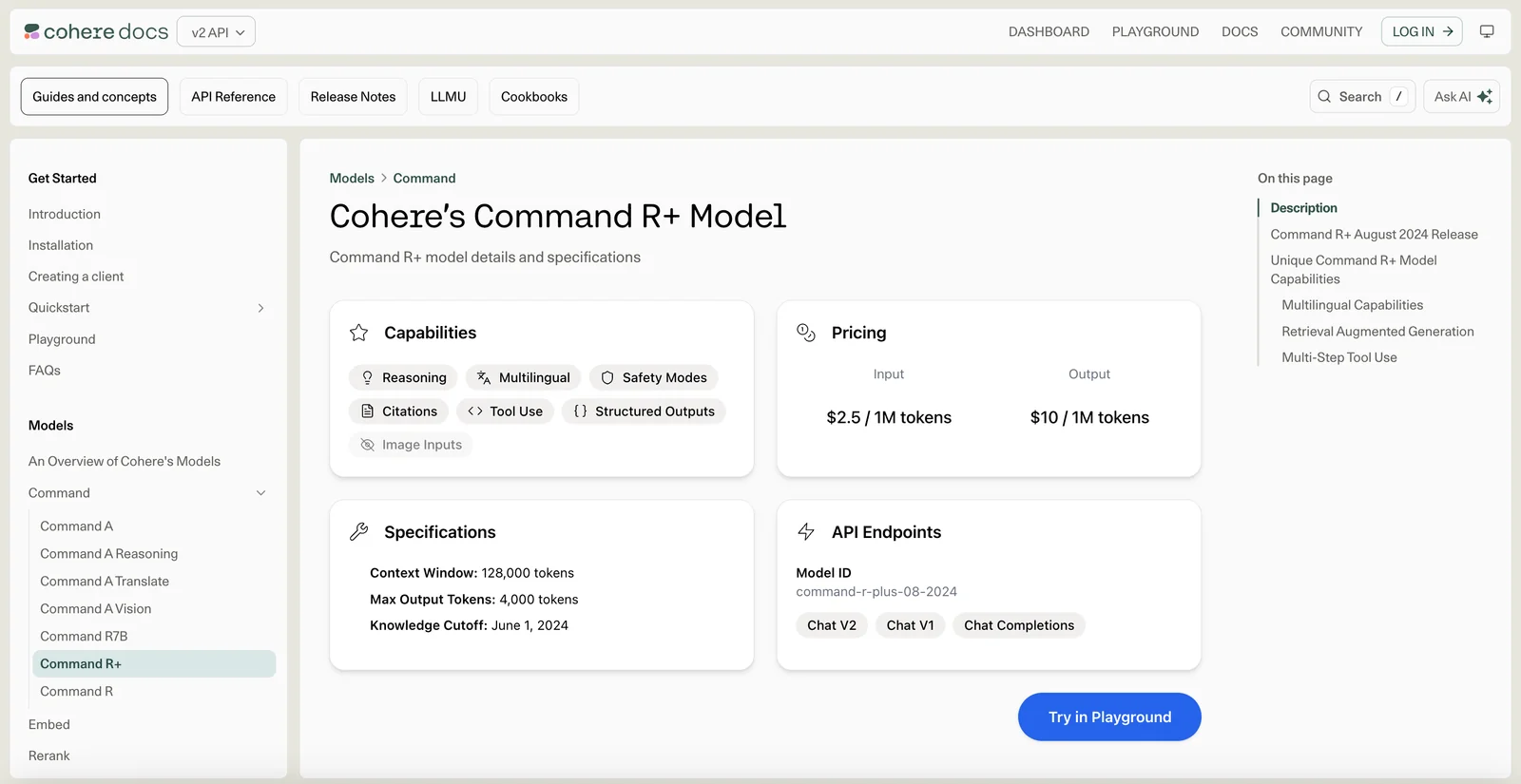
Command R+ is a large language model from Cohere optimized for conversational interaction, long-context inputs (up to ~128K tokens), retrieval-augmented generation (RAG), and both single-step and multi-step tool orchestration. The model supports grounded generation modes with citation spans, a "fast" citation mode for fewer tokens, and prompt templates that include optional system preambles to control task, context, and output style. CohereLabs released an open-weights research checkpoint (c4ai-command-r-plus-08-2024) that enables experimentation with tool use, multilingual capabilities, and RAG workflows.
Screenshots
Key Features
Use Cases



Frequently asked questions about Cohere Command R+
What is the pricing structure for Cohere Command R+?
Cohere Command R+ features a flexible pricing structure that includes a free open research release and a pay-as-you-go API model. The API costs $2.50 per 1 million input tokens and $10.00 per 1 million output tokens, making it accessible for various usage levels.
Key Points
- Free Access: Open research release available.
- Pay-as-You-Go: API pricing based on token usage.
- Flexible Pricing: Costs vary by input and output token usage.
Detailed Explanation
Cohere Command R+ provides an innovative approach to natural language processing with its pricing structure. The free open research release allows users to explore and test the platform without financial commitment, making it ideal for researchers and developers.
For those needing more extensive usage, the pay-as-you-go API offers a scalable solution. Pricing is straightforward:
- Input Tokens: $2.50 per 1 million tokens.
- Output Tokens: $10.00 per 1 million tokens.
This pricing model is particularly beneficial for businesses that require varying levels of API consumption based on their specific projects. For instance, a startup might initially use the free version for development and switch to the API as demand increases, allowing for budget control and flexibility.
Use Cases
- Developers: Can utilize the free version for prototyping applications before scaling up.
- Enterprises: May implement the API for large-scale data processing, budgeting based on actual usage.
- Researchers: Can access the free version to conduct experiments and gather insights.
Best Practices / Tips
- Monitor Usage: Keep track of your token usage to avoid unexpected charges.
- Optimize API Calls: Combine requests when possible to reduce the number of tokens consumed.
- Explore the Free Version: Leverage the free research release to understand the capabilities before committing financially.
Additional Resources
By understanding the pricing structure and optimal usage strategies, users can maximize their experience with Cohere Command R+ while managing costs effectively.
What are the key features of Cohere Command R+?
Cohere Command R+ boasts a powerful 104 billion-parameter model, supports long context windows of up to 128,000 tokens, and features retrieval-augmented generation for more accurate responses. Additionally, it enables multi-step tool use, enhancing its versatility for complex tasks and applications.
Key Points
- 104 Billion Parameters: Ensures high-quality language understanding and generation.
- 128K Token Context Windows: Facilitates comprehension of extensive documents or conversations.
- Retrieval-Augmented Generation: Combines generated responses with relevant information, improving accuracy.
Detailed Explanation
Cohere Command R+ is designed for advanced natural language processing tasks, making it a robust tool for developers and businesses.
-
104 Billion Parameters: This model size allows for intricate language patterns and nuanced understanding, making it suitable for tasks like creative writing, coding assistance, and customer service automation. With more parameters, the model can draw from a wider array of knowledge, providing richer and more accurate outputs.
-
Long Context Windows: Supporting context windows of up to 128,000 tokens means that the model can analyze and understand larger chunks of text at once. This is especially beneficial for applications requiring deep comprehension, such as summarizing lengthy reports, conducting complex conversations, or interpreting legal documents.
-
Retrieval-Augmented Generation: This innovative feature allows the model to pull in real-time information or facts from external databases, enhancing the reliability of the generated content. For example, if a user asks for the latest market trends, the model can retrieve current data while generating a coherent response, making it ideal for research and data-driven tasks.
-
Multi-Step Tool Use: This capability allows the model to execute multiple actions in sequence, which is crucial for workflows that require step-by-step processing. For instance, it can gather information, analyze it, and generate a report—all in one interaction.
Best Practices / Tips
- Utilize Context Effectively: When working with long context windows, provide as much relevant information as possible to maximize the model's understanding.
- Leverage Retrieval Features: Integrate real-time data sources to enhance the accuracy of generated responses, especially for time-sensitive inquiries.
- Test Multi-Step Processes: Experiment with complex workflows to determine how well the model handles sequential tasks, ensuring it meets your specific needs.
Additional Resources
How do I get started with Cohere Command R+?
To get started with Cohere Command R+, visit the official documentation at Cohere Docs. There, you will find a hosted demo, prompt templates, and comprehensive guides for initial experimentation and effective usage of the tool.
Key Points
- Access the official documentation for in-depth guides.
- Utilize the hosted demo to familiarize yourself with the tool.
- Experiment with prompt templates for effective use cases.
Detailed Explanation
Cohere Command R+ is an advanced AI tool designed for natural language processing tasks. To effectively get started with this powerful tool, follow these steps:
-
Visit the Official Documentation: Head to Cohere Command R+ Documentation. The documentation serves as a comprehensive resource, offering insights into features, capabilities, and setup instructions.
-
Explore the Hosted Demo: Engage with the hosted demo available on the documentation page. This interactive experience allows you to test the functionalities of Command R+ without needing to set up an environment. You can input sample data and see how the model responds, providing an intuitive understanding of its capabilities.
-
Utilize Prompt Templates: The documentation includes various prompt templates designed to help you start with common use cases. These templates can significantly reduce the learning curve by providing ready-to-use scenarios that demonstrate how to effectively structure your inputs.
-
Learn Through Examples: Review the examples provided in the documentation. They showcase how to implement specific functionalities in real-world applications, such as content generation, semantic search, and more.
-
Join the Community: Consider joining Cohere's community forums or support channels. Engaging with other users can provide valuable insights, troubleshooting assistance, and best practices for maximizing your use of Command R+.
Best Practices / Tips
- Start Simple: Begin with basic prompts to understand how the model reacts before moving to more complex queries.
- Iterate and Experiment: Use the templates as starting points, but experiment with your own variations to discover what works best for your specific needs.
- Monitor Performance: Keep track of the responses you receive and refine your prompts based on the quality of the output.
- Stay Updated: Regularly check the official documentation for updates, new features, and enhancements that can improve your experience.
Additional Resources
By following these guidelines, you can effectively leverage Cohere Command R+ for your AI projects, ensuring a smooth start and optimizing your outcomes.
How can I integrate Cohere Command R+ with my application?
Cohere Command R+ can be integrated with your application by utilizing its robust API, which provides features like managed scaling and enterprise support. For detailed integration steps, including code examples and best practices, refer to the official Cohere documentation.
Key Points
- API Access: Cohere Command R+ offers a user-friendly API for seamless integration.
- Managed Scaling: The system automatically adjusts resources to meet demand.
- Enterprise Support: Dedicated support options are available for larger applications.
Detailed Explanation
Integrating Cohere Command R+ into your application involves several key steps:
-
Obtain API Access: Sign up for Cohere to receive your API key. This key is essential for authenticating your requests to the Command R+ services.
-
Review Documentation: Familiarize yourself with the Cohere Command R+ documentation. The documentation provides comprehensive guidance on the API endpoints, parameters, and response formats.
-
Set Up Development Environment: Ensure your development environment is ready. This may include installing necessary libraries and frameworks. Cohere supports various programming languages, including Python, JavaScript, and Java.
-
Make API Calls: Start integrating by making sample API calls. For example, you can send a request to generate text or process language. Here's a Python snippet to get you started:
import requests api_key = 'YOUR_API_KEY' url = 'https://api.cohere.com/v1/generate' response = requests.post(url, headers={'Authorization': f'Bearer {api_key}'}, json={ 'prompt': 'Your prompt here', 'max_tokens': 50 }) print(response.json()) -
Test and Iterate: Thoroughly test the integration to ensure it meets your application’s needs. Use different prompts and configurations to see how the API performs.
-
Deploy and Monitor: Once testing is complete, deploy your application. Continuously monitor the API usage and performance to ensure optimal functionality.
Best Practices / Tips
- Utilize Rate Limits: Be aware of the API's rate limits to avoid service interruptions. Implement error handling to manage requests effectively.
- Optimize Prompts: Experiment with different prompts to achieve the best responses from the AI. Tailor your input to get more relevant output.
- Keep Security in Mind: Store your API key securely and avoid hardcoding it in your application code. Use environment variables or secure vaults instead.
Additional Resources
How does Cohere Command R+ compare to other AI models?
Cohere Command R+ distinguishes itself from other AI models through its substantial parameter size, support for extended context, and innovative retrieval-augmented generation capabilities. These features make it particularly effective for more complex conversational tasks, offering advantages in accuracy and relevance over its competitors.
Key Points
- Large Parameter Size: Cohere Command R+ utilizes a massive number of parameters, enhancing its understanding and generation of nuanced language.
- Extended Context Support: This model can handle longer prompts, allowing for more coherent and contextually aware conversations.
- Retrieval-Augmented Generation: It integrates external knowledge sources, improving response accuracy and making it suitable for intricate queries.
Detailed Explanation
Cohere Command R+ is designed to tackle complex conversational tasks effectively. Here’s how it compares to other AI models:
-
Large Parameter Size: With millions of parameters, Command R+ can generate more sophisticated responses. For example, while smaller models may falter with context-heavy queries, Command R+ excels by retaining details from extensive interactions.
-
Extended Context Support: Traditional AI models often struggle with long-term context retention. Command R+ supports a broader context window, which is crucial for applications like customer support or educational tutoring, where maintaining the thread of conversation is vital. This feature allows users to engage in rich dialogues without losing context over multiple exchanges.
-
Retrieval-Augmented Generation: This unique capability enables the model to pull in relevant information from an external database. For instance, if a user asks for specific statistics or recent events, Command R+ can fetch real-time data, thereby providing responses that are not only relevant but also up-to-date, which is a significant advantage over static models that rely solely on pre-existing knowledge.
Best Practices / Tips
- Utilize Contextual Prompts: To maximize the benefits of Command R+, provide detailed and context-rich prompts. This helps the model generate more accurate and relevant responses.
- Explore Retrieval Features: Leverage the retrieval-augmented capabilities by integrating reliable data sources. This can enhance the quality of answers, especially in fields like finance or healthcare where precision is critical.
- Monitor Performance: Regularly evaluate the responses from Command R+ to identify areas for improvement. Adjusting prompts based on feedback can lead to better user interactions.
Additional Resources
- Cohere Documentation - Official documentation for in-depth technical guidance and examples.
- AI Model Comparisons - A resource for comparing various AI models and their capabilities.
- AI in Conversational Interfaces - Insights on the role of AI in enhancing user interactions.
Explore more AI Ai Models tools
Browse all Ai Models tools →Browse by use case: Chatbots & Assistants
Compare Cohere Command R+: vs Mouse-1 · vs Milliseconds.ai · vs SWE-2 · vs Desert Ant Labs