

Claude 4
AIPopularClaude 4 is Anthropic's next-generation family of large models delivering more reliable, interpretable assistance for complex work, learning, and coding.
Claude 4
Claude 4 is Anthropic's next-generation family of large models delivering more reliable, interpretable assistance for complex work, learning, and coding.
About Claude 4
Claude 4 is a generation of large language models from Anthropic (including Sonnet and Opus variants) designed to improve reliability, interpretability, and capability on complex tasks. It emphasizes safer instruction following, clearer explanations of reasoning, and better performance on coding and agentic workflows. Claude 4 powers interactive assistants, developer tools, and integrations via the Claude Developer Platform and is positioned for both end-user productivity and enterprise deployments.
Screenshots

Key Features
Use Cases



Frequently asked questions about Claude 4
What are the pricing options for Claude 4?
Claude 4 offers a flexible pricing model including a free tier, a usage-based API plan, and a custom enterprise plan. For heavy users, the Max plan is available at $100 per month, providing robust features tailored to meet high-demand needs.
Key Points
- Freemium Model: Claude 4 provides a free tier for users to explore basic functionalities.
- Usage-Based API Plan: Ideal for developers needing scalable access with varying costs based on usage.
- Max Plan: A dedicated plan at $100/month for users requiring extensive features and higher usage limits.
Detailed Explanation
Claude 4 features a versatile pricing structure designed to accommodate different user needs, from casual users to enterprises:
-
Free Tier: This entry-level option allows users to access basic features at no cost. It is perfect for individuals or small businesses looking to familiarize themselves with Claude 4’s capabilities without any financial commitment.
-
Usage-Based API Plan: This plan is tailored for developers and businesses that need API access based on specific usage levels. Costs are determined by the number of requests or processing time, making it a cost-effective choice for those with variable workloads. For instance, if a startup anticipates fluctuating usage, they can opt for this flexible plan without incurring fixed monthly charges.
-
Max Plan: For users with high demands, the Max plan at $100/month offers enhanced capabilities, including priority support, advanced features, and higher usage limits. This plan is particularly beneficial for larger organizations or applications that require consistent and intensive use of Claude 4’s functionalities.
Best Practices / Tips
- Evaluate Your Needs: Before choosing a plan, assess your usage patterns to determine which option will be the most cost-effective.
- Start with the Free Tier: If you're new to AI tools, start with the free tier to test features and understand your requirements before committing financially.
- Monitor Usage: If you opt for the usage-based API plan, track your usage regularly to avoid unexpected charges and adjust your plan as needed.
Additional Resources
How do I get started using Claude 4?
To get started using Claude 4, sign up for a free account on the Claude app or the Anthropic Developer Platform. This will provide access to limited features and comprehensive documentation, which will guide you through the initial setup and usage of Claude 4 effectively.
Key Points
- Sign Up for an Account: Create a free account on the Claude app or Anthropic Developer Platform.
- Explore the Features: Familiarize yourself with the available tools and functionalities.
- Utilize Documentation: Access guides and tutorials to maximize your usage of Claude 4.
Detailed Explanation
To begin your journey with Claude 4, follow these steps:
-
Create Your Account:
- Visit the Claude app website or the Anthropic Developer Platform.
- Click on the “Sign Up” button and fill in the required information, including your email and password.
- Verify your email address to activate your account.
-
Explore Features:
- After logging in, navigate through the dashboard to explore various features of Claude 4, such as chat capabilities, API access, and customization options.
- Claude 4 offers a user-friendly interface, making it easy to start with basic tasks like text generation, summarization, and more.
-
Access Documentation:
- Utilize the documentation available on the platform. The guides offer step-by-step instructions on how to use different features and best practices for implementation.
- Consider exploring the FAQs and community forums for additional tips and troubleshooting advice.
Best Practices / Tips
- Start with Tutorials: Take advantage of introductory tutorials provided in the documentation to understand the basic functionalities.
- Experiment with Different Use Cases: Test various applications of Claude 4, such as content creation, coding assistance, or analytical tasks, to find what suits your needs best.
- Stay Updated: Regularly check for updates and new features released by Anthropic to ensure you are utilizing Claude 4 to its fullest potential.
Additional Resources
- Claude Documentation
- Claude Community Forum
- Getting Started with Claude 4 Tutorial
- API Access and Pricing
By following these steps and utilizing available resources, you can effectively start using Claude 4 and enhance your productivity with AI-driven tools.
What are the key features of Claude 4?
Claude 4 boasts enhanced reliability, interpretable outputs, customizable model variants tailored for specific tasks, and seamless integration with developer tools for coding and automation. These features make it a versatile AI tool suitable for various applications, from natural language processing to advanced automation solutions.
Key Points
- Improved Reliability: Claude 4 provides consistent performance across tasks.
- Interpretable Outputs: Users can easily understand and validate AI-generated responses.
- Customizable Model Variants: Tailored models for diverse applications enhance efficiency.
Detailed Explanation
Claude 4 is designed to meet the needs of developers and businesses seeking robust AI solutions.
1. Improved Reliability
Claude 4's architecture has been fine-tuned to ensure its outputs are dependable and accurate. This feature is crucial for applications in sensitive areas like healthcare and finance, where errors can have significant consequences. For example, in financial forecasting, reliable outputs can lead to better decision-making.
2. Interpretable Outputs
One of the standout features of Claude 4 is its ability to produce interpretable outputs. This means users can understand the reasoning behind the AI's decisions. For instance, when generating a summary of a complex document, Claude 4 will provide a concise overview along with key points, making it easier for users to grasp the essential information quickly.
3. Customizable Model Variants
Claude 4 offers multiple model variants, which can be customized according to specific use cases. This flexibility allows developers to choose a model optimized for tasks such as text generation, sentiment analysis, or coding assistance. For example, businesses can utilize a variant tailored for customer service interactions, improving response times and customer satisfaction.
4. Integration with Developer Tools
Claude 4 seamlessly integrates with popular developer tools, enhancing coding and automation workflows. This integration enables developers to automate repetitive tasks or enhance their applications with AI capabilities. For example, using Claude 4 in a continuous integration/continuous deployment (CI/CD) pipeline can automate code reviews and improve code quality.
Best Practices / Tips
- Understand Your Needs: Before implementing Claude 4, identify the specific tasks you want to optimize. This will help you select the most appropriate model variant.
- Leverage Customization: Utilize Claude 4's customizable features to tailor outputs for your audience, ensuring relevance and clarity.
- Monitor and Validate Outputs: Regularly check the AI's outputs for accuracy, especially in critical applications, to maintain reliability.
Additional Resources
How does Claude 4 compare to other AI models?
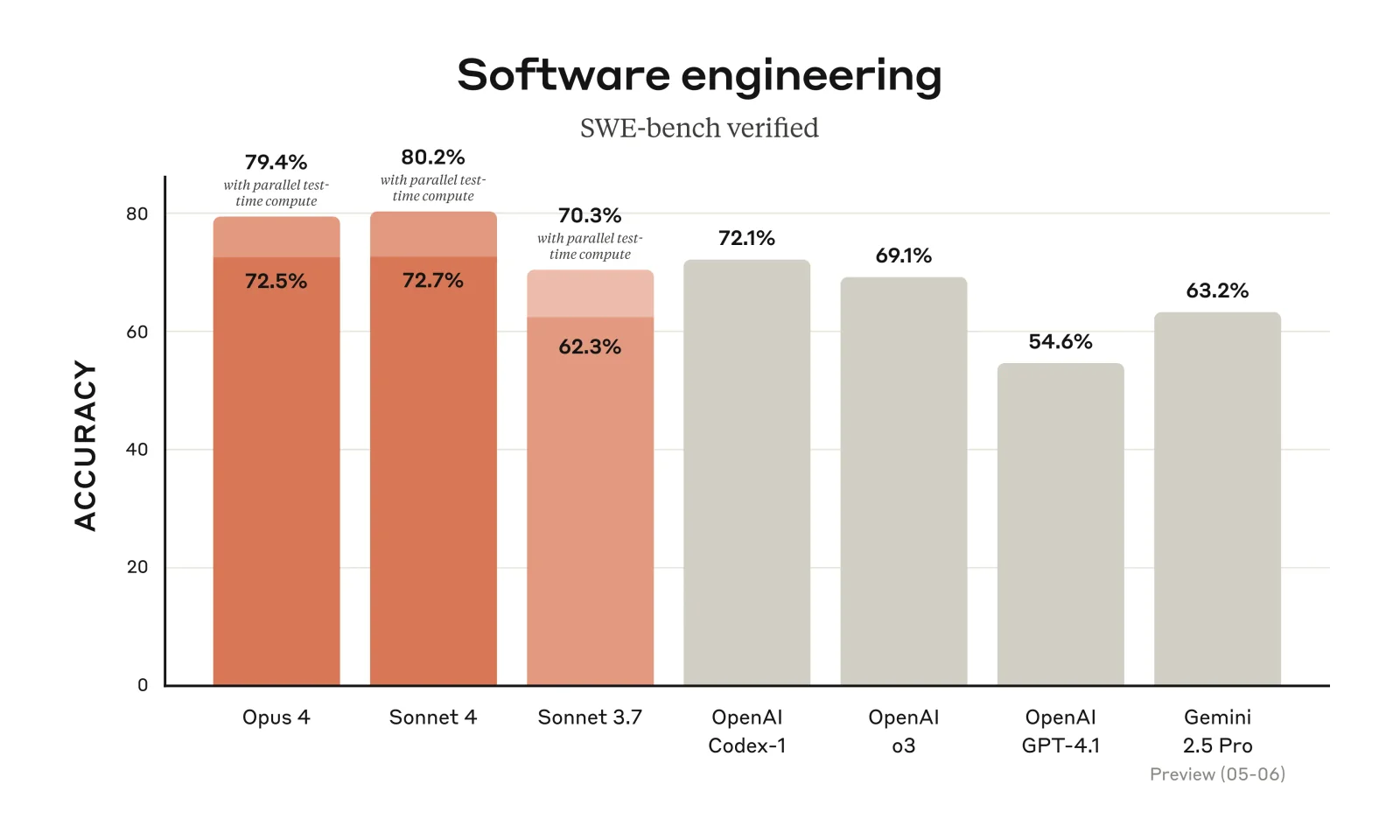
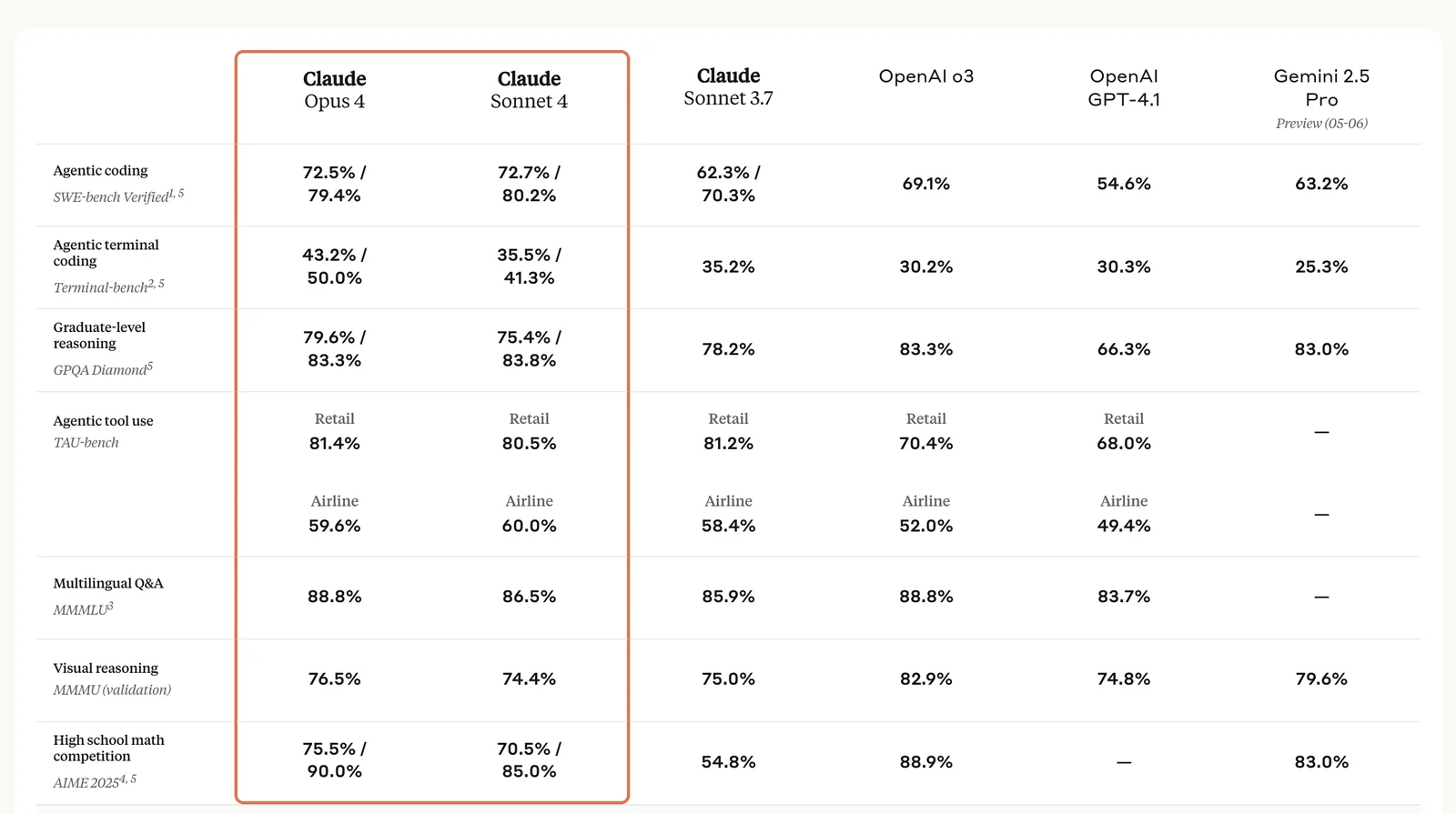
Claude 4 outperforms many AI models by offering enhanced interpretability and reliability, particularly excelling in complex tasks like coding. Compared to competitors such as ChatGPT, it delivers superior performance through its robust architecture and user-friendly interface, making it a top choice for developers and researchers alike.
Key Points
- Enhanced Interpretability: Claude 4 provides clearer insights into its decision-making process.
- Superior Performance in Coding: It handles programming tasks more effectively than many competitors.
- User-Centric Design: The interface is designed for ease of use, making it accessible for both experts and novices.
Detailed Explanation
Claude 4 is part of a new generation of AI models that prioritize user interaction and task performance. Its architecture leverages advanced techniques in natural language processing, allowing it to generate and understand context with greater accuracy.
Comparison with ChatGPT
While ChatGPT is known for its conversational abilities, Claude 4 specifically shines in technical tasks. For example, when asked to write a code snippet in Python, Claude 4 not only generates the code but also explains the logic behind it, enhancing user learning and comprehension.
Use Cases
- Coding Assistance: Developers can use Claude 4 to write, debug, and optimize code, benefiting from its detailed explanations.
- Research Support: Academics can leverage its reliable information retrieval to support their studies, making it an excellent tool for literature reviews and data analysis.
Best Practices / Tips
- Utilize Clear Prompts: For optimal results, provide specific and detailed prompts when interacting with Claude 4.
- Experiment with Different Tasks: Test its capabilities across various domains, from creative writing to technical coding, to fully understand its strengths.
- Integrate Feedback: Use the model’s responses to refine your queries, enhancing the quality of interactions over time.
Additional Resources
What are the technical requirements for using Claude 4 API?
To use the Claude 4 API, you need an API key from the Anthropic Developer Platform, along with support for multiple programming languages via SDKs for smooth integration. Ensure you meet the technical specifications required for optimal performance in your applications.
Key Points
- API Key Requirement: Obtain an API key from the Anthropic Developer Platform.
- Language Support: The API supports various programming languages through SDKs.
- Technical Specifications: Ensure compliance with the API's technical requirements for seamless integration.
Detailed Explanation
The Claude 4 API is designed for seamless integration into various applications, offering robust features powered by advanced AI. To get started, follow these essential steps:
-
Obtain the API Key: Register on the Anthropic Developer Platform to acquire your unique API key. This key is essential for authenticating your requests to the Claude 4 API.
-
Choose Your Programming Language: Claude 4 API supports various programming languages, including Python, JavaScript, and Java. Each language has a dedicated SDK that simplifies integration. For example:
- Python SDK: Ideal for data analysis and machine learning applications.
- JavaScript SDK: Perfect for web applications and real-time data processing.
-
Review Technical Specifications: Familiarize yourself with the API's rate limits, request formats, and response structures. This ensures that your application communicates effectively with the API. For instance, the API may limit requests to 60 per minute, so plan your application design accordingly.
-
Install SDK: Use package managers like pip (for Python) or npm (for JavaScript) to install the relevant SDK. This step is crucial for accessing the API's functionalities quickly.
Best Practices / Tips
- Rate Limiting: Be conscious of the API's rate limits to avoid service disruptions. Implement error handling in your code to manage quota exceedance gracefully.
- Optimize Requests: Minimize the data included in requests by sending only essential parameters. This improves performance and reduces latency.
- Secure Your API Key: Treat your API key like a password. Store it securely and never expose it in public repositories.
Additional Resources
Explore more AI Ai Models tools
Browse all Ai Models tools →Browse by use case: Code Generation
Compare Claude 4: vs Mouse-1 · vs Milliseconds.ai · vs SWE-2 · vs Desert Ant Labs