

Bubble
AINo-code visual platform to build, host and launch web apps with seamless AI prompting and visual editing.
Bubble
No-code visual platform to build, host and launch web apps with seamless AI prompting and visual editing.
About Bubble
Bubble is an all-in-one no-code platform that enables people and teams to design, build, and host full-featured web applications without writing code. Users create interfaces with a visual drag-and-drop editor, define data models and backend workflows, and deploy apps on Bubble's cloud hosting. The platform emphasizes switching seamlessly between AI prompting and visual design, allowing creators to iterate quickly, integrate external APIs and plugins, and launch SaaS products, marketplaces, and CRMs without traditional engineering resources.
Screenshots
Key Features
Use Cases


Frequently asked questions about Bubble
What are the pricing options for Bubble?
Bubble offers a flexible pricing model, starting with a Free tier at $0/month, followed by paid plans beginning at $32/month for the Starter plan. These plans include various features and workload units that cater to different user needs, making it accessible for startups and established businesses alike.
Key Points
- Freemium Model: Bubble provides a Free tier and multiple paid options.
- Starter Plan: The entry-level plan starts at $32/month, offering essential features.
- Scalability: Plans scale up to accommodate growing business needs.
Detailed Explanation
Bubble's pricing structure is designed to cater to a wide range of users, from hobbyists to professional developers.
-
Free Tier: This no-cost option allows users to explore the platform and build apps with limited features and capacity. It's perfect for testing ideas or learning the platform.
-
Starter Plan ($32/month): Ideal for beginners and small businesses, this plan includes core functionalities, up to 2 collaborators, and 10 GB of storage. It allows access to Bubble's visual editor and basic plugins, making it suitable for creating simple applications.
-
Professional Plan ($115/month): This tier includes advanced features such as custom domains, increased API capacity, and priority support. It's tailored for businesses that need more robust performance and reliability.
-
Production Plan ($475/month): Aimed at larger organizations, this plan offers enhanced performance, team collaboration tools, and the ability to handle more significant user loads. It also includes dedicated support and enterprise-level features.
Each plan includes a set number of workload units, which determine how many operations can be processed. Users can upgrade or downgrade their plans as their needs change, ensuring flexibility as projects evolve.
Best Practices / Tips
- Evaluate Your Needs: Start with the Free tier to understand Bubble’s capabilities before committing to a paid plan.
- Consider Future Growth: Choose a plan that allows room for expansion as your app scales and requires more resources.
- Utilize Features Wisely: Familiarize yourself with all features offered in your chosen plan to maximize your app's potential.
Additional Resources
- Bubble Pricing Page - Visit for the latest pricing details.
- Bubble Documentation - Access comprehensive guides and tutorials on using Bubble effectively.
- Bubble Community Forum - Engage with other users for tips, advice, and support.
How can I start using Bubble to build my web app?
To start using Bubble for building your web app, first sign up for a free account on their official website. Then, explore the intuitive visual editor, where you can create your app using the drag-and-drop interface and leverage AI prompting features to enhance your design and functionality.
Key Points
- Create an Account: Sign up for a free Bubble account to access the platform.
- Familiarize with the Editor: Explore the visual editor to understand its layout and features.
- Utilize AI Features: Implement AI prompting to streamline your app development process.
Detailed Explanation
Starting with Bubble is straightforward. Here’s how to get going:
-
Sign Up for a Free Account:
- Visit Bubble's website and click on the "Sign Up" button. You’ll need to provide a valid email address and create a password.
- Once registered, you can access a free plan that allows you to test the platform and build a basic app.
-
Explore the Visual Editor:
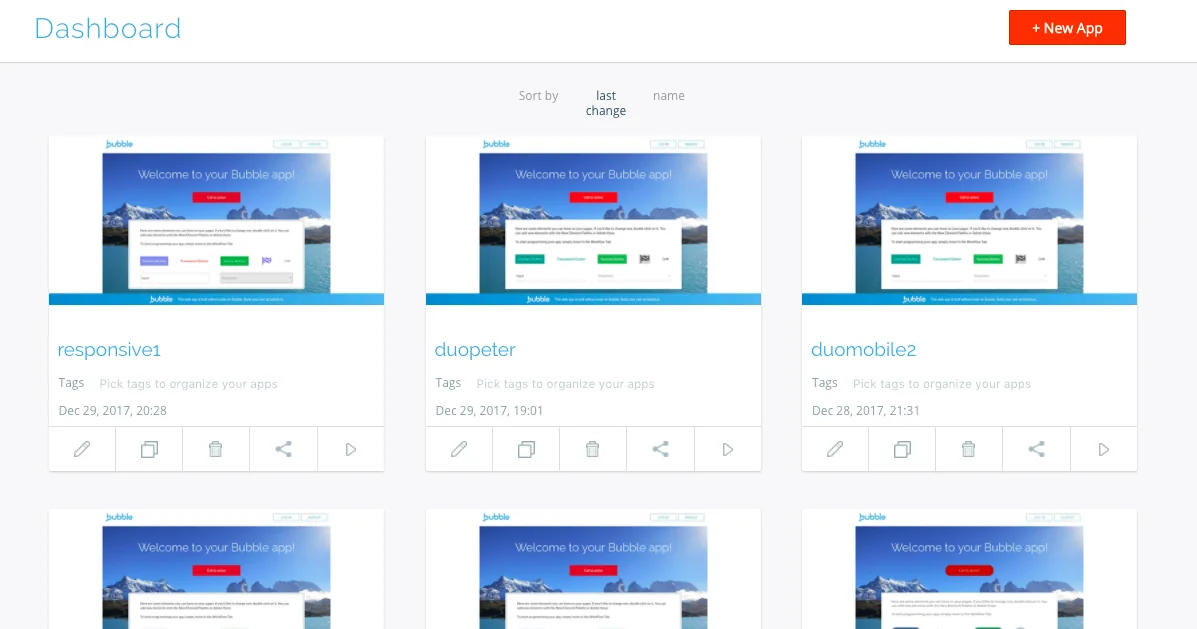
- After logging in, you’ll land on the Bubble dashboard. Click on "New App" to start a new project.
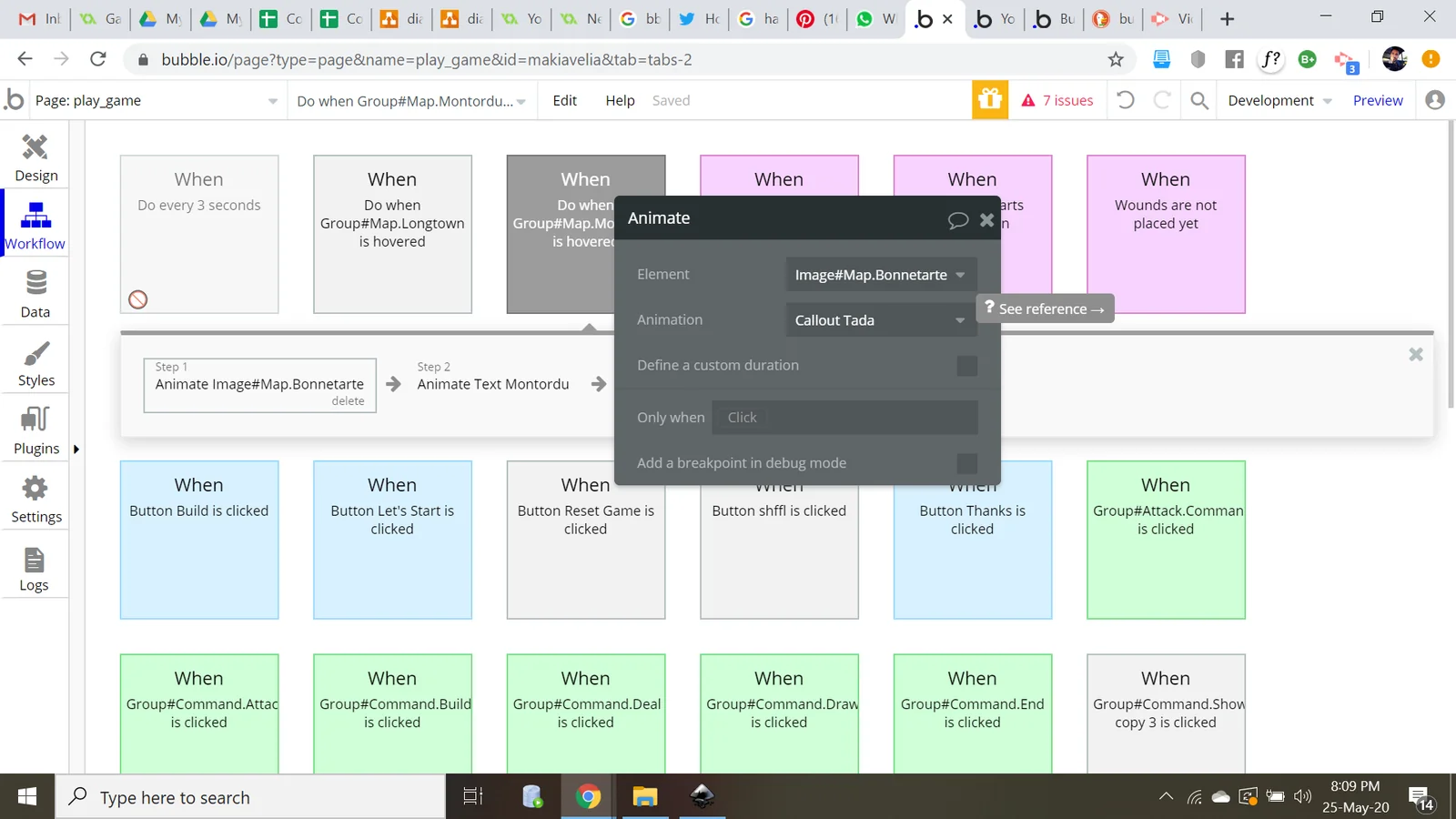
- The visual editor is user-friendly, allowing you to drag and drop elements like buttons, text fields, and images onto your canvas. Spend some time familiarizing yourself with the various tools available.
-
Learn About Bubble's Features:
- Bubble offers a range of features, including workflows, database management, and responsive design options. Use the built-in tutorials and documentation to learn how to use these features effectively.
- The AI prompting feature can assist you in generating content, automating processes, and improving user interactions, making your development experience smoother.
Best Practices / Tips
- Utilize Tutorials: Take advantage of Bubble’s extensive resources, including video tutorials and community forums, especially if you're a beginner.
- Start Simple: Begin with a small project to grasp the fundamentals before moving on to more complex applications.
- Test Regularly: Regularly preview and test your app to identify and fix issues early in the development process.
- Engage with the Community: Join Bubble forums and groups on social media to learn from experienced developers and share your challenges.
Additional Resources
- Bubble Documentation: For in-depth guides on all features.
- Bubble Forum: A community space for asking questions and sharing tips.
- YouTube Tutorials: Visual guides and walkthroughs on using Bubble effectively.
What features does Bubble offer for app development?
Bubble offers an extensive suite of features for app development, including a no-code visual editor, integrated AI prompting, cloud hosting, a robust database and workflow engine, and API/plugin extensibility. These capabilities make Bubble ideal for creating diverse applications, from simple prototypes to complex web applications.
Key Points
- No-Code Visual Editor: Simplifies design and functionality.
- Integrated AI Prompting: Enhances user experience with intelligent automation.
- Cloud Hosting and Database: Provides seamless scalability and management.
Detailed Explanation
Bubble's no-code visual editor allows users to design applications by dragging and dropping elements, making it accessible for non-developers. This feature enables users to create responsive layouts and customize UI components effortlessly. For instance, a startup can quickly prototype and iterate on a new app without needing a coding background, drastically reducing development time.
The integrated AI prompting feature empowers developers to leverage artificial intelligence directly within their applications. For example, you can implement chatbots for customer service or personalized user experiences based on data analytics. This integration helps in enhancing user engagement and retention.
With cloud hosting, Bubble ensures that your applications are always available and scalable. This means that as your user base grows, Bubble can automatically allocate more resources to accommodate increased traffic without manual intervention. Additionally, the platform's database and workflow engine enable users to create complex data structures and automate backend processes without writing a single line of code, thus streamlining operations.
Furthermore, Bubble's API/plugin extensibility allows for integration with third-party services. Developers can enhance their applications by connecting to payment gateways, social media platforms, or analytics tools, making it easier to build comprehensive solutions tailored to specific business needs.
Best Practices / Tips
- Utilize Templates: Start with Bubble’s templates to save time and gain insights into best practices.
- Regular Testing: Continuously test your application during development to identify and fix bugs early.
- Leverage Community Resources: Take advantage of Bubble's forums and community tutorials for troubleshooting and inspiration.
- Focus on UX: Prioritize user experience by utilizing A/B testing features to refine your application’s interface.
Additional Resources
By leveraging these features and best practices, you can effectively use Bubble to bring your app ideas to life with minimal coding knowledge.
How does Bubble compare to other no-code platforms?
Bubble is a leading no-code platform that excels with its robust visual editor and AI capabilities, making it suitable for complex applications requiring custom logic. However, it has a steeper learning curve compared to simpler alternatives like Wix or Shopify, which are better for less intricate projects.
Key Points
- Visual Editor: Bubble's intuitive drag-and-drop interface allows for detailed customization.
- AI Integration: It offers advanced AI features for enhanced functionality.
- Learning Curve: More complex than basic no-code tools, requiring time for mastery.
Detailed Explanation
Bubble distinguishes itself from other no-code platforms by providing a highly customizable environment for building web applications. Unlike simpler tools like Wix or Squarespace, which focus on website design, Bubble allows users to create complex applications that may require custom workflows, databases, and logic.
For instance, if you want to build a marketplace or a social media platform, Bubble’s visual editor lets you structure your application with different data types, user roles, and dynamic content. Users can leverage AI features to automate tasks or analyze user data, enhancing the overall functionality of their applications.
Additionally, Bubble's community and resources support users with tutorials, forums, and templates, although beginners may find the initial setup and learning process challenging.
Best Practices / Tips
- Start Small: Begin with simple projects to familiarize yourself with the platform’s features.
- Utilize Templates: Make use of existing templates to save time and learn best practices.
- Engage with the Community: Join forums and discussion groups to share knowledge and solutions.
- Invest Time in Learning: Dedicate time to learning Bubble’s features to unlock its full potential.
Additional Resources
Does Bubble support API integrations?
Yes, Bubble fully supports API integrations, enabling users to connect with external services seamlessly through its API connector. This feature enhances app functionality by allowing developers to incorporate third-party services, automate workflows, and access real-time data efficiently.
Key Points
- Extensive API Connector: Bubble's API connector allows for easy integration with various external services.
- Custom API Calls: Users can create custom API calls to suit their specific app requirements.
- Enhanced Functionality: Integrating APIs can significantly expand the capabilities of your Bubble applications.
Detailed Explanation
Bubble provides a robust API integration feature that simplifies connecting your applications to external services. With the API Connector, users can easily set up RESTful API calls without needing extensive coding knowledge. Here’s how it works:
- Access API Connector: Navigate to the Plugins section in your Bubble editor and add the API Connector plugin.
- Configure API Settings: Enter the API endpoint, select the request type (GET, POST, etc.), and add any necessary headers or parameters.
- Initialize Call: Test the API connection by initializing the call. Bubble will parse the response, allowing you to use data directly in your app.
- Dynamic Data: Use the data fetched from APIs to populate text fields, lists, or workflows in your application. For example, you can display real-time weather data from a weather API or fetch user information from a social media platform.
Use Case Example
Imagine you are building a marketplace app on Bubble. By integrating payment processing APIs like Stripe or PayPal, you can handle transactions securely. Additionally, connecting with shipping APIs can automate tracking updates for your users, enhancing the overall experience.
Best Practices / Tips
- Read the API Documentation: Always refer to the official documentation of the API you are integrating to understand its requirements and limitations.
- Error Handling: Implement error handling in your workflows to manage API failures gracefully.
- Monitor Usage Limits: Be aware of API rate limits to avoid disruptions in service.
- Secure Sensitive Data: Always handle sensitive information, such as API keys, securely by using Bubble’s built-in security features.
Additional Resources
Explore more AI Ai Agents tools
Browse all Ai Agents tools →Browse by use case: Code Generation · Automation & Productivity
Compare Bubble: vs Scout by Fini · vs Ruflo · vs Harness² · vs The New Beings