

Bookmarkjar ®
AIAI-powered bookmark manager with semantic search, automatic tagging, and cross-platform sync for saving and finding web content.
Bookmarkjar ®
AI-powered bookmark manager with semantic search, automatic tagging, and cross-platform sync for saving and finding web content.
About Bookmarkjar ®
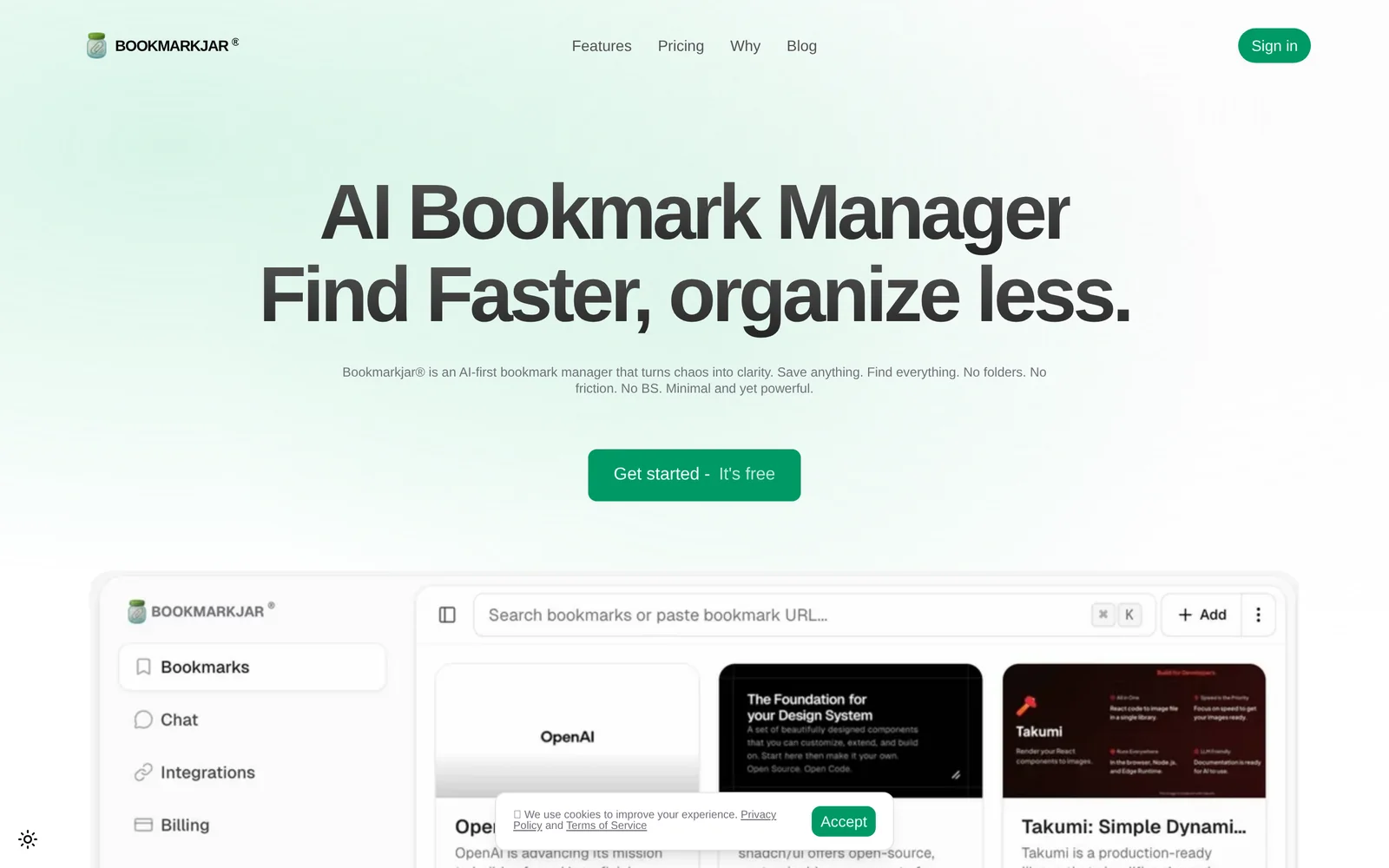
Bookmarkjar ® is an AI-powered bookmark manager that helps users save, search, and organize web content using semantic search and automatic tagging. It extracts meaningful metadata and generates tags to categorize bookmarks automatically, enabling faster retrieval. The product supports saving content from platforms like Twitter and GitHub and keeps bookmarks synchronized across devices. By organizing bookmarks 'by AI', Bookmarkjar aims to reduce manual folder management and improve discoverability of saved links for research, development, and everyday browsing.
Screenshots
Key Features
Use Cases



Frequently asked questions about Bookmarkjar ®
What is Bookmarkjar ®?
Bookmarkjar ® is an AI-powered bookmark manager designed to enhance your online experience. It features advanced semantic search, automatic tagging, and seamless cross-platform synchronization, allowing users to easily save, organize, and locate web content across various devices.
Key Points
- AI-Powered Functionality: Leverages artificial intelligence for smart organization.
- Semantic Search: Enables users to find content efficiently using natural language queries.
- Cross-Platform Sync: Ensures accessibility of bookmarks across multiple devices.
Detailed Explanation
Bookmarkjar ® revolutionizes how users manage their online content. With AI at its core, it intelligently categorizes your bookmarks, making it easier to retrieve information when you need it.
Semantic Search
The semantic search feature allows you to find bookmarks by typing in phrases or questions rather than exact keywords. For example, if you saved a bookmark about healthy recipes, you can search for "quick healthy meals," and Bookmarkjar will present relevant results, enhancing your user experience.
Automatic Tagging
When you save a new bookmark, Bookmarkjar automatically generates tags based on the content of the page. This eliminates the hassle of manual tagging, enabling a quicker organization process. For instance, if you bookmark an article on digital marketing, it might automatically tag it with relevant keywords like "SEO," "content strategy," or "analytics."
Cross-Platform Sync
With cross-platform synchronization, your bookmarks are accessible from any device—be it your smartphone, tablet, or computer. This means you can save a link on your laptop and access it later on your phone without any hassle.
Best Practices / Tips
- Regularly organize bookmarks: Take advantage of Bookmarkjar's automatic tagging by frequently reviewing and adjusting your tags to ensure they remain relevant.
- Utilize semantic search effectively: When searching for bookmarks, frame your queries in a conversational manner to leverage the semantic search capabilities fully.
- Backup your bookmarks: Regularly export or backup your bookmarks to avoid losing important links in case of device failure.
Additional Resources
How does Bookmarkjar ® work?
Bookmarkjar® works by leveraging advanced AI technology to streamline daily workflows, enabling users to organize, manage, and access their bookmarks efficiently. Its intelligent features adapt to user preferences, enhancing productivity and simplifying online navigation.
Key Points
- AI-Powered Bookmark Management: Automates organization of bookmarks.
- User-Centric Interface: Tailors functionality to individual needs.
- Integrative Features: Syncs with various platforms for seamless access.
Detailed Explanation
Bookmarkjar® is designed to enhance the way users interact with their online resources. By utilizing artificial intelligence, it categorizes and organizes bookmarks based on user behavior and preferences. For example, if you frequently visit specific websites related to a project, Bookmarkjar® can intelligently cluster these links, allowing for easy retrieval.
How It Works:
- Setup: Users create an account and install the Bookmarkjar® extension on their browser.
- Bookmarking: As users browse, they can easily save bookmarks with a single click.
- AI Categorization: The AI analyzes saved links to suggest categories, helping users maintain an organized structure.
- Search Functionality: Users can quickly find bookmarks using keywords or tags, saving time and effort.
- Cross-Platform Syncing: Bookmarkjar® syncs across devices, ensuring your bookmarks are accessible anywhere.
Use Cases:
- Students: Organize research materials and resources for projects.
- Professionals: Keep track of important articles and reports relevant to work.
- Hobbyists: Manage links related to personal interests or creative projects.
Best Practices / Tips
- Regularly Update Bookmarks: Periodically review and remove outdated links to keep your collection relevant.
- Utilize Tags: Take advantage of tagging features to enhance searchability and organization.
- Explore Integrations: Use Bookmarkjar® with other applications (like note-taking tools) for a more cohesive workflow.
Additional Resources
With these features and best practices, Bookmarkjar® not only helps users manage bookmarks effectively but also enhances overall productivity through intelligent organization.
What are the main features of Bookmarkjar ®?
Bookmarkjar® offers advanced AI capabilities designed for personalized content curation, collaboration, and organization. Key features include intelligent bookmarking, intuitive user interface, and seamless integration with various platforms, enhancing productivity and user experience for individuals and teams alike.
Key Points
- Intelligent Bookmarking: Automatically categorizes and organizes links.
- User-Friendly Interface: Simplifies navigation and enhances usability.
- Platform Integration: Works smoothly with popular tools and apps.
Detailed Explanation
Bookmarkjar® stands out in the crowded field of bookmarking tools with its core AI features.
Intelligent Bookmarking
This feature employs machine learning algorithms to analyze user behavior and automatically categorize bookmarks. For instance, if you frequently save articles related to "digital marketing," the system will suggest similar content and organize these links under a tailored category, saving you time and effort.
User-Friendly Interface
Navigating Bookmarkjar® is an intuitive experience, thanks to its clean design. Users can quickly find, save, and manage their bookmarks with minimal clicks. The drag-and-drop functionality allows for easy organization, making it especially suitable for users who juggle multiple projects or topics.
Platform Integration
Bookmarkjar® integrates seamlessly with popular tools such as Google Drive, Slack, and Trello. This means you can easily share links and collaborate with your team without switching between applications. For example, you can save a relevant document from Google Drive directly into Bookmarkjar® and share it with your colleagues via Slack.
Best Practices / Tips
- Utilize Tags: Make use of the tagging system to enhance searchability and organization. Tagging your bookmarks with relevant keywords will allow for quicker retrieval.
- Regularly Review Bookmarks: Periodically go through your saved bookmarks to delete outdated links and refine your categories, keeping your workspace clutter-free.
- Explore Integrations: Take advantage of the platform integrations to streamline your workflow. For instance, connect Bookmarkjar® with your project management software to keep your resources organized.
Additional Resources
Who is Bookmarkjar ® for?
Bookmarkjar ® is designed for individuals and teams looking to enhance their daily AI workflows. Whether you're a student, professional, or business owner, Bookmarkjar ® helps streamline research, organization, and productivity by integrating various AI tools to optimize your work processes.
Key Points
- Target Audience: Ideal for students, professionals, and businesses.
- Workflow Enhancement: Simplifies daily tasks with AI integration.
- Versatile Applications: Useful for research, project management, and collaboration.
Detailed Explanation
Bookmarkjar ® caters to a wide audience, including:
- Students: Simplifies research by allowing easy saving and organization of online resources. Students can compile articles, papers, and references, making it easier to access materials for assignments and projects.
- Professionals: Enhances productivity by integrating AI tools that automate routine tasks, such as scheduling, email management, and data analysis. For example, professionals can use Bookmarkjar ® to save important industry articles and access them quickly for reports or presentations.
- Businesses: Teams can collaborate effectively by sharing bookmarks and resources. Bookmarkjar ® promotes teamwork by allowing users to create shared collections, making it easier to manage projects and stay aligned on goals.
Use cases include:
- Research: Bookmarking relevant articles and papers for academic or professional use.
- Project Management: Organizing resources needed for specific tasks or projects.
- Collaboration: Sharing resources with team members to enhance communication and efficiency.
Best Practices / Tips
- Organize Your Bookmarks: Use folders and tags to categorize resources for easy retrieval.
- Integrate with Other Tools: Consider linking Bookmarkjar ® with other productivity apps like Trello or Slack for seamless workflow management.
- Regularly Update Your Links: Periodically review and update your saved bookmarks to ensure you have the most relevant information at your fingertips.
Additional Resources
This comprehensive approach ensures that Bookmarkjar ® meets the diverse needs of users, making it an essential tool for anyone looking to optimize their daily AI workflows.
How much does Bookmarkjar ® cost?
Bookmarkjar® offers a free tier for users, along with various paid plans that unlock advanced features. The pricing for these plans typically starts at around $5 per month, providing additional tools and functionalities for enhanced user experience and productivity.
Key Points
- Free Tier Availability: Access basic features without any cost.
- Affordable Paid Plans: Starting at approximately $5 per month.
- Advanced Features: Paid subscriptions unlock tools for better organization and management.
Detailed Explanation
Bookmarkjar® caters to users looking for an effective bookmarking solution. The free tier allows users to manage a limited number of bookmarks, making it suitable for casual users. However, for individuals or teams who require more robust features, Bookmarkjar® offers paid plans that generally start at $5 per month.
These paid plans include advanced functionalities such as:
- Unlimited Bookmark Storage: Save as many links as you need without restrictions.
- Tagging and Organization: Use tags to categorize bookmarks, making retrieval easier.
- Collaboration Tools: Share bookmarks with team members for enhanced productivity.
- Cross-Device Synchronization: Access bookmarks on any device seamlessly.
For example, a digital marketing team might benefit from Bookmarkjar®'s collaborative features, allowing them to share resources and research links efficiently.
Best Practices / Tips
- Start with the Free Tier: Explore Bookmarkjar®’s basic features before committing to a paid plan.
- Evaluate Your Needs: Consider how many bookmarks you regularly manage to determine if a paid plan is justified.
- Utilize Tags Effectively: Create a tagging system that makes sense for your workflow; this ensures you can find bookmarks quickly.
- Review the Pricing Plans: Keep an eye out for any promotional offers or discounts that may be available for new subscribers.
Additional Resources
This structured approach ensures you maximize your experience with Bookmarkjar® while staying informed about your options and costs.
How do I get started with Bookmarkjar ®?
To get started with Bookmarkjar ®, simply visit bookmarkjar.com to sign up for an account. Once registered, you can explore its features, such as saving web links, organizing bookmarks, and sharing them with others.
Key Points
- Easy account creation process
- User-friendly interface for managing bookmarks
- Features for sharing and organizing links
Detailed Explanation
Bookmarkjar ® is an intuitive online tool designed for efficient bookmark management. To get started, follow these steps:
-
Sign Up: Go to bookmarkjar.com and click on the "Sign Up" button. Fill in your details, including email and password, or use social media accounts for quicker registration.
-
Explore Features: After signing up, take a tour of the interface. Bookmarkjar allows you to:
- Save Web Links: Easily save URLs from your browser with a click.
- Organize Bookmarks: Create folders and tags to categorize your links for easy access.
- Share with Others: Send your bookmark collections to friends or colleagues through email or social networks.
-
Utilize Extensions: Enhance your experience by installing the Bookmarkjar browser extension. This enables one-click saving of bookmarks directly from your browser.
-
Mobile Access: Access your bookmarks on-the-go with the mobile app available for iOS and Android, ensuring you can always find your favorite links.
Best Practices / Tips
- Consistent Tagging: Use consistent tags for your bookmarks to improve searchability and organization.
- Regular Maintenance: Periodically review and delete outdated links to keep your collection relevant.
- Explore Community Features: Engage with community features such as public collections to discover new content and share your personal finds.
Additional Resources
Explore more AI Ai Models tools
Browse all Ai Models tools →Compare Bookmarkjar ®: vs Mouse-1 · vs Milliseconds.ai · vs SWE-2 · vs Desert Ant Labs