

AI Agent Skill for Chat Integration | CometChat
AIA CometChat skill that lets AI coding agents integrate chat, messaging and calls into projects in minutes with automatic setup.
AI Agent Skill for Chat Integration | CometChat
A CometChat skill that lets AI coding agents integrate chat, messaging and calls into projects in minutes with automatic setup.
About AI Agent Skill for Chat Integration | CometChat
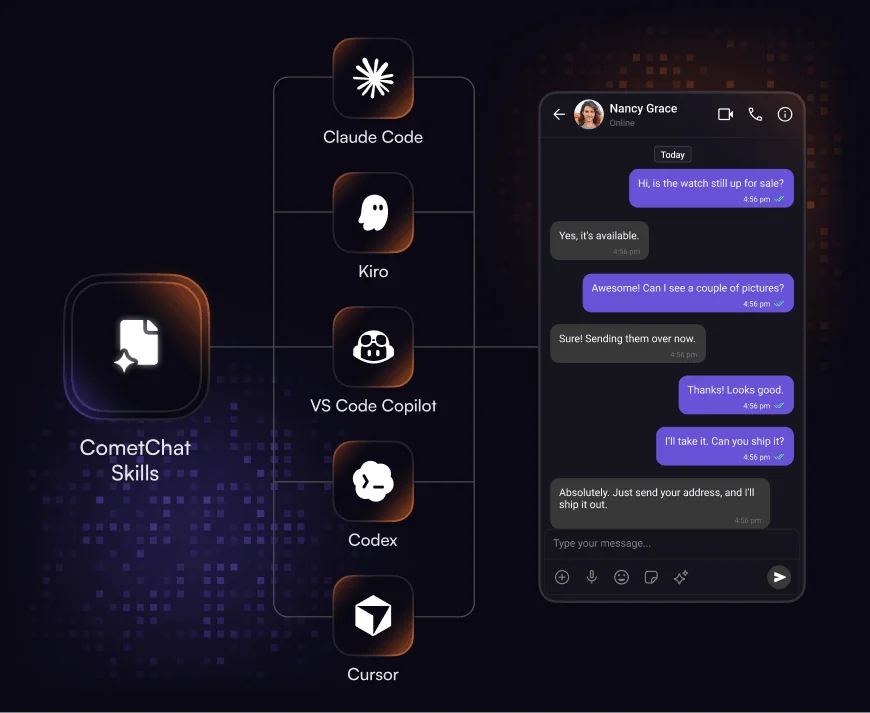
CometChat Skills is an AI-agent-targeted integration tool that enables an AI coding agent to add CometChat chat, messaging, and voice/video calling into a project quickly. A single skill file drives framework detection, SSR safety, credential and env var setup, and writes production-grade, framework-specific integration code tailored to the project's existing files. The skill runs commands via @cometchat/skills-cli (or the agent), supports an iteration menu to add features after initial integration, and pairs with a component catalog, theming presets, and placement patterns to deliver ready UI and feature scaffolding. It works with many coding agents (Claude Code, Cursor, Codex, VS Code Copilot, Kiro, Windsurf, Cline, and others) and supports web, mobile, and native frameworks including React, Next.js, React Native, Angular, Android, iOS, and Flutter. For deeper customization, CometChat recommends installing a docs MCP so the agent can access live CometChat documentation.
Screenshots
Key Features
Use Cases



Frequently asked questions about AI Agent Skill for Chat Integration | CometChat
What is AI Agent Skill for Chat Integration | CometChat?
CometChat Skills empowers developers to integrate CometChat into their applications seamlessly in under 10 minutes. This AI coding agent utilizes a single skill file to manage SSR protection, framework detection, and credential setup automatically, and is compatible with various coding tools like Claude Code, Cursor, Kiro, VS Code Copilot, and Codex.
Key Points
- Quick Integration: Set up CometChat in less than 10 minutes.
- Single Skill File: Manages SSR protection and framework detection automatically.
- Compatibility: Works with major coding tools like Claude Code and VS Code Copilot.
Detailed Explanation
CometChat Skills is designed for developers looking to enhance their applications with chat functionalities quickly. By using a single skill file, developers can streamline the integration process, reducing the time and effort required. This file automates crucial tasks such as Server-Side Rendering (SSR) protection to secure user data, framework detection to adapt to the developer's current environment, and credential setup to ensure secure API calls.
Integration Steps:
- Download the Skill File: Start by obtaining the CometChat skill file from the official CometChat repository.
- Install Dependencies: Ensure that you have the necessary dependencies installed, which may include libraries specific to your development environment.
- Configure Settings: Modify the skill file to include your API credentials, which are essential for connecting to the CometChat services.
- Test the Integration: Utilize built-in testing features to ensure that the integration works smoothly and efficiently.
- Deploy and Monitor: After successful testing, deploy your application and monitor its performance, making adjustments as necessary.
This efficient setup allows developers to focus on building features rather than getting bogged down in the integration process.
Best Practices / Tips
- Use Documentation: Familiarize yourself with the official CometChat documentation to understand all available features and functionalities.
- Test Extensively: Conduct thorough testing in various environments to ensure compatibility and performance.
- Stay Updated: Keep your integration and skill files updated to benefit from the latest features and security enhancements.
Additional Resources
- CometChat Documentation
- Integration Guide for Developers
- CometChat Community Forum for support and insights from other developers.
How does AI Agent Skill for Chat Integration | CometChat work?
AI Agent Skill for Chat Integration | CometChat enhances user interactions by leveraging artificial intelligence to automate and optimize daily workflows within chat applications. This tool streamlines communication, allows for personalized responses, and improves overall user satisfaction by integrating smart AI capabilities into chat platforms.
Key Points
- Automation of Tasks: Streamlines repetitive tasks and responses.
- Personalized Interactions: Offers tailored communication based on user data.
- Enhanced User Experience: Improves engagement and satisfaction through intelligent responses.
Detailed Explanation
The AI Agent Skill for Chat Integration in CometChat utilizes machine learning algorithms to automate and enhance communication tasks. By analyzing user behavior and preferences, it can provide personalized responses, making conversations more relevant and engaging. Here’s how it works:
-
Integration: The AI Agent seamlessly integrates with existing chat applications. This can include platforms like websites, mobile apps, or customer service portals.
-
Natural Language Processing (NLP): It employs NLP to understand user queries and provide accurate responses. For example, if a customer asks about order status, the AI can retrieve and deliver that information instantly.
-
Workflow Automation: Routine tasks such as scheduling, FAQs, and support queries are automated. This saves time and allows human agents to focus on more complex issues. For instance, if a user frequently asks about shipping policies, the AI can proactively provide this information without waiting for a prompt.
-
Analytics and Learning: The AI continually learns from interactions, improving its responses over time. This adaptive learning means that the more it interacts, the better it becomes at addressing user needs.
Use Cases:
- Customer Support: Automating responses to common inquiries, reducing wait times.
- E-commerce: Guiding users through the shopping process and providing personalized product recommendations.
- Healthcare: Assisting patients with appointment scheduling and providing basic health information.
Best Practices / Tips
- Regular Updates: Ensure the AI model is regularly updated to enhance its accuracy and relevance.
- User Feedback: Incorporate user feedback mechanisms to refine responses and improve the AI’s learning process.
- Monitoring Performance: Regularly analyze conversation metrics to identify areas for improvement and adjust the AI accordingly.
Additional Resources
What are the main features of AI Agent Skill for Chat Integration | CometChat?
The AI Agent Skill for Chat Integration by CometChat offers essential features like natural language processing, customizable chatbots, seamless integration with existing systems, and real-time analytics. These capabilities empower businesses to enhance customer interactions, streamline support processes, and deliver personalized experiences.
Key Points
- Natural Language Processing (NLP): Allows understanding and generating human-like responses.
- Customizable Chatbots: Tailor bots to fit specific business needs and branding.
- Seamless Integration: Easily integrates with various platforms and applications for streamlined communication.
Detailed Explanation
The AI Agent Skill for Chat Integration enhances customer engagement through its core capabilities.
Natural Language Processing (NLP)
NLP enables the AI agent to understand user queries effectively and respond in a conversational manner. For instance, it can interpret slang, regional dialects, and contextual phrases, making interactions feel more natural. This feature is particularly beneficial in sectors like e-commerce and customer support, where understanding customer intent is crucial.
Customizable Chatbots
Businesses can create chatbots that reflect their brand voice and meet specific operational needs. For example, an online retail store can design a chatbot that assists with product searches, order tracking, and returns. This level of customization ensures that businesses can maintain a consistent customer experience while maximizing efficiency.
Seamless Integration
The AI Agent Skill allows for easy integration with existing tools and platforms, such as CRM systems and e-commerce websites. This interoperability enables businesses to maintain a unified communication strategy across multiple channels, ensuring that customer interactions are tracked and managed effectively.
Real-Time Analytics
With built-in analytics, businesses can monitor interactions, gather insights, and optimize performance. This data-driven approach helps identify common customer queries, improve response times, and enhance overall service quality.
Best Practices / Tips
- Define Clear Objectives: Before implementation, outline what you aim to achieve with the AI agent—be it improved customer satisfaction or reduced response times.
- Test and Iterate: Regularly test the chatbot's performance and gather user feedback to make continuous improvements.
- Monitor Analytics: Use real-time data to adjust strategies, focusing on high-traffic queries and refining responses to meet customer needs more effectively.
- Avoid Over-Automation: Ensure that the chat experience remains human-friendly. Provide options for users to connect with a live agent if necessary.
Additional Resources
Who is AI Agent Skill for Chat Integration | CometChat for?
AI Agent Skill for Chat Integration | CometChat is designed for businesses, developers, and teams looking to enhance their communication by integrating AI-driven chat solutions. It's particularly beneficial for those managing customer support, automating responses, or streamlining daily workflows.
Key Points
- Target Users: Ideal for businesses, developers, and support teams.
- Functionality: Automates customer interactions and enhances user experience.
- AI Integration: Facilitates seamless integration of AI tools into chat systems.
Detailed Explanation
The AI Agent Skill for Chat Integration by CometChat allows users to leverage artificial intelligence to improve communication efficiency. Businesses can utilize this feature to automate customer support, providing instant responses to frequently asked questions. This not only enhances customer satisfaction but also reduces the workload on support teams.
Use Cases
-
Customer Support: By integrating AI agents, businesses can handle multiple customer queries simultaneously, ensuring that no inquiry goes unanswered. For example, an e-commerce platform can use AI to assist customers in tracking orders or processing returns.
-
Sales Assistance: AI can be programmed to engage potential customers in real-time, providing them with product recommendations based on their browsing history or preferences, thereby driving sales conversions.
-
Internal Communication: Teams can use AI agents to streamline communication within the organization, such as scheduling meetings or sharing updates automatically, which saves time and improves productivity.
Best Practices / Tips
- Define Clear Objectives: Before implementing AI agents, outline specific goals you want to achieve, such as reducing response time or improving customer satisfaction ratings.
- Train Your AI: Regularly update the AI’s knowledge base with new information and training data to ensure it provides accurate responses.
- Monitor Performance: Use analytics tools to track the effectiveness of AI agents in real-time, allowing for adjustments and improvements as needed.
- User Feedback: Encourage customers to provide feedback on their interactions with AI agents, helping you fine-tune responses and enhance user experience.
Additional Resources
How much does AI Agent Skill for Chat Integration | CometChat cost?
The pricing for AI Agent Skill for Chat Integration by CometChat varies based on the specific features and usage requirements. For the most accurate and up-to-date pricing details, visit the official CometChat website.
Key Points
- Pricing structures may vary based on features and usage.
- Plans may include free trials or tiered pricing options.
- Custom quotes may be available for enterprise solutions.
Detailed Explanation
CometChat offers a robust AI Agent Skill for Chat Integration that enhances user communication through AI-driven responses. Pricing can depend on several factors, including:
-
Service Tiers: CometChat typically offers different pricing tiers, such as Basic, Pro, and Enterprise. Each tier provides varying levels of features, including the number of active users, AI capabilities, and customization options.
-
Usage Metrics: The cost may also depend on metrics like the number of messages sent, the number of concurrent users, or API calls made. This pay-as-you-go model allows businesses to scale according to their needs.
-
Custom Solutions: For larger organizations or those with specific needs, CometChat may provide custom pricing solutions. This ensures that the integration aligns perfectly with business requirements, including security and compliance standards.
-
Free Trials: New users may have access to free trials, allowing them to test the AI Agent Skill before committing to a paid plan. Always check the website for current promotions or trial offerings.
Best Practices / Tips
- Assess Your Needs: Before choosing a pricing plan, evaluate your business's communication needs, including the expected volume of interactions and required features.
- Utilize Free Trials: Take advantage of available free trials to explore functionalities and determine if the AI Agent Skill meets your expectations.
- Consult Customer Support: For tailored solutions, reach out to CometChat’s customer support to discuss your specific needs and receive personalized recommendations.
Additional Resources
How do I get started with AI Agent Skill for Chat Integration | CometChat?
To get started with AI Agent Skill for Chat Integration in CometChat, visit CometChat's official page to sign up. Once registered, you can explore various features and integrate AI capabilities into your chat applications seamlessly.
Key Points
- Easy Sign-Up Process: Register quickly through the CometChat website.
- Integration Options: Access various AI tools for enhancing chat functionalities.
- Documentation and Support: Comprehensive resources available to assist with implementation.
Detailed Explanation
To begin using AI Agent Skill for Chat Integration with CometChat, follow these steps:
- Visit the Sign-Up Page: Go to CometChat's Agent Chat Skills page and click the "Sign Up" button.
- Create Your Account: Fill out the required information to create your account. You can also opt for a trial period to test the features before committing.
- Explore AI Agent Features: Once signed in, navigate through the dashboard to explore various AI capabilities, including chatbots and automated responses. This will enhance user engagement and streamline interactions.
- Integrate into Your Application: Follow the provided guidelines to integrate AI functionalities into your existing chat application. CometChat offers SDKs and APIs to facilitate easy integration.
Use Cases
- Customer Support: Implement AI agents to handle customer inquiries automatically, reducing wait times and improving satisfaction.
- E-Commerce: Use AI chatbots to recommend products based on user preferences, enhancing the shopping experience.
- Lead Generation: Engage visitors on your website with AI agents that qualify leads and collect information automatically.
Best Practices / Tips
- Test Before Going Live: Always test your AI integrations in a controlled environment to ensure they function as intended.
- Regularly Update Your AI Models: Keep your AI models updated with the latest interaction data to improve accuracy and user satisfaction.
- Monitor Performance: Use analytics tools provided by CometChat to monitor the performance of your AI agents and make necessary adjustments.
Additional Resources
This comprehensive approach will help you effectively implement AI Agent Skill for Chat Integration in CometChat, enhancing your user interactions and overall communication strategy.
Explore more AI Ai Agents tools
Browse all Ai Agents tools →Browse by use case: Chatbots & Assistants · Automation & Productivity
Compare AI Agent Skill for Chat Integration | CometChat: vs Playad · vs Concierge by Juniors AI · vs Scout by Fini · vs Ruflo