

AgentPeek
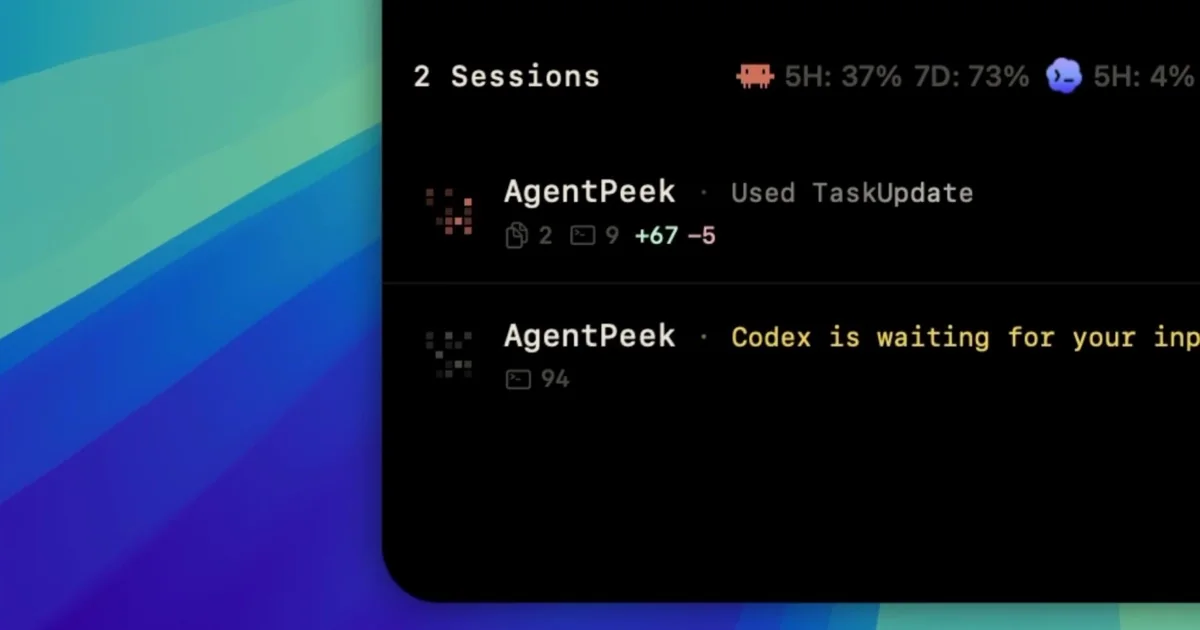
AIMac menu-bar app that puts Claude Code and Codex into the Mac notch to watch sessions, answer prompts, track tokens, and manage local dev servers.
AgentPeek
Mac menu-bar app that puts Claude Code and Codex into the Mac notch to watch sessions, answer prompts, track tokens, and manage local dev servers.
About AgentPeek
AgentPeek is a macOS utility that surfaces Claude Code and Codex sessions directly in the Mac notch and menu bar, enabling real-time observation and interaction with running agents. It shows live agent sessions and permission prompts, lets users answer or intercept prompts, tracks token usage, and provides controls for local development servers. Built as a local-first tool with a small one-time license, AgentPeek aims to give developers and power users low-friction visibility and control over multi-agent AI workflows on their desktop.
Screenshots
Key Features
Use Cases



Frequently asked questions about AgentPeek
What is AgentPeek?
AgentPeek is a monitoring tool that allows users to oversee Claude Code and Codex applications directly from their Mac’s menu bar. It provides insights into session data, permissions, token usage, and local development servers, ensuring that all session data remains secure and local.
Key Points
- Real-time Monitoring: Keep track of application performance and session details.
- Local Data Security: Ensures that all session data is stored locally for privacy.
- User-Friendly Interface: Accessible directly from the Mac menu bar for ease of use.
Detailed Explanation
AgentPeek is designed to enhance productivity for developers by providing real-time insights into the functionality of Claude Code and Codex applications. By integrating with the Mac’s menu bar, AgentPeek allows users to easily monitor various metrics without interrupting their workflow.
Features:
- Session Monitoring: Users can view active sessions, making it easier to diagnose issues or optimize performance.
- Permissions Management: Understand and manage user permissions effectively, ensuring that only authorized access is granted.
- Token Usage Tracking: Keep tabs on API token usage, helping to manage quotas and billing more effectively.
- Local Development Server Insights: Monitor local development servers for quick feedback on application performance.
For example, if you are developing an application using Codex, AgentPeek allows you to see how many sessions are currently active and what permissions each session has. This can help prevent unauthorized access while ensuring your development environment remains secure.
Best Practices / Tips
- Regularly Update: Keep AgentPeek updated to leverage the latest features and security improvements.
- Monitor Token Usage: Regularly check token usage to avoid unexpected charges or service interruptions.
- Utilize Local Data: Take advantage of local storage for session data to minimize security risks associated with cloud storage.
Additional Resources
By utilizing AgentPeek, developers can streamline their workflow, enhance security, and ensure optimal application performance.
How does AgentPeek work?
AgentPeek works by integrating advanced AI technologies to streamline everyday workflows for users. It automates tasks, enhances productivity, and provides intelligent insights, making it easier for professionals to manage their daily activities effectively.
Key Points
- AI Integration: Combines various AI technologies for efficiency.
- Workflow Automation: Automates repetitive tasks to save time.
- Intelligent Insights: Offers data-driven recommendations for better decision-making.
Detailed Explanation
AgentPeek leverages several core AI capabilities to assist users in optimizing their daily workflows. By integrating natural language processing (NLP), machine learning, and data analytics, AgentPeek can understand user queries, predict needs, and provide actionable insights.
How It Works:
- User Input: Users can input tasks or queries through a simple interface.
- AI Processing: The system processes this input using NLP to discern context and intent.
- Task Automation: Routine tasks—like scheduling, reminders, or data entry—are automated. For example, if a user needs to set up a meeting, AgentPeek can automatically check calendars and propose time slots.
- Data Insights: AgentPeek analyzes user data to provide recommendations. For instance, it can suggest the best times for meetings based on past behavior or project timelines, enhancing productivity.
Use Cases:
- For Professionals: A marketing manager can automate social media posts and analyze engagement metrics.
- For Teams: Project teams can coordinate tasks and deadlines more efficiently, with AgentPeek tracking progress and sending reminders.
Best Practices / Tips
- Define Clear Goals: Identify specific tasks you want to automate to maximize efficiency.
- Regularly Update Preferences: Keep your workflow preferences updated in AgentPeek to ensure the AI learns your habits effectively.
- Utilize Insights: Regularly review the insights provided by AgentPeek to make informed decisions and refine strategies.
Additional Resources
What are the main features of AgentPeek?
AgentPeek offers advanced AI capabilities, including real-time analytics, automated reporting, and intuitive user interfaces. These features are designed to enhance user experience and streamline operations, making it a powerful tool for businesses looking to leverage artificial intelligence for improved decision-making and efficiency.
Key Points
- Real-Time Analytics: Provides instant data insights.
- Automated Reporting: Simplifies data collection and presentation.
- User-Friendly Interface: Ensures ease of use for all skill levels.
Detailed Explanation
AgentPeek is built to empower users with its robust AI functionalities. Here’s a closer look at its main features:
Real-Time Analytics
With real-time analytics, users can monitor important metrics as they happen. This feature allows businesses to track performance indicators and make data-driven decisions swiftly. For example, a marketing team can assess the effectiveness of a campaign in real-time, adjusting strategies on the fly to maximize engagement.
Automated Reporting
AgentPeek’s automated reporting feature streamlines the process of data collection and presentation. Users can generate detailed reports with a few clicks, reducing the time spent on manual data entry and analysis. This is particularly beneficial for teams that need to present regular updates to stakeholders without dedicating excessive resources to report creation.
User-Friendly Interface
The intuitive design of AgentPeek ensures that users can navigate the platform easily, regardless of their technical expertise. This accessibility encourages more users within an organization to engage with AI tools, fostering a culture of data-driven decision-making. Tutorials and help guides further enhance the user experience, making onboarding seamless.
Best Practices / Tips
- Utilize Real-Time Data: Regularly check real-time analytics to stay ahead of trends and make timely decisions.
- Automate Routine Reports: Set up automated reporting for repetitive tasks to save time and focus on strategic initiatives.
- Engage with Tutorials: Take advantage of the available tutorials and support resources to maximize the platform's capabilities.
Additional Resources
- AgentPeek Official Documentation
- AI in Business: A Comprehensive Guide
- Understanding Real-Time Analytics
By leveraging these features, businesses can significantly enhance their operational efficiency, making AgentPeek an invaluable asset in the age of artificial intelligence.
Who is AgentPeek for?
AgentPeek is designed for professionals and teams seeking to enhance their daily workflows using AI tools. It's particularly useful for marketers, project managers, content creators, and anyone interested in streamlining tasks, improving productivity, and leveraging AI to make informed decisions.
Key Points
- Ideal for marketers and content creators
- Useful for project managers and teams
- Benefits anyone looking to optimize daily tasks
Detailed Explanation
AgentPeek is a versatile tool that offers significant advantages across various industries.
-
Marketers and Content Creators: For marketers, AgentPeek can automate content generation, social media scheduling, and analytics reporting. This allows teams to focus on strategy rather than repetitive tasks, enhancing creativity and engagement.
-
Project Managers: Project managers can utilize AgentPeek to streamline team communications, track project progress, and manage resources effectively. The tool's AI capabilities can generate project timelines, assign tasks, and provide insights into team productivity.
-
Businesses Seeking Efficiency: Any business aiming to optimize daily operations can benefit from AgentPeek. The tool can automate mundane tasks, such as data entry and report generation, freeing up valuable time for employees to focus on high-impact activities.
For example, a marketing team could use AgentPeek to automate social media posts while analyzing engagement metrics in real-time, allowing them to adjust strategies swiftly based on performance data.
Best Practices / Tips
- Integrate with Existing Tools: Ensure AgentPeek integrates seamlessly with your current applications (like CRM or project management software) for maximum efficiency.
- Customize Workflows: Tailor AI workflows within AgentPeek to suit specific business needs, ensuring that the tool aligns with your goals.
- Regular Training: Invest time in training your team on how to use AgentPeek effectively, which can lead to better adoption and improved results.
Common pitfalls to avoid include underutilizing the tool’s features and failing to update workflows regularly based on business changes.
Additional Resources
How much does AgentPeek cost?
AgentPeek offers various pricing plans tailored to different user needs, starting from approximately $29 per month for basic features. For detailed and up-to-date pricing information, visit the official AgentPeek website.
Key Points
- Pricing begins at around $29 per month.
- Multiple plans available for different user requirements.
- Visit the official website for the latest pricing details.
Detailed Explanation
AgentPeek provides a range of pricing options that cater to different segments of users, including individuals, small businesses, and larger organizations. The basic plan typically starts at $29 per month, which includes essential features such as real-time analytics, user-friendly dashboards, and basic customer support.
For more advanced features, such as enhanced reporting, API access, or priority customer service, users may opt for higher-tier plans, which can range up to $99 per month or more, depending on the features included. It is advisable to check the official AgentPeek website as prices and features can change, and seasonal promotions may also be available.
Example Pricing Tiers:
- Basic Plan: $29/month – Access to core features.
- Pro Plan: $59/month – Additional analytics and reporting tools.
- Enterprise Plan: Starting at $99/month – Comprehensive tools tailored for larger teams.
Best Practices / Tips
- Evaluate Your Needs: Before selecting a plan, assess your specific requirements, such as team size and feature necessity.
- Take Advantage of Free Trials: If available, utilize any free trial periods to test the functionalities before committing to a subscription.
- Stay Updated: Regularly check for promotional offers or changes in pricing on the official website to ensure you're getting the best deal.
Additional Resources
How do I get started with AgentPeek?
To get started with AgentPeek, simply visit AgentPeek's website to sign up. Once registered, you can explore its features and begin leveraging its capabilities for enhanced productivity in your projects.
Key Points
- Easy Sign-Up Process: Register quickly through the website.
- User-Friendly Interface: Navigate the platform effortlessly.
- Explore Features: Discover tools that enhance productivity.
Detailed Explanation
AgentPeek is designed to streamline your workflow, making it an essential tool for professionals. To get started, follow these steps:
- Visit the Website: Go to AgentPeek's sign-up page.
- Create Your Account: Fill in your details to register. Make sure to verify your email for account activation.
- Explore the Dashboard: Once logged in, familiarize yourself with the user-friendly interface. The dashboard is intuitive, allowing you to access various features easily.
- Utilize Resources: Check out tutorials and documentation available on the platform to maximize your usage of AgentPeek’s capabilities.
AgentPeek offers various features such as task management, collaboration tools, and analytics, making it suitable for teams of all sizes.
Best Practices / Tips
- Take Advantage of Tutorials: Utilize the available resources to understand features better.
- Customize Your Workspace: Tailor the interface to your workflow for increased efficiency.
- Stay Updated: Regularly check for new features or updates to ensure you're using the tool to its fullest potential.
Common pitfalls include neglecting to customize settings or skipping tutorials that could enhance your experience.
Additional Resources
By following these steps and recommendations, you'll effectively harness the power of AgentPeek for your projects.
Explore more AI Ai Tools tools
Browse all Ai Tools tools →Browse by use case: Automation & Productivity
Compare AgentPeek: vs Humanizer · vs Worktrunk · vs Mise · vs BiBimba