
Claude Code
AIFeaturedPopularA command-line agent that embeds Claude in your terminal or IDE to map, edit, and manage million-line codebases and automate PR workflows.
Claude Code
A command-line agent that embeds Claude in your terminal or IDE to map, edit, and manage million-line codebases and automate PR workflows.
About Claude Code
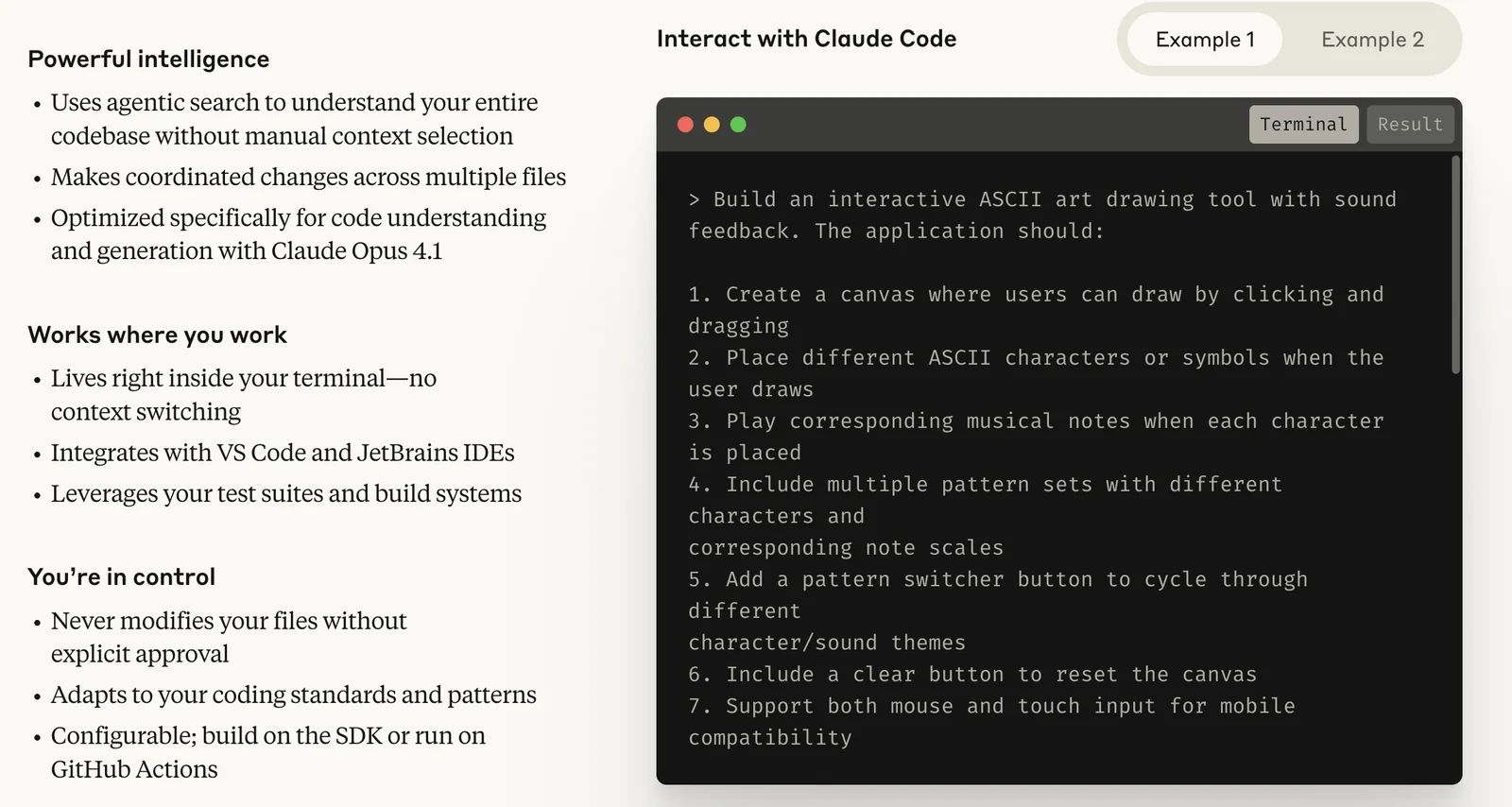
Claude Code is an agentic coding assistant that runs in terminals and IDEs to help developers explore, modify, and maintain large codebases. It automatically gathers relevant context from repositories via agentic search, integrates with GitHub/GitLab and local toolchains to run tests and create pull requests, and exposes an extensible SDK and Model Context Protocol (MCP) so teams can add custom plugins and context stores. Built as a low-level, scriptable harness, Claude Code supports hooks, subagents, and fine-grained permissions so organizations can control automation, audit actions, and build production-ready agents that accelerate debugging, refactoring, and feature development.
Screenshots
Key Features
Use Cases


Frequently asked questions about Claude Code
What is the pricing for Claude Code?
Claude Code pricing includes three main tiers: Pro at $17/month, Max at $100/month, and customizable enterprise options. Each tier offers a unique set of features and usage limits tailored to different user needs. For the most accurate and detailed pricing information, visit Claude Code's official website.
Key Points
- Pro Tier: Priced at $17/month, ideal for individual users.
- Max Tier: Costs $100/month, offering enhanced features for power users.
- Enterprise Options: Customized pricing based on business requirements.
Detailed Explanation
Claude Code provides a structured pricing model to cater to varying user needs.
-
Pro Tier ($17/month): This plan is designed for individual developers or small teams. It includes essential features such as basic code generation, debugging tools, and access to community support. The Pro Tier is suitable for users who need limited usage but still desire robust AI capabilities.
-
Max Tier ($100/month): This tier is aimed at advanced users who require more extensive features. It offers enhanced code generation, priority customer support, and higher usage limits. The Max Tier is perfect for larger projects or teams that rely heavily on AI-driven coding assistance.
-
Enterprise Options: Tailored for businesses, the enterprise pricing varies based on specific needs and usage. Features often include dedicated support, advanced analytics, and custom integrations. Interested businesses can contact Claude Code directly for a personalized quote.
For specific features included in each tier, it's advisable to visit their official website, where comparison charts and detailed descriptions provide clarity.
Best Practices / Tips
- Evaluate Your Needs: Before choosing a tier, assess your coding requirements. Consider factors such as project scale, frequency of use, and necessary features.
- Trial Period: Take advantage of any trial offers to test the features and capabilities of the Pro or Max tiers before committing to a subscription.
- Stay Updated: Regularly check the official website for any promotions or updates to pricing plans, as they may offer discounts or new features.
Additional Resources
What are the key features of Claude Code?
Claude Code features agentic codebase mapping, seamless IDE integration, end-to-end workflow automation, and robust support for third-party plugins. These capabilities help developers manage extensive codebases efficiently and streamline pull request (PR) workflows, enhancing productivity and collaboration in software development.
Key Points
- Agentic Codebase Mapping: Visualize and navigate large codebases effortlessly.
- IDE Integration: Enhance coding environments with direct integration to popular IDEs.
- End-to-End Workflow Automation: Automate repetitive tasks in the development process.
Detailed Explanation
Claude Code stands out with its agentic codebase mapping feature, allowing developers to visualize complex code structures. This helps in quickly locating functions, classes, or modules, making it easier to understand relationships within the code. For example, a developer can instantly see dependencies and impacts of modifications, which is crucial for large-scale projects.
The IDE integration ensures that Claude Code seamlessly fits into existing development environments like Visual Studio Code or IntelliJ IDEA. This integration allows developers to access Claude Code’s features directly within their preferred IDE, promoting a smoother workflow without the need to switch between applications.
Furthermore, Claude Code automates various aspects of the development lifecycle through end-to-end workflow automation. This includes automating pull request (PR) approvals, code reviews, and even deployment processes. By setting up predefined rules, developers can save time and reduce human error, resulting in faster delivery cycles.
Best Practices / Tips
- Utilize Codebase Mapping: Regularly use the codebase mapping feature to familiarize yourself with your project's architecture, especially when onboarding new team members.
- Leverage IDE Integration: Take full advantage of IDE integration by customizing shortcuts and settings to streamline your workflow.
- Automate Wisely: While automation saves time, ensure that the rules set for PR workflows are clear and well-documented to avoid confusion among team members.
Additional Resources
How do I get started with Claude Code?
To get started with Claude Code, subscribe to either the Pro or Max plan, then install the Command Line Interface (CLI) or Integrated Development Environment (IDE) plugin. Follow the setup instructions provided on the official Claude website to seamlessly integrate it into your development workflow.
Key Points
- Choose between Pro or Max subscription plans.
- Install either the CLI or IDE plugin for integration.
- Follow the official setup instructions for smooth implementation.
Detailed Explanation
Claude Code is designed to enhance your coding experience through advanced AI capabilities. Here’s how to get started in a few simple steps:
-
Select a Subscription Plan:
- Visit the official Claude website and choose between the Pro plan ($19/month) or the Max plan ($49/month). Each plan offers different features tailored to various user needs.
-
Download and Install:
- Depending on your preference, download the CLI version or the IDE plugin. The CLI is suitable for developers who work primarily in terminal environments, while the IDE plugin is ideal for those who prefer graphical interfaces like Visual Studio Code or IntelliJ IDEA.
-
Follow Setup Instructions:
- After installation, refer to the setup guide provided on the website. This guide includes step-by-step instructions on configuring your environment, setting API keys, and troubleshooting common issues.
-
Start Coding:
- Once set up, you can begin utilizing Claude Code’s features, like intelligent code suggestions, debugging support, and real-time collaboration tools.
Best Practices / Tips
- Explore Documentation: Familiarize yourself with the official documentation to fully leverage Claude Code’s capabilities.
- Utilize Tutorials: Take advantage of video tutorials and community forums for practical insights and tips from experienced users.
- Regular Updates: Keep your software updated to access the latest features and security enhancements.
Additional Resources
- Claude Official Documentation
- Getting Started with Claude Code
- Community Forum for user support and discussions.
Is there an API for Claude Code integration?
Yes, Claude Code offers an API that enables seamless deployment and integration into existing systems. You can access it through the Claude Console, which provides user-friendly tools and model-specific pricing rates for efficient utilization.
Key Points
- API Accessibility: Easily integrate Claude Code into your applications.
- User-Friendly Console: The Claude Console simplifies API management.
- Model-Specific Pricing: Understand costs associated with different models.
Detailed Explanation
Claude Code's API is designed to facilitate integration with various software systems, making it a versatile tool for developers. The API allows you to harness the power of Claude Code for tasks such as natural language processing, code generation, and more.
To get started with the Claude Code API, follow these steps:
- Sign Up for Access: Create an account on the Claude Console.
- API Key Generation: Once logged in, generate an API key that you'll use for authentication in your requests.
- Explore Documentation: Familiarize yourself with the API documentation to understand the endpoints available, such as those for text generation or code assistance.
- Make API Calls: Utilize libraries like
requestsin Python to make API calls. For example:import requests url = "https://api.claude.com/v1/generate" headers = { "Authorization": "Bearer YOUR_API_KEY", "Content-Type": "application/json" } data = { "prompt": "Generate a Python function to sort a list.", "model": "claude-code" } response = requests.post(url, headers=headers, json=data) print(response.json()) - Monitor Usage: Use the Claude Console to track your API usage and manage costs effectively.
This API is particularly useful for businesses looking to automate tasks or enhance their applications with AI capabilities, offering a wide range of functionalities tailored to specific needs.
Best Practices / Tips
- Optimize API Usage: Start with a clear understanding of the tasks you want to automate to avoid unnecessary calls.
- Monitor Rate Limits: Keep an eye on your API usage to stay within the limits and avoid additional charges.
- Secure Your API Key: Ensure you store your API key securely and do not expose it in public repositories.
Additional Resources
How does Claude Code compare to other AI coding tools?
Claude Code stands out among AI coding tools due to its unique features like agentic mapping and extensive automation capabilities. It excels in managing larger codebases and enhances team collaboration, making it ideal for developers seeking efficiency and innovation in their coding projects.
Key Points
- Agentic Mapping: Facilitates intuitive navigation through complex code structures.
- Extensive Automation: Reduces manual coding tasks, saving time and increasing productivity.
- Team Collaboration: Supports real-time collaboration, which is essential for larger projects.
Detailed Explanation
Claude Code integrates several advanced features that enhance its functionality compared to other AI coding tools.
-
Agentic Mapping: This feature allows developers to visualize and navigate through large codebases effectively. By using a graphical representation of code relationships, users can locate dependencies and understand the code structure at a glance. For instance, if you’re working on a multi-module application, agentic mapping helps identify how different components interact, reducing the time spent searching for specific functions or classes.
-
Extensive Automation: Claude Code automates repetitive coding tasks, such as code formatting, syntax checking, and even deploying code to production environments. This automation not only minimizes human error but also accelerates development cycles. For example, teams can set up automated tests that run every time code is pushed to the repository, ensuring high-quality code without manual intervention.
-
Team Collaboration: The platform is designed with team dynamics in mind. Developers can work simultaneously on the same project, with real-time updates and version control. This is particularly beneficial for larger teams working on complex projects, as it fosters better communication and reduces the chances of conflicts in code changes.
Best Practices / Tips
- Leverage Agentic Mapping: Use this feature to familiarize yourself with new projects or codebases quickly. Spend time exploring the visual layout of the code to understand its architecture before diving into development tasks.
- Automate Testing: Set up continuous integration (CI) pipelines with Claude Code to ensure that every change made is automatically tested. This will help maintain code quality and reduce integration issues.
- Encourage Collaboration: Foster a culture of collaboration among team members by utilizing Claude Code’s real-time features. Schedule regular code reviews and pair programming sessions to enhance knowledge sharing.
Additional Resources
Explore more AI Ai Models tools
Browse all Ai Models tools →Browse by use case: Code Generation · Automation & Productivity
- Soup CLI
- VibeVoice
- Laguna by Poolside
- Arena AI: The Official AI Ranking & LLM Leaderboard
- PromptLayer
- PHBench
Compare Claude Code: vs Soup CLI · vs VibeVoice · vs Laguna by Poolside · vs Arena AI: The Official AI Ranking & LLM Leaderboard