

AgentX
AIPlatform to build, evaluate, and deploy multi-agent AI workflows from prototype to production, or hand off automation end-to-end.
AgentX
Platform to build, evaluate, and deploy multi-agent AI workflows from prototype to production, or hand off automation end-to-end.
About AgentX
AgentX is an AI agent platform that takes builders from prototype to production. It offers a visual builder for multi-agent workflows, built-in evaluation so agents can be tested before shipping and monitored after, and one-click deployment to API, Slack, web, and voice. Teams can build agents for their own products and internal workflows, build and white-label agents for clients, or skip building entirely and have AgentX automate their most manual operations end-to-end. The platform is free for solo builders, with white-label plans for agencies and teams, and reports more than 150,000 users worldwide.
Screenshots
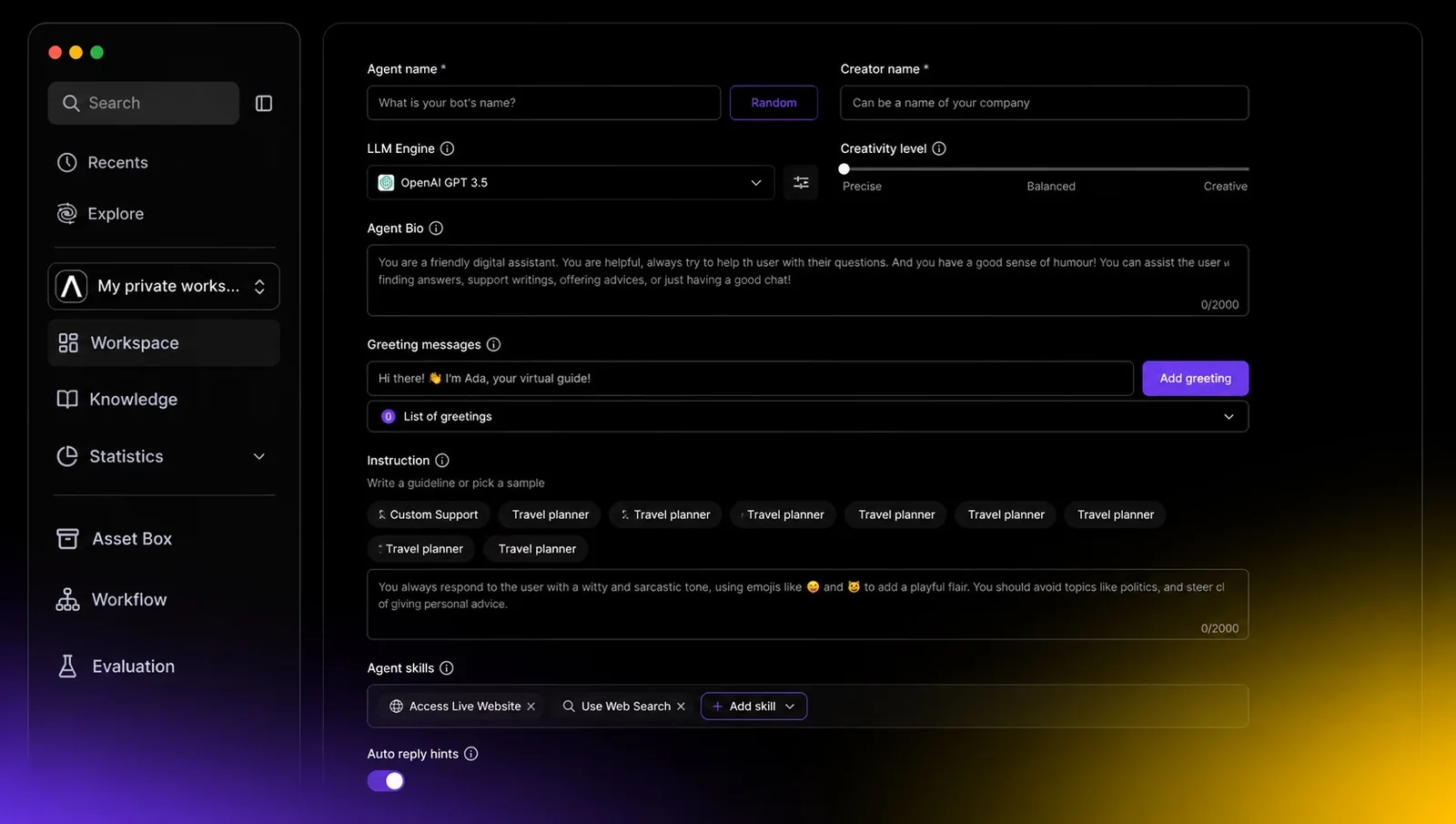
Key Features
Use Cases



Frequently asked questions about AgentX
What is AgentX?
AgentX is a powerful platform designed for building, evaluating, and deploying multi-agent AI workflows. It facilitates the entire automation process, from prototyping to full production, allowing users to seamlessly manage and execute complex AI-driven tasks.
Key Points
- End-to-End Automation: Streamlines the development and deployment of AI workflows.
- Multi-Agent Support: Enables collaborative processes among various AI agents.
- User-Friendly Interface: Simplifies complex workflows for developers and non-developers alike.
Detailed Explanation
AgentX is engineered to enhance the efficiency of AI workflow management. It allows users to create intricate multi-agent systems where each agent performs specific tasks. This is particularly useful in industries such as finance, healthcare, and logistics, where automation can significantly reduce operational costs and improve accuracy.
Use Cases
- Customer Support Automation: Deploy multiple AI agents to handle inquiries, process orders, and manage customer relationships.
- Data Analysis: Use AgentX to analyze large datasets by distributing tasks among various agents, speeding up the process and enhancing data insights.
- Supply Chain Management: Coordinate agents to manage inventory, track shipments, and optimize logistics routes.
The platform also provides tools for testing and evaluating workflows, ensuring that each agent operates effectively and integrates well with others. With built-in analytics, users can monitor performance and make data-driven adjustments.
Best Practices / Tips
- Start Small: Begin with a simple workflow to familiarize yourself with the platform before scaling up.
- Monitor Performance: Regularly check the analytics dashboard to identify bottlenecks and optimize agent interactions.
- Documentation: Utilize the extensive documentation provided by AgentX to troubleshoot issues and explore advanced features.
Additional Resources
How does AgentX work?
AgentX operates by integrating a Visual Agent Builder for easy workflow design, built-in evaluation tools for performance testing, one-click deployment across various platforms, and white-label plans for client customization. It automates manual operations, enabling solo builders, agencies, and internal teams to streamline their processes effectively.
Key Points
- Visual Agent Builder: Create multi-agent workflows without extensive coding.
- Built-in Evaluation: Test and monitor agents before and after deployment.
- One-Click Deployment: Easily deploy agents to multiple channels.
Detailed Explanation
AgentX is designed to simplify the creation and management of AI agents, making it accessible for users with varying technical skills. Here’s how the main features function:
-
Visual Agent Builder: This feature allows users to design complex workflows using a drag-and-drop interface. Users can create agents without needing to write heavy code, which significantly lowers the barrier to entry for non-technical users. For example, a marketing team can design an agent to handle customer inquiries in real-time, improving response rates and customer satisfaction.
-
Built-in Evaluation: Before launching an agent, users can test its functionalities through simulation and monitoring tools. This ensures that any issues are identified and resolved, enhancing the agent's effectiveness upon deployment. For instance, a product team can evaluate an agent's performance in a controlled environment to ensure it meets business objectives.
-
One-Click Deployment: After testing, users can deploy their agents across various platforms—API, Slack, web, and voice channels—by clicking a single button. This streamlined process saves time and resources, allowing businesses to quickly adapt to changing customer needs or market conditions.
-
White-Label Plans: Agencies can leverage AgentX’s white-label solutions to create customized agents for their clients. Each client can have dedicated workspaces, fostering better management and branding. This is particularly beneficial for agencies looking to expand their service offerings without the overhead of developing technology from scratch.
-
Done-For-You Automation: AgentX can take over repetitive tasks, enabling teams to focus on strategic initiatives. For example, a company can automate its customer support operations, allowing staff to concentrate on higher-value activities.
Best Practices / Tips
- Start Simple: Begin with basic workflows and gradually incorporate more complexity as you become familiar with the platform.
- Utilize Testing Features: Always take advantage of the built-in evaluation tools to ensure your agents function correctly before deployment.
- Monitor Performance: After deployment, continuously track agent performance and make necessary adjustments to optimize their effectiveness.
- Explore White-Label Options: If you’re an agency, consider white-label plans to enhance your service portfolio and create additional revenue streams.
Additional Resources
What are the main features of AgentX?
AgentX offers powerful features like a Visual Agent Builder for creating workflows with minimal coding, built-in evaluation tools for testing agents, one-click deployment across various platforms, white-label plans for resellers, and automation capabilities to streamline operations, making it ideal for businesses seeking efficient AI solutions.
Key Points
- Visual Agent Builder: Create workflows effortlessly.
- Built-in Evaluation: Test and monitor agent behavior.
- One-Click Deployment: Deploy to multiple channels easily.
Detailed Explanation
AgentX is designed to simplify the development and deployment of AI agents through its intuitive features.
Visual Agent Builder
This feature allows users to design complex multi-agent workflows using a drag-and-drop interface. You can create interactions without extensive coding knowledge, making it accessible for both technical and non-technical users. For instance, a customer service team can set up a chatbot to handle inquiries in just a few hours, significantly reducing time-to-market.
Built-in Evaluation
Before launching your agents, AgentX enables you to simulate their performance and behavior. This built-in evaluation tool helps identify potential issues, ensuring that agents perform as expected. Post-deployment, you can continuously monitor their behavior, gathering data for further optimization, which is crucial for maintaining high customer satisfaction.
One-Click Deployment
With AgentX, deploying your agents to various platforms—such as APIs, Slack, websites, and voice channels—requires just a single click. This feature streamlines the integration process, allowing businesses to quickly expand their AI capabilities across multiple touchpoints. For example, a marketing agency could launch a promotional campaign via social media and email simultaneously without complex setups.
White-Label Plans
For businesses looking to resell AI solutions, AgentX offers customizable white-label plans. This allows you to create dedicated client workspaces, enhancing your service offerings without the need for extensive development. A digital agency can, for instance, provide tailored chatbot solutions to multiple clients under their brand name.
Done-For-You Automation
AgentX excels in automating repetitive tasks. By leveraging its automation capabilities, businesses can offload manual operations and focus on strategic activities. For example, a retail company could automate inventory management, reducing human error and freeing up staff for customer engagement.
Best Practices / Tips
- Utilize Templates: Start with existing templates in the Visual Agent Builder to save time.
- Regular Monitoring: After deployment, frequently check the built-in evaluation reports to make necessary adjustments.
- Customer Feedback: Encourage user feedback to continually enhance agent performance.
Additional Resources
By leveraging these features of AgentX, businesses can significantly enhance their AI capabilities, streamline operations, and improve customer interactions, ultimately driving growth and efficiency.
Who is AgentX for?
AgentX is designed for solo builders, agencies, internal teams, product teams, and companies looking to enhance their operations. It enables users to prototype and deploy AI agents, automate repetitive tasks, evaluate performance, and even offload development entirely for seamless integration into existing products.
Key Points
- Solo Builders: Create and deploy custom AI agents.
- Agencies: Offer white-labeled agents to clients.
- Internal Teams: Automate manual, repetitive operations.
Detailed Explanation
AgentX is a versatile platform catering to various users, including:
1. Solo Builders
Individuals or small teams can use AgentX to prototype AI agents tailored to their specific needs. This enables them to test ideas quickly and deploy functional agents within their own products, saving both time and resources. For instance, a developer might create a chatbot for a niche market, refining it based on user feedback before a broader rollout.
2. Agencies
Agencies can leverage AgentX to build white-labeled AI solutions. This means they can create agents that appear branded for their clients, managing multiple workspaces for different clients seamlessly. For example, an agency might develop a customer support agent for various businesses, allowing each client to have a unique version tailored to their needs.
3. Internal Teams
Internal teams can utilize AgentX to automate repetitive tasks that consume significant time and effort. By developing custom agents, they can streamline operations, improve efficiency, and reduce human error. For example, a marketing team might automate the data entry process, freeing up team members to focus on strategic initiatives.
4. Product Teams
Product teams can evaluate and monitor the performance of AI agents both before and after deployment. This continuous feedback loop allows for improvements based on real-world usage, ensuring that the agents evolve to meet user expectations effectively.
5. Companies Offloading Development
For businesses that prefer to focus on their core competencies, AgentX offers the option to offload the entire agent development process. This allows companies to have AI solutions tailored to their operations without the need for in-house expertise, thus facilitating quicker implementation and scaling.
Best Practices / Tips
- Start Small: When prototyping, begin with a simple agent to test functionality before adding complexity.
- Iterate Based on Feedback: Regularly update your agents based on user feedback to enhance performance and user satisfaction.
- Monitor Performance Metrics: Use built-in analytics to track agent interactions and identify improvement areas.
- Maintain Documentation: Keep detailed records of the agent's development and iterations for future reference.
Additional Resources
How much does AgentX cost?
AgentX offers a free tier that allows users to access basic features, while its paid plans start at $29 per month for advanced functionalities. This pricing structure caters to various user needs, making it a flexible option for both individuals and businesses seeking AI-driven solutions.
Key Points
- Free Tier: Access to basic features without any cost.
- Paid Plans: Start at $29 per month for advanced tools.
- Flexibility: Suitable for both individuals and businesses.
Detailed Explanation
AgentX provides a robust platform for AI-driven solutions, catering to diverse user needs. The free tier includes essential features such as basic automation and limited integrations, which can be beneficial for individuals or small teams looking to explore AI capabilities without financial commitment.
For users seeking more advanced features, AgentX offers several paid plans starting at $29 per month. These plans include access to premium tools, enhanced support, and advanced analytics, making them ideal for businesses that require more complex automation and insights.
Examples of Paid Features:
- Advanced Analytics: Gain deeper insights into user behavior and performance metrics.
- Custom Integrations: Connect seamlessly with other software tools used by your organization.
- Priority Support: Access to dedicated support staff for quicker resolution of issues.
Best Practices / Tips
- Evaluate Your Needs: Start with the free tier to assess whether the basic features meet your requirements before committing to a paid plan.
- Compare Plans: Review the differences between the paid tiers to choose the one that aligns with your specific needs.
- Leverage Trials: If available, make use of trial periods for paid plans to explore features before purchasing.
Additional Resources
How do I get started with AgentX?
To get started with AgentX, visit AgentX's official website to sign up for an account. After registration, you can explore its features and tools designed to enhance your productivity and streamline your processes effectively.
Key Points
- Easy account registration process
- Comprehensive features for productivity
- User-friendly interface for seamless navigation
Detailed Explanation
To begin using AgentX, follow these steps:
- Visit the Website: Go to AgentX's official site.
- Sign Up: Click on the "Sign Up" button, where you'll provide your email address and create a password. Alternatively, you may have the option to register via social media accounts for quicker access.
- Explore Features: Once signed in, familiarize yourself with the dashboard. AgentX offers various tools designed to enhance project management, automate tasks, and improve team collaboration.
- Utilize Tutorials: Take advantage of the resources available on the site, including tutorials and guides that can help you understand how to make the most of AgentX’s capabilities.
- Integrate Tools: If you use other tools like Slack, Trello, or Google Workspace, explore how AgentX can integrate with these applications for a smoother workflow.
AgentX focuses on providing a user-friendly experience with intuitive navigation. You can customize your workspace according to your needs, ensuring that you can efficiently manage your tasks and projects.
Best Practices / Tips
- Explore the Dashboard: Spend time navigating the dashboard to familiarize yourself with sections such as tasks, projects, and integrations.
- Set Up Notifications: Configure your notification settings to stay updated on important tasks and deadlines.
- Engage with Support: If you encounter any issues, utilize the customer support resources available on the website. Engaging with support can help you troubleshoot problems quickly.
- Regularly Check for Updates: Keep an eye on new features or updates released by AgentX to continually enhance your workflow.
Additional Resources
- AgentX Help Center - Access tutorials and support articles.
- AgentX Blog - Find tips and insights on productivity and project management.
- Integration Guides - Learn about connecting AgentX with other tools and applications.
By following these steps and utilizing the resources available, you can effectively leverage AgentX to boost your productivity and streamline your processes.
Explore more AI Ai Agents tools
Browse all Ai Agents tools →Browse by use case: Automation & Productivity
Compare AgentX: vs Apache Maka · vs Construct Computer · vs ShogunAI · vs fx