

Gemini 3
AIFeaturedPopularGemini 3 is Google’s most advanced multimodal model, combining reasoning, agentic capabilities, and rich multimodal understanding for apps and developers.
Gemini 3
Gemini 3 is Google’s most advanced multimodal model, combining reasoning, agentic capabilities, and rich multimodal understanding for apps and developers.
About Gemini 3
Gemini 3 is Google’s most intelligent model, designed to combine advanced reasoning, multimodal perception, and agentic capabilities into a single, highly capable foundation model. It extends Gemini’s capabilities across text, images and other modalities while enabling dynamic, interactive experiences in the Gemini app and Google Workspace. For developers, Gemini 3 adds new agentic coding features and integrates with Google’s agent development platform (Antigravity) to build, orchestrate, and deploy agent workflows. Its value lies in improved contextual reasoning, richer multimodal understanding, and the ability to power interactive assistants and automated workflows across consumer and enterprise products.
Screenshots
Key Features
Use Cases


Frequently asked questions about Gemini 3
What are the different pricing tiers for Gemini 3?
Gemini 3 offers four distinct pricing tiers: Free, Pro at $19.99 per month, Ultra with custom pricing, and Enterprise ranging from $20 to $55 per user per month. Each tier provides varying levels of features, access, and usage quotas to cater to different user needs.
Key Points
- Free Tier: Basic access with limited features.
- Pro Tier: Enhanced features for individuals and small teams.
- Ultra and Enterprise: Custom solutions for larger organizations with specific needs.
Detailed Explanation
Free Tier
The Free tier of Gemini 3 is designed for users who want to explore the platform without any financial commitment. It offers basic access to essential features, making it ideal for casual users or those just starting with AI tools. However, limitations in usage quotas and functionalities may restrict advanced users.
Pro Tier
For $19.99 per month, the Pro tier unlocks a broader range of features, including increased usage quotas and access to advanced functionalities. This tier is well-suited for freelancers, small businesses, and individuals who require more robust capabilities for their projects. Users can expect better support and regular updates, enhancing their overall experience.
Ultra Tier
The Ultra tier features custom pricing tailored to the specific needs of businesses. This option is perfect for teams requiring extensive collaboration tools, additional storage, or specialized AI functionalities. Businesses can negotiate terms directly with Gemini 3, ensuring they get the best value for their investment.
Enterprise Tier
The Enterprise tier ranges from $20 to $55 per user per month and is designed for larger organizations. It includes all the features of the Pro tier, plus additional enterprise-grade solutions like enhanced security, dedicated support, and team management tools. This tier is optimal for companies that need to manage multiple users and projects efficiently.
Best Practices / Tips
- Evaluate Needs: Assess your organization's requirements before choosing a tier to ensure you select the most suitable option.
- Start Small: If unsure, begin with the Free or Pro tiers to gauge the platform's effectiveness before committing to higher pricing tiers.
- Utilize Trials: Take advantage of any free trials or demos offered for the Ultra and Enterprise tiers to understand their value without financial risk.
Additional Resources
What key features does Gemini 3 offer for developers?
Gemini 3 offers developers advanced reasoning capabilities, multimodal understanding, agentic functionalities, and robust coding assistance. It enables the creation of interactive developer agents, significantly enhancing productivity within Google Workspace and streamlining various development processes.
Key Points
- Advanced Reasoning: Gemini 3 excels in logical problem-solving and decision-making.
- Multimodal Understanding: Supports text, images, and audio for comprehensive data analysis.
- Agentic Capabilities: Facilitates autonomous task execution and interaction with users.
Detailed Explanation
Gemini 3 is designed to empower developers with a suite of features that streamline the development process.
-
Advanced Reasoning: This feature allows Gemini 3 to analyze complex problems and provide logical solutions. For instance, developers can use it to debug code automatically by understanding the context and intricacies of the programming languages involved.
-
Multimodal Understanding: With the ability to comprehend and process diverse types of data—such as text, images, and audio—Gemini 3 provides developers with tools for more interactive applications. For example, it can analyze user-uploaded images alongside relevant text inputs to offer tailored suggestions or actions.
-
Agentic Capabilities: This functionality allows Gemini 3 to operate as an autonomous agent. Developers can create bots capable of completing tasks without constant supervision. For example, a chatbot integrated into a customer support system could understand user queries and resolve them efficiently, enhancing user experience.
-
Coding Assistance: The integrated coding assistance feature provides real-time suggestions and edits as developers write code, minimizing errors and improving efficiency. This can be particularly useful in collaborative environments, where multiple developers are working on the same project.
Best Practices / Tips
- Utilize Advanced Reasoning: Take advantage of Gemini 3’s reasoning capabilities to automate recurring tasks or complex decision-making processes.
- Leverage Multimodal Inputs: Create applications that utilize various data forms to enhance user engagement and provide richer experiences.
- Implement Agentic Features: Develop autonomous agents for repetitive workflows to save time and reduce human error.
- Regular Updates: Keep your integration with Gemini 3 updated to access the latest features and improvements.
Additional Resources
How can I start using the Gemini 3 model in my applications?
To start using the Gemini 3 model in your applications, sign up for an account on the Gemini platform, select a suitable pricing tier, and follow the provided integration guides for developers. Basic access is available for free, allowing you to explore its features before committing to a paid plan.
Key Points
- Account Registration: Create an account on the Gemini platform.
- Pricing Tier Selection: Choose the appropriate pricing plan based on your needs.
- Integration Guides: Utilize developer guides for seamless integration into your applications.
Detailed Explanation
Starting with the Gemini 3 model involves several straightforward steps:
-
Create an Account: Visit the official Gemini website and click on the "Sign Up" button. Provide your email and create a password. You may need to verify your email address.
-
Choose a Pricing Tier: Gemini offers multiple pricing tiers, including a Free Tier that allows basic access to the model with limited features. If you require more advanced capabilities, consider upgrading to a paid plan, which may range from $19.99/month for the Pro plan to custom pricing for enterprise solutions.
-
Integration Guides: Once your account is set up, navigate to the developer section of the website. Here, you’ll find comprehensive integration guides, which include:
- API Documentation: Understand how to interact with Gemini 3 via RESTful API calls.
- SDKs and Libraries: Access software development kits (SDKs) for popular programming languages like Python, Java, or JavaScript.
- Sample Code: Review example projects to get a better understanding of how to implement Gemini 3 in your applications.
-
Testing and Deployment: After integrating Gemini 3, conduct thorough testing to ensure everything runs smoothly. You can utilize sandbox environments provided by Gemini to simulate real-world scenarios without affecting live data.
Best Practices / Tips
- Explore Free Features: Start with the free tier to familiarize yourself with Gemini 3’s functionalities before committing to a paid plan.
- Utilize Community Support: Join forums and community groups related to Gemini 3 for tips and troubleshooting advice from other developers.
- Monitor Usage: Keep an eye on your API usage to avoid exceeding your plan’s limits, especially if you opt for a free tier.
- Stay Updated: Regularly check for updates or new features introduced in Gemini 3 to leverage its full potential.
Additional Resources
What technical requirements are needed to integrate Gemini 3 into my project?
Gemini 3 requires a compatible development environment for API integration, along with specific libraries for agent development. For a successful integration, it's essential to consult the comprehensive developer documentation provided by Google, which outlines all necessary technical requirements.
Key Points
- Development Environment: Ensure compatibility with Gemini 3 requirements.
- Libraries: Utilize required libraries for agent development.
- Documentation: Access Google's developer documentation for detailed guidance.
Detailed Explanation
To effectively integrate Gemini 3 into your project, you must first confirm that your development environment supports the required technologies. This typically includes programming languages like Python or JavaScript, depending on your project's framework. Make sure you have the latest version of your development tools, such as IDEs (Integrated Development Environments) or text editors.
Required Libraries
Gemini 3 may necessitate specific libraries or SDKs (Software Development Kits) for seamless agent development. For example, you might need libraries for natural language processing or machine learning capabilities. Review the official documentation to find a list of mandatory libraries and their versions to avoid compatibility issues.
API Integration Steps
- Setup: Install the necessary libraries and confirm your environment meets the technical specifications outlined in the documentation.
- Authentication: Configure API keys or OAuth tokens for secure access to the Gemini 3 services.
- Development: Start coding your integration, using provided code samples and best practices from the documentation.
- Testing: Thoroughly test your integration in a staging environment before deploying to production.
Best Practices / Tips
- Stay Updated: Regularly check for updates in the developer documentation to ensure compatibility with the latest Gemini 3 features.
- Version Control: Use version control systems like Git to track changes and collaborate effectively.
- Error Handling: Implement robust error handling to manage API responses gracefully, improving user experience.
Additional Resources
How does Gemini 3 compare to other AI models in terms of capabilities?
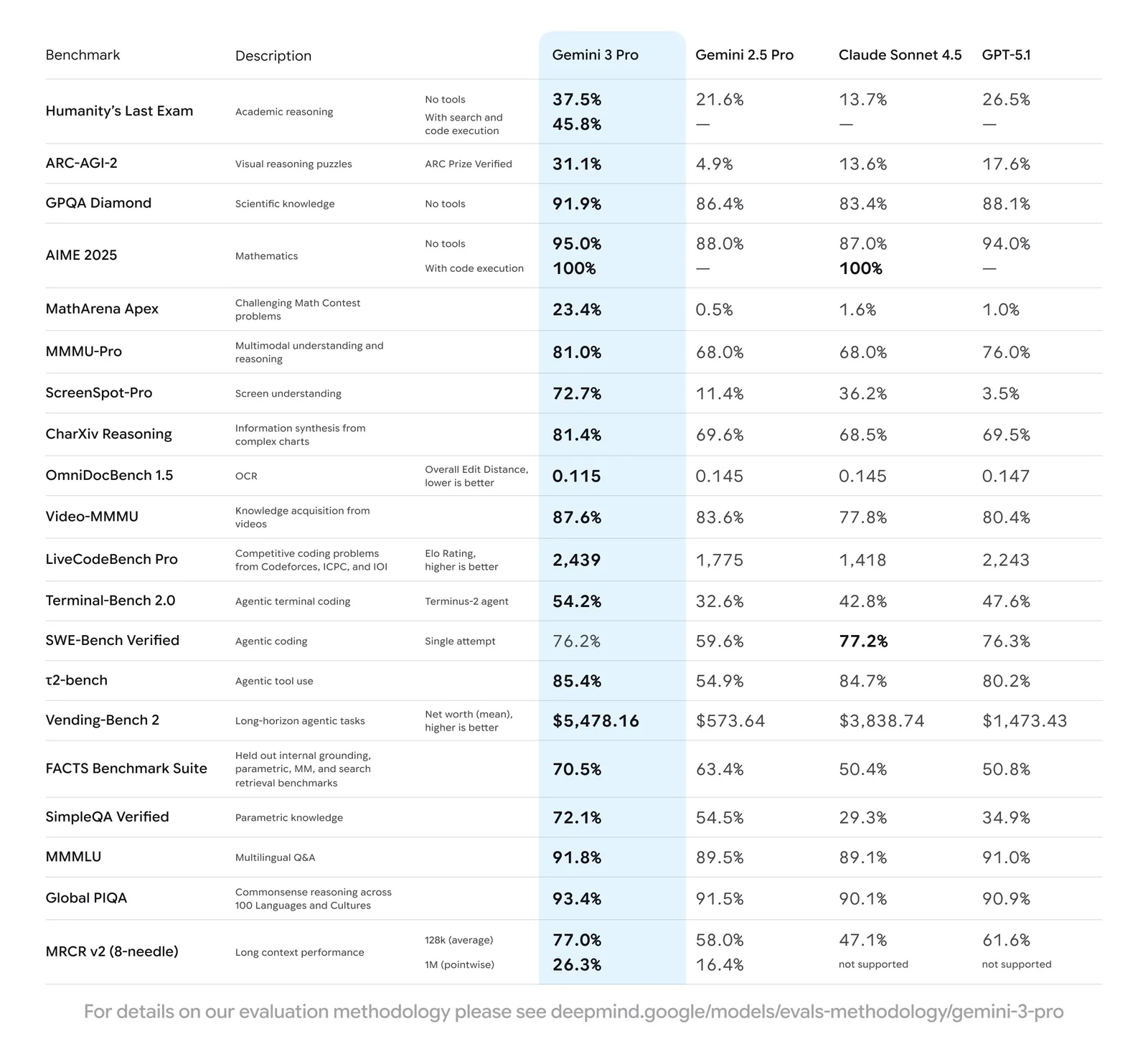
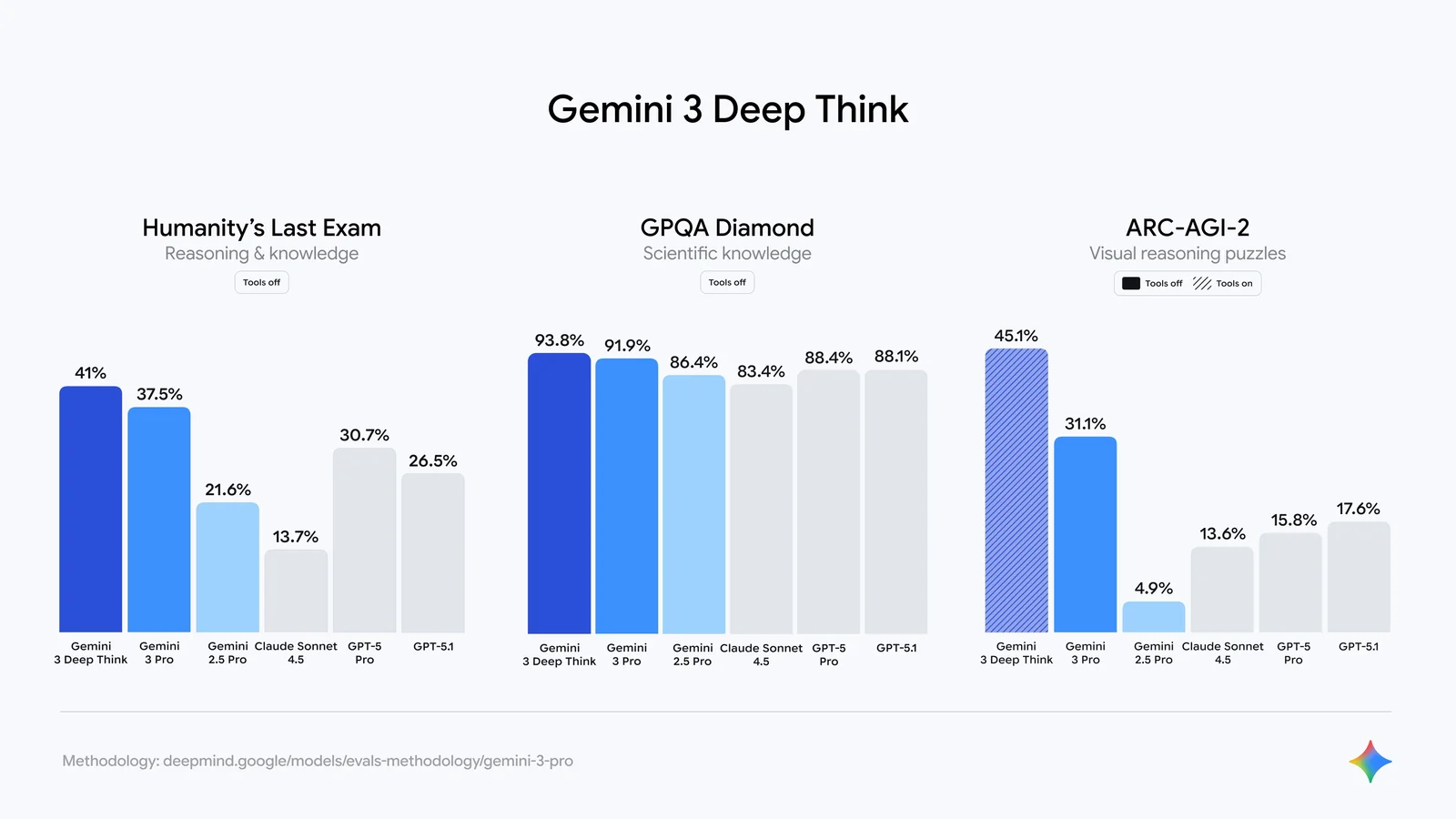
Gemini 3 excels compared to other AI models due to its advanced multimodal capabilities and built-in agentic workflows, which enhance efficiency in complex tasks. Its superior reasoning and coding assistance features further distinguish it, making it a robust choice for developers and researchers alike.
Key Points
- Multimodal Capabilities: Gemini 3 can process and generate content across various formats, such as text, images, and audio.
- Agentic Workflows: It automates complex tasks, allowing for smoother interactions and improved user experience.
- Enhanced Reasoning & Coding: Gemini 3 provides better support for coding tasks, making it ideal for software development and data analysis.
Detailed Explanation
Gemini 3 stands out in the landscape of AI models due to its innovative design that integrates multimodal capabilities. This means it can analyze and generate text, images, and audio simultaneously, providing a comprehensive approach to problem-solving. For instance, in a scenario where a user needs to create a marketing campaign, Gemini 3 can generate the textual content, suggest relevant images, and even create audio snippets for advertisements.
Moreover, Gemini 3's built-in agentic workflows optimize user interactions. Unlike traditional models that require users to manually coordinate tasks, Gemini 3 can autonomously manage sequences, making it particularly effective in project management and complex task automation. For example, it can handle scheduling, reminders, and follow-ups in a single workflow, streamlining the user experience.
The model also excels in reasoning and coding assistance. With enhanced algorithms, Gemini 3 can debug code more effectively and provide suggestions that improve efficiency. Developers working on software projects benefit from its ability to analyze code context, suggest optimizations, and even generate code snippets based on user requirements, significantly reducing development time.
Best Practices / Tips
- Leverage Multimodal Features: Use Gemini 3 for projects that require multiple content types to maximize its capabilities.
- Experiment with Workflows: Take advantage of its agentic workflows by designing tasks that can be automated, enhancing productivity.
- Utilize Coding Assistance: When coding, provide clear context for better outputs. This helps Gemini 3 understand your needs and deliver more relevant suggestions.
Additional Resources
Explore more AI Ai Models tools
Browse all Ai Models tools →Browse by use case: Image Generation · Video Generation · Code Generation · Chatbots & Assistants
- Soup CLI
- VibeVoice
- Laguna by Poolside
- Arena AI: The Official AI Ranking & LLM Leaderboard
- PromptLayer
- PHBench
Compare Gemini 3: vs Soup CLI · vs VibeVoice · vs Laguna by Poolside · vs Arena AI: The Official AI Ranking & LLM Leaderboard