

Rumi.ai
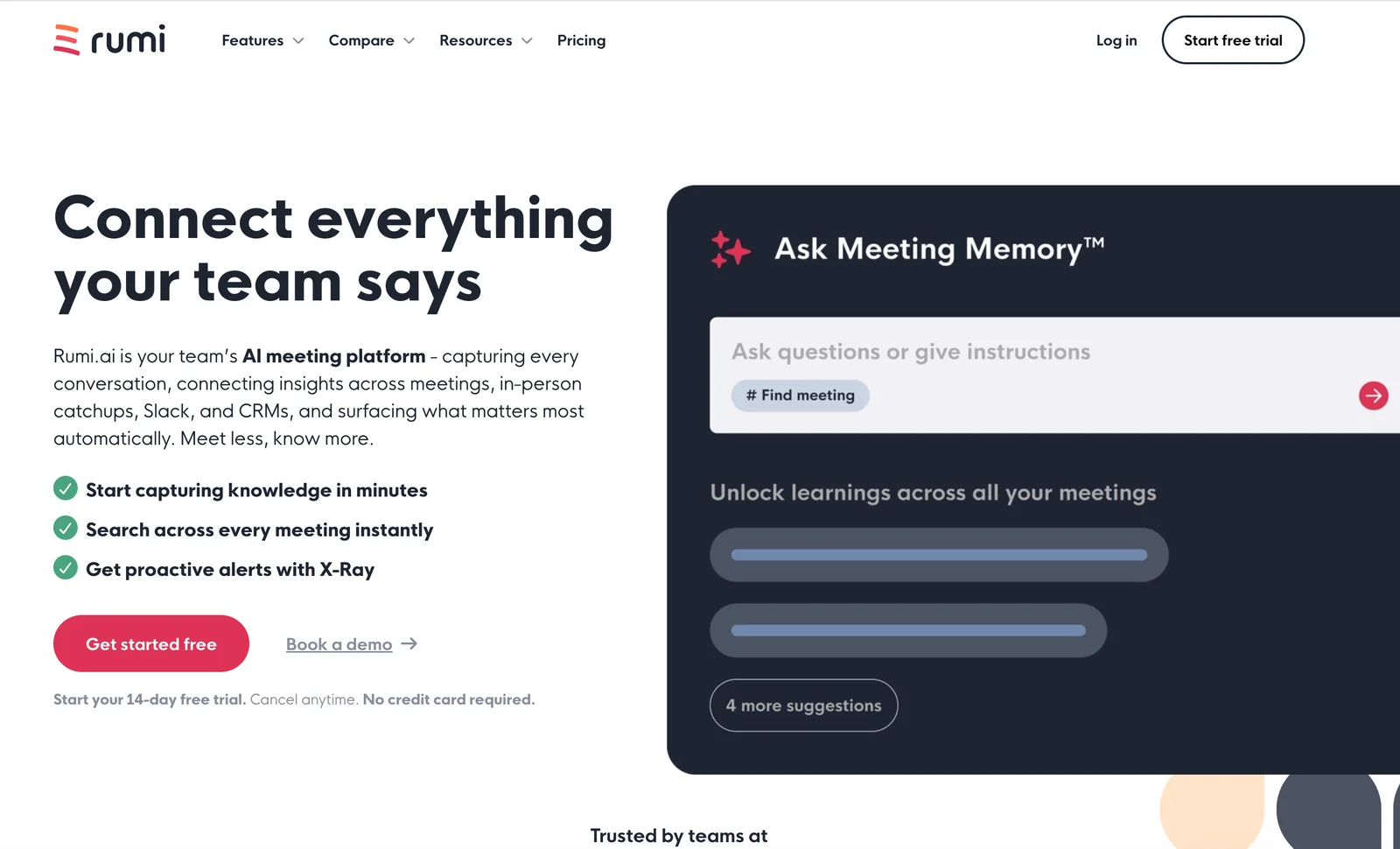
AIAI meeting platform that captures conversations, creates AI-synced notes, summaries, and action items while connecting insights across tools.
Rumi.ai
AI meeting platform that captures conversations, creates AI-synced notes, summaries, and action items while connecting insights across tools.
About Rumi.ai
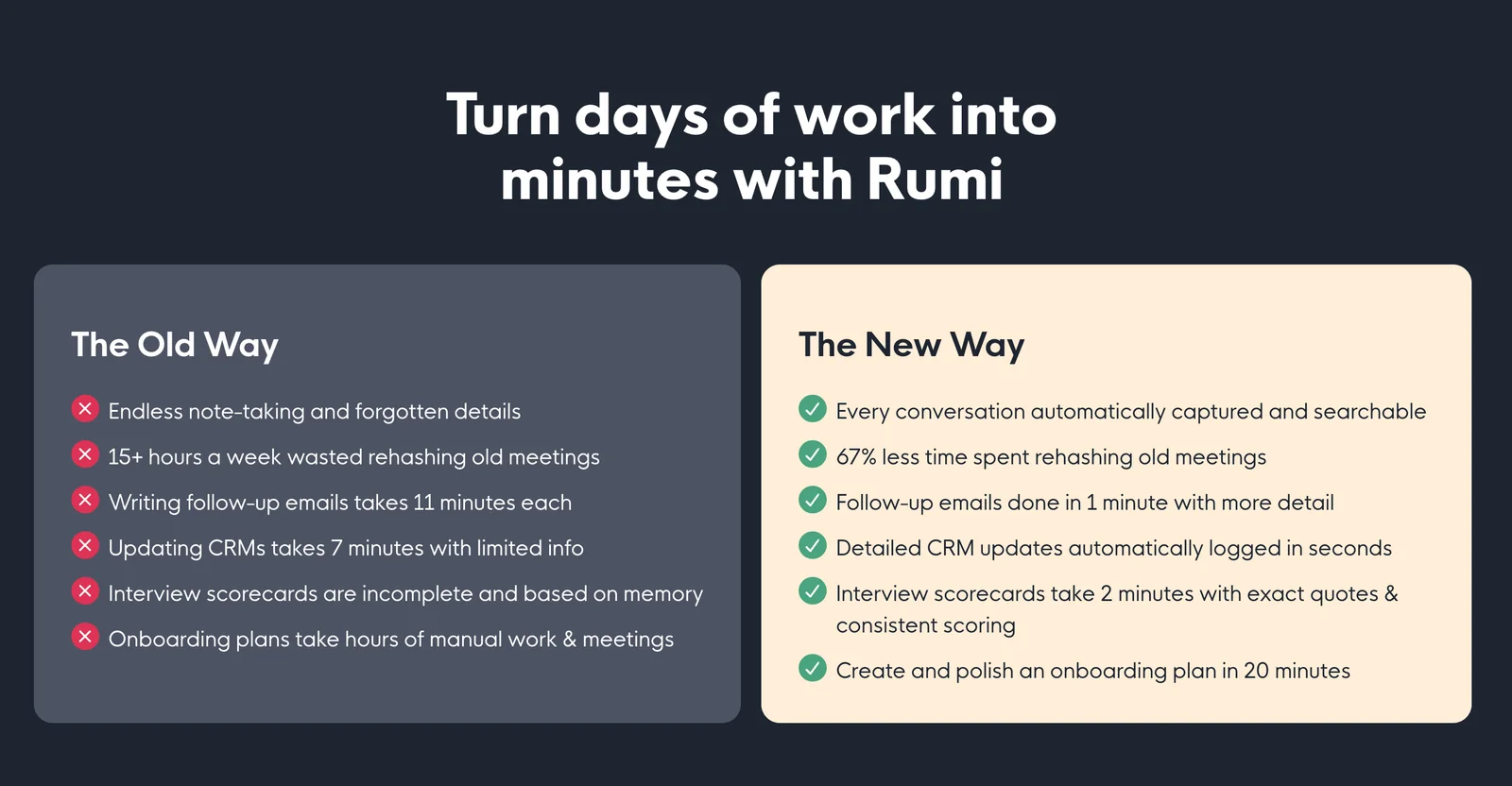
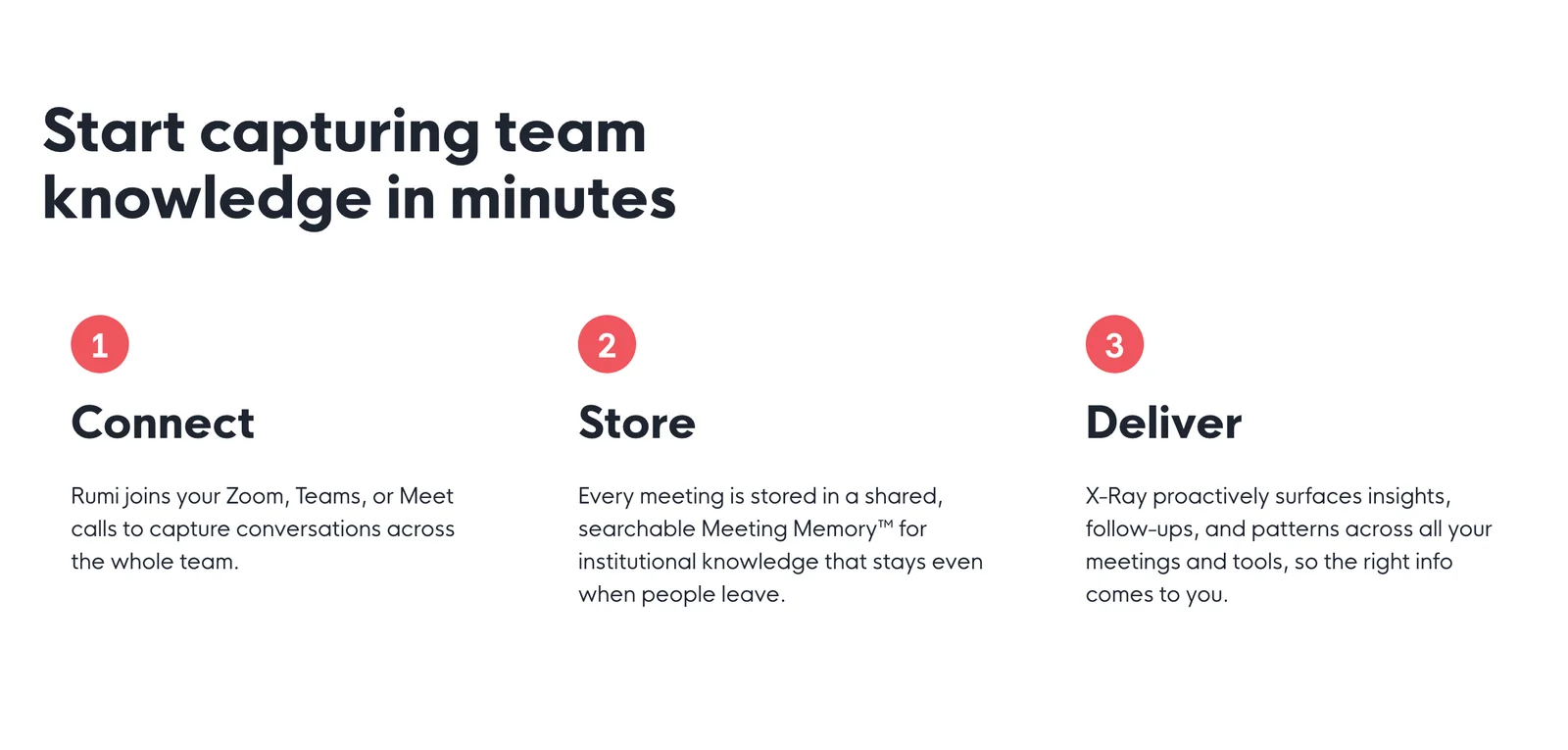
Rumi.ai is an AI-driven meeting platform that captures conversations across meetings, in-person catchups, Slack, and CRMs, producing real-time summaries, structured notes, and actionable tasks. It combines real-time AI and a conversational ChatGPT-like interface to surface insights, link context across meetings, and streamline follow-ups. Built-in integrations (Google Calendar, Slack, CRMs and Google Workspace) and a searchable meeting knowledge base help teams reduce manual note-taking, ensure accountability, and retrieve historical context quickly.
Screenshots
Key Features
Use Cases



Frequently asked questions about Rumi.ai
What pricing options are available for Rumi.ai?
Rumi.ai provides several pricing options, including a free tier with basic features, a 14-day premium trial at no cost, and custom pricing for paid subscriptions and enterprise plans. For specific rates tailored to your needs, it’s best to contact Rumi.ai's sales team directly.
Key Points
- Free tier includes essential features for basic use.
- 14-day premium trial allows users to explore advanced functionalities at no cost.
- Custom pricing is available for both paid subscriptions and enterprise solutions.
Detailed Explanation
Rumi.ai’s pricing structure is designed to accommodate a wide range of users, from individuals to large enterprises.
-
Free Tier: This option allows users to access basic features, which is ideal for those just starting or testing the platform’s capabilities. The free tier includes essential tools that help users understand Rumi.ai's offerings without any financial commitment.
-
14-Day Premium Trial: This trial period allows users to experience the full suite of premium features without any charges. Users can explore advanced capabilities such as enhanced AI tools, integrations, and support. It’s a great way to assess whether the premium features meet your needs before committing to a subscription.
-
Custom Pricing: For businesses requiring tailored solutions, Rumi.ai offers custom pricing for paid subscriptions and enterprise plans. This flexibility ensures that organizations can select plans that align with their specific requirements, including user volume, feature sets, and service level agreements (SLAs). To get precise pricing and discuss your needs, contacting the sales team is recommended.
Best Practices / Tips
- Evaluate Your Needs: Before selecting a pricing tier, assess your specific requirements. Consider the features you need and whether the free tier is sufficient for your use case.
- Take Advantage of the Trial: Use the 14-day premium trial effectively by exploring all features. Create a checklist of must-have functionalities to ensure you evaluate everything crucial to your workflow.
- Consult with Sales: If you’re considering a paid plan, reach out to the sales team. They can provide insights tailored to your organization’s size, industry, and unique needs, ensuring you choose the best option.
Additional Resources
How does Rumi.ai capture meeting notes and action items?
Rumi.ai captures meeting notes and action items by utilizing real-time transcription and AI-driven analysis. It automatically generates structured notes, highlights decisions, and assigns action items to participants, seamlessly integrating with calendar events for enhanced organization and accountability.
Key Points
- Real-time Transcription: Rumi.ai converts spoken words into text instantly.
- Structured Note Generation: Automatically organizes discussions into clear categories.
- Integration with Calendar Events: Links notes and action items to specific meetings and participants.
Detailed Explanation
Rumi.ai employs advanced natural language processing (NLP) technology to ensure accurate real-time transcription of meetings. As participants speak, the AI captures every word, converting dialogue into text format. This process not only transcribes but also identifies key themes and topics discussed during the meeting.
Once the conversation is transcribed, Rumi.ai organizes the information into structured notes. These notes include:
- Decisions Made: Summarizes key decisions for easy reference.
- Action Items: Identifies tasks assigned to participants, ensuring accountability.
- Participant Links: Connects notes and action items to specific attendees, facilitating follow-up.
The integration with calendar events allows Rumi.ai to pull in context, making it easier for teams to understand the background of discussions. This feature is particularly useful for organizations that require rigorous documentation of meetings for compliance or project management.
Example Use Case: In a project kickoff meeting, Rumi.ai can capture discussions about project timelines, budget allocations, and assigned responsibilities. After the meeting, participants receive a structured summary that includes deadlines and the responsible individuals, making it easy for teams to stay aligned.
Best Practices / Tips
- Ensure Clear Audio Quality: For optimal transcription accuracy, conduct meetings in quiet environments with clear audio. Using high-quality microphones can minimize background noise.
- Engage All Participants: Encourage all meeting attendees to speak clearly and at a moderate pace to improve transcription accuracy.
- Review and Edit Notes: After automatic generation, review the notes for any inaccuracies or omissions. This step ensures the final document is reliable and complete.
- Utilize Tags and Prioritization: Use Rumi.ai's tagging features to categorize action items by urgency or project phase, enhancing task management.
Additional Resources
How can I start using Rumi.ai for my team?
To start using Rumi.ai for your team, visit their official website to sign up for a free tier or initiate a 14-day premium trial. Follow the onboarding prompts to seamlessly integrate Rumi.ai with your existing tools, ensuring a smooth transition and maximizing your team's productivity.
Key Points
- Sign Up Options: Choose between a free tier and a premium trial.
- Onboarding Process: Follow guided prompts for easy setup.
- Integration: Connect Rumi.ai with your current tools for enhanced functionality.
Detailed Explanation
To begin your journey with Rumi.ai, first, go to their official website and select the sign-up option that best suits your needs. The free tier allows limited access to features, perfect for smaller teams or initial testing. Alternatively, the 14-day premium trial offers full access to all functionalities, enabling you to explore its complete potential.
-
Creating an Account:
- Click on the “Sign Up” button.
- Fill in your team information and email address.
- Verify your email to activate your account.
-
Choosing a Plan:
- Decide on the free tier or the premium trial. The premium tier typically includes advanced features like enhanced AI capabilities, priority support, and detailed analytics.
-
Onboarding Prompts:
- After account creation, you’ll be guided through onboarding prompts. This includes setting up user profiles, choosing preferences, and customizing your workspace.
-
Integration with Existing Tools:
- Rumi.ai supports integration with various productivity tools such as Slack, Trello, and Google Workspace. Follow the integration steps provided during onboarding to connect these tools seamlessly.
-
Initial Setup:
- Configure any necessary settings, such as team roles and permissions, to ensure that every team member has the access they need.
Best Practices / Tips
- Explore Features: During your free tier or trial period, thoroughly explore all features. This will help you determine which tools your team will benefit from the most.
- Involve Your Team: Encourage team members to participate in the setup process, as their insights can lead to better utilization of the tool.
- Monitor Usage: Keep track of how frequently team members use Rumi.ai to identify areas for improvement or additional training needs.
- Feedback Loop: Establish a feedback mechanism to gather team input on the tool's performance and suggest improvements.
Additional Resources
- Rumi.ai Official Documentation - Comprehensive guides and FAQs.
- Rumi.ai Blog - Updates, tips, and success stories from other users.
- Community Forums - Engage with other Rumi.ai users for shared experiences and best practices.
What integrations does Rumi.ai support?
Rumi.ai supports integrations with Google Calendar, Slack, and various Customer Relationship Management (CRM) systems like Salesforce and HubSpot. These integrations enable users to streamline scheduling, enhance communication, and manage meetings more effectively across different platforms, improving overall productivity.
Key Points
- Integration with Google Calendar: Syncs schedules effortlessly.
- Slack Connectivity: Facilitates real-time communication and notifications.
- CRM Integration: Connects with platforms like Salesforce and HubSpot for better data management.
Detailed Explanation
Rumi.ai’s integration capabilities make it a versatile tool for professionals looking to enhance their workflow.
-
Google Calendar Integration: This feature allows users to sync their Rumi.ai meetings with Google Calendar, ensuring that all events are automatically updated. For instance, if a meeting is scheduled or rescheduled in Rumi.ai, it will reflect in Google Calendar, preventing scheduling conflicts.
-
Slack Connectivity: Rumi.ai integrates with Slack to provide instant notifications and reminders about upcoming meetings. Team members can receive alerts directly in their Slack channels, making it easier to stay informed about schedules and changes without leaving the communication platform.
-
CRM Systems Integration: Rumi.ai connects with popular CRMs such as Salesforce and HubSpot. This integration enables users to manage customer interactions and schedule meetings based on CRM data. For example, sales teams can automatically set follow-up meetings after a deal is closed, ensuring consistent communication with clients.
Best Practices / Tips
- Utilize Calendar Sync: Always enable the Google Calendar sync feature to avoid double bookings and keep track of all your appointments in one place.
- Leverage Slack Notifications: Set up specific channels in Slack for meeting reminders to keep your team informed without cluttering personal message threads.
- Explore CRM Features: Familiarize yourself with the CRM integration capabilities to automate meeting requests based on client interactions, optimizing your sales process.
Additional Resources
How does Rumi.ai compare to other meeting management tools?
Rumi.ai outshines other meeting management tools by providing real-time AI-generated summaries and linking insights across multiple meetings, significantly improving retention and context understanding. Unlike traditional note-taking applications, Rumi.ai enhances productivity and collaboration by making information more accessible and actionable.
Key Points
- Real-Time AI Summaries: Instant summaries help users quickly grasp key points.
- Cross-Meeting Insights: Links information across meetings to retain context.
- Enhanced Collaboration: Facilitates easy sharing and referencing of meeting notes.
Detailed Explanation
Rumi.ai leverages advanced AI algorithms to automatically generate summaries during meetings, ensuring that participants do not miss critical information. For instance, if a team discusses project updates in one meeting and assigns tasks in another, Rumi.ai connects these discussions. This feature allows users to see how decisions evolve over time, making it easier to track progress and accountability.
In comparison, traditional meeting management tools often rely on manual note-taking, which can lead to fragmented information and miscommunication. Rumi.ai solves this by providing a single source of truth that integrates all relevant discussions, decisions, and actions in one place. Moreover, its user-friendly interface allows for seamless navigation and retrieval of past meeting data, which is essential for maintaining continuity in ongoing projects.
Use cases include:
- Project Management: Teams can reference past meetings while discussing current tasks, ensuring that everyone is on the same page.
- Sales Meetings: Sales teams can quickly recall previous client discussions to tailor their pitches effectively.
- Brainstorming Sessions: Ideas generated in one session can be linked to decisions made in subsequent meetings, fostering innovation.
Best Practices / Tips
- Regularly Review Summaries: Encourage team members to review AI-generated summaries before meetings to ensure all participants are informed.
- Utilize Tags and Keywords: Make use of tagging features to categorize meeting notes for easier retrieval.
- Integrate with Calendar Tools: Connect Rumi.ai with calendar applications to automate meeting notes for scheduled sessions.
Additional Resources
Explore more AI Ai Tools tools
Browse all Ai Tools tools →Compare Rumi.ai: vs Agents Never Sleep · vs Port Radar for macOS · vs SubtitleGenerator · vs Zero