

Perplexity
AIFeaturedAn answer engine that searches the web to return concise answers with live references and integrates with developer tools like GitHub Copilot.
Perplexity
An answer engine that searches the web to return concise answers with live references and integrates with developer tools like GitHub Copilot.
About Perplexity
Perplexity is an answer engine that performs real-time web search to provide concise, sourced answers to user queries. It emphasizes verifiable responses by returning live references and citations alongside generated answers, enabling users to check sources. Perplexity integrates into developer workflows (e.g., a GitHub Copilot extension) and exposes an API and community CLI clients so developers can query the engine from IDEs or the terminal. Its value lies in combining generative Q&A with transparent, source-backed search results to improve trust and productivity for research and coding tasks.
Screenshots


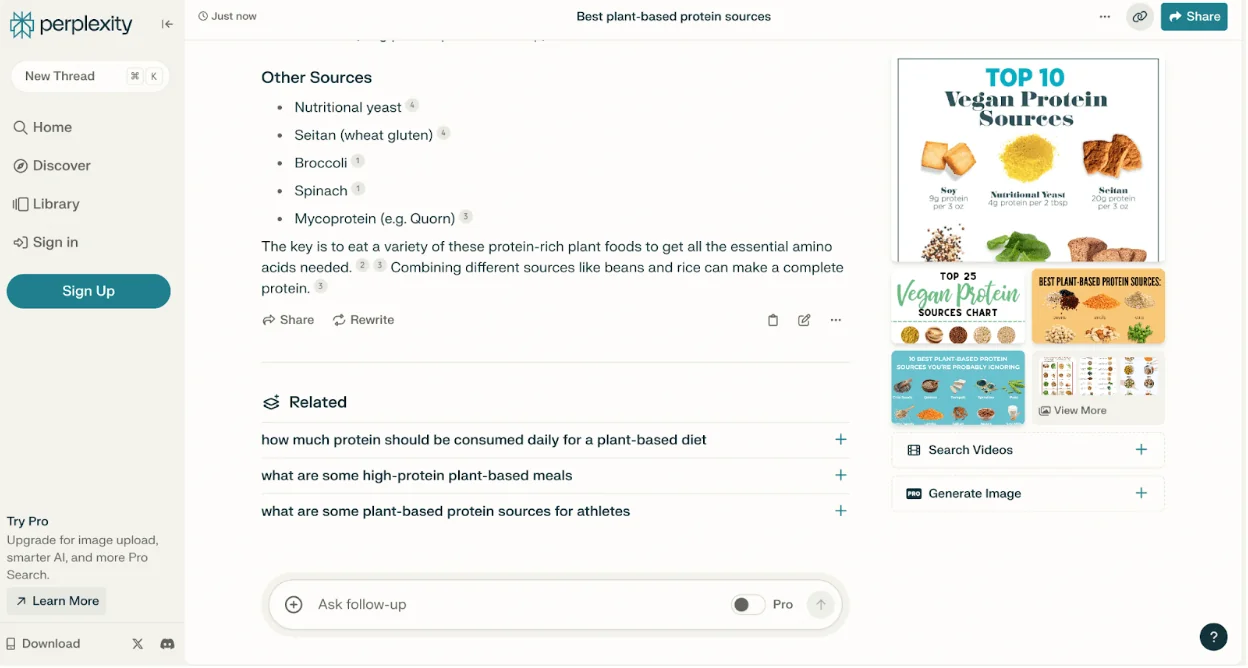
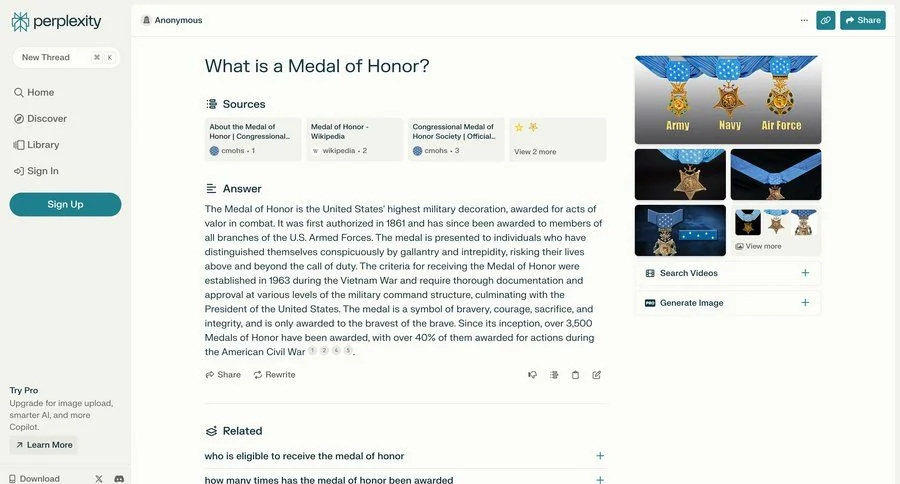
Key Features
Use Cases



Frequently asked questions about Perplexity
What are the pricing options for Perplexity?
Perplexity offers four pricing tiers to cater to different user needs: Free, Pro at $20/month, Max at $200/month, and Enterprise Pro starting at $40/month per seat. Each tier comes with unique features and varying usage limits, making it suitable for both individual and enterprise users.
Key Points
- Free Tier: Basic access with limited features.
- Pro Tier: Enhanced features at $20/month.
- Max Tier: Comprehensive features at $200/month.
- Enterprise Pro: Custom pricing starting at $40/month per seat.
Detailed Explanation
Perplexity’s pricing structure is designed to accommodate a wide range of users, from casual individuals to large enterprises.
-
Free Tier: This option is ideal for those who want to explore Perplexity’s capabilities without commitment. Users can access basic features, making it a great choice for testing the platform.
-
Pro Tier: At $20 per month, this tier unlocks advanced features, including increased query limits and access to premium content. This is perfect for professionals or small teams who require more robust capabilities.
-
Max Tier: For $200 per month, the Max tier offers extensive features, including unlimited queries and priority support. It’s tailored for users who rely heavily on Perplexity for research or content generation.
-
Enterprise Pro: Starting at $40 per month per seat, this tier is designed for organizations needing customized solutions. It includes dedicated support and tailored features, which are essential for larger teams or specific business needs.
Best Practices / Tips
- Evaluate Your Needs: Before selecting a tier, assess how often you use Perplexity and what features are essential for your workflow.
- Trial the Free Version: Utilize the free tier to understand the platform's interface and capabilities before committing to a paid plan.
- Consider Team Requirements: If you’re part of a team, the Enterprise Pro tier may provide the best value with its collaborative features and tailored support.
Additional Resources
How do I start using Perplexity?
To start using Perplexity, visit their official website at perplexity.ai, sign up for a free account, and explore the answer engine. You can also enhance your experience by integrating Perplexity with GitHub Copilot for advanced features and smoother workflows.
Key Points
- Sign up for a free account on Perplexity's website.
- Explore the answer engine for quick responses.
- Integrate with GitHub Copilot for extended functionality.
Detailed Explanation
To begin your journey with Perplexity, follow these steps:
-
Visit the Website: Go to perplexity.ai. The interface is user-friendly, making it easy to navigate.
-
Create Your Account: Click on the "Sign Up" button. You will need to provide some basic information such as your email address and create a password. Alternatively, you can sign up through your GitHub account for a quicker process.
-
Explore the Answer Engine: Once logged in, you can start using the answer engine. Simply type a question or a topic of interest into the search bar. Perplexity will provide detailed responses, including links to relevant sources for further reading.
-
Integrate with GitHub Copilot: For developers, integrating Perplexity with GitHub Copilot can significantly enhance your coding experience. This integration allows you to receive context-aware suggestions directly in your development environment, improving your productivity.
Best Practices / Tips
- Use Clear Queries: When searching in Perplexity, phrase your questions clearly. This leads to more accurate and relevant responses.
- Leverage Source Links: Always check the source links provided in the answers. They can offer deeper insights and additional information on the topic.
- Feedback Mechanism: Utilize the feedback option to improve the quality of responses. If a response isn’t satisfactory, your input helps refine the service.
Additional Resources
- Perplexity Official Documentation: Comprehensive guides and FAQs.
- GitHub Copilot Integration Guide: Learn how to maximize the benefits of using Perplexity with GitHub Copilot.
- Community Forum: Join discussions and share tips with other users.
What features does Perplexity offer?
Perplexity offers advanced features such as web-backed answering, GitHub Copilot integration, API access, and real-time citations. Users benefit from a variety of subscription tiers, each providing different usage limits and capabilities tailored to their needs.
Key Points
- Web-Backed Answering: Utilizes internet data for accurate responses.
- GitHub Copilot Integration: Enhances coding efficiency with AI support.
- API Access: Allows developers to integrate Perplexity’s features into their applications.
Detailed Explanation
Perplexity is an AI-powered tool designed to enhance information retrieval and coding efficiency.
Web-Backed Answering
This feature allows users to receive answers that are not only generated by AI but also backed by up-to-date web data. For instance, if you ask a question about the latest technology trends, Perplexity searches the web in real-time, ensuring the information is current and relevant.
GitHub Copilot Integration
With GitHub Copilot integration, Perplexity assists developers directly within their coding environment. This feature provides contextual suggestions, code completions, and even debugging tips. For example, when programming in Python, users can receive instant suggestions to optimize their code, which streamlines the development process.
API Access
Perplexity offers robust API access, enabling businesses and developers to harness its capabilities within their own applications. This is particularly useful for creating custom solutions that require advanced querying or data analysis. For example, a startup could integrate Perplexity's API to power a chatbot that answers user queries based on real-time data.
Real-Time Citations
Another standout feature is the ability to provide real-time citations for the information presented. This is crucial for users who need to verify sources or reference data in their work. For instance, if a user asks about a specific health condition, Perplexity cites recent studies or articles, enhancing the credibility of the information.
Best Practices / Tips
- Maximize Subscription Tier: Choose a subscription plan that aligns with your usage needs to unlock the full potential of Perplexity’s features.
- Utilize API Documentation: Familiarize yourself with the API documentation for efficient integration and implementation.
- Leverage Real-Time Citations: Always check the citations provided for accuracy and relevancy, especially when using information for scholarly or professional purposes.
Additional Resources
How does Perplexity compare to other AI tools?
Perplexity stands out from other AI tools due to its real-time web search and citation features, making it ideal for research and coding tasks. Its seamless integration with GitHub Copilot further enhances developer productivity, differentiating it from conventional AI platforms that lack these capabilities.
Key Points
- Real-time Web Search: Perplexity provides users with the latest information directly from the web.
- Citation Features: It automatically offers citations for sourced information, bolstering research credibility.
- Integration with GitHub Copilot: Enhances coding efficiency by providing real-time suggestions and feedback.
Detailed Explanation
Perplexity is an innovative AI tool tailored for efficient research and development tasks. One of its most significant features, real-time web search, empowers users to retrieve the most current and relevant information available online. This capability is particularly advantageous for researchers needing the latest data, trends, or insights in their respective fields. For instance, a researcher studying climate change can access recent studies and statistics, ensuring their work is informed by the latest evidence.
The citation features of Perplexity are equally impressive. This functionality allows users to automatically reference sources of information, which is essential for maintaining academic integrity in both professional and academic writing. When researching a complex topic, such as artificial intelligence ethics, users can quickly pull information from reputable journals or articles, with citations formatted correctly for easy inclusion in papers or reports. This not only saves time but also enhances the quality and credibility of their research.
Additionally, Perplexity’s integration with GitHub Copilot sets it apart in the developer community. This integration provides real-time coding suggestions and instant feedback, making the coding process smoother and more efficient. For example, when a developer is working on a Python project, Perplexity can suggest code snippets, identify bugs, or recommend best practices, effectively reducing the chances of errors and expediting project completion.
Best Practices / Tips
- Utilize Real-Time Features: Regularly use the real-time search feature to ensure your information is current and accurate, especially for time-sensitive topics.
- Check Citations: Always verify the sources provided by Perplexity to ensure they meet academic and professional standards, enhancing your research's credibility.
- Explore Integration: Familiarize yourself with the GitHub Copilot integration; take advantage of coding suggestions and feedback to streamline your development workflow.
Additional Resources
How do I integrate Perplexity with my applications?
You can integrate Perplexity with your applications by using its API, which allows for programmatic access. The API supports automated lookups, custom workflows, and various scripting needs, enabling seamless integration across different platforms and enhancing your application's capabilities.
Key Points
- API Access: Programmatic integration via the Perplexity API.
- Versatile Use Cases: Supports automated lookups and custom scripts.
- Enhanced Workflows: Streamline processes and improve efficiency.
Detailed Explanation
Integrating Perplexity into your applications involves several key steps. First, you need to sign up for an API key from the Perplexity developer portal. This key is essential for authenticating your application when making requests.
Step-by-Step Integration
- Obtain API Key: Visit the Perplexity developer portal, register for an account, and request your API key.
- Choose Your Programming Language: The API can be accessed using various programming languages such as Python, JavaScript, or Ruby. Select the one that aligns with your application.
- Make Your First API Call:
- Use the API endpoint for the specific task you want to perform. For example, you might fetch data for a specific query or perform a lookup.
- Example in Python:
import requests

url = "https://api.perplexity.ai/v1/query"
headers = {"Authorization": "Bearer YOUR_API_KEY"}
params = {"query": "What is Perplexity?"}

response = requests.get(url, headers=headers, params=params)
print(response.json())
- Process the Response: The API will return a JSON object with the requested data. You can then manipulate this data as needed within your application.
- Build Custom Workflows: Integrate the API responses into your application’s user interface or backend systems to automate processes like data retrieval or analysis.
Use Cases
- Chatbots: Enhance the capabilities of customer service chatbots by integrating Perplexity for instant responses.
- Data Analysis: Use the API to pull insights from large datasets, automating the extraction of key information.
- Content Creation: Automate content generation for blogs, articles, or reports by utilizing the API to provide relevant information quickly.
Best Practices / Tips
- Rate Limiting: Be aware of the API's rate limits to avoid throttling; implement error handling to manage request failures.
- Caching Responses: To reduce API calls and improve performance, cache frequently accessed data within your application.
- Security: Keep your API key secure and do not expose it in public repositories. Use environment variables to manage sensitive information.
Additional Resources
Explore more AI Ai Agents tools
Browse all Ai Agents tools →Browse by use case: Code Generation
Compare Perplexity: vs Apache Maka · vs Construct Computer · vs ShogunAI · vs fx