

OpenChatKit
AIOpen SourceFreeOpenChatKit is an open-source kit providing instruction-tuned chat models, a moderation model, and an extensible retrieval system for custom, up-to-date chatbots.
OpenChatKit
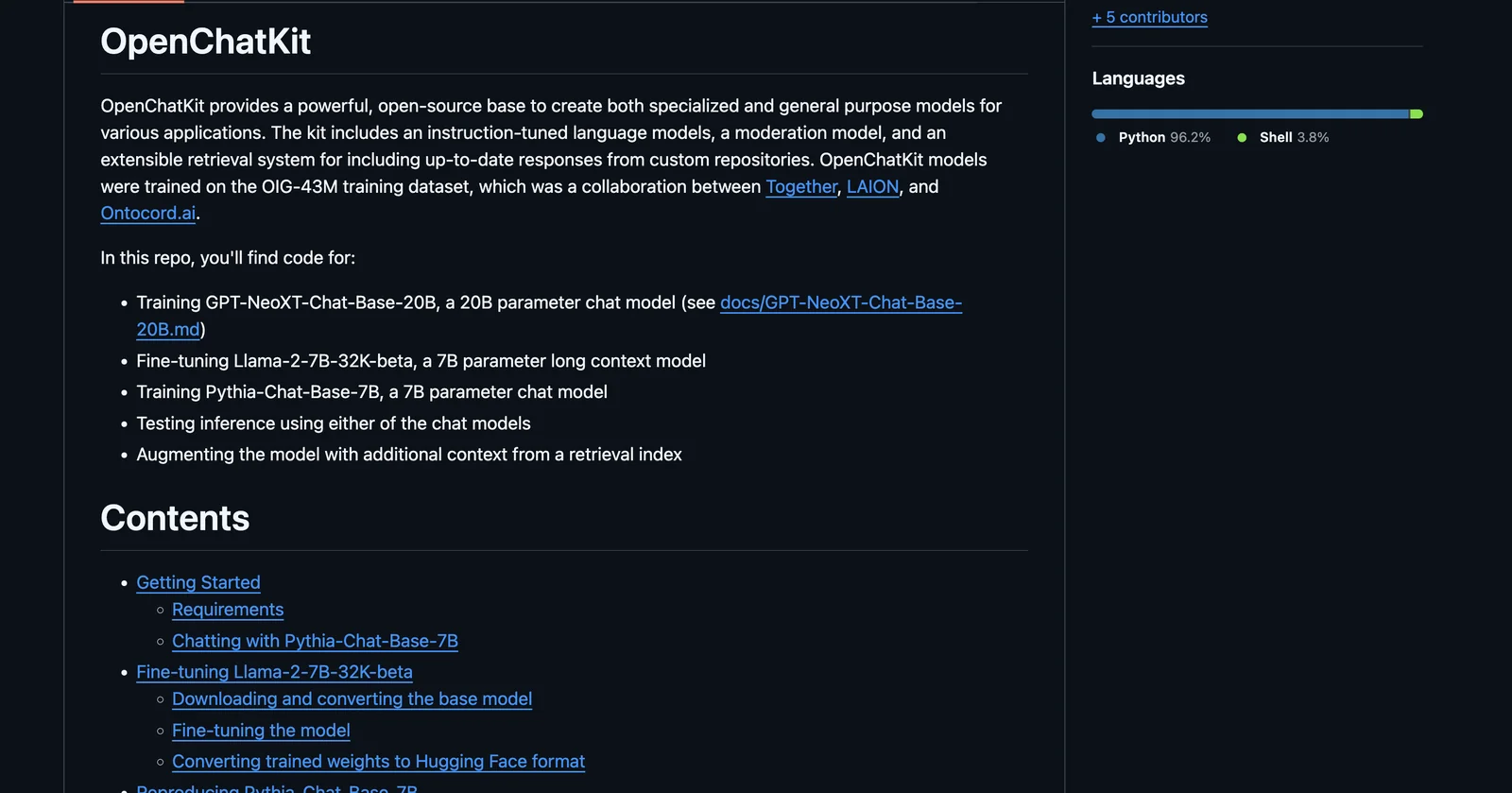
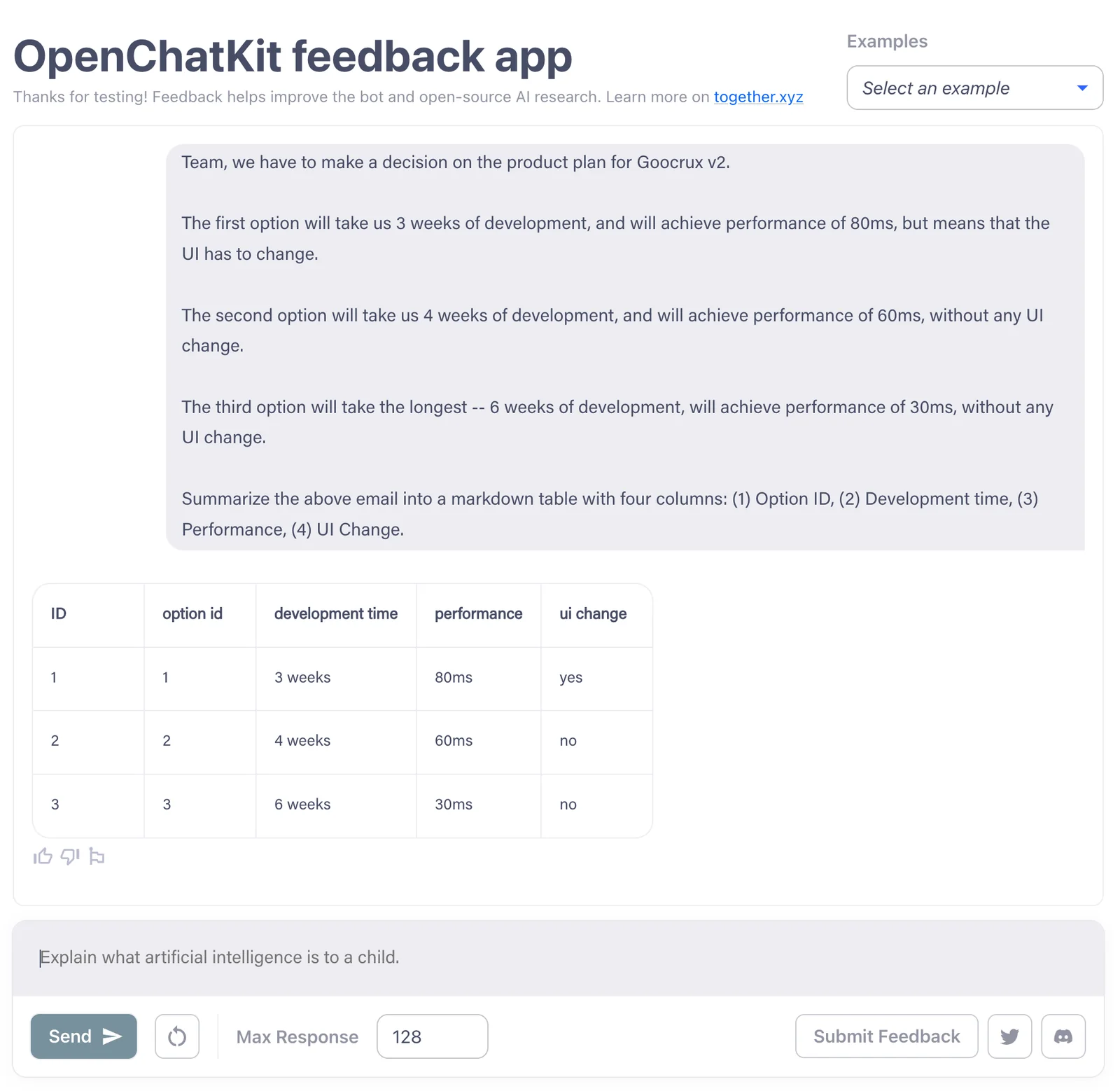
OpenChatKit is an open-source kit providing instruction-tuned chat models, a moderation model, and an extensible retrieval system for custom, up-to-date chatbots.
About OpenChatKit
OpenChatKit is an open-source toolkit and model release from Together Computer that provides instruction-tuned language models (including a 20B GPT-NeoXT-derived chat model), a separate moderation model, and a modular retrieval system to incorporate external, up-to-date knowledge into responses. The repository includes training tooling, inference code, pretrained weights, and utilities for model conversion and deployment. Its value lies in offering a reproducible, community-oriented base for building specialized or general-purpose chatbots that can be customized, extended with retrieval from custom data sources, and deployed with common large-model inference techniques (e.g., DeepSpeed, multi-GPU setups). The project is licensed under Apache 2.0 and was developed mainly by Together Computer with community contributions.
Screenshots
Key Features
Use Cases


Frequently asked questions about OpenChatKit
Is OpenChatKit free to use?
Yes, OpenChatKit is completely free to use because it is an open-source toolkit released under the Apache 2.0 license. However, users are responsible for their own hosting and compute costs associated with running the software.
Key Points
- Open-source: OpenChatKit is available under the Apache 2.0 license.
- Hosting costs: Users must manage their own server and compute expenses.
- Community support: As an open-source project, it benefits from community contributions.
Detailed Explanation
OpenChatKit is a powerful open-source framework designed for building conversational AI applications. Being open-source means that developers can access, modify, and distribute the software freely. Released under the Apache 2.0 license, it allows for commercial use, making it an attractive option for businesses and individual developers alike.
Hosting and Compute Costs
While OpenChatKit itself is free, users need to consider hosting environments (like AWS, Google Cloud, or Azure) and the corresponding compute costs. These expenses can vary significantly based on usage, server specifications, and traffic volume.
For instance, a small-scale deployment may only require minimal resources, leading to lower costs, while a high-traffic application may necessitate a robust server setup, increasing expenses. It's essential to calculate your anticipated usage to budget appropriately.
Use Cases
OpenChatKit is suitable for various applications, including:
- Customer service chatbots that enhance user engagement.
- Virtual assistants capable of handling queries and performing tasks.
- Educational tools that support interactive learning experiences.
Best Practices / Tips
- Evaluate Hosting Options: Compare different cloud providers to find the most cost-effective hosting solution tailored to your needs.
- Monitor Usage: Use tools to track server performance and resource utilization, ensuring you optimize costs effectively.
- Participate in the Community: Engage with the OpenChatKit community for support, updates, and shared resources. This can also provide insights into best practices and optimization techniques.
Additional Resources
What are the key features of OpenChatKit?
OpenChatKit offers advanced features including instruction-tuned chat models, a sophisticated moderation model for effective content filtering, and an extensible retrieval system that ensures up-to-date responses. These capabilities make it an ideal choice for developers and businesses looking to implement conversational AI solutions.
Key Points
- Instruction-Tuned Chat Models: Enhance user interaction with context-aware responses.
- Moderation Model: Filters inappropriate content to maintain a safe environment.
- Extensible Retrieval System: Provides real-time, relevant information for dynamic queries.
Detailed Explanation
OpenChatKit is designed to facilitate seamless communication by leveraging state-of-the-art AI technologies.
-
Instruction-Tuned Chat Models: These models are specifically trained to understand and follow user instructions more effectively than traditional chatbots. For instance, if a user asks for a summary of a complex topic, the model can deliver concise and relevant information, enhancing user satisfaction.
-
Moderation Model: This feature is critical for businesses that require a safe and respectful environment. It employs machine learning algorithms to identify and filter out harmful or inappropriate content in real-time. By doing so, OpenChatKit not only protects users but also helps maintain a brand's reputation.
-
Extensible Retrieval System: This system allows OpenChatKit to access the latest information from various databases and APIs. For example, if integrated with a news API, the chatbot can provide users with current events or updates on specific topics, making it a valuable tool for customer support and engagement.
Best Practices / Tips
- Regular Model Updates: Ensure that your chat models are regularly updated to incorporate the latest data and user interactions, which enhances their accuracy.
- Monitor Moderation Effectiveness: Regularly review moderation logs to adjust filters and improve content safety without stifling user engagement.
- Leverage API Integrations: Use the extensible retrieval system to connect with various APIs that can enrich your conversational AI's capabilities, like weather, news, or product databases.
Additional Resources
How do I get started with OpenChatKit?
To get started with OpenChatKit, visit the official GitHub repository, download the source code, and follow the setup instructions in the documentation. This process will allow you to install and configure OpenChatKit for your conversational AI projects efficiently.
Key Points
- Visit the GitHub Repository: Access the official OpenChatKit page.
- Download Source Code: Get the latest version of OpenChatKit.
- Follow Setup Instructions: Use the documentation for installation guidance.
Detailed Explanation
OpenChatKit is an open-source conversational AI framework that allows developers to create and customize chatbots. Here’s a step-by-step guide to get you started:
-
Visit the GitHub Repository: Go to the OpenChatKit GitHub page where you can find the latest releases and documentation. This is where you will find all necessary files and updates.
-
Download the Source Code: Click on the "Code" button and select "Download ZIP" or clone the repository using Git with the command:
git clone https://github.com/OpenChatKit/OpenChatKit.gitEnsure you have Git installed on your machine for cloning.
-
Set Up Your Environment: After downloading, navigate to the project directory and follow the setup instructions in the documentation. You'll typically need to install dependencies using package managers like pip:
pip install -r requirements.txtThis ensures all necessary libraries are available for OpenChatKit to function.
-
Configuration: Modify configuration files as necessary to tailor the chatbot's behavior to your specific needs. The documentation provides examples and explanations on how to set parameters effectively.
-
Run the Application: Once everything is set up, you can start the application and test your chatbot. Use the command:
python app.pyThis will initiate the server locally, allowing you to interact with your chatbot.
Best Practices / Tips
- Check Compatibility: Ensure your development environment meets the required specifications, including Python version and library dependencies.
- Refer to Documentation Regularly: The OpenChatKit documentation contains valuable information on advanced features and troubleshooting.
- Utilize Community Support: Engage with the community through forums or GitHub issues for help and advice.
Additional Resources
By following these steps and utilizing the provided resources, you can efficiently set up and begin using OpenChatKit for your AI projects.
Does OpenChatKit support API integrations?
Yes, OpenChatKit supports API integrations, enabling users to seamlessly incorporate its advanced AI models into their applications. This functionality allows for the development of custom chatbot solutions tailored to specific business needs, enhancing user interaction and overall service efficiency.
Key Points
- Seamless API Integration: OpenChatKit offers robust APIs for easy integration.
- Customizable Chatbot Functionality: Users can tailor chatbot experiences to meet specific requirements.
- Broad Use Cases: Applicable across various industries for enhanced customer engagement.
Detailed Explanation
OpenChatKit provides a flexible API that supports developers in integrating its AI-driven models into their existing applications. This capability is particularly beneficial for businesses looking to create personalized chatbots for customer service, e-commerce, or even internal team communication.
How to Integrate OpenChatKit via API:
- API Key Registration: Start by registering for an API key through OpenChatKit’s official website. This key will authenticate your requests.
- Choose Your Programming Language: OpenChatKit supports multiple programming languages such as Python, JavaScript, and Java. Ensure your development environment is set up accordingly.
- API Documentation: Review the comprehensive API documentation that provides endpoints, usage examples, and response formats. This resource will guide you through the integration process.
- Development and Testing: Begin by developing your chatbot using the API endpoints. Use mock data for testing before deploying the chatbot in a live environment.
- Deployment: Once tested, deploy your chatbot to your platform, whether it's a website, mobile app, or messaging service.
Use Case Example:
A retail company can utilize OpenChatKit to develop a chatbot that assists customers in navigating their product catalog, providing instant support for inquiries, and even processing orders. The API integration allows the chatbot to pull real-time data, enhancing the customer experience.
Best Practices / Tips
- Understand API Limits: Familiarize yourself with rate limits and quotas to avoid service disruptions.
- Utilize Webhooks: Implement webhooks for real-time updates, allowing your chatbot to respond to user actions promptly.
- Regular Updates: Keep your integration updated with the latest features and security updates from OpenChatKit to ensure optimal performance.
Additional Resources
How does OpenChatKit compare to other AI chat models?
OpenChatKit stands out among AI chat models due to its open-source nature, allowing developers to customize and adapt it freely. Additionally, its robust moderation model addresses safety and ethical considerations, making it a competitive alternative to proprietary models like ChatGPT, especially for businesses seeking flexibility and control.
Key Points
- Open-Source Flexibility: OpenChatKit's code is freely available, enabling tailored modifications.
- Moderation Features: It incorporates advanced content moderation to ensure safe interactions.
- Cost-Effectiveness: Being open-source can reduce overall operational costs compared to proprietary solutions.
Detailed Explanation
OpenChatKit is designed with developers in mind, providing an open-source framework that allows for extensive customization. For instance, users can modify the model to suit specific industry needs, making it ideal for sectors like healthcare or education where specialized knowledge is crucial. This flexibility contrasts with proprietary models, which typically offer limited customization options.
The moderation model in OpenChatKit is another significant advantage. It employs machine learning algorithms to detect and filter harmful content, ensuring a safer user experience. This feature is particularly beneficial for businesses that need to comply with regulatory standards regarding user interactions. For example, educational institutions can deploy OpenChatKit while maintaining a safe environment for students.
Cost is also a crucial factor. OpenChatKit is free to use and modify, which can lead to substantial savings for organizations that would otherwise pay licensing fees for proprietary models. This cost-effectiveness allows businesses, especially startups, to allocate resources more efficiently, investing savings into enhanced features or user experience.
Best Practices / Tips
- Customization: Take advantage of the open-source nature by tailoring the model to your specific needs. Engage with the community for shared modifications and enhancements.
- Implement Moderation: Always utilize the built-in moderation features to maintain a high standard of safety and compliance in user interactions.
- Stay Updated: Regularly check for updates within the OpenChatKit community to benefit from new features and improvements.
Additional Resources
- OpenChatKit GitHub Repository: Access the code and contribute to its development.
- OpenAI ChatGPT Overview: Compare features and functionalities.
- AI Ethics in Chatbots: Learn more about ethical considerations in AI interactions.
Explore more AI Ai Models tools
Browse all Ai Models tools →Browse by use case: Chatbots & Assistants
- Soup CLI
- VibeVoice
- Laguna by Poolside
- Arena AI: The Official AI Ranking & LLM Leaderboard
- PromptLayer
- PHBench
Compare OpenChatKit: vs Soup CLI · vs VibeVoice · vs Laguna by Poolside · vs Arena AI: The Official AI Ranking & LLM Leaderboard