

LangGraph v1.0
AIOpen SourceFreeGraph-based orchestration framework for building, managing, and deploying long-running, stateful language agents.
LangGraph v1.0
Graph-based orchestration framework for building, managing, and deploying long-running, stateful language agents.
About LangGraph v1.0
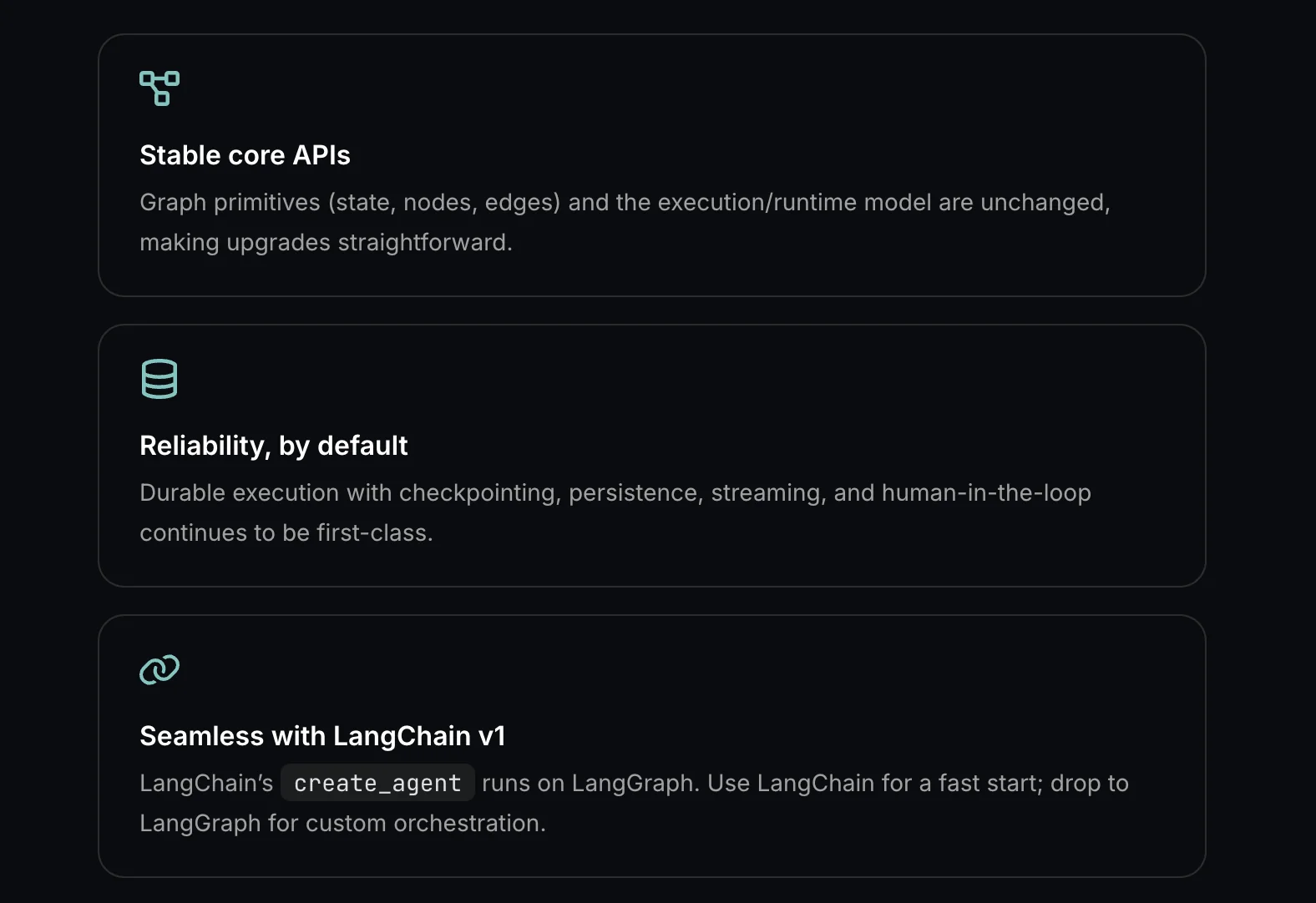
LangGraph is an open-source, low-level orchestration framework for building resilient, long-running and stateful language agents and multi-agent systems as graphs. It provides a graph-first programming model (inspired by Pregel and Apache Beam with a NetworkX-like public interface) to define nodes, edges, branching, subgraphs, and durable state, plus checkpointing and recovery APIs for persistence. LangGraph includes prebuilt components, design patterns, examples and documentation to enable production-grade agent workflows, improved observability and debugging, and integrates with the LangChain ecosystem while remaining usable standalone.
Screenshots
Key Features
Use Cases



Frequently asked questions about LangGraph v1.0
Is LangGraph v1.0 free to use?
Yes, LangGraph v1.0 is free to use under an open-source MIT license for self-hosted development. Users can also access community support and comprehensive documentation without any costs, making it an excellent choice for developers looking to integrate AI tools into their projects.
Key Points
- Open Source License: LangGraph v1.0 is available under the MIT license.
- Community Support: Users have access to a supportive community for troubleshooting.
- Documentation: Comprehensive guides and resources are provided at no cost.
Detailed Explanation
LangGraph v1.0 is a powerful open-source tool designed for developers who wish to leverage AI capabilities in their applications. Being under the MIT license means you can freely use, modify, and distribute the software, which is particularly beneficial for startups and individual developers.
Key Features
- Self-Hosted Development: Users can host LangGraph on their own servers, providing greater control over customization and deployment.
- Community Support: The vibrant community around LangGraph offers forums and discussion groups where developers can ask questions, share insights, and collaborate on projects.
- Documentation: Detailed documentation is available on the official LangGraph website, covering installation, configuration, and advanced usage scenarios. This ensures that even beginners can get started quickly.
For example, if you are a developer planning to build a chatbot or an AI-driven application, LangGraph’s features can be integrated seamlessly into your architecture, allowing you to customize the functionality according to your needs.
Best Practices / Tips
- Explore the Documentation: Take time to read through the official documentation to understand all features and configurations.
- Engage with the Community: Join forums or social media groups related to LangGraph to share experiences and seek advice.
- Test Locally First: Before deploying LangGraph in a production environment, conduct thorough testing on a local setup to identify any potential issues.
Additional Resources
By leveraging these resources, you can maximize the benefits of LangGraph v1.0 and build robust AI applications that meet your specific requirements.
What are the key features of LangGraph v1.0?
LangGraph v1.0 features graph-based orchestration, support for long-running stateful agents, checkpointing, prebuilt components, and multi-language compatibility for Python and JavaScript. These functionalities enhance the development of complex workflows and improve efficiency in machine learning and data processing tasks.
Key Points
- Graph-Based Orchestration: Streamlines complex workflows visually.
- Long-Running Stateful Agents: Maintains state over extended durations.
- Multi-Language Support: Compatible with Python and JavaScript for broader usability.
Detailed Explanation
LangGraph v1.0 is designed to simplify the orchestration of complex workflows through its intuitive graph-based interface. This feature allows users to visually map out processes, making it easier to understand and manage intricate dependencies.
Graph-Based Orchestration
The graph-based orchestration allows developers to create workflows that are both modular and scalable. For example, a data processing pipeline can be represented as a graph, where nodes indicate processing steps and edges represent the flow of data. This visualization aids in debugging and optimizing workflows.
Long-Running Stateful Agents
LangGraph v1.0 supports long-running stateful agents, which are crucial for applications requiring persistent context. For instance, a chatbot that remembers user interactions can leverage this feature to enhance user experience by providing personalized responses based on historical data.
Checkpointing and Prebuilt Components
Checkpointing allows workflows to save their state at various points, enabling recovery from failures without losing progress. Prebuilt components, such as connectors for databases and APIs, accelerate development by allowing users to integrate common functionalities easily.
Multi-Language Support
With support for both Python and JavaScript, LangGraph caters to a diverse audience of developers. This flexibility enables teams to utilize the language that best fits their existing projects or skills, making it easier to adopt LangGraph without a steep learning curve.
Best Practices / Tips
- Utilize Graph Visualization: Take full advantage of the graph-based interface to clarify complex workflows.
- Implement Checkpointing: Always enable checkpointing in long-running processes to minimize data loss.
- Leverage Prebuilt Components: Use available components to save time and ensure best practices in integration and development.
Additional Resources
By following these guidelines and utilizing the key features of LangGraph v1.0, developers can enhance their workflow efficiency and ensure robust application performance.
How do I get started with LangGraph v1.0?
To get started with LangGraph v1.0, simply visit the official LangGraph website, check the comprehensive documentation, and explore the provided examples and guided notebooks. These resources will help you learn how to effectively build and deploy your agent workflows using LangGraph's powerful features.
Key Points
- Official Website: Access the latest version and updates.
- Documentation: In-depth guidance on installation and features.
- Examples and Notebooks: Practical applications to enhance learning.
Detailed Explanation
LangGraph v1.0 is a powerful tool designed for developers and data scientists interested in building AI-driven agent workflows. Here’s how to get started:
-
Visit the Official Website: Go to LangGraph's homepage to download the software. Ensure you have the latest version for optimal performance.
-
Review the Documentation: The documentation is crucial for understanding LangGraph's architecture and capabilities. It covers installation instructions, API references, and configuration settings. You can find this at LangGraph Documentation.
-
Explore Examples and Guided Notebooks: Once you’re familiar with the documentation, check out the examples section. LangGraph offers ready-to-use notebooks that showcase various functionalities. You can easily adapt these examples to your projects, enabling you to see immediate results.
-
Set Up Your Environment: Follow the installation guide to set up your development environment. Ensure you have the necessary dependencies installed, including Python and any relevant libraries.
-
Build Your First Workflow: Start by following a simple example in the guided notebooks. Modify the code to suit your needs and gradually enhance the complexity of your workflows as you become more comfortable with the platform.
Best Practices / Tips
- Start Small: Begin with basic workflows to avoid overwhelm. Gradually increase complexity as you gain confidence.
- Utilize Community Forums: Engage with the LangGraph community for support and to share ideas. This can be invaluable for troubleshooting and learning best practices.
- Stay Updated: Regularly check the website for updates and new features, as the LangGraph team frequently releases enhancements and bug fixes.
- Experiment with Different Use Cases: Try using LangGraph for various applications, such as chatbots, data analysis, or automation tasks to discover its full potential.
Additional Resources
By utilizing these resources effectively, you can harness the full power of LangGraph v1.0 and create robust AI workflows tailored to your specific needs.
What APIs does LangGraph v1.0 offer for integration?
LangGraph v1.0 offers several core APIs for seamless integration, focusing on building and managing agent workflows. Key features include checkpointing APIs for data integrity and compatibility with LangChain, enhancing the flexibility and functionality of AI-driven applications.
Key Points
- Core APIs for Agent Workflows: Essential for constructing and managing AI workflows.
- Checkpointing APIs: Ensure data integrity and recovery during process interruptions.
- Interoperability with LangChain: Facilitates integration with existing tools and frameworks.
Detailed Explanation
LangGraph v1.0 provides foundational APIs that support the development of complex agent workflows. The core APIs allow developers to create, manage, and optimize various agents within a system, making it easier to deploy AI models effectively.
Key Features:
-
Core APIs: These are the backbone of any workflow, enabling developers to manage tasks such as initialization, execution, and termination of agents. For instance, you can initiate an agent with specific parameters, allowing for customized behavior tailored to user needs.
-
Checkpointing APIs: LangGraph emphasizes data integrity through checkpointing. This functionality allows developers to save the state of an agent workflow at specific intervals. In case of a failure, the system can resume from the last checkpoint instead of starting over, significantly improving efficiency and reducing downtime.
-
LangChain Compatibility: By being interoperable with LangChain, LangGraph allows developers to leverage existing tools and libraries in the AI ecosystem. This compatibility makes it easier to integrate with other systems, enhancing the overall functionality and user experience.
Use Cases:
- Data Processing: Utilize LangGraph APIs to automate data cleaning and preprocessing tasks.
- Chatbots: Create intelligent chatbots that can manage conversations and maintain context using checkpointing to track user interactions.
- Dynamic Workflows: Build adaptive workflows that change based on real-time data input, taking advantage of the flexible APIs.
Best Practices / Tips
- Start Simple: Begin with basic workflows and gradually introduce more complex functionalities as you become comfortable with the APIs.
- Utilize Checkpoints: Regularly implement checkpointing to safeguard against data loss, especially in lengthy workflows.
- Explore LangChain: Take full advantage of LangChain’s capabilities to enhance your LangGraph projects and streamline integration processes.
Additional Resources
By leveraging LangGraph v1.0's APIs effectively, developers can optimize their AI applications, ensuring robust and scalable solutions tailored to user demands.
How does LangGraph v1.0 compare to other AI orchestration tools?
LangGraph v1.0 distinguishes itself from other AI orchestration tools through its innovative graph-based orchestration, support for long-running stateful agents, and a robust community backing. These features enhance flexibility and usability, making it a compelling choice for developers seeking advanced orchestration solutions.
Key Points
- Graph-Based Orchestration: Visual representation for easy management.
- Stateful Agents: Ability to maintain context over extended tasks.
- Community Support: Active forums and resources for troubleshooting and collaboration.
Detailed Explanation
LangGraph v1.0 leverages graph-based orchestration, allowing users to visualize complex workflows easily. This feature simplifies the management of AI components, making it easier to understand and optimize processes compared to linear orchestration tools.
Graph-Based Orchestration
With graph-based orchestration, users can create dynamic relationships between various AI components. For instance, if you're integrating natural language processing with data retrieval systems, LangGraph allows you to visualize how these modules interact, leading to more intuitive troubleshooting and optimization.
Long-Running Stateful Agents
LangGraph supports long-running stateful agents that maintain context over time. This feature is particularly useful for applications requiring ongoing interactions, such as chatbots or virtual assistants, which need to remember user preferences or conversation history. In contrast, many other tools lose context once a task is complete, leading to disjointed user experiences.
Strong Community Support
The active community surrounding LangGraph enhances its value. Users can access forums, documentation, and tutorials, making it easier to solve issues and share best practices. Compared to other tools, which may have limited community engagement, LangGraph’s vibrant ecosystem fosters collaboration and innovation.
Best Practices / Tips
- Leverage Community Resources: Engage with the LangGraph community for insights and troubleshooting.
- Utilize Visual Tools: Take advantage of the graph-based interface to map out workflows visually.
- Test Stateful Agents: Regularly test and refine your stateful agents to ensure they maintain context effectively.
Additional Resources
By understanding these components, developers can make an informed decision about integrating LangGraph v1.0 into their AI orchestration strategy, ensuring they leverage its unique strengths over competing tools.
Explore more AI Ai Agents tools
Browse all Ai Agents tools →Browse by use case: Automation & Productivity
Compare LangGraph v1.0: vs Expertise AI · vs ify · vs Hacktron · vs Ninjō AI