

Grok 4.1
AIA conversational frontier model by xAI offering improved emotional intelligence, real-time search, image generation, and creative reasoning.
Grok 4.1
A conversational frontier model by xAI offering improved emotional intelligence, real-time search, image generation, and creative reasoning.
About Grok 4.1
Grok 4.1 is a next-generation conversational model from xAI designed to improve conversational intelligence, emotional understanding, and real-world reasoning. It is available to users on grok.com, X, and iOS/Android apps and is rolling out in an Auto mode; the model emphasizes empathy and interpersonal skill (scoring highly on EQ-Bench) while supporting real-time search, trend analysis, and image generation. Grok is positioned as a free assistant that aims to maximize truth and objectivity while handling creative tasks and nuanced, emotionally-aware dialogue.
Screenshots
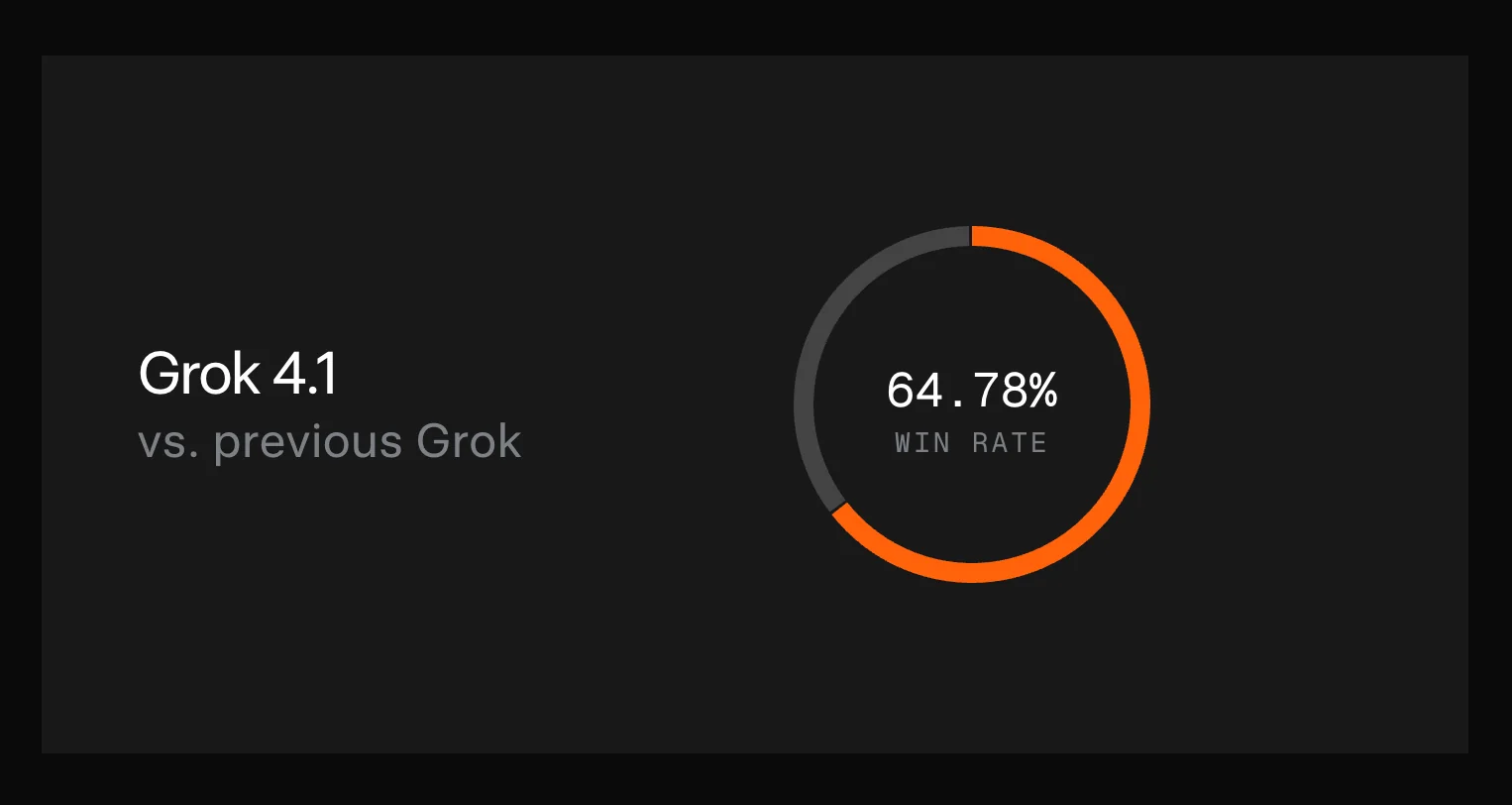
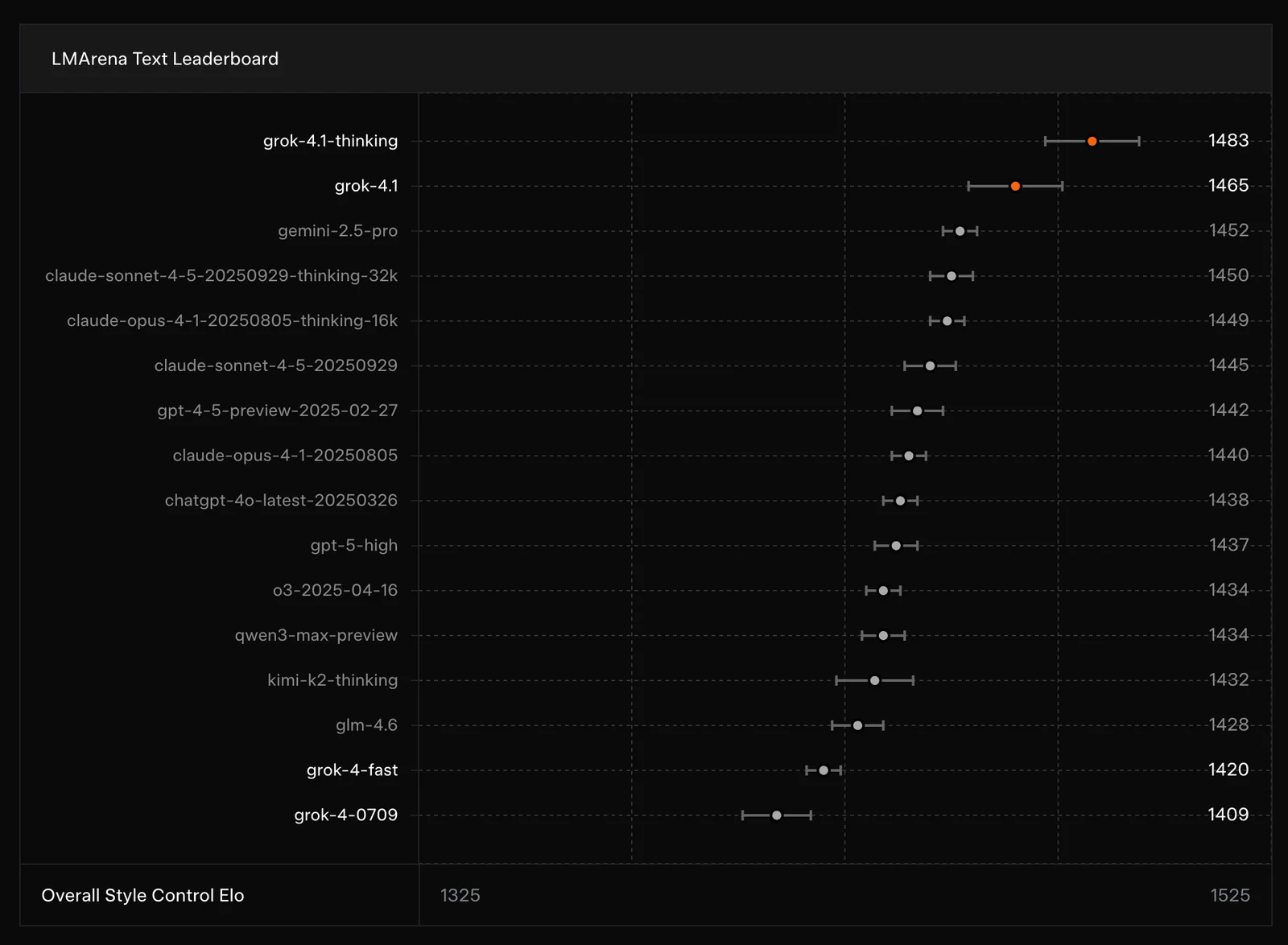
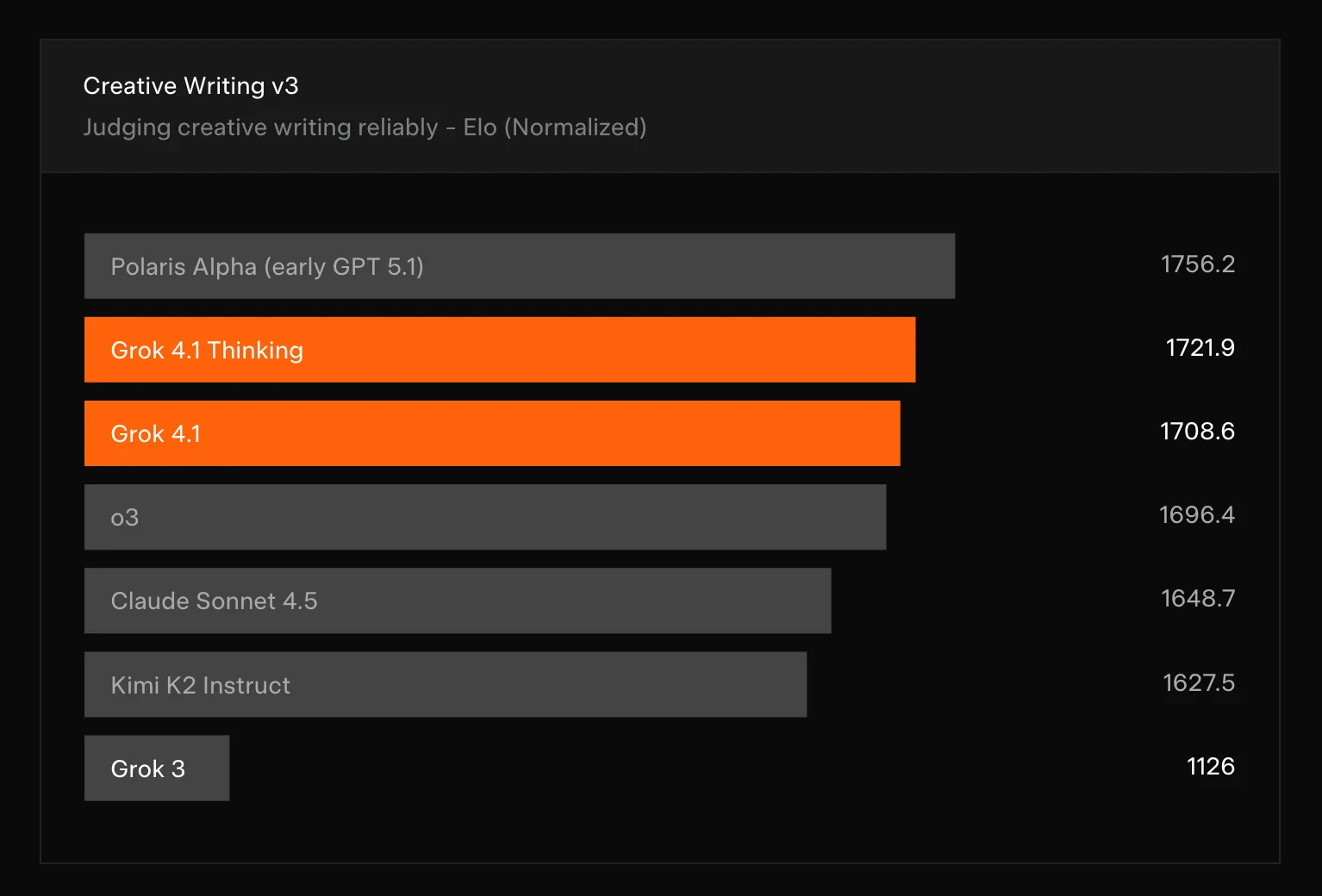
Key Features
Use Cases


Frequently asked questions about Grok 4.1
What is the pricing structure for Grok 4.1?
Grok 4.1 is mostly free, allowing users access to its features via grok.com, X, and mobile apps. For enhanced functionality, users can opt for X Premium+, which offers advanced features, and reports indicate a paid tier starting around $30 per month for additional services and tools.
Key Points
- Free Access: Basic features are available at no cost.
- Premium Options: X Premium+ unlocks advanced functionalities.
- Paid Tier: Additional services are available starting at approximately $30/month.
Detailed Explanation
Grok 4.1 offers a robust platform primarily free of charge, making it accessible to a wide range of users. The core functionalities can be utilized through its website grok.com, as well as on social media platforms like X (formerly Twitter) and various mobile applications. This accessibility encourages user engagement and provides a foundation for those looking to explore AI tools without upfront costs.
For users seeking more advanced capabilities, Grok 4.1 offers X Premium+, a subscription service that enhances the user experience with features such as enhanced analytics, priority support, and exclusive content. Pricing for X Premium+ is competitive, and while exact costs may vary, they generally start around $30 per month.
Additionally, reports from third-party sources suggest that Grok 4.1 may introduce a paid tier that provides even more comprehensive services. This tier is designed for users who require deeper insights or specialized tools, making Grok suitable for both casual users and professionals.
Best Practices / Tips
- Evaluate Needs: Before opting for premium features, assess which functionalities are essential for your use case.
- Start Free: Take advantage of the free access to familiarize yourself with Grok's capabilities.
- Stay Updated: Regularly check Grok’s official channels for updates on pricing and new features to ensure you don’t miss out on enhancements that could benefit your experience.
Additional Resources
What are the key features of Grok 4.1?
Grok 4.1 features enhanced emotional intelligence, real-time search integration, image generation, and improved creative reasoning. This makes it an excellent tool for content creation, social media analysis, and engaging user experiences, catering to various needs in digital marketing and communication.
Key Points
- Enhanced Emotional Intelligence: Grok 4.1 can understand and interpret human emotions, making it more effective in communication.
- Real-Time Search Integration: This feature allows users to access up-to-date information instantly, enhancing content relevance.
- Image Generation: Users can create custom visuals based on input prompts, streamlining the content creation process.
Detailed Explanation
Grok 4.1 stands out in the AI tool landscape with its advanced capabilities:
-
Enhanced Emotional Intelligence: This feature enables Grok 4.1 to analyze text and discern emotional undertones, such as joy, sadness, or frustration. For example, marketers can use this capability to tailor their messaging to resonate more deeply with their target audience.
-
Real-Time Search Integration: By incorporating real-time search functionalities, Grok 4.1 provides users with the latest information from the web. This is particularly beneficial for content creators and social media managers who need to stay updated on trends and current events. Imagine crafting a timely blog post that references the latest industry news, all with just a few clicks.
-
Image Generation: Grok 4.1’s image generation allows users to create unique graphics or illustrations by simply describing what they need. This feature is invaluable for businesses that require visual content but may not have extensive design resources. For instance, a small business can generate promotional images for social media quickly and affordably.
-
Improved Creative Reasoning: Grok 4.1 enhances its creative reasoning abilities, enabling it to generate original ideas and solutions. This is particularly useful for brainstorming sessions where fresh, innovative concepts are needed.
Best Practices / Tips
- Leverage Emotional Insights: Use Grok 4.1’s emotional intelligence to refine your messaging. Tailor content based on the emotional response you aim to evoke from your audience.
- Stay Updated: Regularly utilize the real-time search feature to keep your content relevant. Set reminders to check for the latest trends weekly.
- Experiment with Image Prompts: Test various prompts for image generation to discover the best visual representations for your brand. Don’t hesitate to iterate and refine based on feedback.
- Collaborate with Teams: Use the creative reasoning feature in team settings to generate diverse ideas and solutions. Encourage brainstorming sessions using Grok 4.1 as a collaborative tool.
Additional Resources
How do I get started with Grok 4.1?
To get started with Grok 4.1, visit grok.com or download the app from the Apple App Store or Google Play. After signing up for a free account, you can immediately access its features, making it easy to begin using this powerful AI tool for various applications.
Key Points
- Access the platform: Visit the website or download the app.
- Create a free account: Sign up to unlock features.
- Explore features: Start using Grok 4.1's capabilities right away.
Detailed Explanation
To effectively start using Grok 4.1, follow these steps:
- Visit the Official Website: Go to grok.com to learn more about the platform and its offerings.
- Download the App: If you prefer mobile access, download the Grok app from the Apple App Store for iOS devices or Google Play Store for Android devices.
- Sign Up for an Account: Click on the "Sign Up" button, and fill in the required information, such as your email address and password. Grok 4.1 offers a free account option, allowing you to explore its features without any upfront costs.
- Verify Your Email: After registration, you may need to verify your email address to activate your account fully.
- Log In and Explore: Once your account is activated, log in to start exploring Grok’s AI capabilities, which can include text generation, data analysis, and more depending on your needs.
Use Cases
- Content Creation: Use Grok 4.1 for generating blog posts, articles, or social media content.
- Data Analysis: Leverage AI tools to analyze large datasets quickly and efficiently.
- Personal Assistance: Employ Grok as a virtual assistant to manage schedules, emails, or reminders.
Best Practices / Tips
- Utilize Tutorials: Take advantage of any tutorials or guides offered by Grok to familiarize yourself with its features.
- Experiment with Features: Explore different functionalities within the app to understand which tools best meet your needs.
- Stay Updated: Keep an eye out for updates or new features that may enhance your experience.
Additional Resources
- Grok Official Documentation for detailed guidance on features.
- Grok Community Forum to connect with other users and share experiences.
- Grok Blog for tips and updates on AI usage and best practices.
Does Grok 4.1 support API integrations?
Currently, Grok 4.1 does not offer public API access, limiting direct integration capabilities. However, its availability across multiple platforms facilitates smooth operation on both web and mobile applications, ensuring users can effectively leverage its features without needing API support.
Key Points
- Grok 4.1 lacks public API access.
- It is accessible on multiple platforms including web and mobile.
- Seamless user experience is ensured across devices.
Detailed Explanation
Grok 4.1 is designed to work efficiently across various platforms, including web browsers and mobile applications. This cross-platform capability means that users can access Grok's functionalities on their preferred devices without needing an API. Although the lack of API support may seem limiting, Grok's design focuses on user-friendly interfaces that do not require additional technical integration for most users.
For instance, businesses that rely on Grok for customer engagement can use its web interface or mobile app to manage interactions without the need for API calls. This setup is particularly beneficial for small to medium-sized enterprises that may not have the resources to develop or maintain API integrations.
Moreover, Grok 4.1's compatibility with various operating systems ensures that users can employ the tool in diverse environments, whether on desktop or mobile devices. This flexibility allows organizations to streamline their processes while maximizing the utility of Grok 4.1.
Best Practices / Tips
- Explore Built-in Features: Take full advantage of Grok's built-in functionalities, which often provide sufficient capabilities for most users without needing external API integration.
- Feedback to Developers: If you require API access for specific use cases, consider providing feedback to Grok's development team. User feedback is crucial for future updates and improvements.
- Stay Updated: Regularly check Grok’s official website or community forums for any announcements regarding API availability or new features that may enhance integration options.
Additional Resources
By utilizing Grok 4.1 effectively on its available platforms, users can still achieve strong operational efficiency while waiting for potential future API offerings.
How does Grok 4.1 compare to other AI models?
Grok 4.1 distinguishes itself from other AI models like ChatGPT through its superior emotional intelligence and real-time search capabilities. This unique combination allows for a more engaging, context-aware interaction across multiple platforms, making it ideal for diverse applications in customer service, content creation, and personal assistance.
Key Points
- Emotional Intelligence: Grok 4.1 has a higher capacity for understanding and responding to human emotions.
- Real-Time Search: It integrates live data retrieval, enhancing the relevance of its responses.
- Multi-Platform Experience: Grok 4.1 functions seamlessly across various devices and applications.
Detailed Explanation
Grok 4.1's emotional intelligence enables it to recognize nuances in user sentiment, allowing for more empathetic and tailored interactions. For example, in customer service scenarios, Grok can detect frustration in a user’s tone and respond with appropriate reassurance or solutions, unlike traditional models that may provide generic responses.
Another standout feature is Grok's real-time search capability. This means it can pull in current information from the web, offering answers that are not only contextually relevant but also up-to-date. For instance, when asked about recent events, Grok 4.1 can provide insights that reflect the latest developments, thereby adding value in dynamic situations like news updates or market trends.
The multi-platform experience of Grok 4.1 is designed for versatility, meaning it can be integrated into chat applications, IoT devices, and more, allowing users to engage with the AI seamlessly, regardless of the platform they choose. This makes it particularly useful for businesses looking to enhance customer interactions across channels.
Best Practices / Tips
- Leverage Emotional Cues: When designing interactions with Grok 4.1, consider how emotional intelligence can enhance user experiences. Use language that reflects empathy and understanding.
- Utilize Real-Time Data: Incorporate live updates into your applications to ensure that users receive the most current information. This is especially important in industries like finance or news.
- Cross-Platform Integration: Ensure that Grok 4.1 is available on all platforms your audience uses, from mobile apps to social media feeds, to maximize user engagement.
Additional Resources
What is Grok 4.1?
Grok 4.1 is an advanced conversational AI model developed by xAI that enhances interactions with improved emotional intelligence, enabling real-time search capabilities, image generation, and creative reasoning. This model is designed to facilitate seamless communication and provide users with more engaging and informative responses.
Key Points
- Emotional Intelligence: Grok 4.1 understands and responds to user emotions.
- Real-Time Search: The model can retrieve information instantly from the web.
- Image Generation: It can create images based on textual prompts.
Detailed Explanation
Grok 4.1 represents a significant advancement in conversational AI technology. With its emotional intelligence, Grok 4.1 can detect the sentiment behind user queries, allowing it to tailor responses that resonate more personally with users. For instance, if a user expresses frustration, Grok can respond with empathy and understanding, rather than delivering a standard response.
The real-time search capability allows Grok 4.1 to access the latest information from the internet, making it a powerful tool for users seeking up-to-date answers. This feature is particularly useful in fast-moving fields like technology, health, and finance, where users often require immediate and accurate data.
Moreover, Grok 4.1's image generation feature enables it to create visuals based on descriptive text. For example, users can describe a scene, and Grok can generate a corresponding image, useful for creative projects, marketing, and social media content.
Best Practices / Tips
- Utilize Emotional Prompts: When interacting with Grok 4.1, frame your questions to elicit emotional responses, enhancing the interaction.
- Leverage Real-Time Capabilities: Use Grok for tasks needing current data, like market research or trend analysis, to maximize its potential.
- Experiment with Image Generation: Try descriptive prompts to explore Grok's image creation abilities for diverse applications, from art to advertising.
Additional Resources
How does Grok 4.1 work?
Grok 4.1 operates by integrating advanced AI technologies to streamline everyday tasks and workflows for users. This AI tool enhances productivity by automating various functions, providing intelligent insights, and enabling seamless interactions across multiple applications and platforms.
Key Points
- Integration of AI Technologies: Grok 4.1 combines machine learning and natural language processing.
- Automation of Workflows: It simplifies repetitive tasks, allowing users to focus on higher-value activities.
- User-Friendly Interface: Grok 4.1 features an intuitive design that enhances user experience.
Detailed Explanation
Grok 4.1 enhances productivity by leveraging core AI capabilities, including machine learning (ML) and natural language processing (NLP). These technologies enable Grok to understand and process user inputs intelligently, making it easier to automate routine tasks. For instance, users can ask Grok to schedule meetings, summarize documents, or generate reports based on simple commands.
Use Cases
- Task Automation: Grok 4.1 can automate data entry in spreadsheets, which reduces human error and saves time.
- Smart Recommendations: By analyzing user behavior, Grok can suggest relevant resources or actions, improving decision-making processes.
- Natural Language Interaction: Users can interact with Grok using conversational language, making it accessible for those with varying tech skills.
Best Practices / Tips
- Utilize Voice Commands: Take advantage of Grok's voice recognition capabilities for hands-free operation.
- Explore Customization Options: Tailor Grok's settings to suit your specific workflow needs, enhancing efficiency.
- Stay Updated: Regularly check for updates to benefit from new features and improvements.
Additional Resources
By understanding how Grok 4.1 works and utilizing its features effectively, users can significantly improve their productivity and make everyday tasks easier and more efficient.
What are the main features of Grok 4.1?
Grok 4.1 offers advanced AI capabilities, including enhanced natural language processing, improved contextual understanding, real-time data processing, and machine learning integration. These features enable more efficient interactions and smarter automation across various applications, making Grok 4.1 a powerful tool for businesses and developers alike.
Key Points
- Enhanced Natural Language Processing: Improved understanding of human language nuances.
- Real-Time Data Processing: Instant analysis and insights from data streams.
- Machine Learning Integration: Seamless incorporation of learning algorithms for better performance.
Detailed Explanation
Grok 4.1 revolutionizes AI interactions by incorporating several key features that enhance its functionality and user experience:
-
Enhanced Natural Language Processing (NLP): Grok 4.1 utilizes advanced NLP techniques to interpret and respond to user queries with a high degree of accuracy. This feature allows the system to understand context, tone, and intent, making conversations more natural and effective. For example, businesses can deploy Grok 4.1 in customer service chatbots to provide instant support with human-like responses.
-
Real-Time Data Processing: With the ability to process vast amounts of data in real-time, Grok 4.1 delivers timely insights that can drive decision-making in various sectors. For instance, in finance, Grok 4.1 can analyze stock market trends and provide actionable recommendations based on live data, enabling traders to make informed choices quickly.
-
Machine Learning Integration: Grok 4.1's architecture allows for seamless integration with machine learning algorithms. This capability means that the system can learn and adapt over time, improving its responses and functionalities based on user interactions. For example, in marketing, Grok 4.1 can analyze campaign performance data and optimize future strategies for better outcomes.
Best Practices / Tips
- Leverage NLP Features: Utilize Grok 4.1’s NLP capabilities to enhance customer interactions. Implement chatbots that can understand and respond to complex queries.
- Monitor Real-Time Analytics: Regularly check the insights derived from real-time data processing to stay ahead in your industry. Use dashboards to visualize this data effectively.
- Regularly Update Machine Learning Models: Ensure that the machine learning components are continually trained with fresh data to maintain accuracy and relevance in responses.
Additional Resources
Who is Grok 4.1 for?
Grok 4.1 is designed for a diverse range of users, including businesses, content creators, educators, and developers. It streamlines daily AI workflows, making it ideal for anyone seeking to enhance productivity, automate tasks, or integrate AI into their operations.
Key Points
- Target Users: Businesses, content creators, educators, and developers.
- Functionality: Streamlines daily AI workflows and automates tasks.
- Integration: Easy to incorporate into various work environments.
Detailed Explanation
Grok 4.1 is a versatile AI tool that caters to various professionals looking to improve their efficiency in day-to-day tasks. For businesses, Grok 4.1 can automate data analysis, customer service responses, and project management tasks, allowing teams to focus on strategic activities. Content creators can leverage Grok 4.1 for generating ideas, drafting articles, or optimizing content for search engines. Educators can utilize Grok 4.1 to create personalized learning experiences and automate administrative tasks, while developers can integrate its capabilities into applications to enhance user interaction and functionality.
For example, a small business could use Grok 4.1 to analyze customer feedback, automatically generate reports, and provide insights that guide marketing strategies. A teacher might implement Grok 4.1 to tailor lesson plans based on student performance data, thus improving engagement and learning outcomes.
Best Practices / Tips
- Explore Customization: Take advantage of Grok 4.1’s customization features to tailor it to your specific needs. This could involve adjusting settings for automated responses or creating templates for reports.
- Leverage Integrations: Ensure Grok 4.1 is integrated with existing tools such as CRM systems, content management platforms, or educational software to maximize its effectiveness.
- Regular Training: Continuously train Grok 4.1 with new data to improve its accuracy and relevance in your workflows, ensuring it adapts to changing requirements or industry standards.
Additional Resources
How much does Grok 4.1 cost?
Grok 4.1 offers a free tier, allowing users to explore basic features without any cost. For those seeking advanced functionalities, Grok provides several paid plans, typically ranging from $10 to $50 per month, depending on the level of features and usage required.
Key Points
- Grok 4.1 provides a no-cost entry with its free tier.
- Paid plans range from $10 to $50 per month for advanced features.
- The pricing structure is designed to accommodate various user needs and budgets.
Detailed Explanation
Grok 4.1 is an advanced AI tool that caters to users with different requirements. The free tier allows individuals and small teams to access basic features, making it an excellent starting point for users unfamiliar with AI tools. This tier typically includes essential functionalities that help users understand the platform's capabilities.
For those needing more robust features, Grok 4.1 offers paid plans. These plans are structured to provide additional capabilities such as increased usage limits, advanced analytics, and premium support. Pricing generally falls within the $10 to $50 range per month, depending on the features selected. For instance, a basic paid plan might include enhanced reporting and collaboration tools, while higher-tier plans may offer integrations with other software and priority customer service.
Example Pricing Tiers:
- Free Tier: Basic features with limited usage.
- Basic Plan ($10/month): Includes additional features like analytics and reporting.
- Pro Plan ($25/month): Offers integrations and advanced functionalities.
- Enterprise Plan ($50/month): Tailored solutions for larger teams with extensive support.
Best Practices / Tips
- Evaluate Your Needs: Start with the free tier to determine which features are essential for your workflow before committing to a paid plan.
- Budget Wisely: Consider how often you will use the service and choose a plan that aligns with your budget and expected usage.
- Stay Updated: Keep an eye on Grok's official website for any promotions or updates to their pricing structure, which may offer cost-saving opportunities.
Additional Resources
Explore more AI Ai Models tools
Browse all Ai Models tools →Browse by use case: Image Generation · Chatbots & Assistants
- Soup CLI
- VibeVoice
- Laguna by Poolside
- Arena AI: The Official AI Ranking & LLM Leaderboard
- PromptLayer
- PHBench
Compare Grok 4.1: vs Soup CLI · vs VibeVoice · vs Laguna by Poolside · vs Arena AI: The Official AI Ranking & LLM Leaderboard