

Daemons by Charlie Labs
AIAlways-on AI agents defined in markdown that work 24/7 across Slack, Linear, and GitHub without prompts.
Daemons by Charlie Labs
Always-on AI agents defined in markdown that work 24/7 across Slack, Linear, and GitHub without prompts.
About Daemons by Charlie Labs
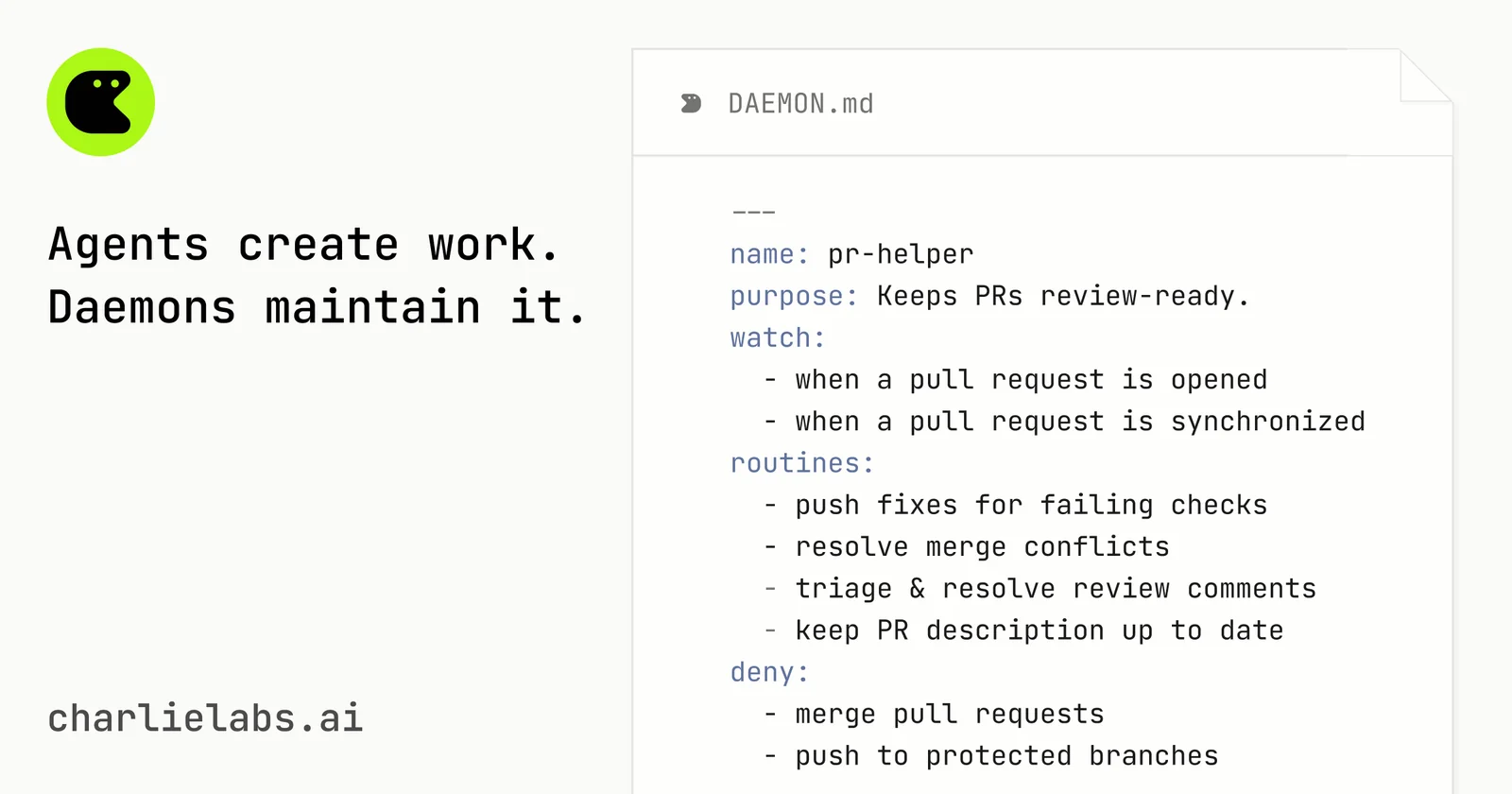
Daemons by Charlie Labs are always-on AI processes that work proactively across Slack, Linear, GitHub, and more, without needing explicit prompts. Each daemon is defined with a simple markdown (.md) file, making automated behaviors easy to author, version, and customize. They run 24/7 to keep pull requests, issues, CI, and docs moving, handling rote work so teams can focus on novel engineering. Charlie operates on a credit system where you pay only for completed work such as a bugfix, feature, message, or refactor, while PR reviews are always free. Teams can start with free credits and no credit card before scaling up.
Screenshots
Key Features
Use Cases



Frequently asked questions about Daemons by Charlie Labs
What is Daemons by Charlie Labs?
Daemons by Charlie Labs are innovative, always-on AI agents that operate continuously across platforms like Slack, Linear, and GitHub, executing tasks without the need for prompts. These intelligent agents enhance productivity by automating routine processes and facilitating seamless collaboration for teams.
Key Points
- Always-On Functionality: Operate 24/7 without user prompts.
- Integration with Popular Tools: Compatible with Slack, Linear, and GitHub.
- Enhanced Productivity: Automate repetitive tasks and streamline workflows.
Detailed Explanation
Daemons by Charlie Labs are designed to act as persistent AI assistants, providing support to teams by automating routine tasks and facilitating communication. Their always-on nature means they can handle inquiries, manage project tasks, and provide updates at any time, which significantly reduces the workload for team members.
Example Use Cases:
- Task Management in GitHub: A Daemon can monitor repositories for pull requests and automatically assign reviewers based on their workload and expertise.
- Team Communication in Slack: Daemons can respond to FAQs, schedule meetings, or summarize discussions, ensuring that team members stay informed without constant manual updates.
- Project Tracking in Linear: They can update project statuses or notify team members about critical deadlines, thus keeping everyone on the same page.
This continuous operation not only saves time but also enhances collaboration by ensuring that all team members have access to the same information in real-time.
Best Practices / Tips
- Define Clear Responsibilities: Ensure each Daemon has specific tasks to handle, minimizing overlap and confusion.
- Regularly Update Configurations: As projects evolve, so should the Daemons. Regular updates to their markdown definitions keep them relevant and efficient.
- Monitor Performance: Track the effectiveness of your Daemons. Adjust their functionalities based on feedback and performance metrics.
Additional Resources
How does Daemons by Charlie Labs work?
Daemons by Charlie Labs operates by utilizing Markdown-Defined Daemons for authoring agent behavior, enabling 24/7 operation without prompts, integrating with tools like Slack and GitHub, and implementing a credit system for completed tasks. This automates engineering processes, allowing teams to focus on critical issues and innovations.
Key Points
- Markdown-Defined Daemons: Simple author agent behaviors in .md files.
- Always-On Operation: Continuous task management without manual prompts.
- Multi-Tool Integration: Seamless functionality across popular collaboration platforms.
Detailed Explanation
Daemons by Charlie Labs leverages a unique architecture that empowers teams to automate repetitive tasks and enhance productivity. Here’s how it works:
Markdown-Defined Daemons
- Simplicity: Daemons are defined through easily readable Markdown files. This format allows for straightforward version control and customization, making them user-friendly and accessible even for non-technical users.
- Behavior Customization: Users can define behaviors specific to their needs, allowing for flexibility in how tasks are automated.
Always-On Operation
- 24/7 Functionality: Daemons operate continuously, which means they can handle tasks proactively, such as issue triaging or pull request management, without the need for constant human oversight.
- Proactive Task Management: This feature reduces the burden on team members, allowing them to focus on more complex and creative work.
Multi-Tool Integration
- Cross-Platform Compatibility: Daemons integrate seamlessly with tools like Slack, Linear, and GitHub, making it easier for teams to coordinate tasks within their existing workflows.
- Coordination Across Teams: Facilitates better communication and task management, minimizing disruptions and enhancing collaboration.
Completed-Work Billing
- Credit System: Users are charged based on completed tasks, such as bug fixes or new features, ensuring cost-effectiveness. PR reviews are always free, making it easier to manage budgets.
- Transparency: This billing model fosters trust and clarity in project management, as teams only pay for tangible results.
Engineering Automation
- Pull Request Maintenance: Daemons help keep pull requests moving, automating reminders and follow-ups that typically consume time and resources.
- Issue Triage: Automatically manages issues in Linear and GitHub, ensuring that backlogs are addressed proactively.
- Routine Refactors: Small fixes and refactors can be deployed automatically, allowing engineers to concentrate on more challenging tasks.
- Documentation Upkeep: Daemons ensure that documentation stays in sync with ongoing changes in code and issues, eliminating discrepancies and enhancing knowledge sharing.
Best Practices / Tips
- Define Clear Behaviors: Take time to outline specific behaviors in your Markdown files to maximize automation efficiency.
- Regular Updates: Keep your daemons updated to reflect any changes in project scope or team structure.
- Monitor Performance: Regularly check the effectiveness of your Daemons to ensure they are meeting your needs and adjust configurations as necessary.
Additional Resources
What are the main features of Daemons by Charlie Labs?
Daemons by Charlie Labs offers key features such as Markdown-defined agent behavior, always-on operation for proactive task management, multi-tool integration across popular platforms, a credit system for completed work billing, and engineering automation to streamline processes and enhance productivity.
Key Points
- Markdown-Defined Daemons: Author agent behavior in simple .md files.
- Always-On Operation: Daemons run continuously, requiring no explicit prompts.
- Multi-Tool Integration: Seamless connectivity with tools like Slack, Linear, and GitHub.
Detailed Explanation
Daemons by Charlie Labs revolutionizes task management for engineering teams through several innovative features:
-
Markdown-Defined Daemons: Users can define agent behaviors using easy-to-read Markdown files. This approach not only simplifies the customization process but also supports version control, making it easy to track changes and collaborate on updates. For instance, a team can quickly modify a daemon’s responses based on project needs without extensive coding.
-
Always-On Operation: Daemons operate 24/7, ensuring that tasks are managed proactively without needing constant input from users. This feature is especially beneficial for teams working across different time zones, as it allows for continuous progress on projects. For example, a daemon can automatically triage issues as they arise, even outside regular working hours.
-
Multi-Tool Integration: Daemons integrate smoothly with popular platforms like Slack, Linear, and GitHub, allowing teams to work where they are most comfortable. This integration means that tasks can be coordinated effortlessly across various workflows. For example, a daemon can notify team members in Slack about new pull requests or issues created in GitHub.
-
Completed-Work Billing: The credit system ensures teams only pay for completed work, such as bug fixes or new features, while pull request reviews are always free. This model promotes efficiency and accountability, making it easier for teams to manage budgets and resources effectively.
-
Engineering Automation: Daemons help automate routine tasks such as maintaining pull requests, tracking issues, and updating documentation. This automation allows engineers to dedicate more time to solving complex problems rather than handling repetitive tasks. For instance, a daemon can automatically update documentation whenever changes are made to code, ensuring accuracy and reducing manual effort.
Best Practices / Tips
- Leverage Markdown: Familiarize your team with Markdown syntax to maximize the benefits of Markdown-defined daemons.
- Monitor Performance: Regularly review daemon performance metrics to optimize their efficiency and impact on your workflow.
- Integrate Gradually: Start with one or two integrations and expand as your team becomes more comfortable with the system.
Additional Resources
Who is Daemons by Charlie Labs for?
Daemons by Charlie Labs is designed for software development teams seeking to optimize their workflow. It benefits professionals involved in PR maintenance, issue triage, routine code refactors, and documentation upkeep, allowing engineers to focus on high-priority tasks while automating repetitive processes.
Key Points
- PR Maintenance: Streamlines pull request reviews.
- Issue Triage: Manages issues across Linear and GitHub.
- Routine Refactors: Automates small code fixes and updates.
Detailed Explanation
Daemons by Charlie Labs serves a diverse audience, primarily software development teams and project managers. The tool enhances productivity by automating critical tasks:
-
PR Maintenance: Daemons keeps pull requests moving smoothly by automating reminders and tracking reviews. This reduces the need for manual follow-ups, ensuring that code changes are merged promptly, which is essential for continuous integration and delivery.
-
Issue Triage: With Daemons, teams can efficiently manage their issue backlog in both Linear and GitHub. It automatically prioritizes issues based on predefined criteria, enabling developers to focus on the most critical problems first. For instance, if an issue has been open for too long or has significant impact, Daemons can flag it for immediate attention.
-
Routine Refactors: This feature allows engineers to ship small fixes and refactors automatically. By integrating with existing CI/CD pipelines, Daemons ensures that routine maintenance doesn’t distract developers from complex project work. For example, if a function needs to be optimized or a bug fixed, Daemons can execute these tasks automatically based on set parameters.
-
Docs Upkeep: Keeping documentation aligned with code changes is crucial for team collaboration. Daemons automatically updates documentation as code and issues evolve, ensuring that all team members have access to the latest information. This minimizes confusion and enhances onboarding processes for new developers.
Best Practices / Tips
- Define Clear Criteria: Establish clear rules for PR and issue prioritization to maximize the effectiveness of Daemons.
- Integrate with Existing Workflows: Make sure to connect Daemons with your current development tools to streamline processes further.
- Regularly Review Automation Settings: As project needs change, revisit the settings to ensure they align with current objectives.
- Train Your Team: Ensure that all team members understand how to leverage Daemons effectively to maximize productivity.
Additional Resources
How much does Daemons by Charlie Labs cost?
Daemons by Charlie Labs offers a free tier that includes basic functionalities, while its paid plans start at $9.99 per month, providing access to advanced features tailored for enhanced user experience and productivity.
Key Points
- Free Tier: Basic features available at no cost.
- Paid Plans: Starting at $9.99 per month for advanced functionalities.
- Features: Enhanced user tools and integrations in paid plans.
Detailed Explanation
Daemons by Charlie Labs is designed to cater to a variety of users, from hobbyists to professionals. The free tier allows you to explore basic functionalities without any financial commitment. This can be particularly useful for individuals or small teams looking to assess the platform's capabilities.
For users seeking more advanced features, Daemons offers several paid plans. The entry-level plan begins at $9.99 per month, which unlocks tools that can significantly enhance productivity and streamline workflows. These features include advanced analytics, integration with third-party applications, and priority customer support.
Higher-tier plans may provide additional benefits such as team collaboration tools, custom integrations, and enhanced security protocols. This tiered pricing structure allows users to select a plan that best fits their needs and budget.
Use Cases
- For Individuals: The free tier is ideal for those wanting to test the platform.
- For Small Teams: The $9.99 plan can facilitate better collaboration and productivity.
- For Corporations: Higher-tier plans offer enterprise-level integrations and security.
Best Practices / Tips
- Start with the Free Tier: Assess your needs before committing financially.
- Evaluate Features: Consider what features are essential for your workflow before upgrading.
- Monitor Usage: Use analytics from the free tier to identify which features you utilize the most, guiding your decision on whether to upgrade.
Additional Resources
By considering the tiers and their features carefully, you can make an informed decision that maximizes your productivity and aligns with your budget.
How do I get started with Daemons by Charlie Labs?
To get started with Daemons by Charlie Labs, visit charlielabs.ai to sign up for an account. Once registered, you can explore its features, tools, and documentation to enhance your projects using AI-powered daemons.
Key Points
- Sign up process: Create an account easily online.
- Explore features: Familiarize yourself with various tools available.
- Documentation: Access guides and resources for effective utilization.
Detailed Explanation
Getting started with Daemons by Charlie Labs is straightforward. Here’s a step-by-step guide to help you navigate the initial setup:
- Visit the Website: Go to https://charlielabs.ai/.
- Create an Account: Click on the "Sign Up" button. You will need to provide your email address and create a password. After submitting, check your email for a verification link.
- Login: Once verified, log in using your credentials.
- Explore Dashboard: Familiarize yourself with the user interface. The dashboard provides access to various features, including project management tools and AI daemon services.
- Documentation: Navigate to the documentation section to find tutorials and user guides. This will help you understand how to implement daemons effectively in your projects.
- Start a Project: Use the provided templates or create a new project from scratch. This can involve defining tasks, setting parameters, and selecting desired functionalities.
Daemons can be used for various applications like automating workflows, managing data, or even enhancing user interactions. Ensure you explore different use cases that align with your needs.
Best Practices / Tips
- Utilize Tutorials: Make the most of available tutorials to reduce the learning curve.
- Experiment: Don’t hesitate to experiment with different features within Daemons to discover what works best for you.
- Join the Community: Engage with forums or discussion groups associated with Charlie Labs for insights and troubleshooting help.
- Feedback: After using the tools, provide feedback to Charlie Labs to help improve their offerings.
Additional Resources
Explore more AI Ai Agents tools
Browse all Ai Agents tools →Browse by use case: Automation & Productivity
Compare Daemons by Charlie Labs: vs Hacktron · vs Ninjō AI · vs Phoenix.vu · vs Dropstone