

Context 7
AIOpen SourceFreeMCP server that transforms code documentation into up-to-date context, code snippets, and embeddings for LLMs and AI code editors.
Context 7
MCP server that transforms code documentation into up-to-date context, code snippets, and embeddings for LLMs and AI code editors.
About Context 7
Context7 is an MCP (Model Context Protocol) server and pipeline that converts documentation repositories into actionable, retrievable context for LLMs, AI agents, and developer tooling. It parses common documentation formats, uses LLMs to extract targeted code snippets and metadata, generates vector embeddings, and exposes fast contextual retrieval via HTTP/MCP APIs and a web interface. Context7 is designed for easy integration with editors and agent runtimes (VS Code, LM Studio, Claude Desktop, etc.), enabling up-to-date, snippet-level documentation injection into AI workflows and code assistants.
Screenshots
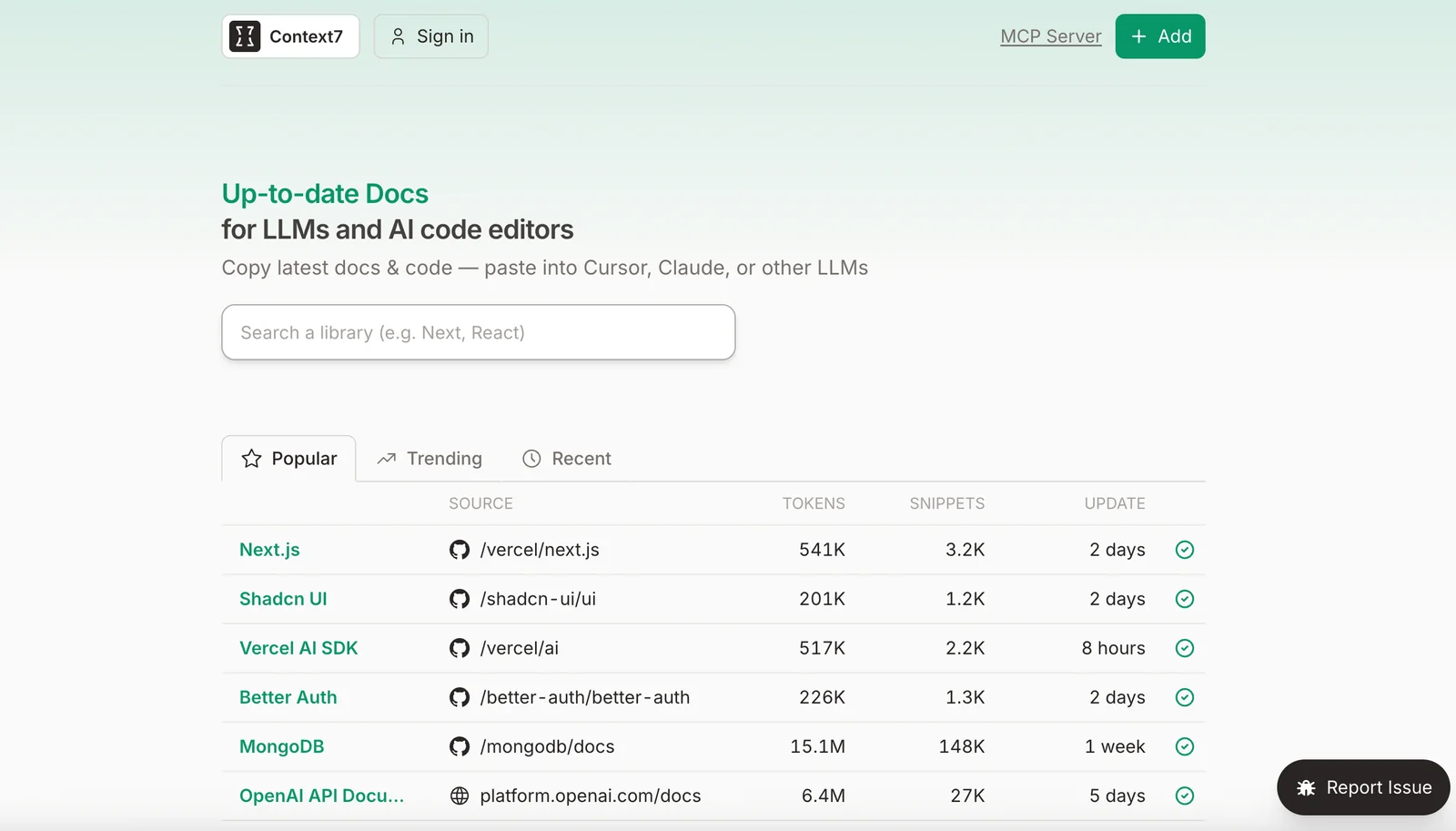
Key Features
Use Cases
MCP Server
https://github.com/upstash/context7💡 MCP (Model Context Protocol) enables AI assistants to securely interact with local and remote resources.


Frequently asked questions about Context 7
What are the pricing options for Context 7?
Context 7 provides a free self-hosted option with full source code available on GitHub. For enterprises, custom pricing solutions are offered, which encompass managed hosting and dedicated support services tailored to organizational needs.
Key Points
- Free Self-Hosted Option: Access full source code via GitHub.
- Custom Enterprise Solutions: Tailored pricing for businesses.
- Managed Hosting and Support: Comprehensive services for enterprise users.
Detailed Explanation
Context 7 is designed to cater to both individual developers and large organizations. The free self-hosted option allows users to download the full source code from GitHub, making it an ideal choice for developers seeking flexibility and control over their deployment.
For businesses, Context 7 offers custom pricing solutions. This option is particularly beneficial for enterprises that require robust features, enhanced security, and scalability. Managed hosting includes server maintenance, updates, and backups, ensuring that your application runs smoothly without the need for in-house IT resources. Dedicated support is also part of the enterprise package, providing users with expert assistance to resolve any issues quickly.
Use Cases
- Freelancers and Startups: The free self-hosted option allows new developers to experiment and build their projects without upfront costs.
- Medium to Large Enterprises: Custom pricing solutions enable businesses to tailor the service according to their specific requirements, including compliance and integration with existing systems.
Best Practices / Tips
- Evaluate Your Needs: Before choosing a plan, assess your project requirements and budget constraints.
- Consider Long-Term Growth: Opting for the enterprise solution might be more cost-effective in the long run if you anticipate scaling your operations.
- Leverage Community Support: If using the free version, engage with the community on GitHub for troubleshooting and feature enhancements.
Additional Resources
How do I get started with Context 7?
To get started with Context 7, download the open-source code from GitHub. Follow the detailed deployment instructions to set it up on your server using Docker or the Command Line Interface (CLI) for efficient configuration and management.
Key Points
- Download the open-source code from GitHub.
- Follow deployment instructions for server setup.
- Utilize Docker or CLI for optimal configuration.
Detailed Explanation
Context 7 is an advanced tool designed for developers and organizations looking to automate workflows and enhance productivity. To begin using Context 7, follow these steps:
-
Download the Code: Visit the Context 7 GitHub repository and clone or download the repository to your local machine or server.
-
Set Up Your Environment:
- Using Docker: If you prefer Docker, ensure that Docker is installed on your system. Use the command:
Then run the container with:docker pull context7/context7docker run -d -p 80:80 context7/context7 - Using CLI: For those who prefer the command line, ensure you have Node.js and npm installed, then navigate to the downloaded directory and run:
npm install
npm start
- Using Docker: If you prefer Docker, ensure that Docker is installed on your system. Use the command:
-
Access the Application: Once deployed, access Context 7 via your web browser by entering the server's IP address or localhost.
-
Configuration: Customize your settings through the configuration files to tailor the functionality to your specific needs.
Best Practices / Tips
- Check System Requirements: Before installation, ensure your server meets the necessary specifications for optimal performance.
- Regular Updates: Keep your Context 7 version updated to benefit from the latest features and security patches. Check the GitHub repository for release notes.
- Utilize Community Support: Engage with the Context 7 community on forums or GitHub issues for troubleshooting and advanced configuration tips.
Additional Resources
- Context 7 GitHub Repository
- Docker Installation Guide
- Node.js Official Site for environment setup.
By following these steps and best practices, you can efficiently set up and maximize your use of Context 7, enhancing your development workflow and productivity.
What are the key features of Context 7?
Context 7 features advanced document parsing across various formats, LLM-powered context extraction for enhanced content understanding, embedding generation for efficient semantic search, and seamless integration with popular code editors like Visual Studio Code (VS Code). These features streamline workflows and improve productivity for developers and content creators alike.
Key Points
- Document Parsing: Supports multiple file formats.
- LLM-Powered Context Extraction: Enhances content relevance.
- Embedding Generation: Optimizes semantic search capabilities.
Detailed Explanation
Context 7 excels in document parsing, enabling users to work with diverse file formats such as PDFs, Word documents, and Markdown files. This flexibility allows developers and content creators to integrate various types of content seamlessly into their workflows.
The LLM-powered context extraction feature utilizes advanced language models to analyze and extract relevant information from documents, ensuring that users can quickly locate the data they need. For instance, if a user is searching for specific code snippets or references within a lengthy document, Context 7 can highlight relevant sections, significantly reducing the time spent sifting through information.
Embedding generation is another standout feature that enhances semantic search capabilities. By converting documents into embeddings, Context 7 allows users to perform searches based on meaning rather than mere keyword matching. This is particularly useful for developers working on large codebases, as it enables more intuitive searches and improves the overall user experience.
Moreover, Context 7’s integration with popular code editors like VS Code facilitates a seamless development experience. Users can easily access Context 7’s features directly within their coding environment, allowing for quicker iterations and more efficient coding practices. This integration is crucial for teams that rely on collaborative coding environments.
Best Practices / Tips
- Utilize Document Parsing: Take advantage of Context 7's ability to parse various formats to consolidate your resources. This will help in managing different document types effectively.
- Leverage Context Extraction: When working with extensive documents, use the context extraction feature to pinpoint essential information quickly. Familiarize yourself with this tool to maximize efficiency.
- Explore Semantic Search: Experiment with embedding generation by searching for concepts instead of keywords. This approach can yield more relevant results, especially in large datasets.
Additional Resources
By understanding and utilizing these features, users can greatly enhance their productivity and efficiency in both coding and content creation, making Context 7 an invaluable tool in their arsenal.
How does Context 7 compare to other MCP tools?
Context 7 excels over other MCP tools by offering a free self-hosting option and advanced LLM integration, making it a cost-effective solution. Unlike many competitors, it supports various document formats and benefits from active community-driven support, enhancing user experience and functionality.
Key Points
- Free Self-Hosting: Context 7 allows users to self-host without incurring costs.
- Robust LLM Integration: It seamlessly integrates with large language models for enhanced capabilities.
- Community-Driven Support: Users can access a wealth of resources and assistance from a dedicated community.
Detailed Explanation
Context 7 distinguishes itself in the MCP (Managed Content Platform) landscape primarily through its free self-hosting option. This feature enables users to deploy the software on their own servers, reducing ongoing costs significantly. In contrast, many other MCP tools charge monthly fees, which can add up quickly for businesses with tight budgets.
The robust LLM integration is another standout feature. Context 7's compatibility with advanced language models allows for sophisticated content generation, natural language processing, and intelligent data analysis. This is particularly beneficial for businesses looking to leverage AI for content creation, data summarization, or customer interaction.
Moreover, the platform's support for multiple document formats—including PDFs, Word documents, and Markdown—ensures versatility in content management. Users can easily upload and manage diverse types of content, streamlining workflows and improving productivity.
Community-driven support is an invaluable asset. Context 7 fosters a vibrant user community that shares knowledge, provides troubleshooting assistance, and contributes to ongoing development. This collaborative environment enhances the overall user experience and can be a deciding factor for businesses choosing between various MCP tools.
Best Practices / Tips
- Evaluate Your Needs: Before selecting an MCP tool, clearly define your requirements, focusing on features like document support and integration capabilities.
- Leverage Community Resources: Engage with the Context 7 community for tips and best practices to maximize the platform’s potential.
- Test Self-Hosting: Take advantage of the free self-hosting option to assess performance and suitability for your organization before committing to any paid solutions.
Additional Resources
Does Context 7 have an API for integrations?
Yes, Context 7 offers a robust API with endpoints designed for contextual retrieval and seamless integration with various editors and tools. This functionality allows users to easily incorporate Context 7 into their existing workflows and applications, enhancing their productivity and access to contextual information.
Key Points
- Robust API Endpoints: Context 7 provides various API endpoints for diverse integration needs.
- Seamless Workflow Integration: Easily embed Context 7 into existing tools and applications.
- Enhanced Contextual Retrieval: Access contextual information effortlessly through the API.
Detailed Explanation
Context 7's API is designed to facilitate contextual data retrieval, making it easy for developers to integrate its functionalities into different applications. This API supports RESTful requests, allowing users to fetch data efficiently.
Example Use Cases:
- Content Management Systems (CMS): Integrate Context 7 with popular CMS platforms to offer writers contextual suggestions and insights while drafting articles.
- Customer Relationship Management (CRM): Embed Context 7 in CRM tools to provide sales teams with relevant information about clients or industries, improving customer engagement.
- IDE Plugins: Developers can create plugins for Integrated Development Environments (IDEs) that utilize Context 7 for providing context-aware coding suggestions.
Step-by-Step Guidance:
- Access Documentation: Visit Context 7’s official API documentation to understand the endpoint structure and authentication requirements.
- Set Up API Keys: Register for an API key to authenticate your requests.
- Make API Calls: Use tools like Postman or cURL to test API requests and responses.
- Integrate with Applications: Follow the integration steps provided in the documentation to embed the API within your chosen application or workflow.
Best Practices / Tips
- Optimize API Usage: Limit the number of API calls by caching responses where applicable to improve performance and reduce latency.
- Monitor API Limits: Be aware of any rate limits imposed by Context 7 to avoid service interruptions.
- Error Handling: Implement robust error handling in your application to manage unexpected responses from the API effectively.
Additional Resources
Explore more AI Mcps tools
Browse all Mcps tools →Browse by use case: Code Generation · Automation & Productivity
Compare Context 7: vs Context Mode · vs MCPJam · vs OzBrain · vs QApilot MCP for Android