

AG-UI Protocol
AIOpen SourceFreeAn open, lightweight event-based protocol that standardizes real-time communication between AI agents and frontend applications.
AG-UI Protocol
An open, lightweight event-based protocol that standardizes real-time communication between AI agents and frontend applications.
About AG-UI Protocol
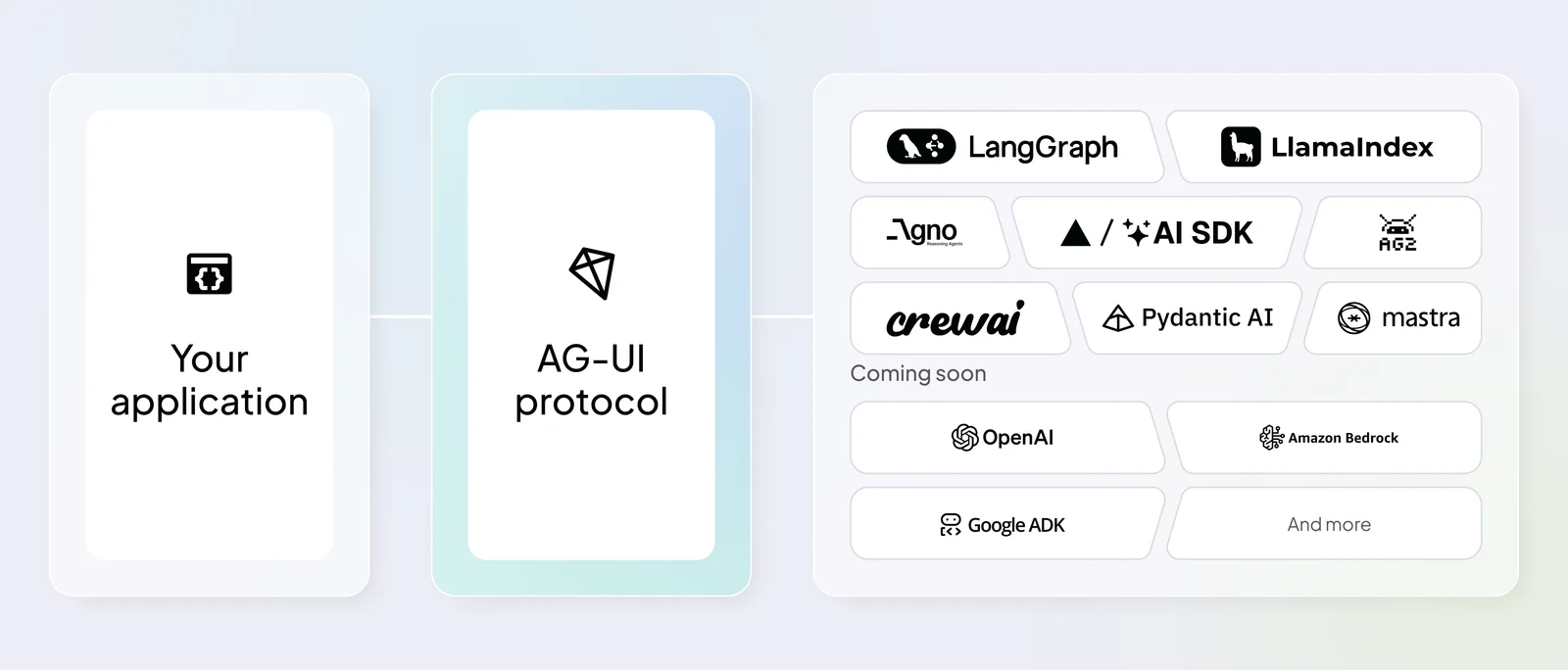
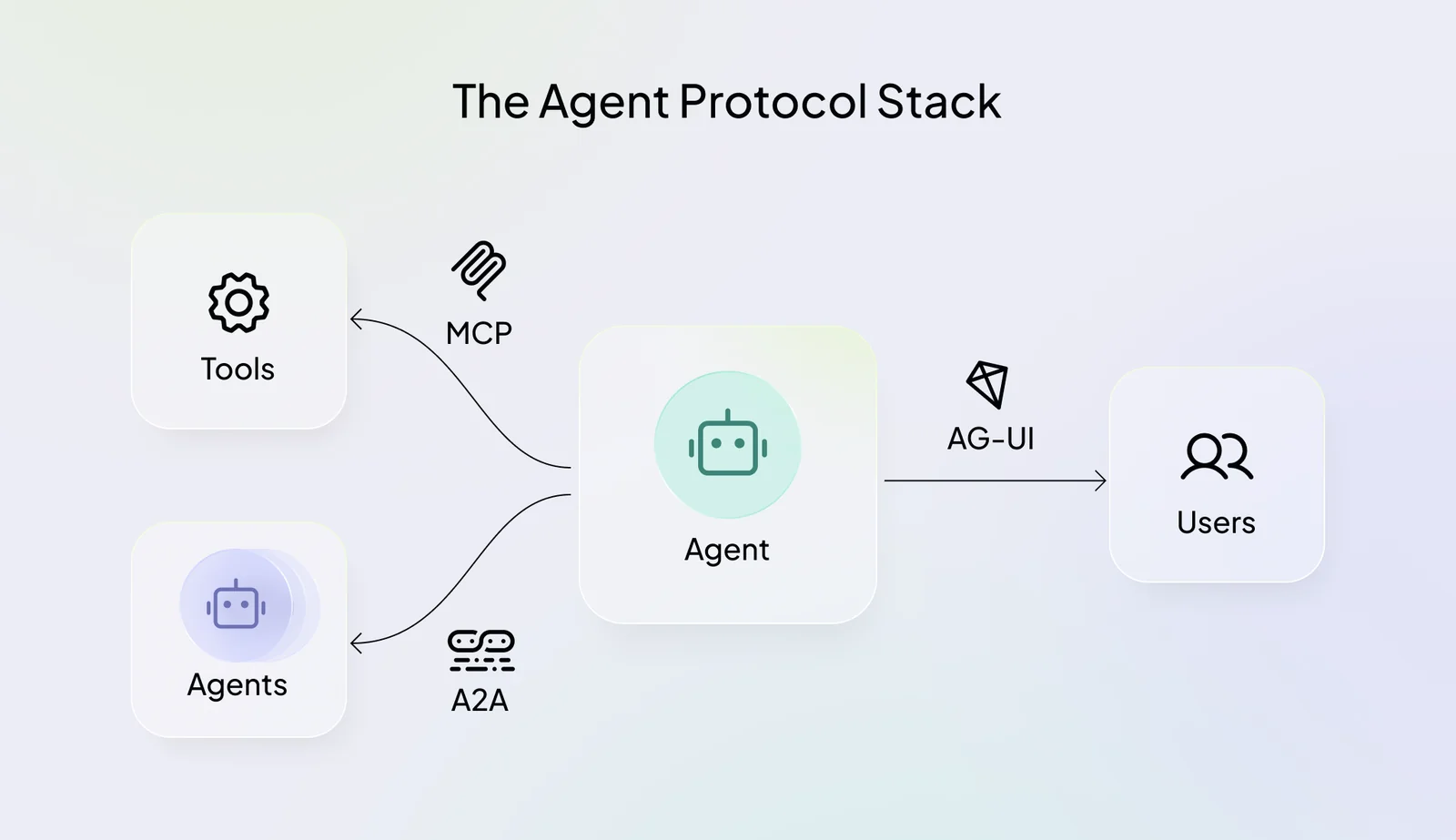
AG-UI (Agent-User Interaction Protocol) is an open, event-driven specification that defines typed events and workflows to connect AI agents with user-facing applications. It standardizes lifecycle, text message, tool call, and state management events to enable streaming interactions, incremental UI updates, and robust synchronization between agents and frontends. AG-UI provides client libraries, reference implementations, CLI tooling, and integration guides so developers can embed agent-driven experiences into web and mobile UIs with real-time streaming and multi-subscriber support. The project is community-driven, MIT licensed, and built for extensibility and framework interoperability.
Screenshots
Key Features
Use Cases



Frequently asked questions about AG-UI Protocol
Is AG-UI Protocol free to use?
Yes, AG-UI Protocol is completely free to use under the MIT license. This allows users to modify and distribute the protocol without any costs. Users also gain access to protocol specifications, extensive documentation, and valuable community support.
Key Points
- Free Usage: AG-UI Protocol is available at no cost.
- MIT License: Users can modify and distribute the protocol freely.
- Community Support: Access to documentation and community resources enhances user experience.
Detailed Explanation
AG-UI Protocol, governed by the MIT license, is an open-source framework designed for building user interfaces. Being free to use means that developers can implement, modify, and distribute the protocol without incurring any fees. This accessibility fosters innovation and collaboration within the developer community.
The protocol offers comprehensive documentation, making it easy for developers to understand and utilize its features effectively. For example, users can access detailed guides on setup, customization, and best practices, ensuring a smooth development process. Additionally, the community surrounding AG-UI Protocol provides a support network where users can ask questions, share experiences, and find solutions to common issues.
By leveraging AG-UI Protocol, developers can focus on building high-quality user interfaces without worrying about licensing costs. This makes it an attractive choice for startups, individual developers, and large organizations alike.
Best Practices / Tips
- Explore Documentation: Take advantage of the extensive documentation available to familiarize yourself with the features and capabilities of AG-UI Protocol.
- Engage with the Community: Participate in forums and community discussions to gain insights and tips from other experienced users.
- Stay Updated: Regularly check for updates or enhancements to the protocol to ensure you are utilizing the latest features and improvements.
Additional Resources
By utilizing AG-UI Protocol effectively, developers can create robust and innovative user interfaces while enjoying the benefits of a supportive community and comprehensive resources.
What are the key features of AG-UI Protocol?
AG-UI Protocol features an event-based architecture, standardized event types, real-time state synchronization, and multilingual support through comprehensive client libraries and SDKs. These capabilities enhance interoperability and efficiency across various applications, making it a versatile choice for developers.
Key Points
- Event-based Architecture: Facilitates efficient communication between components.
- Standardized Event Types: Ensures consistency and simplifies integration.
- Real-time State Synchronization: Maintains up-to-date information across systems.
Detailed Explanation
AG-UI Protocol is designed to streamline the development process and enhance application performance. Here’s a closer look at its key features:
-
Event-based Architecture: This architecture allows components to communicate through events rather than direct calls, reducing dependencies and enhancing modularity. For example, in a chat application, when a user sends a message, an event is triggered, allowing all relevant components to update simultaneously without tightly coupling them.
-
Standardized Event Types: By offering a set of predefined event types, AG-UI Protocol simplifies the integration of different system components. Developers can easily implement functionality without needing to define custom events. For instance, events like
UserJoinedorDataUpdatedcan be utilized across various applications, ensuring a uniform approach to event handling. -
Real-time State Synchronization: This feature allows applications to ensure that all clients have the same view of the data in real-time. This is particularly useful in collaborative environments, such as document editing or online gaming, where multiple users interact simultaneously. For example, if one user makes a change, all other users see that change instantaneously, enhancing user experience.
-
Multilingual Support: AG-UI Protocol provides client libraries and SDKs for various programming languages, including JavaScript, Python, and Java. This versatility enables developers to implement the protocol in their preferred language, making it accessible for a broader range of projects.
Best Practices / Tips
- Leverage Client Libraries: Utilize the provided client libraries to expedite development. They come optimized for performance and compatibility.
- Adopt Standard Event Types Early: Incorporating standardized events from the beginning can save time and reduce complexity as your application scales.
- Monitor State Synchronization: Regularly test the real-time synchronization feature to ensure it meets your application's requirements, especially under heavy load.
Additional Resources
By understanding and utilizing these features effectively, developers can maximize the potential of AG-UI Protocol, leading to more robust and efficient applications.
How do I get started with AG-UI Protocol?
To get started with AG-UI Protocol, run the command npx create-ag-ui-app to scaffold your application. For comprehensive integration, refer to the official documentation, which includes detailed guides and quick-start tutorials tailored to help both beginners and experienced developers.
Key Points
- Scaffolding Your Application: Use
npx create-ag-ui-app. - Official Documentation: Access detailed guides and tutorials.
- Community and Support: Engage with the AG-UI community for troubleshooting and enhancements.
Detailed Explanation
AG-UI Protocol is a powerful framework designed for building user interfaces efficiently. To begin, you first need to install Node.js and npm (Node Package Manager) on your machine. Once these are installed, you can scaffold your application by executing the command:
npx create-ag-ui-app
This command creates a new directory with a starter template, which includes essential files and configurations needed for your project. After running the command, navigate to your project folder using:
cd your-project-name
Next, you can start your development server with:
npm start
This command will launch your application, allowing you to see changes in real-time as you develop your UI components.
The official AG-UI documentation is an invaluable resource that provides step-by-step guides on various features, including component creation, state management, and routing. It also offers quick-start tutorials that can accelerate your learning process.
Best Practices / Tips
- Follow the Documentation: Always refer to the latest official documentation for updates and new features.
- Use Version Control: Implement Git for version control, allowing you to track changes and collaborate effectively.
- Optimize for Performance: Regularly analyze your application's performance and refactor code as necessary to ensure optimal loading times and responsiveness.
- Engage with the Community: Participate in forums and community discussions to learn from others' experiences and share your insights.
Additional Resources
By following these steps and utilizing the provided resources, you can effectively leverage AG-UI Protocol to build robust and user-friendly applications.
What are the technical requirements for integrating AG-UI Protocol?
AG-UI Protocol requires a compatible environment for your frontend application, supporting standard transport methods like HTTP and Server-Sent Events (SSE). You can integrate it using various client libraries designed for seamless connectivity, ensuring efficient data exchange and user interface management.
Key Points
- Compatibility: Ensure your frontend framework is compatible with AG-UI Protocol.
- Transport Methods: Utilize HTTP and SSE for optimal data transmission.
- Client Libraries: Leverage available libraries for easier integration.
Detailed Explanation
Integrating the AG-UI Protocol into your frontend application involves several technical requirements. Firstly, confirm that your environment supports the protocol, which is designed to work with popular frontend frameworks such as React, Angular, and Vue.js. These frameworks facilitate the integration process by providing a robust structure for building user interfaces.
Supported Transport Methods
AG-UI Protocol supports two primary transport methods:
-
HTTP: This is the most widely used method for communication over the web. It allows for synchronous request-response interactions, making it suitable for scenarios where immediate feedback is needed.
-
Server-Sent Events (SSE): This method is ideal for real-time data updates. SSE allows servers to push updates to the client, ensuring that your application remains responsive and up-to-date without requiring constant polling.
Client Libraries
Several client libraries are available to streamline the integration process. These libraries abstract the complexities of handling connections and data transmission, enabling you to focus on building your application. Examples include libraries specifically crafted for JavaScript frameworks, which simplify the implementation of AG-UI Protocol features.
Best Practices / Tips
- Ensure Compatibility: Before integration, check that your frontend framework and server setup are compatible with AG-UI Protocol.
- Choose the Right Transport Method: Depending on your use case, select between HTTP for standard interactions and SSE for real-time updates. This choice can significantly affect performance and user experience.
- Use Client Libraries: Take advantage of existing client libraries to reduce development time and minimize errors. These libraries often come with pre-built functions that handle common tasks, such as connection management and data parsing.
Additional Resources
By following these guidelines and leveraging the available resources, you can ensure a smooth integration of AG-UI Protocol into your frontend applications.
How does AG-UI Protocol compare to other AI communication tools?
AG-UI Protocol excels among AI communication tools due to its open-source foundation, real-time event-based architecture, and standardized event types. Unlike many competitors, it fosters community collaboration without imposing official pricing tiers, making it a flexible choice for developers and businesses alike.
Key Points
- Open-source Advantage: AG-UI Protocol is freely available, allowing customization and innovation.
- Real-time Event-Based: Its architecture supports immediate data processing and communication.
- Community-Driven: It has active community support, enhancing development and troubleshooting.
Detailed Explanation
AG-UI Protocol distinguishes itself in the AI communication landscape primarily due to its open-source nature. Being open-source means that developers can access the code, modify it, and share improvements. This collaborative approach leads to rapid innovation and a diverse set of features tailored to user needs.
The protocol operates on a real-time event-based architecture, which is crucial for applications requiring instantaneous data exchange. For instance, in customer service applications, this allows AI tools to respond to inquiries without delay, enhancing user experience significantly. In contrast, many competitors may use slower polling methods, leading to lag and potential customer dissatisfaction.
Moreover, AG-UI Protocol standardizes event types, which simplifies integration across different systems. Developers can easily implement consistent messaging formats, reducing time spent on debugging and enhancing interoperability among various applications. This contrasts with other tools that might have proprietary formats, creating barriers to seamless communication.
Lastly, the community support surrounding AG-UI Protocol is a significant advantage. Users can engage in forums, seek help, and share solutions, which accelerates learning and problem-solving. This collaborative spirit is often lacking in proprietary platforms, where users may find themselves isolated when encountering issues.
Best Practices / Tips
- Leverage Community Resources: Participate in forums and contribute to discussions to enhance your understanding and usage of AG-UI Protocol.
- Focus on Real-time Use Cases: Identify applications where real-time data processing is critical, such as chatbots or live data feeds, to maximize the benefits of the protocol.
- Custom Developments: Take advantage of the open-source nature to tailor AG-UI Protocol to fit specific business needs, ensuring it aligns with your operational goals.
Additional Resources
- AG-UI Protocol GitHub Repository – access the documentation and codebase.
- Community Forum – connect with other users and developers.
- Real-time Communication Best Practices – explore strategies for implementing effective AI communication tools.
Explore more AI Ai Agents tools
Browse all Ai Agents tools →Browse by use case: Automation & Productivity
Compare AG-UI Protocol: vs Apache Maka · vs Construct Computer · vs ShogunAI · vs fx